
TL;DR
- Data scraping. The automated extraction of structured information from websites, apps, and other digital sources, powering everything from price monitoring to AI training datasets.
- How it works. A scraper targets URLs, loads the page, parses the HTML, extracts what you asked for, and stores the result.
- What you'll get. Real use cases, the technical and legal risks to watch for, whether it's legal for your use case, and a working Puppeteer and Browserless example you can run yourself.
Introduction
Data scraping runs into two real obstacles almost immediately: pages that render with JavaScript, and sites that actively block automated traffic. In this guide, you'll learn how data scraping works end to end, and you'll run a working Puppeteer scrape against Hacker News to see it firsthand.
Whether you're a developer building data pipelines or a business analyst gathering market intelligence, the fundamentals here are the same. This guide also covers the tools involved and how to scrape safely and ethically.
What is data scraping?
Data scraping is the automated process of extracting structured information from websites, applications, or other digital sources. Think of it as a tool that visits web pages, identifies the specific web data you want, and collects it in a format you can analyze and use. When an official API already exposes the data you need, that's usually the cheapest and most reliable source. Scraping is what you reach for when it doesn't.
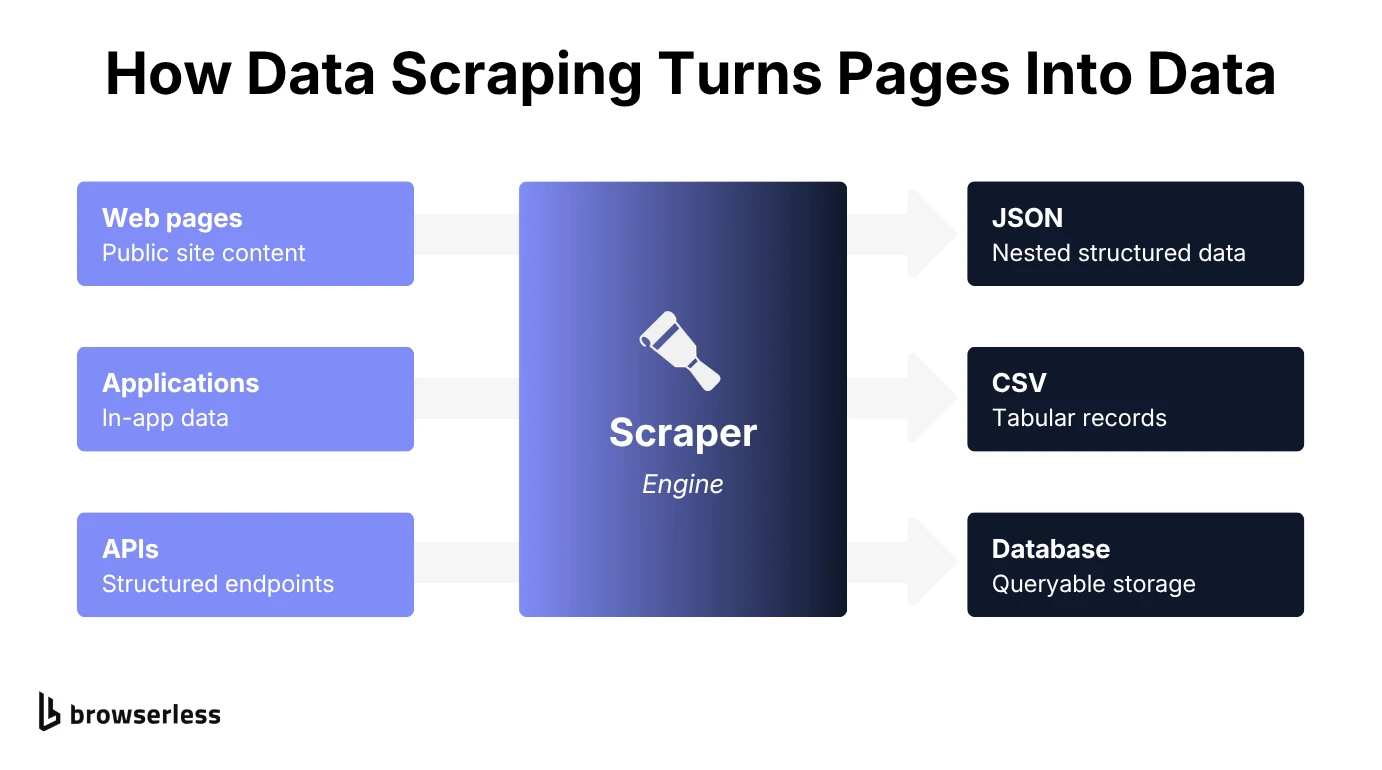
What distinguishes data scraping from data crawling?
Crawling and scraping answer different questions. A crawler discovers URLs by following links or reading a sitemap. A scraper is the program that extracts fields from the pages those URLs point to.
How web scraping, screen scraping, and report mining differ
Scrapers generally fall into three methods, each suited to a different kind of data source:
- Web scraping. Parses the underlying HTML document of a page to extract elements that match a specific pattern. It's the most common method for modern websites and web pages.
- Screen scraping. Captures data from what's rendered on a screen rather than from the page's source code. It's an older technique originally built for legacy computer terminals. It's still useful today for interfaces that don't expose clean HTML, or where optical character recognition (OCR) is needed to read images or other media objects.
- Report mining. Pulls data out of user-generated or auto-generated reports (a PDF export or a printed report layout, for example) rather than live pages, sometimes with OCR doing the work if the report itself is a scanned image.
Reach for OCR when the source is an image or a scanned document rather than real HTML. Screen scraping and report mining both fall back on it for exactly that reason.
Why do people use data scraping?
Data scraping shows up across a wide range of legitimate business and research uses, and the reasons usually fall into three buckets: competitive intelligence, research, and marketing or e-commerce work. Each pulls the same underlying technique toward a different goal, whether that's tracking a rival's pricing, building a dataset that doesn't exist anywhere else, or keeping tabs on what customers are saying in real time.
Turning competitor data into business intelligence
On the business side, scraping mostly comes down to knowing what competitors and customers are doing before it shows up in a quarterly report:
- Price monitoring. Track competitor and marketplace prices across an e-commerce site in real time to price your own products optimally, or just to find the best deal yourself. Browserless's Google Shopping scraping guide walks through a real example.
- Market research. Gather industry trends and customer sentiment from public data sources across the web. That kind of signal is hard to get from a paid research report alone.
- Competitive analysis. Monitor competitor product data, pricing changes, and messaging over time to spot moves before they show up in your own numbers.
All three feed the same goal: a competitive edge built on fewer decisions made on guesswork.
Building datasets and data feeds for research
If you're building datasets rather than watching competitors, the goal is different: you need data that doesn't already exist in a usable shape.
- Academic research. Collect data for studies and analysis at a scale manual collection can't match. This is common in social science and market research.
- AI training. Gather datasets for machine learning models and large language models. If you're specifically feeding an LLM or AI agent from live web pages rather than static datasets, see the guide to AI scraping for the considerations that change.
- Content aggregation. Build news feeds, data feeds, and content databases by pulling from many sources into one place.
- Agent and AI consumption. Feed live pages to an AI agent or an MCP-connected tool instead of a static dataset. This is useful when the data changes too often to pre-collect.
A recommendation model trained on scraped product reviews, for instance, needs exactly this kind of dataset built from scratch.
Keeping e-commerce and marketing teams ahead
For e-commerce and marketing teams, scraping mostly tracks what's working right now:
- Product research. Analyze market trends and customer preferences to spot demand before a competitor does.
- SEO analysis. Study competitor keywords, content strategies, and rankings across search engines to find gaps in your own coverage.
- Social media monitoring. Track brand mentions and sentiment across platforms to catch a PR problem, or an opportunity, while it's still small.
A price-tracking scraper that runs every morning catches a competitor's flash sale the same day it goes live.
How does data scraping work?
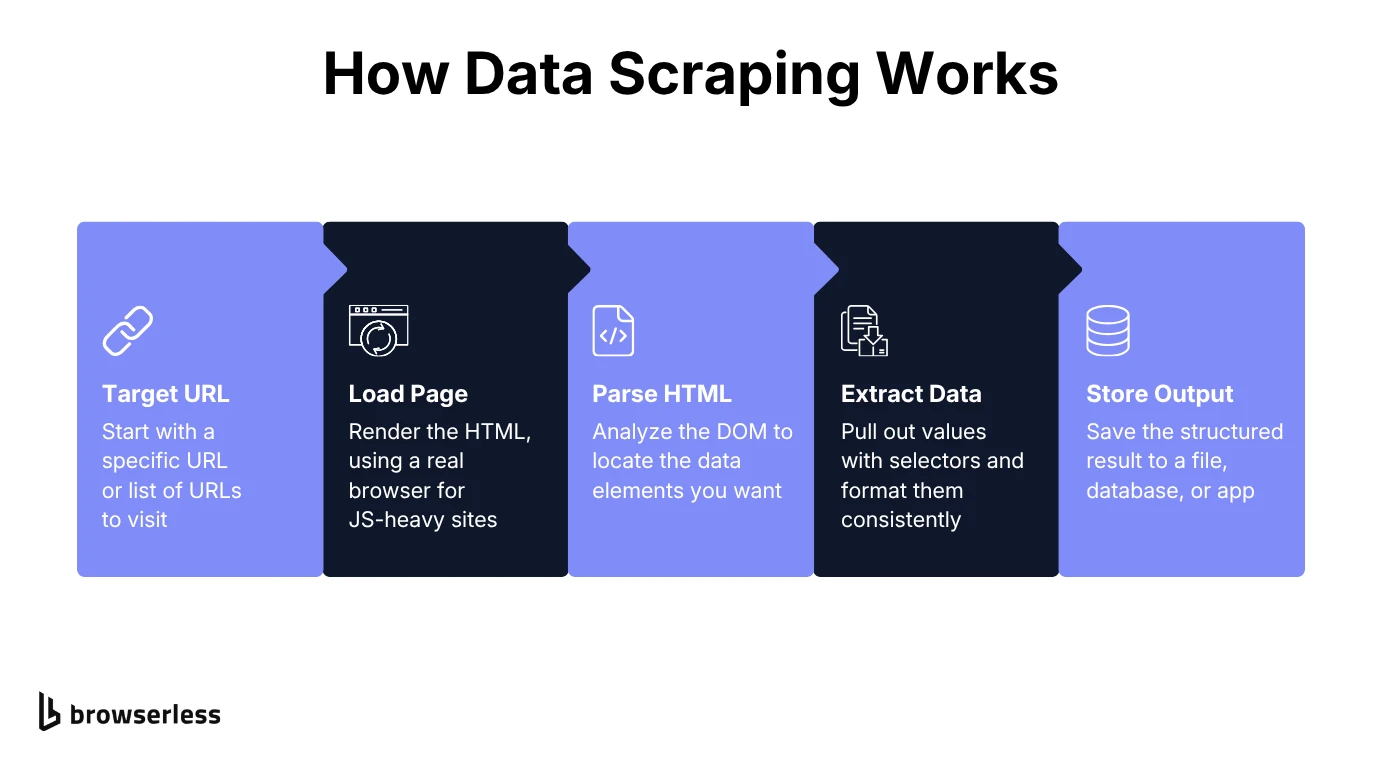
A scraper can pull an entire page or just the specific data you want. Pinpointing the data you actually need lets the scraper filter out unneeded clutter and run faster. For example, when scraping office chair listings on Amazon, you'd typically want just the price and title, not the entire page.
That process breaks down into five steps.
1. Targeting the right URLs
You start by pointing the scraper at a particular website's URL or list of URLs, whether that's a single product page, a set of search results, or an entire site structure built from a sitemap or pagination links. Get this step wrong and everything downstream inherits the mistake. The scraper only ever sees what these URLs point to.
2. Loading the page
Next, the scraper loads the HTML content of the target webpage. Simple HTTP requests work for basic static content. Headless browsers or a headful browser like Chrome usually do better, since many modern websites rely heavily on JavaScript to render their content. Those sites often load data dynamically after the initial page load, so a basic HTTP request often gets back an empty or incomplete page. Production scrapers usually escalate only when needed. They start with a fast HTTP fetch that mimics a real browser's network fingerprint and add a residential proxy if that's blocked. A stealth browser with CAPTCHA solving is the last resort. Browserless's /smart-scrape endpoint automates that whole cascade.
3. Parsing the HTML into a DOM
Once the page loads, the scraper parses the HTML markup into a DOM, a tree of elements it can search the same way your browser's DevTools inspector does. It uses that tree to locate the specific HTML elements holding the data you want.
4. Extracting the data you actually need
You point it at selectors, such as CSS selectors or XPath, and the scraper uses them to extract information from the underlying HTML code.
5. Formatting and storing the output
The extracted data gets converted into your preferred format, typically JSON, CSV, or a database structure, with consistent formatting across every record. From there it moves into storage, whether that's a CSV someone opens by hand, a database an app queries directly, or a message queue that feeds a downstream pipeline.
Where data scraping gets risky
Data scraping offers real capabilities, but it comes with real challenges too, spanning technical hurdles, security and privacy exposure, and ethical questions. Anti-bot detection and evasion keep escalating, with each side adjusting to the other.
Why anti-bot measures and rate limits target high-volume requesters
The technical obstacles show up first, usually within the first few hundred requests:
- Anti-bot measures. Websites decide whether to block a request mainly on two signals: IP reputation and browser fingerprinting. They then layer on CAPTCHA challenges. Browserless's bot detection feature covers the mitigations: stealth routes, residential proxies, and automatic CAPTCHA solving.
- Rate limiting. Sites cap the maximum number of requests per minute per IP for high-volume requesters, and moving faster than the cap earns you a block.
- Data structure changes. Website updates can break scraping scripts overnight. A single renamed class or restructured page silently invalidates every selector built against it.
Cloudflare Turnstile and similar interstitials now gate pages before any HTML is served. That's one sign of how hard sites work to filter out bot traffic.
The security and privacy exposure scraping creates
Past the technical hurdles, scraping brings its own security and privacy exposure, separate from whether the scrape itself is even allowed:
- Personal data exposure. Accidental collection of sensitive information, including phone numbers or email addresses, can happen just by scraping a page broadly instead of targeting specific fields.
- Data breach risk. Storing scraped data securely is on you, not the source site, once that data leaves the original page.
- Privacy compliance. The General Data Protection Regulation (GDPR), California Consumer Privacy Act (CCPA), and similar data privacy regulations still apply to scraped data, including data scraped from users in the European Union.
None of these are unique to scraping, but scraping tends to generate exactly the kind of data (personal, sensitive, or unvetted) that turns a minor security lapse into a real one.
When technically legal scraping still causes harm
Even scraping that's technically permitted can still cause harm, so treat ethics and legality as separate questions:
- Server overload. Excessive requests can degrade a website's performance for other website visitors, even when nothing about the scrape itself is illegal.
- Data misuse. Scraped data can be collected legitimately and still get used inappropriately later, by a bad actor inside or outside the organization that collected it.
- Downstream harm. Even permitted scraping can cause real harm if the resulting data gets used to discriminate against, deceive, or exploit people.
Being legally allowed to scrape something and being reasonable about how you do it are two different bars, and it's worth clearing both.
Where Browserless fits into your data scraping stack
Scaling a scraper past a handful of requests is where most DIY setups start to break, thanks to memory leaks, Chrome version drift, and sites that detect and block automated traffic. Browserless is a headless browser service built to handle that scaling problem. Browsers as a Service (BaaS) is the managed way around it: swap puppeteer.launch() for puppeteer.connect(), or Playwright's connectOverCDP(), against a wss://production-sfo.browserless.io endpoint and keep the same Puppeteer or Playwright library you already use.
What switching to Browserless actually gets you
Running scrapers through Browserless instead of self-hosted infrastructure changes four things directly:
- Scalability. Runs multiple scraping tasks concurrently instead of one at a time. The free plan alone covers 1,000 units a month across 2 concurrent browsers. A unit is up to 30 seconds of browser time.
- Reliability. Sessions are isolated from each other. When you hit your concurrency limit, new requests and connections queue automatically. Only once that queue fills does Browserless return a
429, which you can retry with backoff. - Performance. Infrastructure tuned for scraping workloads, not general-purpose hosting.
- Integration. Drops straight into existing Puppeteer or Playwright code.
If you'd rather try it locally first, the free open-source Docker image needs no license to run. Reach out to support@browserless.io only if you want the Enterprise Docker tier's extra features, like BrowserQL, stealth, or session recording.
A working data scraping example, built with Puppeteer
Here's a data scraping example you can run yourself: a simple scrape of the Y Combinator Hacker News feed using Puppeteer and Browserless. That's the pairing most scraping stacks end up with.
Initial setup
You only need one dependency for this example: puppeteer-core. It's the version without a bundled Chrome download, since Browserless provides the browser.
npm i puppeteer-core
Once that finishes installing, you're ready to go. If you'd rather launch Chrome locally first to watch it work, install the full puppeteer package instead. It bundles its own Chrome.
Browserless setup
To set up Browserless, create an account first. Your account home shows your API token, and the dashboard shows units used and remaining, your concurrency limit, and when the billing cycle resets.
Keep your API key handy. You'll need it in the script below.
The script that does the scraping
Here's a working scraper that opens the Hacker News homepage, grabs every story's title and link in a single querySelectorAll call, and returns the results as JSON.
const puppeteer = require("puppeteer-core");

const scrape = async () => {
  const browser = await puppeteer.connect({
    browserWSEndpoint: `wss://production-sfo.browserless.io?token=YOUR_API_TOKEN_HERE`,
  });
  // const browser = await puppeteer.launch({ headless: true }); // local testing, needs the full "puppeteer" package instead
  try {
    const page = await browser.newPage();
    await page.goto("https://news.ycombinator.com");

    // Inject JavaScript into the page to build a list of results
    const items = await page.evaluate(() => {
      const elements = [...document.querySelectorAll(".athing .titleline > a")];
      const results = elements.map((link) => ({
        title: link.textContent,
        href: link.href,
      }));
      return JSON.stringify(results);
    });

    return JSON.parse(items);
  } finally {
    await browser.close(); // Always runs, even if page.evaluate() throws
  }
};

scrape().then((results) => console.log(results));
The puppeteer.connect() call connects to Browserless and is what runs by default, so add your token there. The commented-out puppeteer.launch() line runs Chrome locally instead, which is handy while you're iterating. To switch, swap which call is commented out and change require("puppeteer-core") to require("puppeteer").
The actual scraping happens inside page.evaluate(), where .athing .titleline > a selects the direct title link in each row. The > matters here. A plain descendant selector also catches the small "(site.com)" link HN nests inside the same block, which doubles your results. Swap that selector for whatever pattern matches the elements you're targeting on a different site.
Once everything's installed and the code's in place, run it from your project's command line.
node scrape-hn.js
You'll see a JSON array of real-time titles and links from the Hacker News feed printed to your console.
Web scraping without installing a library
If you'd rather not run Puppeteer on your own machine or server, pick the endpoint that fits the job:
- /smart-scrape – the default for a site you haven't scraped before. It escalates from a fast HTTP fetch to a stealth browser on its own, as described in step 2.
- /scrape – for when you already know the CSS selectors you want.
- BrowserQL (BQL) – a GraphQL API for sites with heavy bot detection or CAPTCHAs inside forms. Use
/stealth/bqlwhen the site fights back and/chromium/bqlotherwise. Itssolvemutation handles CAPTCHAs, and an opt-in human-like mode covers mouse movement and typing.
BQL solves CAPTCHAs with its solve mutation, which detects the type on its own, such as reCAPTCHA or Cloudflare, even inside iframes. Use solveImageCaptcha for custom image CAPTCHAs. BQL also supports realistic fingerprints and an opt-in human-like mode for mouse movement and typing. Note that /smart-scrape only solves CAPTCHAs that gate the page. A CAPTCHA embedded inside a form needs BQL's solve mutation.
If you'd rather not write raw GraphQL, the Browserless BAP SDK (@browserless.io/bap-ts for TypeScript, bap-py for Python) wraps BQL for you.
Once you have an account, you can open the BQL IDE, a browser-based user interface. Once your query runs, export the equivalent code in whichever language suits your stack.
Conclusion
Data scraping turns manual, page-by-page copying into an automated process you can run at scale, whether you're tracking competitor prices or building a training set for a model. Getting the target and the tags right is only half the job, so check the site's terms and only collect what you actually need.
You now have a working scraper that returns clean JSON from a real target. The next problems are the ones that show up at volume: concurrency, IP blocks, and sites that fight back. That's exactly the layer Browserless is built to handle. Sign up for Browserless, free and point it at a site that's been giving you trouble.
Data scraping FAQs
Is data scraping illegal?
Not inherently, though it depends on what you scrape, how, and the jurisdiction you're in. The main factors are a site's terms of service, copyright law, computer fraud statutes, and data protection regulations like GDPR or CCPA. Browserless's whether web scraping is legal guide covers the details across major jurisdictions, including the hiQ v. LinkedIn case.
How do you scrape data ethically?
Respect a site's robots.txt, only collect the data you actually need, and stay transparent about how you'll use it. Use official APIs when they're available, space out your requests instead of hammering a specific website's server, and monitor your impact to make sure you're not causing harm. For anything involving personal data or crossing jurisdictions, get legal advice before you start.
Can I scrape data from Twitter/X?
Yes, though X's terms of service restrict scraping without its API. Get legal clarity before you start.
Can ChatGPT or other LLMs scrape websites?
An LLM doesn't browse the web on its own, but an AI agent built on top of one can, using the same browser-automation techniques covered in this guide. See the ChatGPT and scraping guide for how that works in practice.
What's the most reliable data scraping software?
For most developers, Puppeteer or Playwright paired with a managed browser service like Browserless is the reliable default, though a non-technical team is often better off with an off-the-shelf web scraper instead. The best web scraping tools guide compares options across both ends of that spectrum.
Does Google allow data scraping?
Google's own terms restrict scraping its search results without permission, and it actively defends against automated access. Scraping other sites is a separate question, governed by their own terms, not Google's.