
Introduction
AI agents can now reason through a goal, take actions, and evaluate what to do next. With Browserless, they can operate on real websites via a fully managed cloud browser, providing reliable access to live, interactive pages without any local setup. LLMs handle decision-making, and n8n provides workflow orchestration to connect each step. In this guide, you'll build three agents that demonstrate this collaboration: an AI Research Agent, an AI Website Reviewer, and a Competitive Intelligence Agent.
Why Browserless + n8n Are Perfect for AI Agents
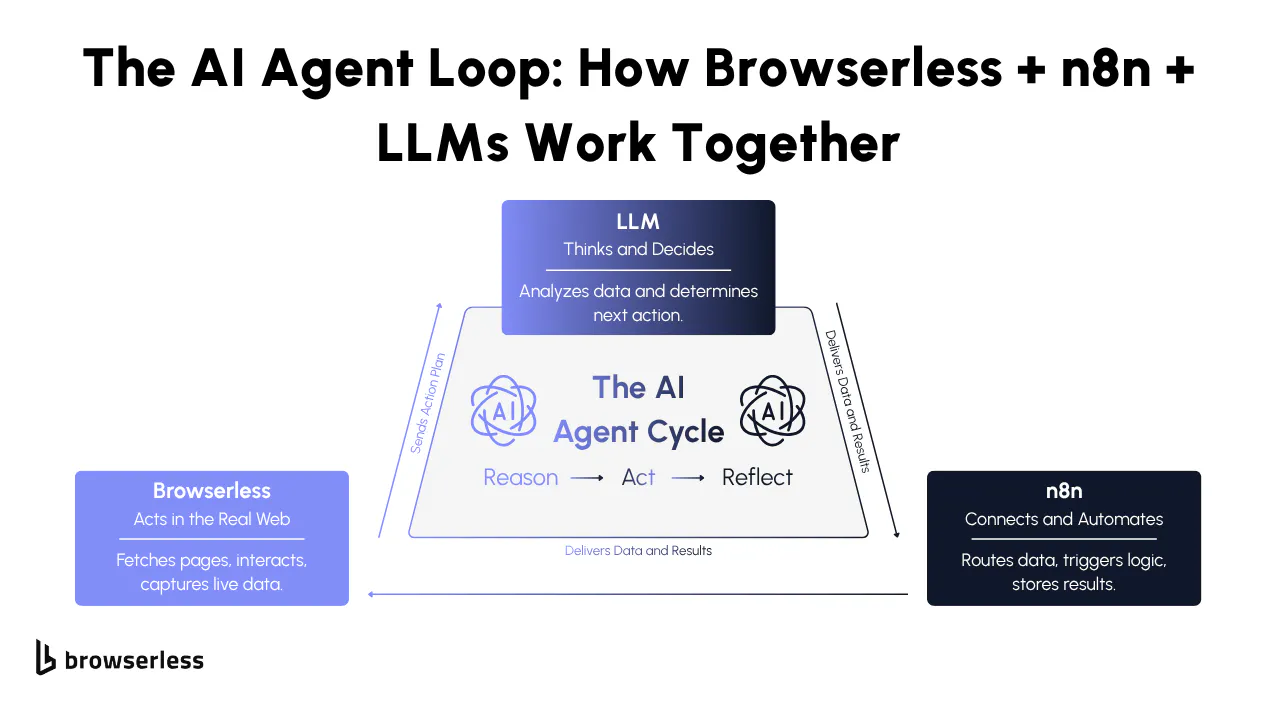
AI agents work best when their reasoning, actions, and evaluations are clearly separated. n8n coordinates each step, while Browserless handles the real browser work, creating a predictable loop the LLM can reason through.
The LLM decides what to do, n8n sends those instructions to Browserless, and Browserless returns clean, rendered results for the next decision. With endpoints like /content, /screenshot, /pdf, /function, and /chrome/bql, the agent can extract data, capture visuals, or interact with the page without any custom scripts. Each layer does its job cleanly, which makes the entire system easy to scale and debug.
This pattern scales naturally because each layer keeps a clear responsibility without requiring custom scripts to glue everything together.
- Reason: The LLM decides the next step, typically producing structured JSON that defines what page to load, what element to inspect, or what comparison to perform.
- Act: Browserless executes the instruction through the appropriate endpoint, rendering pages, returning content, capturing screenshots, or running multi-step actions through BQL.
- Reflect: The LLM interprets Browserless output, scores or summarizes results, decides whether more data is needed, and generates the following instruction set.
All workflow transitions occur through n8n nodes, providing a consistent, transparent operational cycle that works for simple experiments and more advanced agents alike.
To show how this framework actually works in practice, we’ll walk through three agents that each teach you a different, high-value pattern you can reuse in your own automations.
What you’ll learn from these agents:
- Research Agent: How to let an LLM choose pages, scroll through live sites, and gather multi-page data without any predefined scraping rules.
- Website Reviewer: How to combine rendered HTML with real screenshots to evaluate clarity, hierarchy, and messaging like a human reviewer.
- Competitive Intelligence Agent: How to extract structured product or site details, compare two sources side by side, and generate a clean, evidence-based analysis.
These three workflows give you a complete toolkit for building AI agents that explore, interpret, and compare the live web. Let’s dive into each one.
AI Research Agent
What This Agent Does
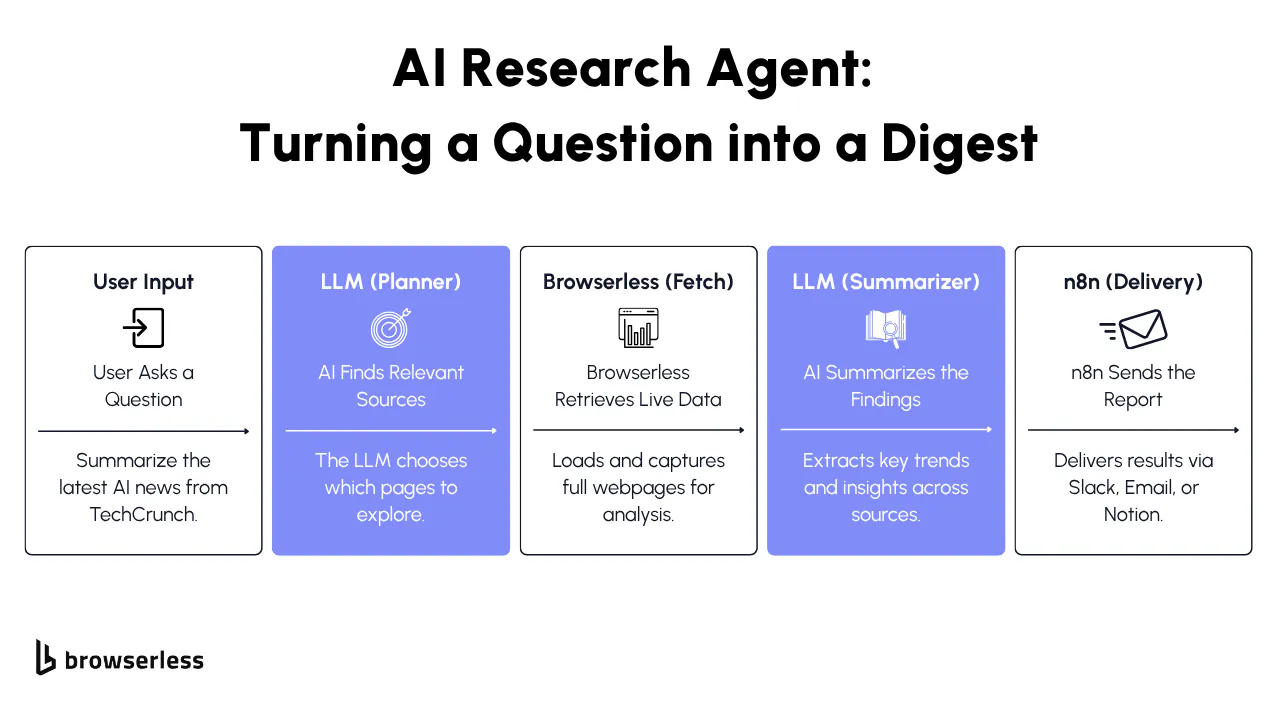
The AI Research Agent turns any research request into a guided browsing session. You can ask for something simple like “Give me today’s top AI headlines and summarize the main themes from techcrunch.com/tag/ai/”, and the agent visits the site, then decides how far down the page it needs to scroll, and whether it should look at a second page of results. It behaves much closer to a human researcher than a traditional scraper.
What makes this powerful is that the agent isn’t following prebuilt rules. It reasons about what it sees, decides when to gather more information, and uses Browserless to carry out the actual web interactions.
Browserless Endpoints This Agent Uses
/chrome/content
The agent uses this endpoint to load a real webpage and return the fully rendered HTML. It includes everything users would see in their own browser, such as articles, dynamic lists, text loaded via JavaScript, timestamps, metadata, and more. This is how the agent gathers the article titles and the text it needs to summarize the day’s themes.
/chrome/bql
Some sites only reveal stories after scrolling. The agent uses Browserless’s BQL interaction endpoint to scroll the page or load additional sections when it believes there is more content. Instead of you writing scroll loops, pagination logic, or selectors, the agent decides when deeper exploration is needed, and Browserless handles the interaction.
How the Agent Works
Reason
When you ask a question, the LLM decides which sites are relevant, what sections matter, and how much depth is needed. If you ask for “today’s AI headlines,” it naturally selects major tech publications. If you ask for “the themes across both pages,” it knows it may need to scroll or load a second page. The key is that you don’t configure any of this. The agent decides the plan on its own.
Act
Once it has a plan, the workflow uses Browserless to carry it out:
- It loads each page through /chrome/content so the agent can read the headlines and story text.
- If the page hides newer posts below the fold, it interacts with the page via /chrome/bql to scroll and reveal more.
- If the agent believes there’s a second page worth exploring, it asks the workflow to fetch that page next.
- If visuals help, it captures a screenshot through /chrome/screenshot.
What’s important is that this isn’t a scripted sequence. The agent decides what to do after each step based on what it sees.
Reflect
After each round of browsing, the agent reviews the content it has received and evaluates whether it has enough to give you a complete answer. If not, it asks for more exploration, maybe an additional scroll, another page, another source.
Once the agent feels it has a full picture, it writes your research summary: the headlines, the themes, and anything notable happening across the news cycle.
n8n Workflow Structure
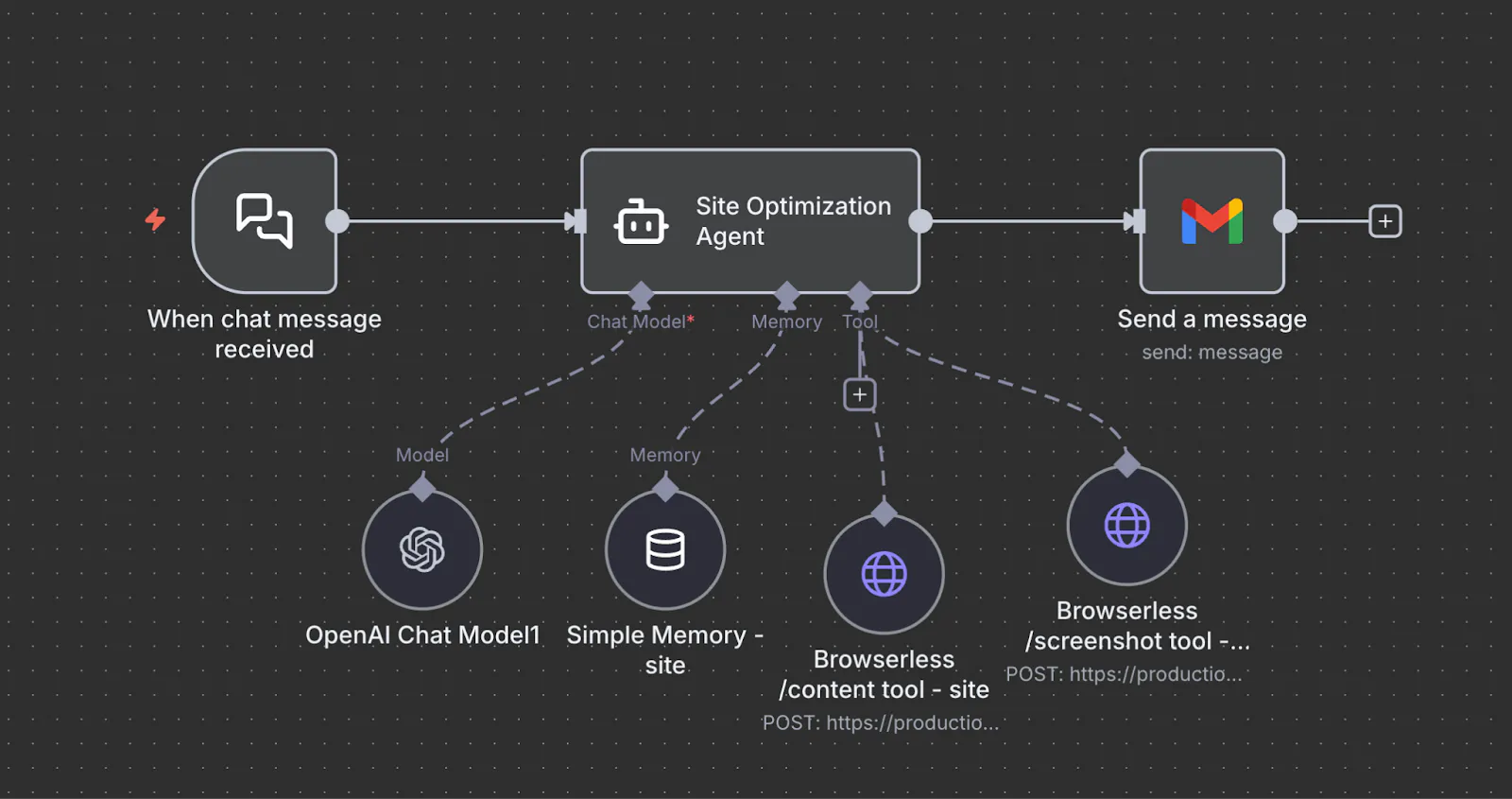
Here’s what actually happens in practice when you run this agent.
Example chat input:
“Go get me the top AI content themes from today from https://techcrunch.com/tag/ai/”
- Input arrives. The message hits the workflow as a plain chat trigger. No parameters, no scraping rules, just a natural language goal.
- The agent plans the approach.
- The LLM decides this is a news aggregation task.
- TechCrunch's AI tag page is treated as the primary source.
- It needs to scan multiple posts, not just the first few.
- It may need to scroll to capture the full day's coverage.
- Live page is loaded. Browserless pulls the fully rendered TechCrunch AI page. The agent reads the actual headlines, timestamps, and excerpts as a human would.
- The agent checks for depth. If only part of the day's content is visible, the agent decides to scroll or paginate. It triggers a BQL interaction to reveal more posts and re-extracts the updated content.
- Themes are synthesized. The agent clusters headlines into themes. For example, regulation, startups, model releases, acquisitions. It checks whether it has enough evidence per theme.
- Final summary is produced. Once the agent is satisfied with coverage, it generates a concise, human-readable summary of what is happening today in AI.
- Results are delivered. n8n routes the output to Slack, email, Notion, or a database. No extra logic needed.
As a developer, you are not scripting crawl depth or DOM paths. You are wiring a stable loop that lets the agent decide how much exploration is required based on what it actually sees.
System Prompt We Used
“You are an AI Research Agent designed to gather accurate information from live websites. You plan where to look, decide which sections of a site matter, interact with the page when necessary, and produce a reliable, well-supported research summary. Your behavior should reflect a careful, step-by-step approach rather than guessing.
Tools Available
You have access to three Browserless tools that let you work with real webpages:
- browserless_content — Loads a webpage and returns the fully rendered HTML, including text loaded by JavaScript. Use this to extract article titles, summaries, timestamps, and metadata.
- browserless_bql — Interacts with the page (scrolling, clicking, waiting) whenever content is hidden behind lazy-loading, infinite scroll, or pagination. Use this to reveal additional sections before gathering text.
- browserless_screenshot — Captures a screenshot of the full page or a specific region when visual structure or layout context improves your analysis.
How to Use These Tools
- Start with content to gather initial information.
- Use bql if the page requires scrolling or interaction to reveal more content.
- Use screenshot when visual confirmation helps, such as verifying the presence of a list or section.
- Never invent missing information. Stop only when you have enough evidence to answer the research question.
Your Task
- Identify the pages that are relevant to the user’s question.
- Load and inspect those pages using Browserless tools.
- Decide whether further loading or interaction is needed (e.g., checking a second page of results).
- Continue until you have gathered all necessary information.
- Produce a clear, accurate research summary written for a human reader.
Final Output
A concise, factual research summary based on what you retrieved through tool calls, with no speculation.”
Production Use Cases
In production, this agent is most often used for scheduled monitoring and on-demand research. A typical pattern is a cron trigger that runs every morning to scan a fixed set of industry or competitor sources and posts a daily brief to Slack or Notion.
The same workflow can be triggered manually by an analyst who needs a fast market read on a specific topic or site. Because the agent decides how deep to explore at runtime, the same setup works for lightweight daily scans and deeper one-off investigations without changing the workflow itself.
Where this becomes especially powerful is in how it connects to downstream systems. Instead of just sending a summary, teams often store results in a database for historical tracking, run a second agent to score or classify findings, or trigger alerts only when meaningful changes are detected.
Over time, this turns into a reusable research service that feeds dashboards, reporting pipelines, and internal tools. The trigger defines when it runs. The agent defines what to explore. Browserless guarantees real page access. n8n handles routing, scaling, and integration across the rest of the stack.
AI Website Reviewer Agent
What This Agent Does
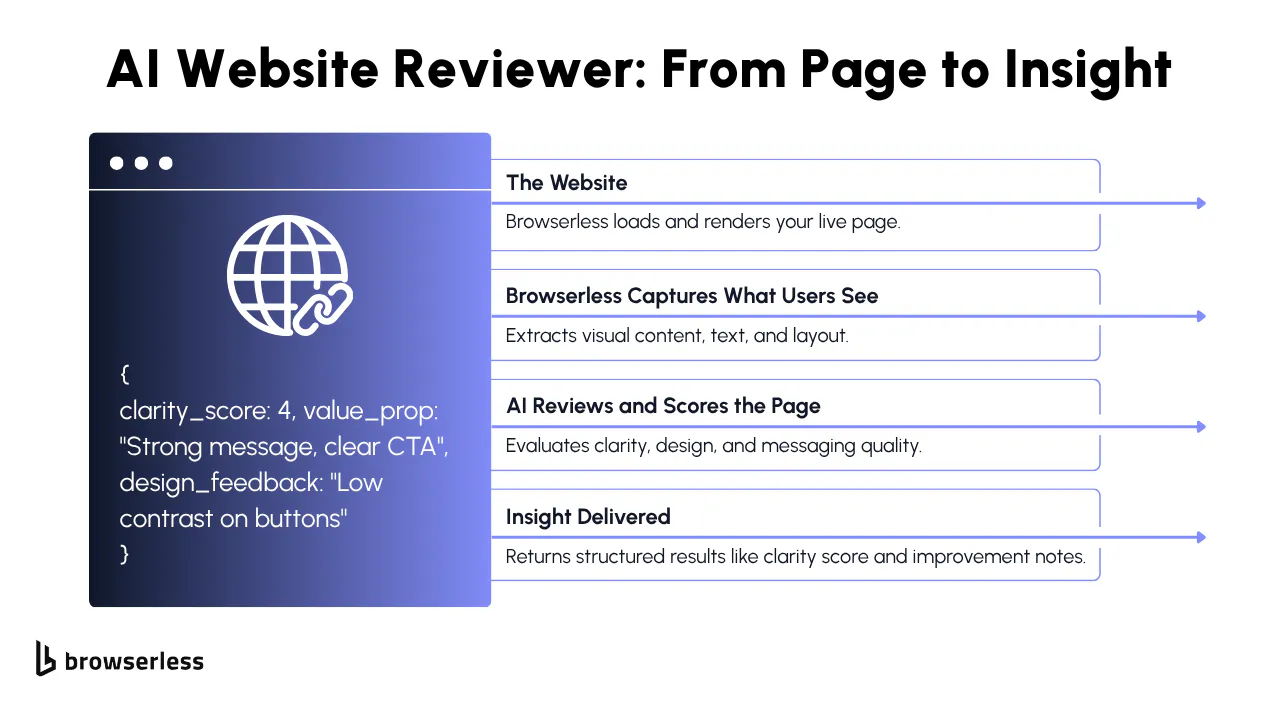
The AI Website Reviewer Agent evaluates a live webpage the way a UX-focused teammate would. Given a URL, it determines what evidence is needed to assess clarity, messaging, hierarchy, and CTA effectiveness, then gathers that evidence directly from the live page.
Rather than relying on a single data source, the agent selectively uses Browserless capabilities to collect both written content and visual context. It may read rendered page text to understand messaging, capture screenshots to evaluate layout and visual emphasis, or interact with the page to reveal additional sections when needed. This gives the agent the same signals a human reviewer would use, not just raw markup.
You don’t define what to inspect or how to inspect it. The agent decides which sections matter, what kind of evidence is required, and which Browserless tools to use to support a credible, evidence-based review.
Browserless Endpoints This Agent Uses
The agent uses this when it needs to read what the page is actually saying. It loads the page the same way a real browser would and lets the agent review the hero message, headings, CTAs, navigation labels, and overall copy to judge clarity and messaging.
It uses screenshots when how the page looks matters. Visual hierarchy, spacing, CTA prominence, and above-the-fold clarity are easier to evaluate by seeing the page rather than inferring it from markup alone.
The agent uses browser interactions only when content isn’t immediately visible. This includes scrolling, opening sections, or waiting for dynamic elements so the page can be fully reviewed before collecting evidence.
When the review needs to be shared or saved, the agent generates a PDF snapshot of the page. This creates a simple, readable record of what the page looked like at the time of the review.
If page speed or loading behavior could affect user experience, the agent checks performance metrics. This helps explain issues where a page looks fine but feels slow or frustrating to use.
For deeper follow-up or technical review, the agent can export the page and its assets as a ZIP file. This is useful when teams want to inspect the underlying files or audit how the page is built.
How the Agent Works
The agent reviews the URL and decides which parts of the page need closer inspection. It focuses on areas that most affect clarity and usability, such as:
- the hero section and primary message
- primary and secondary CTAs
- navigation clarity and labeling
- above-the-fold layout and scanability
- key messaging and supporting sections
Based on this, the agent plans what type of evidence is required—written content, visual layout, interaction to reveal more of the page, or supporting signals like performance.
The workflow then carries out that plan using the appropriate Browserless capabilities:
- The agent uses /content when it needs to read and understand the page’s copy, headings, labels, and overall text structure.
- It captures /screenshot evidence when visual hierarchy, spacing, or CTA prominence needs to be evaluated.
- If important sections are hidden below the fold or behind interactions, the agent uses /chrome/bql to scroll or reveal additional layout before collecting evidence.
- When the review needs to be saved or shared, the agent may generate a /pdf snapshot of the page as a readable record.
- If page speed or load behavior could impact the experience, the agent can check /performance metrics to support its evaluation.
None of these steps are pre-scripted in n8n—the agent decides which tools to use and in what order based on what the page presents and what the review requires.
Once the agent has gathered the necessary evidence, it evaluates the page holistically. It considers questions like:
- Is the main message clear at a glance?
- Do CTAs stand out visually and contextually?
- Is the layout easy to scan and understand?
- Does the copy clearly support the product or goal?
- Are there layout, messaging, or performance issues affecting clarity?
It then synthesizes these observations into a structured review with clear feedback, scores, and practical suggestions for improvement.
n8n Workflow Structure
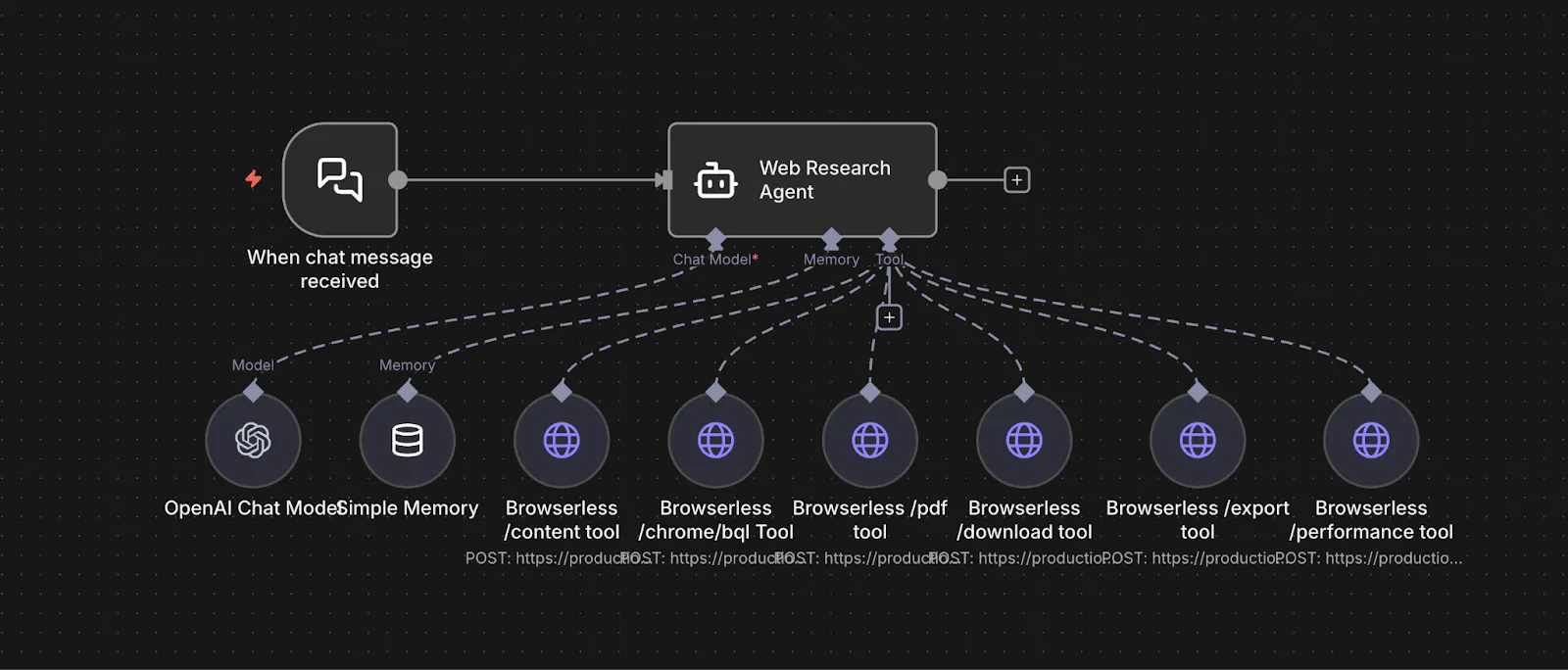
Here’s how this workflow runs when you give the agent a URL to review.
1. Input arrives. You send a message like, “Review https://example.com for clarity, messaging, and CTA strength.” That request enters n8n as a simple trigger, with no predefined inspection rules or selectors.
2. The agent plans what to inspect. The agent decides which parts of the page matter most for the review—such as the hero section, primary CTAs, navigation, above-the-fold layout, and key value sections. Based on this, it determines which Browserless capabilities are needed: reading rendered text, capturing visual layout, interacting with the page, or collecting supporting signals.
3. The page is loaded and evidence is collected.
- The agent uses /content to read the page’s rendered copy, headings, labels, and structure when textual understanding is required.
- When visual hierarchy or layout matters, it captures /screenshot evidence of key sections.
- If important content is hidden below the fold or behind interactions, the agent uses /chrome/bql to scroll or reveal additional sections before collecting evidence.
- When the review needs to be saved or shared, the agent can generate a /pdf snapshot of the page as a readable artifact.
- If page speed or load behavior may affect the experience, the agent may also collect /performance metrics to support its evaluation.
4. The agent evaluates and scores the page. With written content, visual context, and any supporting signals collected, the agent evaluates clarity, messaging strength, CTA effectiveness, layout quality, and overall usability. It combines evidence from multiple Browserless endpoints to form structured feedback and scores.
5. Results are delivered. n8n routes the final review—and any supporting artifacts like PDFs or metrics to Slack, Notion, Google Sheets, or any other downstream system you’ve connected.
You are not defining what to screenshot or which DOM elements to analyze. You are wiring a repeatable review loop and letting the agent decide what evidence it needs to make a credible judgment.
System Prompt We Used
“You are an AI Web Research Agent. Your job is to gather information from live websites using Browserless and produce accurate, well-supported research outputs. You work with real webpages and select the most appropriate Browserless capability based on the research goal, not by defaulting to text extraction.
Tools Available
You have access to the following Browserless tools:
- browserless.pdf(url) Generates a human-readable PDF snapshot of a fully rendered webpage. Use this when the task requires archiving, sharing, or preserving a page as a document.
- browserless.export(url) Exports a webpage and its assets as a ZIP file. Use this when raw page materials are needed for offline inspection or auditing.
- browserless.content(url) Loads a webpage and returns the fully rendered HTML. Use this only when you need to read or analyze page text, metadata, or article content.
- browserless.performance(url) Returns structured performance and diagnostics metrics for a webpage. Use this when the task involves page health or performance analysis.
- browserless.download(url) Downloads a file linked from a webpage. Use this when the task requires retrieving reports, datasets, or documents.
- browserless.bql(query) Performs browser interactions such as navigating, scrolling, clicking, or waiting. Use this only when interaction is required to reveal content before using another tool.
Workflow
- Interpret the user’s research goal and determine what type of output is required (document, assets, analysis, metrics, or files).
- Select the appropriate Browserless tool based on that goal.
- Request a tool call when you need to load a page, interact with it, generate an artifact, or retrieve data.
- Review the tool result and decide whether additional actions or tools are required.
- Stop once you have sufficient evidence to complete the research task.
Guidelines
- Do not default to browserless.content. Use it only when textual analysis is explicitly required.
- Use browserless.bql strictly as a supporting tool to enable other actions.
- When requesting a tool call, respond with valid JSON only.
- Do not guess or infer missing information. Base conclusions only on tool results.
- Stop once the research objective has been met.
Final Output
Produce a clear, concise, human-readable research result based on the information and artifacts you collected. Do not return JSON in the final answer. Your goal is to behave like a reliable research assistant that plans deliberately, interacts with real webpages, selects the correct browser capabilities, and delivers trustworthy results.”
Production Use Cases
In real teams, this agent is commonly used as a continuous site quality monitor. Product and marketing teams schedule it to run on staging or production URLs after deployments to catch messaging regressions, broken CTAs, or layout issues before traffic is affected.
Growth teams also use it to audit landing pages across campaigns and store structured feedback in Notion or Google Sheets for tracking and iteration.
It also naturally connects to broader automation flows. The output can trigger alerts when clarity or CTA scores drop below a threshold. Results can be versioned in a database to track improvements over time.
A second agent can translate the feedback into prioritized tickets for design or content teams. In practice, this turns the workflow into an automated UX and messaging review system that runs continuously in the background rather than as a one-off analysis.
E-commerce Competitive Intelligence Agent
What This Agent Does
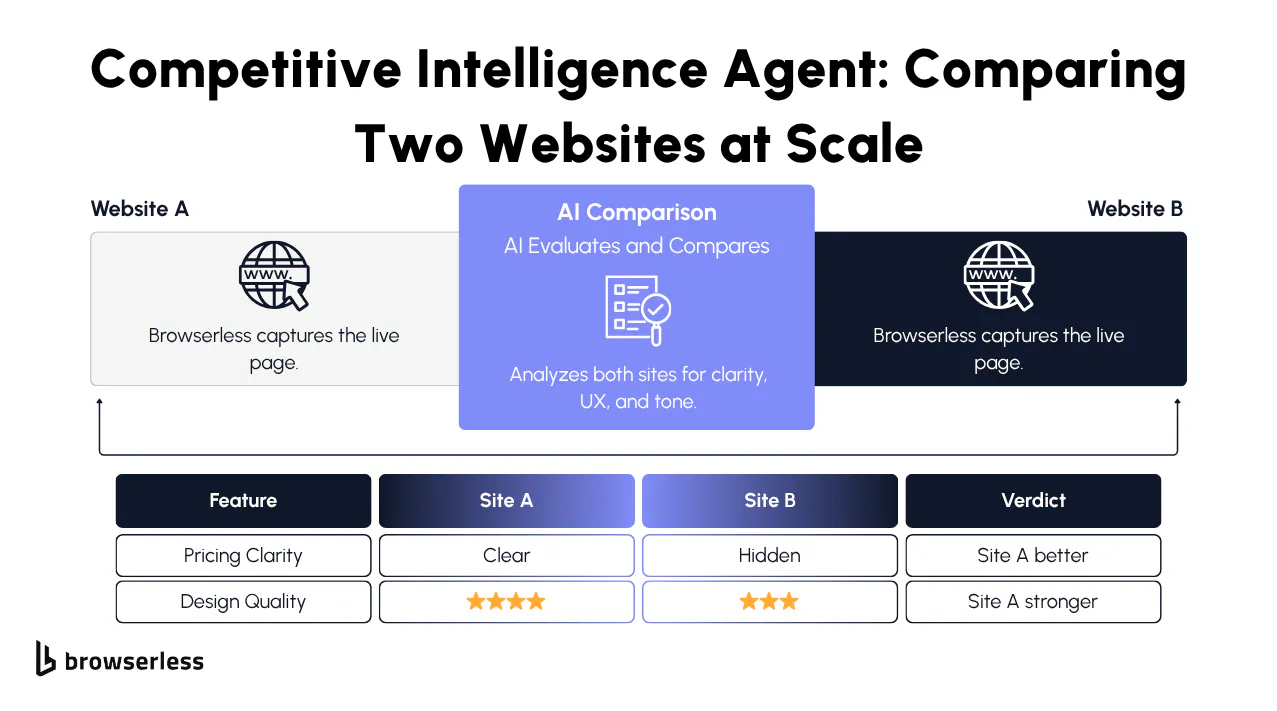
The E-commerce Competitive Intelligence Agent evaluates two product pages side-by-side and produces a detailed comparison that goes far beyond pricing and simple specs.
You give it two URLs in the same category, two headphones, two supplements, two premium mice, and the agent explores each page, gathers the product details that matter, and then produces a structured competitive review.
It reads the product information, pricing, variants, reviews, and shipping details from the rendered HTML, and it uses screenshots to visually inspect pricing boxes, product images, and review modules. This makes it behave less like a scraper and far more like an analyst who knows what to look for when evaluating two competing products.
Browserless Endpoints This Agent Uses
This endpoint loads the full product page, executes JavaScript, and returns all of the structured content the agent needs, including:
- base price and sale price
- coupons or promotions
- variant options
- shipping and delivery windows
- stock statuses
- product descriptions and specs
- review counts and ratings
- cross-sell and “frequently bought together” modules
This is the backbone of the analysis, because it gives the agent the same information a buyer would see when evaluating the product.
Some details are easier to evaluate visually:
- the prominence of the price box
- the size and quality of product images
- how variant selectors are presented
- how review summaries and ratings appear
- whether promo banners stand out
- the way shipping info is grouped
Whenever visual context improves the comparison, the agent captures a screenshot of the relevant section.
These two endpoints together give the agent everything it needs to make a real competitive judgment.
How the Agent Works
Reason
The agent begins by reviewing the two URLs and determining which information is most relevant to compare. It focuses on:
- pricing
- availability
- variants
- reviews
- shipping
- content completeness
- cross-sells and upsells
Once it knows what matters for the category, it plans which parts of each product page to inspect and whether it needs visual confirmation beyond the raw HTML.
Act
The workflow gathers the information the agent requested:
- The product pages are loaded through /content, giving the agent access to all structured product data.
- If the agent wants a closer look at visual hierarchy, variant selectors, or the review module, it uses /screenshot to capture those sections.
- It repeats the process for both URLs to ensure a consistent comparison.
There are no manual selectors or scraping logic in n8n the agent controls what is captured and when screenshots are needed.
Reflect
Once both pages are explored, the agent analyzes the findings and organizes them into a clear comparison. It considers:
- Which product is priced more competitively
- Which one shows more substantial inventory or shipping signals
- Which has more compelling variants
- How does the review strength compare
- Which page presents product information more completely
- Where each product appears stronger or weaker
Using this, it produces a structured comparison table and a narrative summary that feels like something you’d get from a category analyst. Finally, it recommends which product appears more competitive overall and why.
n8n Workflow Structure
Here’s what the flow looks like when you compare two product pages in practice.
- Input arrives. You send a message with two URLs. For example. “Compare these two noise-canceling headphones and tell me which one is stronger on price, reviews, and shipping.”
- The agent forms a comparison plan. The LLM decides what matters for this category. Pricing, availability, variants, reviews, promotions, and shipping. It also decides which details need visual confirmation.
- Both product pages are rendered. Browserless loads each product page through the content endpoint so the agent can read real prices, discounts, variant options, stock status, specs, and review data exactly as a shopper would see them.
- Key sections are captured visually. When layout or emphasis matters. Price boxes, review modules, variant selectors, promo banners. The agent requests screenshots to ground its analysis visually.
- The agent compares and evaluates. With both structured content and screenshots in hand, the agent weighs the strengths and weaknesses of each product and builds a side-by-side comparison.
- The report is delivered. n8n routes the final comparison to Slack, Google Docs, Notion, or any other downstream system.
From an implementation perspective, you are not wiring field extraction or review scraping logic. You are defining a comparison loop and letting the agent decide what evidence it needs to make a defensible judgment.
System Prompt We Used
“You are an E-commerce Competitive Intelligence Agent. Your job is to evaluate two competing product pages in the same category and produce a structured, data-driven competitive comparison. You behave like an unbiased product analyst—extracting real data, checking both pages carefully, and reasoning from evidence rather than assumptions.
Tools Available
You may use the following Browserless tools:
- browserless_content — Retrieves fully rendered HTML from each product page. Use this for prices, discounts, variants, shipping info, availability, product descriptions, reviews, ratings, and cross-sell modules.
- browserless_screenshot — Captures screenshots of visual elements like price boxes, product images, variant selectors, review sections, and promotion banners when appearance matters.
How to Use These Tools
- Extract structured data using content.
- Use screenshots when evaluating how clearly information is presented.
- Use bql if you must reveal additional sections before extracting meaningful data.
- Do not infer product details—always verify through tool results.”
Production Use Cases
E-commerce teams typically spend hours manually comparing product pages, checking prices, reading reviews, exploring variants, and capturing screenshots for reports.
This agent automates all of that by combining Browserless-rendered content with targeted screenshots; it can see the same data a real customer sees and interpret it intelligently.
It isn’t scraping or relying on APIs, it’s performing real product research. And because Browserless powers it, it works on modern, JavaScript-heavy retail sites without custom scripting.
Conclusion
Browserless gives your agents direct access to real browsing and high-fidelity page capture, n8n manages the workflow logic that connects each action, and LLMs supply the reasoning and structured analysis that turn raw outputs into meaningful results. With these pieces working together, you can start small with a single workflow and gradually expand into more capable agents as your needs grow. If you want to build your own agents like these, Browserless gives you a fully managed cloud browser with AI-ready endpoints. Get started with a free Browserless trial or dive into our docs.
FAQs
What is BrowserQL, and why use it for cloud browser automation?
BrowserQL is an API for controlling a real Chrome browser remotely. You use it to navigate pages, extract content, run interactions, and capture screenshots in any cloud or serverless-based environment without installing or managing a local browser. It solves scaling, stability, and deployment issues common with headless automation.
How does Browserless let AI agents work with real websites?
Browserless runs a full browser session in the cloud and exposes it via endpoints such as /content, /screenshot, and /chrome/bql. This lets AI agents read rendered HTML, interact with dynamic elements, and visually inspect pages exactly as users see them. The agent reasons over live browser output, not static source code.
What does n8n provide in an AI agent workflow?
n8n handles orchestration, it connects user input, LLM reasoning, Browserless tool calls, scheduling, memory, and delivery into one workflow. It lets you trigger agents on chat, cron, or webhooks and route results to Slack, Notion, email, databases, or APIs without writing backend glue code.
How is this different from traditional web scraping?
Traditional scraping relies on CSS selectors and static HTML, which break when sites change. This approach uses a real browser, executes JavaScript, and lets the LLM decide how to navigate based on what it sees. There are no hard-coded selectors, no fixed pagination rules, and far fewer failures on modern sites.
What are common production use cases for AI agents built this way?
Teams use these agents for scheduled news and market monitoring, automated website and UX audits, competitive product tracking, and summarization for internal dashboards. Results are typically stored in databases, pushed to Slack or Notion, and connected to alerting or reporting workflows for continuous monitoring.