
Key Takeaways
- Reasoning alone isn’t enough for real-world agents. LLMs can plan and decide effectively, but meaningful automation still requires full browser access to handle dynamic UIs, authenticated flows, and client-side state.
- Production agents need a clean separation of concerns. Keeping reasoning (Claude Code), execution (Playwright), and infrastructure isolated makes agent systems easier to debug, extend, and scale as behavior becomes more complex.
- Browser operations quickly become the bottleneck. Long-lived sessions, parallel execution, and bot detection are infrastructure problems, not agent-logic problems—and managed platforms like Browserless absorb that complexity, so teams can focus on building better agents.
Introduction
If you’ve been building agentic systems, you’ve probably noticed the gap between what models can reason about and what they can reliably execute on the web. Many high-value workflows live inside dynamic, authenticated sites where APIs fall short, pushing agents into real browsers. That’s where challenges surface: unpredictable session lifetimes, parallel runs, shifting page state, and constant bot detection. In this article, we’ll explore why browsers are unavoidable for autonomous agents, how Claude Opus 4.5 and Playwright divide thinking and execution, and what it takes to run these systems in production, using Browserless as the infrastructure layer throughout.
Why AI Agents Need Browsers
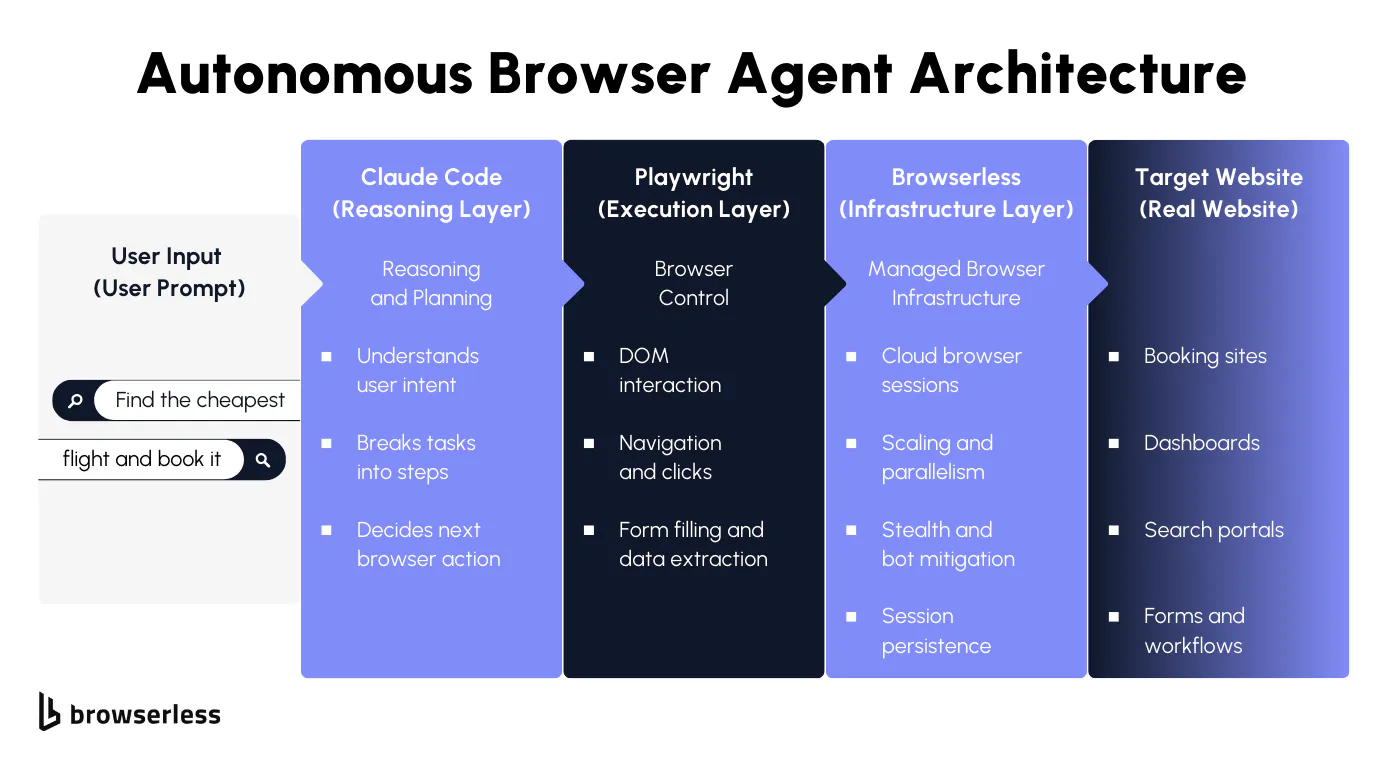
Modern LLMs are already capable of breaking down open-ended goals, planning multi-step work, and deciding what to do next based on partial or messy information. In practice, that reasoning layer is rarely the limiting factor.
The constraint arises when an agent needs to operate within a live website, where progress depends on JavaScript-driven state, authenticated sessions, and user-level interactions that only exist in a browser.
A large share of real agent workloads depend on full browser control, including:
- Booking and purchasing flows
- Form filling and account workflows
- Live research across dynamic sites
Browser automation becomes meaningfully harder once agents replace fixed scripts. Agents don’t follow a single path; they branch, backtrack, and retry based on what they observe in the DOM and network responses. That behavior creates operational pressure in places traditional automation rarely touches:
- Unpredictable session length
- Non-deterministic navigation paths
- Parallel execution and retry complexity
Autonomous agents need browser sessions designed to stay alive, recover from missteps, and scale across concurrent runs, rather than short-lived browsers built for tightly controlled scripts.
Architecture: Reasoning, Execution, and Infrastructure Layers
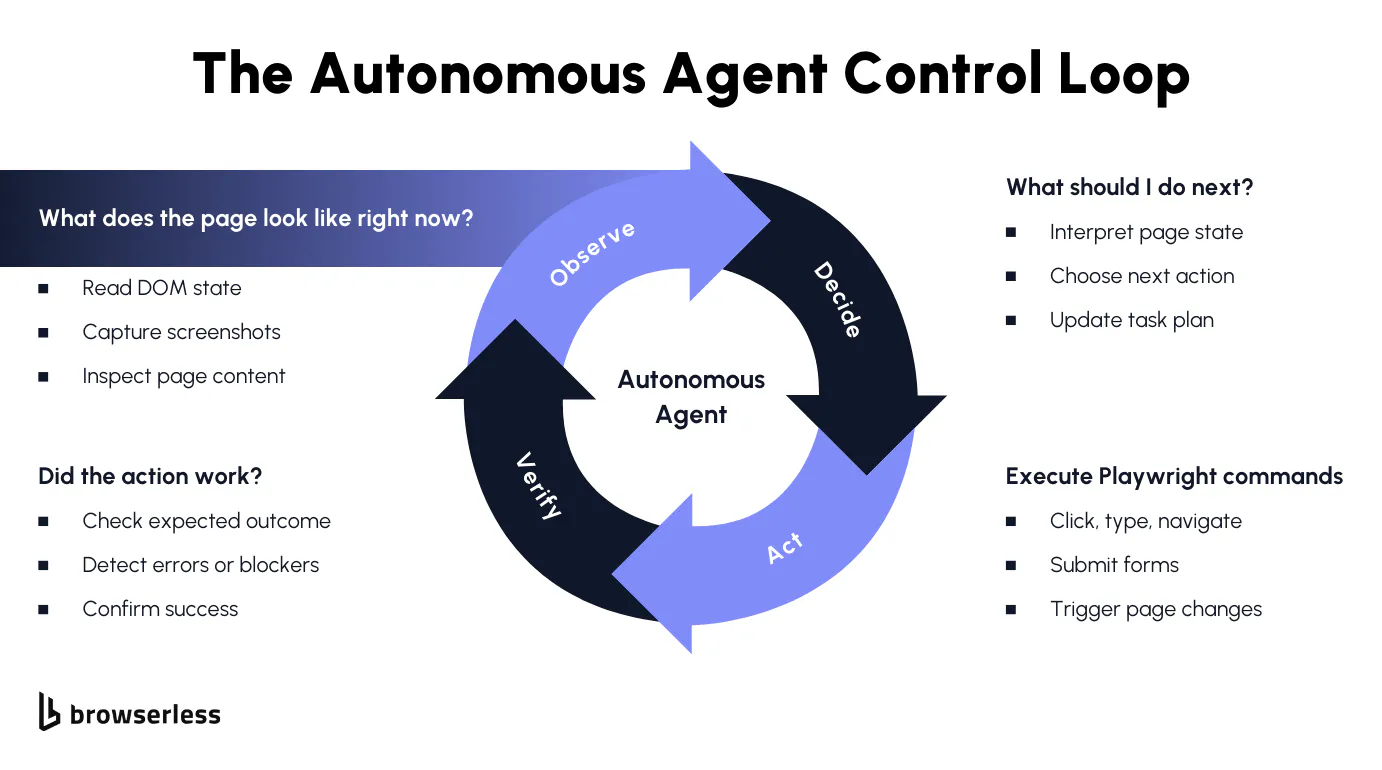
Once browser agents move beyond demos, architecture matters. Mixing task planning, browser control, and session management in the same layer quickly leads to brittle systems that are hard to debug and even harder to scale. A clean separation between reasoning, execution, and infrastructure aligns better with how agents actually run and fail in production.
Each layer has a different failure mode and scaling profile. Reasoning changes frequently as prompts and models evolve. Execution needs deterministic behavior to stay debuggable. Infrastructure has to absorb load, variability, and hostile environments. Keeping these concerns isolated allows us to iterate on one layer without destabilizing the others.
Claude Opus 4.5: The Reasoning Layer
Claude Opus 4.5 operates as the control plane for the agent. It is responsible for task decomposition, deciding which browser actions should happen next, and sequencing those actions based on the observed state. Instead of hardcoding flows, it reacts to signals such as DOM structure, visible text, navigation outcomes, and error states returned by the browser.
This layer also owns recovery logic. When a selector fails, a page partially loads, or a redirect changes the expected flow, Claude Opus 4.5 interprets those signals and decides whether to retry, backtrack, or take an alternate path. Keeping this logic out of the execution layer avoids coupling decision-making to any single site or UI structure.
Playwright: The Execution Layer
The Playwright acts as the agent's actuator. Given an explicit instruction, click this element, fill this field, or navigate to this URL, it performs that action with predictable behavior. Its value here is not intelligence but consistency. The same command produces the same result, which keeps agent behavior inspectable and testable.
Playwright also serves as the observation boundary. It reports back DOM snapshots, selector resolution, navigation events, and interaction results. That feedback becomes structured input for the reasoning layer, closing the loop without embedding assumptions about intent or strategy inside browser code.
Browserless: The Infrastructure Layer
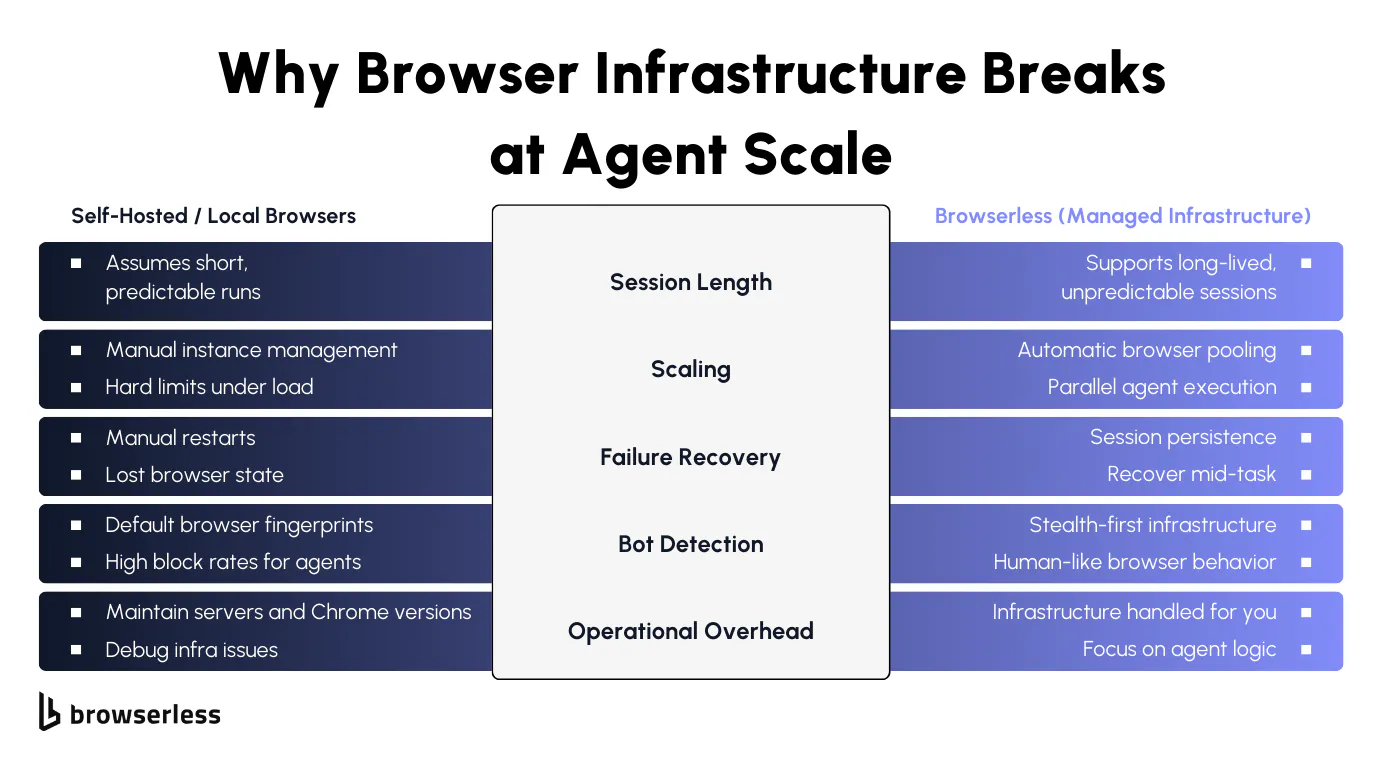
The infrastructure layer is responsible for making browsers available under agent-style workloads, where session length, interaction patterns, and concurrency are hard to predict. Browserless provides managed browser sessions that agents can connect to without handling lifecycle management, pooling, or capacity planning in application code.
This layer absorbs the operational problems that surface at scale: keeping sessions alive across long-running tasks, supporting parallel agent execution, and reducing friction from bot detection triggered by non-linear navigation patterns. With those concerns handled centrally, the agent stack can treat browsers as a stable execution surface rather than a fragile resource.
End-to-end, the flow is straightforward: a user prompt is interpreted by Claude Opus 4.5, translated into explicit Playwright actions, executed through Browserless-managed browsers, and applied to the target website. Each layer stays focused on its own responsibilities, which keeps the system understandable as complexity grows.
Implementation Walkthrough: Building the Agent Loop
We’ll build this agent the same way most of us build real systems: start with something that runs, then make it safer, clearer, and easier to extend. The end result is an agent loop you can reason about, debug, and evolve without rewriting everything every time the prompt changes.
Step 0: Install what you actually need
The dependency list is intentionally short. There’s no framework glue or orchestration layer hiding what’s going on.
Playwright runs locally, but the browser won’t. That separation is important: your Node process controls the agent, while the browser session lives elsewhere. This keeps your dev machine lightweight and mirrors how you’d run agents in production.
Create a .env file:
At this point, you can think of your project as three moving parts:
- a decision-maker (Claude),
- an executor (Playwright),
- and a browser runtime that isn’t tied to your laptop (get your browserless api key here.)
Step 1: Connect Playwright to a remote browser
This is the first thing to get right. Everything else builds on it.
This swap from launch() to connectOverCDP() is deceptively small. It means you no longer worry about browser crashes, local resource limits, or how many agents your machine can handle. As your agent logic gets more exploratory and less predictable, that difference starts to matter.
Step 2: Decide what Claude is allowed to say
Before you ask Claude to “do something,” you want to be very explicit about how it should communicate decisions. Free-form text sounds flexible, but it’s hard to execute safely.
Think of this as an internal API Claude is a client of your executor, and this is the only API it’s allowed to call. When something goes wrong, you can tighten or extend this contract without touching the rest of the system.
Step 3: Observe the page in a controlled way
Agents need feedback, but dumping full HTML or screenshots into prompts doesn’t scale well. Instead, we collect a few high-signal facts about the page.
This function defines what the agent “sees.” If the agent behaves strangely, this is one of the first places to look. Expanding or shrinking observations is often more effective than tweaking prompts.
Step 4: Ask Claude for the next move
Now we bring in the reasoning layer the job here is not to be clever, but to be strict.
The parsing and validation here look mundane, but they save a lot of time. When an agent fails, you want errors to be obvious and close to the source.
Step 5: Execute actions without interpretation
Execution should be boring; this function does not think; it just performs.
If you ever feel tempted to add conditionals here, that’s a sign the logic belongs back in the reasoning layer.
Step 6: Make execution tolerant to small failures
Most browser automation breaks on timing, not logic. A small retry loop absorbs a surprising amount of noise.
Keeping retries here means Claude doesn’t have to reason about transient failures. It only sees failures that actually matter.
Step 7: Run the full agent loop
Finally, we stitch everything together. This loop is intentionally simple, so it’s easy to reason about when something goes wrong.
The important thing here is what isn’t happening: there’s no hidden magic, no orchestration layer, and no implicit retries. Each step is explicit, making agent behavior easier to debug as tasks become more complex.
At this point, you have a working autonomous browser agent that you can run locally, reason about, and extend. Most real-world improvements come from refining observations, tightening the action contract, or adding new action types—not from changing the loop itself.
Why Managed Browser Infrastructure Matters for Agents
Agents Are Inherently Unpredictable
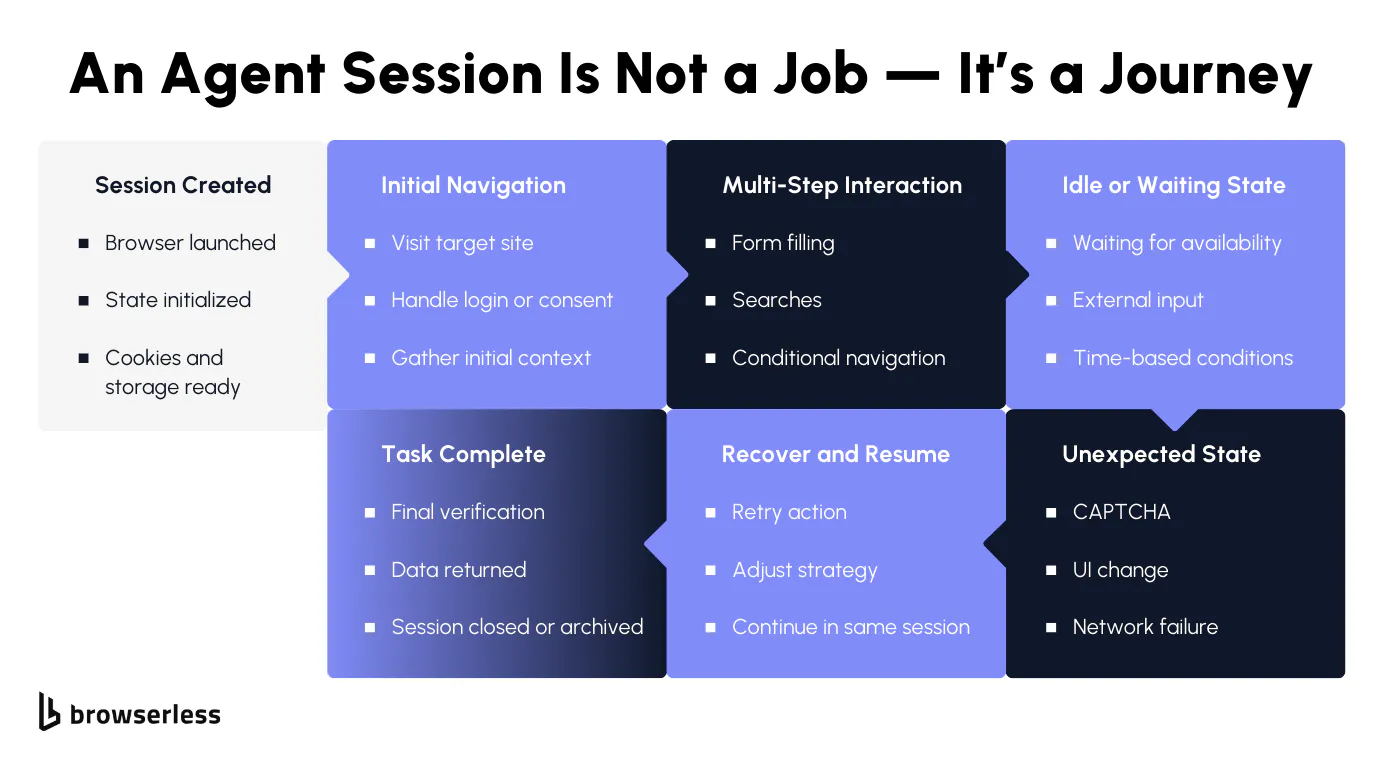
Autonomous agents don’t move through the web in clean, linear ways. They pause to observe, branch when something unexpected appears, retry steps that partially fail, and sometimes spend far longer on a task than anyone anticipated.
One agent might finish in seconds, while another stays active for an extended period because the site behaves differently, loads slowly, or presents additional steps mid-flow. That variability is normal for agents, but it clashes with browser setups designed around short, predictable runs.
When browser lifetimes are tightly constrained, agents end up fighting the environment they run in. Sessions get torn down while useful context still exists, cookies disappear between steps, and partially completed workflows have to start over.
For agents to behave reliably, browser sessions need to tolerate uneven runtimes and preserve state across many decisions without pushing lifecycle management back into the agent logic itself.
Scaling Agents Is a Browser Problem Before It’s an AI Problem
Running a single agent is rarely the hard part. The challenge appears as soon as multiple agents run simultaneously. Each agent expects a browser to be available immediately and to remain usable for as long as its task requires. Completion times don’t line up, resource usage spikes unevenly, and browser processes become the real bottleneck long before models or prompts do.
Without managed infrastructure, teams end up building their own browser pools, tracking active sessions, and handling failures when browsers crash or become unavailable.
That orchestration work quickly dominates the system. Using Browserless shifts those concerns out of application code, so scaling agents becomes a matter of running more workers rather than reinventing browser lifecycle management.
Bot Detection and Debugging Are Amplified for Agents
Agents tend to attract more scrutiny from bot detection systems than traditional scripts. Their behavior is less regular: they revisit pages, pause unpredictably, and follow paths that don’t resemble a human completing a single task. Modern detection systems combine fingerprinting with behavioral signals, so unusual interaction patterns can trigger blocks even when individual actions appear legitimate.
When failures happen, debugging agents is also more difficult than debugging scripts. You often need to understand how the agent moved through the site over time, not just which selector failed.
Long-lived sessions, session replay, and stealth-focused execution turn those failures into observable, diagnosable events. Instead of guessing why an agent stalled or was blocked, teams can inspect what actually happened and adjust agent logic accordingly. The result is less time spent managing browsers and more time spent improving how agents reason, adapt, and recover.
Conclusion
Autonomous agents can unlock real, high-value workflows, but only when they can interact with the web reliably. Once agents start running in parallel and for unpredictable durations, browser management quickly becomes infrastructure work rather than agent logic. Browserless provides a foundation for running Playwright-based agents in production, with managed execution, native integrations across Browser Use, LangChain, and the Vercel AI SDK, and usage-based scaling that grows with demand. If you’re exploring browser-driven agents, the next step is simple: review the AI integrations documentation and try the free tier to run your first autonomous agent end to end.
FAQs
What are autonomous browser agents?
Autonomous browser agents combine a reasoning model with browser automation to complete end-to-end web tasks. They observe the live page state, decide on next steps, and interact with websites in a real browser rather than through fixed scripts.
Why do AI agents need browsers instead of APIs?
Many important workflows exist only within interactive, authenticated websites. Browsers give agents access to DOM interactions, session state, and client-side logic that APIs often don’t expose.
How do Claude Opus 4.5 and Playwright work together?
Claude Opus 4.5 decides what actions to take based on the task and page state. Playwright executes those actions deterministically in the browser, keeping reasoning and execution cleanly separated.
Why is browser infrastructure hard for autonomous agents?
Agents have unpredictable runtimes, branching paths, and uneven resource usage. Running many agents in parallel makes browser lifecycle and capacity management major operational challenges.
What makes Browserless useful for production AI agents?
Browserless provides managed Playwright sessions, support for long-lived and parallel agents, session replay for debugging, and native AI integrations, allowing teams to focus on agent logic rather than browser operations.