
- Browser automation doesn't scale linearly. At 1,000+ sessions, browsers behave less like workers and more like long-lived systems that require active lifecycle and resource management.
- Self-hosting browsers shifts engineering effort toward operations. Pool management, recycling, monitoring, and recovery quickly become ongoing platform work rather than a one-time setup.
- Managed browser infrastructure removes scale as a constraint. Teams keep the same Playwright or Puppeteer code while offloading concurrency, stability, and debugging concerns to platforms like Browserless.
Introduction
Browser automation feels easy when you're starting out. A few scripts run fine, parallel jobs behave, and nothing pushes back. Over time, though, browser usage creeps in everywhere tests grow, background jobs multiply, and product features quietly depend on headless sessions, often without anyone designing for scale. At some point, correctness stops being the hard part, and concurrency takes over. Past a few hundred sessions, and especially beyond 1,000, the system starts behaving differently in ways tuning can't fix. This article is a technical reality check for developers who are already hitting that wall and want to understand why browser automation suddenly feels much harder to run.
When Browser Automation Stops Being "Just Automation"
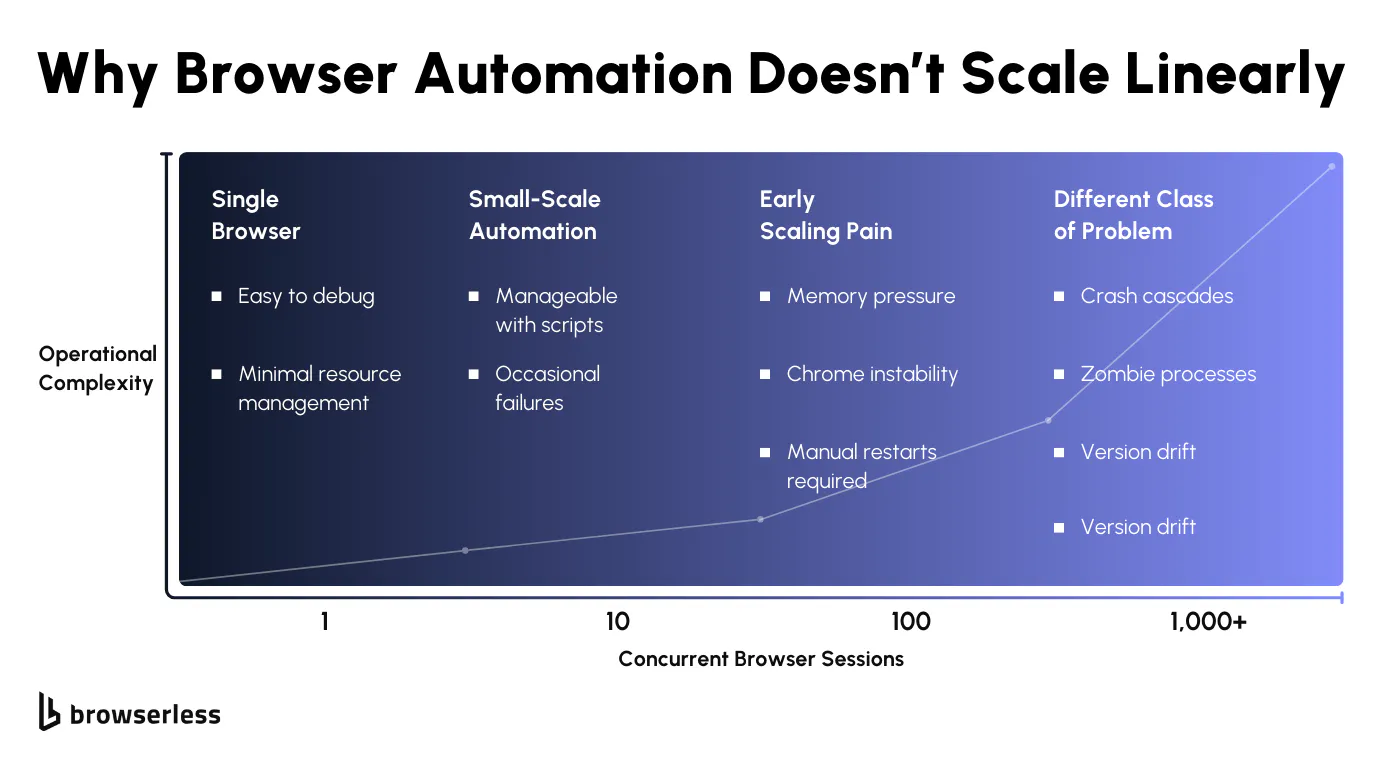
The Non-Linear Nature of Browser Scale
At a small scale, a browser session behaves like a well-contained unit of work. It starts, runs a task, exits, and releases resources in a way that's easy to reason about. Once you introduce hundreds or thousands of concurrent sessions, that model breaks down.
Each browser carries state across navigation, JavaScript execution, caches, and in-memory objects that don't reset cleanly. Memory usage becomes uneven across sessions, CPU spikes line up during rendering-heavy moments, and shared I/O resources start to contend in ways that aren't visible at lower concurrency.
This is where familiar scaling instincts fall short. Browsers don't behave like stateless workers that can be added or removed freely. A pool of long-lived sessions will drift over time, while short-lived sessions introduce startup overhead and resource churn.
The more concurrency you add, the harder it becomes to predict how any individual session will behave. Scale stops being a throughput problem and turns into a resource management problem, where isolation, cleanup, and containment matter more than raw capacity.
Early Warning Signs Teams Tend to Miss
The first signs rarely look dramatic; memory usage grows slowly and unevenly, with no single session appearing to be the culprit. Restarting browsers seems to help, until it doesn't.
Flaky behavior appears only during peak load, making failures hard to reproduce outside production. Execution times begin to vary widely between identical jobs, even though the automation code hasn't changed and the target sites look the same.
Occasional browser crashes are often written off as noise, especially when retries mask the impact. Over time, those crashes tend to occur during periods of higher concurrency, leaving behind half-terminated processes or partially freed resources.
Capacity erodes quietly, and the system becomes more fragile with each run. By the time these patterns are obvious, teams are no longer debugging automation logic; they're debugging browser behavior under sustained load, whether they planned to or not.
What Self-Hosted Browser Infrastructure Actually Requires
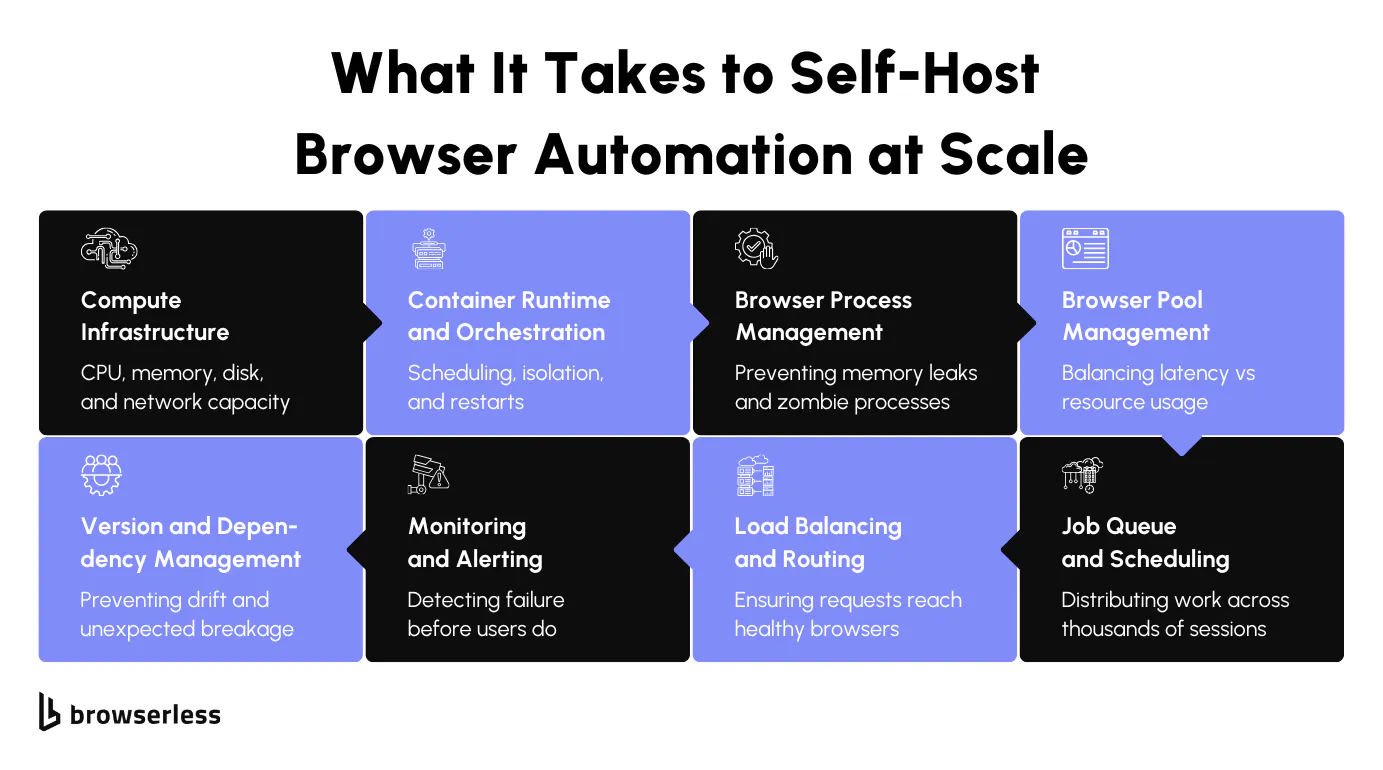
The Core Systems Teams Plan For
When teams decide to self-host browser automation, the initial architecture usually looks reasonable on paper. Container orchestration is often the first building block, enabling the scheduling of browser workloads and isolating them from the rest of the system.
While this solves deployment and placement, it doesn't solve how browsers behave once they're running. Containers help you start browsers, but they don't manage how long those browsers live, when they should be recycled, or how they fail under load.
That responsibility quickly shifts to browser pool mechanics. Teams need to decide how browsers are launched, whether sessions are short-lived or reused, and how to detect when a browser is no longer healthy even though the process is still alive.
Queues and schedulers become necessary to smooth out bursty demand, while load balancing needs to account for session affinity and state rather than treating every request as interchangeable. These pieces form the foundation, but they're only the beginning.
The Operational Burden That Emerges Over Time
Once the system is running in production, the real work starts. Browsers behave differently from most services, so monitoring has to go deeper than simple up/down checks.
Teams end up tracking memory growth per session, watching for CPU spikes during rendering-heavy pages, and keeping an eye on how many browsers are active versus sitting idle. These metrics matter because small inefficiencies multiply quickly at scale.
Alerting becomes a balancing act. Too little signal, and problems go unnoticed until capacity drops. Too much noise, and on-call engineers start ignoring alerts altogether. Over time, browser version management adds another layer of complexity.
Chrome and Chromium updates can change behavior in subtle ways, and keeping versions aligned across environments becomes a recurring task, especially when failures only appear under specific versions.
The hardest issues to deal with are often the ones that don't reproduce outside production. Flaky behavior tied to concurrency, site-specific rendering quirks, or long-lived sessions can't be debugged easily in isolation.
At this stage, browser infrastructure stops being a side concern and becomes a standing operational responsibility. Teams find themselves maintaining it continuously, whether or not that work directly contributes to product features or business goals.
Failure Modes That Only Appear at 1,000+ Sessions
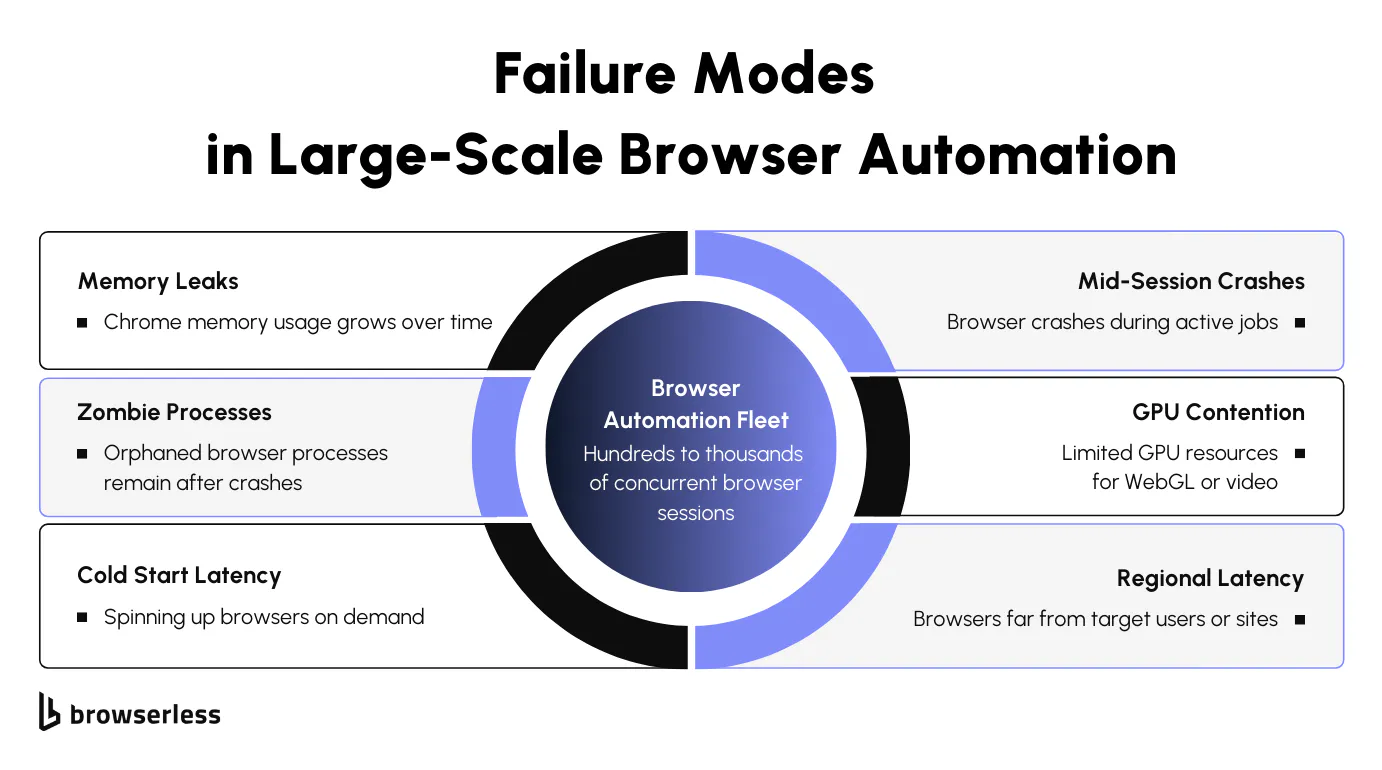
Resource and Process Management Under Sustained Load
As browser automation runs continuously at high concurrency, resource behavior starts to drift in ways that are hard to ignore. Chrome memory usage grows unevenly during long-lived sessions as pages accumulate JavaScript state, caches, and internal objects that don't always get released. Even when individual sessions appear healthy, aggregate memory pressure builds across the fleet.
Over time, it becomes clear that Memory leaks are effectively unavoidable in practice at this scale, which forces teams to rely on recycling strategies rather than expecting browsers to clean up perfectly on their own.
Process management adds another layer of complexity. Browser crashes don't always clean up after themselves, leaving orphaned child processes running in the background. These zombie processes consume memory and file descriptors without contributing any useful work, quietly reducing available capacity.
Aggressive recycling helps reclaim resources, but it also introduces risks. Recycling too frequently can cause long-running workflows to suffer. Recycle too slowly, and the system degrades under accumulated waste. Finding that balance becomes an ongoing operational concern rather than a one-time tuning exercise.
Latency, Availability, and Recovery Challenges
Latency issues tend to surface alongside resource pressure. Launching browsers on demand introduces cold-start penalties that become more pronounced as concurrency increases.
To compensate, many teams maintain warm pools, which improve responsiveness but also increase idle resource usage and management overhead. As the system grows, availability becomes less about whether browsers can start and more about whether they can survive real workloads without failing partway through.
Mid-session crashes are especially difficult to handle. A browser that dies during a multi-step workflow can leave tasks in partially completed states, requiring recovery logic that understands which steps ran, which didn't, and which can safely be retried. Some workloads add further constraints, such as GPU requirements for rendering, WebGL, or video-heavy pages, which complicate scheduling and capacity planning.
Multi-region deployments introduce their own challenges, including latency sensitivity, uneven regional demand, and the need for coordinated failover strategies. At this scale, keeping sessions fast and available becomes inseparable from how browsers are placed, managed, and recovered across the system.
Architecture Patterns Teams Converge On
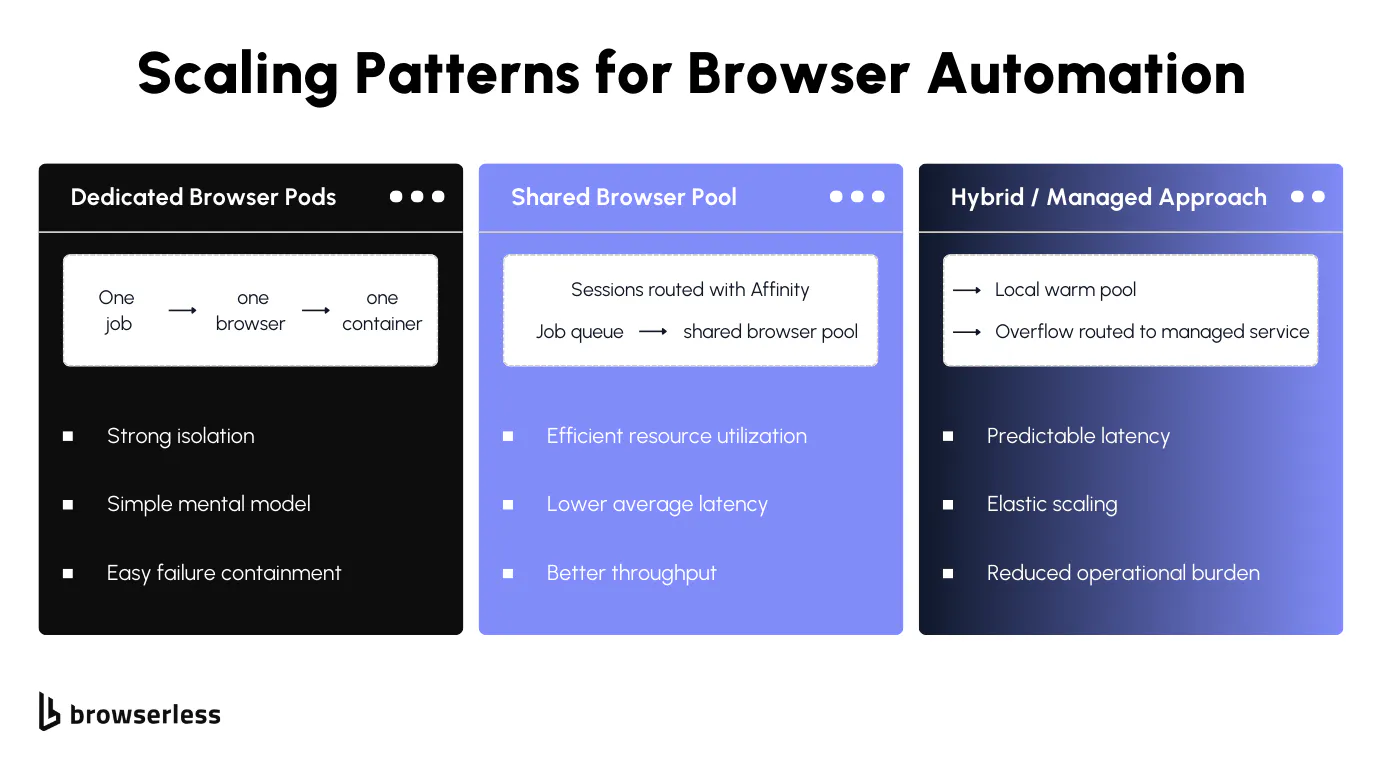
Common Scaling Patterns and Their Trade-Offs
Dedicated browser pods per job
This pattern prioritizes isolation above everything else. Each job gets its own browser instance with a well-defined lifecycle, making cleanup predictable and limiting the blast radius of failures.
The downside shows up quickly at scale. Startup latency becomes a constant tax, utilization stays low, and costs rise linearly with concurrency. What feels clean and safe early on often becomes slow and expensive once hundreds of sessions run in parallel, which isn't always aligned with your project's budget.
Shared browser pools with session affinity
Shared pools improve efficiency by reusing browser instances across jobs, reducing startup overhead and increasing overall utilization. That efficiency comes with added complexity.
Lifecycle management becomes harder, health checks need to detect partially degraded sessions, and session affinity introduces coupling between jobs and browsers. As concurrency grows, the risk of noisy neighbors and cascading failures increases, especially when a single unhealthy browser affects multiple workloads.
Hybrid approaches teams experiment with
Many teams settle into hybrid setups as scale grows. Warm pools handle steady traffic to keep latency predictable, while burst capacity is managed separately to absorb spikes.
This can smooth performance, but it also introduces architectural sprawl. Multiple execution paths, different lifecycle rules, and uneven visibility make the system harder to reason about over time. What starts as a pragmatic compromise often requires ongoing effort to keep aligned.
How teams evaluate these patterns
Choosing between these models usually comes down to trade-offs rather than clear winners. Teams weigh throughput against isolation, balancing how many sessions they can run against how contained failures need to be.
Latency is measured against cost, especially when idle capacity sits unused. Reliability is considered alongside operational complexity, with many teams discovering that the simplest model to explain isn't always the easiest one to operate at scale.
When Managed Infrastructure Becomes the Obvious Choice
When browser operations start consuming the team
There's a point at which browser infrastructure stops being a background concern and becomes a standing operational workload. Platform teams spend more time tuning pools, recycling sessions, and tracking down memory leaks than supporting product features. Scaling decisions begin to hinge on browser stability rather than business demand, and debugging failures requires deep access to browser internals and historical session state, which is difficult to retain in homegrown systems. At this stage, browsers are no longer a tool your system uses, they're a system your team has to run.
Why teams externalize browser infrastructure to Browserless
This is where many teams decide to externalize the browser layer. Managed platforms provide browser pools built for high concurrency, with queueing, concurrency control, and session lifecycle management handled outside application code. Support for long-lived, stateful sessions makes multi-step workflows easier to operate, while native debugging tools like live inspection and session replay make failures observable instead of opaque.
Multi-region execution is available without custom orchestration, and enterprise controls, such as SOC 2 alignment, reduce compliance overhead. The practical result is straightforward: teams keep the same Puppeteer or Playwright code and the same application logic, while browser operations move out of the critical path, similar as you'd have your database server on a separate machine that the code that use it. Platform teams regain time, scaling becomes predictable, and browser automation no longer becomes the bottleneck.
Conclusion
Scaling browser automation is an infrastructure problem, not a scripting one, and while self-hosting can work, complexity quickly shifts engineering effort toward browser lifecycle management. Managed platforms like Browserless remove this burden with high-concurrency browser pools, built-in queueing and session isolation, long-lived sessions, strong debugging visibility, multi-region execution, and SOC 2-aligned operations, resulting in less time spent keeping browsers alive and more time building products. The real choice is not build versus buy, but whether browser infrastructure should be a core focus or invisible background plumbing. Sign up for a free demo and see how browser automation infrastructure disappears so your team can focus on building.
FAQs
Why does browser automation become harder to scale past 1,000 sessions?
At high concurrency, browsers stop behaving like simple workers. Each session consumes memory unevenly, carries state, and competes for shared CPU and I/O resources. Past a few hundred sessions, small inefficiencies compound, and browser lifecycle management becomes the dominant challenge.
What are the most common failure modes when scaling browser automation?
Teams often encounter gradual memory growth, zombie browser processes, flaky behavior under peak load, and crashes that leave resources partially cleaned up. These issues are difficult to reproduce outside production and worsen as concurrency increases.
Why doesn't Kubernetes or container orchestration fully solve browser scaling?
Container orchestration handles scheduling and isolation, but it doesn't address browser-specific concerns such as session reuse, recycling strategies, partial failures, or memory drift. At scale, teams still need dedicated browser pool management and deep operational visibility.
What architecture patterns are used for large-scale browser automation?
Common patterns include dedicated browser instances per job, shared browser pools with session affinity, and hybrid approaches with warm pools and burst capacity. Each pattern trades off isolation, cost, latency, and operational complexity, with no single option fitting all workloads.
When does managed browser infrastructure make sense?
Managed infrastructure becomes attractive when browser operations consume more engineering time than product work. Platforms like Browserless provide high-concurrency browser pools, built-in queueing, long-lived sessions, debugging tools, and multi-region execution, enabling teams to scale automation without running their own browser infrastructure.