
Key Takeaways
- Browser automation is shifting from scripts to AI-driven agents, giving teams a way to run workflows that adapt to changes and make decisions on their own.
- Successful adoption now depends on strong governance, clear observability, and modern infrastructure, since teams supervise automation instead of manually coding every step.
- Organizations that adopt AI-native automation early will gain a meaningful advantage, as 2026 marks the moment when the browser becomes a true control layer for intelligent agents.
Introduction
AI is changing how browser automation works in 2026; instead of writing long scripted sequences, teams are starting to rely on agents that interpret goals, make decisions, and carry out multi-step tasks inside the browser. With LLMs, agent behavior, and browser-native AI now converging, the browser is turning into a control plane for automation rather than just a rendering layer. This shift moves automation away from brittle, selector-driven flows and toward systems that adapt, reason, and repair themselves. As these capabilities mature, 2026 is shaping up to be the year automation evolves from handling isolated tasks to managing end-to-end processes with far less manual oversight.
How AI Automation Is Changing
1. The Automation World Is Growing Up
The automation ecosystem now spans several distinct segments that support different layers of AI-driven workflows. LLM-powered agents are becoming more capable, handling natural-language instructions and executing multi-step tasks in the browser. Cloud browser platforms provide the execution layer these agents rely on, offering scalable environments that behave more predictably than local setups.
Task automation tools continue to evolve with more AI features, giving teams structured ways to orchestrate actions without heavy scripting. Synthetic users and testing frameworks are also gaining relevance as organizations run controlled simulations to validate behavior and performance across evolving interfaces. Together, these segments form a more complete ecosystem than in earlier years.
2. Automation Tools Are Starting to Blend Together
Several automation categories that once operated separately are now merging. RPA, browser automation, and AI agents are beginning to share similar capabilities, making it harder to distinguish where one category ends and another begins.
Tools once focused solely on scripted workflows now integrate reasoning features, and AI-native platforms incorporate elements previously associated with RPA or testing frameworks.
Hybrid platforms are emerging as vendors expand their scope and consolidation continues, with companies looking to offer more unified automation solutions. This trend reflects the growing demand for systems that can handle everything from simple clicks to full agent-driven processes within a single platform.
3. Companies Want to Automate More
Organizations are pushing toward broader automation to improve operational efficiency. Leadership teams want systems that adapt quickly to UI changes, internal process shifts, and new data needs.
This creates demand for automation that behaves more intelligently and recovers gracefully from unexpected conditions. There is still a noticeable gap between early pilot projects and full-scale deployment.
Teams often explore agentic workflows in controlled environments but move cautiously when rolling them out across entire processes. Reliability, oversight, and integration with existing systems remain important considerations as adoption grows.
4. Oversight Matters More Than Ever
Governance is assuming a greater role as AI-driven automation becomes more autonomous. Organizations want to know how decisions are made, what inputs contributed to those decisions, and whether the system's actions can be reviewed or audited later. Transparency and traceability are becoming standard expectations.
Auditability and alignment with internal policies matter more as automation assumes greater responsibility in live environments. Teams are being asked to demonstrate that automated decisions can be monitored, controlled, and overridden when necessary. This reflects a broader trend toward responsible automation practices across industries.
6 Big Changes in Browser Automation
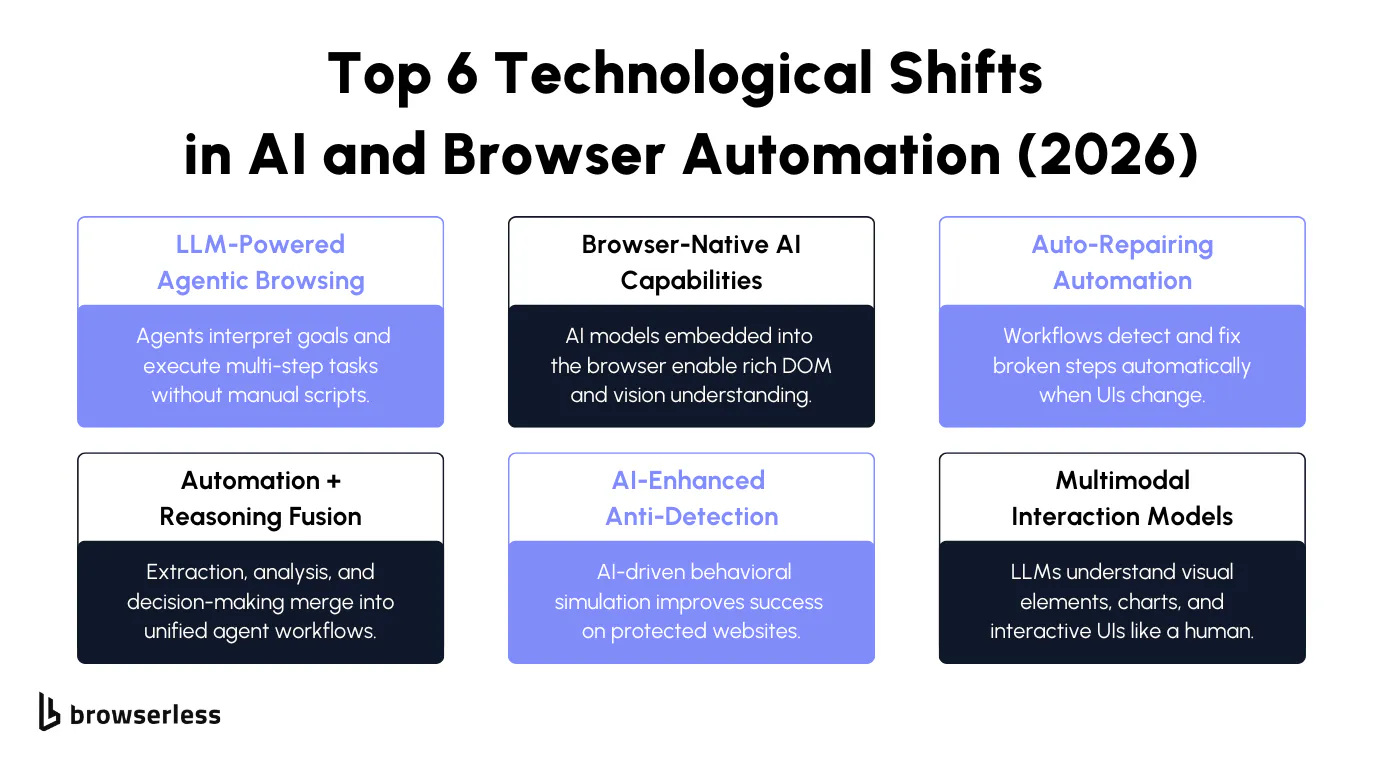
1. Agents That Can Follow Goals
LLM-driven agents now parse natural-language instructions, break them into actionable steps, and execute those steps directly in the browser. They can identify relevant elements, choose interaction paths, and sequence actions without predefined selectors.
This reduces the fragility associated with DOM-level automation and allows agents to reason through unclear or partially changing interfaces. They also maintain internal state across multi-step workflows.
That means they can track what they've done, infer what comes next, and correct their plan if the environment shifts. Instead of writing procedural scripts, engineers monitor the agent's plan, adjust constraints, and review execution logs. This creates a different working model where oversight replaces manual step authoring.
2. AI Running Directly in the Browser
Running AI inside the browser shortens feedback loops and makes decision-making more precise. These models operate with direct access to the DOM tree, computed styles, rendering states, and layout metadata, allowing them to detect subtle shifts that remote models often miss.
Latency drops significantly because the model doesn't need to round-trip requests to external inference endpoints for each interaction. With vision-assisted understanding layered in, these models can interpret pixel-level cues alongside structural data.
This allows them to distinguish visually similar elements, recognize state changes in components, and react to animations or transitions with more accurate timing. The result is automation that executes faster and aligns more closely with how the UI behaves in real time.
3. Automation That Fixes Itself
Self-healing automation uses a combination of structural analysis and similarity modeling to recover when expected elements move, are renamed, or change hierarchy. Instead of failing when a selector is missing, the agent computes alternative candidates based on semantic meaning, visual context, or past interactions.
This reduces the maintenance work that engineers typically handle when websites roll out incremental UI updates. Auto-repairing workflows can also store repair patterns, making them more resilient over long durations and across large automation fleets. For teams running high-volume or long-lived processes, this significantly cuts recurring overhead.
4. Agents That Can Think and Act
Agents are beginning to merge execution and reasoning into a single loop. They can extract data, evaluate it, and decide the next step without needing explicit if/else logic. This capability extends automation into workflows that depend on conditional choices, branching logic, or intermediate analysis.
This enables business-level automation: tasks such as verifying eligibility, making routing decisions, or evaluating UI states in context. Automations no longer stop at "click and extract." They incorporate traits of interpretation, planning, and adaptation that were previously difficult to encode manually.
5. AI That Looks More Human Online
AI models are now used to generate human-like behavioral signatures. They vary input timings, scroll patterns, event spacing, and pointer movement in ways that mimic natural interaction. Instead of randomizing these behaviors, the AI models them from real user telemetry, making them statistically harder to distinguish from legitimate traffic.
When paired with real browser environments, these techniques significantly increase session stability on high-protection sites. They also adapt to changing detection methods, as models can retrain or adjust their patterns as new fingerprinting techniques emerge.
6. AI That Understands Pages and Images
Multimodal models combine textual understanding, DOM reasoning, and visual perception. They can interpret charts, infographics, dashboard widgets, embedded visualizations, and dynamic components that traditional scraping tools couldn't parse reliably.
This unlocks automation for workflows involving visual data extraction, UI validation, and applications where the key information isn't stored in straightforward text nodes. As multimodal performance improves, teams will be able to automate interactions previously considered too complex or too visual to script.
The Hardest Problems Today
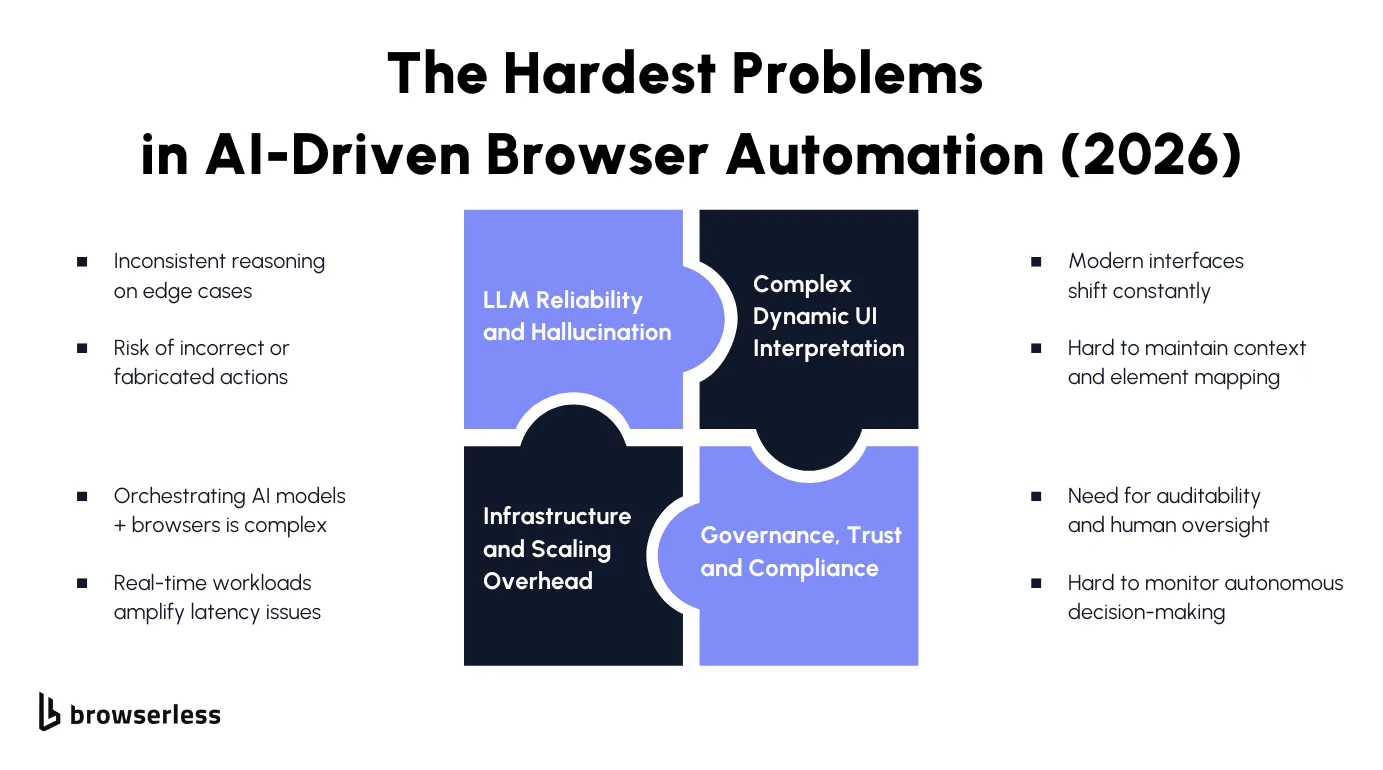
AI Still Makes Mistakes
LLMs can misinterpret instructions, generate inaccurate steps, or produce reasoning gaps when dealing with unfamiliar UI patterns. Hallucination remains a known risk, and edge cases often highlight inconsistencies in how models assess state or choose actions.
Modern Websites Change Quickly
Today's UIs rely heavily on client-side rendering, transitions, and real-time updates, making it difficult for agents to maintain an accurate understanding of on-screen state. Highly interactive components can unexpectedly shift or reload, forcing agents to resolve conflicts between expected and actual UI behavior.
Better AI Costs More
Running larger AI models inside automation pipelines introduces meaningful cost and latency tradeoffs. Teams must balance model size, accuracy, and speed, especially when workflows run continuously or across high-volume browser fleets.
Sites Detect Automation More Easily
Detection systems keep growing more sophisticated, combining behavioral analysis, fingerprinting, and dynamic challenges. This creates pressure for automation to incorporate adaptive, AI-driven countermeasures rather than relying on static evasion techniques.
Agents Need More Training
Agents lack domain-specific reasoning data, limiting their ability to handle nuanced tasks or niche workflows. Without stronger supervised datasets tailored to UI reasoning, models struggle to consistently interpret ambiguous or domain-heavy interfaces.
Teams Need More Visibility
Organizations want greater transparency when automation makes decisions. It's still challenging to inspect why an agent acted a certain way or override decisions without interrupting the entire workflow. This lack of transparency complicates adoption in regulated or risk-sensitive environments.
Running Everything Together Is Hard
AI automation requires coordinating models, browsers, session control, observability layers, and orchestration systems. Running these as a cohesive stack is challenging, especially for teams scaling across many workflows or building multi-agent setups.
Slow Models Break Automation
Slow model responses disrupt interactive automation, causing agents to miss timing windows or misread state transitions. When latency accumulates, real-time workflows degrade quickly, eroding confidence in AI-driven automation.
How Teams Are Adapting Their Automation Strategies in 2026
1. New Ways to Structure Automation
Multi-agent orchestration is becoming more common as teams split responsibilities across specialized agents. One agent may handle navigation, another may perform reasoning, and a third may verify outcomes.
This separation improves clarity and makes it easier to scale automation across workflows. Hybrid RPA/browser loops are also gaining adoption, allowing traditional rule-based automation to coordinate with AI agents when tasks require interpretation rather than fixed scripting.
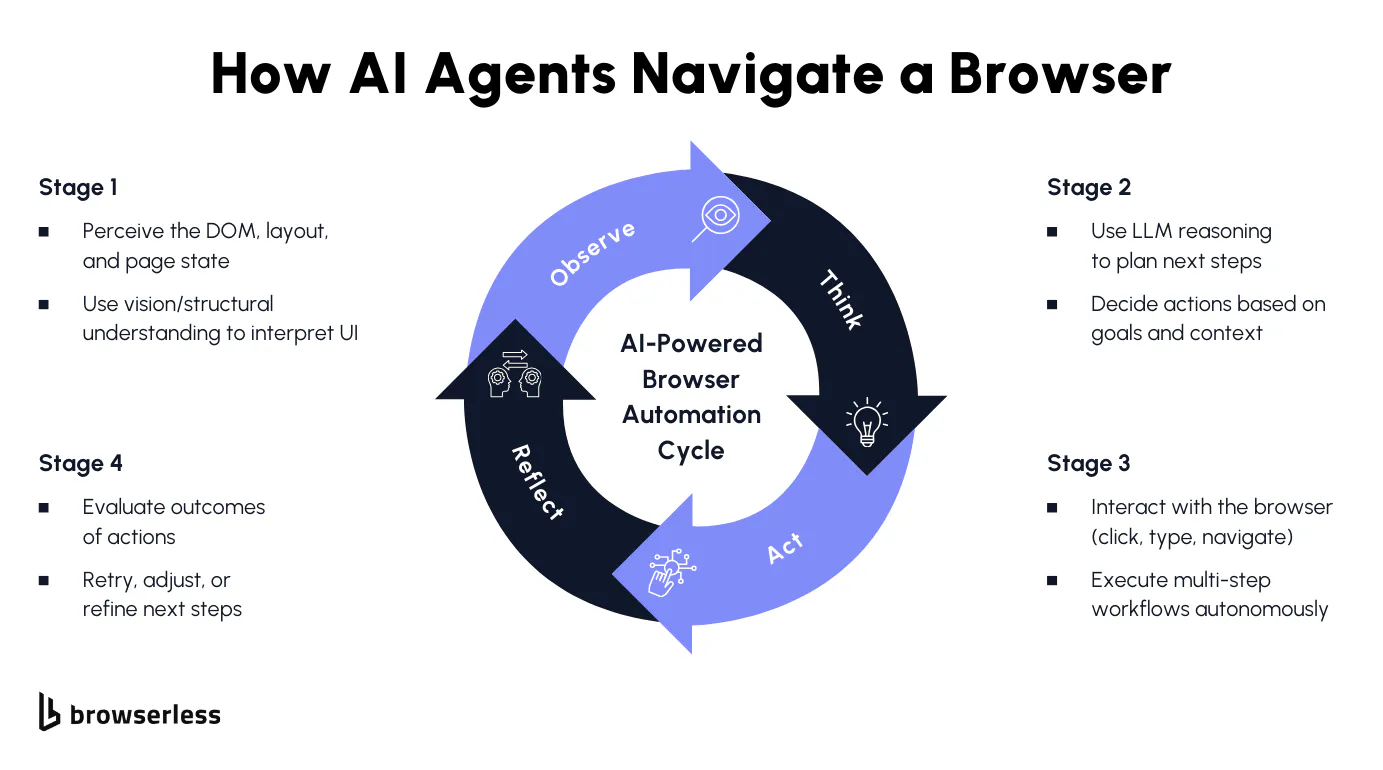
Continuous observe-think-act cycles are emerging as the foundation for modern AI automation. Instead of moving blindly from step to step, agents repeatedly examine the UI, update their internal model of the environment, and choose the following action.
Human-in-the-loop systems provide oversight when agents hit uncertain situations, giving teams a controlled way to supervise decisions without blocking automation entirely.
2. Engineers Set Goals, Not Steps
Engineering teams are shifting from writing step-by-step scripts to defining goals and constraints for agents. Instructions describe the end state, and the agent plans how to reach it. This reduces brittle procedural code while still giving teams control over boundaries and expected outcomes.
Supervision is becoming an increasingly important part of the engineering workflow. Instead of debugging selectors or building rigid automations, teams review agent plans, monitor execution traces, and shape behaviors through constraints.
Observability plays a major role here; developers want real-time insight into agent intent, plan changes, timing decisions, and failure points to keep automation reliable across changing interfaces.
3. More Guardrails for Agents
Safety practices are maturing alongside the adoption of agents. Sandbox environments let teams test agent behavior without affecting production systems, giving them a chance to catch unexpected decisions early. Deterministic overrides help control how agents behave in ambiguous situations by forcing the system to fall back to known-safe actions.
Escalation paths are becoming a standard requirement. When an agent encounters uncertainty, it can pause execution, surface its reasoning, and request human review. These controls make automation more predictable and help organizations adopt AI systems without losing visibility into decision-making.
4. Using AI and Scripts Together
Teams are pairing AI agents with traditional scripts to balance flexibility and predictability. AI handles the ambiguous or dynamic parts of the workflow, such as reasoning about UI changes or interpreting visual components. At the same time, scripts provide deterministic handling for steps that must always run the same way.
This blended model improves stability and reduces failure rates. AI handles the messy edge cases, and scripts enforce reliable execution where exact behavior matters. Over time, this combination leads to automation pipelines that adapt to change while still maintaining firm control over essential processes.
What's Ahead in 2026
What's Coming Soon
In the near term, early adopters will accelerate their use of AI-native automation platforms, especially as tools become more stable and better integrated with cloud browsers. Teams experimenting today will expand into more complex workflows as confidence in agent behavior grows.
New platforms purpose-built for agentic automation will enter the market, offering better orchestration, clearer observability, and improved consistency across multi-step tasks.
Another primary focus will be on improving the reliability of agent decisions. Vendors will invest heavily in techniques that reduce hallucinations and refine reasoning consistency, especially for workflows involving complex interfaces or business logic.
This period is likely to produce clearer performance baselines for how well agents handle real-world tasks and what teams should expect from early-stage deployments.
What's Coming Later
Later in the year, we'll likely see early standardization around how organizations design, deploy, and supervise AI automation. Engineering teams will adopt repeatable patterns for goal-setting, observability, and human review, making agent workflows easier to scale across departments. Safety and governance frameworks will mature, giving companies greater confidence to adopt automation for higher-impact processes.
Browser engines may expose features optimized for AI-driven workflows. This can include improvements to DOM access, new hooks for agent supervision, and better resource handling for concurrent sessions. These changes will reduce friction in agent execution and make browser environments more predictable for enterprise-scale automation.
Where Automation Is Heading
If LLM reliability improves faster than expected, agents could take on far more autonomy than they currently do. Multi-step workflows that once required a mix of scripting and supervision may shift toward almost fully autonomous execution, especially when paired with browser-native reasoning models.
This would significantly expand the scope of tasks teams are comfortable automating. We may also see browsers adopt AI-native automation APIs, enabling deeper agent integration without relying solely on external orchestration layers.
At the same time, if anti-bot techniques escalate, new evasion methods powered by behavioral simulation and adaptive reasoning will emerge. Regulatory changes could also reshape adoption curves, especially if new rules encourage stronger oversight or limit agents' autonomy in sensitive environments.
Conclusion
Browser automation is moving quickly toward a world where intelligent agents handle most of the work that once required detailed scripting. Progress in 2026 makes governance, observability, and modern infrastructure even more critical, since teams now supervise agents rather than write every step themselves. Organizations that lean into AI-native automation early will see long-term advantages as agents take on more responsibility inside the browser. If you want to explore this shift firsthand, you can open a free Browserless account and start testing automation in a cutting-edge cloud browser environment.
FAQs
What is AI-native browser automation?
AI-native browser automation uses large language models and agent systems to understand goals, navigate websites, and complete tasks without step-by-step scripts. It behaves more like a decision-making assistant than a traditional automation tool.
Why are intelligent agents replacing scripted automation?
Scripts break whenever a UI changes. AI agents can interpret the page, reason about what they see, and adapt their actions. This makes automation more stable and easier to scale.
What challenges do teams face when using LLM-powered automation?
Teams often run into issues with model accuracy, inconsistent reasoning, and higher latency. They also need better oversight tools to review and control the agent's activities.
How are browsers evolving to support AI automation?
Browsers are starting to expose deeper access to DOM structure, state, and session data, making it easier for AI models to understand the interface and act reliably in real time.
How can companies get started with AI browser automation?
Teams begin by testing small workflows with cloud-based browsers and supervised agents. Platforms like Browserless make it easy to spin up real browsers and run AI-driven tasks without maintaining infrastructure.