
Introduction
Between heavier bot detection, stricter login flows, and more teams shipping AI agents that need to touch the real web, the difference between a browser platform that's fast and debuggable versus one that's just "available" shows up in your latency, your infra bill, and your incident queue.
In this article, you'll get a practical comparison of Browserless and Anchor: what each product is trying to optimize for, where they differ, strengths and weaknesses, and which one to pick for your workflow.
What is Browserless?
Browserless is a hosted browser automation platform with multiple ways to run workloads on managed browsers:
- BrowserQL, a GraphQL-based automation API built around stealth and CAPTCHA handling.
- Browsers as a Service, a tool for connecting your existing Puppeteer or Playwright code over WebSocket.
- REST APIs, used for one-off operations like screenshots and PDFs.
It also supports region-specific endpoints (for example, US West, London, and Amsterdam) and exposes standard connection URLs for automation libraries. On the state side, Authenticated Profiles capture cookies, localStorage, and IndexedDB from a logged-in session and replay them into new ones, and the Session API can keep a session's state alive for days across full browser restarts.
What is Anchor Browser?
Anchor positions itself as managed browser infrastructure for AI agents, built around persistent identity and authentication rather than render-and-return or scraping. Its main differentiator is OmniConnect, an identity layer built with 1Password: you store a set of credentials once as an "identity," attach that identity to a session, and the session launches already logged in. Anchor's stated design goal is that "your automation never touched a raw password or cookie" and that it can self-heal a session that gets logged out mid-task by re-authenticating automatically.
Beyond OmniConnect, Anchor gives you two other interaction styles: create a remote browser session and connect via CDP (Chrome DevTools Protocol) with Playwright, and use "agentic tools" endpoints like "perform web task" (natural language) or "get webpage content."
Browserless vs. Anchor Browser: The key differences
Both products let you run real browsers in the cloud, but they optimize for different developer experiences.
Browserless is built around giving you choices: low-level control through Puppeteer/Playwright, higher-level control through BrowserQL, and simple REST calls when you just need artifacts like screenshots or PDFs.
Anchor leans harder into "agentic" and identity-first workflows: prebuilt tools, an AI-driven task endpoint, a dedicated credential vault, plus the option to drop down to a CDP-connected session when you need full control.
The fastest for headless browser automation
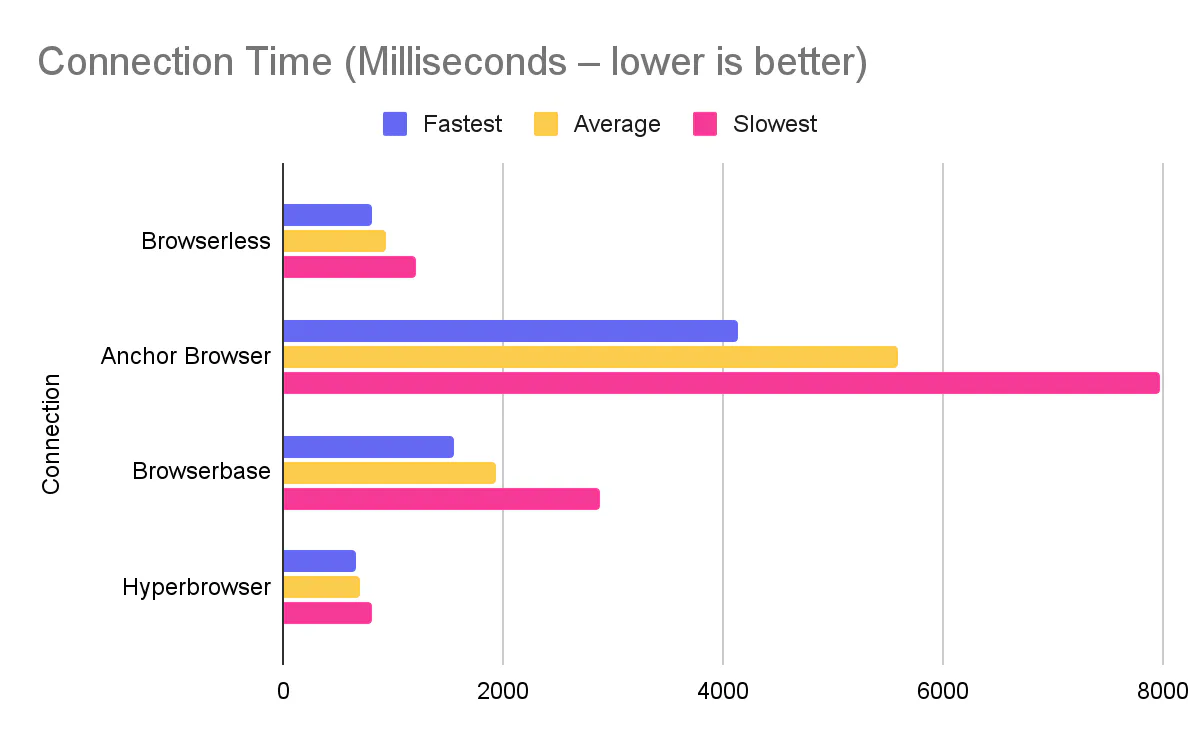
Speed of job completion is an important factor for many teams looking for a browser automation solution. When it comes to the lowest latency and highest throughput for real automation code, Browserless has a measurable edge in the benchmark comparison we ran.
Browserless averaged 936.4ms to connect vs. Anchor at 5,582.4ms.
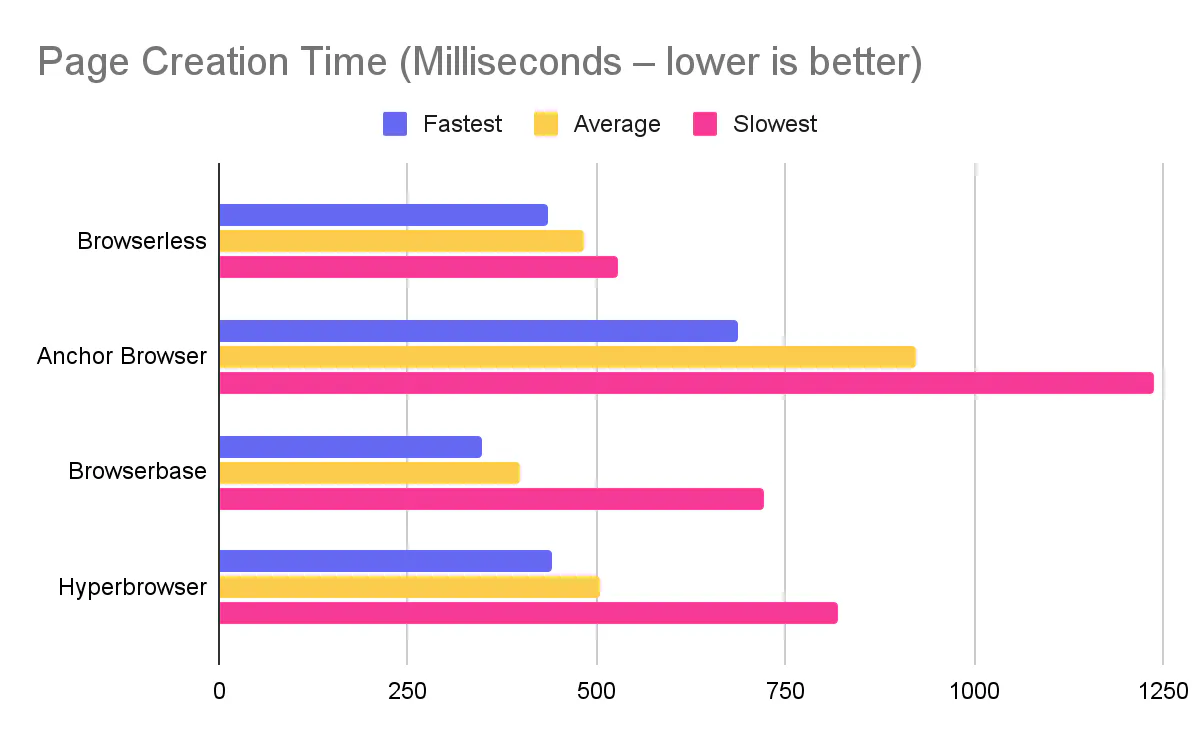
Browserless averaged 482.3ms to create a page vs. Anchor at 923ms.
Browserless averaged 166.2ms navigation vs. Anchor at 401.6ms.
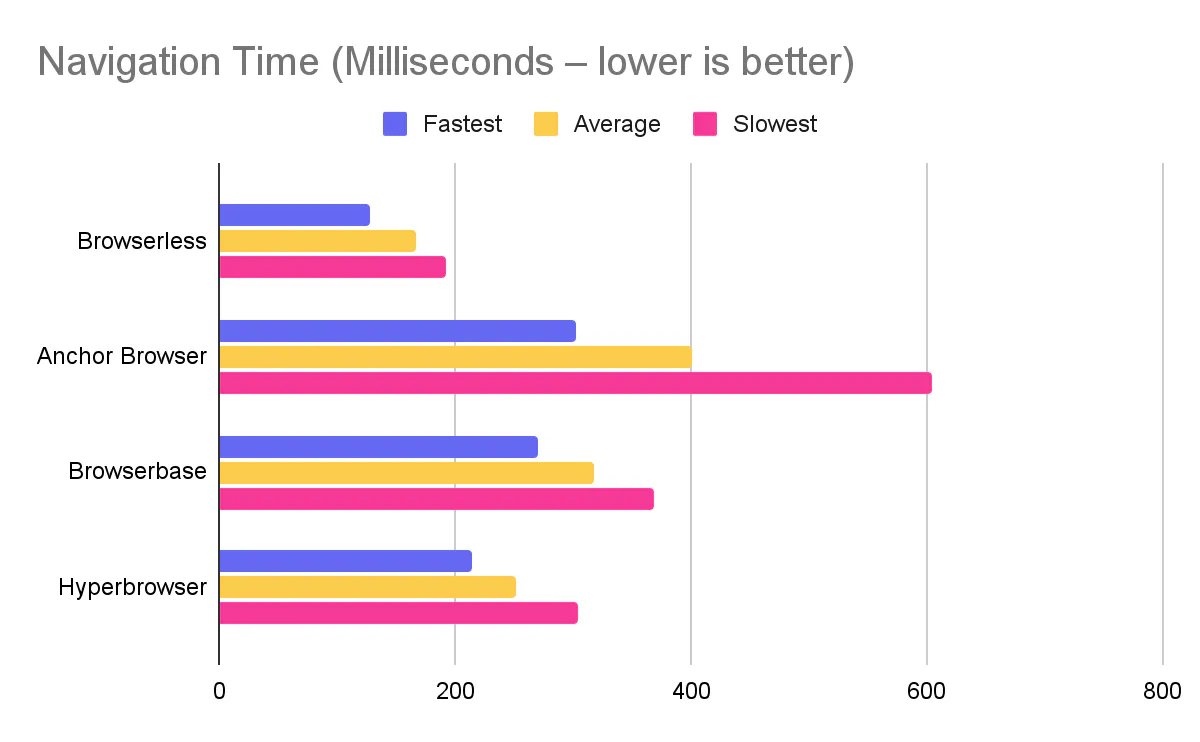
Anchor was slower across all three measured phases (connect, new page, navigate), and in fact the slowest of all four tools we benchmarked.
That difference matters if you open lots of short-lived sessions or you're doing navigation-heavy crawls.
Persistent logins and identity: Authenticated Profiles vs. OmniConnect
This is where the two products differ most, and it's worth being precise about it.
Browserless persists login state through two mechanisms that compose with each other. Browserless Cloud Authenticated Profiles let you log in once, capture cookies (including HttpOnly, Secure, and SameSite cookies), localStorage, and IndexedDB under a name scoped to your API token, then replay that state into any number of parallel sessions with ?profile=<name>. The full lifecycle is REST-managed (POST /profile, GET /profiles, GET|PUT|DELETE /profile/:name), and there's no plan requirement to create or reuse a profile over the API. This is a cloud capability today; self-hosted deployments don't run the profile subsystem yet. Separately, the Session API lets you open a session with a ttl and have its cookies, localStorage, and cache survive for days across full browser restarts, in an isolated userDataDir per session.
That corrects a claim you'll see elsewhere: persisting a login across runs isn't logic you have to build and operate yourself. Both mechanisms ship today and are documented.
Anchor's OmniConnect solves an adjacent but different problem: identity management, not just state replay. You create a named identity in a credential vault, attach it to a session, and Anchor handles re-authentication if the session gets logged out mid-task, without the agent or your code ever touching the raw password or cookie. Browserless's profiles and sessions restore state through the API rather than passing secrets through the model's context, but Browserless doesn't publish a dedicated credential vault, an explicit "secrets never reach the model" architecture claim, or automatic re-login on session expiry the way OmniConnect does. If your workload is specifically about onboarding many customers' credentials into an agent flow and handling MFA-style re-auth automatically, that's a real capability gap worth weighing.
Security, compliance, and isolation
Anchor's own comparison content lists several things as "absent from Browserless's published docs": ISO 27001, per-session VM isolation, a zero-data-retention (ZDR) mode, and the "secrets never reach the model" framing above. We checked each of these against our own trust page and docs rather than assume either side.
- SOC 2, GDPR, HIPAA-ready, DPA: Browserless publishes SOC 2 Type II, GDPR compliance, a Data Processing Addendum on Enterprise plans, and a signed BAA available for Enterprise deployments handling PHI, all listed on our trust page.
- ISO 27001: accurate. Browserless does not currently publish an ISO 27001 certification.
- Isolation model: Browserless documents containerized browser environments with network segmentation, and session state lives in a per-session
userDataDirisolated across a shared fleet. That's process- and container-level isolation. We don't publish a per-session VM-isolation claim the way Anchor does. - Zero-data-retention mode: Browserless documents data deletion procedures on service termination and plan-based storage windows (1 to 90 days depending on plan, custom for Enterprise), but doesn't offer a dedicated toggle that disables all recording and logging the way Anchor's ZDR mode does.
If ISO 27001, VM-level isolation, or a formal ZDR mode are hard requirements for your deal, that's a legitimate reason to look at Anchor or talk to our Enterprise team about what's configurable outside the published docs.
The best for bot detection bypass
Bot detection bypass is where the product philosophies diverge.
Browserless has an explicit "stealth-first" lane: BrowserQL is designed to handle browser lifecycle, stealth configuration, and CAPTCHA solving, and it has a dedicated stealth route (/stealth/bql) you can hit directly.
Anchor also exposes anti-bot oriented capabilities, but they're presented more as platform features and plan inclusions. For example, the pricing page lists "Cloudflare Verified Browser Agents" (starter) and "Anchor Chromium – Full stealth solution" (growth).
One practical point: even if your bypass is smart, it still runs on a browser. The same benchmark post shows Anchor was slower in connection, page creation, and navigation, which can translate into lower throughput for bypass-heavy workflows that retry often.
The best for web scraping services
There are two different needs people lump under web scraping:
- You want raw browser infrastructure so you can run your own scrapers reliably.
- You want a managed service where you describe the data and someone else ships the automation.
Browserless explicitly supports both. On the infra side, it has a scraping-focused product page and multiple API styles depending on how much control you want. On the managed side, it offers a "Data Delivery Service" (custom scripting service) where you hand over requirements and Browserless sets up the automation.
Anchor's equivalent tends to be tool endpoints. For instance, "Screenshot Webpage" is documented as a legacy tool at POST /tools/screenshot with an API key passed as a query parameter.
Anchor also provides an AI-driven endpoint to perform various tasks, such as scraping web pages, which can be useful when you're scraping to complete a workflow and return a result.
Deployment: self-hosted and private vs. BYOC
Anchor's Enterprise tier offers bring-your-own-cloud and on-premise deployment with a managed control plane, alongside BAA, HIPAA, DPA, SSO, and RBAC.
Browserless's deployment story actually has three options. The free open-source Docker image provides Puppeteer, Playwright, REST, and basic session management, for non-commercial use. Licensed self-hosted Enterprise adds BrowserQL, stealth, CAPTCHA solving, session recording, and advanced (priority, persistence) session management, running the full Enterprise image on your own infrastructure under a commercial license, and you operate it yourself. Private Deployment is closer to what Anchor describes as a managed control plane: Browserless runs dedicated VMs for you, on the same Enterprise image and APIs as licensed self-hosted, without your team operating the infrastructure. Neither of our paid tiers is branded "BYOC," but Private Deployment is the accurate comparison point, not self-hosted alone.
When to choose Browserless
Choose Browserless when:
- You care about throughput and baseline latency for real automation workloads (the benchmark gap is large, especially on connection time).
- You want multiple abstraction levels in one platform: BrowserQL for stealth-heavy flows, BaaS for your existing Playwright/Puppeteer code, and REST APIs for PDFs/screenshots.
- You need a dedicated bot-detection lane with stealth routes and BrowserQL capabilities like built-in CAPTCHA solving.
- Persistent logins across runs are available today through Browserless Cloud's Authenticated Profiles or the Session API, without waiting on a roadmap item.
- You want a managed option like the Data Delivery Service (custom scripting service) so you can offload scraper buildout and maintenance, or Private Deployment if you want dedicated infrastructure without operating it yourself.
- You need region-specific endpoints you can target directly (for example, to keep traffic close to your users or the target site).
When to choose Anchor
Anchor is a better fit when:
- Your agent needs to onboard many customers' credentials and handle MFA-style re-authentication automatically, which is what OmniConnect is purpose-built for.
- ISO 27001 certification, per-session VM isolation, or a formal zero-data-retention mode are contractual requirements, not just nice-to-haves.
- You want an official SDK pattern built around agent tasks, step callbacks, and schema-shaped output.
- You plan to spin up large batches of sessions with the same configuration (Anchor documents batch session creation up to 5,000, processed asynchronously).
If you're evaluating solutions and the first question from procurement is "how much does Anchor cost?", the answer is that it depends. Anchor's pricing model combines a monthly plan with usage charges such as per-browser creation, per browser-hour, proxy usage per GB, and per AI step.
Conclusion
Browserless and Anchor both solve the same core problem: running real browsers remotely so you don't babysit Chrome in containers. The difference is what they optimize for.
If you're shipping deterministic automation (scraping, QA flows, document rendering), need persistent logins across runs today, and performance plus anti-bot reliability are top priorities, Browserless is the stronger default, and both the published benchmark data and the state-persistence mechanisms back that up.
If your primary goal is an identity-first agent platform where credentials are vaulted and rotated for you, or you have a hard requirement for ISO 27001 or per-session VM isolation, Anchor's OmniConnect and compliance posture are closer to what you're buying.
FAQs
Does Browserless support persistent logins across separate runs?
Yes. Browserless Cloud's Authenticated Profiles capture and replay cookies, localStorage, and IndexedDB across sessions, and the Session API can keep a session's state alive for days across full browser restarts.
Is Browserless ISO 27001 certified?
No. Browserless publishes SOC 2 Type II, GDPR compliance, a Data Processing Addendum on Enterprise plans, and a signed BAA available for Enterprise, listed on our trust page. ISO 27001 isn't part of that published set today.
Does Browserless isolate each session in its own VM?
Browserless documents containerized browser environments with network segmentation, and each session's state lives in its own isolated userDataDir across a shared fleet. We don't publish a per-session VM-isolation claim; if that's a hard requirement, talk to our Enterprise team about what's available outside the public docs.
What is Anchor's OmniConnect, and does Browserless have an equivalent?
OmniConnect is Anchor's credential vault and identity layer: you store credentials once, attach them to a session, and the session launches already authenticated without exposing raw passwords to the agent or your code, with automatic re-login if the session expires. Browserless's Authenticated Profiles and Session API solve a related problem (state persists across runs, restored via the API rather than the model), but Browserless doesn't publish a dedicated credential vault or automatic re-authentication on expiry the way OmniConnect does.
Can I self-host Browserless or run it in my own cloud?
Yes, three ways. The free open-source Docker image (Puppeteer, Playwright, REST, basic session management) is for non-commercial use. Licensed self-hosted Enterprise adds BrowserQL, stealth, and session recording, running the full image on infrastructure you operate. Private Deployment is closer to a managed control plane: Browserless runs dedicated VMs for you on the same image and APIs.