
Introduction
If you're building serious browser automation – scrapers, test suites, or AI agents that live in a real browser – you will run into two questions very quickly:
- Which provider should actually run my browsers?
- How painful will it be to switch later?
Browserless and Hyperbrowser both sit in that "hosted browser infra" space. Both let you point Playwright, Puppeteer, Selenium, or an AI agent at a remote browser and forget about running Chrome yourself. But they make very different bets on APIs, AI tooling, and how much abstraction you want.
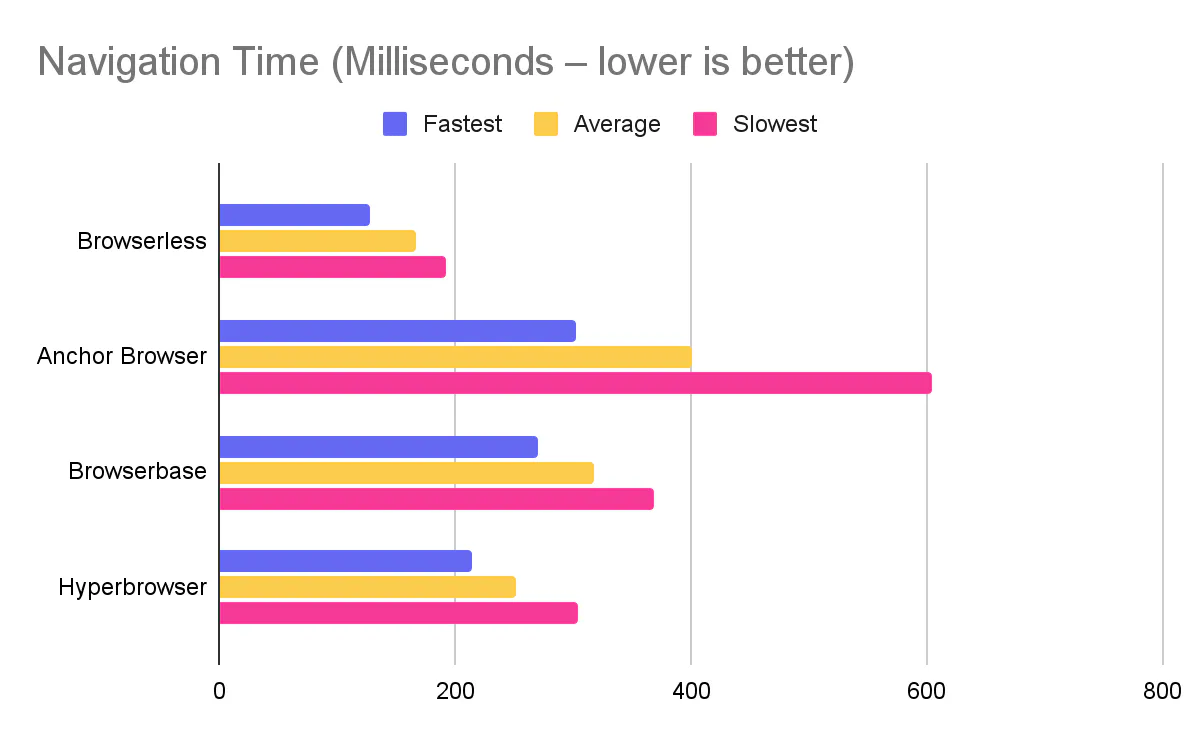
To make this concrete, we'll lean on our own benchmark of Browserless and other browser automation tools – "How fast is your hosted browser? A practical benchmark for automation workloads" – where we compared Browserless, Anchor Browser, Browserbase, and Hyperbrowser on realistic Puppeteer flows. In that benchmark, Hyperbrowser had the fastest connection time, while Browserless was faster for page creation and page navigation.
This article breaks down what Browserless and Hyperbrowser actually are, where each one shines, how their headless browser automation features differ, and when you should reach for one over the other.
What is Browserless?
Browserless is a managed headless-browser platform and open-source project that gives you "browsers as a service". You connect existing Playwright, Puppeteer, or Selenium code to remote browsers over WebSocket, or you call higher-level REST and GraphQL APIs for screenshots, PDFs, scraping, and bot-resistant automation.
- Browsers as a Service (BaaS v2) – a CDP WebSocket endpoint for Playwright and Puppeteer, with persistent sessions, regional endpoints, and launch options (including stealth) encoded in the connection URL.
- BrowserQL (BQL) – a GraphQL-based, stealth-first automation API that encapsulates bot detection bypass, CAPTCHA solving, and multi-step workflows in a declarative query language.
- REST APIs – one-shot endpoints like /screenshot, /pdf, /content, and /scrape for common "render then export" jobs.
- AI integrations – first-party guides for Browser Use, Vercel AI SDK, LangChain, n8n, Make, and Zapier to plug browser automation into AI agents and no-code workflows.
- Deployment – SaaS, plus a popular open-source Docker image and enterprise self-hosting for teams that need full control.
A minimal Node.js example with Playwright against Browserless BaaS looks like this:
You keep using normal Playwright or Puppeteer APIs – the only real change is the WebSocket endpoint.
What is Hyperbrowser?
Hyperbrowser is a hosted browser platform that describes itself as "browser infra for AI agents". In practice, it is a cloud browser grid wrapped in an SDK, scraping APIs, and an AI agent layer called HyperAgent.
At a high level, Hyperbrowser:
- Spins up "sessions" – cloud browsers you can attach to from Playwright, Puppeteer, or Selenium.
- Provides session-level controls for stealth mode, proxies, multi-region routing, CAPTCHA solving, and static profiles.
- Exposes Scrape / Crawl / Extract APIs that return Markdown, HTML, links, and metadata with a single call, plus batch scrape for up to 1,000 URLs.
- Ships HyperAgent – a Hyperbrowser AI agent that lets you describe tasks in plain language and have an AI drive the browser for you.
- Publishes an official Hyperbrowser MCP integration so AI models can call "scrape_webpage", "extract_structured_data", or "crawl_webpages" via Model Context Protocol tools.
If you're wondering what Hyperbrowser is in practical terms, it's a company that sells Hyperbrowser serverless browser infrastructure with strong AI-first ergonomics: a small SDK, AI agents, and a clear credit-based billing model.
Here's what a simple Playwright + Hyperbrowser script looks like:
That same pattern is used when you evaluate Hyperbrowser on playwright, evaluate Hyperbrowser on puppeteer, or evaluate Hyperbrowser on selenium – create a remote session, then connect your library to the session's cloud browser endpoint.
You can then evaluate Hyperbrowser on cloud browser setups without rewriting your automation logic, making it straightforward to evaluate Hyperbrowser on web automation or on web scraping side-by-side with another provider.
Browserless vs. Hyperbrowser: The key differences
At a glance, both platforms do the same thing: they run a lot of real browsers for you. The differences show up in how you talk to those browsers, how opinionated the platform is about AI, and how far each goes on bot detection and web scraping services.
Browserless gives you several API "surfaces" – BaaS v2 for raw CDP connections, REST APIs for simple jobs, and BrowserQL for stealth-heavy work – all sharing the same underlying software.
In Hyperbrowser's case, most features hang off a single SDK and HTTP API: sessions, web scraping, and HyperAgent. You still attach Playwright, Puppeteer, or Selenium to CDP, but the platform leans into being a Hyperbrowser AI platform with an AI agent and MCP tooling.
Here's how that plays out, category by category.
Browserless vs. Hyperbrowser comparison table
Next, let's zoom in on three practical questions.
The best for headless browser automation
If your main concern is robust headless browser automation – test suites, end-to-end flows, and scheduled jobs – both platforms work well with Playwright and Puppeteer. The core patterns look like this:
An example of Browserless with Puppeteer:
An example of Hyperbrowser with Playwright:
When people talk about Hyperbrowser headless browser automation features, they usually mean this combination of Playwright / Puppeteer support, session lifecycle, proxy options, and stealth toggles – in short, the core Hyperbrowser headless browser automation path for scripts.
Where Browserless pulls ahead for headless automation is in breadth and deployment:
- You can start with simple REST APIs, move to BaaS v2 when you need full control, or jump into BrowserQL for stealth-heavy jobs, all without switching providers.
- You can self-host via Docker / Kubernetes and still talk to your own cluster through the same APIs.
Hyperbrowser's advantage is that its "happy path" is very opinionated and AI-friendly. HyperAgent is built in, and you can attach external AI tools (Claude Computer Use, OpenAI CUA, Gemini Computer Use, Browser-Use) to the same session fleet with well-documented guides.
If you want a general-purpose headless browser automation platform that covers test automation, scraping, and infra use cases, Browserless is usually the safer default. If your top priority is an AI-first stack with HyperAgent and tight integrations into AI tooling, Hyperbrowser's design will feel more streamlined.
The best for bot detection bypass
Both platforms invest heavily in anti-bot work. This is where the details matter.
On Browserless:
- BrowserQL is a stealth-first automation that bypasses even the most sophisticated bot detection systems.
- We recommend a layered approach – stealth routes, residential proxies, and CAPTCHA solving – with /stealth and /unblock APIs and BrowserQL as first-class tools.
A minimal BrowserQL mutation to scrape links might look like this:
You send that mutation to the BrowserQL endpoint with your token query parameter and get structured results back. The server handles headless browser orchestration, stealth, and CAPTCHA solving behind the scenes.
On Hyperbrowser:
- Hyperbrowser stealth mode browser automation is done via useStealth: true or useUltraStealth: true, with docs explaining that ultra stealth is reserved for enterprise plans and should be combined with proxies.
- CAPTCHA solving is enabled with solveCaptchas: true, and you can inspect session event logs for captcha_detected and captcha_solved events.
A Node snippet turning all of that on could look like:
Strictly on depth of features, Browserless offers more knobs – dedicated unblock APIs, a stealth-first GraphQL language, and explicit guidance on combining stealth routes with residential proxies. Hyperbrowser counters with a simpler experience: stealth and CAPTCHA solving are flags on a session, and the rest of your code stays unchanged.
For the hardest anti-bot environments, Browserless's combination of BrowserQL, stealth routes, and /unblock will typically give you more room to maneuver. For "medium hard" sites, Hyperbrowser's stealthy browser and decent proxies might be enough.
The best for web scraping services
On the scraping side, both platforms give you high-level primitives, but the ergonomics differ.
Hyperbrowser's Scrape API is very explicit about enabling users to scrape any page to get formatted data.
A single call can fetch Markdown, HTML, links, and metadata, optionally combined with proxies and CAPTCHA solving:
There is also batch scrape (up to 1,000 URLs per job) on higher plans, making it easy to schedule large crawls.
Browserless offers two main approaches:
- REST /scrape and /content for "URL in, HTML / JSON out" flows, with shared configuration options for timeouts, wait conditions, and blocking unwanted resources.
- BrowserQL use cases like "Scrape and Extract Data", where you define a mutation that navigates, selects elements, and maps them into JSON with a single GraphQL request.
A simple REST scrape might look like:
A BrowserQL mutation could shape the data into JSON, without you parsing raw HTML yourself.
For teams that want a single API to "just give me Markdown and metadata" with minimal configuration, Hyperbrowser's Scrape, Crawl, and Extract tooling is approachable and feels close to Hyperbrowser's no-code browser automation features. For teams building full scraping pipelines with custom mapping, conditional logic, hybrid BQL + Playwright flows, and deep anti-bot requirements, Browserless's mix of BrowserQL and REST will scale further.
In Browserless's own Browser Automation Benchmark 2026, Hyperbrowser had the fastest connection time, but Browserless was stronger on page creation and navigation. If you care about page-heavy scraping throughput, those navigation numbers can be significant over thousands of pages.
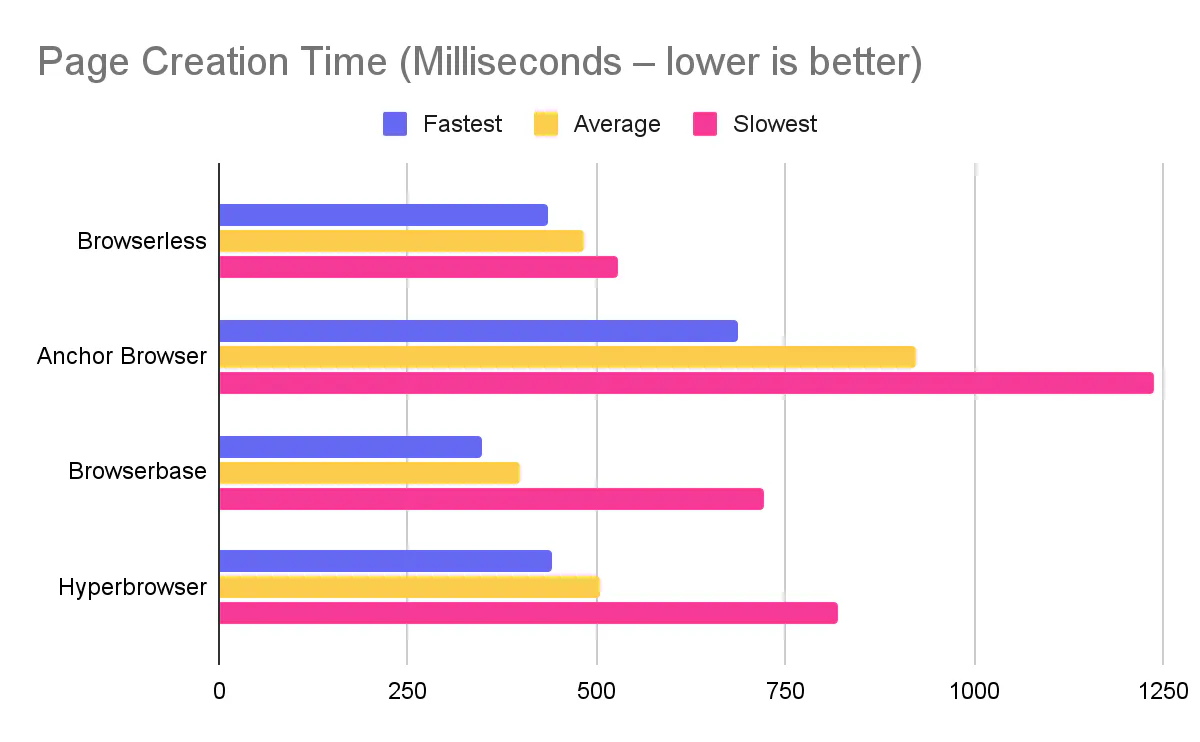
Interestingly, that same benchmark when running a Hyperbrowser vs. Browserbase comparison: Hyperbrowser connected faster, while Browserbase opened pages slightly quicker. You can also see a full comparison of Browserless vs. Browserbase to compare those browser solutions.
When to choose Browserless
Browserless is the better fit when you want a flexible, long-term browser automation foundation rather than a single "AI-native" stack.
Choose Browserless when:
- You care about API breadth as much as raw speed – You can start with REST, move to BaaS v2, and adopt BrowserQL later without switching providers or rewriting your mental model.
- You need serious bot detection bypass – BrowserQL, stealth routes, /unblock, residential proxies, and CAPTCHA solving are all documented and tuned for bypassing modern bot systems.
- You want deployment options and data-plane control – Open-source Docker images and enterprise docs make it possible to run Browserless in your own infrastructure with the same APIs you would use in the cloud.
- You are building more than AI agents – The same cluster can serve Playwright test automation, periodic scraping jobs, screenshot / PDF generation, and AI agents through AI integrations.
- You want good "escape hatches" – Features like the /function API let you send arbitrary Puppeteer code over HTTP, which is handy when you cannot or do not want to ship a full Node runtime.
- You like ecosystem-level integrations – Browserless leans into AI and workflow tooling: Browser Use, Vercel AI SDK, LangChain, n8n, Make, Zapier, and others get first-class documentation.
If you need a browser platform that can outlive your current framework choices and serve a bunch of use cases, Browserless wins.
When to choose Hyperbrowser
Hyperbrowser makes the most sense when you want a tightly integrated AI-first stack that Browserless does not currently replicate as a first-party feature.
A few cases where Hyperbrowser is a strong fit:
- You want a first-party MCP server from your browser provider – The Hyperbrowser MCP integration ships as an official server (npx Hyperbrowser-MCP) with clear docs, tools such as scrape_webpage, extract_structured_data, and crawl_webpages, and documented sessionOptions.
- You want HyperAgent as your primary automation interface – HyperAgent is a Hyperbrowser AI agent that can execute "Go to X and do Y" instructions without you writing selectors or navigation logic. That AI-driven browser control is a core part of the platform, not an integration.
- You like a credit billing model – Hyperbrowser pricing is expressed in credits.
- You prefer SDK-centric scraping – For teams who want to evaluate Hyperbrowser on web scraping by dropping in
client.scrape.startAndWait({ url })and reading Markdown and HTML back, Hyperbrowser's scraping abstractions are very direct.
There's significant overlap – Browserless can integrate with MCP via community projects, and it plays very well with external AI frameworks – but these specific experiences (first-party MCP server, HyperAgent, and credit-level accounting for AI agents) are currently distinctive to Hyperbrowser.
Conclusion
Browserless and Hyperbrowser are both strong options if you want to stop baby-sitting headless Chrome, but they reflect different philosophies.
Browserless focuses on providing durable and flexible infrastructure – a browser layer you can plug into test automation, scraping, PDFs and screenshots, and AI workflows, with several APIs (BaaS v2, BrowserQL, REST) and a clear story for bot detection and self-hosting.
Hyperbrowser focuses on being a Hyperbrowser AI platform – AI agent plus serverless browser infrastructure – with one SDK, APIs, stealth, CAPTCHA flags, and a polished integration into Model Context Protocol and AI agents.
Our Browser Automation Benchmark 2026 blog captures this well: Hyperbrowser won on connection time, while Browserless came out ahead on page creation and navigation, which often matter more in deep scraping and automation pipelines.
If your priority is a broad, battle-tested browser platform with multiple ways to integrate and strong bot detection bypass, Browserless is usually the better choice. If you are laser-focused on AI-native workflows, MCP tooling, and HyperAgent, and you're happy to live inside the Hyperbrowser SDK, Hyperbrowser is worth serious evaluation.
FAQ
What is the main difference between Browserless and Hyperbrowser?
Browserless is a flexible, multi-API browser automation platform offering BaaS (Browsers as a Service), BrowserQL for stealth automation, and REST APIs, with options for self-hosting. Hyperbrowser is an AI-first platform with a single SDK, built-in HyperAgent for AI-driven browser control, and an official MCP server for Model Context Protocol integrations.
Which platform is faster for browser automation?
In Browserless's 2026 benchmark, Hyperbrowser had the fastest connection time (692.5 ms vs 936.4 ms), while Browserless was faster for page creation (482.3 ms vs 505.8 ms) and navigation (166.2 ms vs 251.1 ms). For scraping and automation pipelines with many page loads, Browserless's navigation speed advantage can be significant.
Which platform is better for bot detection bypass?
Browserless offers more depth for anti-bot work with BrowserQL (a stealth-first GraphQL API), dedicated stealth routes, /unblock APIs, residential proxies, and integrated CAPTCHA solving. Hyperbrowser provides simpler session-level flags (useStealth, useUltraStealth, solveCaptchas) that work well for moderately protected sites.
Can I self-host Browserless or Hyperbrowser?
Browserless offers hosted SaaS, an open-source Docker image, and enterprise self-hosting for teams that need their own cluster and VPC boundaries. Hyperbrowser focuses exclusively on their hosted cloud service and does not currently offer self-hosted deployment options.
Which platform is better for AI agents?
Both platforms support AI agents, but with different approaches. Hyperbrowser ships its own HyperAgent and has deep integrations with Browser-Use, Claude Computer Use, Gemini Computer Use, and OpenAI CUA, plus an official MCP server. Browserless is designed as a building block for external agents with documented integrations for Browser Use, Vercel AI SDK, LangChain, n8n, Make, and Zapier.
What is HyperAgent?
HyperAgent is Hyperbrowser's built-in AI agent that lets you describe browser tasks in plain language and have an AI drive the browser for you. It's a core feature of the Hyperbrowser platform, designed for AI-driven browser automation without writing selectors or navigation logic.
What is BrowserQL?
BrowserQL (BQL) is Browserless's GraphQL-based, stealth-first automation API. It lets you define browser automation flows declaratively with built-in bot detection bypass, CAPTCHA solving, and multi-step workflows in a single query. It's designed specifically for bypassing complex bot detection systems.
How does pricing compare between Browserless and Hyperbrowser?
Browserless uses usage-based plans with tiered units or concurrency, plus enterprise options. Hyperbrowser uses a credit model where 1 credit = $0.001, with explicit rates for browser hours, proxy usage, Scrape API calls, and AI-agent tokens.
Which platform is better for web scraping?
For turnkey scraping with minimal configuration, Hyperbrowser's Scrape/Crawl/Extract APIs return Markdown, HTML, and links with a single call, plus batch scraping up to 1,000 URLs. For complex scraping pipelines with custom mapping, conditional logic, and deep anti-bot requirements, Browserless's combination of REST APIs and BrowserQL offers more flexibility.
Do both platforms support Playwright and Puppeteer?
Yes, both platforms support connecting Playwright, Puppeteer, and Selenium via Chrome DevTools Protocol (CDP). With Browserless, you connect directly to a WebSocket endpoint. With Hyperbrowser, you create a session via the SDK and connect to the returned wsEndpoint.