
Introduction
Cloudflare is widely used to prevent automated website access, often presenting a barrier to scrapers with JavaScript challenges, fingerprint detection, and CAPTCHAs. Puppeteer, a powerful browser automation tool built by the Chrome team, can mimic real user behavior and execute JavaScript in a full browser environment. In this guide, you'll learn how to configure Puppeteer to evade Cloudflare defenses and build a reliable scraper using stealth plugins, proxy rotation, and CAPTCHA handling.
How Cloudflare Detects and Blocks Bots
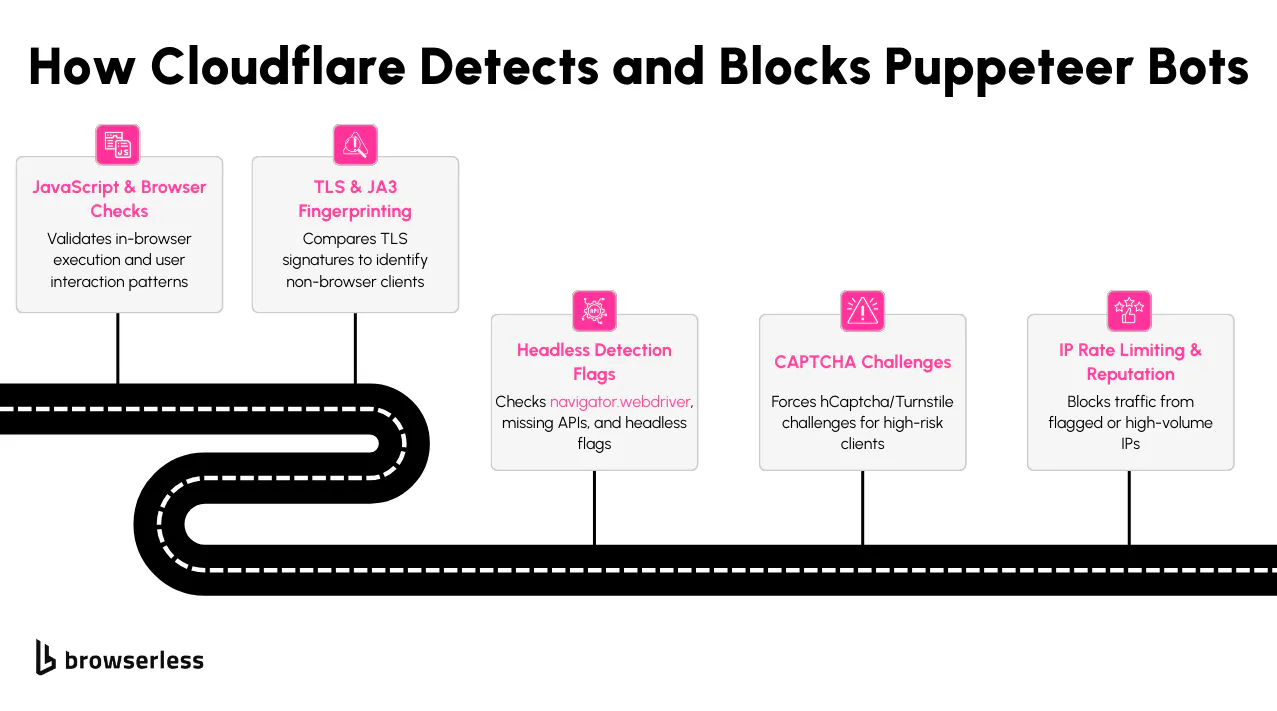
Puppeteer gives you low-level control over Chromium, but Cloudflare is built to detect exactly that kind of automation. If you’re running a basic script without modifying fingerprints, you'll likely get blocked quickly. Cloudflare doesn't rely on one method; it combines several signals to decide whether a session looks real or automated.
One of the first layers is JavaScript execution. Cloudflare uses in-browser challenges to check whether scripts are being evaluated correctly. If Puppeteer runs in headless mode or hasn’t been patched with stealth techniques, it can fail these tests. Things like incorrect property values or missing JavaScript execution paths often give it away.
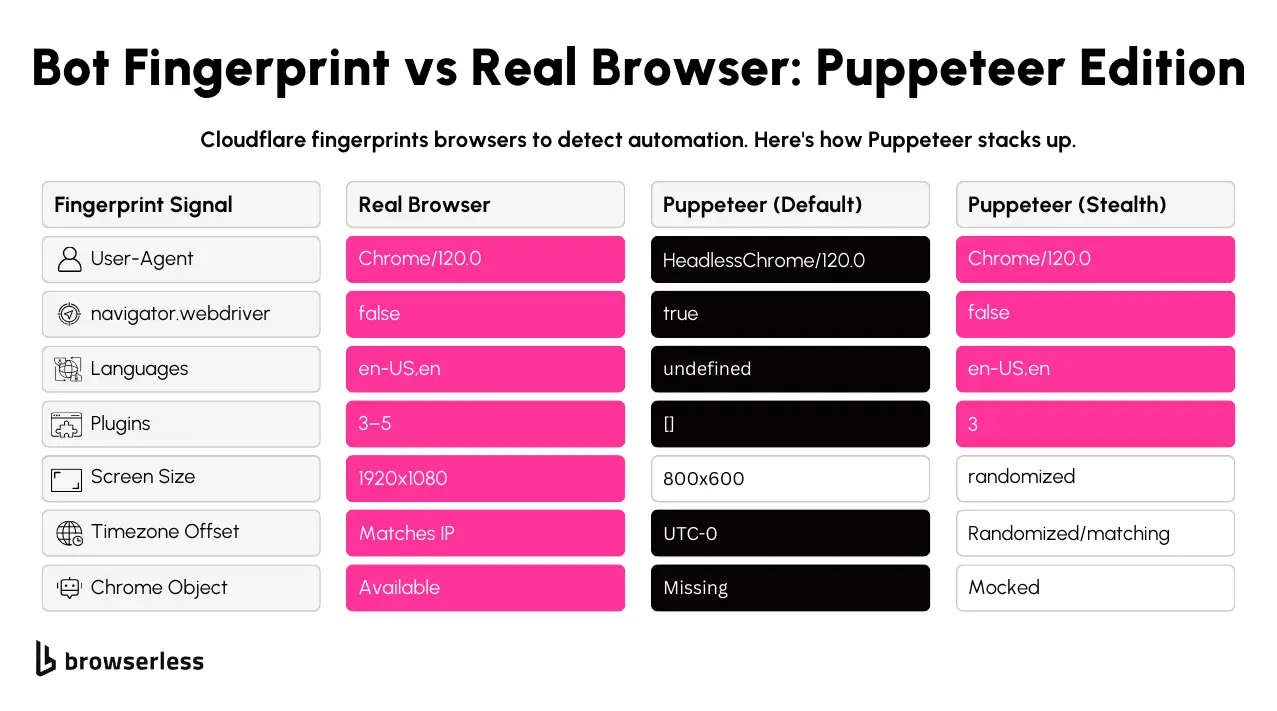
Fingerprinting is another area where Puppeteer needs extra configuration. Cloudflare checks for markers like navigator.webdriver, a lack of browser plugins, and unusual timezone offsets. A fresh Puppeteer instance in headless mode will expose several immediately unless you're using puppeteer-extra-plugin-stealth or manually patching the browser environment.
Then there's the TLS fingerprint during the SSL handshake. Most real browsers generate specific JA3/JA4 values when negotiating a secure connection. Depending on how it’s launched, Puppeteer may produce a different fingerprint depending on how it handles TLS options. That mismatch can signal automation to Cloudflare before the page even finishes loading.
Cloudflare tracks network-level behavior. If your Puppeteer scraper makes too many requests from the same IP, loads pages too quickly, or skips normal user interactions like scrolling or clicking, you’ll hit rate limits or CAPTCHAs. Combining stealth techniques with proxy rotation and human-like timing helps reduce this frequency.
Setting Up Puppeteer with Stealth Plugins
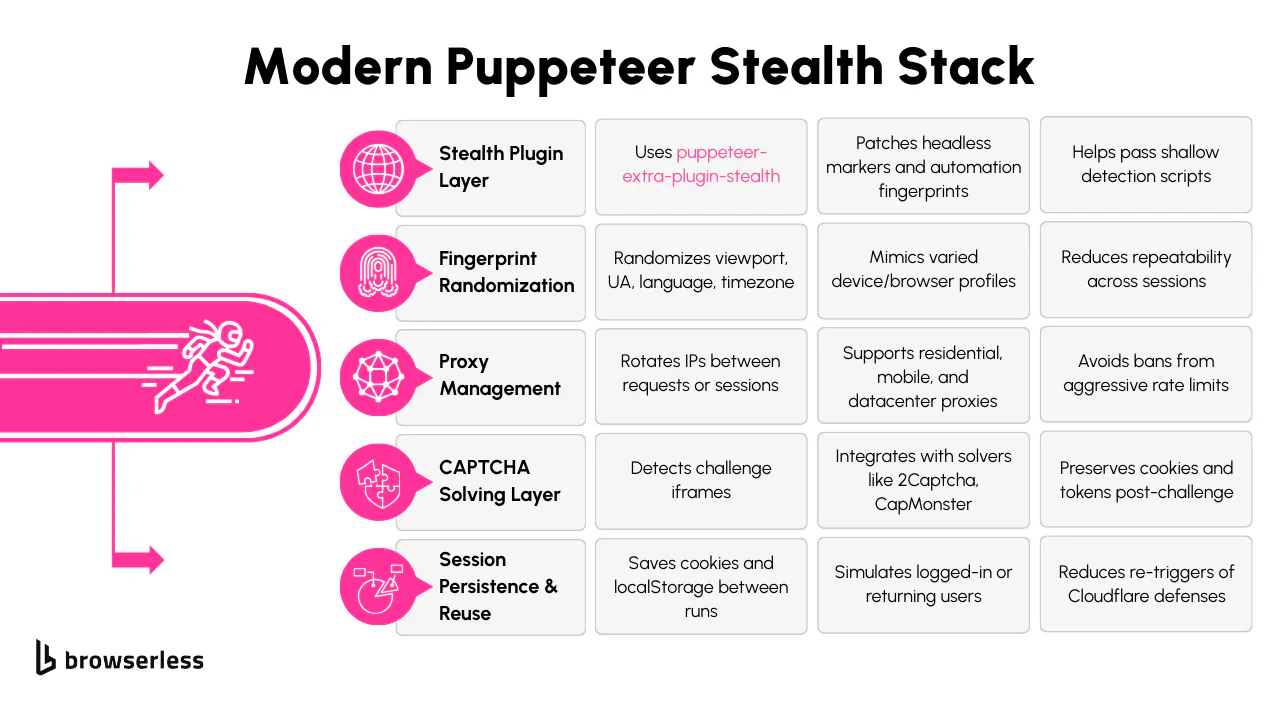
Puppeteer is easy to detect on its own. Out of the box, it sets off multiple red flags like navigator.webdriver being true, missing browser plugins, and a fixed viewport that doesn’t match normal devices. You’ll want to use puppeteer-extra with the stealth plugin to get around that. This combination patches most of the obvious indicators that automation is running.
Start by installing the packages:
npm install puppeteer-extra puppeteer puppeteer-extra-plugin-stealth
Once installed, you can load the plugin like this:
const puppeteer = require("puppeteer-extra");
const StealthPlugin = require("puppeteer-extra-plugin-stealth");

// Apply the stealth plugin, which patches many automation signals like navigator.webdriver, WebGL, plugins, etc.
puppeteer.use(StealthPlugin());
The stealth plugin automatically masks a lot of things that Cloudflare checks. For example, it modifies navigator.webdriver to return false, simulates installed plugins, fakes proper language and timezone settings, and even patches WebGL metadata.
You’ll also want to randomize your user agent and viewport size manually. These two values are frequently used to fingerprint bots. Here's how you can set them on a new page:
const browser = await puppeteer.launch({ headless: false }); // Headed mode reduces bot detection

const page = await browser.newPage();

// Set a realistic user-agent to match the IP’s region and browser version
await page.setUserAgent(
  "Mozilla/5.0 (Windows NT 10.0; Win64; x64) AppleWebKit/537.36 (KHTML, like Gecko) Chrome/114.0.0.0 Safari/537.36",
);

// Randomize viewport slightly to avoid fingerprinting from consistent dimensions
await page.setViewport({
  width: Math.floor(1024 + Math.random() * 100),
  height: Math.floor(768 + Math.random() * 100),
});
Randomizing values slightly each session helps reduce the chance of being fingerprinted across multiple visits. If the website you're targeting requires authentication or tends to challenge new sessions, you can also preload cookies and session storage. This makes Puppeteer behave more like a returning visitor than a fresh instance every time.
For harder challenges, especially ones that use Cloudflare’s Turnstile you might need to run Chromium in non-headless mode. While headless mode has improved recently, some sites still flag it. You can toggle this when launching:
const browser = await puppeteer.launch({
  headless: false, // Avoid headless if site fingerprinting is aggressive
  args: ["--no-sandbox"], // Required in some CI environments — otherwise omit for local runs
});
Combining these techniques gives you a stronger baseline for bypassing detection. You're not invisible, but you're much less obvious. From here, you can start layering on proxy support and CAPTCHA handling to stay under the radar.
Proxy Rotation and CAPTCHA Handling Strategies
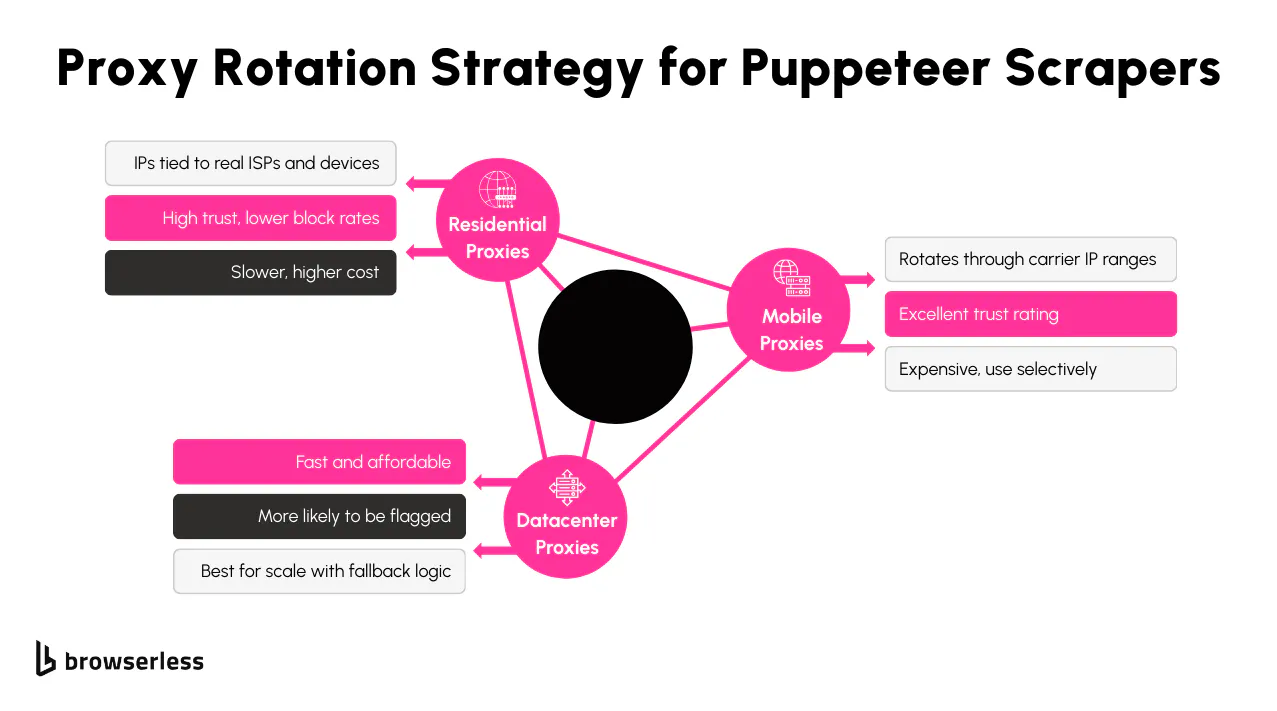
Rotating IP addresses is one of the most effective ways to avoid being flagged when scraping Cloudflare-protected sites. If you send too many requests from a single IP, Cloudflare will start issuing challenges or block you outright. Using a pool of proxies, especially residential ones, makes it harder for detection systems to link traffic back to automation. These can be passed to Puppeteer during browser launch using the --proxy-server flag.
Here’s an example of launching Puppeteer with a single proxy:
const proxy = "http://user:pass@proxyhost:port"; // Format: http(s)://user:pass@ip:port

const browser = await puppeteer.launch({
  headless: false,
  args: [`--proxy-server=${proxy}`],
});
To rotate proxies, loop through a list of proxy addresses in your script and launch a new browser instance for each one. For higher-volume scraping, you'll want to carefully manage concurrency and session state to avoid reinitializing the browser too often.
Cloudflare doesn’t just block based on IP it also challenges behavior that looks automated. That’s where CAPTCHA detection and solving come in. The most common CAPTCHA used is Turnstile. You can detect if a CAPTCHA is being shown by checking for specific elements on the page, like iframe sources that include “captcha” or forms that block submission.
Example check for a CAPTCHA:
// Look for iframes likely tied to CAPTCHA providers (Cloudflare, Turnstile, etc.)
const isCaptcha = await page.$('iframe[src*="captcha"], iframe[src*="turnstile"]');

if (isCaptcha) {
  console.log("CAPTCHA triggered");
  // You may want to skip, retry with a new proxy, or solve it with a 3rd-party service
}
For solving, you can integrate with services like 2Captcha or use BQL (Browserless Query Language), which supports automated CAPTCHA solving built into its scraping pipeline. These services typically take a sitekey and URL, solve the challenge externally, and return a token you inject into the page to move forward.
Once you solve a CAPTCHA or pass Cloudflare's JS checks, persisting session data cookies and local storage is especially helpful. This reduces the chance of running into another challenge immediately after. You can save session state with Puppeteer like this:
// Save session cookies and localStorage for reuse across scraping sessions
const cookies = await page.cookies();

const localStorageData = await page.evaluate(() => {
  const data = {};
  for (let i = 0; i < localStorage.length; i++) {
    const key = localStorage.key(i);
    data[key] = localStorage.getItem(key);
  }
  return data;
});

// You’ll want to write these to disk to reuse across runs
// fs.writeFileSync('cookies.json', JSON.stringify(cookies))
// fs.writeFileSync('localStorage.json', JSON.stringify(localStorageData))
Keeping session data allows your scraper to appear more consistent across visits. When combined with rotating IPs and programming CAPTCHAs, it becomes much easier to move through Cloudflare defenses without being flagged repeatedly.
When Puppeteer Fails: Falling Back to BQL
There comes a point where even the most tuned Puppeteer setup hits a wall, especially when Cloudflare ramps up its defenses with:
- Turnstile embedded in iframes or shadow DOMs
- TLS/JA3 fingerprinting that flags your browser during the handshake
- Behavioral detection that sees through stealth plugins
- Unsolvable “are you human?” flows that stall headless browsers
At that point, offloading your scraping to a managed browser platform is usually more efficient, and that’s exactly what Browserless BQL (Browser Query Language) is built for.
BQL is a high-level browser automation API that wraps all the hard stuff: stealth, proxy rotation, CAPTCHA handling, session reuse, retries, and more. No local browser is needed.
When you just need the page back rather than a scripted flow, and you are authorized to automate the target, the web unblocker API covers the same ground in a single POST request.
BQL Use Case: Human Verification (Cloudflare Interstitial)
Cloudflare often shows an “Are you human?” screen that’s not a full CAPTCHA, just a button click or delay. You can handle that automatically with the verify mutation:
mutation Verify {
  goto(url: "https://protected.domain") {
    status
  }

  verify(type: cloudflare) {
    found # true if a challenge was detected
    solved # true if it was resolved (auto-clicked)
    time # how long it took (ms)
  }
}
This is useful for the "checking your browser" flow, where Puppeteer often gets stuck in a redirect loop or infinite wait. BQL handles this and moves on.
Use Case: Solving reCAPTCHA Automatically
If the site is serving full CAPTCHA challenges, BQL also supports solve, which works for reCAPTCHA out of the box:
mutation SolveCaptcha {
  goto(url: "https://protected.domain") {
    status
  }
  solve(type: recaptcha) {
    found # true if a CAPTCHA was present
    solved # true if solved correctly
    time # time it took to solve
  }
}
You can also pass type: recaptcha for sites using Google's CAPTCHA variant. No need to integrate 2Captcha manually. No iframe detection. No token injection. It handles hidden iframes, shadow DOMs, and retry logic for you.
Instead of spending time troubleshooting TLS fingerprints, proxy bans, or weird browser signals, BQL lets you focus on the scrape logic, not browser tuning. Use Puppeteer when it works, and BQL when it doesn’t.
And since BQL runs in the cloud, you don’t have to spin up a headless browser cluster or maintain infrastructure. You send a scrape recipe, and BQL does the rest. Think of it as Puppeteer++ with built-in infrastructure.
Conclusion
Puppeteer gives you a solid foundation for getting around Cloudflare by mimicking real user behavior. With the right combo of stealth plugins, rotating proxies, and smart CAPTCHA handling, you can reliably access content on sites that usually block automation. These techniques help you stay under the radar, reduce friction, and scale your scraping without constant roadblocks. Want to take it further? Try out Browserless, it’s everything you love about Puppeteer, but with built-in stealth, proxy rotation, and CAPTCHA solving. No setup, no stress. Start your free trial and see how smooth scraping can be.
FAQs
Can Puppeteer bypass Cloudflare Turnstile CAPTCHAs in 2026?
Turnstile CAPTCHAs are harder to bypass than older versions like reCAPTCHA. Puppeteer can't solve Turnstile independently unless you integrate an external solver or reroute the challenge. One option is using stealth plugins with a CAPTCHA-solving API like 2Captcha or CapMonster. These services handle the challenge externally and return a response token. Another alternative is to avoid solving the problem altogether and retry the request with a new proxy or session. With less effort, Browserless BQL can bypass Cloudflare with built-in CAPTCHA solving, including Turnstile support, for high-frequency scraping.
How do I rotate proxies dynamically in Puppeteer when scraping Cloudflare-protected sites?
To rotate proxies in Puppeteer, you must relaunch the browser instance with a different proxy each time. You can pass the proxy via the --proxy-server flag when launching Puppeteer. If you're running high-volume scraping, keep a pool of proxies and loop through them, attaching each one to a new session. Use sticky sessions for login-based scraping and fresh IPs for public-facing pages. Integrating proxy providers like Smartproxy or Bright Data with Puppeteer is common for Cloudflare-heavy targets.
Why does Puppeteer get blocked by Cloudflare even with stealth mode enabled?
Stealth mode hides most of Puppeteer's browser automation fingerprints but is imperfect. Some sites use TLS fingerprinting (JA3/JA4), detect rendering delays, or flag abnormal WebGL values that even stealth plugins can’t fix. If Cloudflare sees mismatches between headers, device emulation, and TLS fingerprints, it will still flag your session. To go deeper, you may need to adjust Chrome launch arguments, use patched Chromium builds, or offload scraping to something like Browserless BQL, which handles TLS-level fingerprinting for you.
What’s the best way to persist session data in Puppeteer when scraping behind Cloudflare?
To avoid triggering Cloudflare’s challenges on every request, persist session state between runs. After the first visit, save cookies and localStorage from the browser context. On the next run, preload them before visiting the page again. This makes Puppeteer behave more like a returning user than a fresh session. It also reduces the chance of hitting a CAPTCHA or being rate-limited. Puppeteer allows exporting cookies and injecting them into new contexts easily, especially when paired with rotating proxies.