
Key Takeaways
- Data parsing turns raw content into a usable structure. Whether you're working with HTML, JSON, or unstructured text, parsing is the step that transforms what you collected into something your code can actually use.
- The technique depends on the data. Regex works for predictable patterns. DOM selectors work for HTML. Machine learning works for unstructured text. Choosing the wrong approach wastes time and yields unreliable results.
- Web data parsing has its own challenges. JavaScript-rendered pages, dynamic content, single-page applications, and bot detection mean you often need a real browser to get the data before you can parse it. Tools like Browserless handle the browser layer so you can focus on the parsing logic.
Introduction
Data parsing is the step most pipelines depend on, but few teams plan for it properly. You collect a page, an API response, or a document, and now you need to turn that raw content into structured fields your application can use. The problem is that sources rarely cooperate. HTML is messy, formats change without notice, and JavaScript-rendered pages don't even have the data in the initial response. This guide covers what data parsing entails, the core techniques for parsing both structured and unstructured data, how to choose the right parsing tools, and how to build extraction pipelines for web data using Browserless, BrowserQL, and common parsing libraries such as Cheerio, Beautiful Soup, and Scrapy.
What data parsing is and why it matters
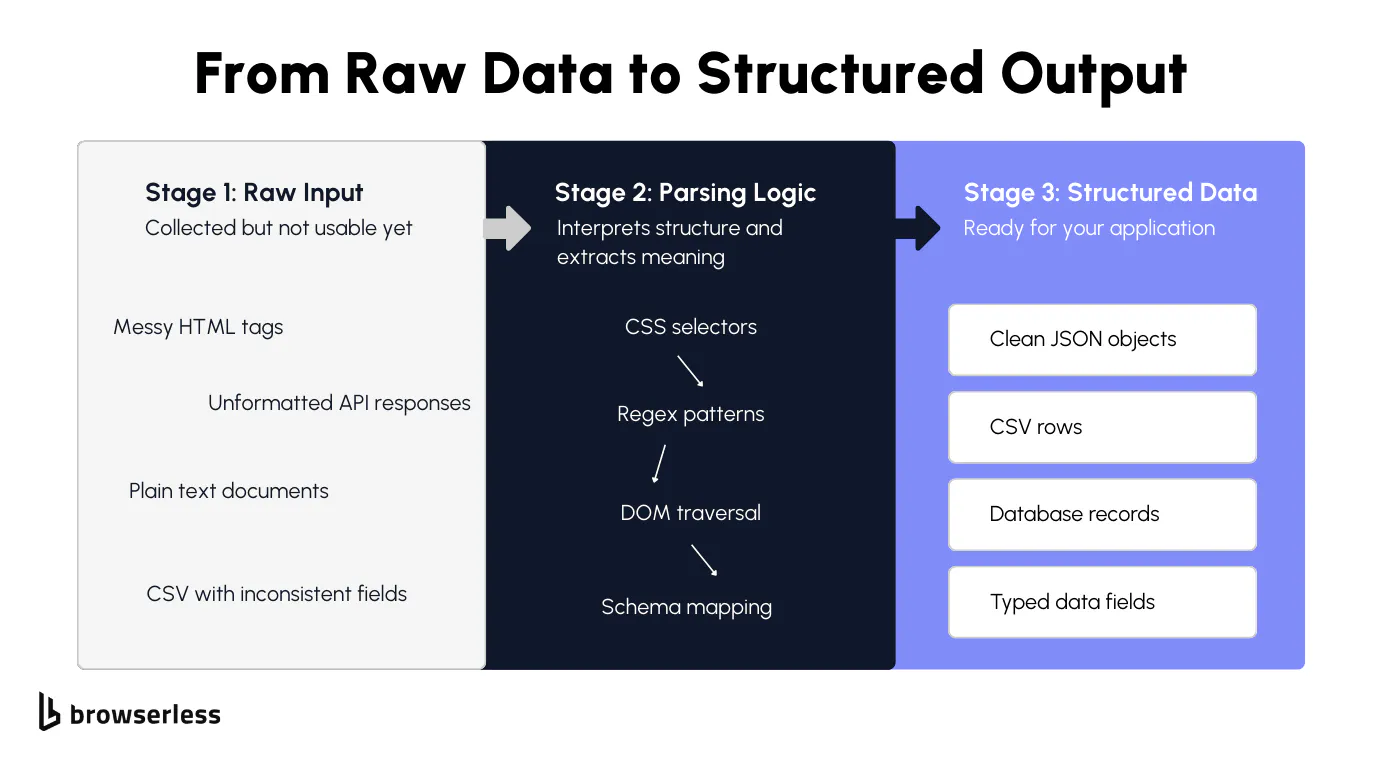
Parsing vs collecting vs extracting
If you've ever built a data pipeline, you've probably hit a wall where the data you collected looks nothing like what your application needs. That's the data parsing step, and it's where most things break. Understanding the difference between collecting, parsing, and extracting saves you a ton of debugging time because the fix depends on which step actually failed.
Collecting data involves getting the raw data. Fetching a web page, calling an API, downloading a file. At this stage, you have raw material but nothing usable yet. It might be a blob of HTML from a web page, a JSON response, or a scanned document. You haven't turned it into usable data.
Data parsing is the process of interpreting the structure of raw data. You're reading HTML tags, splitting delimiters in a CSV, matching patterns in text, or navigating the hierarchy of a JSON object. The parsing process is what converts raw data from one format into something your code can traverse and query. Data extraction comes after.
That's when you pull key data points out of the parsed data: a product name from an H1 tag, a price from a span, a rating from a data attribute. Most parsing tools blend these steps together, which is fine until something breaks.
When it does, knowing whether the issue is in how you're interpreting the data structures or in what you're pulling out makes the fix much faster. Data parsing fails most often when the source format changes without warning or when the raw data arrives incomplete with inconsistent data fields.
Common input and output formats
The format of your input data determines which data parsing tool or technique you need. Getting this wrong means converting data through the wrong approach, which wastes time and produces unreliable extracted data. Here are the most common data formats for web data:
- HTML is the most common input for web data and requires DOM-aware parsing. You need to understand the tag structure, classes, and nesting to extract relevant data. This is what you'll deal with on most web pages and HTML pages.
- JSON (JavaScript Object Notation) from APIs arrives in a structured format that is already machine-readable. You still need validation and field mapping to handle missing keys or unexpected types, but converting raw JSON data is simpler than parsing HTML.
- XML (Extensible Markup Language) follows a similar tree structure to HTML with stricter parsing rules. Common in legacy systems, data feeds, and semi-structured data sources.
- CSV is simple but messy in practice. Inconsistent data, unescaped characters, and missing headers cause parsing failures that manual data parsing can catch, but automated data parsing requires explicit rules to handle them.
- Plain text from emails, logs, or scanned documents has no inherent structure. This is true unstructured data that requires pattern matching or natural language processing approaches.
- PDF content often requires document processing before parsing can start, since text isn't stored in a structured format.
On the output side, you're converting data into structured formats your application can consume:
- JSON objects for APIs and web applications
- CSV rows for spreadsheets and flat file pipelines
- Database records for storage and querying
- Data frames for data analysis in tools like Pandas
The goal is always the same. Take messy input data and produce clean, typed, usable data in a more readable format that your code can work with reliably. Getting the input-output mapping right at this stage prevents type errors, missing fields, and silent data loss downstream.
Data parsing techniques: from simple to advanced
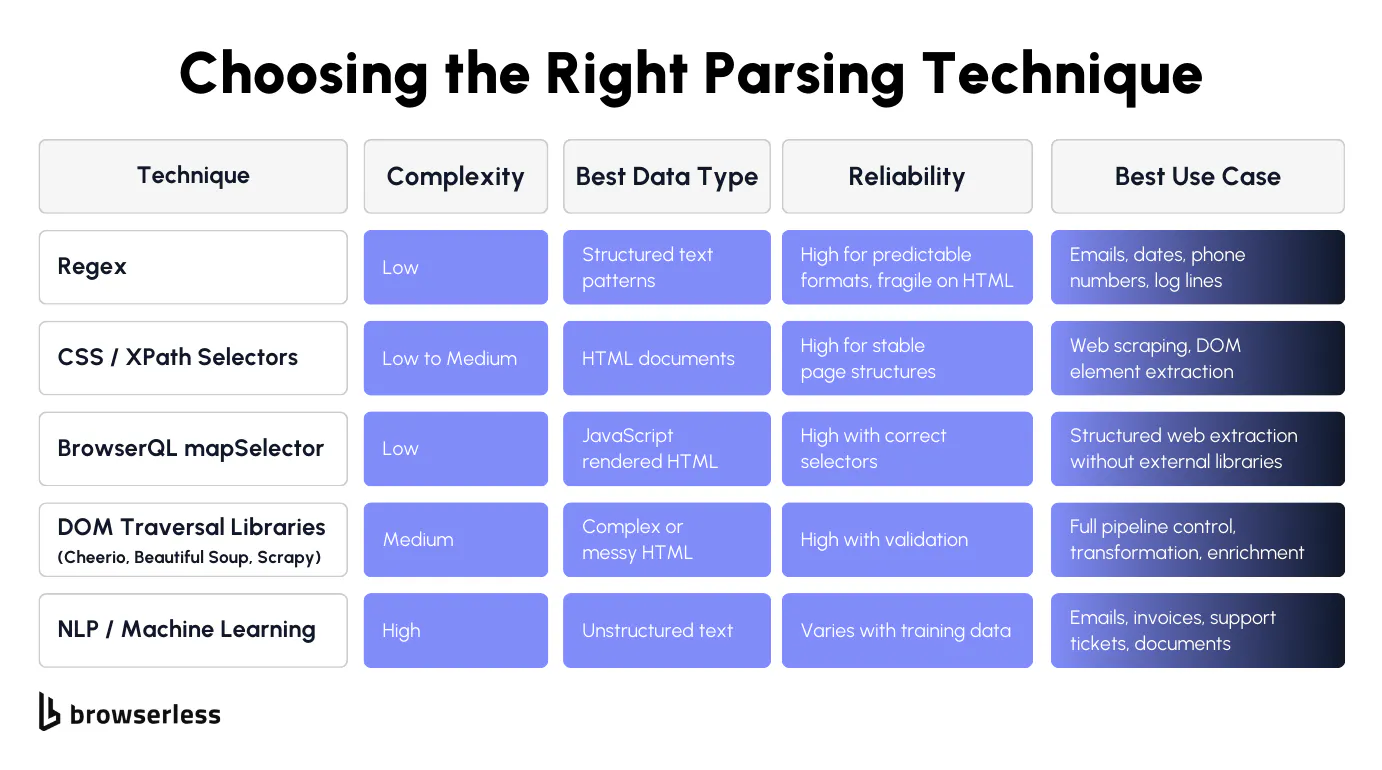
Rule-based parsing: regex, selectors, and DOM traversal
Rule-based parsing is the starting point for most developers and the foundation of most parsing tools. You define explicit parsing rules that tell your code exactly where to find the relevant data. It's fast, predictable, and easy to debug when it works. The tradeoff is that it's rigid. When the source changes, your rules break.
Regex works well for predictable, repeating patterns in text. If you need to extract relevant information like email addresses, phone numbers, dates, or specific log line formats, regex handles it cleanly. The patterns are precise and fast to execute, making them well-suited for automated data extraction from structured text with consistent formatting.
Where regex falls apart is with HTML; trying to parse an HTML page with regex yields fragile patterns that break the moment the page structure changes. For HTML and web data, use the right parsing tools:
- CSS selectors target specific elements by class, ID, tag, or attribute. They're the most common approaches for web scraping and reliable data extraction from web pages.
- XPath offers more flexibility for complex HTML data structures, especially when you need to navigate parent-child relationships or match on text content.
- DOM traversal with libraries like Cheerio (Node), Beautiful Soup (Python), or Scrapy gives you complete control over the HTML tree. You can walk the structure, filter elements, and handle edge cases that simple selectors miss, which is useful when you need to build your own parser for a specific site.
Rule-based approaches are best for stable, well-structured data sources with predictable formats. If you're running the same parsing process against the same site or API repeatedly and the structure doesn't change, rules give you the most reliable data extraction with the lowest overhead. These are traditional methods, but they work.
Machine learning and NLP for unstructured data
When the data doesn't have a predictable structure, parsing rules stop working. Emails, support tickets, invoices, scanned documents, and free text fields all vary in format from one record to the next. This is where machine learning and natural language processing come in, and where data-driven data parsing starts to make more sense than building your own data parser with rigid rules.
NLP techniques let you extract relevant information from text without defining formal grammar rules or patterns. This approach handles large volumes of unstructured data where manual parsing would be impossible and rule-based parsing would produce inconsistent results.
If you have thousands of invoices that all look slightly different, a trained model can learn to identify key data points regardless of layout, improving data accuracy and reducing human error.
- Named entity recognition works out of the box for common entities like names, locations, and organizations using pretrained models. It's a practical starting point for extracting relevant data from multiple sources without having to build sophisticated parsing techniques from scratch.
- Supervised learning requires labeled training data, but can handle domain-specific data extraction that pretrained models miss. You train it on your own data, and it learns the parsing rules automatically, which is the core of data-driven data parsing.
- Transfer learning lets you take a pretrained model and fine-tune it on a small dataset from your domain. This is practical when you don't have large volumes of labeled examples but still need reliable data extraction from unstructured sources.
Machine learning approaches handle messy, variable input data better than rules, but they come with costs. You need training data, evaluation pipelines, and retraining schedules to maintain data quality as inputs drift. They're best for unstructured data and document processing where the format varies too much for traditional methods to hold up.
For structured data like HTML or JSON with consistent layouts, stick with selectors and regex. Save ML for the cases where the data structures genuinely can't be predicted. That's the data parsing process in practice: match the technique to the data, and only reach for sophisticated parsing techniques when simpler tools no longer work.
Parsing web data: the browser problem
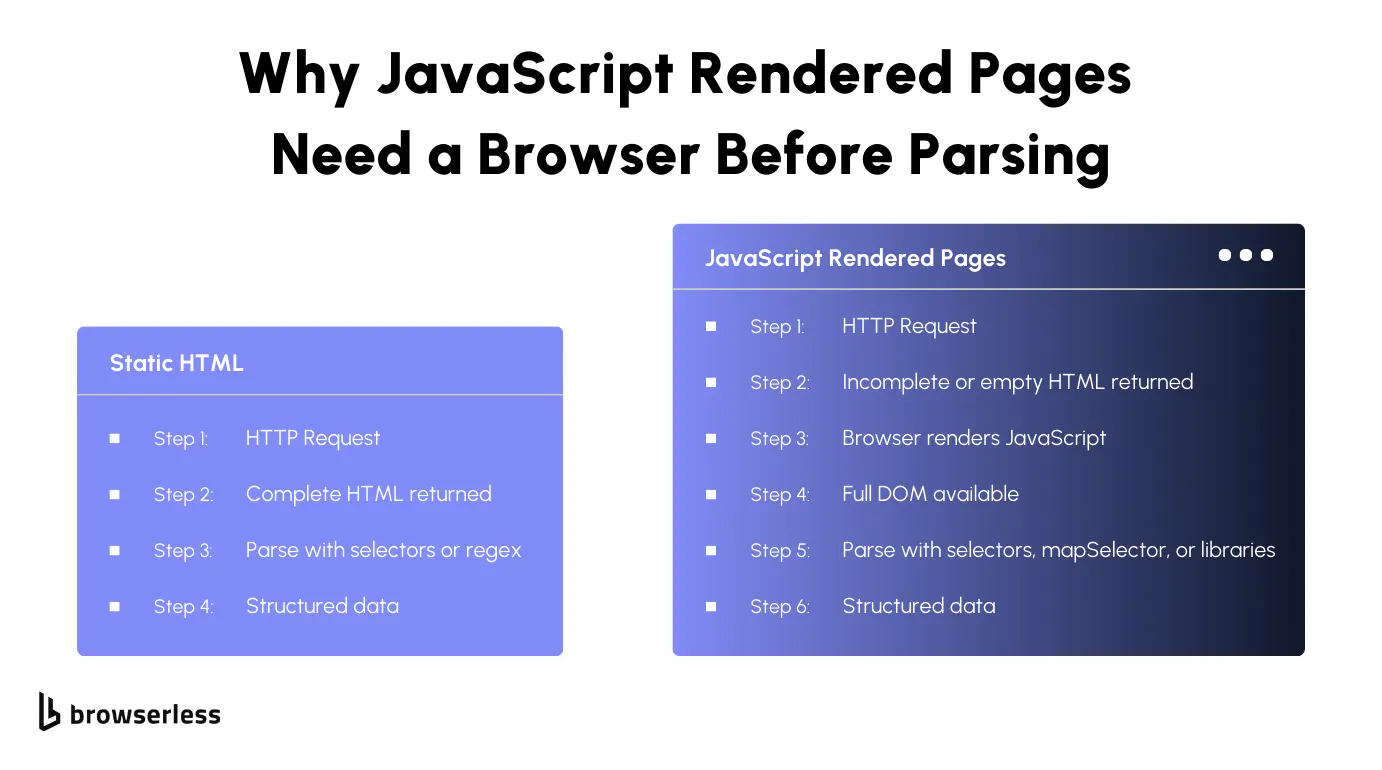
Why modern web pages need a browser
This is the gap between data collection and data parsing that most guides skip over. You write your parsing rules, point them at a URL, and get back empty or broken results. The problem isn't your parser. The problem is that the raw data you're trying to parse doesn't exist yet.
Most websites in 2026 render content with JavaScript after the initial HTML loads. Single-page applications, lazy-loaded content, and client-side rendering all mean that the actual data you want appears only after a real browser executes the page's scripts.
Send a simple HTTP request, and you'll get back a shell of HTML with empty divs and script tags. Your data parsing tool has nothing useful to work with because the parsed data it needs hasn't been generated yet.
This matters for any automated data parsing pipeline that targets web data. The data parsing process breaks at the very first step if the input data is incomplete. Without browser rendering, you're trying to extract relevant data from an HTML page that's essentially blank. You need a real browser to execute the JavaScript, wait for the DOM to populate, and then hand that fully rendered output to your parser. That's where Browserless comes in.
How Browserless handles rendering before parsing
Browserless gives you several ways to get fully rendered web data before your parsing process starts. The /content endpoint renders JavaScript and returns the full DOM as HTML in a single request. The /scrape endpoint goes further by accepting CSS selectors and returning structured JSON without you needing an external parser.
BrowserQL's HTML mutation with the clean argument strips non-text nodes and attributes, reducing payload size by nearly 1,000 times. BrowserQL's mapSelector turns DOM elements directly into structured JSON, skipping external parsing entirely. For protected sites, the /unblock API or /stealth/bql endpoint handles bot detection before parsing begins. We walk through each of these with code examples in the next section.
Building a web data parsing pipeline with Browserless
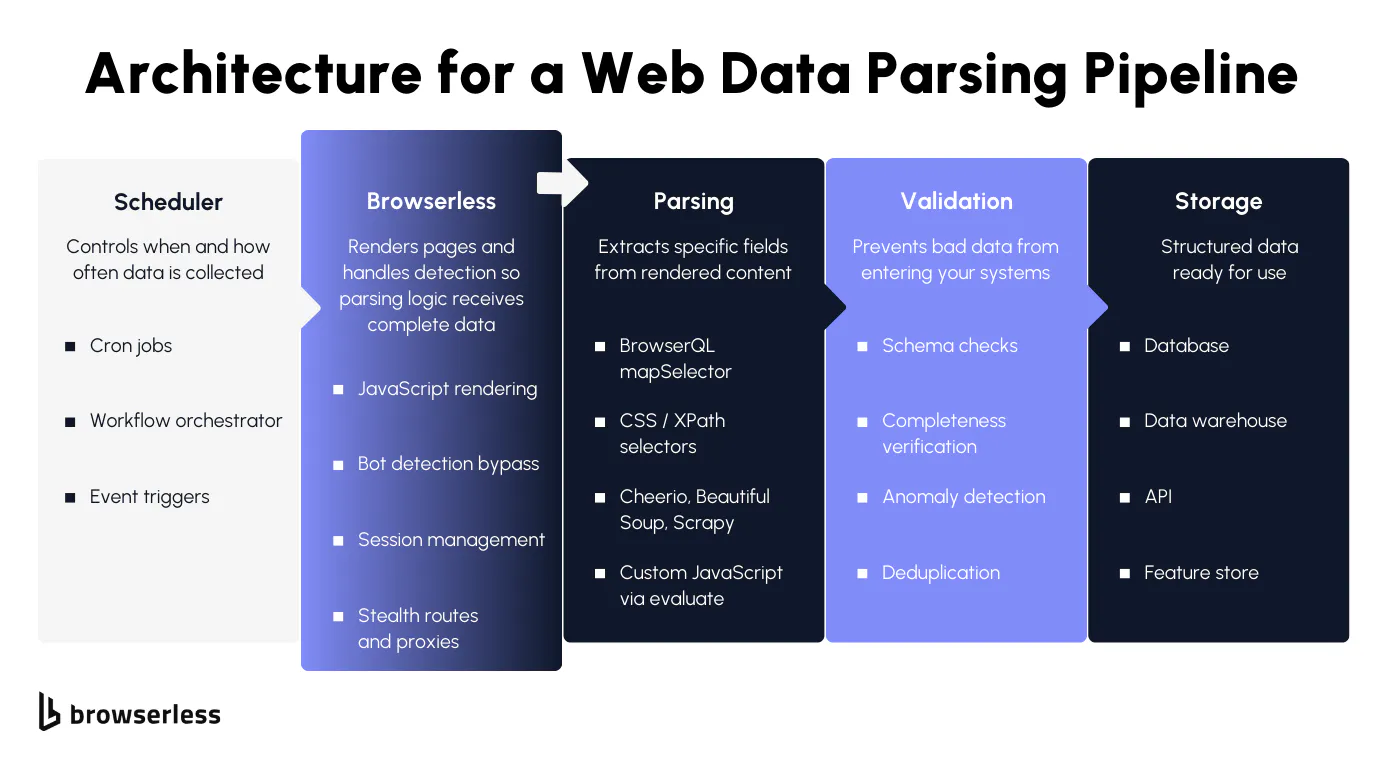
Once you understand the browser rendering problem, the next step is putting the pieces together into a real workflow. A good data parsing pipeline has a clear flow: get the rendered page, extract the relevant data, validate it, and store it. Browserless handles rendering and bot detection, which means the code examples below start from a complete DOM rather than a half-loaded shell.
To make this concrete, we'll use Books to Scrape, a demo bookstore built for practicing web scraping. It has product cards with titles, prices, ratings, and links across multiple pages. Here's how to think about it as a complete data parsing process, from raw web data to usable, structured output.
Step 1: Get the rendered page
Every web data parsing pipeline starts with getting complete input data. For simple, unprotected web pages like Books to Scrape, the /content endpoint is all you need:
curl -X POST "https://production-sfo.browserless.io/content?token=YOUR_API_KEY" \
  -H "Content-Type: application/json" \
  -d '{
    "url": "https://books.toscrape.com",
    "waitForTimeout": 3000
  }'
For protected sites where bot detection blocks your data collection tasks, escalate to /unblock with residential proxies. Replace the Hacker News URL below with whichever site is blocking your access, and if even /unblock isn't enough, try the BQL snippets shown later in this post:
curl -X POST "https://production-sfo.browserless.io/unblock?token=YOUR_API_KEY&proxy=residential" \
  -H "Content-Type: application/json" \
  -d '{
    "url": "https://news.ycombinator.com/",
    "content": true,
    "cookies": false,
    "screenshot": false,
    "browserWSEndpoint": false
  }'
Both return fully rendered HTML. The difference is that /unblock handles the bot detection for you before returning the parsed data your pipeline needs.
Step 2: Extract the data
This is where you choose your data parsing tool. Browserless offers several approaches, depending on how much control you need. Every example here targets the real selectors on Books to Scrape.
Option A: mapSelector for structured JSON without external parsing
If you want structured data back without running a separate parser, mapSelector is the most efficient data parsing solution. Use aliases to name your fields so the response comes back as clean, typed JSON:
mutation ExtractBooks {
  goto(
    url: "https://books.toscrape.com"
    waitUntil: domContentLoaded
    timeout: 35000
  ) {
    status
  }
  books: mapSelector(selector: "article.product_pod", timeout: 15000) {
    title: mapSelector(selector: "h3 a") {
      name: attribute(name: "title") {
        value
      }
    }
    price: mapSelector(selector: ".price_color") {
      innerText
    }
    availability: mapSelector(selector: ".availability") {
      innerText
    }
    link: mapSelector(selector: "h3 a") {
      href: attribute(name: "href") {
        value
      }
    }
  }
}
The response returns an array of structured JSON objects with the title, price, availability, and link for each book. No external parsing tools, no converting raw data through a library, no extra steps. The extracted data is ready for your database or data analysis pipeline.
Option B: text mutation for simple field extraction
When you're pulling key data points from a single book's detail page rather than a list, the text mutation with aliases keeps things clean:
mutation ExtractBookDetail {
  goto(
    url: "https://books.toscrape.com/catalogue/a-light-in-the-attic_1000/index.html"
    waitUntil: domContentLoaded
    timeout: 35000
  ) {
    status
  }
  title: text(selector: "h1", timeout: 10000) {
    text
  }
  price: text(selector: ".price_color", timeout: 10000) {
    text
  }
  stock: text(selector: ".availability", timeout: 10000) {
    text
  }
  description: text(selector: "#product_description ~ p", timeout: 10000) {
    text
  }
}
Each field comes back named exactly how you aliased it. The text mutation is best for detail pages where you need a handful of named fields from a single URL.
Option C: evaluate mutation for complex parsing logic
Sometimes the data on a page needs to be transformed before it's useful. Prices need cleaning, ratings need to be converted from CSS classes to numbers, or you need to combine values from multiple elements. The evaluate mutation lets you run custom JavaScript inside the browser to handle sophisticated parsing techniques that simple selectors can't:
mutation TransformAndExtract {
  goto(
    url: "https://books.toscrape.com"
    waitUntil: domContentLoaded
    timeout: 35000
  ) {
    status
  }
  evaluate(
    content: """
    (() => {
      try {
        const ratingMap = { One: 1, Two: 2, Three: 3, Four: 4, Five: 5 };
        const books = Array.from(document.querySelectorAll('article.product_pod')).map(card => {
          const priceText = card.querySelector('.price_color')?.textContent || '';
          const price = parseFloat(priceText.replace(/[^0-9.]/g, ''));
          const ratingClass = card.querySelector('.star-rating')?.classList[1] || '';
          const title = card.querySelector('h3 a')?.getAttribute('title') || '';
          const link = card.querySelector('h3 a')?.getAttribute('href') || '';
          const inStock = card.querySelector('.availability')?.textContent?.includes('In stock');
          return {
            title: title,
            price: price,
            currency: priceText.match(/[£$€]/)?.[0] || 'GBP',
            rating: ratingMap[ratingClass] || null,
            inStock: inStock,
            link: link
          };
        });
        return JSON.stringify({ books, count: books.length, error: null });
      } catch (e) {
        return JSON.stringify({ books: null, count: 0, error: (e?.message ?? String(e)) });
      }
    })()
    """
  ) {
    value
  }
}
This handles data parsing, extraction, and transformation in a single step inside the browser. The parsed data comes back as clean JSON with prices as numbers, currency symbols extracted, star ratings converted from CSS class names to integers, and stock status as booleans. The evaluate mutation is the right choice when you need to clean, transform, or combine values before they leave the browser.
Option D: HTML with clean, then parse externally
If you already have a data parser built in Cheerio, Beautiful Soup, or Scrapy, grab the cleaned HTML from BrowserQL and feed it into your existing systems. The clean argument strips the noise so your parsing tools work with a more readable format:
mutation GetCleanHTML {
  goto(
    url: "https://books.toscrape.com"
    waitUntil: domContentLoaded
    timeout: 35000
  ) {
    status
  }
  html(clean: { removeAttributes: true, removeNonTextNodes: true }) {
    html
  }
}
Then parse externally with your tool of choice. Here's what that looks like with Cheerio in Node:
const cheerio = require("cheerio");
// html comes from the BQL response above
const $ = cheerio.load(html);
const books = [];
$("article.product_pod").each((i, el) => {
  books.push({
    title: $(el).find("h3 a").attr("title"),
    price: $(el).find(".price_color").text().trim(),
    availability: $(el).find(".availability").text().trim(),
  });
});
Or with Beautiful Soup in Python:
from bs4 import BeautifulSoup
# html comes from the BQL response above
soup = BeautifulSoup(html, 'html.parser')
books = []
for card in soup.select('article.product_pod'):
    books.append({
        'title': card.select_one('h3 a')['title'],
        'price': card.select_one('.price_color').get_text(strip=True),
        'availability': card.select_one('.availability').get_text(strip=True)
    })
This approach gives you complete control over the data parsing process and works best when you need to apply complex business logic, enrich the extracted data with external references, or integrate with existing systems that already have built-in parsing rules.
Step 3: Validate before you store
Once you have your parsed data, validate it before it enters your systems. Check for missing fields, verify data formats match your schema, deduplicate records, and flag anomalies. This is the step that turns raw extracted data into reliable, usable data your application can trust.
The data parsing pipeline as a whole follows this flow: schedule or trigger the collection, let Browserless render the page and handle bot detection, extract the relevant data using whichever parsing approach fits best, validate data quality and accuracy, then store it in your database, data warehouse, or API.
Browserless handles the hardest part of the pipeline: delivering a fully rendered, unblocked page to your data parser so the rest of the automated data-parsing process can run reliably.
Conclusion
Every pipeline in this guide follows the same pattern: render first, then parse, then validate. Which approach you pick depends on whether your source is structured, semi-structured, or unstructured, and the sections above walk through each scenario with working code. For JavaScript-heavy sites, the pipeline section shows four extraction methods, ranked from simplest (mapSelector) to most flexible (external libraries such as Cheerio, Beautiful Soup, or Scrapy). Browserless removes the rendering and bot-detection steps from your code, leaving you with a clean DOM and a single job: write the selectors. Every code example runs against real selectors on Books to Scrape, so you can test them yourself. Sign up for a free trial and try them against your own targets.
FAQs
What is data parsing?
Data parsing means taking raw data and converting it into structured formats your code can actually use. A data parser works by reading input data from web pages, APIs, or documents and extracting key data points into usable formats such as JSON or database records. Without it, you're stuck with raw data in an unusable format. It's the step that enables data processing, data analysis, and business operations.
How does data parsing work on JavaScript pages?
Most web pages render with JavaScript, so a basic HTTP request gives you incomplete input data. The parsing process needs a real browser to render the HTML page first. Browserless handles this and returns parsed data as HTML or structured JSON. Then you apply parsing rules with selectors, mapSelector, or parsing tools like Cheerio and Beautiful Soup to extract relevant data from the web data.
Regex or CSS selectors?
Regex for predictable data formats like emails and dates. CSS selectors for HTML pages when you need to target elements within the DOM. Regex on raw HTML breaks easily and creates inconsistent data. Selectors provide reliable data extraction from web pages. For web data parsing and scraping, selectors in popular parsing tools are a better solution.
What is mapSelector?
It's the fastest way to do automated data parsing in BrowserQL. mapSelector iterates over DOM elements and returns structured data directly as JSON. Name your key data points with aliases like productName and productPrice. It skips external parsing tools entirely by converting raw data into structured formats inside the browser. No need to build your own parser for most web data extraction.
How do I parse protected websites?
Use /unblock or /stealth/bql before your parsing process starts. /unblock returns rendered HTML after bypassing detection, giving your data parser clean input data. BrowserQL on /stealth/bql provides advanced anti-detection, and you can add proxy, CAPTCHA solving (via the solve mutation), and data extraction mutations to the same query.
Build my own parser or use existing tools?
Build your own data parser when you need complete control over sophisticated parsing techniques or custom data formats. Use existing parsing tools or mapSelector for automated data parsing that converts data without requiring you to maintain your own parser. Most teams start with popular parsing tools and only build their own when data collection tasks hit edge cases that existing systems can't handle.
Grammar-driven vs. data-driven data parsing?
Grammar-driven parsing (regex, CSS selectors) requires you to define every rule. It's fast and precise when the input format is stable. Data-driven parsing (ML, NLP) learns patterns from examples rather than from explicit rules. The practical difference: grammar-driven breaks when the source format changes; data-driven degrades gracefully but requires training data up front. Most pipelines start grammar-driven and add ML only for inputs where the structure varies too much to write rules by hand.
Can I parse scanned documents and PDFs?
Yes, but they need a preprocessing step. For PDFs with selectable text, extract the text layer first, then parse it with regex or selectors. For scanned documents and image-based PDFs, you need OCR to convert pixels to text before any parsing rules can apply. Browserless can generate PDFs and screenshots via its REST API, but the parsing of existing PDFs and scans happens outside the browser layer.
How do I get better data quality?
Validate the extracted data against schemas after parsing. Standardizing data into a single format catches human error and inconsistencies early. For web data, use Browserless to get fully rendered HTML pages so your data parser starts with complete input data. Good data accuracy comes from the full pipeline: rendering, extracting, validating, and standardizing data before it hits your existing systems.
What is data parsing used for in web scraping?
Data parsing converts raw HTML from web pages into structured data for analysis, monitoring, and automated pipelines. A data parser helps you extract relevant data, such as prices and product details, from semi-structured data at scale. Browserless handles rendering and bot detection, so your parsing tools can focus on converting raw data from one format into a usable format for your data collection and processing tasks.