
TL;DR
- List crawling, defined. List crawling pulls structured rows from paginated list pages (product grids, directory listings, search results), and at scale it breaks in predictable ways. Render JS-rendered lists with Browserless's
/scrapeREST endpoint in one round trip, so you don't have to stand up Selenium or Playwright. - Sites cap visible pages, not records. A directory claiming 50,000 records often only lets you walk 100 pages. Slice the crawl by a stable facet (state, category) and dedup on canonical URL.
- Soft blocks return 200 OK, not 429. Your script writes zero rows and keeps walking, with no failed requests to log. Browserless's six-tool escalation handles the blocks before they turn into silent data loss.
Introduction
You ran your list crawling job overnight, came back to check it, and page 50 was empty. No error, no 429, nothing in the logs, the site quietly stopped serving data and your script kept walking. That's one of four problems every production list crawler hits early on, along with the directory whose pagination quietly stops at 100 pages, the throttling that kicks in once you go concurrent, and the script crash six hours into a run. In this guide, we'll walk through each with code and the escalation path past it.
What is list crawling?
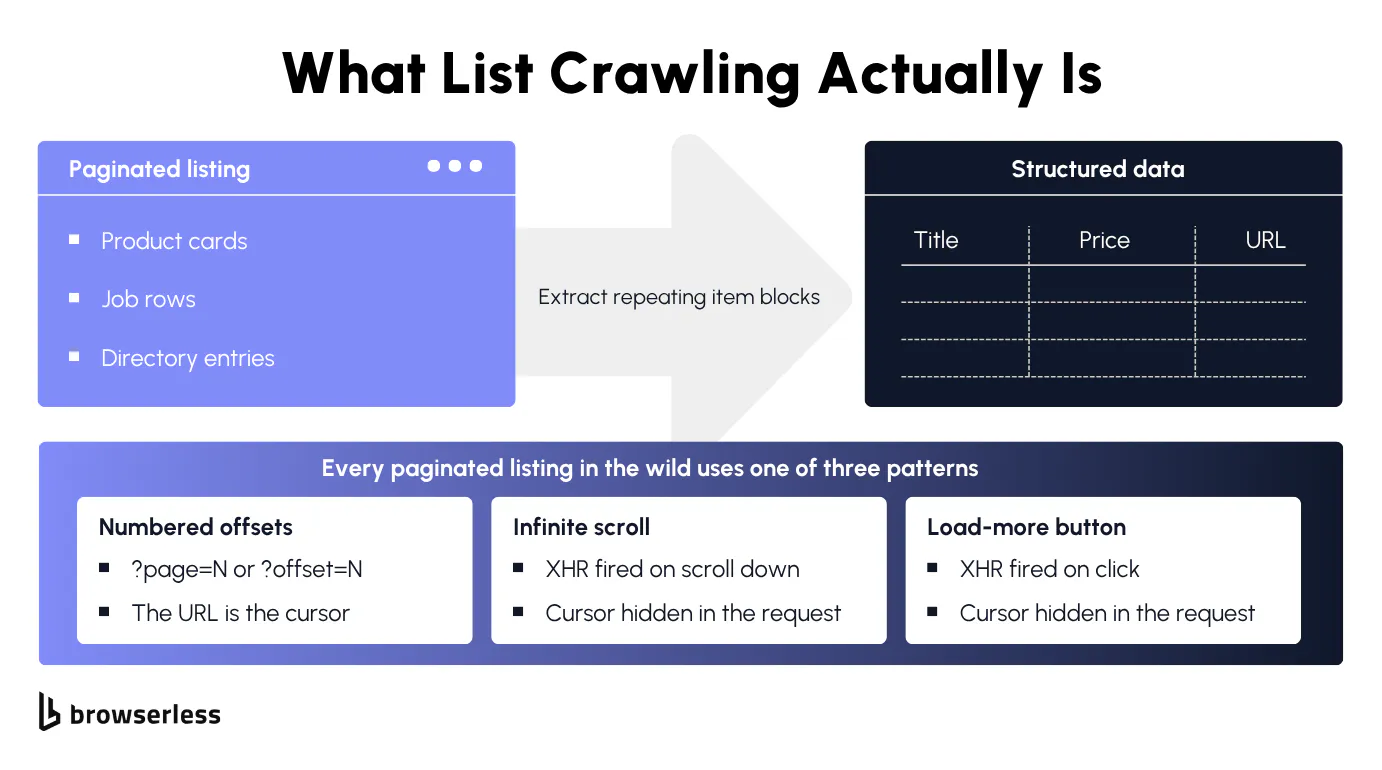
List crawling pulls structured data from list pages that share a repeating layout, things like a category page of product cards, a directory of business listings, or a results page of search hits. Unlike crawling detail pages where each URL is its own unique record, list pages are where the repeating shape makes extraction tractable.
The page URLs follow a predictable pattern (?page=2, ?page=3 or a slugged path like /category/electronics/page-3), each card exposes the same fields in the same DOM positions, and the canonical URL or listing ID stays stable across runs so dedup works cleanly.
How list crawling differs from general web scraping
Where list crawling stays narrow, general web crawling spiders an arbitrary link graph across a target site, following anything the parser can resolve and stopping when budgets run out. That difference in scope is what makes list crawling tractable in the first place.
That narrower scope reshapes the problems you actually face. Pages drift as listings come and go mid-crawl, and two filter combinations can overlap and surface the same item twice. The site quietly throttles you before you notice, and the item IDs you keyed on get reformatted after a redesign.
None of these are crawl-budget or graph-traversal problems, which is what most general web scraping articles cover. The shape of the list data is known before the job starts, and that's exactly what makes the failure modes specific and worth solving.
Where list crawling shows up
List crawling shows up in four flavors:
- E-commerce product catalogs. 5,000 SKUs across 250 pages, each card carrying product title, product price, rating, thumbnail, and stock status.
- Business directories. Bigger by record count, smaller per row. A directory might cover every dentist in the United States with name, address, phone, and specialty, where the full dataset is larger than any single facet shows.
- Job boards. Turn over fast, so the value is an incremental crawl rather than a single bulk pull. Each posting follows a standard layout with title, company, location, salary range, and posted date.
- Review platforms and news aggregators. The unit of analysis flips from the product or article to the review itself, with author, rating, review text, helpful-count, and timestamp repeating thousands of times under each item.
A single extractor with the same rules stays reusable across the entire target website.
The 30-line version
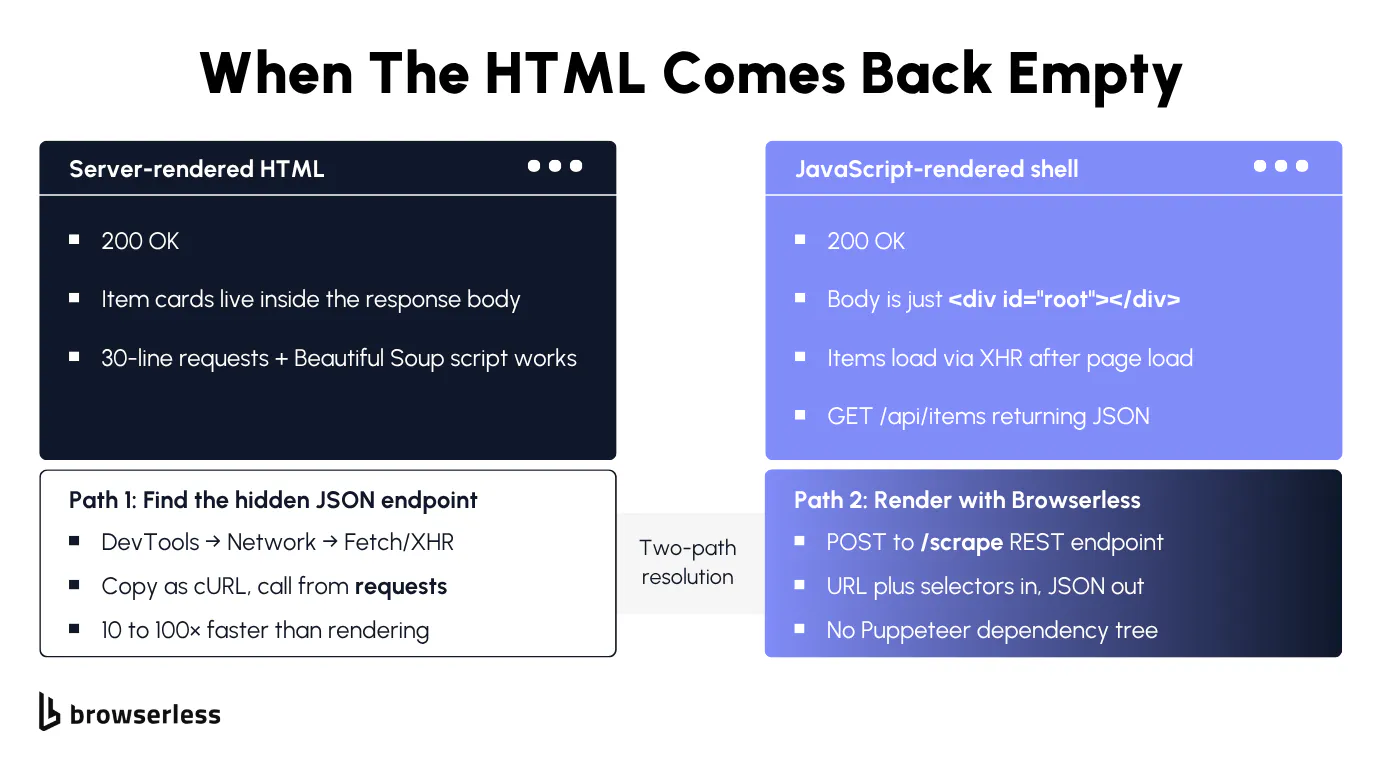
A list crawling job usually starts as a Python script. You import requests, parse with Beautiful Soup, walk pages until you run out, and write rows to a CSV. That baseline holds until the page is JS-rendered, and the first escalation tier past it is the one tutorials usually skip.
Static lists and basic HTML structures with Beautiful Soup
If the listing renders server-side, you can pull every page with a simple HTTP client (requests) and Beautiful Soup. The exact DOM shape barely matters here. A table list, a CSS grid, or a flexbox of cards all parse with the same soup.select() pattern.
The pagination shape matters more. Numbered URL offsets in the page numbers (?page=2, ?page=3) are the easy case for these static lists. Walk through multiple pages until one returns no items.
Infinite scroll is the same pattern underneath, just without visible page numbers. Watch the browser's network requests in DevTools as you scroll and you'll see the page fires a JSON request in the background to fetch the next batch. That endpoint is what you actually want, so request it directly instead of rendering the page. Load-more buttons do the same thing, triggered by a click instead of a scroll.
The baseline only holds when three assumptions line up. The list data sits in the initial HTML response body, the page cursor is in the URL, and the site isn't gating you. Each assumption breaks on modern sites, usually the first one. The first page comes back as an empty shell, the raw HTML is just a <div id="root">, and the dynamic content only shows up after JavaScript renders.
Before pointing this at a real site, you want to prove the parser works against something stable. books.toscrape.com is a sandbox built for exactly this kind of testing. It serves a 1,000-book catalog across 50 numbered pages of fully server-rendered HTML, with no rate limiting or bot detection getting in the way.
The baseline below walks every page until it hits a 404, parses each product card with Beautiful Soup, and returns one row per book with title and price.
import requests
from bs4 import BeautifulSoup

BASE = "https://books.toscrape.com/catalogue/page-{page}.html"


def fetch_page(page: int):
    # Pull one page. Return [] on 404 so the caller knows we've walked past the last page.
    resp = requests.get(BASE.format(page=page), timeout=30)
    if resp.status_code == 404:
        return []
    resp.raise_for_status()
    # Force UTF-8 so the £ in prices doesn't render as Latin-1 garbage.
    resp.encoding = "utf-8"
    soup = BeautifulSoup(resp.text, "html.parser")
    items = []
    for card in soup.select("article.product_pod"):
        title = card.h3.a["title"]
        price = card.select_one("p.price_color").get_text(strip=True)
        items.append({"title": title, "price": price})
    return items


def crawl():
    # Walk pages 1, 2, 3... until fetch_page returns an empty list.
    rows = []
    page = 1
    while True:
        items = fetch_page(page)
        if not items:
            break
        rows.extend(items)
        page += 1
    return rows


if __name__ == "__main__":
    rows = crawl()
    print(f"total books: {len(rows)}")
    print(f"sample: {rows[0]}")
Render JavaScript-rendered lists in one round trip
Dynamic lists, the ones rendered by JavaScript after the initial response, won't show up in a plain requests.get() call. The list data is arriving from background requests the page fires after JavaScript executes. The cheapest escalation is Browserless's /scrape REST endpoint, a scraping API that executes JavaScript on the target page and returns CSS-matched elements as JSON in one round trip. The headless browser runs on managed infrastructure, the extraction rules run inline, and there's no local stack to babysit.
Add blockAds=true to speed up rendering by skipping ad iframes. /scrape covers one-shot extraction. Sessions that need to solve CAPTCHAs inline (solveCaptchas=true), live longer, or maintain state move up to Browsers as a Service or BrowserQL, where those knobs live on the connection URL. For dismissing consent banners specifically, blockConsentModals=true is supported on /screenshot, /pdf, and BQL sessions.
The same books catalog hits /scrape as a POST with a URL and a list of CSS selectors, and the response is one JSON record per matched element.
Three selectors in the elements array pull the title attribute (h3 a), the price text (p.price_color), and the stock label (p.instock.availability) from every product card on the page.
# Browserless renders the page server-side and returns matched elements as JSON.
# blockAds=true skips ad iframes during rendering so the call returns faster.
ENDPOINT="https://production-sfo.browserless.io/scrape"

curl -sS -X POST "${ENDPOINT}?token=${BROWSERLESS_API_KEY}&blockAds=true" \
  -H "Content-Type: application/json" \
  -d '{
    "url": "https://books.toscrape.com",
    "elements": [
      { "selector": "article.product_pod h3 a" },
      { "selector": "article.product_pod p.price_color" },
      { "selector": "article.product_pod p.instock.availability" }
    ]
  }'
When it stops working
One-shot extraction holds up at small scale, but a successful list crawler usually breaks the same two ways once the target website's catalog gets large. The site caps the visible page count well below the records it advertises, and the IP cost of crawling around that cap triggers concurrency throttling and rate limits.
Getting past pagination caps
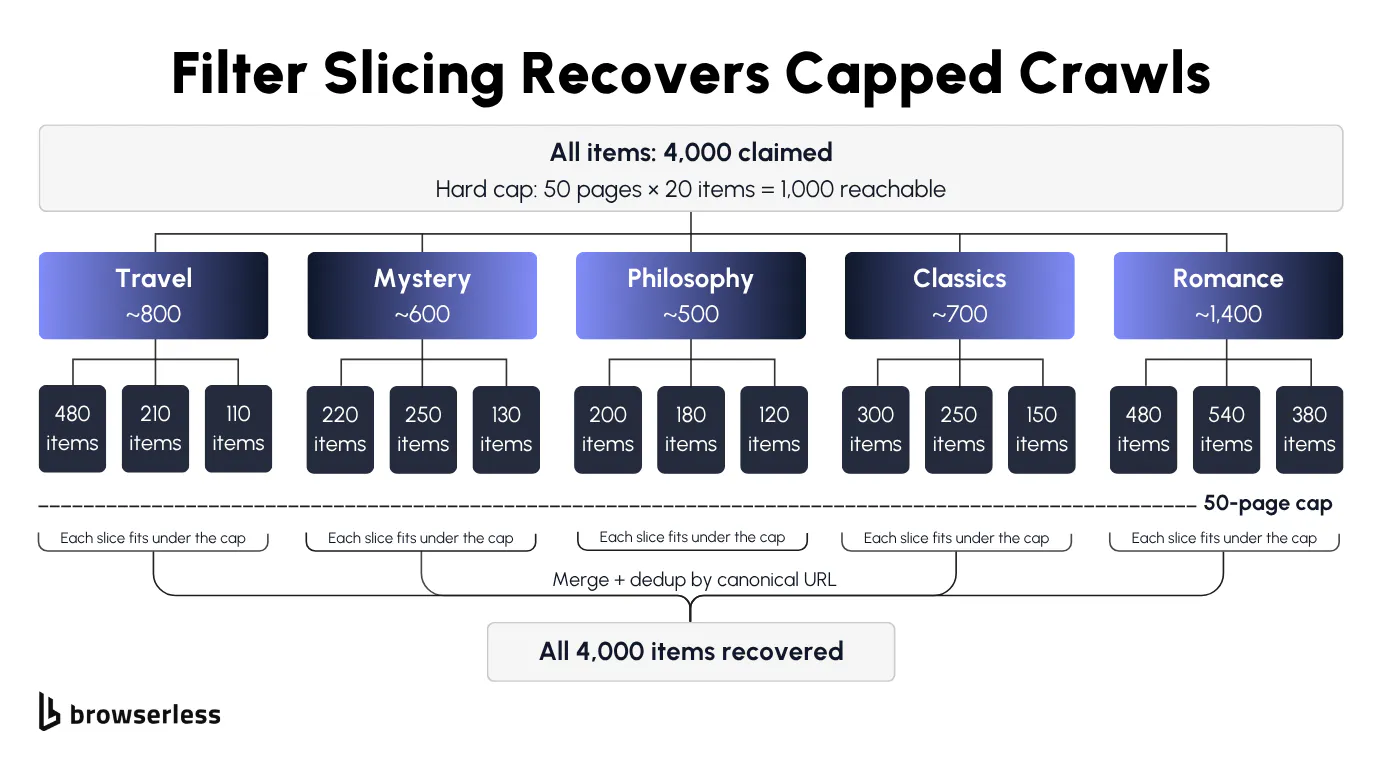
Real directories often cap visible pages well below the dataset they advertise. The search results say 50,000 records, page navigation stops at 100, and 100 pages of 20 items each is 2,000 records. The other 48,000 are missing data, only reachable through filters.
Try ?per_page=100 on the URL first, since many sites that cap visible pages still accept much larger page sizes on the query string. When that fails, slice by facet. Pick a low-cardinality field with good coverage (state, category, price band) and run each value as its own paginated crawl, so 50,000 dentists split by US state gives you 50 slices of roughly 1,000 records each, every one comfortably under the 100-page cap.
Slicing has two costs worth planning around. Slices overlap, so dedup on canonical URL with idempotent writes. Slices also drift mid-crawl as new listings appear and old ones drop off, so pick an axis whose values stay stable for the duration of the run and store the slice cursor alongside the per-page cursor.
The script below pulls all five slices end-to-end against books.toscrape.com's category pages and dedupes them into SQLite. SLICES lists the facets, parse_cards extracts items and normalises each URL to a canonical form, walk_slice paginates through a single slice until the site returns a 404 or an empty page, and the __main__ block ties it together with INSERT OR IGNORE on the canonical URL. If the same product shows up under two slices, the second insert silently no-ops on the duplicate URL, so re-running the same crawl ten times never drifts the row count.
Why SQLite for dedup instead of a Python set or a CSV append? Two reasons. Multi-process safety, since SQLite handles the file lock for you if you decide to run several copies of the crawler in parallel against the same store. Plus restart safety, since the database persists between runs, so re-running the same crawl skips work you've already done rather than duplicating it. A set would forget everything the moment the process exits, and a CSV append would double-write every overlapping row.
import sqlite3
from urllib.parse import urljoin

import requests
from bs4 import BeautifulSoup

BASE = "https://books.toscrape.com/"

# One entry per slice. For a real directory these would be states, categories, or price bands.
SLICES = [
    "catalogue/category/books/travel_2/",
    "catalogue/category/books/mystery_3/",
    "catalogue/category/books/philosophy_7/",
    "catalogue/category/books/classics_6/",
    "catalogue/category/books/romance_8/",
]


def parse_cards(html: str, page_url: str):
    # Extract one page worth of product rows. Returns a list of dicts, one per card.
    soup = BeautifulSoup(html, "html.parser")
    out = []
    for card in soup.select("article.product_pod"):
        link = card.h3.a
        # Strip fragments and query strings so the same product seen under two slices dedupes on a single key.
        href = urljoin(page_url, link.get("href")).split("#", 1)[0].split("?", 1)[0]
        out.append({
            "canonical_url": href,
            "title": link.get("title"),
            "price": card.select_one("p.price_color").get_text(strip=True),
        })
    return out


def walk_slice(slice_path: str):
    # Walk one slice page by page. Stops on a 404 (past the last page) or an empty result page.
    rows = []
    page_url = urljoin(BASE, slice_path + "index.html")
    page_num = 1
    while True:
        resp = requests.get(page_url, timeout=30)
        if resp.status_code == 404:
            break
        resp.encoding = "utf-8"
        items = parse_cards(resp.text, page_url)
        if not items:
            break
        rows.extend(items)
        page_num += 1
        # Next page in the slice, URL pattern is page-2.html, page-3.html, ...
        page_url = urljoin(BASE, slice_path + f"page-{page_num}.html")
    return rows


if __name__ == "__main__":
    conn = sqlite3.connect("/tmp/list-crawling-dedup.sqlite")
    # canonical_url is the primary key, duplicate inserts get silently dropped.
    conn.execute(
        "CREATE TABLE IF NOT EXISTS listings ("
        "canonical_url TEXT PRIMARY KEY, title TEXT, price TEXT)"
    )
    inserted = 0
    for slice_path in SLICES:
        for r in walk_slice(slice_path):
            # INSERT OR IGNORE makes overlapping slices a no-op on the second hit.
            cur = conn.execute(
                "INSERT OR IGNORE INTO listings (canonical_url, title, price) "
                "VALUES (?, ?, ?)",
                (r["canonical_url"], r["title"], r["price"]),
            )
            inserted += cur.rowcount
        conn.commit()
    total = conn.execute("SELECT COUNT(*) FROM listings").fetchone()[0]
    print(f"inserted: {inserted}, total in table: {total}")
    conn.close()
With the slicing pattern in place, the next bottleneck is per-IP rate limits. Slices that look identical from one IP get throttled together, which means 50 sequential slices on a single proxy is barely faster than the 100-page wall it was meant to solve. Routing each slice through Browserless with a residential proxy gives every slice its own exit IP, and routing several slices in parallel turns the wall-clock budget from a problem into a knob. The next H3 puts both pieces together.
Concurrent crawlers with residential proxies
Filter slicing fixed the missing-pages problem, but now you have 50 slices to walk on a 6-hour deadline. You need more browser sessions running at once plus proxy rotation so your automated traffic doesn't hit rate limits on the third concurrent request.
How many sessions you can run depends on your Browserless plan. Free gives you 2 concurrent, Prototyping 5 (10 on annual), Starter 30 (40 on annual), Scale 80 (100 on annual). Enterprise customers get custom limits set per contract. Extra requests go into the built-in queueing system, and once the queue fills you get a 429 Too Many Requests back. Size the worker pool to your plan or you'll burn cycles in the queue, since an 8-connection Free crawler runs 2 concurrent and queues 6, and a 200-connection Scale crawler hits the same wall against the 80-concurrent ceiling.
The IP side rides on the same connection URL. Add proxy=residential to route through the Browserless residential proxy pool, proxyCountry=us (or gb, de, etc.) to pick the exit country, and proxyLocaleMatch=1 to auto-align the browser language to that country instead of wiring up locale in Playwright by hand. For slices that need the same user across several pages, add proxySticky, which the docs frame as best-effort rather than a guarantee.
MAX_WORKERS Playwright workers pull slices off a queue, connect through the residential proxy with locale alignment on, and share a next_request_at timestamp as a soft rate limiter so they never hit the target closer than 1 second apart. The WSS URL carries every proxy parameter as a query string, so the connection is already configured by the time Playwright opens it.
One worker maps to one Browserless browser session, so two workers means two connections counted against your plan's concurrency cap. The shared asyncio.Queue is what lets workers pick up new slices as they finish their current one, instead of pre-assigning slices upfront and getting stuck behind the slowest worker. The rate limiter sits across all workers because the target site doesn't care which of your workers is hitting it, only the cumulative request rate matters. connect_over_cdp is the right choice here because the workers don't intercept network responses. If you need page.route() mocking, point at /chromium/playwright and use chromium.connect() instead.
walk_one_page extracts items from a single page, worker is the per-task loop that pulls a slice off the shared queue and walks it page by page until the slice is exhausted, and main seeds the queue with the slices and spins up MAX_WORKERS worker tasks. Every navigation waits for a slot from the shared rate limiter before it fires.
import asyncio
import os
import time
from urllib.parse import urljoin

from playwright.async_api import async_playwright

TOKEN = os.environ["BROWSERLESS_API_KEY"]
# Every proxy knob lives on the connection URL, no extra setup call needed.
# proxy=residential picks the residential pool, proxyCountry sets the exit country,
# and proxyLocaleMatch=1 auto-aligns the browser language to that country.
WS = (
    "wss://production-sfo.browserless.io/chromium/stealth"
    f"?token={TOKEN}&proxy=residential&proxyCountry=us&proxyLocaleMatch=1"
)
# Match this to your Browserless plan: Free 2 / Prototyping 5 / Starter 30 / Scale 80.
MAX_WORKERS = int(os.environ.get("MAX_WORKERS", "2"))
BASE = "https://books.toscrape.com/"
SLICES = [
    "catalogue/category/books/travel_2/",
    "catalogue/category/books/mystery_3/",
    "catalogue/category/books/philosophy_7/",
]

# All workers read/write this. It's the soft rate limit per host.
next_request_at = 0.0


async def wait_for_slot():
    # Block until we're at least 1 second past the previous worker's request to the target site.
    global next_request_at
    now = time.monotonic()
    if now < next_request_at:
        await asyncio.sleep(next_request_at - now)
    next_request_at = max(time.monotonic(), next_request_at) + 1.0


async def walk_one_page(page, url: str):
    """Extract one page's worth of cards. Returns None on failure."""
    resp = await page.goto(url, wait_until="domcontentloaded", timeout=60_000)
    if resp is None or resp.status >= 400:
        return None
    items = []
    for c in await page.locator("article.product_pod h3 a").all():
        items.append({
            "title": await c.get_attribute("title"),
            "url": urljoin(url, (await c.get_attribute("href")) or ""),
        })
    return items


async def worker(name: str, queue: asyncio.Queue, results: dict):
    """One worker = one Browserless session. Pulls slices off the shared queue."""
    async with async_playwright() as pw:
        # Each worker holds its own browser session through the residential proxy.
        browser = await pw.chromium.connect_over_cdp(WS)
        try:
            context = browser.contexts[0] if browser.contexts else await browser.new_context()
            page = await context.new_page()
            while True:
                # Grab the next slice off the queue, or stop when the queue is empty.
                try:
                    slice_path = queue.get_nowait()
                except asyncio.QueueEmpty:
                    break
                count = 0
                url = urljoin(BASE, slice_path + "index.html")
                page_num = 1
                while True:
                    # Wait for our rate-limit slot, then fetch the next page.
                    await wait_for_slot()
                    items = await walk_one_page(page, url)
                    if not items:
                        break
                    count += len(items)
                    page_num += 1
                    url = urljoin(BASE, slice_path + f"page-{page_num}.html")
                results[slice_path] = count
                print(f"[{name}] {slice_path} -> {count} items")
                queue.task_done()
        finally:
            await browser.close()


async def main():
    queue: asyncio.Queue = asyncio.Queue()
    for s in SLICES:
        queue.put_nowait(s)
    results: dict = {}
    workers = [
        asyncio.create_task(worker(f"w{i}", queue, results))
        for i in range(MAX_WORKERS)
    ]
    await asyncio.gather(*workers)
    print(f"workers={MAX_WORKERS} total_items={sum(results.values())}")


if __name__ == "__main__":
    asyncio.run(main())
Keeping the crawl alive
A list crawling job that worked on day one rarely survives week two untouched. Detection systems catch up to your traffic pattern, soft blocks start hiding inside 200 OK responses, and the process you started at 9 a.m. dies in the middle of slice 27 at 3 p.m.
Soft blocks and anti-bot defenses
The page-50 problem is almost always a soft block. The protected site stopped serving listings to your IP or session, but returns a 200 OK with a stripped skeleton instead of a 429. Your script logs no errors, writes no rows, and just keeps paginating into the void.
A hard 429 is the easy case (back off, swap IPs, retry). The soft block hides the failure inside a successful HTTP response, and a CAPTCHA mid-pagination has the same shape. Both require more sophisticated techniques than naive retries.
Browserless layers anti-bot defenses across six escalating tools, each addressing a different detection class:
- Stealth Routes. Fingerprint mitigations on a purpose-hardened managed environment (
/stealth), Chromium with anti-detection (/chromium/stealth), or genuine Chrome (/chrome/stealth). - Residential proxies. Pair
proxy=residentialwith stealth so the IP reputation matches the persona. - In-session CAPTCHA solving. Add
solveCaptchas=trueto handle a CAPTCHA without leaving your existing Puppeteer or Playwright session. /unblockAPI. Bypasses sites that detect Puppeteer or Playwright fingerprints by driving native browser interfaces instead.- BrowserQL's
solvemutation. Multi-step orchestration covering reCAPTCHA and Cloudflare Turnstile. - BrowserQL's
liveURLmutation. Streams the live browser to a shareable URL a human can take over (last resort for challenges no automated tier clears).
The common open-source alternative, puppeteer-extra-plugin-stealth, ships its fingerprint patches as JavaScript injected into a stock Chromium. Detection vendors hash the patch shape itself, so every new Cloudflare Turnstile or JA4 detection vector requires the plugin author to ship a release and you to bump the dependency. Browserless's Stealth Routes update centrally with each detection-vendor change, no client-side bump needed, and the patches sit below the JavaScript layer where the plugin's reach ends.
/stealth/bql runs on the same hardened Chromium build that the other stealth routes use. It pairs naturally with BrowserQL's mapSelector mutation, which iterates a selector across the page and pulls a record per match in one declarative request. The humanlike mode in BrowserQL is opt-in only (humanlike: true in the launch payload), not something the platform applies for you.
Here's the whole listing pull as a single mutation. The browser navigates with goto, then mapSelector walks every article.product_pod card on the page and pulls title and price out together. One request in, all the rows out.
# POST to https://production-sfo.browserless.io/stealth/bql
#        ?token=${BROWSERLESS_API_KEY}
#        &proxy=residential&proxyCountry=us&proxyLocaleMatch=1
#        &launch=eyJodW1hbmxpa2UiOnRydWV9   (base64 of {"humanlike":true})  # opt-in humanlike mode in the launch payload

mutation ScrapeListing {
  # Navigate the privacy-hardened Chromium browser to the listing page.
  # waitUntil: networkIdle gives the page time to finish background JSON calls.
  goto(
    url: "https://books.toscrape.com/catalogue/page-1.html"
    waitUntil: networkIdle
  ) {
    status
  }

  # mapSelector iterates every product card on the page and pulls title + price from each.
  # One declarative request returns the whole list, no per-page click-and-extract loop.
  cards: mapSelector(selector: "article.product_pod") {
    title: mapSelector(selector: "h3 a") {
      value: attribute(name: "title") {
        value
      }
    }
    price: mapSelector(selector: "p.price_color") {
      text: innerText
    }
  }
}
Resuming after a crash
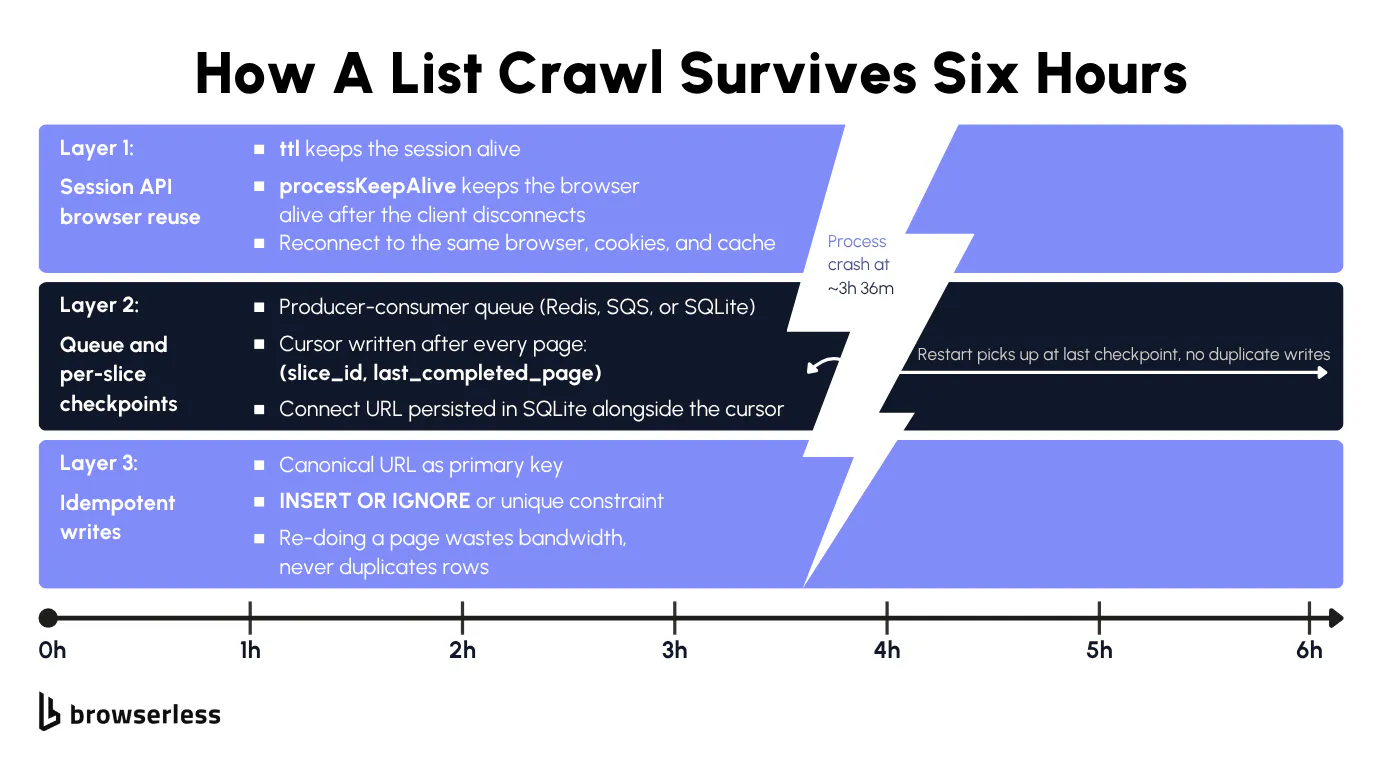
A crawler that dies at item 47,800 of 50,000 has two things to recover. The script-side state knows which slice it was in and which page within that slice. The browser-side state holds every cookie, every CAPTCHA the session had already solved, and the same residential IP the proxy was holding onto, all gone unless the browser process is still alive somewhere.
The application-layer fix is a per-slice cursor checkpoint plus idempotent writes. Store the slice ID and current page in a SQLite table that flushes after each page commits, write idempotently on the canonical URL (same pattern as the slicing section), and the restart reads the cursor to resume from the next page of the same slice.
The browser-side fix is Browserless's Session API, which you call as POST /session with ttl (how long the session lives in total) and processKeepAlive (how long the browser stays alive after the last client disconnects). The response returns a connect URL and a stop URL for cleanup. Reconnect within the processKeepAlive window and you land on the same live browser with its cookies and cache intact. Reconnect after it expires and a fresh browser opens, but cookies and localStorage still restore from the saved session. Plan-tier ttl ceilings cap session lifetime at 1 day on Free, 7 days on Prototyping, 30 days on Starter, and 90 days on Scale. If the crash takes longer than processKeepAlive to recover from, the browser session is gone and the script-side cursor is the only way back in.
The script below opens a persisted session, initialises three SQLite tables (session URLs, per-slice cursor, deduplicated rows), and runs phase 1 until a simulated crash then phase 2 to recover.
Phase 1 and phase 2 do almost the same work, just at different stages of the crawl. Phase 1 walks pages, commits each one, then dies, while phase 2 picks up the same loop and runs it to completion. The parsing logic and the per-page commit logic are identical in both, so they're factored into shared helpers. Drift between two near-identical parsers is a real risk if you duplicate the code, since you can end up inserting rows with slightly different schemas and not notice until the dedup count looks wrong weeks later.
The two helpers are walk_one_page, which extracts cards from a single listing page, and commit_page, which writes those rows with INSERT OR IGNORE and advances the per-slice cursor in the same transaction. That single-transaction shape is what makes the whole flow replay-safe.
Phase 1 opens the persisted session, walks a handful of pages committing after each one, then raises a RuntimeError to mimic the kind of crash that kills your Python process mid-run. By the time the function dies, the connect URL and the page cursor are already sitting in SQLite from those per-page commits, which is what makes recovery possible.
Crash recovery only works because some state survives the process death and some doesn't, and the lines fall in your favor. The Python process is gone, along with the browser Playwright object and every variable in memory. The local SQLite file survives because the cursor flushes after every page. The Browserless session survives because processKeepAlive=600_000 keeps the browser alive on managed infrastructure for 10 minutes past the disconnect.
Reconnect within that window and you land on the same Chrome instance, the same cookies, the same residential IP. Wait 11 minutes and the browser is torn down. The cursor still works in that case, but phase 2 spins a fresh session and starts cold (cookies and CAPTCHA solutions lost, IP rotated).
Phase 2 is the recovery itself, a fresh Python process picking up where the crash left off. It reads the connect URL and the page cursor out of SQLite, reconnects to the same browser session via connect_over_cdp, replays the last completed page (INSERT OR IGNORE makes that a no-op for the rows), and walks the rest of the catalogue to exhaustion.
import os
import sqlite3
from urllib.parse import urljoin

import requests
from playwright.sync_api import sync_playwright

TOKEN = os.environ["BROWSERLESS_API_KEY"]
SESSION_URL = f"https://production-sfo.browserless.io/session?token={TOKEN}"
BASE = "https://books.toscrape.com/catalogue/"
DB_PATH = "/tmp/list-crawling-resume.sqlite"
CRASH_AFTER_PAGE = 3  # The demo crashes the Python process after this page.


def init_db(reset: bool):
    # Three tables: the Browserless session URLs, the per-slice page cursor, and the deduplicated rows.
    if reset and os.path.exists(DB_PATH):
        os.remove(DB_PATH)
    conn = sqlite3.connect(DB_PATH)
    conn.executescript("""
        CREATE TABLE IF NOT EXISTS session_state (
            id INTEGER PRIMARY KEY CHECK (id = 1),
            connect_url TEXT NOT NULL,   -- where phase 2 reconnects to the same browser
            stop_url TEXT NOT NULL       -- DELETE here to release the session at the end
        );
        CREATE TABLE IF NOT EXISTS cursor (
            slice_id TEXT PRIMARY KEY,
            last_done_page INTEGER NOT NULL  -- last page that committed cleanly
        );
        CREATE TABLE IF NOT EXISTS listings (
            canonical_url TEXT PRIMARY KEY,  -- dedup key, same pattern as the slicing section
            title TEXT NOT NULL,
            price TEXT NOT NULL
        );
    """)
    conn.commit()
    return conn


def create_session():
    # ttl = total session lifetime in ms (here 1 hour).
    # processKeepAlive = how long the browser stays alive after the last client disconnects (here 10 min).
    resp = requests.post(
        SESSION_URL,
        json={"ttl": 3_600_000, "processKeepAlive": 600_000},
        timeout=30,
    )
    resp.raise_for_status()
    return resp.json()


def walk_one_page(page, page_num: int):
    # Pull one page of the catalog. Returns [] on 404 so the caller knows we hit the end.
    url = urljoin(BASE, f"page-{page_num}.html")
    resp = page.goto(url, wait_until="domcontentloaded", timeout=60_000)
    if resp is None or resp.status == 404:
        return []
    rows = []
    for c in page.locator("article.product_pod").all():
        link = c.locator("h3 a")
        rows.append({
            "canonical_url": urljoin(url, link.get_attribute("href") or ""),
            "title": link.get_attribute("title") or "",
            "price": c.locator("p.price_color").inner_text().strip(),
        })
    return rows


def commit_page(conn, slice_id: str, page_num: int, rows):
    # Two writes in one transaction: idempotent INSERT for the rows, and an upsert on the cursor.
    # If the process crashes mid-way, the next process reads this same cursor and resumes from page_num.
    inserted = 0
    for r in rows:
        cur = conn.execute(
            "INSERT OR IGNORE INTO listings (canonical_url, title, price) VALUES (?, ?, ?)",
            (r["canonical_url"], r["title"], r["price"]),
        )
        inserted += cur.rowcount
    conn.execute(
        "INSERT INTO cursor (slice_id, last_done_page) VALUES (?, ?) "
        "ON CONFLICT(slice_id) DO UPDATE SET last_done_page = excluded.last_done_page",
        (slice_id, page_num),
    )
    conn.commit()
    return inserted


def part1_until_crash():
    conn = init_db(reset=True)
    session = create_session()
    # Persist the connect + stop URLs so phase 2 can reconnect to the same browser.
    conn.execute(
        "INSERT INTO session_state (id, connect_url, stop_url) VALUES (1, ?, ?)",
        (session["connect"], session["stop"]),
    )
    conn.commit()
    with sync_playwright() as pw:
        browser = pw.chromium.connect_over_cdp(session["connect"])
        ctx = browser.contexts[0] if browser.contexts else browser.new_context()
        page = ctx.pages[0] if ctx.pages else ctx.new_page()
        # Walk pages 1 through CRASH_AFTER_PAGE, committing after each one.
        for page_num in range(1, CRASH_AFTER_PAGE + 1):
            commit_page(conn, "all", page_num, walk_one_page(page, page_num))
        browser.close()
    # Simulate the crash. The browser stays alive on Browserless for processKeepAlive ms.
    raise RuntimeError("simulated crash mid-job")


def part2_resume():
    # Fresh Python process. Read the saved state out of SQLite.
    conn = init_db(reset=False)
    connect_url, stop_url = conn.execute(
        "SELECT connect_url, stop_url FROM session_state WHERE id = 1"
    ).fetchone()
    last_page = conn.execute(
        "SELECT last_done_page FROM cursor WHERE slice_id = 'all'"
    ).fetchone()[0]

    with sync_playwright() as pw:
        # Reconnect to the same browser session that survived the crash.
        # All cookies, CAPTCHA solutions, and the residential IP are preserved.
        browser = pw.chromium.connect_over_cdp(connect_url)
        try:
            ctx = browser.contexts[0] if browser.contexts else browser.new_context()
            page = ctx.pages[0] if ctx.pages else ctx.new_page()
            # Replay the last completed page. INSERT OR IGNORE makes the rows a no-op.
            commit_page(conn, "all", last_page, walk_one_page(page, last_page))
            page_num = last_page + 1
            # Walk forward from the next page until the catalog ends.
            while True:
                rows = walk_one_page(page, page_num)
                if not rows:
                    break
                commit_page(conn, "all", page_num, rows)
                page_num += 1
        finally:
            browser.close()
    # Release the persisted session on Browserless when we're done.
    requests.delete(f"{stop_url}&force=true", timeout=10)
    conn.close()


if __name__ == "__main__":
    try:
        part1_until_crash()
    except RuntimeError as exc:
        print(f"[CRASH] {exc}")
    part2_resume()
In a real crash the timing is rarely this clean. Processes die during page loads, during CAPTCHA solves, during in-flight requests. The pattern still works because the cursor advances atomically with the inserts, so worst case you replay the one page that was in flight when the process died. INSERT OR IGNORE makes that a no-op for the rows, the CAPTCHA token in the live browser is reused, and you lose one page of bandwidth at most. That's a reasonable cost for a six-hour crawl.
For a fifteen-minute job, the whole resume machinery is overkill, just rerun from scratch.
Conclusion
Production list crawling is an infrastructure problem more than a parser problem. Browserless covers every layer on one connection string, from /scrape for hidden APIs through Browsers as a Service for concurrent residential-proxy walks to the Session API for crash-safe resume.
Sign up for a free account and run the whole pipeline against your target today.
FAQs
How do I know the slicing plan actually recovered every record?
Compare your final unique-row count against the directory's advertised total. A gap of more than a few percent usually means a slice axis with insufficient cardinality (one or more facet values still exceeded the page cap themselves), or a stale facet that drifted mid-run. Re-slice using a higher-cardinality axis (zip code instead of state, smaller price bands), or run two orthogonal slicing axes and dedup the union on canonical URL. The body section above covers the ?per_page=100 and slicing mechanics that get you to the row count in the first place.
Why does my scraper return empty results on page 50 but not on page 1?
Almost always a soft block. To confirm, compare the page-50 HTTP response body against a known-good page-1 capture. If the headers and selectors are present but the item rows are missing, the site is stripping the listing for your session rather than your scraper hitting a layout change. The fix is the escalation order in the "Soft blocks and anti-bot defenses" section above.
Is list crawling the same as web scraping?
Different decision points. Choose list crawling when you know the layout shape before you start. Choose general web scraping when you're discovering structure as you go, like building a dataset from an unfamiliar site map or auditing a site for content of an unknown shape. List crawling pays off when the URL pattern, pagination, and dedup key are predictable. General scraping pays off when they aren't.
What if the crash outlasts the Browserless session-keepalive window?
The browser session is gone, but the application-layer cursor in SQLite is still there. Start a fresh session, replay the last committed page (idempotent writes mean it's a no-op), and walk forward from there. The cost is whatever cookies and CAPTCHA solutions the dead session was holding. For long jobs, set processKeepAlive to a value that comfortably covers your worst-case restart time.
When should I keep the same proxy IP versus letting it rotate?
Use proxySticky when your slice requires session-aligned state, like a logged-in cart, a multi-step checkout, or a target that fingerprints the JA3 + ASN combo per session. Accept rotation when each page request is independent. The proxySticky parameter is best-effort, not a guarantee, so design the work so a mid-session rotation only costs you a single page retry. When a strict-stickiness guarantee is non-negotiable (banking flows, regulated checkout sessions), reach out to Browserless about dedicated residential allocation, which sits on top of the same connection-URL parameters but with a tighter SLA than the best-effort pool.