
TL;DR
- Playwright testing. A cross-browser end-to-end test framework built by Microsoft that runs against Chromium, Firefox, and WebKit with auto-waiting, test isolation, parallel execution, and Trace Viewer debugging baked in from the start.
- Fast to start. You can go from zero to a working test suite in under five minutes, then layer on network mocking, retry strategies, and Trace Viewer debugging as your suite grows.
- The scaling wall. When local machines and CI runners start choking on browser processes, Browsers as a Service (BaaS v2) offloads execution to managed cloud browsers so your CI pipeline doesn't bottleneck on RAM.
- What's covered. Setup, writing tests with web-first assertions, fixing flaky tests, intercepting network requests, debugging failures, and scaling parallel test execution on cloud infrastructure.
Introduction
The Playwright testing framework feels bulletproof until you push it past a dozen tests and your CI pipeline starts failing for reasons that have nothing to do with your code. Teams get the basics working quickly, but the problems surface later: flaky tests that pass locally but fail in CI, test suites that take 20 minutes because parallelization stalls at four or five workers, and debugging failures from a screenshot that tells you nothing. In this guide, you'll learn how to go from zero to a scaled test suite: setup, assertions that don't flake, network mocking, Trace Viewer debugging, and cloud execution with Browserless.
What Playwright testing is and why it matters for test automation
How Playwright testing compares to Selenium and other frameworks
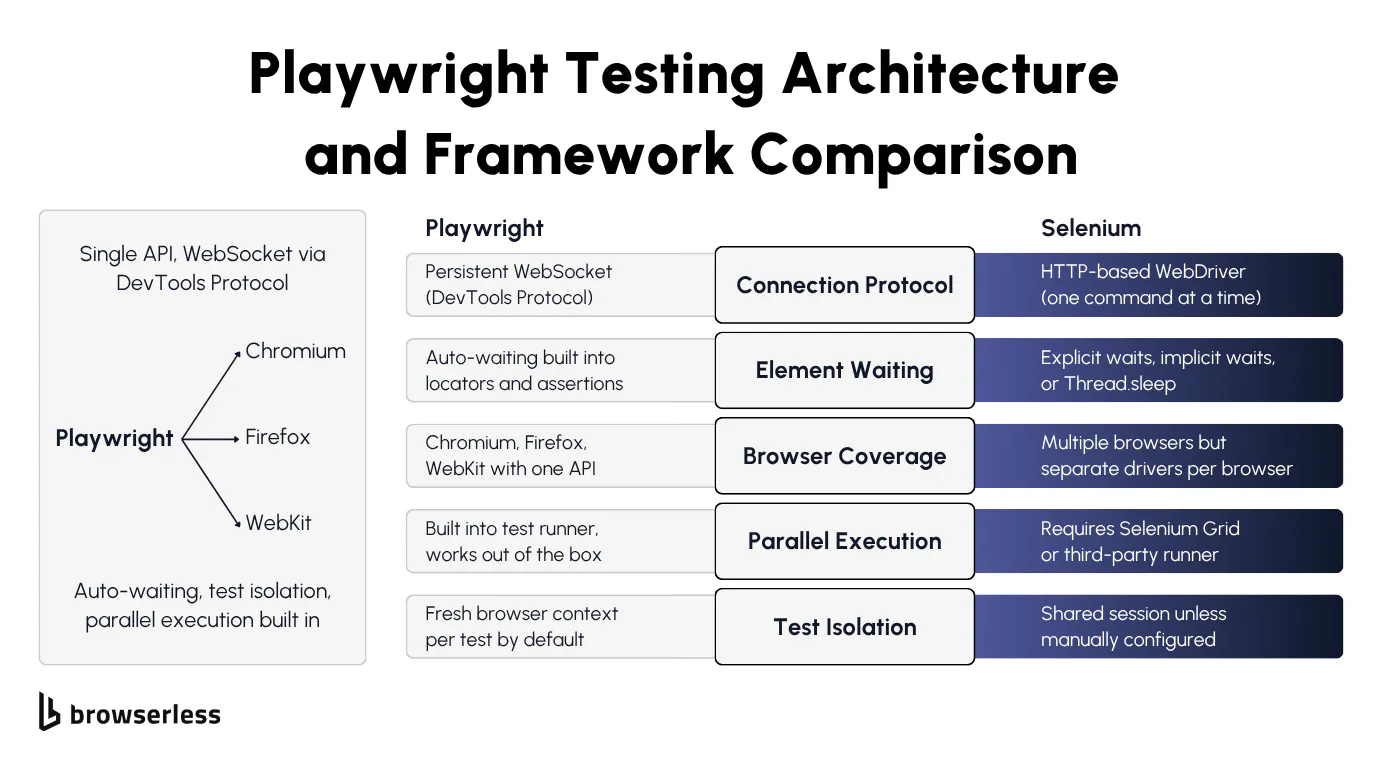
Playwright and Selenium take fundamentally different approaches to talking to the browser. Selenium sends each command over HTTP via the WebDriver protocol, then waits for a response before sending the next one.
Playwright connects to each browser over a persistent protocol and keeps the channel open. For Chromium it uses the Chrome DevTools Protocol (CDP), for Firefox it uses Juggler, and for WebKit it uses Playwright's own protocol. The result is the same in each case: commands fire over an open connection without HTTP round-trips.
If you've spent any time debugging Selenium tests, automatic waiting is the most obvious difference. In a Playwright testing workflow, locators and assertions keep retrying until elements are visible, stable, and actionable, so you're not writing manual waits.
With Selenium, your options are explicit waits, implicit waits, Thread.sleep (or its language equivalent), or some brittle combination of all of them. They all either slow your tests down or make them flaky. On the browser coverage side, Playwright supports all three major rendering engines through a single API.
Selenium covers more browsers overall but requires separate driver binaries and often needs per-browser adjustments to your test scripts. Playwright's test runner ships with built-in parallel workers, whereas Selenium requires Selenium Grid or a third-party runner to achieve the same.
If you're currently on Selenium and considering a switch, see the migrating from Selenium to Playwright guide for the migration path in detail. Note that Browserless 2.x dropped Selenium support, so the migration path for cloud execution is Selenium to Puppeteer or Playwright (then connect to Browserless), rather than Selenium directly to Browserless.
Key features of the Playwright testing framework
Playwright runs every test in a fresh browser context, which means each test gets the equivalent of a brand-new browser profile with its own cookies, localStorage, and cache. By default this prevents cross-test contamination, one of the most common sources of hard-to-debug failures.
The built-in test runner (@playwright/test) handles automatic retries, HTML reporting out of the box, plus JUnit and JSON output for CI. Unlike other test automation setups, you don't need to bolt on a separate framework or wire up reporter plugins yourself.
The codegen tool (npx playwright codegen) records your user interactions in a real browser and spits out test code you can use as a starting point, though you'll almost always need to clean it up before it's production-ready.
CI failure screenshots are notoriously unhelpful. Trace Viewer is the fix. It captures DOM snapshots, network requests, console logs, and action timelines for every test run. When a test fails, you can replay it step by step without re-running anything.
Playwright also supports API testing alongside browser-based tests in the same suite, so you can validate that an endpoint returns a 200 and then check the UI renders correctly, all using the same expect assertions.
Setting up Playwright and writing your first test
Installing Playwright and configuring the test runner
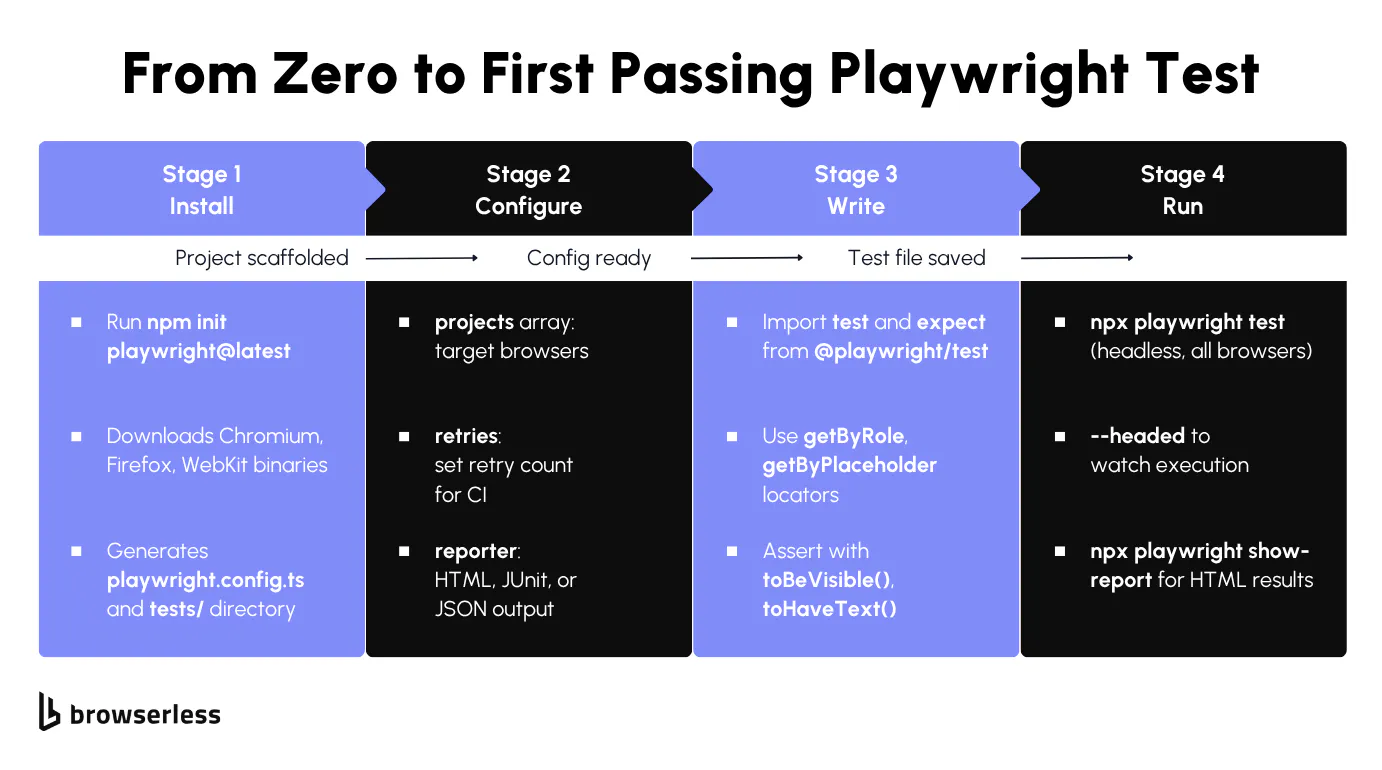
The scaffolding command does the heavy lifting. You'll need Node.js 18 or later (Node 20+ recommended; run node -v to confirm). Scaffold a Playwright project with one command:
npm init playwright@latest
This generates a playwright.config.ts, a tests/ directory with an example spec, and downloads the three browser binaries. In the config, the projects array defines which browsers to test against, testDir points to your test folder, retries sets how many times to retry failed tests, and reporter configures the output format. Once the scaffolding is done, run the suite with npx playwright test (headless by default). Add --headed to watch in a visible browser, --ui for interactive mode, or --project=chromium to target a single browser. After a run, npx playwright show-report opens an HTML report.
The generated config looks like this:
// playwright.config.ts
import { defineConfig, devices } from "@playwright/test";

export default defineConfig({
  testDir: "./tests",
  fullyParallel: true,
  // Retry failed tests twice in CI, zero retries locally
  retries: process.env.CI ? 2 : 0,
  workers: process.env.CI ? 1 : undefined,
  reporter: "html",
  projects: [
    { name: "chromium", use: { ...devices["Desktop Chrome"] } },
    { name: "firefox", use: { ...devices["Desktop Firefox"] } },
    { name: "webkit", use: { ...devices["Desktop Safari"] } },
  ],
});
Run the example test against Chromium to confirm everything works:
npx playwright test --project=chromium
You should see output like this:
Running 1 test using 1 worker
  ✓  1 [chromium] › tests/example.spec.ts:3:5 › has title (498ms)
  1 passed (3.1s)
Writing a basic end-to-end test with assertions
With the project scaffolded, you're ready to write your first real Playwright testing spec. Create a new test file at tests/example.spec.ts and import test and expect from @playwright/test. Each test() block receives a page fixture automatically, so there's no manual browser launch step.
Playwright's locator strategy prioritizes accessibility over raw CSS selectors. Methods like page.getByRole('heading', { name: 'todos' }), page.getByPlaceholder('What needs to be done?'), and page.getByTestId('todo-item') make your tests read like user stories. They also survive UI refactors far better than .class-name selectors.
Web-first assertions make the biggest difference for test reliability. When you write await expect(page.getByRole('heading')).toBeVisible(), Playwright automatically retries that assertion for up to 5 seconds (configurable via expect.timeout in your config).
By contrast, page.waitForSelector() waits for visibility by default but doesn't retry assertions or check actionability the way web-first assertions do. Web-first assertions are the most reliable lever you have for cutting flaky tests.
The following test navigates to the Playwright TodoMVC demo, adds an item, and verifies it appears in the list:
import { test, expect } from "@playwright/test";

test("add a todo item and verify it appears", async ({ page }) => {
  await page.goto("https://demo.playwright.dev/todomvc/#/");

  await expect(page.getByRole("heading", { name: "todos" })).toBeVisible();

  const todoInput = page.getByPlaceholder("What needs to be done?");
  await todoInput.fill("Buy groceries");
  await todoInput.press("Enter");

  const todoItem = page.getByTestId("todo-title");
  await expect(todoItem).toBeVisible();
  await expect(todoItem).toHaveText("Buy groceries");

  await todoInput.fill("Write Playwright tests");
  await todoInput.press("Enter");

  const todoItems = page.getByTestId("todo-title");
  await expect(todoItems).toHaveCount(2);
  await expect(todoItems.nth(0)).toHaveText("Buy groceries");
  await expect(todoItems.nth(1)).toHaveText("Write Playwright tests");
});
Run the test in headed mode with npx playwright test --headed to watch the browser interact with the page in real time. Once it passes, you've got a working foundation to build on.
Fixing flaky tests and mocking network requests
How to fix flaky tests with retries, proper assertions, and test isolation
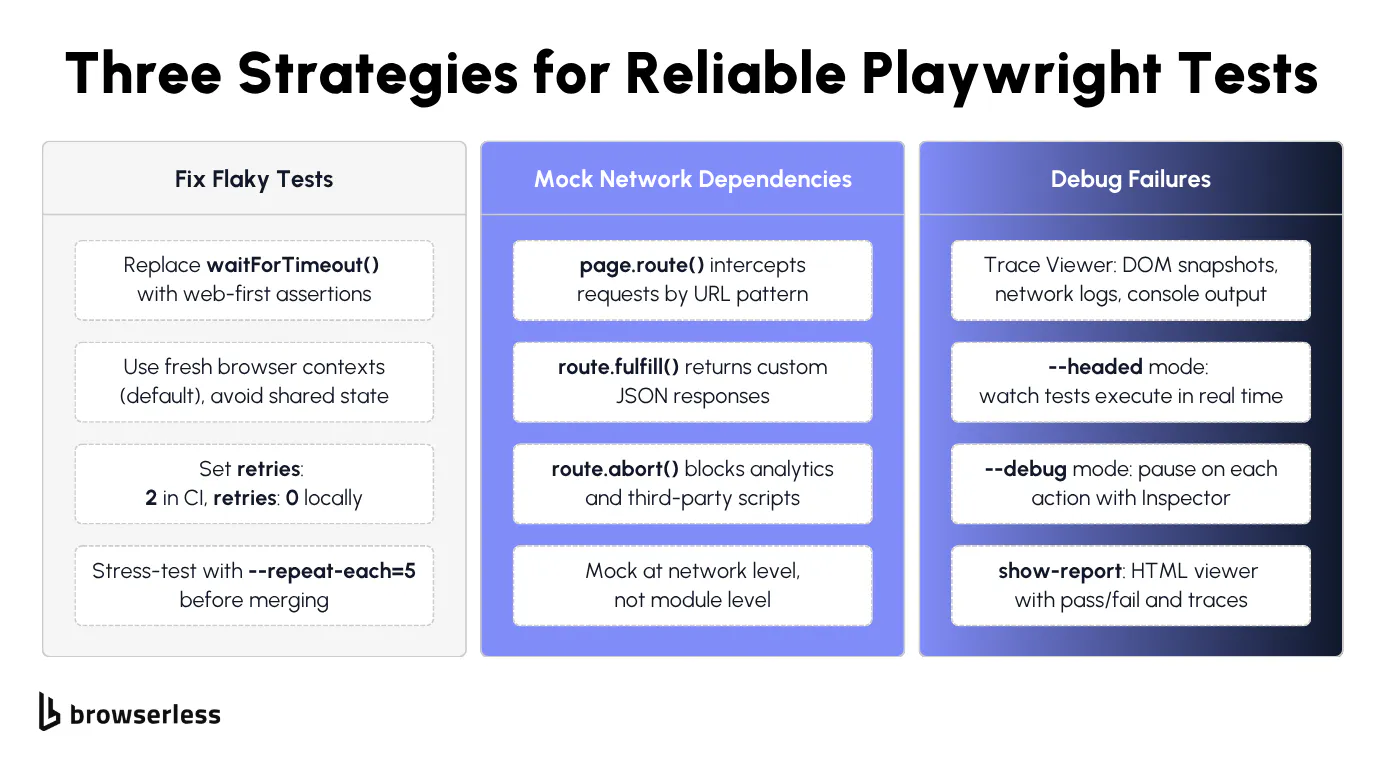
Flaky Playwright tests often come down to timing: the test tries to click a button or read text before the element is ready. Spotting page.waitForTimeout(2000) anywhere in your test code is a red flag.
Replace it with await expect(locator).toBeVisible() or the appropriate web-first assertion. Playwright's assertions automatically retry until the condition is met, which fixes the root cause instead of papering over the problem with a sleep.
The second-biggest source of flakiness is shared state between tests. Playwright's default isolation handles browser state per test, but anything outside the browser (a shared database, a worker-scoped fixture, in-memory module state) can leak between runs. Reset that external state explicitly in beforeEach rather than letting it carry over.
Avoid leaning on cross-test state through test.describe.configure({ mode: 'serial' }) or worker-scoped fixtures. Both patterns create implicit dependencies between tests, so results vary with execution order and a single failure cascades through every dependent test downstream.
Configure retries in your Playwright config with retries: 2 for CI environments and retries: 0 locally. Retries catch genuinely intermittent issues like network hiccups or slow CI runners, but they shouldn't mask broken tests.
If a test requires retries to pass consistently, it has a bug. Fix the underlying timing or state issue instead. In practice, the most common offenders are tests that assume a page loads instantly, or that rely on data from a previous test run.
Use test.beforeEach and test.afterEach hooks for setup and teardown. Avoid putting cleanup logic in afterAll, since a crash in one test skips cleanup for everything that follows. Before merging any new test scripts, run npx playwright test --repeat-each=5 to stress-test for flakiness. If a test fails even once in five runs, it will fail in CI.
How to intercept network requests and mock API responses
External API dependencies will eventually break your tests. The API goes down, response times spike, or the data changes, and your test fails for reasons completely outside your control. Playwright's page.route() method solves this by intercepting network requests at the browser level and returning whatever response you need.
The pattern is straightforward: page.route('**/api/users', route => route.fulfill({ body: JSON.stringify(mockData) })) intercepts any request matching that URL pattern and returns your mock data. The test never hits the real API, so it runs fast and produces deterministic results every time.
Route handlers also let you test error scenarios that are hard to reproduce against a real backend. Return a 500 status to verify your error UI renders correctly. Return malformed JSON to check that your parser doesn't crash.
Use route.abort() to block specific requests entirely: analytics scripts, tracking pixels, ad loaders, and any other third-party requests that slow down your tests or clutter the network tab.
Mock at the network level, not the module level. Intercepting fetch or axios directly inside your application code ties your tests to implementation details. If someone swaps the HTTP library, all your mocks break, but network-level interception with page.route() works regardless of how the application makes its requests.
The following test loads a real page, then exercises both happy-path and error mocks using page.evaluate() to trigger fetches against the routed URLs. Asserting the responses inside the same test() keeps everything in one runnable spec:
import { test, expect } from "@playwright/test";

test("intercept API and render mock data", async ({ page }) => {
  const mockTodos = [
    { id: 1, title: "Mock item one", completed: false },
    { id: 2, title: "Mock item two", completed: true },
  ];

  // Happy-path mock: return our fixture data for /api/todos
  await page.route("**/api/todos", (route) =>
    route.fulfill({
      status: 200,
      contentType: "application/json",
      body: JSON.stringify(mockTodos),
    }),
  );

  // Error-path mock: return a 500 to verify error-handling code paths
  await page.route("**/api/error-test", (route) =>
    route.fulfill({
      status: 500,
      contentType: "application/json",
      body: JSON.stringify({ error: "Internal Server Error" }),
    }),
  );

  // Block analytics and tracking requests to keep tests fast and deterministic
  await page.route("**/{analytics,tracking,gtag}**", (route) => route.abort());

  await page.goto("https://demo.playwright.dev/todomvc/#/");

  // Trigger the happy-path mock and verify the response
  const okRes = await page.evaluate(async () => {
    const res = await fetch("/api/todos");
    return { status: res.status, data: await res.json() };
  });
  expect(okRes.status).toBe(200);
  expect(okRes.data).toEqual(mockTodos);

  // Trigger the error-path mock and verify the 500 surfaces correctly
  const errRes = await page.evaluate(async () => {
    const res = await fetch("/api/error-test");
    return { status: res.status, data: await res.json() };
  });
  expect(errRes.status).toBe(500);
  expect(errRes.data.error).toBe("Internal Server Error");
});
Between deterministic route fulfillment, error mocking for edge cases, and route.abort() for unwanted third-party traffic, your tests no longer depend on external services to pass.
One caveat when porting these patterns to Browserless: page.route() works fully when Playwright connects via its native protocol (the /chromium/playwright endpoint, used by connectOptions.wsEndpoint in your Playwright Test config below). With the standalone chromium.connectOverCDP() example shown in the next section, network interception goes through the CDP Fetch domain instead and may behave differently from local runs. Stick with connectOptions and /chromium/playwright when your tests rely on page.route().
The remaining bottleneck is infrastructure: how many browsers can your CI runner handle before it runs out of memory?
Scaling Playwright tests on cloud browsers with Browserless
Connecting Playwright tests to Browserless BaaS
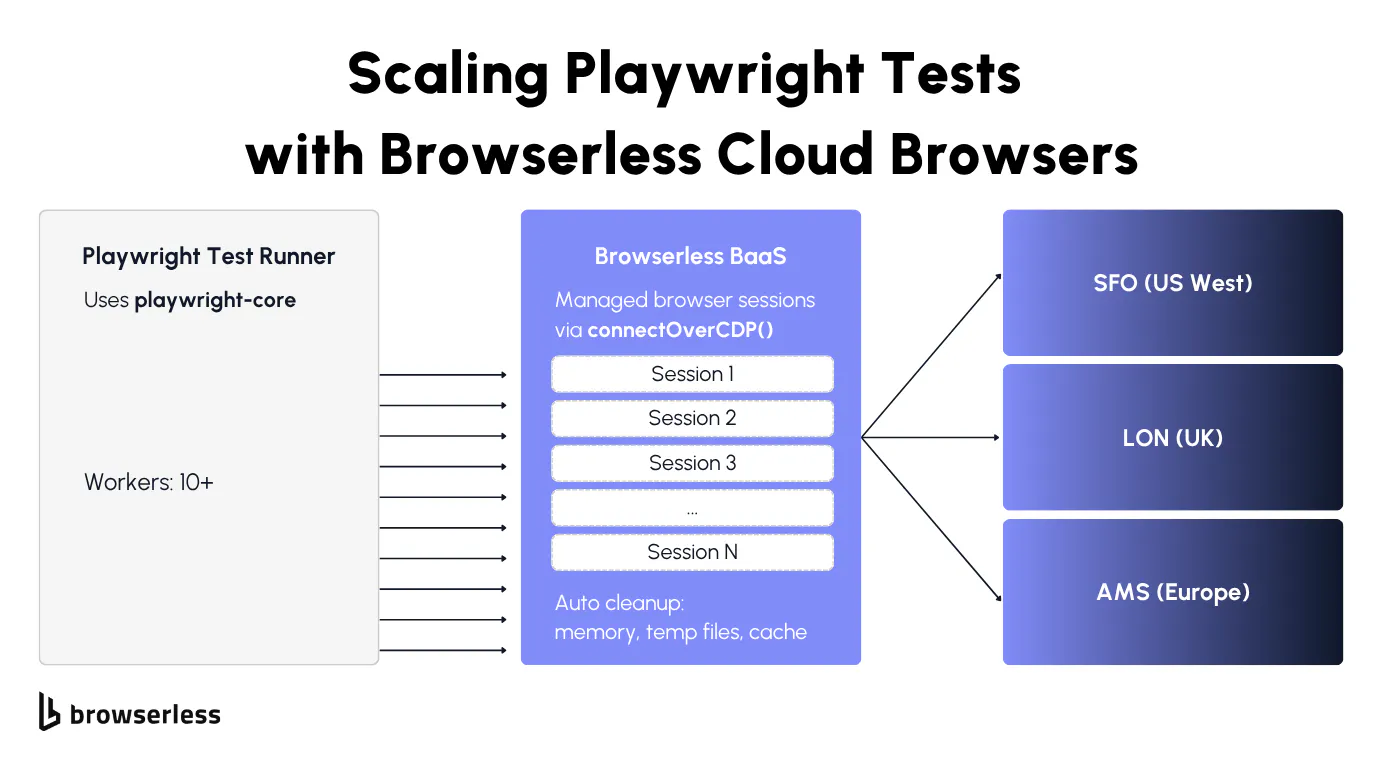
Local Playwright testing hits a wall when your CI runner runs out of memory. Each Chromium instance typically uses 100-300MB of RAM, depending on page complexity, so running tests with ten parallel workers on a 4GB CI runner puts you near the limit. Add a few heavier tests with complex DOM trees, and you'll start seeing out-of-memory crashes.
Browsers as a Service (BaaS), specifically BaaS v2 (the current Puppeteer/Playwright over WebSocket layer), lets you point your existing browser automation tests at cloud-hosted browsers. Your test code stays exactly the same. Only the connection line changes: swap playwright for playwright-core (the lightweight package without bundled browser binaries) and replace the implicit browser launch with chromium.connectOverCDP() pointing at a Browserless endpoint.
Each connection gets its own isolated browser process, with the same context-per-test guarantees you're used to locally. Browserless handles startup, memory management, cleanup, and session teardown, so you don't end up with zombie Chrome processes, out-of-memory crashes, stale /tmp directories, or lingering orphaned tabs filling up your CI runner's disk.
If your staging server is in Europe but your tests are running from US West, you're adding round-trip latency to every single page.goto() call. Browserless has regional endpoints to fix that: production-sfo.browserless.io for US West, production-lon.browserless.io for the UK, and production-ams.browserless.io for Amsterdam. Pick the one closest to your staging server.
Install playwright-core to get started:
npm install playwright-core
Then connect to Browserless and run a test against a cloud-hosted browser:
import { chromium } from "playwright-core";

const TOKEN = process.env.BROWSERLESS_API_KEY;

const browser = await chromium.connectOverCDP(
  `wss://production-sfo.browserless.io/chromium?token=${TOKEN}`,
);

const context = await browser.newContext();
const page = await context.newPage();

await page.goto("https://demo.playwright.dev/todomvc/#/", {
  waitUntil: "domcontentloaded",
});

const heading = await page.getByRole("heading", { name: "todos" });
console.log(`Heading visible: ${await heading.isVisible()}`);

const todoInput = page.getByPlaceholder("What needs to be done?");
await todoInput.fill("Test from Browserless");
await todoInput.press("Enter");

const todoCount = await page.getByTestId("todo-title").count();
console.log(`Todo items: ${todoCount}`);

await page.screenshot({ path: "browserless-screenshot.png" });
await browser.close();
Running this produces:
Heading visible: true
Todo items: 1
That's the same TodoMVC interaction from earlier in the guide, now running on a cloud browser. The test code is identical. The only difference is where the browser runs, which is the point: you don't rewrite tests to scale them.
Running parallel test execution at scale
The workers setting in your Playwright config controls how many tests run simultaneously. Locally, four workers on a machine with 8GB RAM is roughly the safe limit before Chrome instances start competing for memory.
With Browserless, you can push that number against your plan's concurrency limit, since each session runs on dedicated cloud infrastructure rather than your local machine or CI runner.
To scale, set up a custom fixture or global setup that opens a fresh connectOverCDP connection per worker. Browserless automatically load-balances incoming connections across its infrastructure using a least-connected algorithm, so ten parallel sessions run on dedicated cloud workers rather than your local CPU. When a test finishes, Browserless tears down the entire session, including temp files, cache, and anything else that leaked.
For teams testing against bot-protected staging environments, the escalation path is:
- Start with basic BaaS for remote execution.
- If your staging environment uses bot detection, switch the connection URL from
/chromiumto/chromium/stealth. - For multi-step flows that need cookies and localStorage across reconnections, use the Session API to persist state.
- For workflows that need GraphQL-style composition or built-in CAPTCHA solving, move to BrowserQL on
/stealth/bql.
Update your playwright.config.ts to point all workers at Browserless:
// playwright.config.ts
import { defineConfig } from "@playwright/test";

export default defineConfig({
  testDir: "./tests",
  fullyParallel: true,
  // Scale to 10 parallel workers on Browserless cloud infrastructure
  workers: 10,
  retries: 2,
  reporter: [["list"], ["html"]],
  use: {
    connectOptions: {
      wsEndpoint: `wss://production-sfo.browserless.io/chromium/playwright?token=${process.env.BROWSERLESS_API_KEY}`,
    },
    trace: "on-first-retry",
    screenshot: "only-on-failure",
  },
});
With this config, each of the 10 workers gets its own isolated cloud browser, and you can scale the workers count up to your plan's concurrency limit. For a comparison of the self-managed CI runner approach and offloading to Browserless, see the selecting and maintaining CI runners for Playwright guide.
Conclusion
Playwright handles the local testing story well: auto-waiting, test isolation, Trace Viewer, and cross-browser coverage. The scaling wall hits when your CI runner runs out of memory or you need parallel sessions against protected staging environments. Browserless BaaS moves the browsers off your infrastructure so you can keep adding workers without adding ops work. Sign up for a free trial and test it against your own workloads.
FAQs
What is Playwright testing used for?
End-to-end testing of web applications across Chromium, Firefox, and WebKit, with each test running in its own isolated browser context. It covers form fills, click sequences, screenshot comparisons, API validation (verifying an endpoint returns a 200, for example), and accessibility auditing. Unlike Selenium, Playwright bundles the test runner and browser automation into a single package and supports TypeScript, JavaScript, Python, Java, and .NET.
How does Playwright handle cross-browser testing?
Define browsers in the projects array of playwright.config.ts, and Playwright downloads the binaries for you. Every test runs against all configured browsers with the same scripts. For remote execution, connectOverCDP() works with Chromium, while Firefox and WebKit connect through Playwright's native connect() method with /firefox/playwright and /webkit/playwright paths.
Can you run Playwright tests in CI/CD pipelines?
It works with GitHub Actions, GitLab CI, Jenkins, and Azure Pipelines. Playwright outputs JUnit XML, JSON, and HTML reports and provides Docker images with browser dependencies pre-installed. For teams that don't want to manage browser binaries in CI, Browserless BaaS connects your runner to cloud browsers over WebSocket instead.
How do you debug a failed Playwright test?
Trace Viewer (--trace on) captures DOM snapshots, network logs, and console output for every step, letting you replay failures without re-running. Use --headed and --debug locally, --trace on for CI. For cloud sessions, Browserless offers a live debugger with network inspection and DOM highlighting.
What is the difference between Playwright and Cypress for testing?
Playwright runs outside the browser over a persistent connection (CDP for Chromium, Juggler for Firefox, Playwright's own protocol for WebKit). Cypress runs inside the browser and supports Chrome and Firefox, with experimental WebKit support. Playwright handles multi-tab, multi-origin, and iframe scenarios natively, where Cypress has limitations. Parallel execution is built into Playwright's runner, while Cypress needs Cypress Cloud or a third-party orchestrator.