
If you're shipping modern web apps, you're probably juggling a few competing realities: fast-moving UIs, multiple client types, and backend data spread across multiple resources and services. Traditional REST APIs can handle that, but they often push you into multiple endpoints, multiple requests, and a bunch of glue code to stitch responses together.
GraphQL is one of the cleaner ways teams handle the challenge of data requirements changing with every sprint.
In this guide, you'll learn what GraphQL is, what a GraphQL API is, what GraphQL is used for, how GraphQL queries and mutations work, what GraphQL introspection means, and how all of that shows up in real scraping and automation workflows.
What is GraphQL?
GraphQL is a query language for APIs that lets a client request exactly the data it needs, shaped like the response it wants, in a single request. Instead of calling multiple URLs and hoping each endpoint returns the right fields, you send a GraphQL query that describes the data you want, and the server returns JSON with that same shape.
Here's a mental model that holds up in production:
- Schema describes what's possible: your GraphQL schema defines data types, relationships, and operations.
- Operations describe what you want: queries fetch data, mutations modify data (and can return data), subscriptions stream updates.
- Resolvers fetch it: server-side functions map fields to existing data sources, whether that's a database, microservices, or third-party APIs.
That separation is the core idea behind why GraphQL feels different from typical REST APIs. The GraphQL service defines capabilities in the schema definition language (SDL), and client requests express needs with a data query.
How GraphQL works under the hood
At runtime, a GraphQL server is basically an execution engine that takes your operation, checks it against a type system, and then resolves the requested fields. It is a query language plus a server-side runtime for executing queries using a type system you define for your data.
A high-level request lifecycle looks like this:
- Parse the operation, i.e., your GraphQL query or GraphQL mutation.
- Validate it against the GraphQL schema, such as types, fields, arguments, and nullability.
- Execute it field-by-field:
- For each field in the selection set, call a resolver.
- Resolvers can call existing code, hit databases, or aggregate data from multiple data sources.
- Return a JSON payload matching the query shape, as well as the errors if anything failed.
Here's a simple diagram:
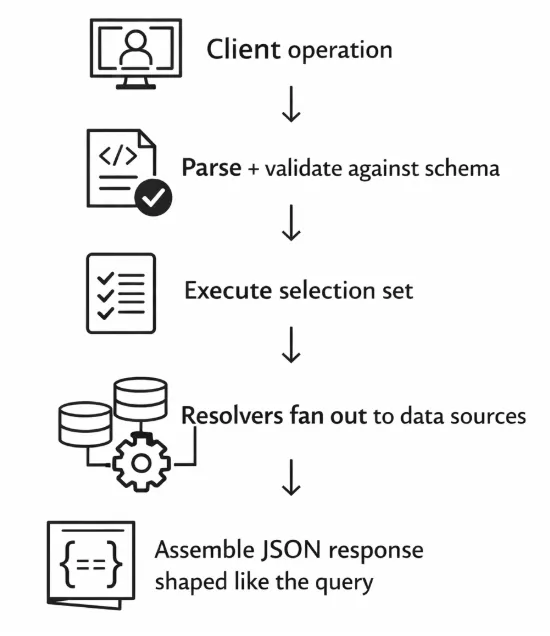
The key detail is "execute selection set." GraphQL doesn't fetch all the data for a resource by default. It fetches the exact data your selection set asks for, then assembles the response in that same nested shape.
What is a GraphQL API?
A GraphQL API is an API that exposes a schema and accepts GraphQL operations (queries, mutations, subscriptions). In practice, most GraphQL requests go to a single endpoint (often /graphql) and the body contains a query string and optional variables.
"Schema-first" usually means the schema is treated as the contract:
- You define data types and relationships in the GraphQL schema definition language.
- You implement resolvers that connect schema fields to business logic and existing data.
- Clients build against the schema, not against a set of resource-specific URLs.
That single endpoint part sometimes throws REST-first teams. GraphQL doesn't replace HTTP - it uses HTTP - but it moves the "what do you want?" part into the request payload instead of relying on multiple endpoints and predefined response shapes.
What is GraphQL used for?
GraphQL tends to shine when you have lots of clients, lots of backend systems, or a UI that changes frequently.
Common use cases include:
- Aggregating multiple backend services into one graph: a single query can pull from multiple data sources without the client doing manual parsing code across endpoints.
- Powering mobile and web apps with different data needs: mobile devices might need only a couple of fields, while desktop UIs need richer nested relationships.
- Evolving APIs without version sprawl: you can add fields and types without forcing a new versioned endpoint, as long as you keep existing fields stable.
- Flexible content and commerce: product pages, catalogs, personalization, and content models often map nicely to a graph of related types.
When it's overkill:
- You have one or two simple resources with stable shapes.
- You mostly need cacheable, read-heavy endpoints that fit cleanly into HTTP caching and CDNs.
- Your team doesn't want to take on schema governance, query cost controls, and resolver performance work.
GraphQL solves real problems, but it also introduces new operational concerns. You'll want that tradeoff to be deliberate.
Queries, variables, and pagination patterns
A GraphQL query is made of fields and selection sets. The selection set is what gives you only the data you asked for.
Here's a simple example:
query GetRepo($owner: String!, $name: String!) {
  repository(owner: $owner, name: $name) {
    name
    description
    stargazerCount
    owner {
      login
      avatarUrl
    }
  }
}
Variables keep your query reusable and safer than string concatenation. Most clients send JSON variables alongside the query.
Fragments help when multiple UI components need the same field groups:
fragment RepoCard on Repository {
  name
  description
  stargazerCount
}

query Home($owner: String!, $name: String!) {
  repository(owner: $owner, name: $name) {
    ...RepoCard
  }
}
The multiple API calls before and after
If you've ever done this with a traditional REST API, you know the pattern:
- GET /repos/:owner/:name
- GET /repos/:owner/:name/owner
- Maybe more calls for related resources, depending on the page
That's multiple requests, multiple endpoints, and a lot of code that merges these shapes together.
With GraphQL, you can often retrieve data for the whole screen in a single query. That's not free - the server still has to do the work - but the client-side data aggregation usually gets simpler.
Pagination patterns you'll actually see
Pagination is where GraphQL gets opinionated based on the schema you're consuming. The common patterns:
- Cursor-based connections -
edges { node cursor }andpageInfo { hasNextPage endCursor } - Offset/limit - simple, but can be brittle with changing datasets
- Infinite scroll cursors - common in feeds, notifications, content lists
If you're building the API, cursor pagination tends to be the safest default for performance and consistency. If you're consuming a GraphQL API (including for scraping), learn the API's pagination style early so you don't accidentally pull massive pages.
What is mutation in GraphQL?
Mutations are the write side of GraphQL: create, update, delete, or "trigger an action." They live on the top-level Mutation type in the schema, separate from the Query type.
A mutation typically:
- Accepts input arguments, often grouped into input types
- Performs a write or side effect on the server
- Returns a predictable payload, usually the updated object, which makes client caches easier to update
Here's an example mutation structure (short and readable):
mutation UpdateUser($id: ID!, $email: String!) {
  updateUser(id: $id, email: $email) {
    id
    email
    updatedAt
  }
}
The convention that returns the updated object is one of those small quality-of-life things that make GraphQL feel ergonomic. You modify data and immediately get back the exact data your UI needs, without a follow-up fetch.
What is GraphQL introspection?
GraphQL introspection is the ability to query a GraphQL API about its own schema. Tools like GraphiQL and GraphQL Playground use introspection queries to power docs, autocomplete, and the experience of clicking around the schema.
Introspection is great for developer experience, but it's also something you'll see teams lock down in production. Depending on your threat model, you might:
- Allow introspection only for authenticated users
- Disable it on public endpoints
- Gate it behind environment flags or network policies
There's no universal rule here. The practical rule is to treat schema visibility as part of your API surface area, then decide based on the risk you're comfortable with.
Practical example: how developers explore a new API
A typical flow when you're testing GraphQL APIs for the first time:
- Use GraphiQL/Playground (or curl) to run an introspection query
- Browse types, fields, and arguments in the generated docs
- Prototype a few GraphQL requests with variables
- Generate types for your client (e.g., TypeScript, Swift, Kotlin) so your UI code stays honest
The fact that the API is self-describing is one of GraphQL's underrated wins. You spend less time hunting for stale docs and more time shipping.
GraphQL's tradeoffs
GraphQL makes it easy for clients to express complex queries. That power shifts work to the server, which is where most of the tradeoffs live.
Use this checklist when you're evaluating GraphQL vs a traditional REST API:
- Caching complexity - HTTP caching is straightforward with REST. With GraphQL, caching strategies usually move into the client, persisted queries, or custom gateway layers.
- Query cost and performance - A single query can be cheap or expensive depending on nesting, filters, and resolver behavior.
- N+1 resolver issues - Field-by-field execution is great for composition, but it can explode into many backend calls if you're not batching.
- Error handling shape - GraphQL responses can include partial data plus an errors array. That's useful, but you need a consistent policy across teams.
- Schema governance - The schema becomes a product. You'll need conventions for deprecation, naming, and ownership.
Guardrails you should put in early
OWASP's GraphQL Cheat Sheet calls out query depth and limiting as practical defenses against expensive queries and denial-of-service style abuse. In practice, that usually means setting:
- Maximum query depth
- Complexity scoring (cost analysis)
- Result size limits and pagination enforcement
If you've ever watched a production GraphQL server fall over because someone requested nested relationships five levels deep, you already know why this matters.
When to choose GraphQL vs. REST
You don't need a philosophical GraphQL vs. REST APIs debate; you need a decision that fits your constraints.
Go with GraphQL when:
- You support multiple client types with different data requirements, including mobile and web apps, internal tools, and partner integrations.
- The UI changes often, and you want to avoid shipping new endpoints for every screen tweak.
- You're aggregating data from multiple data sources and want a clean contract for data clients.
- Bandwidth matters, and you want clients to request data they need without over-fetching
Stick with REST when:
- Your resources are stable and map cleanly to endpoints.
- You want simple caching and observability with standard HTTP semantics.
- Your team doesn't want to own schema governance and resolver performance work.
- The single endpoint model conflicts with existing infrastructure in a way you can't reasonably change.
GraphQL doesn't have to replace REST. Plenty of teams run both: REST for simple, cacheable resource; GraphQL for the UI-facing composition layer.
GraphQL for web scraping pipelines
If you're building scraping or automation pipelines in 2026, you'll keep running into GraphQL. A lot of modern frontends fetch their real data through GraphQL requests, even when the UI is a complicated SPA.
That creates a useful option for scraping:
- Instead of DOM scraping, you can sometimes replicate the GraphQL call directly.
- You retrieve data in structured JSON without writing a bunch of selector logic.
- The pipeline can be more stable when the UI layout changes, because you're pulling the underlying data model.
This only works if you can authenticate and replicate the request ethically and within the site's terms. You're not trying to be invisible. You're trying to be reliable and predictable.
How to spot GraphQL requests
In Chrome DevTools:
- Open Network
- Filter by graphql or look for a single endpoint receiving POSTs
- Click a request and look for a payload containing query and variables
- Watch for "persisted queries" (you might see an operation name plus a hash instead of a full query string)
A typical raw GraphQL HTTP request looks like this:
curl 'https://example.com/graphql' \
  -H 'content-type: application/json' \
  -H 'authorization: Bearer <token>' \
  --data-raw '{
    "query": "query Products($first:Int!, $after:String){ products(first:$first, after:$after){ edges{ node{ id name price } cursor } pageInfo{ hasNextPage endCursor } } }",
    "variables": { "first": 25, "after": null }
  }'
If you can consistently make that call, you've got a clean data extraction path without brittle DOM logic.
When GraphQL won't be enough
GraphQL endpoints don't magically remove browser complexity. You still hit situations where a browser is required:
- Session bootstrapping happens in the UI (cookies, CSRF tokens, dynamic headers).
- Anti-bot challenges gate access before the API call ever succeeds.
- GraphQL calls only fire after complex UI flows (multi-step wizards, websockets, device checks).
- CAPTCHA or interstitial flows block the initial session.
In those cases, GraphQL knowledge still helps. You just apply it one layer deeper: use a browser to establish the session, then let the pipeline call the GraphQL endpoint once the right cookies and headers exist.
Where Browserless fits: BrowserQL and GraphQL-style automation
If you like GraphQL's declarative approach, Browserless has a similar model for browser automation where you describe what you want.
BrowserQL (BQL) is a GraphQL API for browser automation with built-in stealth capabilities. Your script is one big mutation that drive a managed browser through the mutation fields: navigate, wait, click, extract, and return structured output.
Unlike a typical GraphQL API, BQL is exclusively mutations - because all operations change browser state. Every step is a mutation field: navigating to a page, clicking an element, reading text, even solving a CAPTCHA.
This lands well for scraping pipelines because it reduces the parts that usually get flaky:
- You're calling a single endpoint with explicit operations
- You can keep automation steps readable, like a query language for browser actions
- You can debug with tooling designed around the same model (an IDE experience, live sessions, etc.)
A small example idea: one mutation that navigates and extracts
The exact shape of BQL operations depends on the schema Browserless exposes, but the pattern is consistent: a mutation expresses a sequence of browser actions through mutation fields, then returns structured results.
The actual BQL mutation structure
BQL mutations compose directly - no wrapper types, no special input objects. You chain mutation fields sequentially, and each builds on the state the previous one left:
mutation ScrapeHN {
  goto(url: "https://news.ycombinator.com", waitUntil: firstMeaningfulPaint) {
    status
    time
  }
  firstHeadline: text(selector: ".titleline") {
    text
  }
}
For nested structured data, mapSelector lets you express multi-level extraction declaratively:
mutation MapHN {
  goto(url: "https://news.ycombinator.com", waitUntil: networkIdle) {
    status
  }
  # Iterate over each submission
  posts: mapSelector(selector: ".submission") {
    itemId: id
    # Get the ranking of the submission
    rank: mapSelector(selector: ".rank", wait: true) {
      rank: innerText
    }
    # Get the link of the submission
    link: mapSelector(selector: ".titleline > a", wait: true) {
      # You can query for arbitrary tags attributes as well by using the "attribute" mechanism.
      link: attribute(name: "href") {
        value
      }
    }
  }
}
The response comes back as structured JSON matching that shape.
Why this matters for production pipelines
In scraping and automation, reliability is usually about controlling variance:
- Variance in browsers - Headless flags, device fingerprinting, and inconsistent environments.
- Variance in execution - timing, waits, page transitions, and unexpected modals.
- Variance in debugging - reproducing issues where something fails in the cloud.
BrowserQL is the same thing you'd build yourself, but tuned and hosted. It gives you a managed runtime plus a query-language interface, which can be easier to integrate into existing systems than long-lived scripts.
If your pipeline starts as a quick prototype and turns into a job that runs 50,000 times a day, that transition is where a managed approach usually pays off.
Hybrid mode: BQL session + Puppeteer/Playwright handoff
If your team already has Puppeteer or Playwright scripts, BQL's reconnect mutation lets you use BQL to establish the session (handling bot detection and CAPTCHA), then hand off the live browser to your existing library code:
mutation EstablishSession {
  goto(url: "https://example.com/login") {
    status
  }
  solveCaptcha: solve(type: cloudflare) {
    found
    solved
  }
  reconnect(timeout: 30000) {
    browserWSEndpoint
  }
}
The returned browserWSEndpoint connects directly to Puppeteer via puppeteer.connect().
IDE and code export
Browserless ships an IDE at https://browserless.io/account/bql that's built around the same model as GraphiQL - but tuned for browser automation. It includes one-click code export to JavaScript, Python, Java, C#, and cURL, so you can prototype a mutation in the IDE and drop it into your pipeline without rewriting headers or payload structure.
Conclusion
So, what is GraphQL in practice? It's an open, strongly typed way to describe and execute data fetching: the schema describes what exists, a GraphQL query requests exactly what data you want, and the GraphQL server executes it field-by-field through resolvers. Mutations handle the data modification side, and introspection queries make the system self-describing and easy to explore.
For automation teams, the takeaway is practical: when a site is GraphQL-powered, understanding queries, mutations, and introspection often lets you build cleaner, more stable scraping pipelines than pure DOM scraping. And when GraphQL calls are gated behind browser-only flows, it helps to have a browser automation layer that still feels declarative.
If you want to explore that approach, try Browserless and take BrowserQL for a spin. It's a GraphQL-style interface for browser automation, designed for real-world scraping and reliability work.
FAQs
What is GraphQL in simple terms?
GraphQL is a query language for APIs where you ask for the exact fields you want, and the server returns JSON in the same shape. The schema acts like the contract, and operations (queries and mutations) describe what you want to fetch or change.
When to use GraphQL for web scraping pipelines?
Use GraphQL when the site's frontend is already pulling structured data from a GraphQL endpoint, and you can reproduce those requests legitimately (auth, headers, variables, pagination). It's often more stable than scraping rendered HTML because you're extracting from the underlying data model.
Stick with browser automation when session setup, anti-bot challenges, dynamic tokens, or UI-driven flows prevent direct API access. In those cases, use the browser to establish state, then call the GraphQL endpoint once the session is in place.