
TL;DR
- Bot detection. The systems websites use to identify and block automated traffic by scoring browser fingerprints, Internet Protocol (IP) reputation, Completely Automated Public Turing test (CAPTCHA) responses, and user behavior together.
- Signal correlation. A clean fingerprint means nothing if your IP is flagged, and a good IP means nothing if your behavior looks automated. Detection engines correlate identity, network, and behavior across sessions and over time, so single-vector fixes won't hold.
- Two primary factors. IP reputation and browser fingerprinting drive most blocks. Residential proxies paired with stealth browser sessions handle most protected sites without further work.
- Layered escalation. Start with stealth routes, add residential proxies when IP blocking appears, switch to the
/unblockAPI for sites that detect Chrome DevTools Protocol (CDP) connections, and escalate to BrowserQLsolvefor persistent CAPTCHA. Only add complexity when the previous layer stops working.
Introduction
Your scraper was working fine yesterday, but today it returns a CAPTCHA page instead of data, likely caused by bot detection. Every major website runs some form of bot management, and the detection engines check your browser fingerprint, evaluate your IP reputation, analyze how you interact with the page, and correlate all of it across sessions to decide if you're a real user or automated traffic. In this article, we'll walk through each detection layer and how to bypass it.
What is bot detection?
Bot detection is how websites identify and block automated traffic. Bot management engines score browser fingerprints, IP reputation, CAPTCHA responses, and user behavior together, then assign a risk score that decides whether to allow the request, serve a challenge, or block outright.
The systems are layered on purpose. Any single signal (a clean fingerprint, a residential IP, human-like timing) can be spoofed in isolation. What separates bots from real users is whether all those signals stay consistent across sessions and over time. Security teams tune the thresholds per site, which is why automation that works against one target gets blocked on the next.
How bot detection systems work
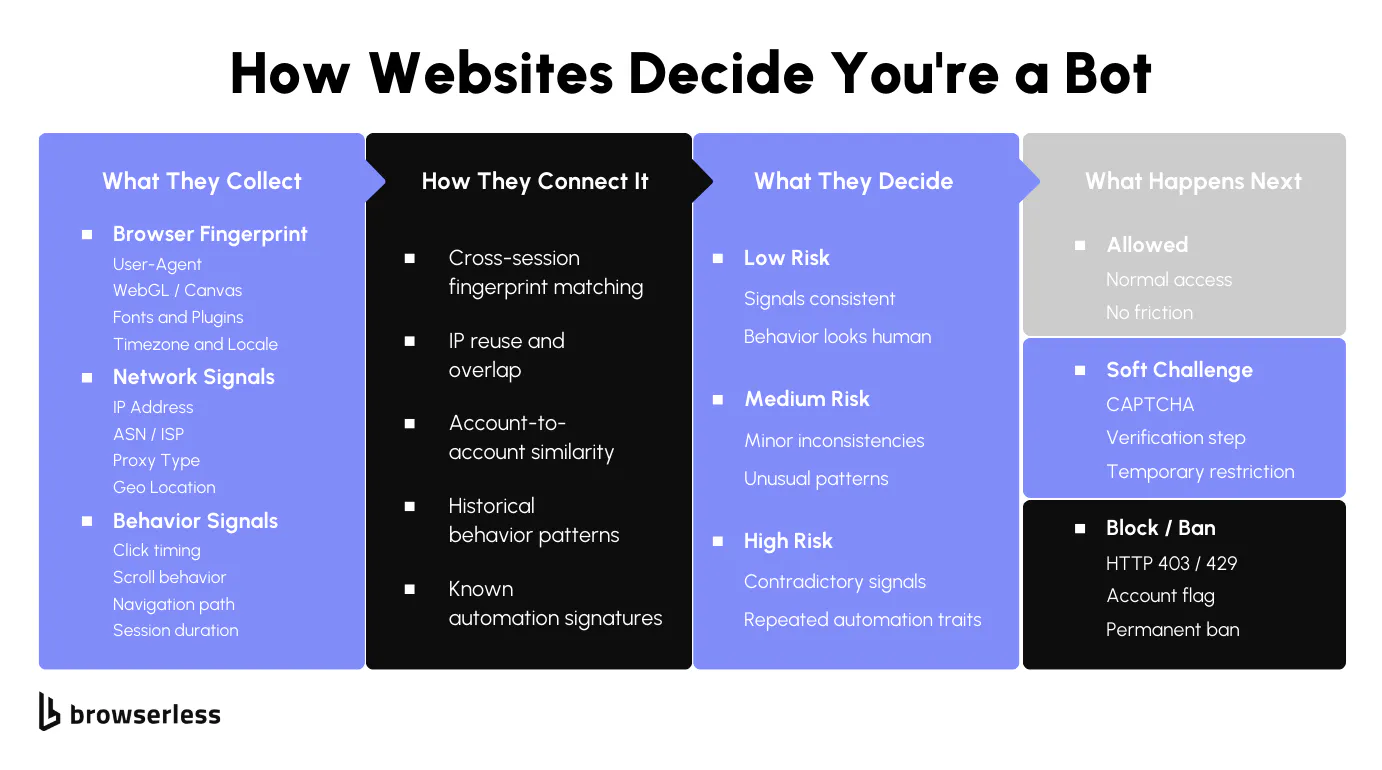
Detection engines combine browser-level, network, and behavioral signals into a single risk score. The diagram below shows the pipeline from signal collection through correlation analysis to enforcement.
Fingerprinting and identity signals
Each page load sends your browser data to the site: User-Agent string, screen resolution, WebGL renderer, canvas hash, fonts, and timezone. Individually, these mean nothing. Together, they form a fingerprint that bot detection uses to identify your browser across visits and separate real users from bots.
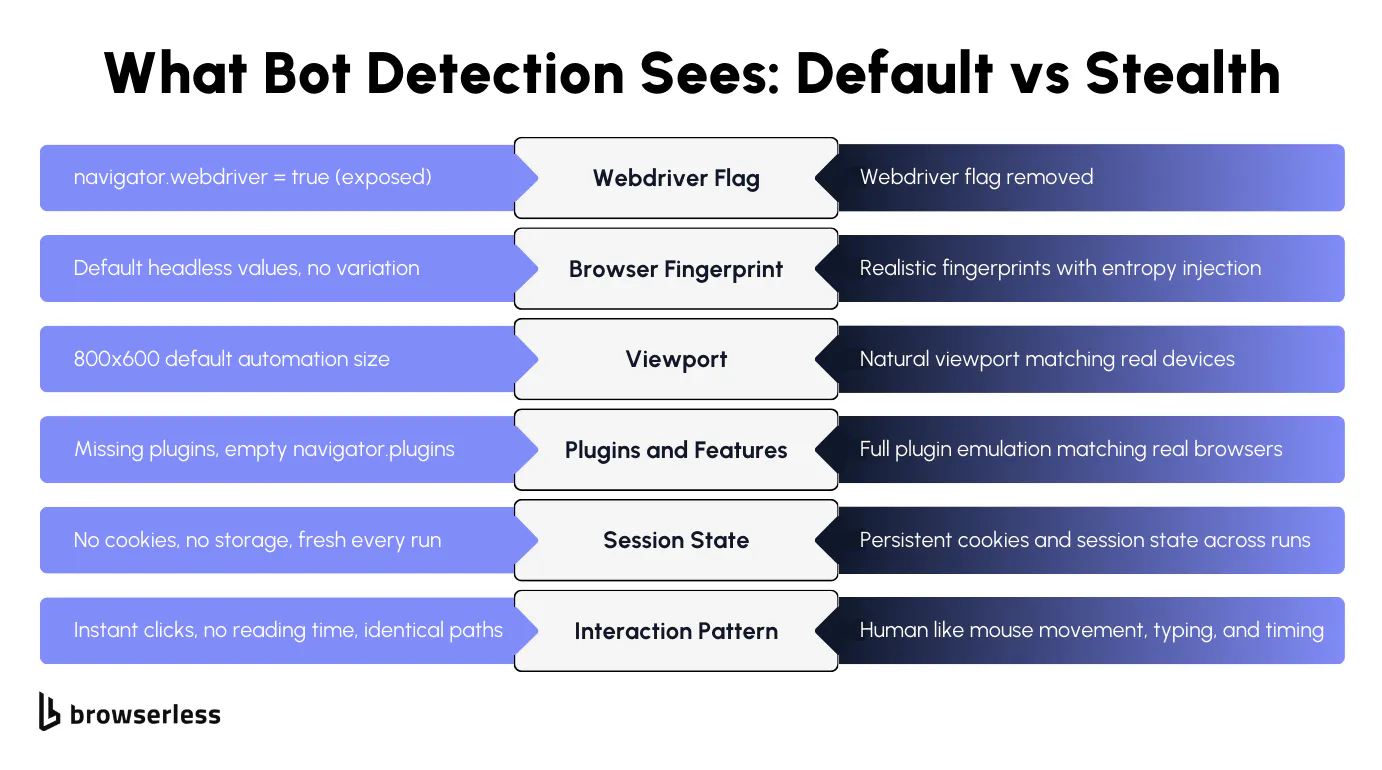
Headless browsers leak signals that give you away instantly: the navigator.webdriver flag is true, the plugin list is empty, the viewport defaults to something like 800x600, and canvas returns identical values across sessions.
Bot detection engines know what these defaults look like. Your code doesn't need to do anything suspicious. Loading the page with default automation settings is enough for the site to detect and flag you as automated traffic.
Detection doesn't stop at a single visit. Sites correlate fingerprints across sessions to track bot activity over time. Fifty requests with the same canvas hash and empty plugins are grouped as traffic from a single source, even when the IP addresses change. The fingerprint links your sessions together, which is why rotating IPs alone won't protect you from getting blocked.
IP reputation, CAPTCHA, and behavioral analysis
Before a site even looks at your browser, it's already checked your IP address. Your IP carries a reputation score based on its origin and history. Cloud provider ranges, shared hosting blocks, and IPs with prior abuse reports score low. Clean residential ranges score high. IP reputation is the first filter: sites evaluate it before checking anything else.
When IP reputation isn't conclusive, CAPTCHA appears. Sites trigger reCAPTCHA, Cloudflare Turnstile, and AWS Web Application Firewall (WAF) when the bot score crosses a threshold, protecting the site from malicious bots running credential-stuffing and account-takeover attempts while avoiding false positives that block real users.
Behavioral analysis goes deeper than fingerprints or IP checks. Sites track mouse movement, scroll patterns, click timing, and time on page. Real users pause, scroll back, and take unpredictable paths. Bots go straight to the target on every attempt.
All of this feeds into a single risk score. Machine learning engines analyze patterns across all traffic, so detection gets sharper over time, and security teams tune thresholds differently per site. That's why identical code works on one site and gets blocked on the next.
Bypassing fingerprint and identity detection
Once a site has flagged your browser as automated, the fix is to make those identity signals look like a real user's. The sections below cover how stealth routes rewrite the fingerprint surface and how human-like behavior covers the rest.
How stealth routes mask automation fingerprints
The best way around this is to make your browser look like a real user's. The Browserless anti-detection techniques guide covers the full range of approaches. Browserless's /stealth routes handle this automatically by applying fingerprint mitigations and injecting entropy into every session.
Browserless spoofs WebGL, Canvas, WebRTC, AudioContext, and other browser fingerprint values with realistic, varied data and removes the navigator.webdriver flag along with other automation indicators. Detection engines that check for default headless browser settings won't find them.
To illustrate this, the following Playwright snippet connects through the /stealth route with a residential proxy. The wss:// URL connects to Browsers as a Service (BaaS), so the same Puppeteer or Playwright script you'd run locally now runs against a managed browser:
import { chromium } from "playwright-core";

// Connect to Browserless stealth route with residential proxy
const browser = await chromium.connectOverCDP(
  'wss://production-sfo.browserless.io/stealth?token=YOUR_API_KEY&proxy=residential&proxyCountry=us&launch={"acceptInsecureCerts":true}',
);

const context = await browser.newContext({
  viewport: { width: 1366, height: 768 },
});

const page = await context.newPage();
await page.goto("https://bot.sannysoft.com", { waitUntil: "networkidle" });
await page.screenshot({ path: "stealth-test.png" });
await browser.close();
You have three stealth route options: /stealth is the recommended default with managed mitigations, /chromium/stealth is optimized for Chromium, and /chrome/stealth uses Chrome-native mitigations.
For BrowserQL users, the /stealth/bql endpoint applies the same protections to GraphQL-based automation. Each stealth route applies the same anti-detection layer; the difference is the underlying browser binary. /stealth and /chromium/stealth run the in-house privacy-hardened Chromium with the smallest fingerprint surface, while /chrome/stealth runs Google Chrome for sites that explicitly require it. Pick the one that matches the browser the target site expects.
Human-like behavior and session consistency
Fingerprint mitigations cover what your browser reports about itself. Behavior is the other half, and bot detection systems analyze both. The blockAds parameter enables ad blocking (which many real users have enabled), removing a signal that distinguishes your sessions from human traffic.
BrowserQL ships a humanlike mode that simulates mouse movements, typing patterns, scroll behavior, and natural interaction timing for sites with stricter detection. It's off by default. Enable it by setting humanlike: true in the launch payload or toggling Human-like Behavior in the BQL IDE session settings.
Session state matters just as much as fingerprinting. Every time your automation starts with a clean browser, zero cookies, no stored data, and a fresh environment, bot detection flags it as suspicious activity. Persisting cookies and session state across runs makes your browser appear to be a returning user rather than a new bot on every attempt.
Don't treat your fingerprint and session state as separate concerns. A stable fingerprint with zero cookies looks like a thousand fresh visitors arriving from the same browser; a full cookie jar paired with a rotating fingerprint looks worse. Keep both stable across runs so your browser presents as the same returning user every time.
Bypassing IP and network detection
A clean fingerprint won't help if your IP shows up on a datacenter blocklist. Most bot-detection engines run reputation lookups before they look at the browser, so the network layer is where the next bypass lives: residential routing for trust, geographic alignment so all the signals match.
Residential proxies and IP reputation
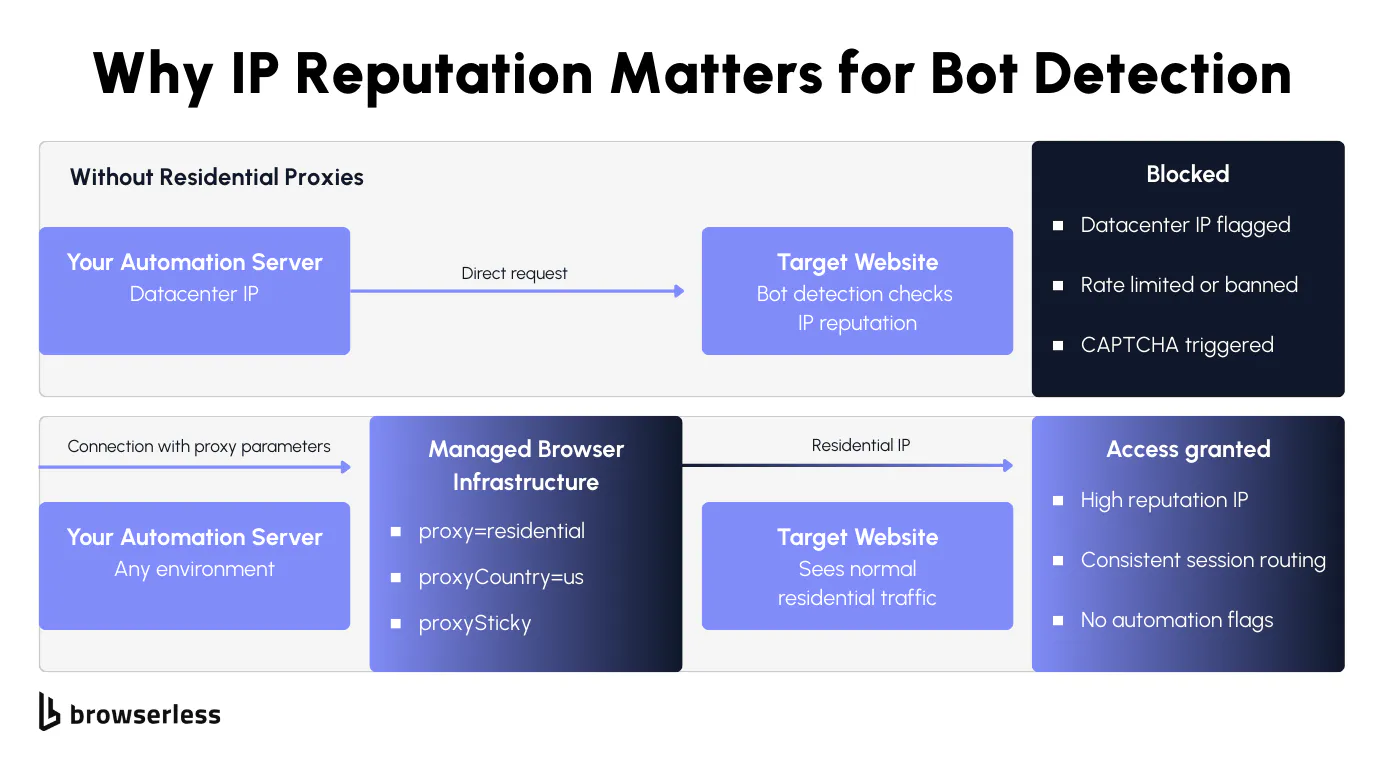
Stealth routes fix your browser fingerprint, but bot detection systems evaluate your network before they even look at the browser. Datacenter IP addresses from cloud providers are easy to identify and get blocked because legitimate users don't browse from the server infrastructure.
Bots running automated attacks typically use these cheap data center IPs, so detection engines flag them aggressively. Residential proxies use real Internet Service Provider (ISP)-assigned IP addresses that carry higher trust scores and look like normal human traffic to bot management systems.
Browserless has built-in residential proxy support. Add proxy=residential and proxyCountry to your connection URL, and every request in the session routes through a residential IP:
import { chromium } from "playwright-core";

// Stealth route with residential proxy and sticky IP for the full session
const browser = await chromium.connectOverCDP(
  'wss://production-sfo.browserless.io/stealth?token=YOUR_API_KEY&proxy=residential&proxyCountry=us&proxySticky&launch={"acceptInsecureCerts":true}',
);

const context = await browser.newContext({
  viewport: { width: 1366, height: 768 },
  locale: "en-US",
  timezoneId: "America/Chicago",
});

const page = await context.newPage();
await page.goto("https://api.ipify.org?format=json", { waitUntil: "networkidle" });
await page.screenshot({ path: "proxy-test.png" });
await browser.close();
The proxySticky parameter asks the proxy network to keep the same IP across the session when possible. In practice this covers most requests, redirects, and sub-resources from a single network route, with occasional rotation if the upstream node drops.
Bot detection flags mid-session IP changes as suspicious activity, so sticky sessions reduce that risk substantially even with the best-effort caveat. For REST API users, the same parameters work on any endpoint:
curl -X POST "https://production-sfo.browserless.io/content?token=YOUR_API_KEY&proxy=residential&proxyCountry=us&launch=%7B%22acceptInsecureCerts%22%3Atrue%7D" \
  -H "Content-Type: application/json" \
  -d '{
    "url": "https://nowsecure.nl",
    "waitForTimeout": 3000
  }'
You set the proxy at connection time, and Browserless handles routing from there, with no per-request configuration or separate proxy management needed.
Rate limiting and geographic consistency
Residential IPs solve the reputation problem, but bad request patterns will still get you blocked. Sending requests in bursts from a single IP triggers rate limiting even with residential proxies. Spread requests across time with controlled pacing and concurrency so your web traffic looks like real users browsing rather than bots hammering the site.
Geographic consistency is another common failure point: if your proxy routes through a US residential IP but your browser locale is German and your timezone is Tokyo, detection engines catch that mismatch and flag it.
Security teams configure these cross-signal checks to detect and block traffic that doesn't add up. Match your proxy geography with your browser locale, timezone, and language settings so all signals align. You can set this manually in your Playwright context (as the snippet above does, with US proxy + en-US locale + America/Chicago timezone), or add proxyLocaleMatch=1 on a /stealth connection to have Browserless align the Accept-Language header to your proxyCountry automatically.
Account-based workflows need one identity per IP address. Bot detection systems track which accounts share IPs and flag the overlap as bot activity or potential account takeover. If you're scraping without accounts, IP rotation works, but only with controlled pacing.
When the Browserless execution region, proxy geography, browser settings, and language headers all match, sessions look like normal human traffic, and detection engines have fewer attack patterns to correlate against you.
Bypassing CAPTCHA and advanced bot detection
The most protected sites layer CDP-aware detection and CAPTCHA on top of fingerprint and IP checks, so the bypass needs to layer too. The escalation runs from in-session CAPTCHA solving to the /unblock API to BrowserQL, each step trading more configuration for more reach against aggressive targets.
The /unblock API and BrowserQL solve mutation
When stealth routes and residential proxies aren't enough, you have two options before reaching for BrowserQL. If a CAPTCHA is your only blocker, add solveCaptchas=true to your /stealth connection URL, and Browserless detects and solves it inside the same Playwright or Puppeteer session with no library swap needed. If the site is detecting the CDP connection itself rather than a CAPTCHA, the /unblock API is the next step. It works without using Puppeteer, Playwright, or any automation library, so it doesn't carry the CDP fingerprints those libraries usually leave behind.
The /unblock API works directly with the browser's native interfaces and automatically corrects common bot blockers that sites use to block automated traffic. Security teams configure these blockers to detect library connections specifically, so removing that signal is often enough to get through.
Pair /unblock with residential proxies for the best results on protected sites. This curl request returns the fully rendered page content with bot detection bypassed:
curl -X POST "https://production-sfo.browserless.io/unblock?token=YOUR_API_KEY&proxy=residential&proxyCountry=us" \
  -H "Content-Type: application/json" \
  -d '{
    "url": "https://nowsecure.nl",
    "content": true,
    "cookies": false,
    "screenshot": false,
    "browserWSEndpoint": false
  }'
You get back rendered HTML after bypassing bot management systems. For most protected sites, that's all you need, without CAPTCHA challenges or block pages.
When CAPTCHA still appears despite stealth settings and residential IP addresses, BrowserQL's solve mutation handles it automatically, detecting the CAPTCHA type and solving reCAPTCHA, Cloudflare Turnstile, and other challenge types without human involvement.
Use the if mutation to conditionally trigger solving only when a CAPTCHA is present, saving time and resources on pages that don't always serve challenges.
mutation BypassAndSolve {
  goto(url: "https://nowsecure.nl", waitUntil: domContentLoaded, timeout: 60000) {
    status
  }
  if(selector: "[class*='captcha'], #challenge-running, .g-recaptcha") {
    solve(timeout: 120000) {
      found
      solved
      time
    }
  }
  content: html {
    html
  }
}
The if mutation checks whether a CAPTCHA element exists on the page before attempting to solve. If no CAPTCHA is present, it skips straight to content extraction. Otherwise, solve identifies the type and handles it.
The timeout parameter on solve controls how long to wait for a CAPTCHA to appear on the page (default 30 seconds), not the solve duration itself. Once a CAPTCHA is found, solving runs until complete regardless of this timer, so set your session-level timeout generously for sites with aggressive bot management.
Escalation strategy: start light, scale up
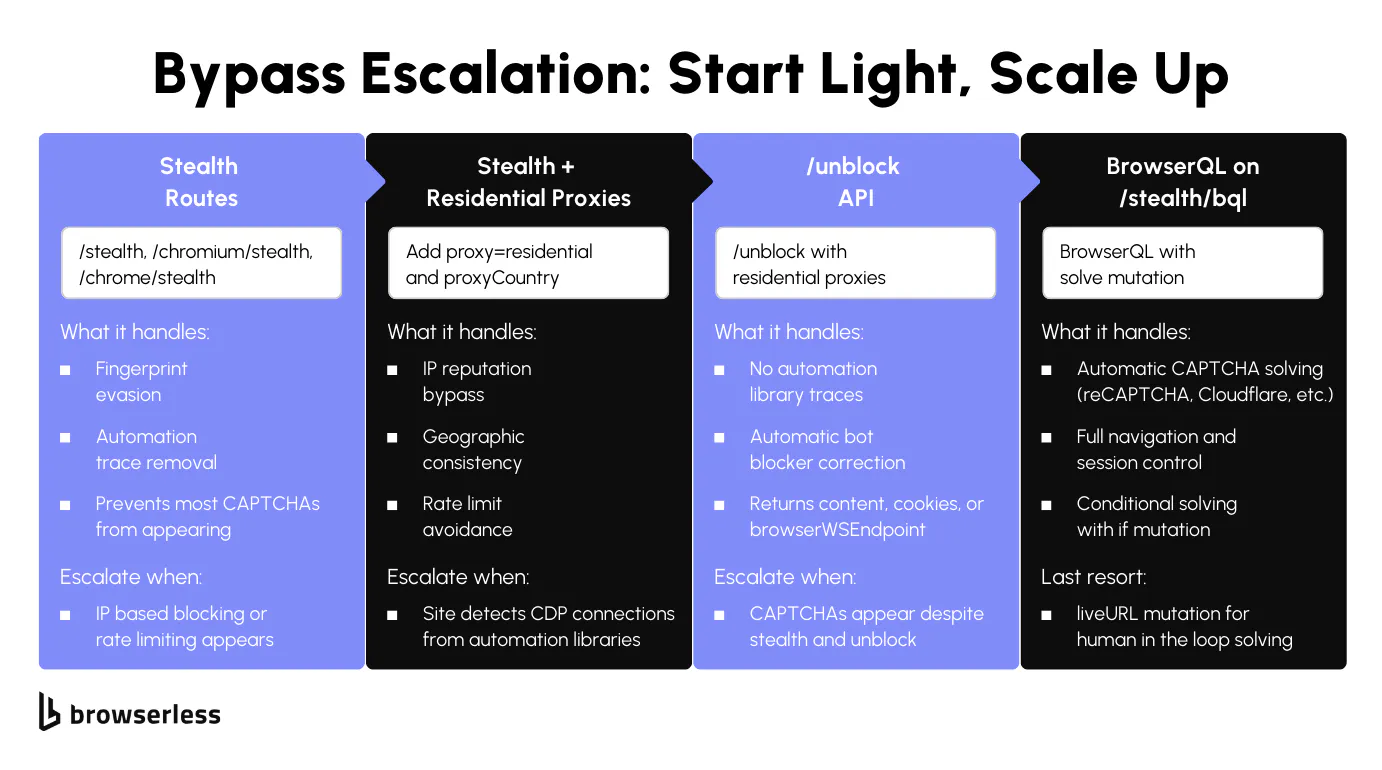
Start with the simplest approach and escalate only when the site's detection engines block your current attempt:
- Stealth routes. Stealth fingerprint mitigations prevent most CAPTCHA from appearing in the first place. They handle most sites that use basic bot detection to identify and block automated traffic.
- Residential proxies. If stealth alone gets through the browser checks but the site still blocks your requests, the IP addresses are the problem. Add
proxy=residentialandproxyCountryto route traffic through trusted residential IP addresses that appear to be legitimate users. - The
/unblockAPI. Some bot management systems specifically identify traffic from Puppeteer and Playwright by detecting the DevTools Protocol connection. The/unblockAPI works without those library connections and automatically corrects common bot blockers. - BrowserQL
solve. When a site serves CAPTCHA despite stealth and proxies, the BrowserQLsolvemutation handles reCAPTCHA, Cloudflare, and other challenges automatically. Use theifmutation to solve only when a challenge is actually present. liveURLmutation. For the hardest CAPTCHA challenges where automated solving fails,liveURLgenerates a browser URL that a human can access to solve the challenge manually. Save it for cases where every automated attempt has already failed. It's the most resource-intensive layer in the stack.
Most sites are handled by step one or two, so you'll rarely need the full stack. Let the detection response tell you when to escalate rather than over-engineering upfront.
Conclusion
Bot detection evaluates fingerprints, IP reputation, CAPTCHA, and behavior together, and building automation that gets past it means matching your bypass to the detection layer that's actually blocking you. Browserless gives you a tuned version of each layer (stealth, residential proxies, /unblock, and BrowserQL solve) so you don't have to build them yourself. For a wider look at which web scraping tools handle bot-protected sites best, see our guide to the best web scraping tools for data extraction. Sign up for a free trial and test your automation against protected sites.
FAQs
What is bot detection?
Bot detection is the process by which websites identify and block automated traffic. Bot management engines evaluate browser fingerprints, IP addresses, CAPTCHA responses, and behavior to assign a bot score that determines whether to allow access, serve a challenge, or block the request. Security teams use these systems to protect their site from bad bots, malicious bots, credential stuffing, account takeover, distributed denial-of-service (DDoS) attacks, spam, and fraud.
Why does my scraper get blocked with a headless browser?
Headless browsers expose traces that bot detection engines instantly identify: the navigator.webdriver flag, default viewport, missing plugins, and automation library signatures. These default settings make it easy for bot management algorithms to detect automated traffic and block your requests. Stealth routes remove these signals using fingerprinting mitigations and entropy injection, so your browser appears to be a legitimate user's session.
Datacenter vs. residential proxies for bot detection?
Datacenter IP addresses come from cloud providers and carry low trust scores because real users don't browse from server infrastructure. Bot detection engines associate them with bad bots and automated attacks. Residential IP addresses come from real ISPs, look like normal human traffic, and bypass IP blocking on most protected sites. They cost more but avoid the reputation problems that cause blocks.
How does CAPTCHA work in bot detection?
CAPTCHA triggers when a site's bot management system assigns a bot score above a threshold but below a full block. ReCAPTCHA and Cloudflare Turnstile are the most common. Some use machine learning to analyze behavior invisibly, while others present visual challenges. They protect the site from suspicious activity and bot attacks while avoiding false positives that block real users.
How do I handle CAPTCHA in automation?
Prevent them first with stealth routes and residential proxies. When they still appear, the BrowserQL solve mutation auto-detects the type and solves reCAPTCHA, Cloudflare, and others. Use the if mutation to trigger solving only when a CAPTCHA is present, saving resources. For challenges where automated solving fails, liveURL generates a URL for human solving as a last resort.
Best approach to bypass bot detection?
Start with /stealth routes for fingerprint protection, then add residential proxies when IP blocking triggers. Move to /unblock when bot management detects CDP connections from automation libraries, and escalate to BrowserQL on /stealth/bql with solve for persistent CAPTCHA. Escalate only when the current layer stops working.
What types of bots do detection systems target?
Bad bots engage in credential stuffing, account takeover, DDoS attacks, spam, fraud, and abusive scraping. Good bots, like search engine crawlers and monitoring tools, are allowed through. Bot management engines use machine learning to detect and distinguish these by analyzing attack patterns, request frequency, fingerprints, and behavioral data across all site traffic.
How does machine learning improve bot detection?
Machine learning engines analyze traffic across millions of requests to identify bot activity that rule-based detection misses. They automatically detect behavioral anomalies, cluster suspicious accounts, and adapt to new attack patterns. Bot management algorithms improve over time as they process more data, which is why static bypass techniques become less effective, and staying ahead of detection requires evolving your approach.
Can bot detection cause false positives?
Yes. Aggressive settings can block legitimate users on VPNs, shared corporate IPs, or unusual browser configurations. Sites balance catching bots against accidentally blocking real visitors. Layered detection with machine learning generates fewer false positives than relying solely on IP blocking or strict fingerprint matching.
Why do some sites block me with stealth and proxies?
The most protected sites run multiple detection layers and correlate signals across sessions. Even with stealth browser settings and residential IP addresses, bot detection can flag behavioral patterns, request timing, or account-level suspicious activity. When stealth and proxies aren't enough, the /unblock API works without the Puppeteer or Playwright fingerprints those libraries usually leave behind, and BrowserQL solve handles most CAPTCHA challenges the site serves.