
Key Takeaways
-
Detection fails at the system level, not the request level. Most blocks occur when identity, network, and behavior drift out of alignment over time, even if each individual request appears fine in isolation.
-
Stability beats cleverness. Long-lived profiles, consistent network mapping, and behavior that holds up under repetition perform better than heavy randomization or aggressive scaling.
-
Escalation should be deliberate: Start with the lightest tooling that works. For API workflows, move from REST APIs to the /unblock API to BrowserQL. For library users, move from BaaS to BaaS with stealth routes and proxies to BrowserQL with reconnection back to BaaS. Only add complexity when correlation and challenges actually appear.
Introduction
If you've built scraping or automation systems, you've probably seen things fail even when nothing obvious changed. Modern detection trips when identity, network, and behavior no longer align. An IP can look reasonable, a browser profile can look normal, and the code can run without errors, yet the combined signals don't quite hold together. The real objective isn't hiding or clever tricks. It's keeping setups stable: consistent profiles, sessions that age naturally, and automation that behaves consistently across repeated runs. This guide explains how detection actually works in 2026, where implementations tend to break down, and how to design identity, network, and behavior layers that stay reliable under pressure with practical examples that naturally align with tools such as Browserless later in the stack.
How Sites Detect Automation
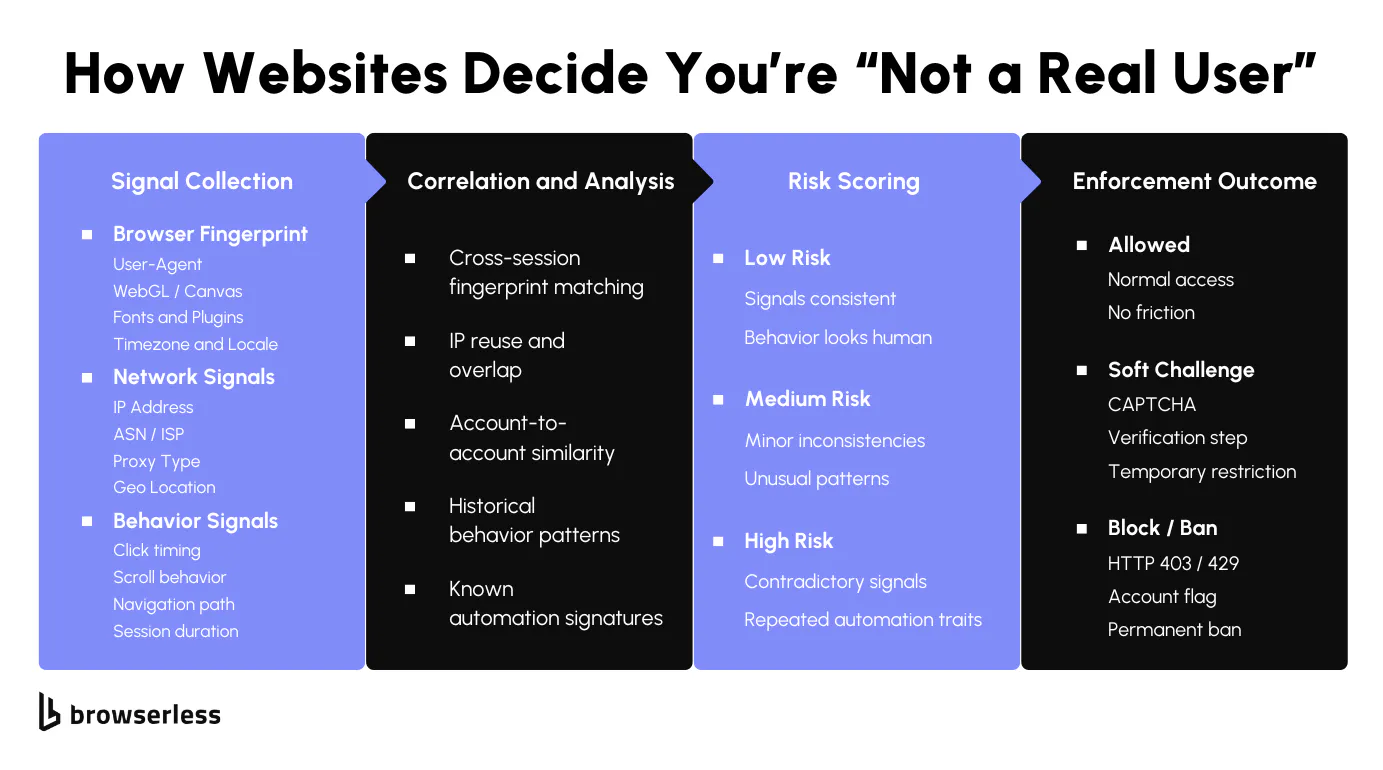
It's the combination of signals
Detection works more like correlation than validation. Fingerprint data, IP attributes, session state, and behavior are collected independently, then evaluated together across requests and over time. A single request might look fine, but once multiple sessions are linked, inconsistencies start to surface.
Risk scoring tends to increase when the same browser traits appear across different networks and when persistence patterns look unnatural (for example, always starting in a blank state). Teams run into trouble not because one value is "wrong," but because the combined profile becomes unstable when replayed at scale.
Once correlation kicks in, a few specific patterns tend to cause friction faster than anything else:
-
The same browser identity resolving from different IP ranges or geographies within a short time window, often caused by aggressive proxy rotation or shared profiles
-
Sessions that always start in a clean state, with no carryover cookies, no incremental navigation, and no idle time between actions
-
Identical execution paths across runs, where page order, delays, scroll depth, and click timing line up closely enough to be grouped as one behavioral signature
These issues usually don't show up in small tests; they appear once traffic volume grows, concurrency increases, or sessions are replayed often enough for correlation systems to build a baseline.
When an anti-detect browser helps
Anti-detect browsers address a narrow but important problem: maintaining stable identities once correlation comes into play. They're useful when you need multiple logged-in sessions to persist over time without overlapping shared platforms, reused accounts, or long-running workflows where cookies, local storage, and browser traits must stay consistent across runs. Without that continuity, correlation systems start linking sessions even when individual requests look fine.
They matter less when identity persistence isn't a factor. For public pages with no authentication or long-term state, full profile management often adds friction without much benefit. In those cases, rendering JavaScript or handling basic limits is usually the real challenge, and lighter tooling scales more cleanly.
A practical approach is to start with the simplest layer that works and move up only when detection requires it. If all you need is rendered HTML, screenshots, or PDFs, managed browser endpoints can handle execution and page lifecycle without carrying an identity state. Tools like Browserless are best suited to this entry point; a full anti-detect setup is not necessary yet.
The REST /content API below is a good example. It spins up an isolated browser, waits for client-side rendering to complete, returns the DOM, and then tears everything down. There's no persona, no long-lived storage, and no profile reuse, which is exactly what you want when identity persistence doesn't matter yet.
curl -X POST "https://production-sfo.browserless.io/content?token=YOUR_API_KEY" \
  -H "Content-Type: application/json" \
  -d '{
    "url": "https://example.com",
    "waitForTimeout": 2000
  }'
When these requests start hitting challenges or blocks, that's the signal to escalate. We cover the full path with code later in this guide.
Fingerprints and Profile Consistency
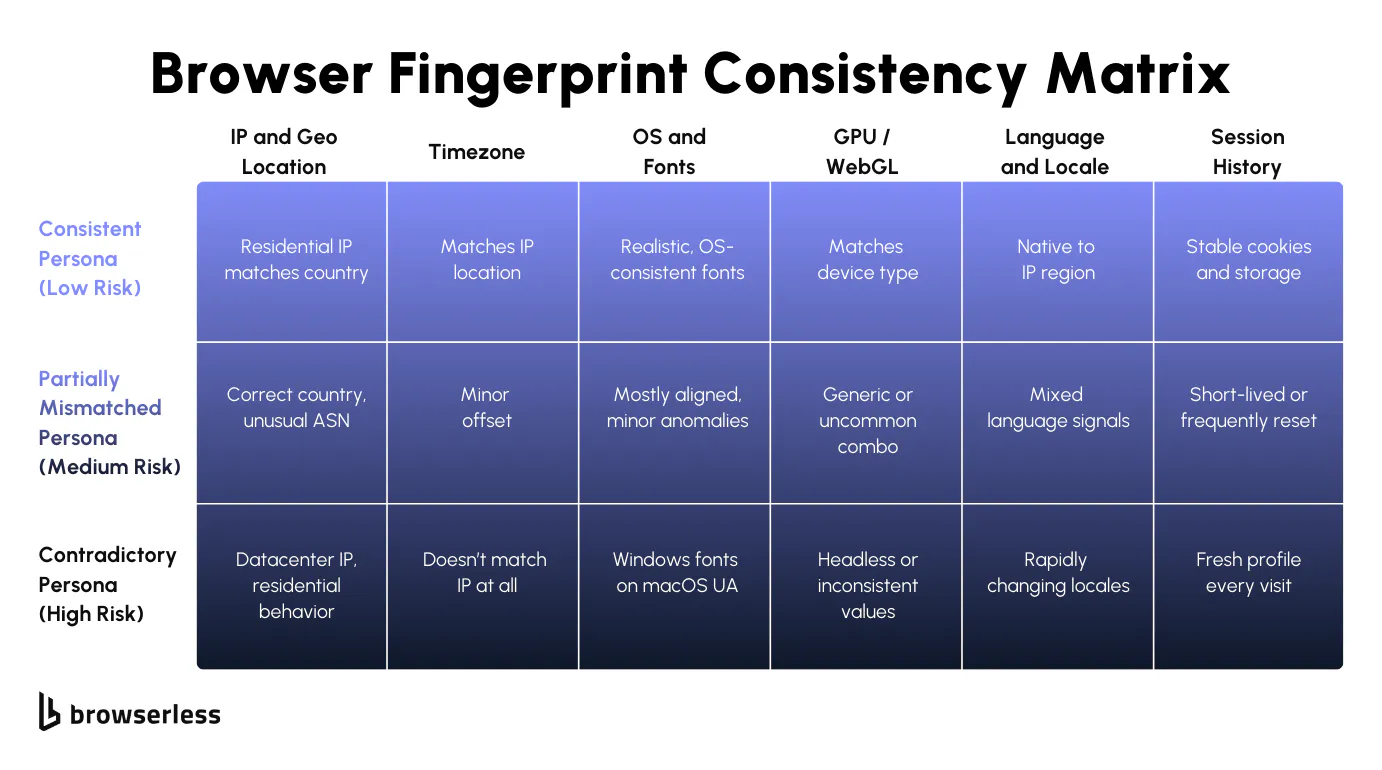
Avoid unnecessary profile churn
If you've spent time tuning fingerprints, it's easy to assume that heavy randomization lowers risk. In reality, it often raises it. When the timezone and IP don't align, OS and fonts drift, or GPU and device traits change between runs, those mismatches accumulate. Individual sessions may pass, but once traffic is correlated, the profile looks unstable rather than unique.
The main issue usually isn't a single bad value; it's churn. Profiles that reset on every run never build storage, cache, or behavioral history, making them easy to group as short-lived environments. Even well-written automation starts to fail once the surrounding browser state keeps changing.
Treating profiles as stateful runtime objects is more effective. Persistent profiles allow cookies and storage to evolve naturally and keep fingerprint traits aligned across sessions, making debugging far easier than dealing with a new environment for every execution.
Rotation still matters, but it should be deliberate. Creating new environments on a schedule or per task often increases variance without lowering detection risk. Tying profile changes to real lifecycle events, such as new accounts, clear isolation boundaries, or explicit separation requirements, leads to fewer surprises as systems scale.
-
Define personas with fixed browser-level traits (OS, fonts, GPU, timezone, locale) and keep them unchanged across runs
-
Persist cookies, local storage, and cache so session state evolves instead of resetting
-
Treat profile rotation as a controlled event tied to identity changes, not a background behavior
-
Avoid mixing proxy rotation with fingerprint rotation unless the identity itself is meant to change
Where Browserless fits
Identity and execution are different problems. Not every workflow needs a full persona that persists forever. The key is to match your tooling to the level of detection you're actually facing, and escalate only when you need to.
REST APIs for simple rendering
REST endpoints fit best when the task is straightforward: fetch rendered HTML, capture a screenshot, or generate a PDF. Identity doesn't matter, and each request runs in isolation. This keeps pipelines simple and debuggable, especially early on, before correlation or behavior-based blocking becomes an issue. When friction starts showing up here, it's usually a sign that the problem has shifted from rendering to identity.
/unblock API for bot detection bypass
When REST endpoints start returning challenge pages or incomplete content, the /unblock API is the next step. It works directly with the browser's native interfaces, leaves no traces of automation libraries, and automatically detects and corrects common bot blockers. You send a single POST request and get back content, cookies, screenshots, or a browserWSEndpoint for continued automation. Pair it with residential proxies for stronger results. This sits between simple rendering and full browser control, and handles a large percentage of protected sites without requiring you to manage session state yourself.
BaaS with stealth routes for library users
If you already have Puppeteer or Playwright code, BaaS lets you run it at scale without managing browser lifecycles, versioning, or concurrency. When detection becomes an issue, switch your connection URL to a stealth route (/stealth, /chromium/stealth, or /chrome/stealth) and add residential proxies.
This gives you advanced fingerprint evasion without rewriting your existing automation logic. It's the library user's escalation path before moving to BrowserQL.
BrowserQL for the hardest sites
BrowserQL is the strongest option. It's designed for sites with aggressive bot detection where browsing must appear coherent across multiple steps: navigating pages, waiting on client-side state, solving CAPTCHAs, and maintaining session flow.
You write GraphQL mutations instead of scripting individual browser actions, and the /stealth/bql endpoint comes with built-in fingerprint evasion, residential proxy support, and automatic CAPTCHA solving.
For developers, this means working at a higher level than raw CDP calls while keeping full control over timing, navigation, and session state. When you need even more flexibility, BrowserQL's reconnect mutation lets you hand the session back to Puppeteer or Playwright for continued automation through BaaS.
Network Consistency and Proxies
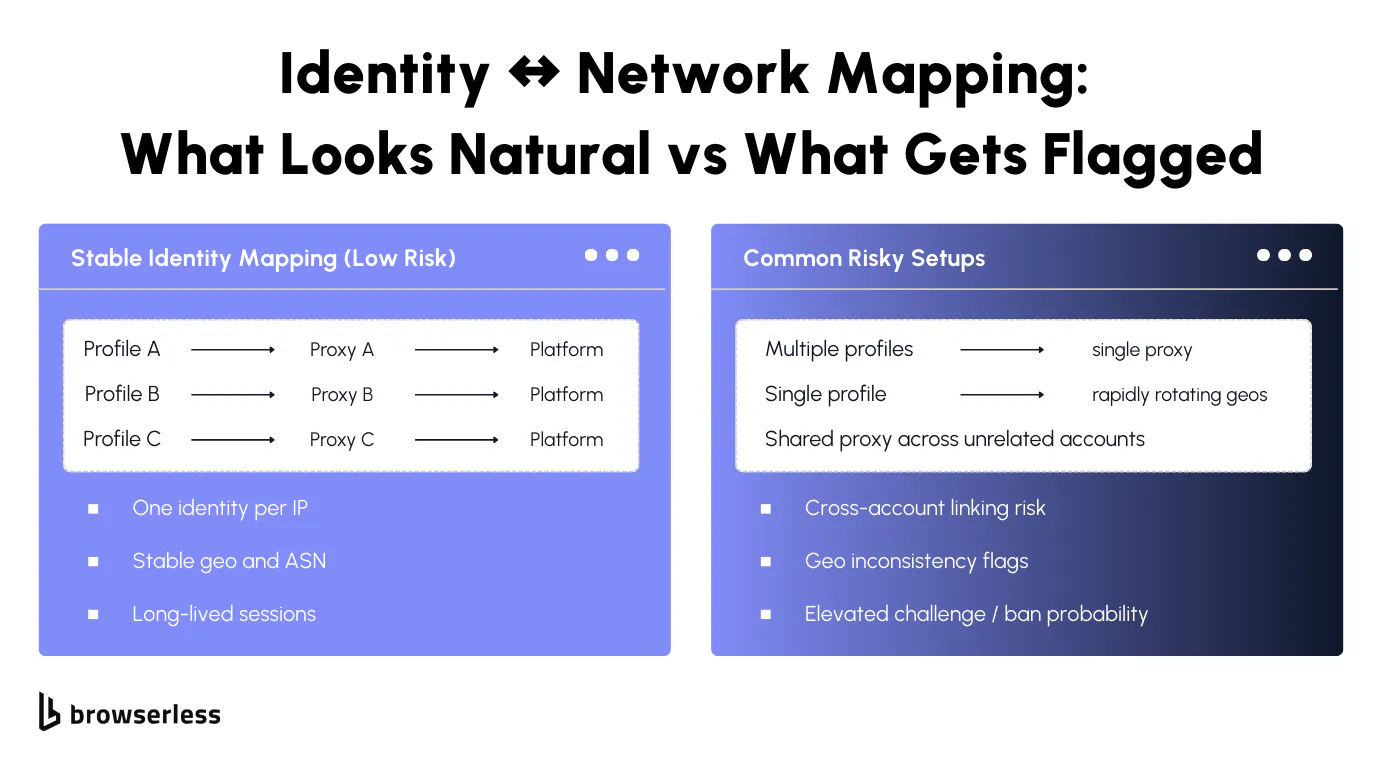
Keep IP and location consistent
Network signals tend to anchor everything else a platform sees. IP addresses, ASNs, and geographic locations are among the first attributes to correlate across sessions, and once accounts or repeat visits are involved, they exhibit long memory.
When the same identity appears from different networks too quickly, or when location shifts don't align with browser and session state, continuity breaks. Even clean profiles struggle once the network layer changes, because correlation systems begin treating activity as shared access or reuse rather than as normal return traffic.
How much this matters depends on the workload. Account-heavy systems usually perform best when each identity remains tied to a stable IP address over time, since frequent changes introduce patterns that don't match typical usage.
Scraping-heavy systems can tolerate rotation, but only when pacing and concurrency stay controlled. As rotation frequency and parallelism increase, timing, navigation depth, and interaction patterns must withstand correlation, or traffic starts clustering in ways that trigger friction later rather than immediately.
Browserless: proxy and region setup
With Browserless, proxy and region behavior is defined when a browser session is created, not patched in afterward. Proxies are passed as connection-level parameters, so the browser launches already bound to a specific network route.
That means every request, redirect, WebSocket, and resource load for that session uses the same proxy, avoiding subtle inconsistencies that can occur when IPs change mid-session or across retries.
At the same layer, you select the Browserless region or endpoint you connect to. This controls where the browser itself runs, affecting latency and routing characteristics, which can influence how traffic is perceived by the destination site.
When the execution region, proxy geo, and browser locale align, sessions tend to behave more predictably. This matters most for multi-step flows and long-lived sessions, where small mismatches compound over time.
Here's an example using a Browserless WebSocket connection with a proxy defined up front (common in Playwright, Puppeteer, or Browser Use-style integrations):
import { chromium } from "playwright-core";

// Proxy configuration varies by plan and integration; add proxy options as supported by your Browserless endpoint.
const browser = await chromium.connectOverCDP(
  "wss://production-sfo.browserless.io?token=YOUR_API_KEY&proxy=residential&proxyCountry=us&proxySticky=true",
);

const context = await browser.newContext();
const page = await context.newPage();
await page.goto("https://example.com");
In this setup, the browser session is created with the proxy already attached. There's no per-request switching, and no risk of the browser starting on one network and finishing on another.
For REST-based use cases, proxy configuration and region selection follow the same principle: define everything at request time to ensure consistent execution. For example, fetching rendered content through a specific region endpoint:
curl -X POST "https://production-sfo.browserless.io/content?token=YOUR_API_KEY&proxy=residential&proxyCountry=us&proxySticky=true" \
  -H "Content-Type: application/json" \
  -d '{
    "url": "https://example.com",
    "waitForTimeout": 2000
  }'
Here, the production-sfo endpoint controls where the browser runs, while proxy settings (if used) stay fixed for the duration of that request. Combining region selection with stable proxy assignment makes network behavior easier to reason about, especially when sessions need to persist or be replayed.
In practice, this usually comes down to a few rules that hold up as systems grow:
-
Match proxy geography with browser locale and timezone so network and environment signals stay aligned
-
Keep identity-to-proxy mapping stable for sessions that rely on login state or reuse
-
Treat proxy or region changes as explicit lifecycle events, not background rotation
Handled this way, the network layer becomes a predictable component of the session rather than a variable that quietly disrupts continuity later.
Automation That Doesn't Scream "Automation": Behavior, Rate Limits, and Recovery
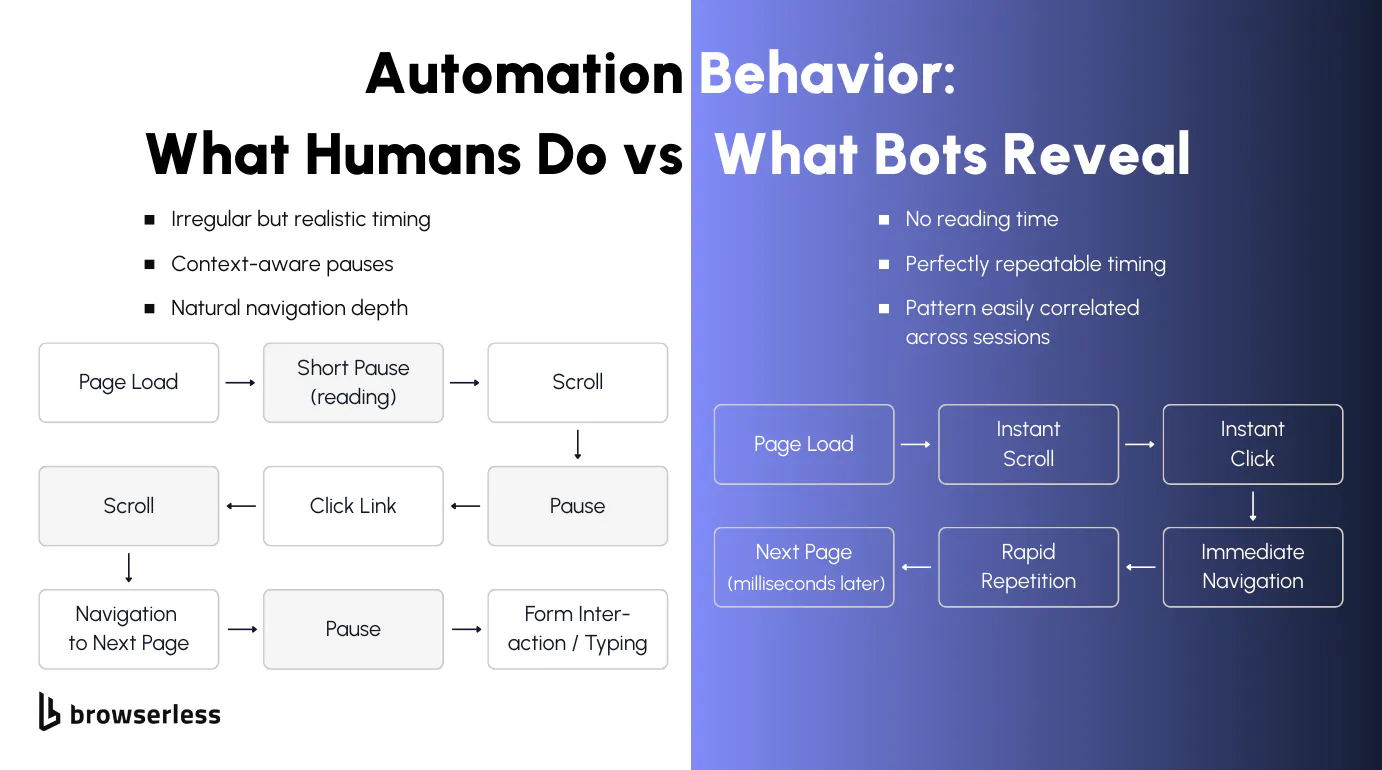
Use realistic pacing and variance
Automation gets caught because it behaves too cleanly for too long. Real users pause, scroll unevenly, read before clicking, and don't move through sites at a perfectly repeatable speed. When scripts run the same path with the same timing every time, those patterns become easy to group, even if nothing else looks obviously wrong.
This means paying attention to how sessions unfold, not just whether a selector resolves or a request succeeds. Let pages breathe, react to what actually loads, and allow flows to change based on context instead of forcing everything through a fixed sequence.
Concurrency is where small mistakes turn into fast failures. One session that's slightly too rigid might pass, but dozens running in parallel with the same behavior won't. Identical navigation depth, delays, and click order quickly amplify detection signals.
Scaling slowly makes it easier to see where friction starts, and watching how often challenges or blocks appear gives you a chance to adjust before things cascade. The goal isn't randomness or speed; it's building behavior that holds up under load, not just working in isolated tests.
When to escalate your approach
When sites begin returning interstitials, partial content, or challenge pages, stateless requests are no longer reliable. The site expects a real session to progress through redirects, client-side checks, or CAPTCHA gates. But the answer isn't to jump straight to a full browser session. Escalate in steps, and only add complexity when the previous layer stops working.
Start with REST rendering
REST endpoints handle most straightforward use cases. If a page renders cleanly and returns complete content, there's no reason to use anything heavier.
curl -X POST "https://production-sfo.browserless.io/content?token=YOUR_API_KEY" \
  -H "Content-Type: application/json" \
  -d '{
    "url": "https://example.com",
    "waitForTimeout": 2000
  }'
If this starts returning challenge pages or incomplete output, move to the /unblock API.
Escalate to the /unblock API
The /unblock API bypasses bot detection without requiring a browser library. It works directly with the browser's native interfaces, leaves no traces of automation, and automatically corrects common bot blockers. Pair it with residential proxies for the best results.
curl -X POST "https://production-sfo.browserless.io/unblock?token=YOUR_API_KEY&proxy=residential" \
  -H "Content-Type: application/json" \
  -d '{
    "url": "https://example.com",
    "content": true,
    "cookies": false,
    "screenshot": false,
    "browserWSEndpoint": false
  }'
You get back the full HTML after detection is bypassed. If you need to continue automating after unblocking, set browserWSEndpoint to true and connect your Puppeteer or Playwright code to the returned WebSocket URL.
If the /unblock API still isn't getting through, escalate to BrowserQL.
Escalate to BrowserQL
BrowserQL gives you full control over navigation, timing, CAPTCHA solving, and session state in a single GraphQL mutation. Use the /stealth/bql endpoint with residential proxies for maximum effectiveness.
const response = await fetch(
  "https://production-sfo.browserless.io/stealth/bql?token=YOUR_API_KEY&proxy=residential&proxyCountry=us",
  {
    method: "POST",
    headers: { "Content-Type": "application/json" },
    body: JSON.stringify({
      query: `mutation Navigate {
        goto(url: "https://example.com", waitUntil: domContentLoaded, timeout: 35000) { status }
        solve { found solved time }
        title: text(selector: "title", timeout: 10000) { text }
      }`,
      variables: {},
    }),
  },
);
const data = await response.json();
This handles navigation, CAPTCHA solving, and data extraction in one request. If you need to hand the session back to Puppeteer or Playwright after BQL does the heavy lifting, use the reconnect mutation to get a WebSocket endpoint and continue with your library code through BaaS.
For library users: the BaaS escalation path
If you already have Puppeteer or Playwright code, the escalation looks different.
Start with a standard BaaS connection without stealth or proxies. This works for sites with no bot detection.
const browser = await chromium.connectOverCDP(
  "wss://production-sfo.browserless.io?token=YOUR_API_KEY",
);
const context = await browser.newContext();
const page = await context.newPage();
await page.goto("https://example.com");
When detection appears, switch to a stealth route and add residential proxies. Your automation code stays the same, only the connection URL changes.
const browser = await chromium.connectOverCDP(
  "wss://production-sfo.browserless.io/stealth?token=YOUR_API_KEY&proxy=residential&proxyCountry=us",
);
const context = await browser.newContext();
const page = await context.newPage();
await page.goto("https://example.com");
For sites that serve CAPTCHA despite stealth and proxies, use BrowserQL to handle the hard parts, then reconnect back to your Playwright code for the rest of the workflow.
import { chromium } from "playwright-core";

const TOKEN = "YOUR_API_KEY";
const url = "https://example.com";

// Use BQL to navigate, solve CAPTCHAs, and get a reconnect endpoint
const bqlResponse = await fetch(
  `https://production-sfo.browserless.io/stealth/bql?token=${TOKEN}&proxy=residential&proxyCountry=us`,
  {
    method: "POST",
    headers: { "Content-Type": "application/json" },
    body: JSON.stringify({
      query: `mutation UnblockAndReconnect($url: String!) {
        goto(url: $url, waitUntil: networkIdle) { status }
        solve { found solved time }
        reconnect(timeout: 30000) { browserWSEndpoint }
      }`,
      variables: { url },
    }),
  },
);

const { data } = await bqlResponse.json();
const browserWSEndpoint = data.reconnect.browserWSEndpoint;

// Connect Playwright to the same unblocked session
const browser = await chromium.connectOverCDP(browserWSEndpoint + `?token=${TOKEN}`);
const context = browser.contexts()[0];
const page = context.pages().find((p) => p.url().includes(url));

// Continue your Playwright automation in the unblocked session
await page.screenshot({ path: "screenshot.png", fullPage: true });
await browser.close();
The value across all these steps is the same: add complexity only when the previous layer stops working. REST handles most pages. The /unblock API handles most protected pages. BrowserQL handles the rest. Integrations such as Browser Use, LangChain loaders, n8n, and Make workflows all sit on the same escalation path.
Conclusion
Anti-detection works best when things stay predictable: identities don't shift, network choices make sense, and automation doesn't push harder than it needs to. Most issues come from small inconsistencies that add up as traffic grows. Browserless scales with your detection needs. Start with REST APIs for simple rendering, move to the /unblock API when bot detection appears, and escalate to BrowserQL for the hardest sites. For library users, BaaS with stealth routes covers most cases before BrowserQL becomes necessary. Sign up for a free trial and test it against your own workloads.
FAQs
What causes scraping or automation setups to get blocked even when nothing changes?
Blocks usually come from signal drift over time, not a single bad request. Identity, IP, and behavior may each appear acceptable in isolation, but when sessions are correlated, instability emerges. Common causes are frequent IP changes, fingerprints that don't persist, and execution timing that becomes easy to cluster at scale.
When do anti-detect browsers actually make sense to use?
They're useful when session continuity matters, such as when multiple logged-in accounts are used, reused identities are used, or workflows that require cookies and storage to persist across runs. If there's no authentication or long-term state, full profile management often adds overhead without improving reliability.
Why does heavy fingerprint randomization increase detection risk?
Because it creates environment churn profiles that change too often, it never builds stable storage, cache, or behavioral history. Many modern platforms correlate aspects of environment consistency across repeated sessions, especially when traffic volume or reuse increases.
How should proxies be used to avoid correlation issues?
For account-based workflows, stability usually beats rotation one identity per IP over time reduces the risk of linking. For scraping, rotation can work, but only with controlled pacing. As concurrency and rotation increase, behavior patterns matter more, and traffic starts to group quickly.
How does Browserless fit into an anti-detection strategy?
Browserless works best as an escalation layer. REST endpoints handle rendering and artifacts when identity doesn't matter. When bot detection appears, the /unblock API bypasses it without requiring a browser library. For library users, BaaS with stealth routes and proxies handles most protected sites. When sites introduce CAPTCHAs or aggressive behavior-based blocking, BrowserQL gives you full control over navigation, timing, and session state through the /stealth/bql endpoint.