
Key Takeaways
- Stealth plugins reduce surface-level signals but don't solve infrastructure-level detection. Modern anti-bot systems evaluate IP reputation, TLS fingerprints, behavioral patterns, and session consistency, all areas that browser-level plugins rarely control.
- Detection problems increase with scale. What works for small test runs often breaks under sustained traffic due to identity correlation, fingerprint reuse, and limited observability into session failures.
- Browserless shifts automation from script patching to managed browser infrastructure. By connecting Playwright over CDP to a managed Browserless BaaS environment with optional stealth techniques, you gain more consistent behavior and improved production reliability.
Introduction
If you're using Playwright in production, you've likely seen this pattern: add a stealth plugin, blocks drop for a while, then return as traffic scales. Stealth plugins only patch a thin layer of browser signals (basic fingerprints and automation flags) while modern detection systems evaluate IP reputation, TLS signatures, behavior, and long-term session identity. Once you move beyond small workloads, infrastructure choices matter more than script-level tweaks. In this article, I'll cover what stealth actually changes, what it leaves exposed, and how Browserless shifts the focus from patching scripts to running managed browser infrastructure with stealth routes for improved bot-detection evasion at scale.
Why Playwright stealth plugins fall short
Playwright stealth plugins patch obvious automation signals, such as navigator.webdriver, certain JavaScript properties, user agents, and common headless flags. That can help against basic checks, but modern anti-bot systems evaluate much more than what runs on the page.
Detection now includes canvas and WebGL fingerprints, audio context signals, font and timezone consistency, hardware concurrency, TLS client hello signatures, IP reputation, and cross-session identity tracking. Stealth plugins rarely touch network-layer or infrastructure-level signals, and they don't control how browsers behave under load.
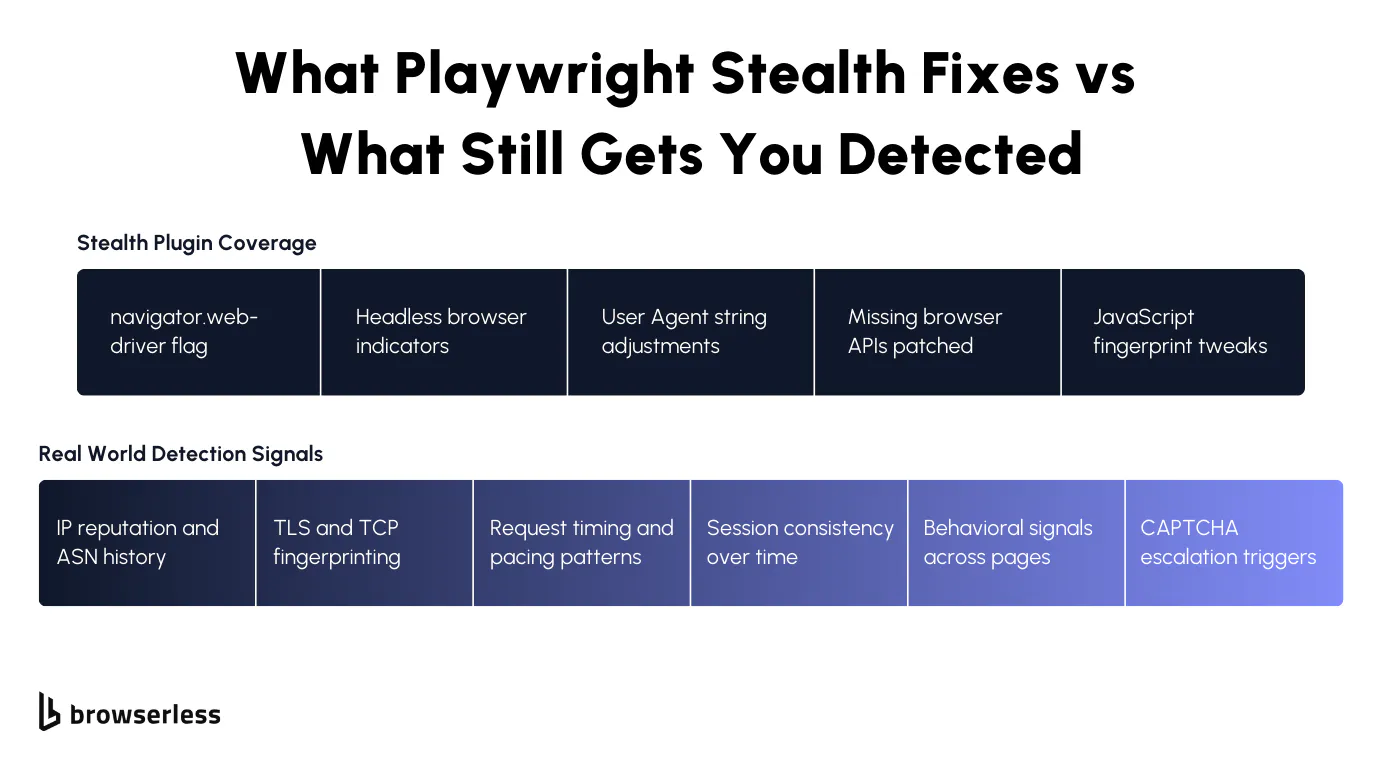
Open source packages also require frequent updates to keep up with browser changes, creating maintenance overhead in production. When detection systems correlate small inconsistencies across fingerprints, behavior, and IP histories, failures quickly escalate into CAPTCHA or hard blocks, exposing the limits of plugin-based stealth.
Typical detection vectors stealth does not solve
Stealth plugins focus on browser-exposed signals, but modern detection systems evaluate the full request lifecycle. Once traffic reaches production scale, network reputation, transport-layer fingerprints, and behavioral consistency carry more weight than patched JavaScript properties. In practice, detection tends to cluster around a few recurring vectors:
- IP reputation and rotation. Detection systems score IPs based on historical abuse patterns, ASN ownership, request frequency, and identity reuse across sessions.
- TLS and TCP level fingerprints. Client hello signatures, cipher ordering, ALPN negotiation, and connection reuse patterns can identify non-standard or automated stacks even when the browser looks normal.
- Behavioral and timing anomalies. Interaction timing, scroll patterns, resource loading cadence, and event sequencing are analyzed for statistical deviations from real user activity.
- CAPTCHA escalation. When multiple weak signals accumulate, sites dynamically increase friction by triggering progressive challenges that plugins cannot reliably prevent.
Operational risks at scale
When you move from limited test runs to sustained production traffic, small weaknesses compound quickly. Scripts that seemed stable begin failing after minor site updates that introduce new DOM structures or client-side detection checks, while block rates gradually increase as IP reputation, fingerprint reuse, and session correlation degrade trust over time. Without detailed session visibility (live inspection, network traces, and browser-level logs), it becomes difficult to separate automation bugs from detection triggers, turning routine failures into prolonged debugging cycles.
What Browserless changes compared to local Playwright
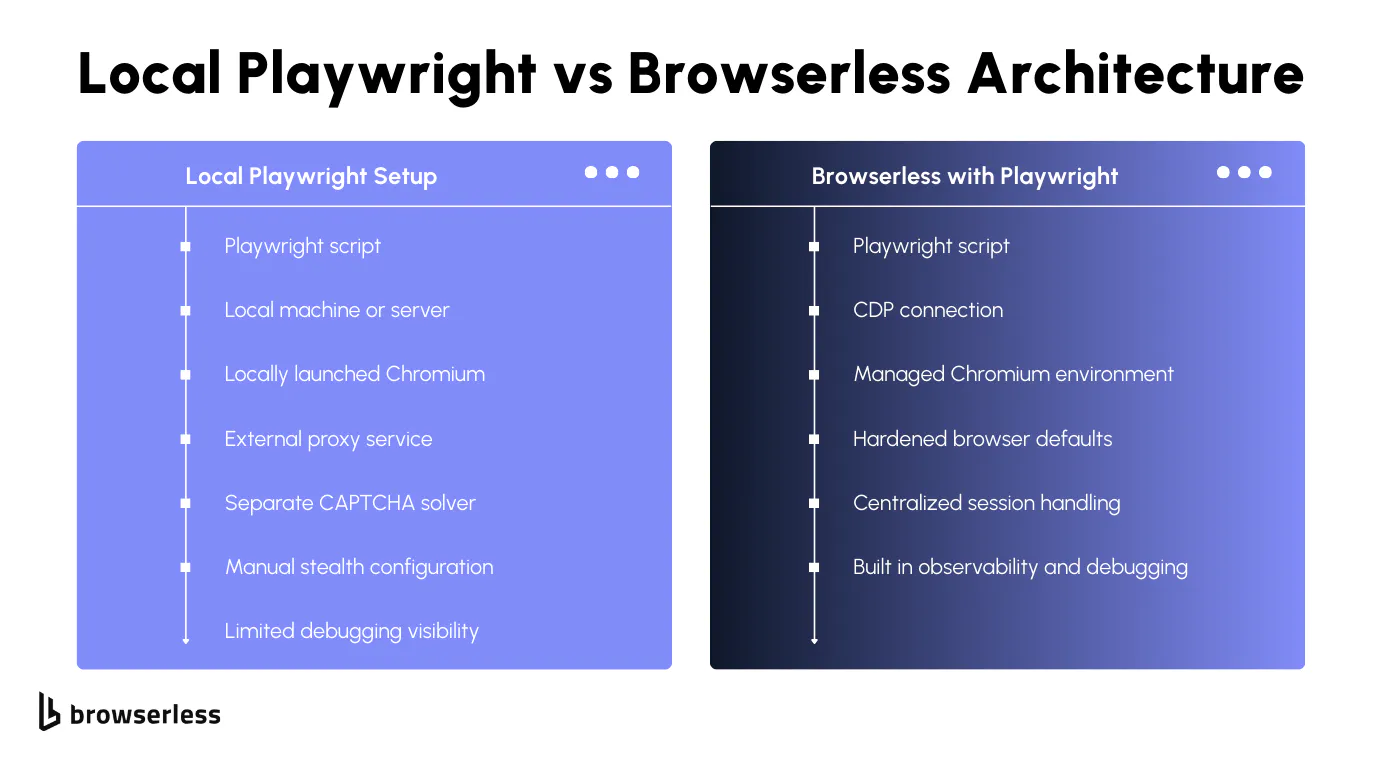
When you run Playwright locally, your automation logic, browser runtime, network stack, and fingerprint surface are tightly coupled to your own infrastructure. Browserless separates those concerns by moving the browser layer into a managed infrastructure that you connect to over CDP, so your code stays focused on automation while the browser environment is handled remotely. Instead of launching Chromium on your machine, you connect directly to a managed remote Chromium instance using Browserless BaaS:
import { chromium } from "playwright";

const browser = await chromium.connectOverCDP(
  "wss://production-sfo.browserless.io?token=YOUR_API_TOKEN",
);

const context = await browser.newContext();
const page = await context.newPage();
await page.goto("https://example.com");
Here, Playwright still drives the session, but the browser runs within the Browserless infrastructure. That shift introduces managed browser environments, centralized updates, and controlled runtime configuration without modifying your automation scripts.
Because the connection is CDP-based, you retain full Playwright control while offloading browser hardening, network-level tuning, and runtime consistency. You also gain built-in session management and observability features that make it easier to inspect, monitor, and debug sessions when blocks or failures occur, without instrumenting every script manually.
How Browserless handles stealth
Browserless provides dedicated stealth capabilities through its BaaS endpoints and stealth routes, which apply anti-detection mitigations at the browser level rather than inside your page scripts. Instead of installing a local stealth plugin, you connect Playwright over CDP to a Browserless WebSocket endpoint such as:
import { chromium } from "playwright";

const browser = await chromium.connectOverCDP(
  "wss://production-sfo.browserless.io/chromium/stealth?token=YOUR_API_TOKEN",
);
When a stealth route is used, Browserless applies fingerprint adjustments and bot-detection mitigations directly within the managed browser session. This includes modifying automation-exposed properties and reducing common detection signals using CDP-level controls, rather than relying solely on JavaScript patches injected into the page. Because these mitigations run inside Browserless infrastructure, they are applied consistently across sessions without adding plugin logic to your Playwright code.
Infrastructure advantages over DIY setups
With local Playwright setups, you are responsible for launching and maintaining browser binaries, managing concurrency limits, handling crashes, and coordinating scaling across containers or virtual machines.
Browserless moves the browser runtime into managed infrastructure, where browser sessions are created over WebSocket connections, while REST APIs handle one-off tasks like /screenshot, /pdf, and /content. Your automation logic remains in your application, but the browser execution layer runs remotely and can be configured through connection parameters.
Browserless also supports session management features, including session reconnection via the Browserless.reconnect CDP command, allowing you to reuse authenticated sessions or inspect live browser state.
Because browser updates, runtime configuration, and environment consistency are managed within the service, you avoid version drift across environments and reduce the operational overhead of maintaining your own browser fleet.
Using Playwright with Browserless
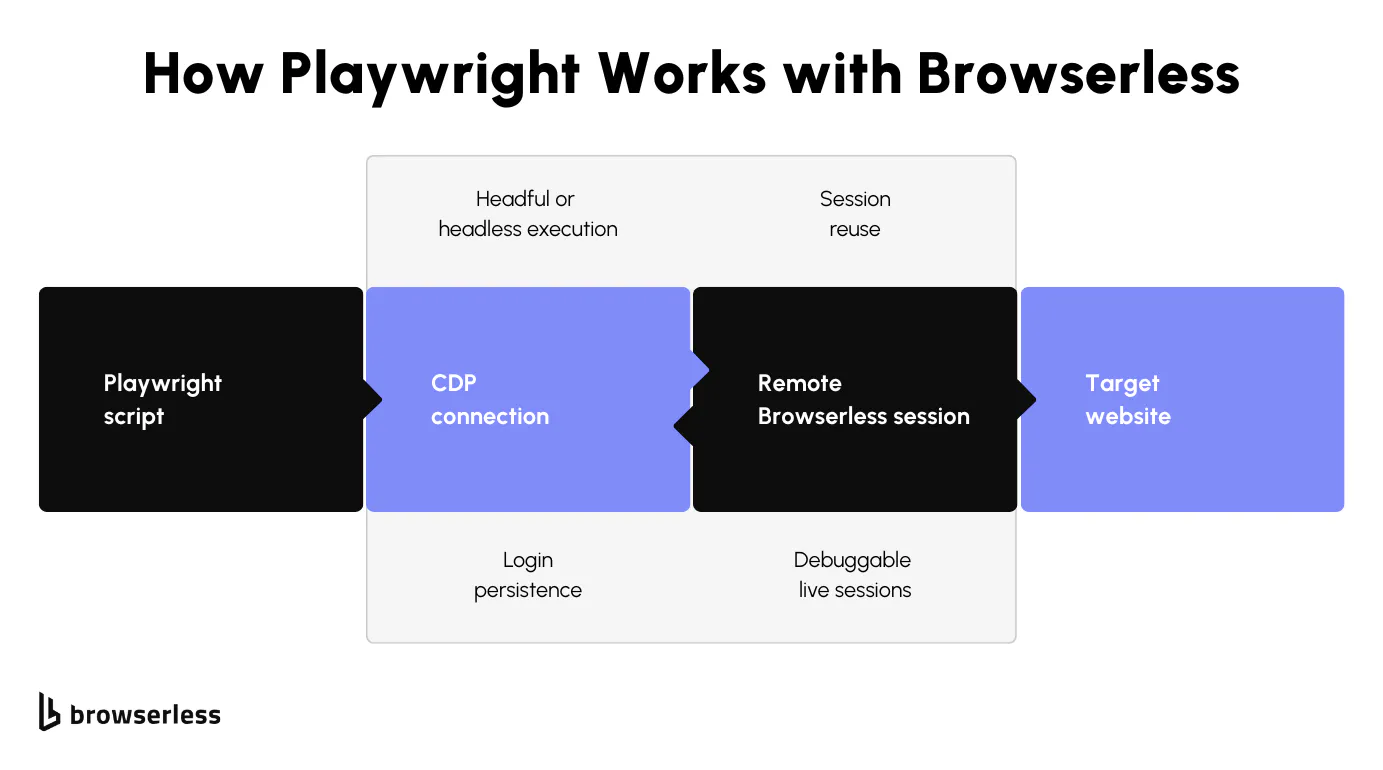
Using Playwright with Browserless is very close to a standard setup: instead of launching a local browser process, you connect via the CDP to a managed browser running in Browserless infrastructure. Your automation code (navigation, selectors, evaluations, and interactions) remains largely unchanged, since Playwright still controls the session.
Connection parameters allow you to configure options such as stealth mode and other runtime settings without modifying your scripts. Browserless also supports session lifecycle features like persistent sessions and CDP reconnection, which makes it possible to reuse authenticated states and manage longer-running workflows without rebuilding browser context on every execution.
Architecture patterns
When you move beyond simple scripts, how you structure browser sessions starts to matter just as much as what your Playwright code does. With Browserless, the connection model over CDP gives you flexibility to design around workload shape, session lifespan, and identity management instead of being locked into short-lived local browser launches.
Single-session workflows are well-suited for transactional tasks such as form submissions, data extraction from a single flow, or short-lived automations. You connect, create a context, complete the workflow, and close the session. This helps keep identity scope tight and reduces cross-task fingerprint correlation. It also makes failures easier to isolate because each run is self-contained.
Concurrent scraping jobs benefit from Browserless's remote browser infrastructure, where each job can establish its own CDP connection without competing for local CPU and memory resources. Instead of coordinating multiple local Chromium instances, your application can treat each connection as an independent worker. Concurrency becomes an application-level concern rather than a browser orchestration problem, and scaling up means increasing connections rather than reengineering container layouts.
Login persistence and authenticated sessions rely on maintaining state across executions, either via persistent sessions or by reusing storage. With Browserless session management and CDP reconnection, you can keep an authenticated context alive and reconnect to it when needed, rather than re-running login flows on every execution. This reduces repeated authentication patterns that can trigger detection systems and gives you control over the session lifecycle, especially for long-running workflows or account-based automation.
Reliability and debugging workflows
When automation starts failing in production, the biggest challenge isn't writing better selectors; it's understanding exactly what happened inside the browser session at the moment things broke.
- Live session inspection allows you to connect to an active browser session and observe its state in real time, which is useful when debugging complex flows or intermittent blocks.
- Faster root-cause analysis for blocks and failures comes from centralized session management and consistent runtime environments, reducing ambiguity about whether issues originate from code, fingerprinting, or upstream detection systems.
When Browserless outperforms stealth plugins
Stealth plugins can help with surface-level detection, but in some cases, infrastructure makes a measurable difference. Sites protected by Cloudflare or enterprise-grade WAFs evaluate far more than browser flags, including network reputation, session consistency, and transport-layer signals.
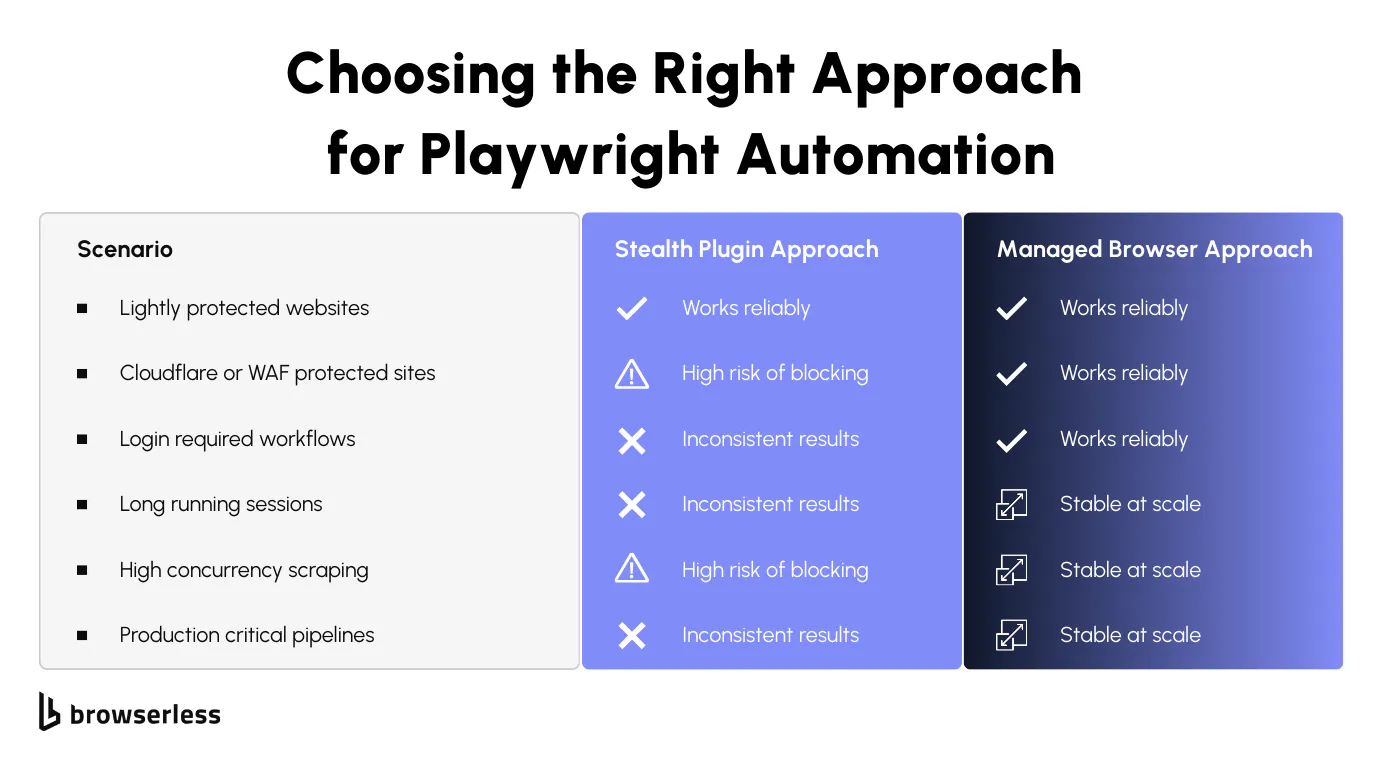
JavaScript-heavy applications with dynamic rendering and client-side verification often expose inconsistencies that simple patches cannot mask. Long-running automation tasks and production scraping or agent workloads also benefit from stable session management, consistent runtime environments, and centralized observability, which are difficult to replicate with local browser instances and third-party plugins.
Cost and performance considerations
Running Playwright locally may appear cheaper at first, but scaling requires maintaining browser binaries, container orchestration, proxy infrastructure, and monitoring systems. As concurrency increases, you begin managing CPU saturation, memory limits, crash recovery, and version alignment across environments. Managed browsers shift those operational responsibilities away from your application layer, reducing infrastructure overhead and simplifying horizontal scaling.
There are also indirect costs that accumulate over time. Proxy rotation services, CAPTCHA-solving providers, and engineering time spent debugging intermittent blocks often exceed initial infrastructure savings. When developers spend less time maintaining browser fleets and chasing detection edge cases, they can focus on improving extraction logic, data quality, and system reliability instead of firefighting production issues.
For a detailed breakdown of plan limits and pricing tiers, visit the Browserless pricing page. There is a free plan available, so you can connect your existing Playwright scripts to Browserless and evaluate stability and performance before committing to a paid tier. This makes it straightforward to compare real-world results against your current infrastructure costs without upfront investment. Keep in mind that the proxy feature will consume units considerably, so use it wisely on the free plan.
Best practices for sustainable automation
Reliable automation depends on consistent identity management, predictable traffic patterns, and active monitoring of detection signals. Even with managed infrastructure, poor traffic behavior can degrade session trust over time. Sustainable systems treat detection signals as operational metrics rather than one-off errors.
Respecting rate limits
Sending traffic at volumes or frequencies that exceed normal user patterns increases the likelihood of reputation scoring and throttling. Distributing requests across time, isolating workloads by session, and avoiding burst patterns help maintain stable session trust. Thoughtful concurrency control reduces unnecessary CAPTCHA escalation and preserves IP reputation.
Designing human-like interaction flows
Interaction timing, navigation sequencing, and resource loading behavior are evaluated statistically by modern detection systems. Introducing realistic delays, avoiding perfectly uniform event timing, and allowing client-side scripts to fully execute before progressing reduces behavioral anomalies. Maintaining consistent viewport settings and avoiding abrupt navigation jumps also helps preserve session credibility.
Monitoring block signals proactively
Detection rarely manifests as a single hard failure; it often begins with subtle friction, such as increased challenge frequency or slower response times. Tracking CAPTCHA rates, HTTP status code changes, response-time anomalies, and content variations helps you detect reputation drift early. When these signals are visible and measured, you can adjust traffic patterns or session strategies before full blocks occur.
Conclusion
Stealth plugins can hide obvious automation flags, but they don't solve the infrastructure, fingerprint, and session-level signals that drive detection at scale. As traffic grows, those gaps manifest as higher block rates, more CAPTCHA, and harder-to-debug failures. Browserless shifts the burden from patching scripts to running Playwright on managed browser infrastructure built for production workloads. If you're experimenting, plugins may be enough, but if automation is tied to revenue, research, or core workflows, it's worth testing a managed approach. The easiest way to evaluate the difference is to connect your existing Playwright code to a Browserless endpoint and run it under real traffic. Sign up for a trial and compare stability, block rates, and visibility firsthand.
FAQs
Is Playwright stealth enough to bypass modern bot detection?
Playwright stealth plugins can hide obvious automation flags, but they do not address network-layer signals, IP reputation scoring, TLS fingerprints, or long-term session correlation. For production workloads, infrastructure-level controls are often required.
What does Browserless do differently from local Playwright?
Browserless runs the browser in managed infrastructure and lets you connect over CDP, separating automation logic from browser execution. It also provides stealth routes, session management, and centralized observability that are not available in a default local setup.
How do anti-bot systems detect Playwright automation?
Modern systems analyze a combination of browser fingerprints, TLS client hello signatures, IP reputation, behavioral timing patterns, and session history. Detection rarely relies on a single signal; instead, it aggregates multiple weak indicators.
Can Browserless reduce CAPTCHA frequency?
Browserless can reduce CAPTCHA triggers by applying browser-level stealth mitigations and providing a more consistent session environment. However, CAPTCHA rates still depend on traffic behavior, IP quality, and workload patterns.
When should I use Browserless instead of a stealth plugin?
If you're running small, low-volume tasks, a stealth plugin may be sufficient. If you're operating authenticated workflows, concurrent scraping jobs, or long-running automation tied to business outcomes, managed browser infrastructure like Browserless provides more predictable stability and control.