
TL;DR
- Bypassing CAPTCHA. It means reducing how often challenges appear and routing around them safely, rather than defeating security systems.
- The trigger. CAPTCHA decisions are risk-driven: TLS fingerprint, IP reputation, browser coherence, and behavior all factor in, so the fix depends on which signal is tripping it, not a generic solver.
- Start with allowed access. APIs, partner feeds, and allowlisting are lower-risk and more durable than any bypass technique, so treat automation fixes as the fallback, not the first move.
- Browserless and BrowserQL. Both give you real browsers, session persistence, retries, and built-in CAPTCHA handling (
solveCaptchas=trueon a stealth connection, or the BQLsolvemutation) for flows you're authorized to automate, without the maintenance overhead.
Introduction
Your scraper ran clean for months, then a CAPTCHA started showing up on every third request. Now you're trying to bypass CAPTCHA challenges instead of shipping the feature you set out to build. Modern CAPTCHA is a routing layer now: bot detection, fingerprinting, Cloudflare-style challenges, and flaky sessions, not a single puzzle you solve once. For web scraping or automation tools, the real problem isn't solving a CAPTCHA image – it's keeping your workflow reliable and debuggable as the target keeps changing.
In this guide, you'll learn what CAPTCHA is, how modern CAPTCHA systems decide to challenge you, and what bypassing CAPTCHA can mean in a legitimate engineering context: fewer triggered challenges, earlier detection when one does appear, and a safe way around it through official APIs, allowlisting, or a human in the loop.
What is CAPTCHA?
CAPTCHA stands for Completely Automated Public Turing test to tell Computers and Humans Apart. At a practical level, it's a gate that tries to separate human users from bots and other automated systems when a website thinks the request is risky.
Common CAPTCHA types
Here's what you'll typically run into, depending on the site and the risk level:
- A simple CAPTCHA image where you type the plain-text CAPTCHA code, the kind optical character recognition was originally built to defeat.
- Checkbox flows like reCAPTCHA, and drop-in widgets like GeeTest or Cloudflare Turnstile.
- Image challenges that ask you to select every square matching a prompt.
- Audio CAPTCHA challenges, built from short audio files instead of a distorted image, for accessibility.
- Puzzle challenges, slider challenges, or embedded widgets.
- Full-page interstitials that look like a web page but exist mainly to validate traffic.
- Background checks like reCAPTCHA v3, which scores every request and never shows a challenge, and Cloudflare Turnstile, which assesses in the background but may still show a widget or ask for a checkbox depending on its mode.
- Proof-of-work challenges such as Friendly Captcha, where the browser quietly works through a computational puzzle instead of asking you anything.
Teams implement CAPTCHA to defend something concrete: account takeover, credential stuffing, comment spam, scraping at scale, or inventory scalping. CAPTCHA challenges appear on most sites because their risk systems think your request looks unlike those of normal users.
The label CAPTCHA covers several different systems, and knowing which one you're looking at tells you how to respond. Google's reCAPTCHA is the most widespread: reCAPTCHA v2, released in 2014, is the "I'm not a robot" checkbox that can escalate to an image grid, while reCAPTCHA v3, released in 2018, moved the check out of sight. Cloudflare Turnstile takes the same background-first approach.
You'll also meet these inside larger anti-bot stacks. GeeTest, AWS WAF's CAPTCHA, and FunCaptcha all turn up on high-value targets, usually wired into the same risk scoring the rest of this guide describes.
How CAPTCHA works
Once you know CAPTCHAs are risk-driven, it's easier to reason about why you get challenged. Modern systems typically combine multiple signals into a score, then decide whether to allow, challenge, rate limit, or block.
Common signals include:
- Network reputation – IP quality, ASN (autonomous system number), geolocation consistency, and prior abuse signals.
- Browser identity – Headers, client hints, TLS fingerprinting, and cookie continuity.
- JavaScript and page signals – Whether scripts execute, timing, interaction patterns, and automation tells such as
navigator.webdriver. - Behavior – Navigation depth, request cadence, form submissions, and error rates.
- Challenge results – Whether a prior challenge was validated, failed, or abandoned.
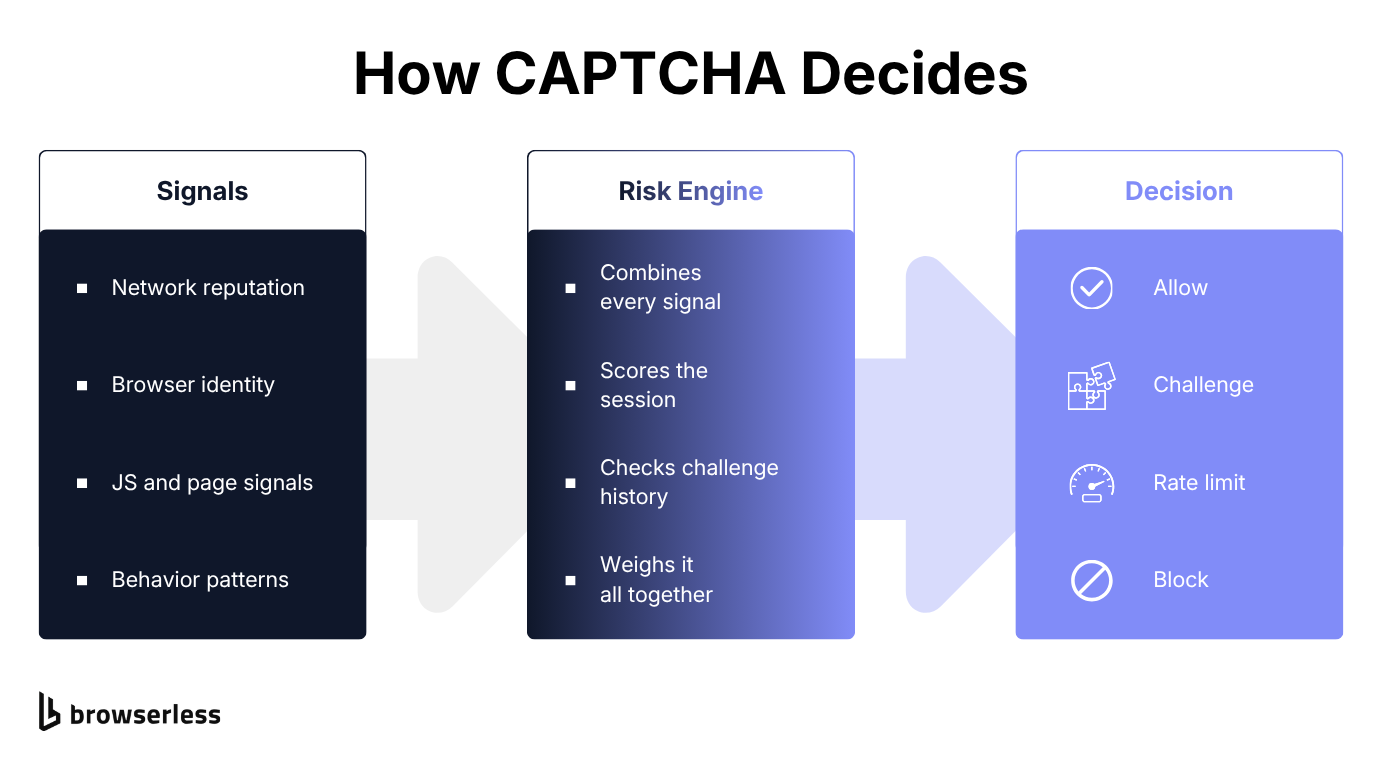
That's why CAPTCHA solving is only one part of the story. Many systems aren't trying to see if you can solve puzzles. They're trying to see if your browser, session, and behavior look coherent.
reCAPTCHA v2, reCAPTCHA Enterprise, and Cloudflare Turnstile
Google's reCAPTCHA is a common example. Whether it's the "I'm not a robot" checkbox in reCAPTCHA v2 or a score-based or checkbox key in reCAPTCHA Enterprise, what you see as a challenge is the end of a pipeline that already assessed your request, your device, and your history. reCAPTCHA v3 never shows a challenge at all – it scores every request in the background and hands the site a number to act on.
Cloudflare Turnstile also runs its check in the background, but it returns no score: it issues a token the site validates server-side, then accepts or rejects the request. What the visitor sees depends on the mode the site picked – Managed can prompt for a checkbox, Non-Interactive shows a widget with a spinner, and Invisible shows nothing at all. Either way, a poorly configured headless browser can fail these checks with no puzzle in sight.
Why businesses need to bypass CAPTCHA legally
If you're doing web scraping or automation for real work, you've probably hit at least one of these:
- Price monitoring for e-commerce competitors.
- Market research and trend tracking.
- Lead generation where you're enriching publicly available data.
- Compliance monitoring where you need to verify claims, listings, or disclosures.
- Internal QA that tests production-like flows at scale.
In these contexts, bypassing CAPTCHA doesn't usually mean breaking a security control. It means building a workflow that does one of the following:
- Uses an allowed access path such as an API, export, partner feed, or permissioned endpoint.
- Reduces suspicious automation patterns so you get challenged less often.
- Detects the challenge and routes to a permitted fallback, including a human review step.
Techniques to bypass CAPTCHA
Think of this section as techniques to avoid CAPTCHAs and handle them predictably, rather than a CAPTCHA-solver arms race. Your goal is to keep your automation stable while staying inside the rules that apply to your use case.
The five approaches below map to the most common failure points. Each one also sets you up for the comparison and scaling sections later.
TLS fingerprinting
Transport Layer Security (TLS) fingerprinting is the practice of identifying an HTTPS client by its handshake signature, like a telltale sign of how it starts secure connections. Some systems use that profile to identify non-browser clients, especially when you're making many requests.
Here are the key TLS fingerprinting takeaways:
- If you're calling a protected web page with a raw HTTP library, you may stand out even with a nice
User-Agent, the browser identifier string your client sends. - The least brittle fix is often to use an actual browser engine for browser-only properties, or a managed browser service that already handles the messy edges.
- If you own the target or have permission, test your requests across clients and log what changes between a passing and a challenged request.
A simple, safe way to validate whether your client choice is the trigger is to run an A/B test in the same environment:
- Client A: Your current HTTP client, whether that's a Python script or a raw curl call.
- Client B: A real browser session running Chrome or Firefox, using Puppeteer, Playwright, or Selenium.
- Compare: Status code, redirects, and whether you see a CAPTCHA page.
Here's the kind of instrumentation you want in your logs:
GET /products?q=shoes HTTP/1.1
Host: scraping-sandbox.netlify.app
User-Agent: Mozilla/5.0 (Windows NT 10.0; Win64; x64) AppleWebKit/537.36
Accept: text/html,application/xhtml+xml
Accept-Language: en-US,en;q=0.9
Cookie: session=abc123xyz
If the same request works in a browser but fails in your HTTP client, you've learned something actionable without crossing into evasion.
JavaScript fingerprinting
JavaScript fingerprinting is a catch-all device fingerprinting term for what the site can learn once the page runs, including installed plugins, rendering details, timing, and whether the browser behaves like real Google Chrome instead of an automated copy.
In practical terms:
- Some pages won't fully load content until scripts run.
- Some challenges appear only after JavaScript calls an API endpoint and decides that you look risky.
- Bot defenses often check for automation artifacts and inconsistent behavior.
The safe engineering approach is to focus on coherence:
- Run a real browser when the site is browser-dependent.
- Persist cookies and storage between steps so your session is consistent.
- Avoid teleporting through flows faster than a normal user would, especially around login and checkout.
Here's a Playwright example that does something you can justify in most legitimate systems: detect a CAPTCHA and stop cleanly so you can route to an approved fallback. It reuses the default page (rather than opening a new one) so Browserless's own CAPTCHA event is visible, and falls back to a text match for challenge pages that event doesn't cover.
import { chromium } from "playwright-core";

const url = process.env.TARGET_URL;
const token = process.env.BROWSERLESS_TOKEN;

(async () => {
  const browser = await chromium.connectOverCDP(
    `wss://production-sfo.browserless.io/stealth?token=${token}`,
  );

  try {
    const context = browser.contexts()[0];
    const page = context.pages()[0];
    const cdp = await context.newCDPSession(page);

    let captchaFound = false;
    cdp.on("Browserless.captchaFound", () => {
      captchaFound = true;
    });

    await page.goto(url, { waitUntil: "domcontentloaded" });

    // Give late-loading challenges a bounded window to appear.
    await page.waitForLoadState("networkidle", { timeout: 10_000 }).catch(() => {});

    // Fallback for challenge pages the CDP event doesn't cover. Match visible
    // text, not raw HTML: a page that only loads a CAPTCHA script isn't blocked.
    // Tune these markers to the challenge your target actually shows.
    const visibleText = (await page.locator("body").innerText()).toLowerCase();
    const looksLikeCaptcha =
      captchaFound ||
      visibleText.includes("verify you are human") ||
      visibleText.includes("i'm not a robot");

    if (looksLikeCaptcha) {
      await page.screenshot({ path: "challenge.png", fullPage: true });
      throw new Error("CAPTCHA challenge detected - route to approved fallback.");
    }

    // Continue normal automation...
    console.log("No CAPTCHA detected, continuing.");
  } finally {
    await browser.close();
  }
})();
The next lever many teams reach for is IP behavior, often too quickly and without thinking through the compliance and reliability implications.
IP address rotation
IP rotation is often discussed as if it's a magic switch. In reality, it's an operational tool with a lot of footguns.
Legitimate reasons to vary egress IP include:
- You're running multi-region testing for your own web app.
- A partner has rate limits per IP and you're distributing allowed traffic.
- You need redundancy when an ISP route is degraded.
What you shouldn't do is treat IP rotation as a way to bypass rules on a website you don't have permission to automate. Even when you do have permission, you'll want to keep the behavior stable:
- Prefer sticky sessions when a flow relies on cookies. On Browserless stealth routes, BQL,
/unblock, and/scrapethis is already the default; passproxySticky=falseonly when you deliberately want a fresh IP. - Keep request rates predictable.
- Don't randomly add headers like
X-Forwarded-FororX-Original-IPunless you control the proxy chain and know why they're present.
If you're debugging a challenge spike, log IP, ASN, region, and challenge rate together. That data tells you whether the issue is network reputation or something higher up the stack.
Browserless runs both residential and datacenter proxy networks, with country- and city-level targeting through proxyCountry and proxyCity when a target only serves certain regions. The two networks aren't priced the same: residential runs 6 units/MB against 2 units/MB for datacenter, so treat proxy choice as a cost decision, not just a reliability one.
HTTP header configuration
Headers are not a cheat code. They're just the contract your client presents to the server. Problems happen when your headers are inconsistent with how a real browser behaves, or inconsistent across requests in the same session.
At minimum, keep the following aligned:
User-Agent– already defined above; keep it consistent with the browser engine you're actually running.AcceptandContent-Type– what you can receive and what you're sending.Accept-Language– locale, which often impacts challenges and page variants.Cookie– session continuity, which is where most reliability lives.
If you're integrating a CAPTCHA-solving service or solver API for your own properties or with explicit permission, you'll also see request parameters such as the data sitekey value (usually the data-sitekey attribute), the page URL, and the returned CAPTCHA code. Treat those as sensitive integration details and protect your API key. Make sure your solver software records when a challenge was validated so you can measure outcomes.
Avoiding honeypots
A honeypot is a trap element designed to catch bots. The classic example is a hidden form field that real users never fill, but naive automation submits anyway.
Safe, reliability-focused practices:
- Only submit visible fields.
- Prefer interacting the same way a user would, through the UI, rather than constructing form payloads blind.
- Validate what you're about to submit before you send the request.
In browser automation, a simple pattern is to create a locator by label or accessibility name, not by all the inputs on the page. That reduces the chance you accidentally fill a hidden CAPTCHA field or trap input.
Once you've got the fundamentals right, you're ready to choose an approach that matches your scale and risk profile.
A comparison of CAPTCHA bypass tools
CAPTCHA bypass covers everything from official integrations and site relationships to managed browsers. It also covers standalone reCAPTCHA solver services running AI models that claim they can automatically solve CAPTCHAs found on any webpage. A useful way to compare these approaches is by reliability, operational complexity, cost, and whether the approach is compatible with your legal and ethical constraints.
Here's a practical comparison:
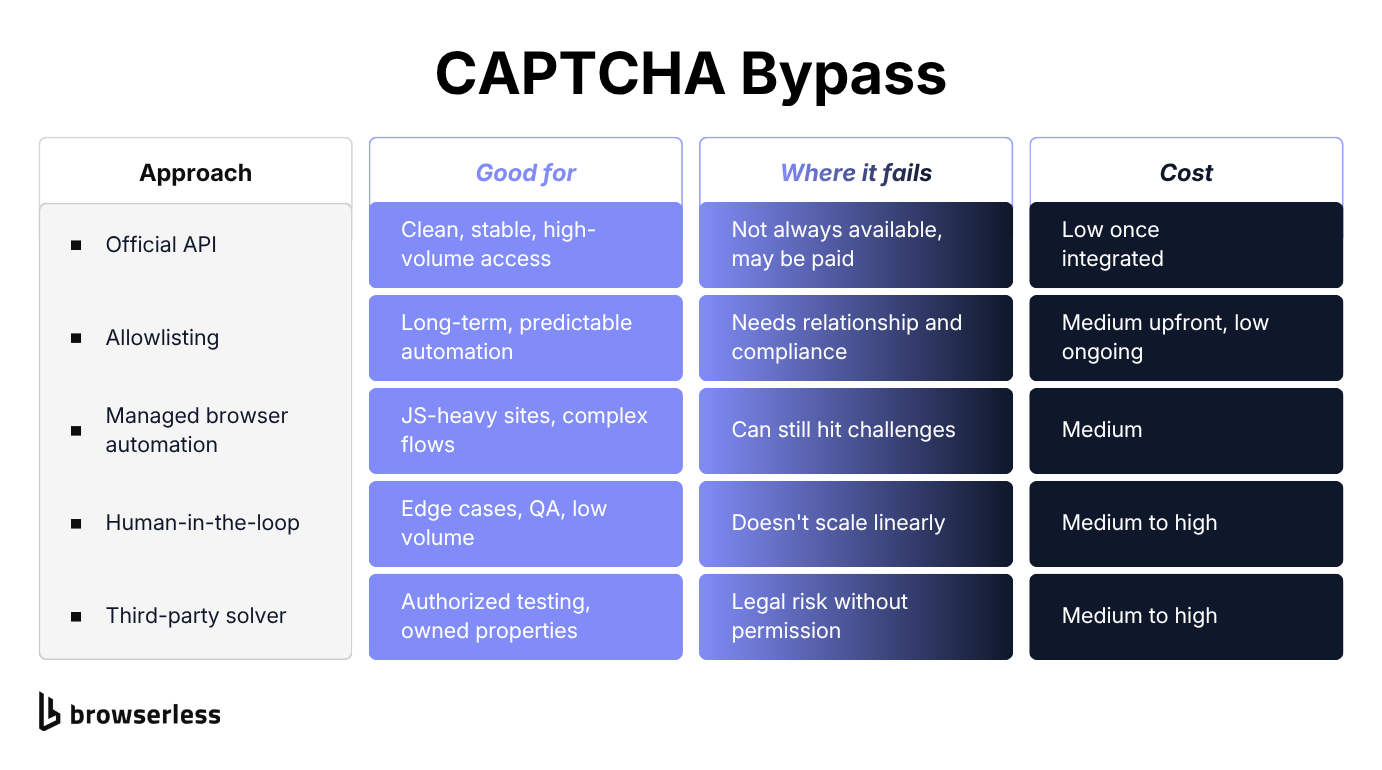
"Managed browser automation" in that comparison means a hosted browser layer with stealth and CAPTCHA handling built in, which helps on JavaScript-heavy sites and challenge pages that raw HTTP clients struggle with.
Smart Scrape's CAPTCHA handling is worth a caveat: it clears challenges gating the page itself, but not one embedded in a form you need to submit. Use BQL's solve mutation for that case instead.
If you care about your success rate, define it the right way. Don't ask: did we solve a CAPTCHA challenge once? Ask: did the end-to-end workflow return correct data, with retries, over a week, without burning accounts or causing incidents?
What it takes to run browser automation at scale
Whichever approach you pick, tool choice matters less than operational guarantees, retries, observability, and predictable failure modes. A realistic scale-ready stack usually includes:
- A browser layer for JS and complex pages.
- Session persistence so cookies and storage survive across steps.
- Rate limiting and backoff logic.
- Instrumentation that captures screenshots and HTML when failures happen.
- A policy layer – what you do when a challenge appears, including when to stop.
If you're building this yourself, you'll end up writing a lot of glue code: queueing, proxy management, monitoring, and failure classification. That's usually the moment teams look at managed services, not because they can bypass everything, but because they reduce the time you spend on brittle maintenance.
Here's a concrete scenario where teams commonly hit CAPTCHAs: e-commerce price monitoring.
CAPTCHA bypass for e-commerce price monitoring
E-commerce monitoring is a common CAPTCHA trigger as it involves repetitive access patterns, similar URLs, lots of pagination, and a strong incentive for sites to protect inventory and pricing.
If you're doing this legitimately, the workflow choices matter more than any single CAPTCHA solver. For this exact repetitive-page pattern, Smart Scrape is worth checking first, since it's built for pulling structured data off pages like these without you writing the browser-control code yourself.
- Crawl frequency – don't hammer product pages every minute if you only need daily deltas.
- Session management – keep cookies persistent instead of logging in again for every request.
- Page selection – fetch the minimal pages you need, not the entire site map.
- Data quality – validate that you got a product page, not a challenge page, before you store results.
A simple but powerful practice is to treat challenge detection as a first-class outcome. Your pipeline should explicitly output one of:
- Success – Parsed data and metadata, including timestamp, URL, and content type.
- Challenge – A screenshot, the HTML, and a classification.
- Blocked – The status code, headers, and a retry decision.
Once you think this way, a managed browser platform becomes appealing because it standardizes the hard parts. That's exactly what the next section covers.
How Browserless helps you bypass CAPTCHA
Browserless hosts real browsers, plus workflow features that reduce failure rates when targets are sensitive.
In a bypass CAPTCHA context, that means you can:
- Run real browsers at scale without managing your own fleet, with the same retries, timeouts, and persisted sessions covered above.
- Detect challenge pages via the
Browserless.captchaFoundevent, solve supported ones automatically withsolveCaptchas=true, or fall back to the Unblock API when stealth routes alone can't get past a site's defenses.
Solving supported CAPTCHAs with BrowserQL
BrowserQL (BQL) is Browserless's stealth-first browser automation tool. It's useful when you want to express an automation flow as a single request/response with structured outputs. On properties you own or have permission to automate, BQL can handle supported CAPTCHAs inline through the solve and solveImageCaptcha mutations, so you can avoid wiring a separate solver API in many workflows. The supported set covers reCAPTCHA v2 and v3, Cloudflare Turnstile, GeeTest, Friendly Captcha, DataDome, and more. solve detects the type automatically, so the optional type argument only saves time when you already know it. A solved reCAPTCHA checkbox may not visibly appear ticked, so still click submit.
On harder targets, stealth routes (/stealth, /chromium/stealth, /chrome/stealth) accept solveCaptchas=true and proxy=residential as query parameters on the same connection string, so you're not wiring separate proxy and CAPTCHA-solving tooling on top of your browser layer.
The key point is operational. You're building a system that can keep running when CAPTCHA shows up, without relying on brittle hacks that break the moment a site changes a script.
Here's the same idea with Browser Use, letting an AI agent clear CAPTCHAs through Browserless:
Conclusion
CAPTCHA bypass is a loaded phrase, but in real-world engineering it means one of two things: you make your automation coherent enough that you trigger fewer challenges, or you handle the ones that appear safely enough that your pipeline stays reliable.
For legitimate business purposes:
- Allowed access first – APIs, feeds, or allowlisting.
- Reliability next – sessions with backoff, observability, and a clear policy for what happens when a CAPTCHA appears.
If your automation keeps hitting CAPTCHAs or breaking every time a site changes its defenses, stop patching around it and fix the layer underneath. Browserless and BrowserQL reduce the operational overhead, so you ship the same automation you'd build yourself, but with fewer surprises around sessions, retries, and challenge detection. Sign up to start building with Browserless.
Bypass CAPTCHA FAQs
What is the success rate of different CAPTCHA bypass methods?
The honest answer depends on what you measure. If success rate means end-to-end data correctness over time, official APIs and allowlisting win. Managed browsers can be strong for JS-heavy sites, but you should still expect challenge spikes and plan fallbacks.
Is it legal to bypass CAPTCHA for business purposes?
Sometimes, but legality depends on jurisdiction, contracts, and the site's ToS (terms of service). The safest pattern is permissioned access: APIs, partner feeds, or written approval. If you're unsure, involve counsel.
What's the difference between a CAPTCHA solver and avoiding CAPTCHAs?
Avoiding means reducing triggers and building coherent sessions so challenges appear less often. Solving means completing a challenge, often via a CAPTCHA-solving service or human workers, which should only be used with explicit authorization.
Can headless browsers trigger reCAPTCHA v3?
Yes. reCAPTCHA v3 scores requests in the background, so a headless browser with default settings, predictable timing, or missing browser signals can get a low score and be blocked without any visible challenge. Running a real, well-configured browser and keeping behavior consistent matters more here than any solver.
Why do residential proxies work better than datacenter IPs?
Residential and mobile networks generally carry a different reputation with these systems than datacenter IP ranges do, since datacenter ranges are cheap to acquire in bulk and easier to flag. Browserless runs both networks, with residential priced at 6 units/MB against 2 units/MB for datacenter, which is why proxy choice is worth treating as a cost decision as much as a compliance one.
Can JavaScript fingerprinting alone bypass CAPTCHA?
Not reliably. CAPTCHA decisions often combine JS signals with network reputation, cookies, and behavior. You'll get better outcomes by making the whole session coherent.
What are the best practices for enterprise-grade CAPTCHA bypass?
Start with allowed access paths. From there: persist sessions, implement backoff, detect challenge pages early, keep logs and screenshots, and define when the system stops vs. retries.