
Key Takeaways
- Proxies give you control, VPNs give you privacy. A VPN encrypts all your internet traffic through one tunnel. A proxy works at the request level, letting you choose which IP hits which target. For web scraping and automation, per-request control and speed matter more than full device encryption.
- Pick the proxy type based on your target. Residential proxies are hardest to detect. Datacenter proxies are fast but get flagged. Mobile proxies blend into cellular traffic. The right type depends on how aggressive the site's detection is, not just cost.
- Browserless handles proxies at connection time. Target a country or city, keep a sticky IP, and match browser language to proxy location. No VPN client, no separate proxy middleware. Works across REST APIs, BaaS, and BrowserQL.
Introduction
Proxy vs VPN is one of those comparisons that sounds simple until you actually need to pick one for a production workload. Both mask your IP address, both can route traffic through another location, and both show up in every "online privacy" article on the internet. But they solve different problems, and choosing wrong can cost you speed, reliability, or money, depending on what you're building. This guide breaks down how proxies and VPNs actually work under the hood, how they differ in encryption, routing, and performance, and when each makes sense for scraping, automation, and browser-based workflows.
How proxies and VPNs actually work
What a proxy server does
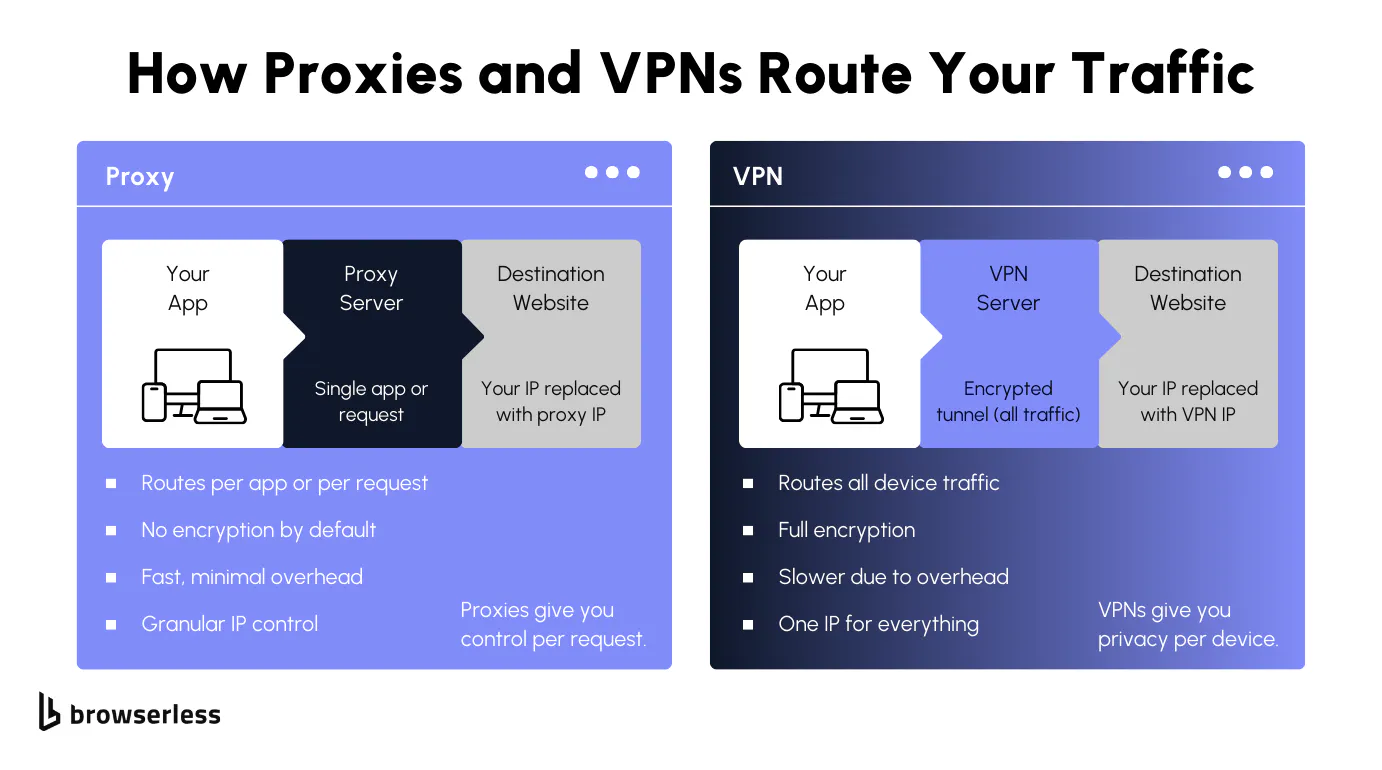
A proxy server is basically a middleman between you and the website you're trying to reach. When you send a web request, it goes to the proxy first. The proxy then forwards that request to the destination web server on your behalf, grabs the response, and sends it back to you. The site on the other end never sees your real IP address. It only sees the proxy's IP address, which is the whole point.
What makes proxies useful for automation is that they operate at the request level, not across your entire internet connection. You can route one request through a residential proxy in the US and another through a data center proxy in the UK without changing your device's network settings.
HTTP proxies are the most common and handle standard web traffic. SOCKS proxies operate at a lower level and support any protocol, which gives you more flexibility. A forward proxy sits between the client and the internet, which is the setup you'll see in most scraping and automation workflows.
One thing to know upfront: most proxies do not encrypt traffic. For HTTPS, TLS still protects your connection end-to-end, but the proxy itself adds no extra encryption layer. For plain HTTP, requests travel in plain text. Either way, proxies offer limited security compared to a VPN. What you get instead is control. You choose the IP address, the country, and whether to keep it sticky or rotate it per session. Different proxy types handle different jobs.
What a VPN does
A VPN, or virtual private network, creates an encrypted tunnel between your device and a remote VPN server. Everything you do online goes through that tunnel. Unlike a proxy, a VPN reroutes all your internet traffic, not just traffic from a single app or request.
The VPN encrypts data before it leaves your device, so your internet service provider, anyone on your network, and everything in between cannot see what you're doing. The VPN server then forwards your requests to the destination, and the site sees the server's IP address instead of your own. That's what makes VPNs a solid choice when you need to protect sensitive data, access geo-restricted content, or stay secure on public wifi.
The downside is speed. Because a VPN encrypts traffic across your entire internet connection, it adds noticeable overhead. The further the VPN server is from you or from the target site, the worse the latency. VPN providers also give you one IP address for all your device traffic, which means you get zero per-request control.
You can't rotate IPs between sessions or target different geos per request, the way you can with proxies. For personal online privacy, remote access, and bypassing geo restrictions, VPNs are great. For web scraping and automation that require granular IP control, rotation, and speed without encryption overhead, proxies are a better tool.
Types of proxies and when each one matters
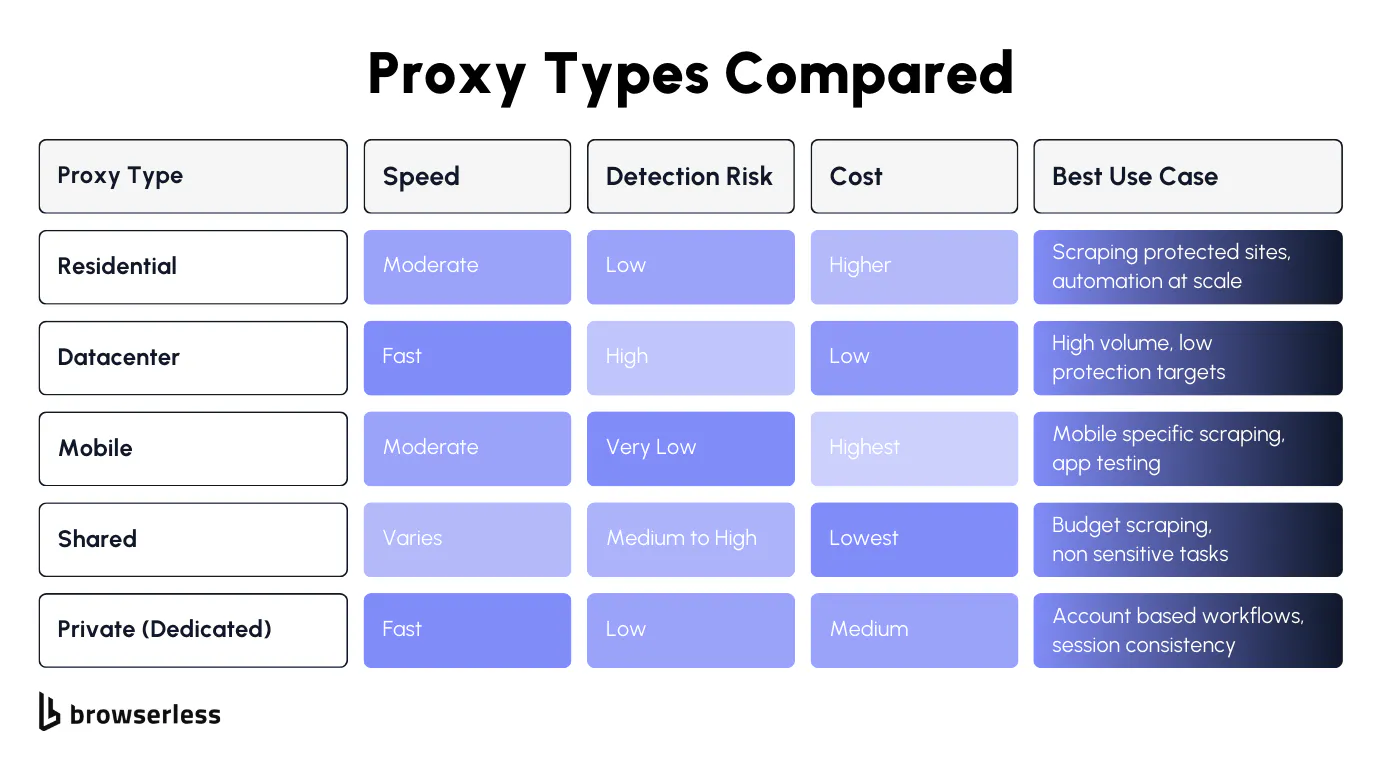
Not all proxies work the same way. Some are categorized by where their IP addresses come from, others by the protocol they use. Picking the right type depends on what you're building. A web scraping pipeline has different needs than private browsing or accessing geo-restricted content. Here's how the main types break down.
Proxy types by source
The source of a proxy's IP address determines its detectability and cost. This is usually the first decision you make when choosing a proxy for automation.
- Residential proxies use real IP addresses assigned by internet service providers to home networks. Because the IP address looks like a normal user's, websites have a much harder time flagging it. Residential proxies are the go-to choice for web scraping protected sites, bypassing geo restrictions, and any workflow where you need to look like a real visitor. They're slower and more expensive than datacenter options, but the tradeoff is worth it for detection resistance.
- Datacenter proxies come from cloud hosting providers and data centers, not from ISPs. They're fast, cheap, and great for high-volume tasks where the target site doesn't have aggressive bot detection. The downside is that many proxy servers from data centers share IP ranges that are easy for sites to identify and block. Use these for targets with limited security or when speed matters more than stealth.
- Mobile proxies route your web requests through real cellular networks, giving you an IP address from a mobile carrier. These are the hardest to detect because mobile IPs are shared across thousands of real users on the same network. They're useful for mobile-specific scraping, app testing, and accessing web content that behaves differently on mobile connections. They're also the most expensive option.
- Shared proxies split a single IP address across multiple users. They're the cheapest option, which is why free proxies usually fall into this category. The risk is that other users on the same IP can get it flagged or banned through their own activity, and that affects you, too. Shared proxies work for low-stakes tasks, but avoid them for anything where reliability matters.
- Private (dedicated) proxies give you exclusive use of an IP address. Nobody else routes traffic through it, which eliminates the cross-contamination risk you get with shared proxies. These are a good middle ground for account-based workflows, moderate-scale web scraping, and any task that requires consistent behavior from the same IP over time.
Proxy types by protocol
Beyond the IP source, proxies also differ in how they handle your traffic at the protocol level. This affects what kind of web requests they can process and how much visibility you have into the connection.
- HTTP proxies handle standard web traffic and are the most common type you'll see in scraping and automation setups. They understand HTTP and HTTPS requests, can modify headers, and work with most proxy service providers and automation libraries out of the box. For most web scraping and browser traffic use cases, HTTP proxies are all you need.
- SOCKS proxies operate at a lower level than HTTP proxies and support any protocol, not just web traffic. That means they can handle things like FTP, email, or custom TCP connections. They don't interpret the data passing through, which gives you more flexibility but also means they can't modify headers or cache web content the way HTTP proxies can. Use SOCKS when you need protocol flexibility beyond standard web requests.
- Forward proxies sit between the client and the internet, forwarding requests on behalf of the user. This is the setup most automation and scraping workflows use. When people say "proxy" in the context of web scraping, they almost always mean a forward proxy. It handles outgoing web requests from your scripts and replaces your real IP address with the proxy server's IP address before the request reaches the destination.
- Transparent proxies don't hide your IP address at all. They pass your original IP through to the destination server and are mainly used for caching web pages, content filtering on internal networks, or monitoring browser traffic. You won't use these for scraping or automation, since the whole point of a proxy in that context is to mask your identity.
- Anonymous proxies hide your real IP address from the destination server, but the server may still detect that a proxy is being used. They're a step up from transparent proxies for online privacy, but they don't offer the same level of stealth as residential or mobile proxies. Some anonymous proxy servers also inject headers that reveal the proxy's presence, which limits their usefulness for web scraping against sites with even basic detection.
Proxy vs VPN: the key differences that actually matter
Encryption, scope, and performance
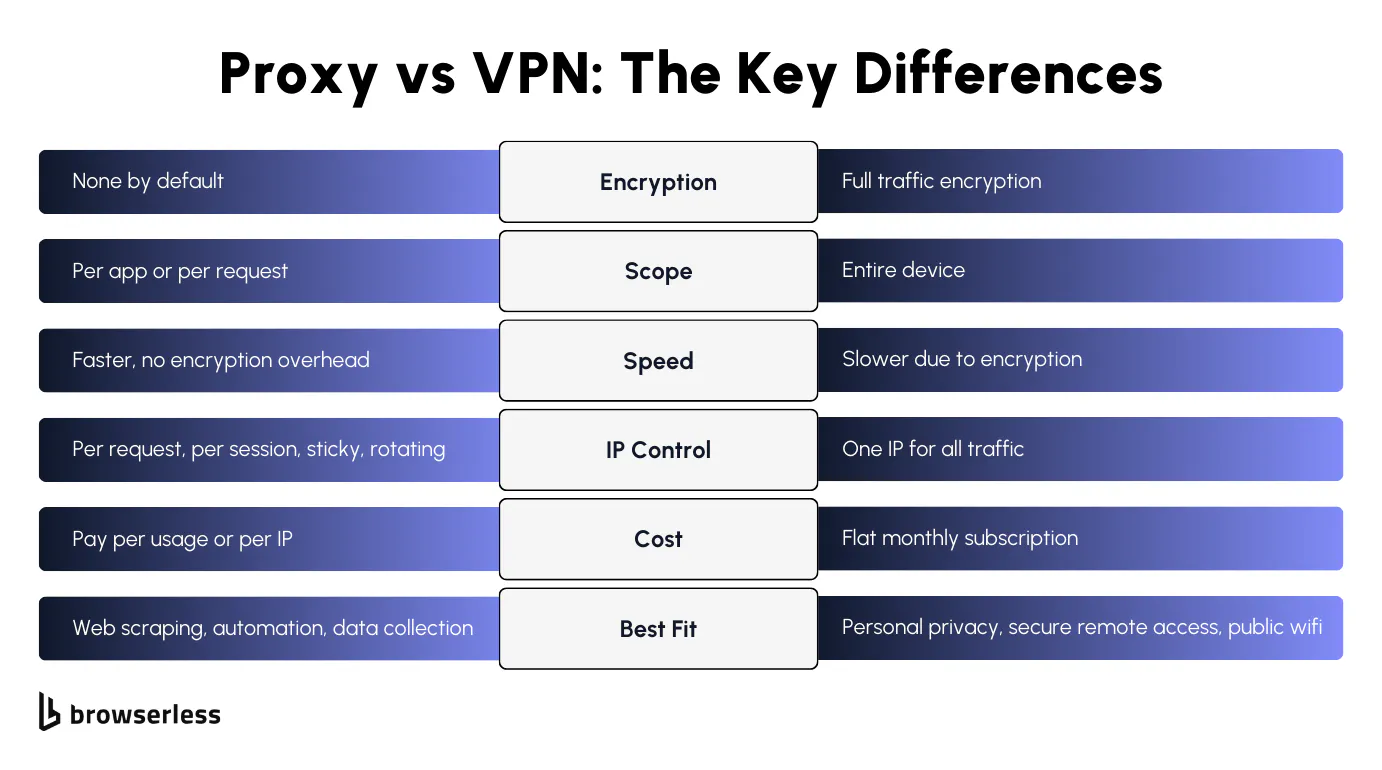
The biggest difference between a proxy and a VPN is how your traffic is handled. A VPN encrypts all your internet traffic through an encrypted tunnel before it reaches the VPN server. A proxy server doesn't encrypt data by default. If you need to protect sensitive data or browse privately on public Wi-Fi, data encryption matters. If you're running web scraping against public web pages, it's just overhead.
Scope is the other big one. A VPN covers your entire internet connection, every app, every background service, all routed through one VPN server. Unlike proxies, you can't pick and choose. A proxy server works at the request level.
Route one web request through a residential proxy in the US, the next through a datacenter proxy in Germany, and leave the rest of your browser traffic untouched. For web scraping at scale, that per-request control is everything.
Speed follows from there. VPN encrypts traffic across your entire internet connection, adding latency to everything. Proxies skip encryption, so web requests move faster. When you're making thousands of requests in a pipeline, those milliseconds add up fast.
IP handling and privacy
VPNs give every app on your device one encrypted exit point. Proxies give each request its own exit point, IP, and geo. That difference in granularity is what makes proxies the default for automation.
When to use proxies for scraping and automation (and how Browserless handles it)
Why proxies win for automation
Three things matter in an automation pipeline: IP flexibility, speed, and no global side effects on your environment. Proxies deliver all three. VPNs encrypt everything on your device. Useful for privacy, wasteful for scraping public web pages.
With Browserless, there's no VPN client to configure and no VPN connection wrapping your entire device. You set proxy parameters directly on the request. Here's a simple content fetch using a residential proxy; your own IP address never touches the destination web server:
curl -X POST "https://production-sfo.browserless.io/content?token=YOUR_API_KEY&proxy=residential&proxyCountry=us" \
  -H "Content-Type: application/json" \
  -d '{
    "url": "https://example.com",
    "waitForTimeout": 2000
  }'
One web request, one residential proxy, one response. No tunnel wrapping traffic that never needed encryption in the first place.
How Browserless integrates proxies
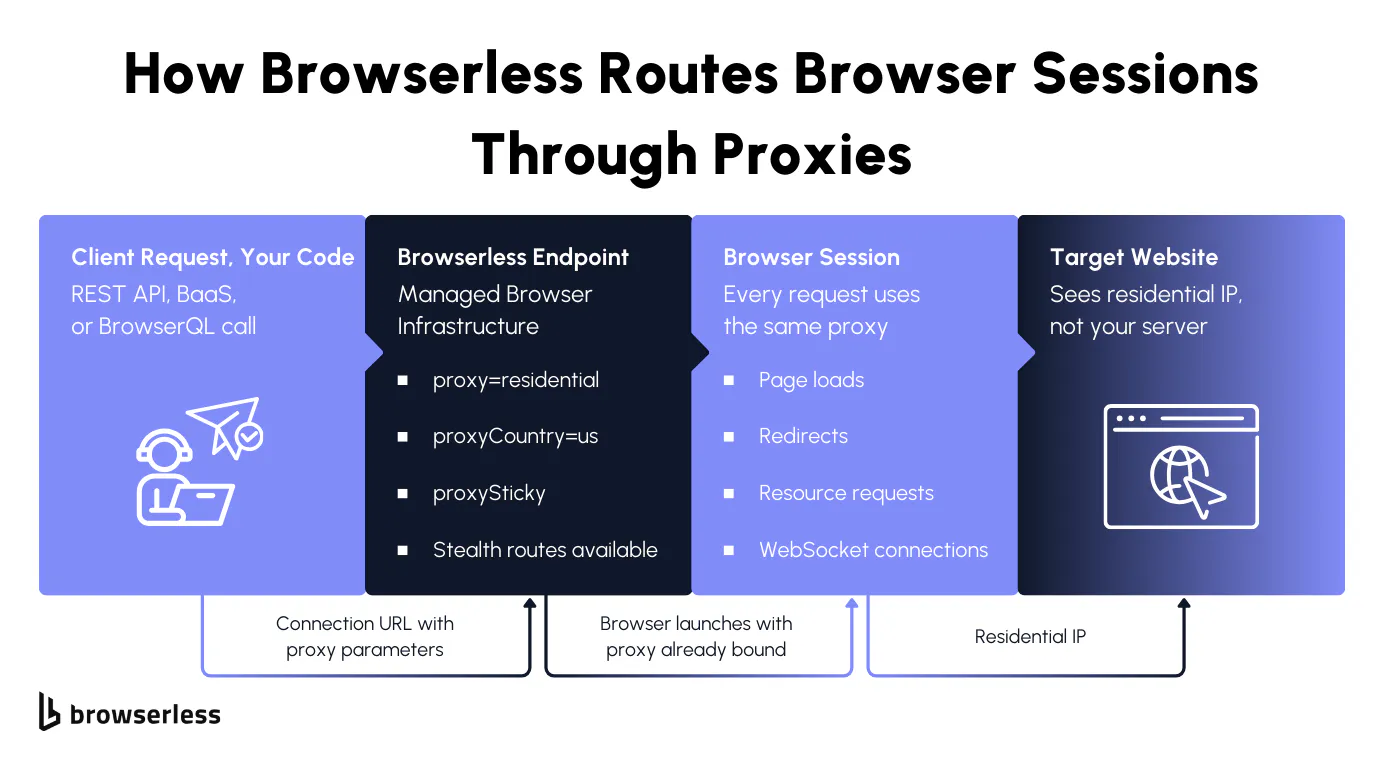
Browserless gives you that control at the connection level. Target a country or a specific city, or keep the same server IP address throughout the session. On stealth, you can even automatically match the browser's language to the proxy's location, so a Brazilian proxy makes the browser display in Portuguese. Here's what that looks like with Playwright:
import { chromium } from "playwright-core";

// Sticky session with a BR residential proxy, city targeting, and locale matching
const browser = await chromium.connectOverCDP(
  "wss://production-sfo.browserless.io/stealth?token=YOUR_API_KEY&proxy=residential&proxyCountry=br&proxyCity=sao%20paulo&proxySticky=true&proxyLocaleMatch=1",
);
const context = await browser.newContext();
const page = await context.newPage();
await page.goto("https://example.com");
Note: City-level proxying (proxyCity) requires a Scale plan (500k+ units). Plans under 500k units will receive a 401 error.
Every web request in that session goes through the same residential IP address in São Paulo, with the browser language matching the proxy's region. The proxy handles routing while the browser handles rendering, with no extra layer between them.
If you already have your own proxy service, Browserless supports that too. Use the externalProxyServer parameter to route through your own proxy instead of the built-in residential network:
curl -X POST "https://production-sfo.browserless.io/content?token=YOUR_API_KEY&externalProxyServer=http://user:pass@proxy.example.com:8080" \
  -H "Content-Type: application/json" \
  -d '{
    "url": "https://example.com",
    "waitForTimeout": 2000
  }'
For even more granular control, BrowserQL lets you proxy specific request types within a session. You can route document and XHR requests through a residential proxy while letting images and scripts load directly, which cuts bandwidth and keeps proxy costs down since residential proxies consume 6 units per MB (see Pricing for how units work):
mutation SelectiveProxy {
  proxy(country: US, sticky: true, type: [document, xhr]) {
    time
  }
  goto(url: "https://example.com", waitUntil: domContentLoaded) {
    status
  }
}
Browserless turns proxy routing into a connection parameter. Country, city, sticky session, locale match, or your own external proxy server, all set in the URL or query, all scoped to the individual browser session.
Conclusion
Proxy vs VPN comes down to what you're actually building. VPNs make sense when you need full device encryption and privacy for personal browsing or secure remote access. Proxies make sense when you need per-request IP control, geographic targeting, and speed for scraping and automation workflows. For browser automation specifically, proxies are the standard because they integrate directly into your connection without adding encryption overhead or losing request-level control. Browserless makes this easier by building residential proxy support directly into every browser session, whether you're using REST APIs, BaaS with Puppeteer or Playwright, or BrowserQL. Sign up for a free plan and test proxy routing against your own targets.
FAQs
What is a proxy vs. a VPN?
A proxy server is an intermediary server that replaces the user's IP address with its own for web requests. A virtual private network creates an encrypted tunnel that reroutes internet traffic from your entire internet connection through a VPN server. The key difference: a proxy swaps IPs per request without encrypting traffic, whereas a VPN encrypts everything but locks you to a single exit IP.
Can I use a VPN for web scraping?
You can, but you'll hit walls fast. A VPN locks you to a single IP per session, with no way to rotate IPs or target specific geos on request. That means rate limits hit sooner, geo-targeted scraping becomes impossible, and you're adding encryption overhead to requests that don't need it. The one scenario where a VPN still makes sense alongside scraping is if your infrastructure runs on a shared or untrusted network and you need to encrypt traffic between your machine and the proxy endpoint.
What type of proxy is best for web scraping?
Residential proxies use real IP addresses from internet service providers. Datacenter proxies are faster but more easily detected by sites with bot protection. Mobile proxies work for mobile-specific scraping. Avoid free proxies and free proxy connections for production work. For the hardest sites, combine a residential proxy with Browserless stealth routes, proxyCountry, proxyCity, and proxyLocaleMatch to access geo-blocked content and match the browser language.
Do I need both a VPN and a proxy?
For most scraping setups, no. A proxy handles IP masking, rotation, and geo-targeting on its own. Layering a VPN on top adds latency without improving scrape results. Where some enterprise teams do use both is when the scraping infrastructure sits on a shared corporate network. The VPN secures traffic between internal systems, while the proxy handles outbound request routing. If your setup is a single machine or a dedicated server, a proxy alone is all you need.
How does Browserless handle proxies?
Add proxy parameters to your connection URL. The browser launches bound to the proxy, and every web request uses the same route. Parameters include proxy=residential, proxyCountry, proxyCity, proxySticky, proxyLocaleMatch, and externalProxyServer for your own proxy services. BrowserQL's proxy mutation routes specific request types through different proxies. Works across REST APIs, BaaS, and BrowserQL.
Is a proxy server safe for web browsing?
Depends on the proxy. A private proxy gives you a dedicated IP address with no cross-contamination. Free proxy connections may access user data or inject web content into web pages. An anonymous proxy hides your real IP address from the web server, but may reveal that you are using a proxy. For anonymous browsing across all apps, a VPN adds full-device encryption. For web scraping, a residential proxy from a trusted proxy service provider offers the best balance.
What is a forward proxy vs a reverse proxy?
A forward proxy sits between the client and the internet, forwarding web requests and replacing the client's original IP address with the server's IP address. Most HTTP proxies, web proxy setups, and anonymous proxy services are forward proxies. A reverse proxy sits in front of a web server, handling incoming web traffic for load balancing, caching web content, and network security on internal networks. Web scraping uses forward proxies. You'll encounter reverse proxies on the sites you scrape.
Can proxies help with bypassing geo restrictions?
Yes. Proxies mask your real IP address, replacing it with a server's IP address in another location. Use a residential proxy to access geo-restricted content at the city level, with proxy settings such as proxyCity. Browserless supports proxyLocaleMatch so web pages render in the local language. This beats VPN technology for automation because you control the location per web request, rather than routing all your internet traffic through a single VPN server. For bypassing content restrictions at scale across many proxy servers, proxies give you the flexibility a VPN service can't.