
TL;DR
- Web scraping API. A web scraping application programming interface (API) is a hosted endpoint you send a target Uniform Resource Locator (URL) to and get back Hypertext Markup Language (HTML) or JavaScript Object Notation (JSON) after optional browser rendering, with the browser and network work handled for you.
- Hidden APIs. Many pages fill themselves from undocumented JSON endpoints you can request directly, and this guide shows how to find and replay them, plus when to drive a managed browser instead.
- Three paths. Build your own stack, buy a black-box data API, or run your own scraper on a managed browser and keep the data.
- Managed infrastructure. You can keep your extraction logic and data while a hosted browser layer handles the browser and network work, including challenge orchestration.
Introduction
The data loads fine in your browser, then your script gets back an empty shell or a block page. Closing that gap is what a web scraping API is for. You send it a target URL and it runs the proxy and browser work a bare request can't, then returns the page's data, though no setup clears every protected target. You reach for one when a site has no usable public API, or when the API it offers is gated or throttled below what you need. From there, the guide follows a single request from URL to data, weighs building the stack yourself against handing it to a managed browser, and shows when a site's own hidden API is the cleaner path.
What is a web scraping API?
A web scraping API, sometimes called a web scraper API, is a hosted service you send a target URL to and get back its data as page source or structured data after optional browser rendering.
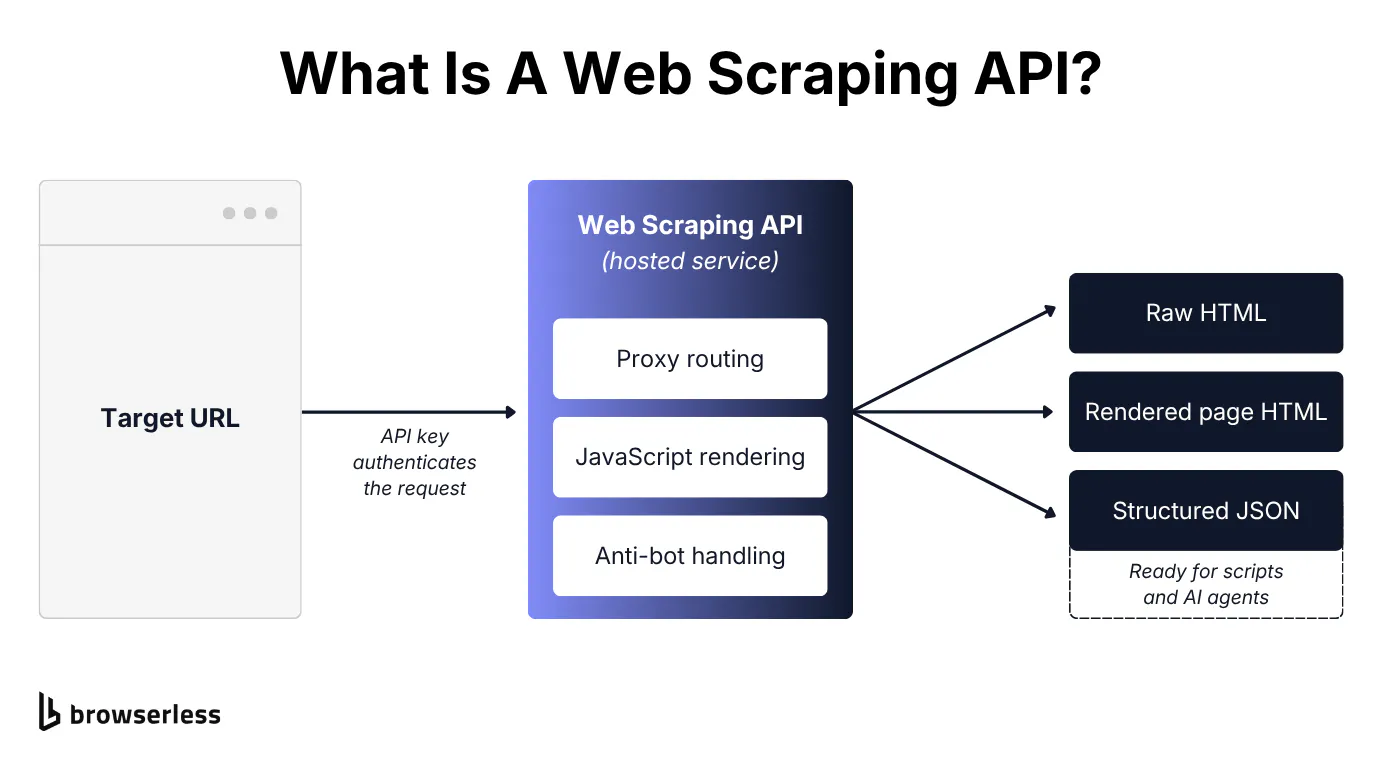
An API key authenticates the call. Behind it, the service manages proxies, real-browser JavaScript rendering, waiting, and anti-bot handling, the parts that usually break a scraper. Collecting data becomes a single request instead of infrastructure you have to run.
How a web scraping API works
A web scraping API works as an ordered cascade, escalating only as far as the page forces it. Walking it stage by stage also shows when a cheap raw request is enough and when a page needs a full browser.
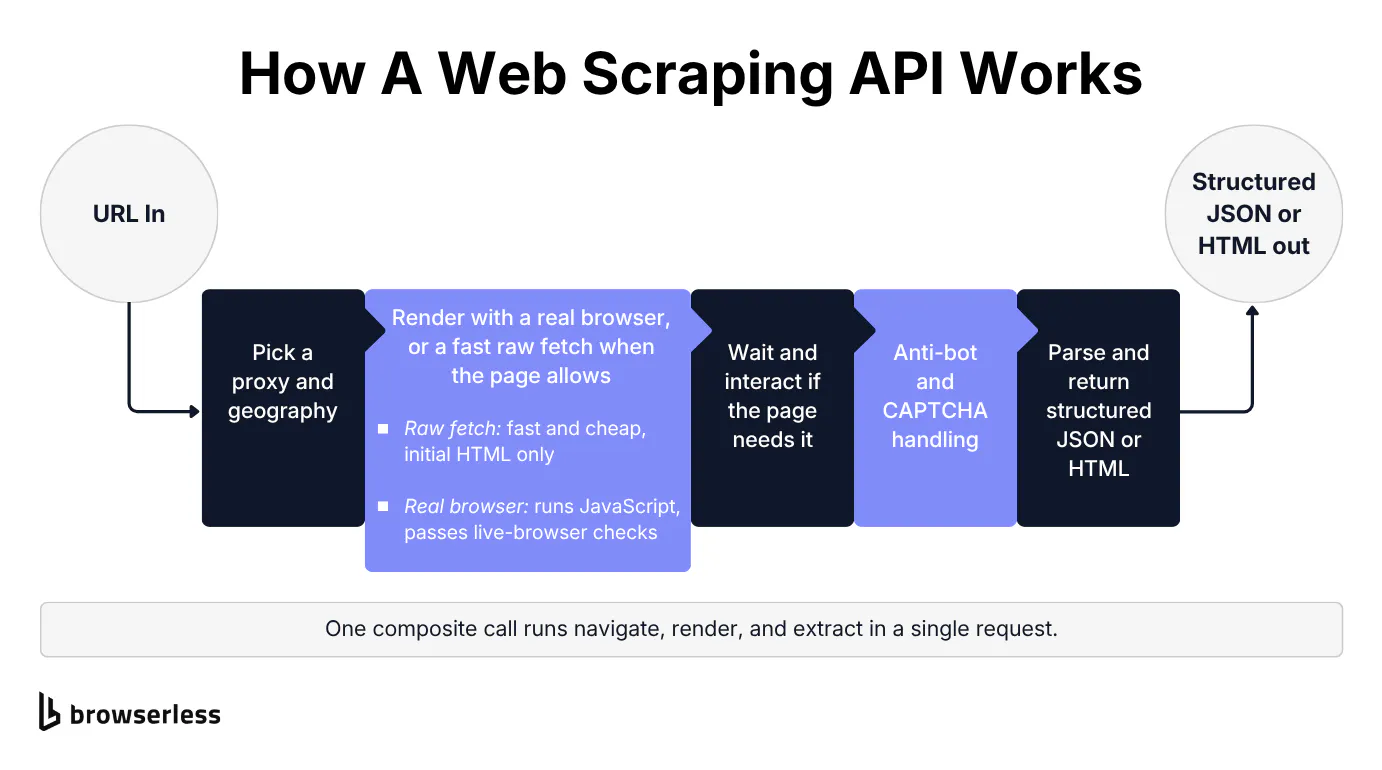
What happens between URL and JSON
A scraping request moves through an ordered cascade.
- Pick a proxy and geography.
- Render the page with a real browser, or take a fast raw fetch when the page allows it.
- Wait and interact if the page needs it.
- Handle anti-bot checks, including Completely Automated Public Turing test to tell Computers and Humans Apart (CAPTCHA) challenges.
- Parse and return structured JSON or HTML.
Each stage exists because some class of page needs it.
Rendering is easy to underestimate. A JavaScript-heavy page ships almost no data in its initial HTML. The content you want exists only after a real rendering engine runs the page's scripts and builds the document object model (DOM). That's why a bare Hypertext Transfer Protocol (HTTP) client returns an empty shell where the data should be. Headless browsers, real browser engines like headless Chrome running without a visible window, are what produce that finished DOM.
Raw HTTP or headless browser rendering
The cascade hides a choice that drives both cost and reliability. A raw-HTTP call is fast and cheap but only returns the server's initial page HTML, so a client-rendered or protected page comes back empty or blocked. A real-browser render executes the JavaScript and can satisfy checks that require browser behavior, at higher latency and cost. Browserless exposes that path directly as /content, which renders the page in a real browser and returns the fully rendered HTML, including JavaScript-injected content.
Static or server-rendered HTML favors the raw fetch, since the data is already in the response. JavaScript-rendered pages need a browser to produce the DOM, and protected targets may need browser behavior too.
The example below fetches a static catalog page with a plain HTTP client and parses the fields straight out of the returned HTML. On this server-rendered page it returns the fields without launching a browser, so it uses fewer resources than the browser path. Run the same code against a page that builds its list in JavaScript, and the parsed fields come back empty.
Many hosted web scraping APIs expose both the raw and the browser path behind one interface, so the choice becomes a parameter rather than a rewrite.
import requests
from bs4 import BeautifulSoup

HEADERS = {"User-Agent": "Mozilla/5.0 (raw-http-scraper-demo)"}


def fetch(url):
    resp = requests.get(url, headers=HEADERS, timeout=20)
    resp.raise_for_status()
    resp.encoding = resp.apparent_encoding  # honor the page's real charset (UTF-8)
    return BeautifulSoup(resp.text, "html.parser")


# Server-rendered catalog: the fields are already in the HTML the server sends,
# so a bare fetch is enough.
soup = fetch("https://books.toscrape.com/")
books = soup.select("article.product_pod")
print(f"books.toscrape.com (server-rendered): parsed {len(books)} books")
for book in books[:3]:
    title = book.h3.a["title"]
    price = book.select_one("p.price_color").get_text(strip=True)
    print(f"   {price:>8}  {title}")

# Same code, a JavaScript-rendered page. The quotes are injected by a script
# after load, so they are absent from the initial HTML and the parser finds
# nothing. This is where the cheap path stops.
soup = fetch("https://quotes.toscrape.com/js/")
quotes = soup.select("div.quote")
print(f"quotes.toscrape.com/js (JavaScript-rendered): parsed {len(quotes)} quotes")
The server-rendered catalog parses 20 books with titles and prices. The JavaScript-rendered page parses zero, with its content appearing only after a browser runs the page's scripts.
If you don't want to maintain that cascade yourself, Browserless packages the same stages behind /smart-scrape, which starts with a fast HTTP fetch and only escalates to a proxied fetch, then a headless browser, then a browser plus a CAPTCHA solve when the page demands it. Smart Scrape solves only the CAPTCHAs that gate access to the page. It returns the rendered page but does not fill or submit forms, so a form-embedded CAPTCHA needs BrowserQL's solve mutation instead. The response lets you watch the cascade work. A strategy field names the rung that resolved the page, and an attempted array lists every rung it climbed.
The example prints the cascade fields and the size of the content it hands back, so you can watch the cascade decide in one call. A static, server-rendered page resolves on the fast http-fetch rung. A page that blocks a bare request makes attempted climb further.
# Source your token first:  export BROWSERLESS_TOKEN="your-browserless-token"
ENDPOINT="https://production-sfo.browserless.io/smart-scrape?token=${BROWSERLESS_TOKEN}"

probe() {
  curl -s "${ENDPOINT}" \
    -H "Content-Type: application/json" \
    -d "{\"url\":\"$1\"}" \
  | jq -r '"resolved: \(.ok)  |  strategy: \(.strategy)  |  attempted: \(.attempted | join(" -> "))  |  data: \(.content | length) chars"'
}

# Static, server-rendered: the fast HTTP rung already has the data.
probe "https://news.ycombinator.com"

# A page that blocks a bare request: the cascade climbs every rung.
probe "https://www.google.com/search?q=web+scraping+api"
The static target resolves on http-fetch and hands back the page in one call, no browser involved. If the browser rung succeeds, the blocked target's attempted array climbs from http-fetch to http-proxy to browser, and one rung further to browser-captcha when a challenge appears. It still returns the content, just after paying for the rung the page forced. Either way, the response shows how far the request progressed.
Extracting fields once the page is rendered
Once the page is in hand, you often want specific fields rather than the whole document. For selector-based extraction without running the HTTP client and writing the parsing yourself, a managed endpoint does it in one call. Browserless exposes /scrape, which takes a URL and a list of Cascading Style Sheets (CSS) selectors and returns structured JSON for each match, with text, HTML, attributes, and position, so you can read just the text field when that's all you need.
# Source your token first:  export BROWSERLESS_TOKEN="your-browserless-token"
curl -s "https://production-sfo.browserless.io/scrape?token=${BROWSERLESS_TOKEN}" \
  -H "Content-Type: application/json" \
  -d '{
        "url": "https://books.toscrape.com/",
        "elements": [{ "selector": "article.product_pod .price_color" }]
      }' \
| jq -r '"matched \(.data[0].results | length) prices, first 5:",
         (.data[0].results[:5][] | "   " + .text)'
On the same catalog page that selector matches 20 prices, returned as structured results you read the text from, with no HTML to parse.
To extract structured data from a page that needs a real browser, like the JavaScript quotes page the raw fetch came back empty on, BrowserQL's mapSelector runs querySelectorAll as a mutation and pulls each element into a nested JSON object with aliased fields.
# Source your token first:  export BROWSERLESS_TOKEN="your-browserless-token"
read -r -d '' QUERY <<'GQL'
mutation ScrapeQuotes {
  goto(url: "https://quotes.toscrape.com/js/", waitUntil: networkIdle) { status }
  quotes: mapSelector(selector: "div.quote") {
    text: mapSelector(selector: "span.text") { innerText }
    author: mapSelector(selector: "small.author") { innerText }
  }
}
GQL

curl -s "https://production-sfo.browserless.io/chromium/bql?token=${BROWSERLESS_TOKEN}" \
  -H "Content-Type: application/json" \
  -d "$(jq -n --arg q "$QUERY" '{query: $q}')" \
| jq -r '"extracted \(.data.quotes | length) structured quotes",
         (.data.quotes[:3][] | "   \(.author[0].innerText): \(.text[0].innerText[:52])...")'
The raw fetch's zero quotes become 10 structured records, each with an author and text, extracted from the rendered DOM in a single query.
Build, buy, or build on infrastructure
The next decision is who should own each layer of the pipeline, and then whether to scrape at all when the site already has an official API.
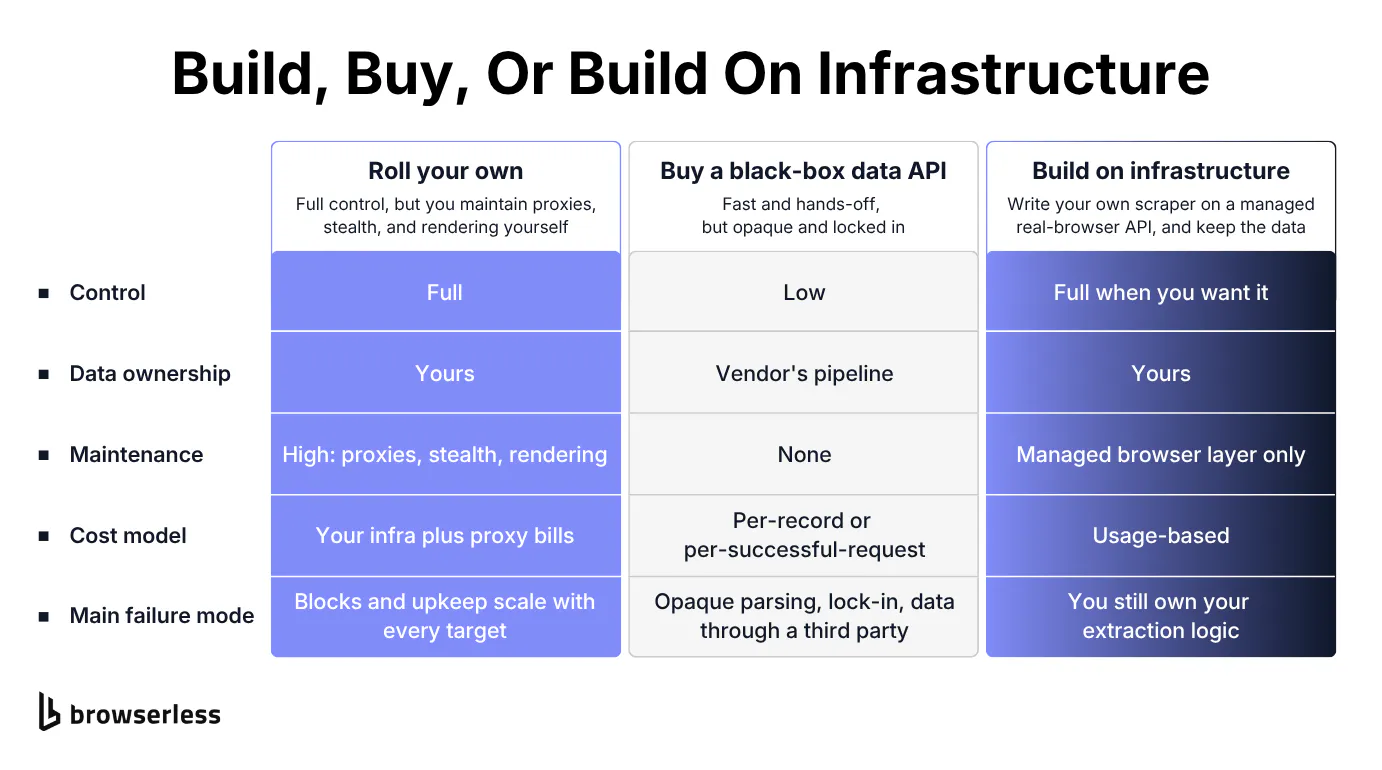
The three ways to run a scraper
Most write-ups frame the web scraping API choice as build versus buy. There are three options, not two.
Option one is rolling your own. You get full control and keep everything, but you maintain the browser and network stack yourself, and the cost climbs with every failed request you retry.
Option two is buying a black-box data API. It's fast and needs no maintenance, but you get opaque billing plus vendor-controlled parsing and data handling. Dedicated per-site APIs, the kind of "Amazon API" or "Google search API" endpoint that returns pre-parsed results for one site, live in this category.
Option three is building on infrastructure. You own the scraper and keep the data, but you run it on managed infrastructure that handles the browser layer, including proxying and stealth.
The usual objection is that option three sounds like more work than a black box, so teams default to a black box or low-code tool. A managed browser layer can offer a similar one-request entry point while preserving more control.
Build-on-infra runs on a spectrum. At the easy end, a single /smart-scrape call is about as simple as a black-box request, one URL in and structured data out. At the control end, /function and BrowserQL (BQL) let you write the scraper you need, including steps like filling forms and clicking through pagination. Option three can start with one request while still letting you move to custom /function or BQL logic when the extraction needs more control.
The table below lays the three side by side.
| Approach | Control | Data ownership | Maintenance | Cost model | Main failure mode |
|---|---|---|---|---|---|
| Roll your own | Full | Yours | High (proxies, stealth, rendering) | Your infra plus proxy bills | Blocks and upkeep scale with every target |
| Black-box data API | Low | Vendor's pipeline | None | Per-record or per-successful-request | Opaque parsing, lock-in, data through a third party |
| Build on infrastructure | Full when you want it | Yours | Managed browser layer only | Usage-based | You still own your extraction logic |
The cost dimension has real mechanics behind it. Managed services meter usage (Browserless, for instance, bills in usage-based units, with proxy traffic billed per megabyte), and concurrency scales with the account so you can run many requests in parallel for large-scale data extraction. Choose based on the control and data ownership the job needs and the infrastructure you're willing to maintain.
Option three is easiest to believe when you see it. The example posts your own Node and Puppeteer logic to /function, which runs it server-side on a managed browser and returns your own JSON.
const TOKEN = process.env.BROWSERLESS_TOKEN;
const ENDPOINT = `https://production-sfo.browserless.io/function?token=${TOKEN}`;

// This is your scraper. It runs on the managed browser, not on your machine.
const fn = `
export default async ({ page }) => {
  await page.goto("https://quotes.toscrape.com/", { waitUntil: "networkidle2" });
  const quotes = await page.$$eval("div.quote", (nodes) =>
    nodes.slice(0, 5).map((el) => ({
      text: el.querySelector(".text").textContent,
      author: el.querySelector(".author").textContent,
    }))
  );
  return { data: { quotes }, type: "application/json" };
};
`;

const res = await fetch(ENDPOINT, {
  method: "POST",
  headers: { "Content-Type": "application/javascript" },
  body: fn,
});

const payload = await res.json();
const quotes = payload.data.quotes;
console.log(`/function returned ${quotes.length} quotes:`, quotes);
Browserless runs that function on its own browser and hands back the { quotes } array your code built, so the parsing and output shape stay yours. You can point it at your own target right now.
Web scraping vs. an official API
When a site has an official API, should you scrape at all? When a stable public or official API exists and returns the data you need, use it, since it's sanctioned and usually easier to maintain than a scraper. When no API exists, or it's unavailable or too limited for the data and request volume you need, scraping may be the practical fallback, subject to the site's terms, applicable law, and reasonable rate limits.
An official API hands you a contract and predictable structure while limiting you to its rate limits and its choices about what to expose. Scraping can reach content the page renders for your session, but you own the parsing and the fragility when the markup changes, and access controls still limit what you can collect reliably.
There's a middle ground worth naming. Scraping a site's hidden API means calling an unofficial endpoint you discover rather than one documented for you. You get JSON structure without an official contract, which is often the best available option when the sanctioned API falls short.
Hidden APIs and anti-bot walls in practice
Before testing a hidden endpoint or an anti-bot workflow, confirm your use complies with the site's terms, applicable law, and reasonable rate limits. Then start with the least invasive option, a permitted JSON endpoint, and reach for browser rendering only when the target requires it.
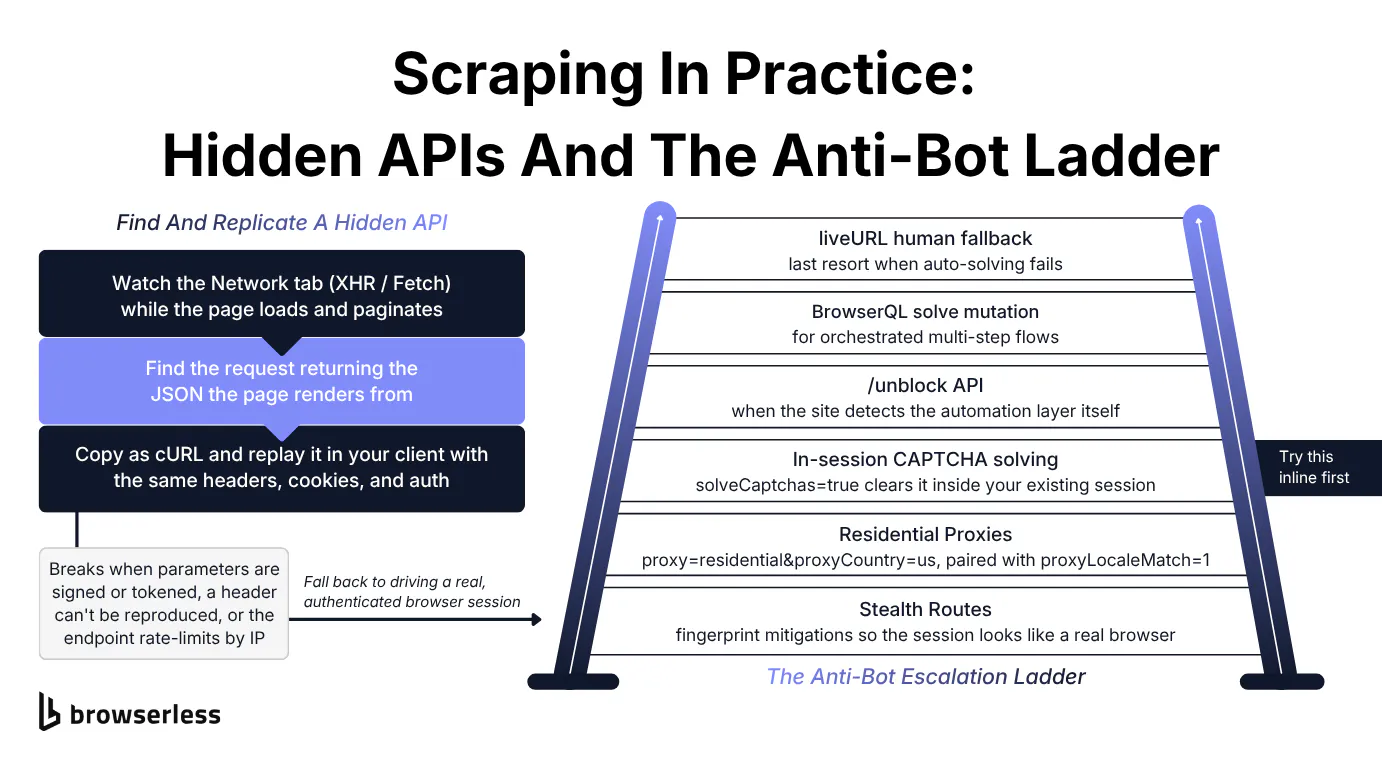
Finding a site's hidden API
Finding a site's hidden API is mostly a DevTools exercise. Open the Network tab, filter to XHR (XMLHttpRequest) or Fetch, and watch the requests fire as the page loads and you paginate. Somewhere in that list is the call returning the JSON the page renders from. Right-click it, copy it as cURL, and replay it in your own client with the request metadata the browser sent, including headers, cookies, and any session token.
When the endpoint permits direct requests, calling it usually avoids browser startup and HTML parsing.
Point the next call at the endpoint you copied from the Network tab and set the same headers the browser sent, then page through the results. A realistic User-Agent and Accept cover a public endpoint, while a private one would carry cookies or a token here too.
import requests

ENDPOINT = "https://hn.algolia.com/api/v1/search_by_date"

HEADERS = {
    "User-Agent": "Mozilla/5.0 (hidden-api-demo)",
    "Accept": "application/json",
}
Wrap a single page request in a function, passing the page number as the query parameter the endpoint paginates on.
def fetch_page(page, per_page=5):
    params = {"tags": "story", "hitsPerPage": per_page, "page": page}
    resp = requests.get(ENDPOINT, headers=HEADERS, params=params, timeout=20)
    resp.raise_for_status()
    return resp.json()
Loop over the pages, collecting hits and stopping once you reach the last page the endpoint reports in nbPages, with no HTML parsing anywhere in the pipeline.
collected = []
for page in range(3):  # first 3 pages for the demo
    data = fetch_page(page)
    collected.extend(data["hits"])
    print(f"page {page}: pulled {len(data['hits'])} stories "
          f"(of {data['nbPages']} pages available)")
    if page >= data["nbPages"] - 1:
        break  # no more pages

print(f"collected {len(collected)} stories, no HTML parsed:")
for hit in collected[:5]:
    points = hit.get("points") or 0
    print(f"   [{points:>4} pts]  {hit['title']}")
Direct replication can fail when request signing or session state changes faster than your client can reproduce, or when the endpoint rate-limits by Internet Protocol (IP) address. The fix is to let a real, authenticated browser session issue the request, so a genuine session produces the tokens and you capture the JSON it returns. A persisted session you reconnect to keeps that browser and its cookies alive between pages, so a paginated or logged-in scrape doesn't re-authenticate on every request.
The one place the hidden-API technique meets a managed browser is here. The BrowserQL response mutation records the raw XHR and JSON responses a real session makes, filtered by URL pattern, method, or resource type, while the browser runs the signed request itself. You capture the hidden endpoint's JSON without reproducing its signing flow in a separate client. The snippet below navigates a real session to an API-driven target and captures its hidden JSON response.
# Source your token first:  export BROWSERLESS_TOKEN="your-browserless-token"
read -r -d '' QUERY <<'GQL'
mutation CaptureHiddenJSON {
  goto(url: "https://www.msn.com/", waitUntil: load) { status }
  # operator: and requires BOTH filters to match (xhr AND GET).
  # The default `or` would match "xhr OR GET" and pull in far too much.
  response(type: xhr, method: GET, operator: and) { url type method body }
}
GQL

curl -s "https://production-sfo.browserless.io/chromium/bql?token=${BROWSERLESS_TOKEN}" \
  -H "Content-Type: application/json" \
  -d "$(jq -n --arg q "$QUERY" '{query: $q}')" \
| jq -r '"captured \(.data.response | length) hidden response(s)",
         "   \(.data.response[0].url)",
         "   \(.data.response[0].body | length) bytes of JSON"'
On a live run the session captures a hidden JSON GET request the page fired in the background, with a populated body of roughly 250 KB pulled straight from the live session.
Getting past anti-bot defenses
Raw-HTTP scraping fails on heavily protected targets for a concrete reason. Anti-bot systems like Cloudflare and DataDome inspect network and browser fingerprints, including Transport Layer Security (TLS) behavior and IP reputation, so a bare client gets soft-blocked or served a challenge page no parser can read. The fix is an ordered ladder you climb only as far as the target forces you.
The ladder runs in this order:
- Stealth Routes reduce common automation signals so the session looks less like a default automated browser, though they don't make it undetectable.
- Residential proxies (
proxy=residential&proxyCountry=us) with proxy rotation can help when poor IP reputation contributes to blocking. On a stealth route, pair them withproxyLocaleMatch=1so the browser language matches the proxy's geography. - In-session CAPTCHA solving (
solveCaptchas=true) can attempt a challenge inside your existing Puppeteer or Playwright session without switching tools. - The
/unblockAPI steps in when the site detects the automation layer itself, and it can hand back a browser endpoint and cookies so you continue in your own automation. - The BrowserQL
solvemutation handles orchestrated multi-step flows. - A
liveURLhuman fallback is the last resort when auto-solving fails.
Teams tend to jump straight past the third rung. Staying in the same session and solving inline before reaching for /unblock is simpler and cheaper than jumping to a heavier tool. Add solveCaptchas=true to the same stealth connection URL, and Browserless attempts the challenge in-session and, when it succeeds, applies the token to the page. It detects common providers, including reCAPTCHA, Cloudflare Turnstile, and DataDome, though success depends on the target.
Two details matter when you configure this. humanlike is an opt-in BrowserQL flag, off by default, that simulates natural interaction timing on BQL sessions when you enable it. The /stealth/bql route runs Browserless's privacy-hardened Stealth browser, with fingerprint randomization for targets that actively detect Chrome or Chromium.
Two snippets show different rungs of the ladder so you see the escalation rather than just read it. The first connects a real browser through Browserless's Browser-as-a-Service (BaaS), routed through a residential proxy, and loads a fingerprint-check page so you can inspect which automation signals remain exposed.
import puppeteer from "puppeteer-core";

const TOKEN = process.env.BROWSERLESS_TOKEN;

// Stealth route + residential proxy. proxyLocaleMatch aligns the browser's
// Accept-Language header to proxyCountry for a cleaner fingerprint.
const browser = await puppeteer.connect({
  browserWSEndpoint:
    `wss://production-sfo.browserless.io/chromium/stealth?token=${TOKEN}` +
    `&proxy=residential&proxyCountry=us&proxyLocaleMatch=1`,
});

const page = await browser.newPage();
await page.goto("https://bot.sannysoft.com/", { waitUntil: "networkidle2" });

// Read the signals a bot-detector inspects, straight from the live page.
const signals = await page.evaluate(() => ({
  webdriver: navigator.webdriver, // real browsers report false/undefined
  userAgent: navigator.userAgent, // must not leak "HeadlessChrome"
  languages: navigator.languages, // aligned to the proxy via proxyLocaleMatch
}));
console.log(signals);

await browser.close();
Against bot.sannysoft.com the sample run reports navigator.webdriver: false, a Chrome user agent without a HeadlessChrome leak, and ["en-US"] languages aligned to the US proxy. Treat those values as diagnostics, not proof that the session is undetectable.
The second climbs to the top of the ladder. It's a stealth BrowserQL flow that navigates to a Cloudflare-protected target and runs the solve mutation. The code posts to the /stealth/bql route and reads back the found and solved fields, so you branch on the actual result.
# Source your token first:  export BROWSERLESS_TOKEN="your-browserless-token"
read -r -d '' QUERY <<'GQL'
mutation SolveChallenge {
  goto(url: "https://nowsecure.nl", waitUntil: load) { status }
  solve(type: cloudflare) { found solved time }
  text { text }
}
GQL

curl -s "https://production-sfo.browserless.io/stealth/bql?token=${BROWSERLESS_TOKEN}" \
  -H "Content-Type: application/json" \
  -d "$(jq -n --arg q "$QUERY" '{query: $q}')" \
| jq -r '"goto status:      \(.data.goto.status)",
         "challenge found:  \(.data.solve.found)",
         "challenge solved: \(.data.solve.solved)"'
When the challenge appears, solve returns found: true and solved: true in roughly 20 seconds, and the text behind it comes back. When found is true but solved is false, you branch to a liveURL human fallback.
Escalation discipline ties the whole guide together, so reach for the cheapest method that clears a target and climb only when it forces you. Check for a hidden JSON endpoint before you render a page, and render before you fight anti-bot, stepping up one rung at a time instead of starting at the top. The right scraper does the least work the target allows, which keeps a scrape cheaper to run and less likely to be blocked.
Conclusion
A web scraping API can combine browser and network handling with extraction behind one request while still leaving room for custom logic, so start with the least expensive method that works and add a browser or challenge handling only when the target requires it. Browserless supports that progression with its REST endpoints and BrowserQL. A single /smart-scrape call handles easy targets, /function and BQL let you write the scraper yourself, and the anti-bot ladder steps in when a site fights back. Point /smart-scrape at the target that's been blocking you, inspect the returned strategy rather than assuming access, and sign up for a free account when you're ready to test the workflow.
Web scraping API FAQs
Is there a free web scraping API?
Yes. Browserless offers a free account for testing /scrape against permitted targets, so you can build against real pages before committing. Check the current plan limits before using it for production workloads.
What can you scrape that an official API won't give you?
An official API returns only the fields the provider chose to expose, inside its rate limits. Scraping can collect content available to your session that an official API omits, such as data it leaves out, a site that offers no API at all, or a site's own hidden JSON endpoint you discover and call directly. Authentication, access controls, and page changes can still limit coverage, and you own the parsing where an official API hands you a stable contract.
How do you scrape a website's hidden API?
Spot the right request in the Network tab by filtering to XHR or Fetch and watching for the JSON that matches the page, then replay it from your own client with the same headers and cookies. Where the parameters are signed or the endpoint rate-limits by IP, drive a real browser session to produce valid tokens. Whatever the mechanics, legality turns on the site's terms and your jurisdiction, so check the terms and rate-limit politely rather than hammering an endpoint built for one browser.
Do you need a real browser to scrape JavaScript-heavy sites?
For pages that build their content client-side, yes. To tell in advance, open View Source (the raw HTML the server sends) and search for a value you can see on the page. If it's missing from the source but present in the rendered DOM, the page builds that content in JavaScript and a raw fetch will come back empty, so you need a headless browser to run the scripts first.
Can a web scraping API get past Cloudflare?
It can improve the odds, but no tool bypasses everything. The realistic approach to anti-bot bypass is a layered escalation that you climb only as far as a given target forces you, changing the odds at each step rather than guaranteeing a pass. Treat any claim of a guaranteed Cloudflare bypass as a red flag.
How does a web scraping API handle proxies?
A managed web scraping API takes proxy management off your hands, so you don't wire up rotating proxies yourself. Requests route through the provider's proxy pool, usually residential IPs that rotate according to its configuration. On Browserless you add proxy=residential&proxyCountry=us and align the browser language with proxyLocaleMatch=1. Pairing residential proxies with Stealth Routes can reduce some IP- and fingerprint-based blocks, without guaranteeing access.
What kinds of sites can a web scraping API pull data from?
A web scraping API can collect data from many publicly accessible pages when the site's controls and terms permit it. Common jobs include e-commerce monitoring for pricing and stock and news tracking. Search engine results page (SERP) collection is another frequent use. Because the request runs at collection time, the result can be more current than a cached feed, though caching and target behavior still affect freshness.
What output formats does a web scraping API return?
Output formats vary by provider. On Browserless, /scrape returns matched text, while mapSelector and /function produce structured JSON whose shape you define, and BrowserQL can capture a page's hidden data in JSON form.