
TL;DR
- Two paths. A headless browser is a real browser engine driven by code with no visible window, and the best headless browser for scraping is either a managed API you point your existing code at, or an open-source library you run yourself, taking on binary updates, memory management, and every anti-bot fix.
- Eight tools, two categories. Four hosted headless browser APIs and four JavaScript libraries, each with the job it's genuinely good at and the one it isn't.
- Nothing makes a scraper invisible. Stealth patches, proxy rotation, and managed fingerprint handling each close a different part of the bot detection gap, and none of them closes all of it.
Introduction
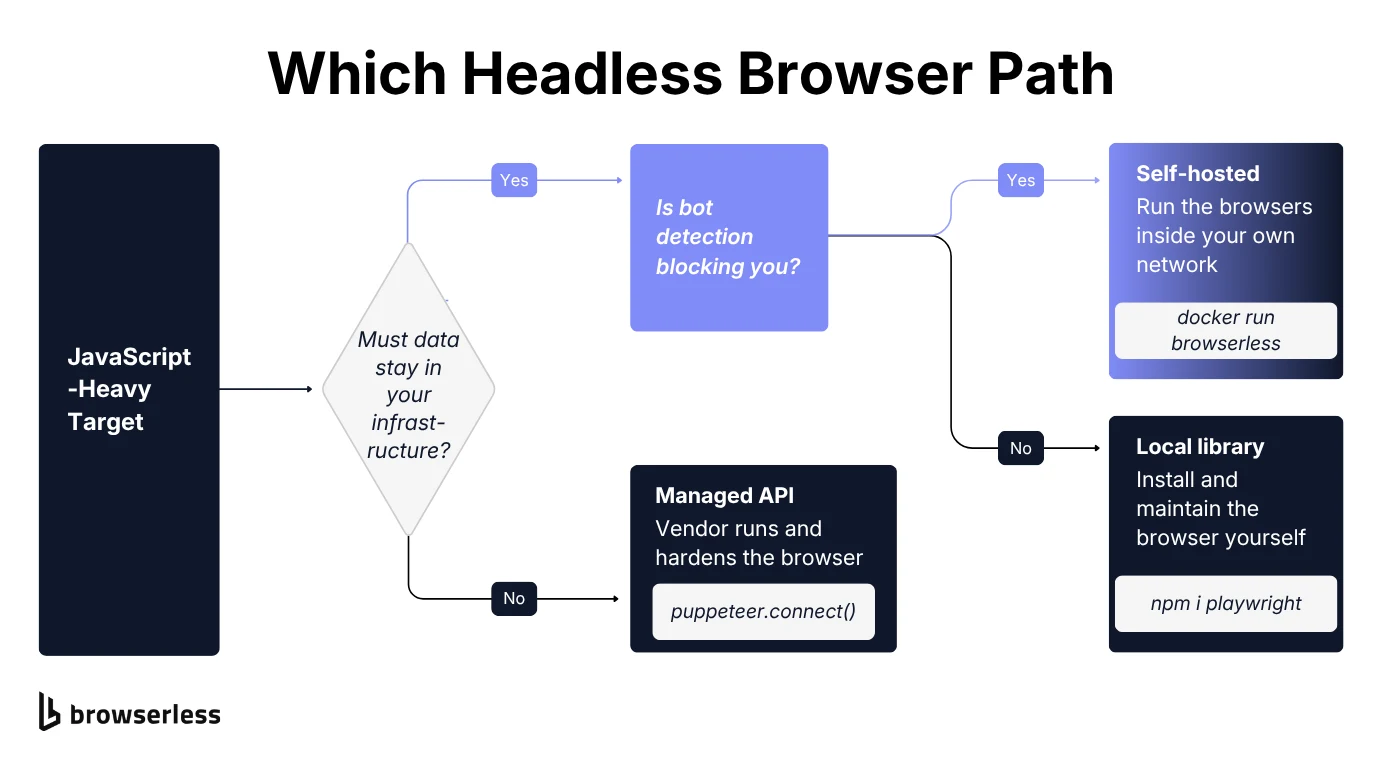
Choosing the best headless browser for scraping comes down to one fork every project eventually hits. Run the browser yourself, or pay someone else to run it. Pick wrong and you'll either be babysitting Chrome binaries and chasing bot detection on your own time, or paying for infrastructure you didn't need yet.
Below you'll find both paths to headless scraping, four hosted headless browser APIs and four open-source JavaScript libraries, with a comparison table up front if you only want the shortlist. The last section covers where bot detection actually breaks a DIY setup, and what a managed API buys you once it does.
What is a headless browser?
A headless browser is a real web browser engine, Chrome, Chromium, Mozilla Firefox, or WebKit, running in headless mode with no graphical user interface attached. You control it entirely through code: navigate to a URL, click something, read the resulting HTML, all without a window ever opening on screen.
A curl call or a fetch request gets you the raw HTML a server sends back and nothing more, while modern websites lean on client-side JavaScript rendering to build the page after that initial response. Infinite scroll, dynamic content that loads on click, complex web applications that render almost nothing until JavaScript runs.
If the data you want only shows up after the page executes its own scripts, an HTTP client alone won't see it. Modern headless browsers will. They render the actual page the way a visitor's browser would, scripts and all.
That's the entire reason headless web browsers exist for scraping. Static web pages with server-rendered HTML don't need one. JavaScript-heavy websites that render nothing without JavaScript execution leave you no other option.
Comparison table
Here's how the headless browser landscape breaks down, with a GitHub star count where a tool has a real public repo and a review score where it doesn't. All figures are as of August 2026.
| Tool | Category | Description | GitHub stars / ranking signal |
|---|---|---|---|
| Browserless | Headless browser API (open source + managed) | Open-source and managed browser infrastructure with Puppeteer/Playwright compatibility, plus BrowserQL and stealth handling on the cloud and Enterprise images. | 13.6k stars (browserless/browserless) |
| Bright Data Scraping Browser | Headless browser API | Hosted browser API with built-in CAPTCHA solving and proxy rotation, billed by bandwidth. | 4.6/5 on G2 (hosted product, no public repo) |
| ScrapingBee | Headless browser API | Request/response scraping API with JavaScript rendering, screenshots, and structured extraction. | 5.0/5 on Capterra, 100+ reviews (hosted product) |
| Browserbase | Headless browser API | Browser-session API built for AI agents, paired with the Stagehand SDK for LLM-driven page interaction. | 1.4M weekly npm downloads for the Stagehand SDK |
| Playwright | JS library/framework | Cross-browser automation framework covering Chromium, Firefox, and WebKit with auto-waiting built in. | 95.2k stars |
| Puppeteer | JS library/framework | Chrome-first automation library, now with stable Firefox support, and the largest scraping community and plugin ecosystem. | 95.5k stars |
| Selenium WebDriver | JS library/framework | W3C WebDriver standard framework supporting the widest range of languages and browsers. | 34.4k stars |
| puppeteer-extra with stealth | JS library/framework (plugin) | Plugin framework that patches Puppeteer's default fingerprint to reduce headless-detection signals. | 7.4k stars |
Scope note: everything here is a browser or a library that drives one. If you're weighing the wider category of parsers, crawlers, and extraction platforms as well, the guide to web scraping tools covers that ground instead.
Treat those numbers as popularity, not ranking. A smaller, newer tool can still be the right headless browser for scraping your specific target site.
Best headless browser APIs for web scraping
Either you call a REST endpoint and get page data back, or you point your existing Puppeteer, Playwright, or Selenium code at a remote browser instead of a local one. You get less say in the underlying browser, and in return you stop patching it, scaling it, and chasing its memory leaks.
Browserless
Best for: teams that want headless browser automation with standard Puppeteer and Playwright compatibility, without giving up the option to self-host or run inside their own virtual private cloud.
Browserless is browser infrastructure you can run yourself with Docker, or hand off entirely to a managed cloud. Either way you keep writing standard, unforked Puppeteer or Playwright code, and point it at a Browserless endpoint instead of a local Chrome install.
For scraping specifically, Browserless also exposes purpose-built REST APIs so you don't need a full Puppeteer script for simple jobs. /content returns rendered HTML and /scrape pulls structured data with CSS selectors, while /smart-scrape escalates on its own, from a fast HTTP fetch up to a headless browser and CAPTCHA solving, so you can scrape dynamic sites without paying for a full render on pages that don't need one.
If you'd rather keep the script you already have, only the connection line changes. This example connects puppeteer-core to a Browserless endpoint, opens a page, loads a URL, and prints the page title:
import puppeteer from "puppeteer-core";

const browser = await puppeteer.connect({
  browserWSEndpoint: `wss://production-sfo.browserless.io?token=${process.env.BROWSERLESS_TOKEN}`,
});

try {
  const page = await browser.newPage();
  await page.goto("https://example.com");
  console.log(await page.title());
} finally {
  await browser.close();
}
That prints Example Domain, the title read back from a browser instance running on Browserless rather than on your machine.
Two details carry over to any script you connect this way. Keep the API key in an environment variable instead of the file, and keep the await browser.close() call inside the finally block. A navigation that throws would otherwise leave the remote session open until it times out on its own.
Past that basic connection, stealth routes and the Unblock API handle sites that flag automation libraries, BrowserQL covers the heaviest bot detection, and self-hosted deployment covers teams whose compliance rules out sending traffic through a third party's cloud at all. For TypeScript and Python, the typed BAP SDKs expose that same stealth engine as autocompleted, type-checked methods, so you get the anti-bot handling without writing raw BrowserQL.
If what you want is one API call that returns clean JSON with no code of your own, a request/response scraping API further down this list is a more turnkey starting point than a browser you connect to and drive yourself.
Features:
- REST endpoints for screenshots, PDFs, rendered HTML, and structured scraping, alongside the raw Puppeteer/Playwright connection.
- Self-hosted Docker option running the same Puppeteer, Playwright, and core REST API surface as the cloud, for teams that need data to stay inside their own infrastructure. BrowserQL and stealth handling need the Enterprise image rather than the open-source one.
- A Session API that keeps cookies, cache, and localStorage in an isolated user data directory, so state survives browser restarts instead of starting cold every time.
- BrowserQL for sites running heavier anti-bot systems, alongside residential proxy rotation.
- Typed BAP SDKs for TypeScript and Python that drive the stealth engine through Puppeteer- and Playwright-shaped code.
- SOC 2 (Service Organization Control 2) Type II certification and VPC (virtual private cloud) deployment options for enterprise compliance needs.
| Pros | Cons |
|---|---|
| Works with unforked, standard Puppeteer and Playwright, no proprietary SDK to learn. | Self-hosted setup takes more initial configuration than a request/response service that needs none. |
| Self-hosted runs the same Puppeteer, Playwright, and core REST APIs as the cloud, with BrowserQL and stealth on the Enterprise image. | Getting the most from the anti-bot tooling means moving off plain Puppeteer, either to the typed BAP SDKs for TypeScript and Python or to BrowserQL from any other language. |
| Purpose-built REST endpoints cover common scraping jobs without a full script. | Driving the browser over the network adds a hop a local Chrome install doesn't have. |
| SOC 2 Type II and self-hosted deployment satisfy compliance requirements other tools on this list don't address. |
Bright Data Scraping Browser
Best for: teams running large-scale scraping against heavily protected sites who need built-in unblocking more than they need a specific programming interface.
Bright Data's Browser API gives you a Chrome instance running on Bright Data's own infrastructure, reachable over a Chrome DevTools Protocol (CDP) endpoint from Puppeteer, Playwright, or Selenium with a one-line connection-string change.
The pitch is that you keep your existing automation code and let Bright Data handle everything around it, from proxy rotation across its residential IP network to CAPTCHA solving and browser fingerprinting meant to look like a real user session.
The unblocking layer is the actual product here, not the browser: automatic retries, header selection, and JavaScript rendering handling layered on top of a standard CDP connection.
Browser API bills per gigabyte of traffic rather than per request, which gets expensive fast on bandwidth-heavy jobs like full-page scraping with images left in.
Lock-in is the other cost. The unblocking layer leans on Bright Data's proprietary proxy network, so your scraping reliability ends up tied to one vendor's IP infrastructure rather than a portable configuration.
Features:
- CDP-based connection compatible with Puppeteer, Playwright, and Selenium via a single endpoint change.
- Automatic CAPTCHA solving and browser fingerprinting tuned to resemble real user sessions.
- Device emulation across hundreds of real mobile and desktop profiles.
- Session ID retrieval for pulling logs, debugging errors, and auditing bandwidth per session.
| Pros | Cons |
|---|---|
| Built-in unblocking handles CAPTCHA and fingerprinting without extra configuration. | Bandwidth-based pricing scales unpredictably on image- or media-heavy pages. |
| Works with three major automation libraries through one CDP endpoint. | Ties your infrastructure to Bright Data's proprietary proxy network. |
| Backed by a large, established residential proxy network. | No self-hosted option if data residency requirements rule out a third-party cloud. |
ScrapingBee
Best for: developers who want a single API call to return page data, with no browser session, proxy pool, or automation library to manage at all.
ScrapingBee skips the browser-connection model entirely and works as a JavaScript rendering service behind a single HTTP request. Send a target URL, get back HTML, Markdown, or structured JSON, with headless Chrome rendering, proxy management, and retries all handled behind that one call.
For a team that just wants to access data and has no interest in writing Puppeteer scripts, that's a simpler mental model than any tool expecting you to drive a browser session yourself.
Beyond the core HTML API, ScrapingBee layers on an AI extraction mode where you describe the fields you want in plain language instead of writing CSS selectors. Dedicated endpoints for specific sources like Amazon, Google Search, and YouTube skip custom parsing entirely.
JavaScript heavy sites still get a real headless Chrome render when you need it, including waiting for specific selectors or running a short interaction script before extracting data.
Every request is stateless, which is where that simplicity turns into a constraint, so ScrapingBee isn't built for the multi-step, stateful workflows a persistent browser session handles.
Logging in, navigating through several pages, and scraping the result of that flow in one continuous session isn't what a request/response API is for, even with its JavaScript scenario scripting.
Features:
- Single-call HTML API with optional Markdown or structured JSON output.
- AI-based field extraction that skips CSS/XPath selector writing for well-defined data.
- Dedicated scraper endpoints for Amazon, Google Search, YouTube, and other high-traffic sources.
- Billing counts successful responses rather than every attempt, so failed requests don't charge you.
| Pros | Cons |
|---|---|
| Genuinely simple integration, one API call with no browser session to manage. | Stateless requests are a weaker fit for multi-step, logged-in workflows. |
| AI extraction mode removes selector-writing for straightforward data. | No persistent browser instance, so complex web interactions are harder to script. |
| Dedicated endpoints for common sources cut out custom parsing work. |
Browserbase
Best for: teams building AI agents or large language model (LLM) driven automation that needs to browse and act on live websites, rather than traditional bulk data extraction.
Browserbase runs headless Chrome sessions as a service, reachable through a browser-session API that any Puppeteer, Playwright, or Selenium script can connect to. Who it's built for is the difference. Its own positioning centers on AI agents that simulate user interaction on the open web, navigating, clicking, and filling in forms rather than pulling static content off a page.
The Stagehand SDK is the clearest expression of that focus. Instead of writing brittle CSS selectors for every element, Stagehand lets you describe an action in natural language, "click the search button," and an underlying model resolves it into real browser interactions. That matters more for an autonomous agent navigating unfamiliar sites than for a scraper hitting the same known page structure every day.
Session replay and observability tooling round this out, letting you debug exactly what an agent did across a run. If your actual task is bulk, repeatable extraction from known page structures rather than agentic browsing, that agent-first tooling is overhead you may not need.
A request/response API or a plain Puppeteer connection is a more direct fit when you already know what you're scraping and don't need a model in the loop deciding how to interact with the page.
Features:
- Browser-session API compatible with Puppeteer, Playwright, and Selenium.
- Stagehand SDK for natural-language, LLM-driven page interaction instead of hard-coded selectors.
- Session replay and observability for debugging agent runs after the fact.
- Search and fetch APIs for pulling web context into an agent without a full browser session.
| Pros | Cons |
|---|---|
| Purpose-built for AI agent workloads, not retrofitted from a scraping tool. | Agent-first tooling is more than a straightforward bulk-scraping job typically needs. |
| Stagehand reduces selector maintenance for sites with changing layouts. | Newer entrant than the scraping-focused APIs above, with a shorter production track record. |
Best headless browsers for web scraping in JavaScript
These four are open-source libraries and frameworks. You install them, write the web automation code yourself, and own everything that comes with managing headless browsers at scale: binary updates, resource usage, proxy rotation, and any anti-bot work beyond what ships by default. What you get back is full control over the browser and no per-request bill.
Playwright
Best for: cross-browser scraping and teams that want resilient locators and auto-waiting handled for you instead of hand-rolled timeouts.
Playwright, maintained by Microsoft, drives multiple browser engines through one API. That matters when a target site renders differently across Chromium, Mozilla Firefox, and WebKit, or when you need to check your scraper gets the same page a real Safari visitor would.
Every action auto-waits for its element to be ready, whether that's a click, a fill, or an assertion, instead of firing at a page that hasn't finished rendering. That kills a whole category of flaky, timing-related scraper bugs.
Its locator system is built around how a person would find something on a page, by role, label, or visible text, rather than a brittle CSS path that breaks the moment a developer renames a class. Each browser context is fully isolated, so you can save an authenticated session once and reuse it across runs without repeating a login flow.
Network interception lets you block images or unrelated network requests outright, which cuts browser rendering work on runs that only need the underlying data rather than a fully rendered visual page.
The shape of a minimal Playwright run is close to the Browserless snippet above, except the browser launches locally instead of being connected to:
import { chromium } from "playwright";

const browser = await chromium.launch();
const page = await browser.newPage();
await page.goto("https://example.com");
console.log(await page.title());
await browser.close();
That prints Example Domain. The cost of the extra power shows up in the learning curve. Isolated browser contexts and auto-waiting take longer to learn than they take to explain, especially for a one-off script a simpler tool would finish just as fast.
Features:
- Single API driving Chromium, Firefox, and WebKit.
- Auto-waiting and web-first assertions that retry until a condition is actually met.
- Role-, label-, and text-based locators instead of brittle CSS selectors.
- Isolated browser contexts for reusing saved login sessions across runs.
- Native support for Python, .NET, and Java in addition to JavaScript.
- Built-in tracing that captures a full execution trace, screenshots, and network activity on failure.
| Pros | Cons |
|---|---|
| WebKit coverage catches Safari rendering differences the other libraries here miss entirely. | Larger API surface takes longer to learn than Puppeteer's for a simple script. |
| Auto-waiting eliminates a common source of flaky scraping runs. | |
| Multi-language support fits teams not standardized on JavaScript. |
Puppeteer
Best for: scraping with Chromium based browsers, especially for teams that want the largest community, tutorial base, and plugin ecosystem to draw on.
Puppeteer, the headless browser library maintained by the Chrome team, controls Google Chrome or Chromium through the DevTools Protocol. Its API is deliberately narrower than Playwright's, with fewer concepts to learn and a more direct path from "open a page" to "read its content."
That simplicity, plus being the older of the two headless browser libraries, is why it still has the largest ecosystem of scraping tutorials, Stack Overflow answers, and community plugins of any tool on this list.
Puppeteer isn't Chrome-only any more. Since v23 it downloads and drives the stable release of Mozilla Firefox over WebDriver BiDi (bidirectional WebDriver), so the practical gap against a fully cross-browser tool is WebKit, which it doesn't cover at all. If Safari rendering differences matter to your scrape, that gap is the one to weigh.
Its plugin system, most visibly through puppeteer-extra below, is where much of the community's anti-bot tooling has concentrated. The equivalent Puppeteer script is a near-mirror of the Playwright one, which is most of why teams pick it on familiarity alone:
import puppeteer from "puppeteer";

const browser = await puppeteer.launch();
const page = await browser.newPage();
await page.goto("https://example.com");
console.log(await page.title());
await browser.close();
Same output as the Playwright version, same number of lines, and the only real difference is the import.
That popularity cuts both ways, though. Headless Puppeteer's default fingerprint is among the most heavily studied by bot detection systems, so an unmodified script is comparatively easy to flag on a site actively watching for it.
Features:
- Direct Chrome DevTools Protocol control with a compact, straightforward API, plus stable Firefox support over WebDriver BiDi.
- The largest scraping-specific tutorial and community-plugin ecosystem of any tool covered here.
- Built-in support for intercepting requests, emulating devices, and generating PDFs or screenshots.
- Official support for both
puppeteer(bundles Chrome) andpuppeteer-core(bring your own browser binary).
| Pros | Cons |
|---|---|
| Simpler API surface than Playwright for straightforward scraping tasks. | No WebKit support, so Safari-specific rendering differences go uncaught. |
| Largest community and plugin ecosystem for troubleshooting and extensions. | Its popularity makes its default fingerprint a well-studied target for bot detection. |
| Mature, widely deployed, and backed directly by the Chrome team. |
Selenium WebDriver
Best for: teams that already have Selenium infrastructure in place, or that need language support beyond what Playwright or Puppeteer natively offer.
Selenium is the oldest of the traditional headless browsers, predating both Playwright and Puppeteer by over a decade, and it implements the WebDriver specification from the W3C (World Wide Web Consortium), a standardized protocol for browser automation tasks that every major browser vendor supports directly.
That standard is what Selenium still has over the others. Official bindings for multiple programming languages, Java, Python, C#, Ruby, and JavaScript, cover far more of a typical enterprise's stack than a JavaScript-first tool ever will. Selenium Grid extends that further, letting you distribute test and scraping runs across many machines and browser versions at once.
Because Selenium was built for automated testing rather than scraping, its API leans verbose for the sequence most scrapers actually need, which is navigate, wait, extract, close.
It also runs somewhat slower in practice, since WebDriver's standardized protocol adds a layer of indirection that Playwright and Puppeteer skip with their more direct connections.
If you're already running Selenium for QA and headless browser testing, extending that infrastructure to scraping usually beats standing up a second, unrelated tool. Starting from nothing, Puppeteer or Playwright will get you there faster.
Features:
- Official bindings for Java, Python, C#, Ruby, and JavaScript.
- Implements the W3C WebDriver standard, supported natively by every major browser.
- Selenium Grid for distributing runs across multiple machines and multiple browsers.
- Cross browser support through the same standard every vendor already implements.
- The largest and most mature browser-automation ecosystem, dating back to 2004.
| Pros | Cons |
|---|---|
| Broadest language support of any tool on this list. | More verbose API for simple scraping tasks than Puppeteer or Playwright. |
| Selenium Grid scales distributed runs across many machines at once. | Generally slower in practice, since WebDriver adds protocol overhead. |
| Deep, mature ecosystem built up over two decades. | Built for cross-browser testing first, scraping second. |
Puppeteer-extra with the stealth plugin
Best for: developers who want to keep writing vanilla Puppeteer code but need to reduce the signals that flag a script as a headless browser in the first place.
Check the target site's terms of service and its robots.txt before reaching for any of this. The fuller version of that caveat sits in the bot detection section below, and it applies here more than anywhere else in this article.
Puppeteer-extra is a plugin framework that wraps standard Puppeteer without replacing it, so any existing script keeps working once you add it.
Its most widely used plugin, puppeteer-extra-plugin-stealth, rewrites the properties a default headless Chrome instance leaks, from navigator.webdriver down to canvas fingerprints.
Because it's a plugin rather than a separate browser, adding it barely touches your code. Install the package, wrap your Puppeteer import, and the same page.goto() and page.click() calls carry on working underneath the patched browser fingerprints.
It won't get you past a determined detection system on its own. Anti-bot vendors of the Cloudflare and DataDome class watch the stealth plugins as closely as scrapers do, and ship countermeasures on their own release cycle, so treat it as raising the bar rather than clearing it.
Features:
- Drop-in plugin architecture that layers onto existing Puppeteer code without a rewrite.
- Patches
navigator.webdriver, plugin lists, WebGL and canvas fingerprints, and other known headless tells. - Modular plugin system beyond stealth, including user-agent anonymization and adblocking.
- Also available for Playwright through the companion playwright-extra package.
| Pros | Cons |
|---|---|
| Minimal code changes required for an existing Puppeteer script. | Patches a known, public list of tells, so sophisticated detection systems adapt to it. |
| Free and open source, with an active plugin ecosystem beyond stealth. | Requires you to keep the plugin itself updated as detection techniques evolve. |
How bot detection systems spot a headless browser
Before any of what follows, settle one thing. Check the target site's terms of service and its robots.txt first, since reducing detection signals doesn't change whether you're allowed to be there. That applies to every tool in this article, not just the stealth plugin. Everything below assumes you've answered it.
What follows is what gives a default headless browser away, then what each layer of bot detection defense actually buys you.
The browser fingerprints that give you away
A default headless browser gives itself away in ways that have nothing to do with the code you write. navigator.webdriver flips to true the moment the browser comes under automation control, and reading it is a single JavaScript check any site can run instantly.
The User-Agent is just as loud. A stock headless build still identifies itself as HeadlessChrome where the headful one says Chrome. Fingerprinting cuts deeper still, since a cloud browser with no GPU renders WebGL through a software rasterizer and its unmasked renderer string comes back as something like SwiftShader instead of the Apple or NVIDIA hardware a real visitor would report.
None of these need sophisticated bot detection systems to catch. Sites that want to block headless browsers start right here, with the first things a basic detection script looks for.
Beyond that first layer, more advanced systems watch user behavior over time. Mouse movement that's too linear, keystroke timing that's too uniform, or a pattern of automated browsing that never produces the small inconsistencies a real person's session naturally has.
A residential proxy alone doesn't fix any of that, since the browser behavior and fingerprint checks run independent of IP address entirely.
What actually helps against anti-bot systems
Each layer of defense buys you something different, and avoiding bot detection is rarely all-or-nothing.
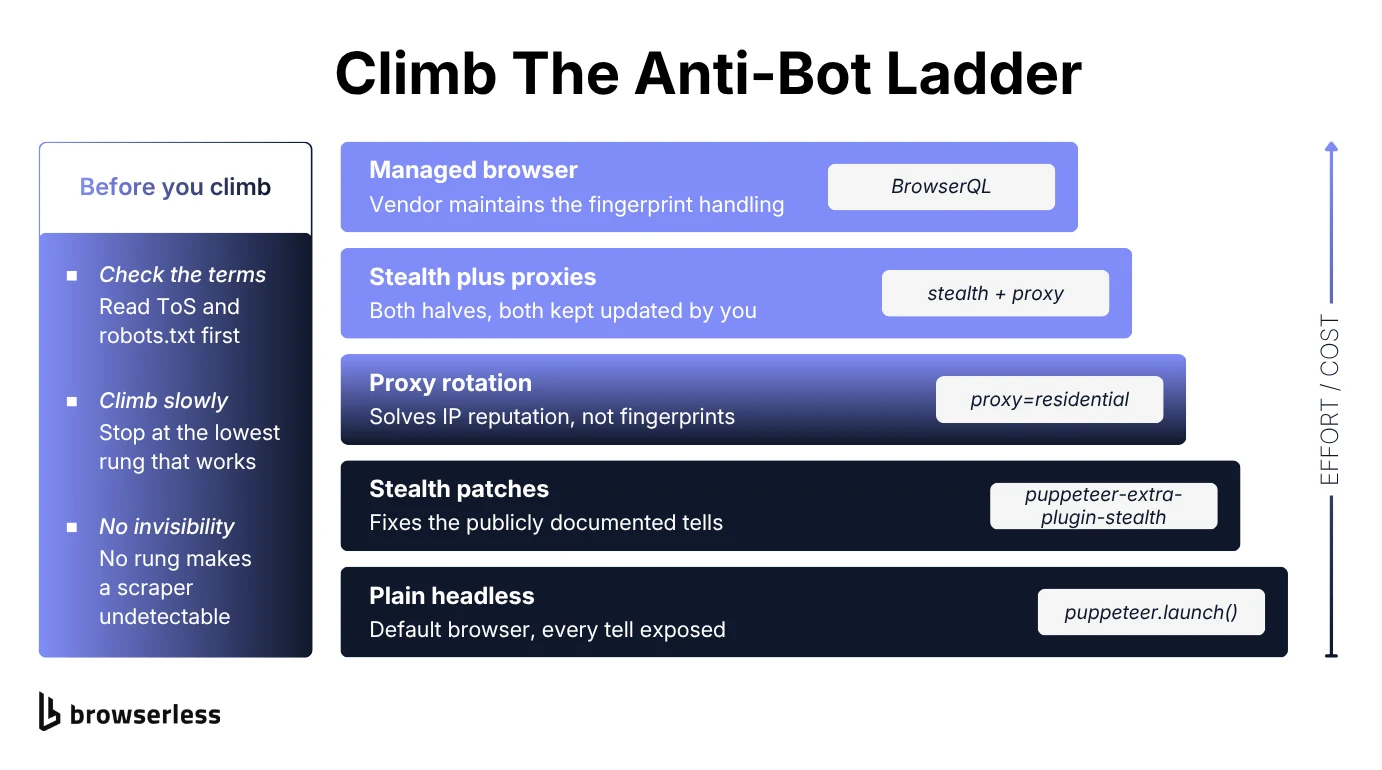
Stealth plugins patch the well-known, publicly documented tells. That helps against basic bot detection, but it won't reliably beat a well-resourced system built specifically to catch those same patches. Rotating proxies solves the IP-reputation half of the problem without touching the fingerprint half.
A managed API closes more of the gap at once, with human-like fingerprints, residential proxies carrying high IP reputation, CAPTCHA solving, and session persistence, and it keeps closing it as detection moves.
That's what you're paying for when you hand the problem to something like Browserless's BrowserQL instead of patching Puppeteer yourself. Less setup on day one, and none of the upkeep that never really goes away on the DIY path.
Bypassing anti-bot systems outright is not what any of this buys you. No tool on this list, paid ones included, makes headless browsing invisible, and the realistic goal is making it less obvious.
Conclusion
There's no perfect headless browser for scraping, only the best fit for how much infrastructure you want to own versus how much you'd rather pay to skip. The decision is easier made backwards, so start from what your target websites actually do to you and let the amount of anti-bot maintenance you're willing to absorb pick the category for you.
If bot detection is the piece slowing you down, that's usually the clearest signal you've outgrown a plain headless browser running on its own. Point your existing Puppeteer or Playwright code at a managed browser to see what it handles that your current setup doesn't, and sign up for a free Browserless account.
A few more questions worth answering before you pick.
Best headless browser for scraping FAQs
What is the best headless browser API for web scraping?
Depends what you're optimizing for. Browserless is the strongest fit if you want to keep using standard Puppeteer or Playwright code with the option to self-host. Past that, Bright Data's Scraping Browser leans hardest into built-in unblocking for heavily protected sites, ScrapingBee is the simplest single-call option if you don't want to manage a browser session at all, and Browserbase is built for AI agent workloads rather than bulk scraping.
What is the best headless browser for JavaScript web scraping?
Playwright and Puppeteer are the two most common answers, and the right pick hinges on scope. Choose Playwright if you need WebKit coverage or multiple programming languages; choose Puppeteer if your targets are Chrome-first and you want the simpler API and larger scraping-specific community. Selenium is the better fit only if you already have Selenium infrastructure or need language support neither of the other two offers.
Is API scraping legal?
Scraping publicly available data is generally legal in the US, but legality is tied to what you scrape, how you access it, and what you do with the data afterward. Respect a site's terms of service and robots.txt where you can, avoid scraping personal or copyrighted data without a legitimate basis, and don't circumvent authentication or paywalls. When in doubt on a specific use case, that's a question for a lawyer, not a blog post.
Can a website detect a headless browser?
Yes, and cheaply. Detecting a default headless browser takes one JavaScript check, not a sophisticated anti-bot system, which is why an unmodified script tends to get blocked on the sites that care. Stealth plugins and managed services move you out of that easiest-to-catch bracket, and how far up the ladder you need to climb is set by the target site rather than by the tool.