
TL;DR
- CAPTCHA solver API. A service that reads the challenge identifiers off a page (the
sitekeyand page URL) and hands your automation a token to submit in place of a human solving the challenge. - Token gap. Score-based challenges like reCAPTCHA v3, and score-plus-proof-of-work ones like Cloudflare Turnstile, grade the whole session, so a valid token minted from a low-trust headless context can still be rejected.
- Two categories. Token-based services bolt a second vendor onto your flow. Browser-integrated solving runs inside the session you already drive, carrying real fingerprint and behavioral history.
- Where Browserless fits. Browsers as a Service (BaaS) auto-solves with
solveCaptchas=trueon the connection URL, at 10 units per successful solve.
Introduction
Your CAPTCHA solver API hands back a token that looks valid, and the site rejects it anyway. Nothing in your integration changed, yet the same token that sailed through last month is now accepted by the solver and refused by the page. Getting a token back is the easy part, and it's where the real problem begins. Modern challenges grade the whole browser session that minted the token, so a structurally perfect token from a low-trust session still gets turned away. You paid for a solve and got blocked anyway. This guide covers how the token flow works, why valid tokens still fail, and what solving costs in production once retries and proxies are in the math.
What is a CAPTCHA solver API?
A CAPTCHA solver API sits between your automation and the challenge widget on a page, taking a test meant to stop bots and returning a token your code can submit. Before you compare services, it helps to pin down what the API returns and which challenge families you'll meet.
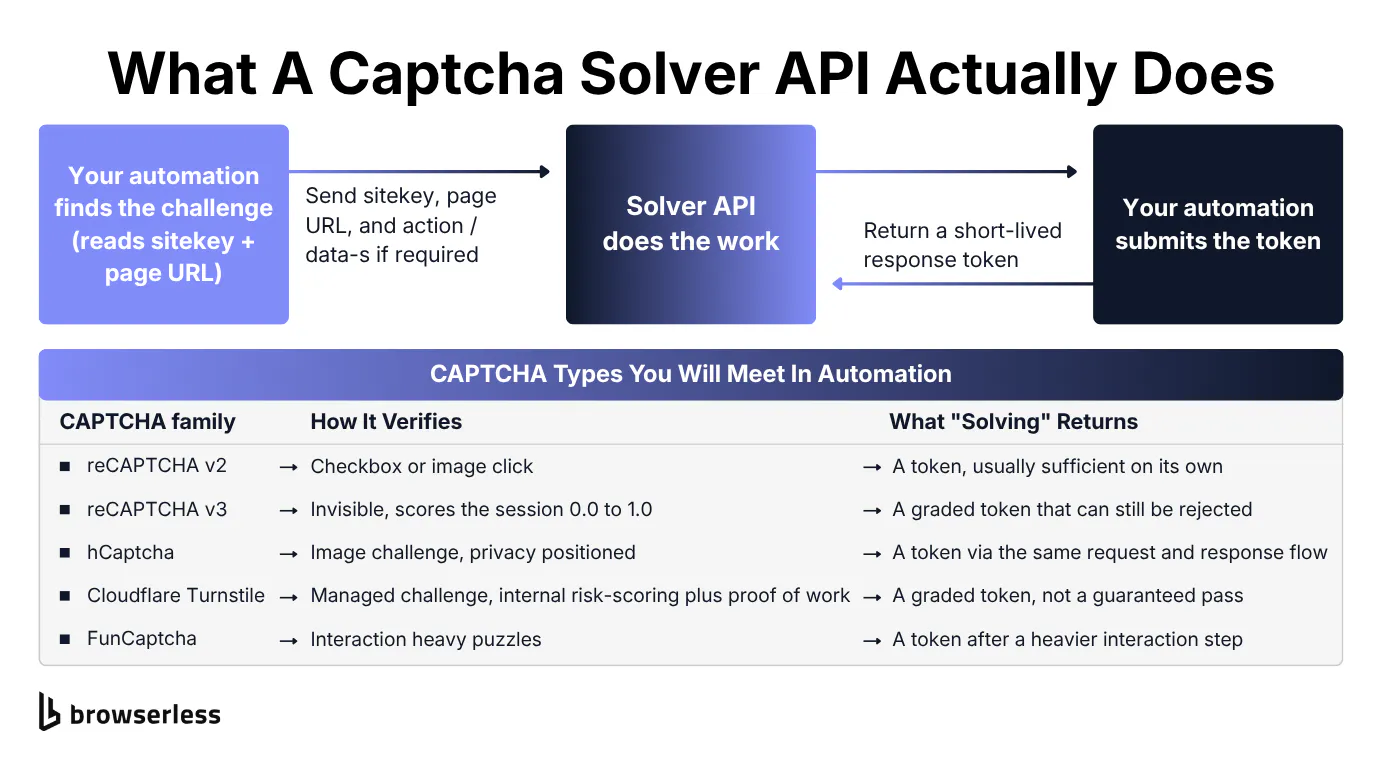
The sitekey-to-token handoff
The core transaction is a small one where your code finds the challenge on the page, reads the identifiers that describe it, sends them to the solver, and gets back a response token. The service does the work of solving, and your automation submits the result in place of a human.
Token-based services need the same required parameters. The most important is the sitekey, the public identifier the challenge widget is configured with, followed by the page URL where the challenge appears. Some challenge types add one more field: an action name for reCAPTCHA v3 or a data-s value for certain reCAPTCHA v2 deployments.
That shared request-and-response shape is why the labels are interchangeable, whether a vendor calls it a "captcha solving API", a "captcha bypass API", or a "captcha solving service". The names differ, but the contract is identical. Send the identifiers, get a token back.
CAPTCHA types you'll meet in automation
"Solving" isn't one operation, since what it takes to clear a challenge changes with the CAPTCHA family, and that difference decides which approach works and which quietly fails. The table below covers the families you'll hit, how each verifies, and what a solve returns.
| CAPTCHA family | How it verifies | What a solve returns |
|---|---|---|
| reCAPTCHA v2 | Checkbox or image grid with user interaction | A g-recaptcha-response token after the click or selection |
| reCAPTCHA v3 | Invisible, scores the session 0.0 to 1.0, no interaction | A token that carries a score the server still judges |
| Cloudflare Turnstile | Managed challenge blending internal risk-scoring with a proof-of-work | A cf-turnstile-response token tied to session trust |
| FunCaptcha / Arkose | Interaction-heavy puzzles | A token after completing the puzzle flow |
| GeeTest | Slider and gap puzzles | A validated challenge response |
The split that matters is between click-based and score-based types. Click-based types like reCAPTCHA v2 hand back a token that's largely sufficient on its own. Score-based types like reCAPTCHA v3 and Turnstile grade the session that produced the token. Keep the hidden-field names in view: g-recaptcha-response and cf-turnstile-response. The next section injects tokens straight into them.
How a CAPTCHA solver API works
A CAPTCHA solver API turns a challenge into a token through a short but fragile sequence, spelled out step by step below.
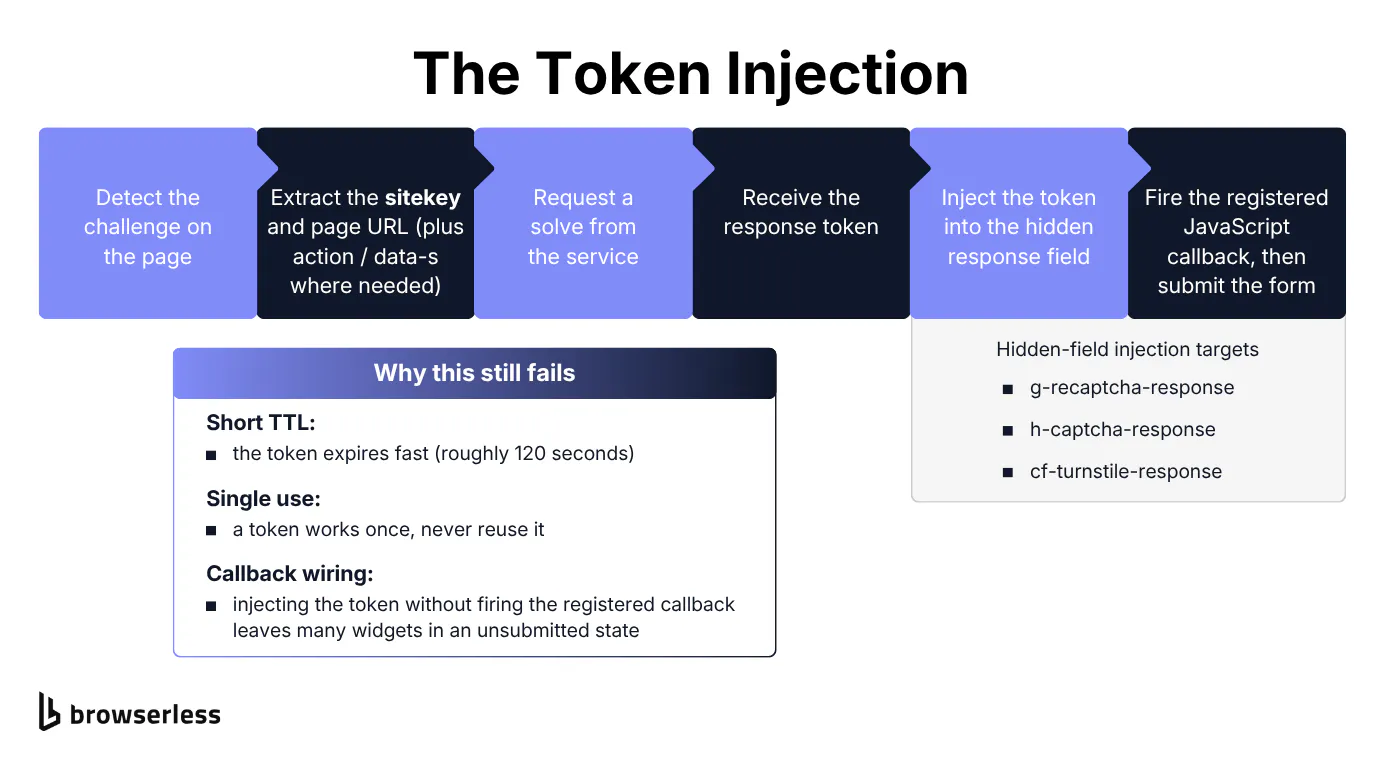
The token injection flow, step by step
Six steps take a challenge from detected to submitted:
- Detect the challenge on the page, usually by finding the widget container or its hidden response field.
- Extract the
sitekeyand the page URL, plus anactionordata-svalue when the type needs it. - Request a solve from the service and wait for the token.
- Inject the token into the hidden response field:
g-recaptcha-responseorcf-turnstile-response. - Fire the JavaScript callback the widget registered, so the page knows a response arrived.
- Submit the form.
Three details break this flow more than any selector bug. A token has a short life, often on the order of two minutes, so a token that waits in a queue too long expires before step 6. Tokens are single-use, so a retry needs a fresh solve, not a replay. Injecting a token without firing the registered callback leaves many widgets visually unsolved, so the form refuses to submit even though the field holds a valid value.
The snippet below runs the core of that dance against a live challenge page: read the sitekey, buy a token from an external service, inject it, and submit. It skips step 5, firing the widget's registered callback, which the reCAPTCHA demo page doesn't need but a production widget usually does, one more fragile piece the manual path leaves to you.
The token-service call follows the submit-then-poll contract nearly every solver exposes, where you post the challenge identifiers and poll until the minted token is ready. Without a SOLVER_API_KEY the helper returns a placeholder, so the injection and submit steps still run against the live page.
import os
import time
import requests
from playwright.sync_api import sync_playwright

TOKEN = os.environ["BROWSERLESS_TOKEN"]
TARGET_URL = "https://www.google.com/recaptcha/api2/demo"
WS = f"wss://production-sfo.browserless.io/chromium?token={TOKEN}"


def buy_token(sitekey, page_url):
    """Submit the challenge to a 2Captcha-style service and poll for the token."""
    key = os.environ.get("SOLVER_API_KEY")
    if not key:
        print(f"  (no SOLVER_API_KEY: using a placeholder for sitekey {sitekey[:12]}...)")
        return "PLACEHOLDER_TOKEN"

    job = requests.post("https://2captcha.com/in.php", data={
        "key": key, "method": "userrecaptcha",
        "googlekey": sitekey, "pageurl": page_url, "json": 1,
    }).json()["request"]

    while True:  # tokens are minted, not instant
        time.sleep(5)
        res = requests.get("https://2captcha.com/res.php", params={
            "key": key, "action": "get", "id": job, "json": 1,
        }).json()
        if res["status"] == 1:
            return res["request"]


with sync_playwright() as p:
    browser = p.chromium.connect_over_cdp(WS)
    page = browser.contexts[0].pages[0]
    page.goto(TARGET_URL, wait_until="domcontentloaded")

    # 1. Read the sitekey the service needs to identify the challenge.
    sitekey = page.get_attribute(".g-recaptcha", "data-sitekey")
    print(f"1. sitekey: {sitekey}")

    # 2. Buy a token from the external service (the paid, high-latency step).
    token = buy_token(sitekey, page.url)
    print(f"2. token: {len(token)} chars")

    # 3. Drop the token into the hidden field the widget submits.
    page.eval_on_selector("#g-recaptcha-response", "(el, t) => { el.value = t; }", token)
    print("3. token injected into #g-recaptcha-response")

    # 4. Submit. A real high-trust token passes here; a low-trust one is rejected.
    page.click("#recaptcha-demo-submit")
    print("4. form submitted")
    browser.close()
Run it and the console prints each numbered step in order, the extracted sitekey, the token length, the injection, and the final submit, so you can see exactly where a real run succeeds or stalls.
Why a valid token still gets rejected
A valid token and a passed challenge are different events. Score-based challenges grade the whole session rather than the single click that produced the token.
reCAPTCHA v3 returns a session score from 0.0 to 1.0 and never shows a checkbox. Cloudflare Turnstile blends internal risk-scoring with a lightweight proof-of-work. In both cases the server decides using signals it collected while the page loaded: the browser fingerprint, the Transport Layer Security (TLS) handshake, behavioral history, and IP reputation. The token is a receipt that the challenge ran, not proof that the session earned trust.
A token minted from a headless, fingerprint-poor context with no history scores low and gets rejected downstream, even though the token itself passes every structural check. You paid for a solve and still got blocked.
The fix is to make the request come from a session the site already trusts, a real browser with a real fingerprint and history, which is exactly what the production approaches later in this guide do.
Choosing a CAPTCHA solver API
Choosing a CAPTCHA solver API comes down to two categories: a token-based service you call out to for each challenge, or in-session solving that runs inside the browser you already drive. Token services win on raw per-solve price. In-session solving wins on session trust against score-based challenges. The "free" tier deserves an honest look before you commit.
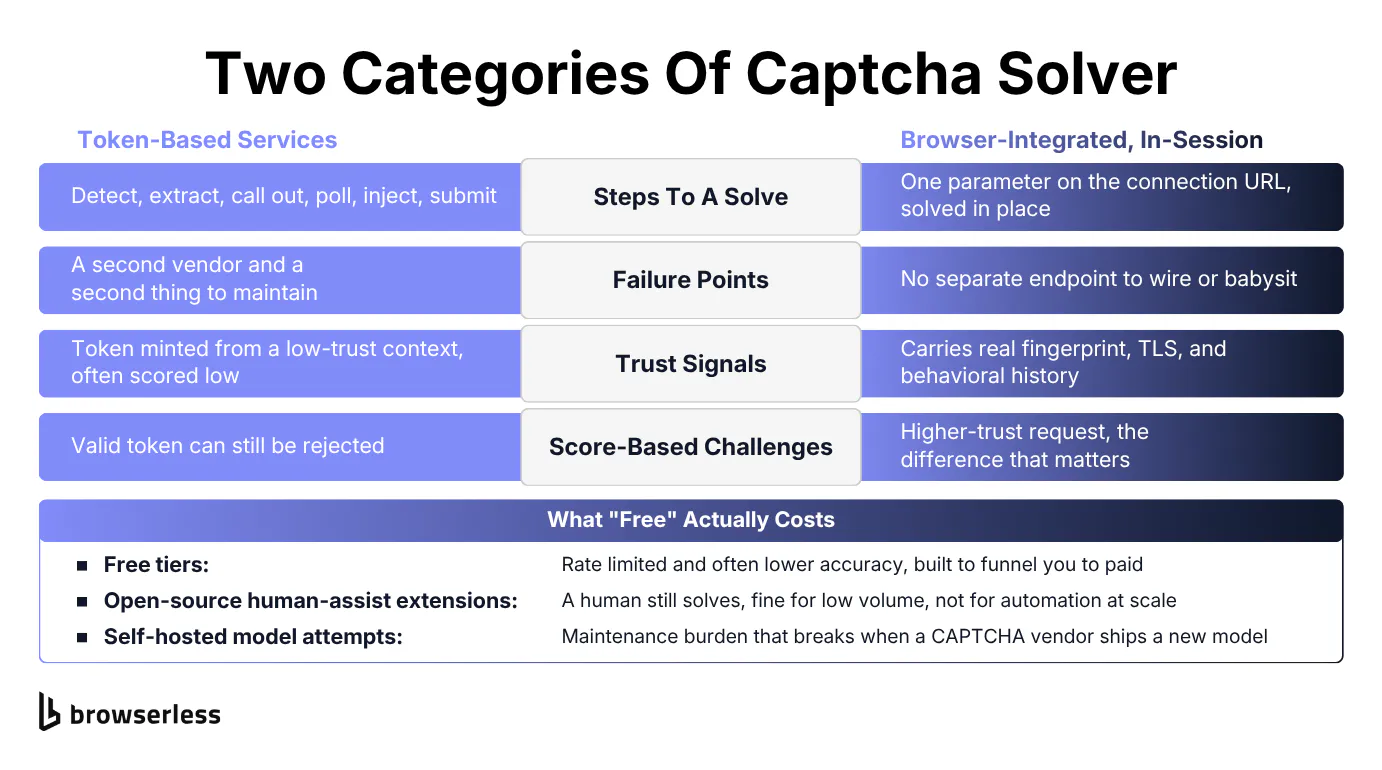
Token services vs. in-session solving
Token-based services are the classic model. You detect the challenge, extract the identifiers, call out to the service, poll for the token, inject it, and submit. It works, but it adds a second vendor and a second failure point, and the token it returns carries none of your session's trust signals.
For teams that already run their own browser infrastructure, separating CAPTCHA handling from browser execution can be an intentional architectural choice. Providers like CapSolver provide a standalone CAPTCHA solver API that can be integrated into Puppeteer, Playwright, Selenium, and protocol-level HTTP workflows. Its supported CAPTCHA types include reCAPTCHA v2 and v3, Cloudflare Turnstile, GeeTest, AWS WAF, DataDome, and other challenge types.
The API uses createTask to submit a CAPTCHA task, while asynchronous token tasks are retrieved through getTaskResult. Keeping this layer separate lets a team retain its existing browser and session architecture while managing CAPTCHA task routing, proxy configuration, retries, monitoring, and usage independently. This model is a practical fit for authorized automation workflows that need centralized CAPTCHA handling across multiple runtimes without moving browser execution to a bundled platform.
Browser-integrated solving removes that separate layer entirely. The in-session CAPTCHA solving runs inside the browser session you're already driving, so it inherits that session's genuine browser fingerprint, its negotiated TLS handshake, and everything the site logged about how it behaved. Against score-based challenges, that higher-trust request is what decides the outcome. The shorter flow is a nice side effect.
On a managed platform the reduction is a single parameter, set by connecting Puppeteer or Playwright to a stealth route with solveCaptchas=true on the connection URL, which auto-solves the challenge inside the session with no move to a separate endpoint. It's the passive path, where you set the one parameter and the token lands in the hidden field on its own, without ever calling a solve function. The example below sets it, then polls that field to confirm the solve landed.
import puppeteer from "puppeteer-core";

const TOKEN = process.env.BROWSERLESS_TOKEN;
const sleep = (ms) => new Promise((r) => setTimeout(r, ms));

// Connect to the stealth route with solveCaptchas=true so any challenge
// it detects, it attempts to solve inside this session.
const browser = await puppeteer.connect({
  browserWSEndpoint:
    `wss://production-sfo.browserless.io/chromium/stealth` +
    `?token=${TOKEN}&solveCaptchas=true&timeout=180000`,
});

const page = await browser.newPage();
const cdp = await page.createCDPSession();

// Register the CAPTCHA events before navigating so you don't miss detection.
cdp.on("Browserless.captchaFound", (p) =>
  console.log(`captchaFound -> type: ${p.type}, status: ${p.status}`),
);
cdp.on("Browserless.captchaAutoSolved", () =>
  console.log("captchaAutoSolved fired"),
);

await page.goto("https://www.google.com/recaptcha/api2/demo", {
  waitUntil: "networkidle2",
  timeout: 60000,
});

// Auto-solve drops the response token into the hidden field. Poll it until it
// populates. That populated field is the deterministic signal the solve landed.
let tokenLength = 0;
for (let i = 0; i < 40 && tokenLength === 0; i++) {
  tokenLength = await page
    .$eval("#g-recaptcha-response", (el) => el.value.length)
    .catch(() => 0);
  if (tokenLength === 0) await sleep(3000);
}

console.log(`Auto-solve complete: response token injected (${tokenLength} chars)`);
// The reCAPTCHA checkbox can still look unticked; click submit to continue.
await page.click("#recaptcha-demo-submit").catch(() => {});

await browser.close();
The captchaFound log fires when the challenge is detected, and the token length is the reliable signal that the solve landed in the hidden field, with no call to a separate solver. Poll that field to confirm the solve landed.
Free CAPTCHA solvers and browser extensions
The "free" cluster is the cheapest thing to rank for and the easiest to oversell, so treat it honestly. "Free" almost always means the cost moved somewhere you notice later.
Three shapes of "free" show up, starting with token-service free tiers that are rate-limited and often less accurate and exist to funnel you toward a paid plan. Open-source human-assist browser extensions still put a person in the loop, which is fine for a handful of manual solves and useless for automation at scale. Self-hosted open-source model attempts carry a maintenance burden and break the week a CAPTCHA vendor ships a new model.
None of these is the wrong choice for the right job, but each shifts the cost into rate limits, accuracy, or your own engineering time. That trade is the setup for the production math in the next section.
Running CAPTCHA solving in production
The headline price a CAPTCHA solver API quotes per 1,000 solves is the least useful number in production. The full figure includes retries, proxies, and the glue you maintain, and the most reliable place to solve turns out to be inside the session itself.
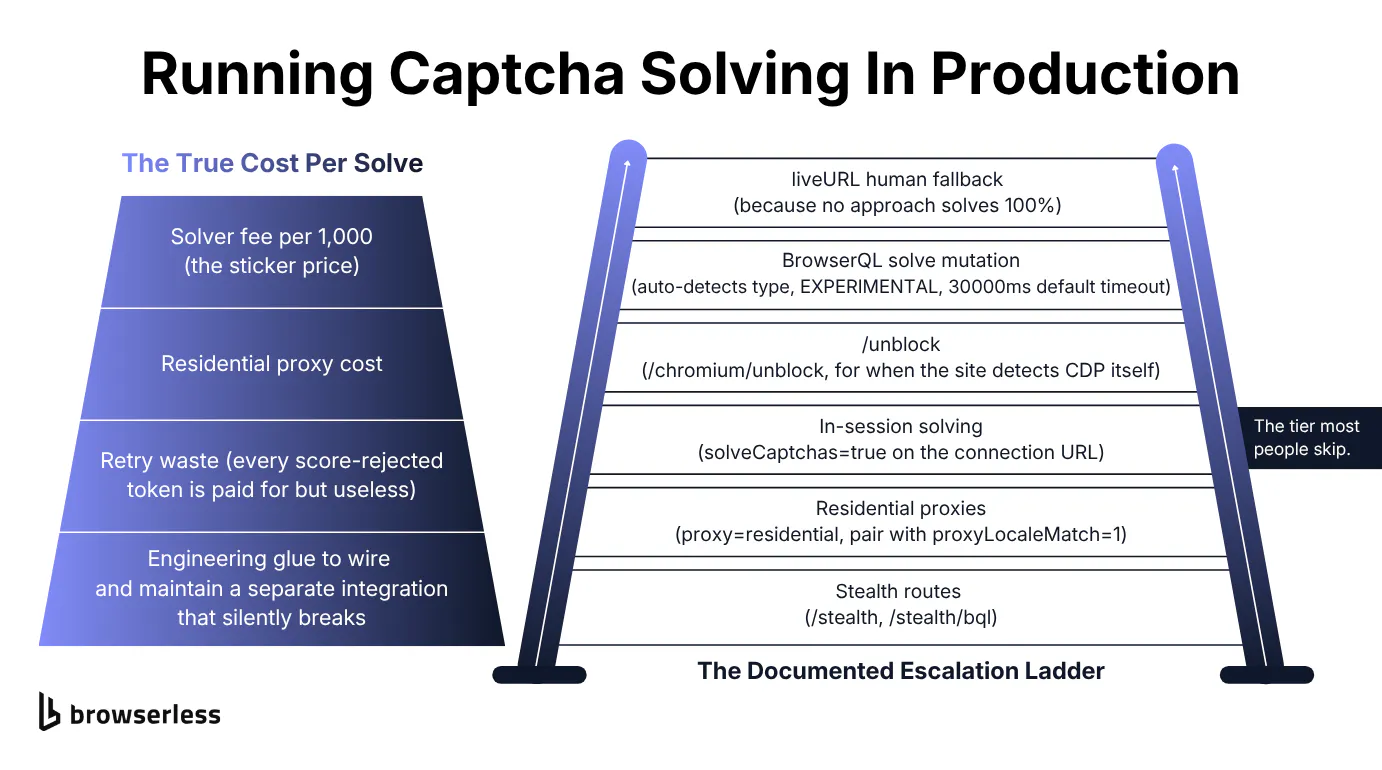
The real cost per solve
Run the arithmetic the sticker price hides, and you find four parts to the true cost of a solve. There's the solver fee. There are the residential proxies you route through to look legitimate. There's the retry waste from every score-rejected token you paid for but couldn't use. Finally, there's the engineering time to wire and maintain a separate integration, which breaks silently when a challenge vendor changes its model.
Take a workload of 100,000 page loads a month where, say, 15% hit a challenge. That's 15,000 solves. Assume a token service charges on the order of $1 per 1,000 solves, so the sticker line is about $15 a month, which looks trivial. Now add the proxy bandwidth those challenged loads consume, the extra solves you buy because score-rejected tokens force a retry, and the developer hours spent keeping the integration alive. The sticker number turns out to be the smallest term in the sum.
Token services aren't expensive per solve, and a cheaper rate is a clear advantage for high-volume, low-trust targets. An in-session solve usually costs more per solve, but only successful solves are billed, so it wins on integration, session trust, and total cost once retries are counted.
Solving inside the browser session
Because you're already driving a high-trust browser session, the solve inherits that session's trust, which closes the gap from earlier. Browserless bypasses bot detection in layers rather than a single call, in escalation order:
- Stealth Routes (
/stealth,/stealth/bql) apply fingerprint mitigations first, which reduces how often you pay to solve anything. - Residential proxies (
proxy=residential) add IP reputation, paired withproxyLocaleMatch=1so the browser language matches the proxy geography. - In-session solving (
solveCaptchas=true) clears the challenge without leaving your Puppeteer or Playwright session. Most guides skip this tier. - The web unblocker API (
/unblock, docs) steps in when a site you are authorized to automate detects the automation protocol itself, not just the CAPTCHA, and it can hand back abrowserWSEndpointplus cookies so you continue in your own session. - The BrowserQL
solvemutation auto-detects the challenge or takes aCaptchaTypesvalue, for orchestrated multi-step flows. liveURLis the human fallback for the cases nothing automated clears.
Under the hood, the in-session path exposes verifiable detail. The Browserless.solveCaptcha command is part of the Chrome DevTools Protocol (CDP) surface, and two CDP events report progress: Browserless.captchaFound on detection and Browserless.captchaAutoSolved when a solve completes. Note that captchaAutoSolved doesn't fire in every environment, so treat the populated response field as the reliable confirmation. The command returns five fields:
| Field | What it holds |
|---|---|
found | Whether a challenge was detected |
solved | Whether the solve succeeded |
time | Solve duration in milliseconds |
token | The response token, when the type produces a submittable one |
error | The failure reason, empty on a successful solve |
The BrowserQL solve mutation defaults to a 30000ms timeout and returns { found, solved, time, token }, and it's marked EXPERIMENTAL, so treat it as non-deterministic and check found and solved rather than assuming a pass. A companion solveImageCaptcha handles legacy distorted-text CAPTCHAs through captchaSelector and inputSelector.
The CaptchaTypes enum reaches well beyond the common families:
recaptcha(targets reCAPTCHA v2) andrecaptchaV3.- Cloudflare (Turnstile is handled by
solve). funcaptchafor FunCaptcha / Arkose.- GeeTest, DataDome, Akamai, PerimeterX, Amazon WAF.
- friendlyCaptcha, MTCaptcha, Capy, Lemin.
- A generic slider, plus normal and text challenges.
When you don't pass a type explicitly, solve auto-detects the challenge on the page. The older verify mutation is deprecated in favor of solve.
In-session solving costs 10 units per successful solve, and attempts that don't clear aren't charged, so the retry waste from earlier never lands on your bill. The BrowserQL flow below runs against a real Cloudflare-protected target, calls solve to clear the managed challenge, and prints the response fields.
const TOKEN = process.env.BROWSERLESS_TOKEN;
const endpoint = `https://production-sfo.browserless.io/stealth/bql?token=${TOKEN}`;

// solve auto-detects the challenge type, clears it inside the session, and reports back.
const query = `
  mutation SolveCloudflare {
    goto(url: "https://nowsecure.nl", waitUntil: networkIdle) { status }
    solve(type: cloudflare) { found solved time token }
  }`;

const res = await fetch(endpoint, {
  method: "POST",
  headers: { "Content-Type": "application/json" },
  body: JSON.stringify({ query }),
});

const { data } = await res.json();
console.log("goto status:", data.goto.status);
console.log(
  `found: ${data.solve.found}, solved: ${data.solve.solved}, time: ${data.solve.time}ms`,
);
A live run returns found: true and solved: true in roughly 18 seconds, and the managed challenge clears via cookies and auto-continues, so the token field returns a placeholder and there's no form to submit. If found comes back false, add a waitForSelector for the challenge before solve and retry. Everything here runs against your own token, and a free Browserless account covers two concurrent sessions.
For an LLM-driven agent that can walk into a challenge mid-task, Browser Use adds integrations=browseruse alongside solveCaptchas=true on the connection URL. That bridges the found/solved events into Browser Use's CaptchaWatchdog (which ships in browser-use 0.12.0 and later), so the agent pauses while Browserless solves the challenge and resumes its plan instead of crashing on it.
Where the stealth-route example earlier let the token land passively, the snippet below is the explicit counterpart. It calls Browserless.solveCaptcha directly and logs the raw response fields the command returns: found, solved, time, token, and error.
import puppeteer from "puppeteer-core";

const TOKEN = process.env.BROWSERLESS_TOKEN;

const browser = await puppeteer.connect({
  browserWSEndpoint:
    `wss://production-sfo.browserless.io/chromium` +
    `?token=${TOKEN}&solveCaptchas=true&timeout=180000`,
});

const page = await browser.newPage();
const cdp = await page.createCDPSession();

await page.goto("https://www.google.com/recaptcha/api2/demo", {
  waitUntil: "networkidle2",
  timeout: 60000,
});

// The singular command. Returns { found, solved, time, token, error }.
const result = await cdp.send("Browserless.solveCaptcha");
console.log("  found  :", result.found);
console.log("  solved :", result.solved);
console.log("  time   :", result.time, "ms");
console.log("  token  :", result.token ? `${result.token.length} chars` : null);
console.log("  error  :", result.error ?? "(none)");

if (result.solved) {
  // reCAPTCHA's checkbox can still look unticked after a solve; click submit.
  await page.click("#recaptcha-demo-submit").catch(() => {});
}

await browser.close();
No approach clears every challenge, which is why the liveURL tier exists. When auto-solve comes up empty, the liveURL mutation hands the live session to a person. It returns a shareable URL that opens the running browser in a viewer, separate from your token-bearing API connection, so you can pass it off to someone to finish by hand.
const TOKEN = process.env.BROWSERLESS_TOKEN;
const endpoint = `https://production-sfo.browserless.io/stealth/bql?token=${TOKEN}`;

// liveURL hands the running session to a human via a shareable viewer link.
const query = `
  mutation HumanFallback {
    goto(url: "https://nowsecure.nl", waitUntil: networkIdle) { status }
    liveURL { liveURL }
  }`;

const res = await fetch(endpoint, {
  method: "POST",
  headers: { "Content-Type": "application/json" },
  body: JSON.stringify({ query }),
});

const { data } = await res.json();
console.log("goto status:", data.goto.status);
console.log("liveURL:", data.liveURL.liveURL);
Open the returned URL in any browser, solve the challenge by hand, and the automated session picks up from the cleared state. Nothing here is undetectable, and treating it that way is how accounts and IP ranges get burned.
Where you solve a challenge matters more than which solver you pick. Solving inside the browser you already drive gives the token the session context a standalone token can't carry, backed by stealth and a residential proxy, which is what gets a scored request through.
Conclusion
A CAPTCHA solver API turns a page challenge into a token, but that token is only worth as much as the session behind it, which is why score-based challenges reject low-trust solves no matter how valid the token looks. In-session solving wins because it inherits the trust of the browser you already drive, and it takes a single parameter to switch on. With solveCaptchas=true on your connection URL most challenges clear in place, and when you want explicit control, the BrowserQL solve mutation shown earlier cleared a live Cloudflare challenge with solved: true in about 18 seconds. A free Browserless account covers two concurrent sessions, so sign up and point one of these at the CAPTCHA that has been blocking you.
FAQs
Is CAPTCHA bypass with a solver API legal?
Solving CAPTCHAs sits in a grey area that depends on the site's terms of service and your jurisdiction, not on the tool itself. Automating access to a site that forbids it in its terms can breach that contract even where no law is broken, and some data carries extra legal protection on top. Check the target's terms and your local rules before you run anything at scale, and treat CAPTCHA solving as one part of sustainable, terms-aware automation rather than a way around consent.
Is there a free CAPTCHA solver API?
Yes, but "free" is the wrong question. The one that matters is when free is good enough. If you run a handful of solves by hand, or your volume is low and occasional, a free tier or a human-assist extension will do the job at no cost. The moment solving has to run unattended and reliably at volume, the hidden costs (rate caps, lower accuracy, maintenance) show up and a paid or in-session path pays for itself.
How much does CAPTCHA solving cost per 1,000?
Token services advertise on the order of $1 to $3 per 1,000 solves by CAPTCHA type, but treat that sticker as the smallest line in the bill. On a workload where a few thousand solves a month cost around $15 in solver fees, the proxy bandwidth, the retries you buy back when score-based challenges reject a token, and the engineering time to keep the integration alive each dwarf it. As a rule of thumb, budget several times the sticker price. In-session solving prices per successful solve instead, with failed attempts unbilled, and usually wins once those extras are counted.
Can a CAPTCHA solver API solve reCAPTCHA v3?
It can return a reCAPTCHA v3 token, but returning a token and clearing the check are two separate steps. v3 leaves the accept-or-block call to the site, so a token from a low-trust automation context still gets rejected. Raise the session's trust with stealth and real browsing signals before solving, and the same token starts landing.
What is the difference between a CAPTCHA solver API and a CAPTCHA solving service?
The terms are interchangeable. The distinction worth drawing is the delivery model: a standalone token service you call out to, versus in-session solving that runs inside the browser you're already automating. The second inherits your session's trust signals, which matters most against score-based challenges.
How does a CAPTCHA solving service actually solve a challenge?
Most services combine two approaches. For an image challenge, like a Google reCAPTCHA grid that asks you to click every square with traffic lights, they run the captcha image through machine learning models tuned for image recognition, and they fall back to human workers when a challenge is too novel for the model. Token-based providers advertise high accuracy and a strong success rate on the common families, though the real figure shifts with each captcha challenge and with newer vendors like Arkose Labs behind FunCaptcha. Whatever the method, the captcha solution comes back as a token, and other captcha types such as sliders or distorted text follow the same submit-then-return shape.
What do you need to call a CAPTCHA solver API?
Three things. An API key that authenticates your account, the captcha parameters that identify the challenge (the sitekey and the page URL, plus an action or data-s value for some types), and an HTTP request that posts those parameters to the service. Most providers aim for easy integration by exposing a plain POST request contract, and their documentation ships code examples in popular programming languages like Python, JavaScript, and PHP. If your language isn't covered by an official SDK, the sample code in the docs maps cleanly onto any HTTP client.
Where do developers use CAPTCHA solving in scraping and automated testing?
CAPTCHA solving shows up across browser automation work. Many developers reach for it in web scraping and data extraction, where a challenge sits between a crawler and the public data behind it, and in automated testing that has to run past a login screen. Bypassing captchas in these production systems usually means pairing your scraping tools with JavaScript rendering and solid proxy infrastructure, and picking solutions that offer dedicated support. Slotting a solver into an existing automation stack behind login pages and agent workflows keeps that web data flowing.