TL;DR
- Google Maps scraper. A Google Maps scraper reads business listings from the rendered results feed, where you can extract names, links, ratings, and images without parsing the map.
- Feed scrolling. Google Maps lazy-loads listings in a nested container, so your scraper needs bounded scrolling, defensive field handling, selector monitoring, and clear failure signals.
- Production path. Build and test locally, then move the browser workload to Browsers as a Service (BaaS) when you want managed browser infrastructure, regional endpoints, and launch options such as ad blocking or stealth.
Introduction
A Google Maps scraper reads business listing data from the rendered results feed. When you use Google Maps scraping against the consumer interface, you depend on a page that can change. As with any web scraping job, the selectors, validation, and monitoring are yours to keep working. The official Places API can give you supported structured data, while this guide shows you how to work with the rendered page.
In this guide, you'll use Puppeteer to scrape Google Maps data locally, scroll the feed, connect the finished script to Browserless, and export the results as JSON. You'll also get working Python and API code examples, plus the practical limits to consider before collecting data at scale.
Here's the same job built as a no-code workflow, if you'd rather not maintain the script yourself:
What is a Google Maps scraper?
A Google Maps scraper is a browser automation script that opens a Google Maps search and turns the rendered listing cards into structured data. The supported data fields in this hotel example are the business name and listing URL, with rating text and an image URL when those fields are present. You can extract business names consistently from the cards, but the optional fields vary by listing.
You can use the same process for restaurants, dentists, plumbers, and other Google Maps locations. Some cards expose additional Google Maps business data, such as an address, opening hours, phone number, or business website. Treat those fields as optional, and treat Google Maps URLs as navigation links rather than guaranteed Places API identifiers.
How to extract Google Maps data in five steps
You'll start with a visible local browser, confirm the selectors and scrolling behavior, then change the connection for production. Keeping the first run local makes page behavior and selector failures easier to inspect.
Step 1: Set up Puppeteer locally
Install puppeteer-core, which can launch an existing Google Chrome installation through its channel option. You'll reuse the same package when you connect to Browserless in Step 5.
In a new project directory, run the following commands.
# Initialize an ES module project and install the browser client.
npm init -y
npm install puppeteer-core
npm pkg set type=module
Step 2: Search Google Maps and wait for listings
The first script opens Google Maps and runs a search, then waits for the first cards to render.
// script.js
import puppeteer from "puppeteer-core";
const LISTING = 'a[href^="https://www.google.com/maps/place/"]';
// Google Maps re-navigates the main frame after the first paint, which destroys
// any wait task bound to the old execution context. Poll instead of using
// waitForSelector, and retry only the two expected context-reset errors.
const waitForListings = async (page, selector, timeoutMs = 60000) => {
const deadline = Date.now() + timeoutMs;
while (Date.now() < deadline) {
try {
const count = await page.evaluate(
(s) => document.querySelectorAll(s).length,
selector,
);
if (count > 0) return count;
} catch (error) {
const message = error instanceof Error ? error.message : String(error);
const contextReset =
message.includes("Execution context was destroyed") ||
message.includes("Cannot find context with specified id");
if (!contextReset) throw error;
}
await new Promise((resolve) => setTimeout(resolve, 1000));
}
throw new Error("No Google Maps listings appeared before the timeout");
};
(async () => {
let browser = null;
try {
browser = await puppeteer.launch({ headless: false, channel: "chrome" });
const page = await browser.newPage();
// A wider viewport surfaces more results per screen on Google Maps.
await page.setViewport({ width: 1440, height: 900 });
const query = encodeURIComponent("Hotels in Dublin, Ireland");
await page.goto(`https://www.google.com/maps/search/${query}?hl=en`, {
waitUntil: "domcontentloaded",
});
const count = await waitForListings(page, LISTING);
console.log(`Search complete, ${count} listings on screen`);
} catch (error) {
console.error(error);
process.exitCode = 1;
} finally {
if (browser) await browser.close();
}
})();
The script opens an installed Chrome channel and waits for the first search results. If Chrome is installed in a nonstandard location, replace channel: "chrome" with an explicit executablePath. Puppeteer's launch documentation covers both options.

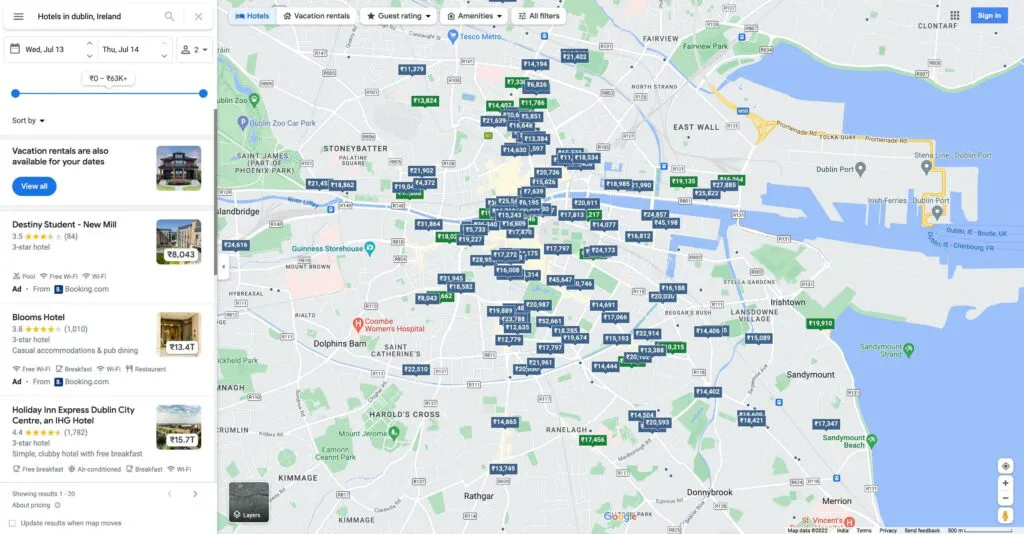
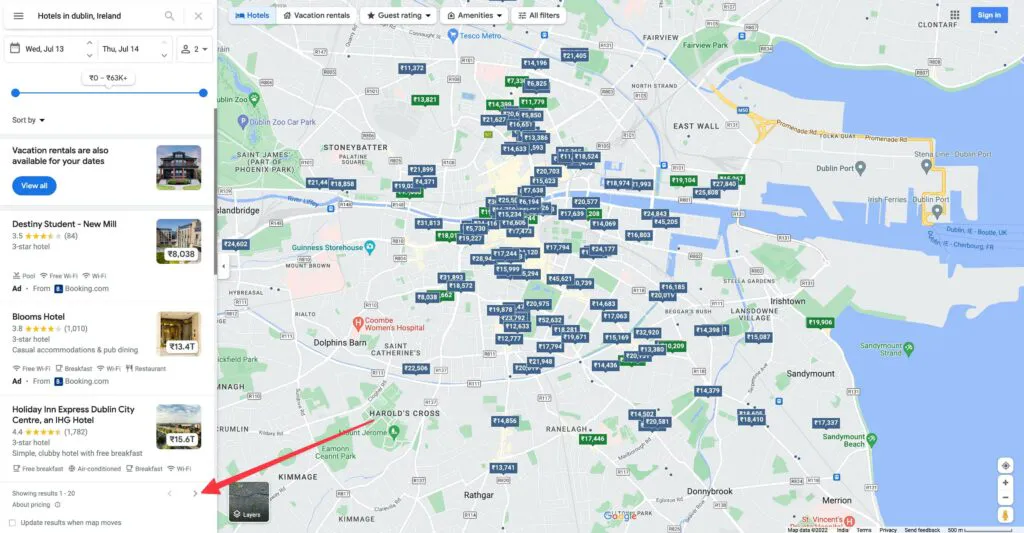
You'll read the left-hand results feed rather than the map itself. Much of the map is rendered through canvas or WebGL, while the feed exposes the business cards as ordinary DOM elements that are easier to query.
Using a direct search URL keeps the script from depending on the search box. Older tutorials often target #searchboxinput, while Google can generate identifiers such as ucc-1. Neither is a supported interface.
Google Maps can also replace the main execution context after the first paint. If that happens, a selector wait tied to the old context fails even though the page continues loading. The polling helper avoids that race and retries only the two context-reset errors it expects. Every other error still stops the script.
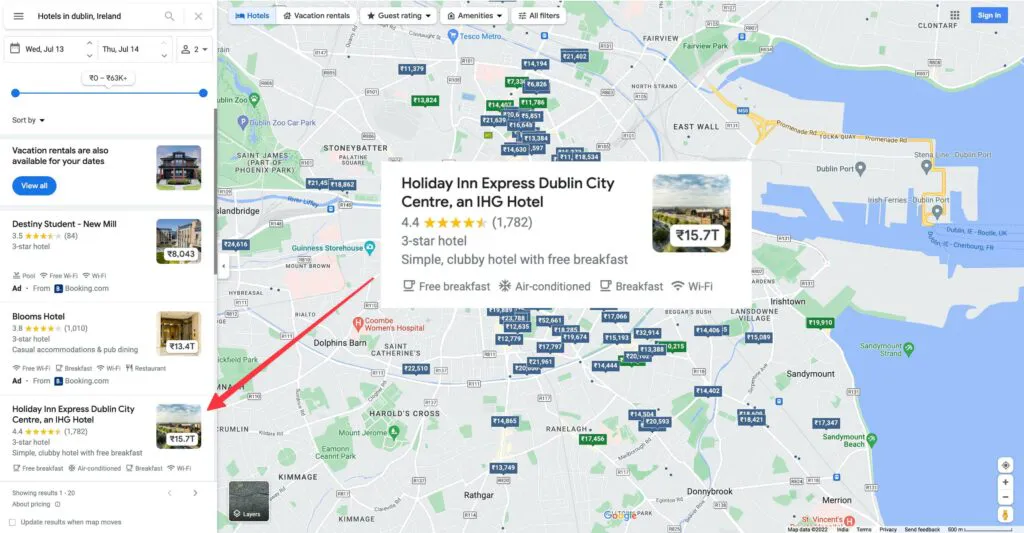
The result cards are ordinary DOM elements kept in sync with the rendered map. Each matched card contains a link to its Google Maps detail page and may contain the optional fields extracted below.
Step 3: Extract fields from the result cards
With listings on screen, add a SELECTORS map and turn the first rendered batch into records. You'll add scrolling and export in Steps 4 and 5.
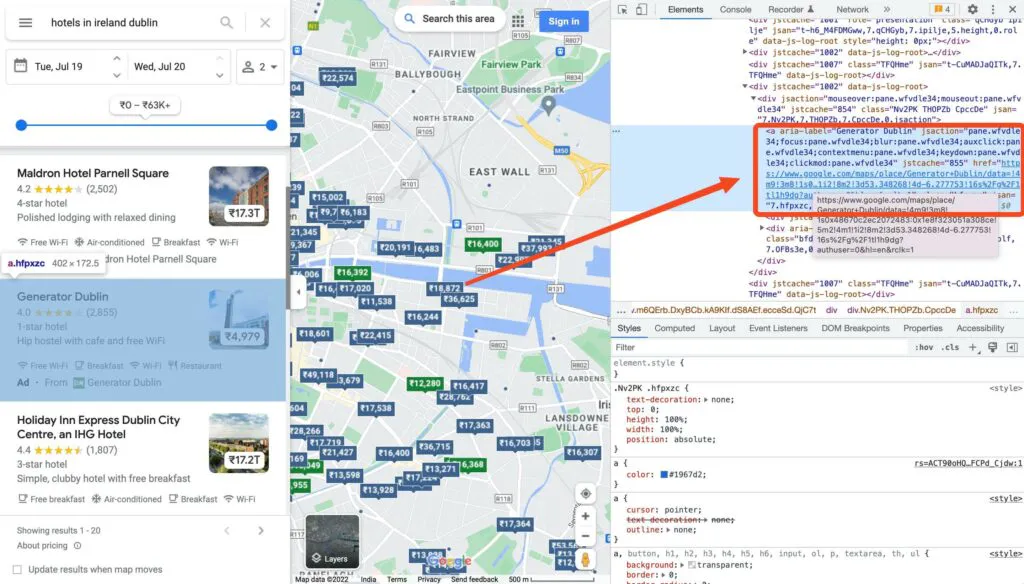
Google's compiled, machine-generated class names can change, so expect to re-check them. If your scrape suddenly returns empty strings, start here. The four field selectors do not imply that every card contains every optional field.
import puppeteer from "puppeteer-core";
// Class names for the elements inside each result card.
const SELECTORS = {
NAME: ".qBF1Pd.fontHeadlineSmall",
LISTING: 'a[href^="https://www.google.com/maps/place/"]',
RATING: ".ZkP5Je",
LINK: ".hfpxzc",
IMAGE: ".FQ2IWe.p0Hhde",
};
// Google Maps re-navigates the main frame after the first paint, which destroys
// any wait task bound to the old execution context. Poll instead of using
// waitForSelector, and retry only the two expected context-reset errors.
const waitForListings = async (page, selector, timeoutMs = 60000) => {
const deadline = Date.now() + timeoutMs;
while (Date.now() < deadline) {
try {
const count = await page.evaluate(
(s) => document.querySelectorAll(s).length,
selector,
);
if (count > 0) return count;
} catch (error) {
const message = error instanceof Error ? error.message : String(error);
const contextReset =
message.includes("Execution context was destroyed") ||
message.includes("Cannot find context with specified id");
if (!contextReset) throw error;
}
await new Promise((resolve) => setTimeout(resolve, 1000));
}
throw new Error("No Google Maps listings appeared before the timeout");
};
// Scrapes the visible result cards, skipping sponsored listings.
const getData = async (page) => {
return await page.evaluate((selectors) => {
const elements = document.querySelectorAll(selectors.LISTING);
const places = Array.from(elements)
.map((element) => element.parentElement)
.filter(Boolean)
// Sponsored cards match the same selectors as organic results.
// The label reads "Sponsored" on its own for some ads and
// "Sponsored · By <partner>" for others, so match the prefix.
.filter((place) => !place.querySelector('[aria-label^="Sponsored"]'))
.map((place) => {
const name = (place.querySelector(selectors.NAME)?.textContent || "").trim();
const rating = (
place.querySelector(selectors.RATING)?.textContent || ""
).trim();
const link = place.querySelector(selectors.LINK)?.href || "";
const image =
place.querySelector(selectors.IMAGE)?.querySelector("img")?.src || "";
return { name, rating, link, image };
});
return places;
}, SELECTORS);
};
(async () => {
let browser = null;
try {
browser = await puppeteer.launch({ headless: false, channel: "chrome" });
const page = await browser.newPage();
await page.setViewport({ width: 1440, height: 900 });
const query = encodeURIComponent("Hotels in Dublin, Ireland");
await page.goto(`https://www.google.com/maps/search/${query}?hl=en`, {
waitUntil: "domcontentloaded",
});
await waitForListings(page, SELECTORS.LISTING);
const finalData = await getData(page);
console.log("Final data", finalData);
return finalData;
} catch (error) {
console.error(error);
process.exitCode = 1;
} finally {
if (browser) await browser.close();
}
})();
Pass SELECTORS explicitly into page.evaluate. Its callback runs in the browser execution context and cannot read variables from the surrounding Node.js scope unless you pass them as arguments.
The sponsored filter matches an English label prefix rather than an exact value. Ads can use both aria-label="Sponsored" and labels such as aria-label="Sponsored · By Booking.com". The example requests hl=en so that prefix is predictable. If you remove it, adjust the filter for the session locale.

An exact-match selector catches the card on the left and walks straight past the one on the right, which lands in your results as though it were an organic listing. Matching the prefix with ^= catches both and produces one record per non-sponsored card. Optional fields remain empty when a card does not contain them.
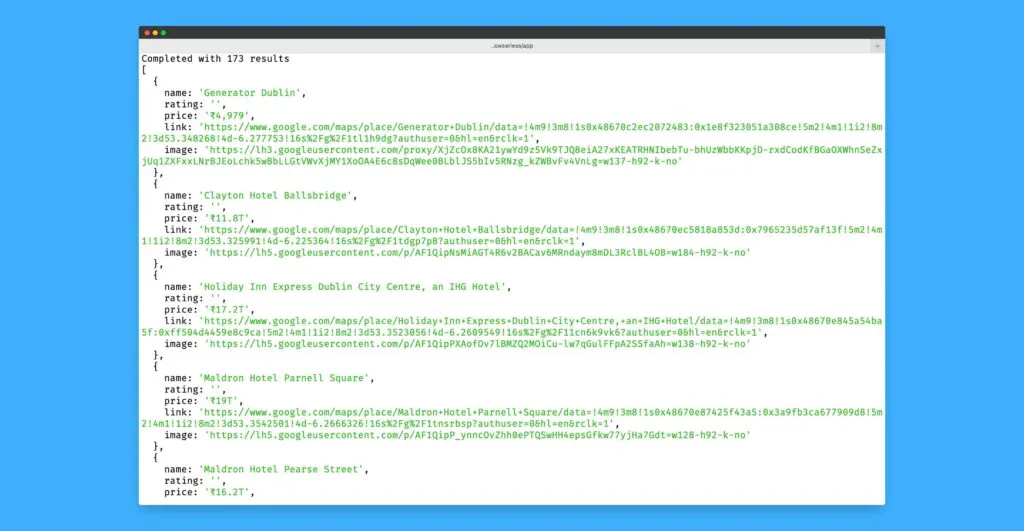
[
{
"name": "Clontarf Castle Hotel",
"rating": "4.5(5,650)",
"link": "https://www.google.com/maps/place/Clontarf+Castle+Hotel/...",
"image": "https://lh3.googleusercontent.com/gps-cs-s/..."
},
{
"name": "easyHotel Dublin City Centre",
"rating": "4.5",
"link": "https://www.google.com/maps/place/easyHotel+Dublin+City+Centre/...",
"image": "https://lh3.googleusercontent.com/gps-cs-s/..."
}
]
Running the script prints those records to the console, with the full link and image URLs the sample above truncates.

The rating field may be a bare average rating such as 4.5 or include a review count such as 4.5(5,650), so parse it defensively. Split on the opening parenthesis only when it exists, and remember that decimal and thousands separators can vary with the locale.
Card contents depend on the category and individual listing. Plumber cards may expose a phone number, address, opening hours, and website link, while hotel cards tend to emphasize price and star class. Treat every field other than the listing link and name as optional.

Optional fields can disappear between page loads, even within the same business category. The example therefore returns a consistent object shape while allowing rating and image to be empty.
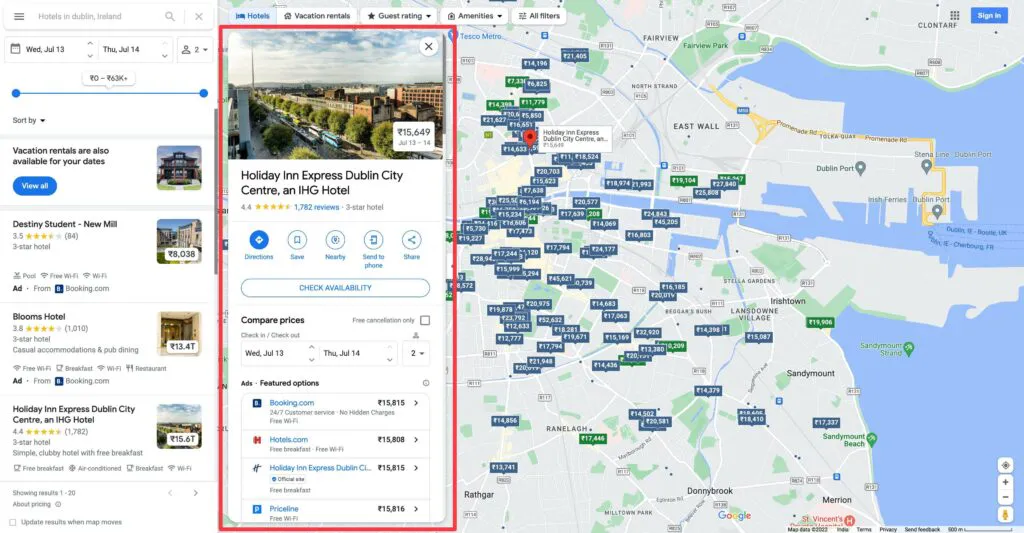
A listing detail page usually exposes more fields in one place, although its selectors and field availability can also change. Follow the scraped link only for data that is missing from the feed and handle absent values there as well.

Opening a detail page costs one extra navigation per listing. Use it only for fields missing from the card, such as a fuller review view, and maintain a separate selector set for detail pages.
The selectors above are implementation details, not a supported Google Maps API. Re-test them before a production run and surface empty-field rates in your monitoring so a DOM change does not silently look like valid data.
Keep this reference table handy while you build. It collects the fields and selectors from this step, what a detail page carries on top, the ways to run the scraper, and the things most likely to break a run.

Step 4: Scroll through the results feed
New cards render as you approach the bottom of the sidebar. Use the infinite-scroll feed rather than relying on the numbered "next page" button described by older versions of this guide.
The scroll helper looks for the English end-of-list marker requested through hl=en. As a fallback, it stops when both the listing count and the feed's scroll height remain unchanged for three checks. A pass limit turns a feed that never settles into an error instead of a silently partial export.
// Scrolls the results feed until no new listings appear.
const scrollToEnd = async (page, maxPasses = 40) => {
let previousCount = -1;
let previousHeight = -1;
let stablePasses = 0;
for (let pass = 0; pass < maxPasses; pass++) {
let state = null;
try {
state = await page.evaluate((selector) => {
const feed = document.querySelector('div[role="feed"]');
if (!feed) throw new Error("Google Maps results feed not found");
const reachedEnd = feed.innerText.includes(
"You've reached the end of the list",
);
feed.scrollTop = feed.scrollHeight;
return {
count: document.querySelectorAll(selector).length,
height: feed.scrollHeight,
reachedEnd,
};
}, SELECTORS.LISTING);
} catch (error) {
const message = error instanceof Error ? error.message : String(error);
const contextReset =
message.includes("Execution context was destroyed") ||
message.includes("Cannot find context with specified id");
if (!contextReset) throw error;
}
if (state) {
if (state.reachedEnd) return { count: state.count, stoppedBy: "end-marker" };
const unchanged =
state.count === previousCount && state.height === previousHeight;
stablePasses = unchanged ? stablePasses + 1 : 0;
if (stablePasses >= 3) return { count: state.count, stoppedBy: "stable-feed" };
previousCount = state.count;
previousHeight = state.height;
}
await new Promise((resolve) => setTimeout(resolve, 3000));
}
throw new Error(`Google Maps feed did not settle after ${maxPasses} passes`);
};
Call scrollToEnd after the initial search and before getData. In Step 5, the inline retry check and timeout move into two small helpers, sleep and isContextReset, at the top of final.js.
The returned stoppedBy value records whether the page showed its end marker or the stability fallback ended the loop. Neither proves Google Maps has no other matching businesses. It only marks the end of the current ranked feed.
Scrolling the last card into view may move the viewport without advancing the nested feed. Setting the feed's own scrollTop reaches later batches, while checking both its height and listing count avoids stopping on a single paused update.
You'll know the current feed is finished when Google displays its end-of-list message at the bottom of the sidebar.

The maxPasses ceiling keeps your session bounded when the page continues changing, is blocked, or no longer matches the expected DOM. Your runtime and result count will depend on the query and page behavior, not on a fixed Google Maps limit.
Step 5: Export Google Maps data and connect Browserless
Once the local flow works, use the Browserless quickstart to copy your API token and confirm the endpoint for your region. The three steps so far assemble into one script in the order you built them.

Save the following as final.js. The complete script uses a local or hosted headless browser, then extracts the listings and exports them as JSON.
import { writeFile } from "node:fs/promises";
import puppeteer from "puppeteer-core";
// Use local Chrome in development and Browserless in production.
const BROWSERLESS_TOKEN = process.env.BROWSERLESS_TOKEN;
const IS_PRODUCTION = process.env.NODE_ENV === "production";
const LISTING = 'a[href^="https://www.google.com/maps/place/"]';
// Keep volatile page selectors in one place.
const SELECTORS = {
NAME: ".qBF1Pd.fontHeadlineSmall",
LISTING,
RATING: ".ZkP5Je",
LINK: ".hfpxzc",
IMAGE: ".FQ2IWe.p0Hhde",
};
const sleep = (milliseconds) =>
new Promise((resolve) => setTimeout(resolve, milliseconds));
// Retry only navigation-related execution-context resets.
const isContextReset = (error) => {
const message = error instanceof Error ? error.message : String(error);
return (
message.includes("Execution context was destroyed") ||
message.includes("Cannot find context with specified id")
);
};
// Switch browser transports without changing the scraping logic.
const getBrowser = () => {
if (IS_PRODUCTION) {
if (!BROWSERLESS_TOKEN) {
throw new Error("Set BROWSERLESS_TOKEN before running in production");
}
return puppeteer.connect({
browserWSEndpoint: `wss://production-sfo.browserless.io?token=${encodeURIComponent(BROWSERLESS_TOKEN)}`,
});
}
return puppeteer.launch({ headless: false, channel: "chrome" });
};
const waitForListings = async (page, timeoutMs = 60000) => {
const deadline = Date.now() + timeoutMs;
while (Date.now() < deadline) {
try {
const count = await page.evaluate(
(selector) => document.querySelectorAll(selector).length,
LISTING,
);
if (count > 0) return count;
} catch (error) {
if (!isContextReset(error)) throw error;
}
await sleep(1000);
}
throw new Error("No Google Maps listings appeared before the timeout");
};
// Scroll the nested feed, not the main document.
const scrollToEnd = async (page, maxPasses = 40) => {
let previousCount = -1;
let previousHeight = -1;
let stablePasses = 0;
for (let pass = 0; pass < maxPasses; pass++) {
let state = null;
try {
state = await page.evaluate((selector) => {
const feed = document.querySelector('div[role="feed"]');
if (!feed) throw new Error("Google Maps results feed not found");
const reachedEnd = feed.innerText.includes(
"You've reached the end of the list",
);
feed.scrollTop = feed.scrollHeight;
return {
count: document.querySelectorAll(selector).length,
height: feed.scrollHeight,
reachedEnd,
};
}, LISTING);
} catch (error) {
if (!isContextReset(error)) throw error;
}
if (state) {
if (state.reachedEnd) return { count: state.count, stoppedBy: "end-marker" };
const unchanged =
state.count === previousCount && state.height === previousHeight;
stablePasses = unchanged ? stablePasses + 1 : 0;
if (stablePasses >= 3) {
return { count: state.count, stoppedBy: "stable-feed" };
}
previousCount = state.count;
previousHeight = state.height;
}
await sleep(3000);
}
throw new Error(`Google Maps feed did not settle after ${maxPasses} passes`);
};
// Extract organic cards and keep one record per listing URL.
const getData = async (page) =>
page.evaluate((selectors) => {
const cards = Array.from(document.querySelectorAll(selectors.LISTING))
.map((element) => element.parentElement)
.filter(Boolean)
.filter((card) => !card.querySelector('[aria-label^="Sponsored"]'));
const seenLinks = new Set();
return cards
.map((card) => ({
name: (card.querySelector(selectors.NAME)?.textContent || "").trim(),
rating: (card.querySelector(selectors.RATING)?.textContent || "").trim(),
link: card.querySelector(selectors.LINK)?.href || "",
image: card.querySelector(selectors.IMAGE)?.querySelector("img")?.src || "",
}))
.filter((place) => {
if (!place.link || seenLinks.has(place.link)) return false;
seenLinks.add(place.link);
return true;
});
}, SELECTORS);
const main = async () => {
let browser = null;
try {
browser = await getBrowser();
const page = await browser.newPage();
await page.setViewport({ width: 1440, height: 900 });
const query = encodeURIComponent("Hotels in Dublin, Ireland");
await page.goto(`https://www.google.com/maps/search/${query}?hl=en`, {
waitUntil: "domcontentloaded",
});
await waitForListings(page);
const scrollResult = await scrollToEnd(page);
const places = await getData(page);
// Write the export beside this script.
const outputUrl = new URL("./final.json", import.meta.url);
await writeFile(outputUrl, `${JSON.stringify(places, null, 2)}\n`, "utf8");
console.log(
`Collected ${places.length} listings; stopped by ${scrollResult.stoppedBy}; wrote ${outputUrl.pathname}`,
);
} finally {
if (browser) await browser.close();
}
};
main().catch((error) => {
console.error(error);
process.exitCode = 1;
});
Run it in production by setting NODE_ENV and supplying the Browserless API token from your account dashboard. Keep the token in an environment variable so it never lands in your repository.
# Keep the token out of source control, then run the remote branch.
export BROWSERLESS_TOKEN="your-browserless-token"
NODE_ENV=production node final.js
The script writes final.json beside final.js and prints a one-line summary with the listing count and how the scroll loop stopped. A stoppedBy value of stable-feed means the fallback heuristic ended the loop rather than Google's end marker.
JSON preserves the scraper's object shape, which makes it a useful starting format. If your team prefers CSV files or Google Sheets, you can add on a conversion step without changing the collection logic. You'll only need extra formatting or API code, especially if you later collect nested fields.
The example uses the production-sfo regional endpoint. Check the documented Browserless connection URL patterns and choose the region closest to your workload before deployment.
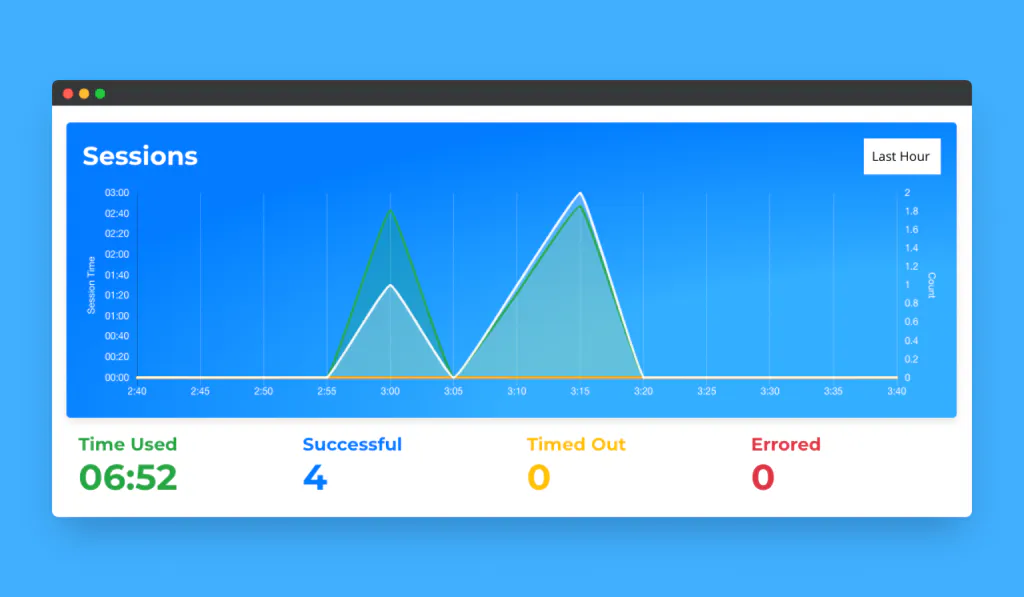
Most session time goes into lazy-loading the feed, and duration varies between runs. For recurring data scraping jobs, add concurrency limits, rate limiting, retry backoff, and jitter around each search. Reuse a browser only when it fits your isolation requirements. Keep every run bounded, and record failures instead of exporting them as complete results.
Other ways to extract Google Maps data
Puppeteer gives you full browser control, but it isn't your only option. You can keep the same selectors and nested-feed logic while changing the client or submit smaller extraction jobs through a Google Maps scraper API.
Use Playwright with Python
If your stack is Python rather than Node, the same approach works with Playwright. In production, the script connects to Browserless over CDP. Its development branch launches a local Playwright Chromium installation.
Install Playwright. The second command is needed only for the local-development branch.
# Install Playwright and its matching Chromium binary.
python3 -m pip install playwright
python3 -m playwright install chromium
Save the complete scraper as final-python.py.
import json
import os
import time
from pathlib import Path
from urllib.parse import quote
from playwright.sync_api import sync_playwright
# Use local Chromium unless the production branch is selected.
BROWSERLESS_TOKEN = os.environ.get("BROWSERLESS_TOKEN")
IS_PRODUCTION = os.environ.get("NODE_ENV") == "production"
# Keep Google Maps selectors together so they are easy to update.
NAME_SELECTOR = ".qBF1Pd.fontHeadlineSmall"
LISTING_SELECTOR = 'a[href^="https://www.google.com/maps/place/"]'
RATING_SELECTOR = ".ZkP5Je"
# Retry only navigation-related execution-context resets.
def is_context_reset(error):
message = str(error)
return (
"Execution context was destroyed" in message
or "Cannot find context with specified id" in message
)
def wait_for_listings(page, selector, timeout_s=60):
deadline = time.time() + timeout_s
while time.time() < deadline:
try:
count = page.evaluate("s => document.querySelectorAll(s).length", selector)
if count:
return count
except Exception as error:
if not is_context_reset(error):
raise
time.sleep(1)
raise TimeoutError("No Google Maps listings appeared before the timeout")
# Scroll the nested results feed until it stops growing.
def scroll_to_end(page, selector, max_passes=40):
previous_count = -1
previous_height = -1
stable_passes = 0
for _ in range(max_passes):
state = None
try:
state = page.evaluate(
"""selector => {
const feed = document.querySelector('div[role="feed"]');
if (!feed) throw new Error("Google Maps results feed not found");
const reachedEnd = feed.innerText.includes(
"You've reached the end of the list"
);
feed.scrollTop = feed.scrollHeight;
return {
count: document.querySelectorAll(selector).length,
height: feed.scrollHeight,
reachedEnd,
};
}""",
selector,
)
except Exception as error:
if not is_context_reset(error):
raise
if state:
if state["reachedEnd"]:
return {"count": state["count"], "stopped_by": "end-marker"}
unchanged = (
state["count"] == previous_count
and state["height"] == previous_height
)
stable_passes = stable_passes + 1 if unchanged else 0
if stable_passes >= 3:
return {"count": state["count"], "stopped_by": "stable-feed"}
previous_count = state["count"]
previous_height = state["height"]
time.sleep(3)
raise RuntimeError(f"Google Maps feed did not settle after {max_passes} passes")
# Extract organic cards and deduplicate their listing URLs.
def get_places(page):
return page.evaluate(
"""([nameSel, listingSel, ratingSel]) => {
const cards = Array.from(document.querySelectorAll(listingSel))
.map((el) => el.parentElement)
.filter(Boolean)
.filter((card) => !card.querySelector('[aria-label^="Sponsored"]'));
const seenLinks = new Set();
return cards.map((card) => ({
name: (card.querySelector(nameSel)?.textContent || "").trim(),
rating: (card.querySelector(ratingSel)?.textContent || "").trim(),
link: card.querySelector('a.hfpxzc')?.href || "",
image: card.querySelector('.FQ2IWe.p0Hhde img')?.src || "",
})).filter((place) => {
if (!place.link || seenLinks.has(place.link)) return false;
seenLinks.add(place.link);
return true;
});
}""",
[NAME_SELECTOR, LISTING_SELECTOR, RATING_SELECTOR],
)
with sync_playwright() as p:
if IS_PRODUCTION:
if not BROWSERLESS_TOKEN:
raise RuntimeError("Set BROWSERLESS_TOKEN before running in production")
browser = p.chromium.connect_over_cdp(
f"wss://production-sfo.browserless.io?token={quote(BROWSERLESS_TOKEN, safe='')}"
)
else:
browser = p.chromium.launch(headless=False)
try:
context = browser.contexts[0] if browser.contexts else browser.new_context()
page = context.new_page()
page.set_viewport_size({"width": 1440, "height": 900})
page.goto(
"https://www.google.com/maps/search/Hotels+in+Dublin,+Ireland?hl=en",
wait_until="domcontentloaded",
)
wait_for_listings(page, LISTING_SELECTOR)
scroll_result = scroll_to_end(page, LISTING_SELECTOR)
places = get_places(page)
# Write the export beside this script.
output_path = Path(__file__).with_name("final-python.json")
output_path.write_text(json.dumps(places, indent=2) + "\n", encoding="utf-8")
print(
f"Collected {len(places)} listings; "
f"stopped by {scroll_result['stopped_by']}; wrote {output_path}"
)
finally:
browser.close()
The Python version follows the same bounded scroll and narrow context-reset retry, then writes final-python.json. It uses the shared-fleet root WebSocket URL shown above. Keep browser.close() in finally so a failed navigation still releases the remote session.
The roundup of Python web scraping tools compares Playwright with Requests, BeautifulSoup, and Scrapy for this kind of job.
Use a Google Maps scraper API
Puppeteer and Playwright provide full CDP control, while Browserless's Browser Automation Protocol (BAP) offers a typed, Puppeteer-shaped SDK on top of BrowserQL. BAP methods build BrowserQL (BQL) operations, so you can opt into managed stealth, residential proxies and CAPTCHA solving once Google starts serving interstitials. The examples below use the standard /chromium/bql route. Switch to /stealth/bql when you need the stealth browser. Each BAP page uses its own WebSocket and must be closed when the work finishes.
BAP and BQL are both code-first rather than natural language services. You still provide the Google Maps URL, selectors and extraction logic.
Install the TypeScript SDK with npm install @browserless.io/bap-ts. The first-batch example below uses goto and mapSelector.
import Browserless from "@browserless.io/bap-ts";
const token = process.env.BROWSERLESS_TOKEN;
if (!token) throw new Error("Set BROWSERLESS_TOKEN before running this example");
// The WebSocket opens when the first page is created.
const browser = Browserless.connect({
browserWSEndpoint: "wss://production-sfo.browserless.io/chromium/bql",
token,
});
try {
const page = await browser.newPage();
await page.goto(
"https://www.google.com/maps/search/Hotels+in+Dublin,+Ireland?hl=en",
{
waitUntil: "networkIdle",
},
);
// Read the first rendered batch of listing names.
const listings = await page.mapSelector(
'a[href^="https://www.google.com/maps/place/"]',
);
console.log(listings.map((listing) => listing.innerText));
} finally {
await browser.close();
}
mapSelector returns the business names from the first rendered batch. It waits for its selector by default and returns innerText, innerHTML, id, and class. BAP is not a drop-in Puppeteer replacement: for example, it doesn't expose Puppeteer's input devices or browser contexts.
For arbitrary attributes, either use BAP's page.evaluate() method and serialize the result with JSON.stringify, or send a raw BQL operation through page.send(). The raw mutation below requests each anchor's aria-label and href through attribute(name:). Google sets the business name as the overlay link's aria-label, which is a steadier source than the visually hidden text inside it.
mutation ScrapeGoogleMaps {
# Load the search before running the selector query.
goto(
url: "https://www.google.com/maps/search/Hotels+in+Dublin+Ireland?hl=en"
waitUntil: networkIdle
) {
status
}
# Alias the returned fields to stable output keys.
listings: mapSelector(
selector: "a[href^=\"https://www.google.com/maps/place/\"]"
wait: true
) {
name: attribute(name: "aria-label") {
value
}
link: attribute(name: "href") {
value
}
}
}
mapSelector returns one entry per match. The response keys follow the aliases: each item contains a name object whose value is the business name and a link object whose value is the href. The SDK and raw BQL examples intentionally return only the initial batch.
BAP exposes page.evaluate(), so you can port the same feed-container loop when you need the rest of the currently exposed results. Its scroll({ throughPage: true }) method scrolls the document rather than the nested Google Maps feed.
The docs also cover a Python SDK (pip install bap-py). If it isn't published on PyPI yet when you read this, use Playwright over CDP as shown above or send BQL over HTTP as shown next.
For a language without an installable BAP SDK, or when you want to submit GraphQL directly, send the BQL mutation to its HTTPS endpoint with POST. The endpoint uses GraphQL over HTTP rather than a REST API. Python with requests is only a compact HTTP client in this example.
Install the HTTP client first.
# Install the HTTP client used by the next example.
python3 -m pip install requests
Save the request as bql.py.
import os
import requests
endpoint = "https://production-sfo.browserless.io/chromium/bql"
token = os.environ["BROWSERLESS_TOKEN"]
query = """
mutation ScrapeGoogleMaps {
goto(
url: "https://www.google.com/maps/search/Hotels+in+Dublin+Ireland?hl=en"
waitUntil: networkIdle
) {
status
}
listings: mapSelector(selector: "a[href^=\\"https://www.google.com/maps/place/\\"]", wait: true) {
name: attribute(name: "aria-label") {
value
}
link: attribute(name: "href") {
value
}
}
}
"""
# Submit the BrowserQL mutation over HTTP.
response = requests.post(
endpoint,
params={"token": token},
headers={"Content-Type": "application/json"},
json={"query": query, "variables": {}, "operationName": "ScrapeGoogleMaps"},
timeout=120,
)
response.raise_for_status()
payload = response.json()
# HTTP 200 can still contain a GraphQL error payload.
if payload.get("errors"):
raise RuntimeError(payload["errors"])
print(payload)
The response contains goto status data and a listings array. Direct HTTP BQL ends its browser session with the request, while BAP callers must close their pages and sockets. Neither option requires a local browser binary.
Use Google Maps data responsibly
Scraping a page successfully doesn't determine whether you can store, republish, enrich, or use its data for outreach. Before running data collection at scale, review the source terms and the rules that apply to your specific use.
Check whether scraping Google Maps is legal
Use the following as general information, not legal advice. Public websites can still impose contractual restrictions, so a page being reachable doesn't determine whether collection or reuse is permitted. Consider contracts, copyright, privacy, database rights, and the applicable laws for your location and use case.
The Google Maps Additional Terms restrict copying Maps content, mass downloads or bulk feeds, redistribution, and certain uses of Maps data to create or augment substitute mapping services, business-listing databases, mailing lists, or telemarketing lists. Review those restrictions before using automated data collection to build a local business database or lead lists. A path being allowed by robots.txt does not override those contractual terms.
Reviews and photos can also carry rights belonging to users or other providers. Before collecting or republishing content at volume, or building a lead product, review the current terms and get qualified advice for the intended use. The broader guide to whether web scraping is legal provides context, but it does not replace the Maps-specific terms.
Turn Google Maps listings into business leads and reports
Once you have a permitted dataset, keep collection separate from enrichment or reporting. These patterns help you control extra requests and preserve the source context:
- Detail pages. Each detail page adds one navigation, so checking every result changes one search-page navigation into roughly
N + 1page loads. Read the card first and request only missing business information. - Internal reports. Transform permitted data into HTML and use Puppeteer PDF generation to render a PDF report. PDF generation handles output. Your own code must perform any analysis and templating.
- Local SEO. You can aggregate permitted data for competitor or market analysis at the category level without republishing a raw directory.
- Enrichment. The cards used here do not provide verified social media profiles or email verification. Following a business website to find social media links or other social profiles is a separate collection step with its own source terms and privacy considerations.
- Lead generation. Before turning Maps-derived records into business leads or lead lists, check Google's terms and the privacy and marketing laws that apply. The official Places API or another licensed provider may be a better fit.
Conclusion
Your scraper depends on generated selectors, a nested-feed scrolling heuristic, localized labels, and consistent endpoint configuration. Monitor those moving parts, and treat a sudden drop in records or populated fields as a failed run.
Browserless supplies the remote browser and session infrastructure. Your code still owns navigation, extraction, validation, and compliance. When you're ready to move the tested script off your machine, sign up for a free Browserless account and use the regional connection URL from Step 4.
Google Maps scraper FAQs
Why does a Google Maps scraper return fewer results than the interface?
Google Maps lazy-loads the current ranked feed and can vary results by query, location, locale, or session. The end marker and stability heuristic only tell you that the visible feed stopped growing. They don't prove that you've received every matching business.
Can I export Google Maps data to Google Sheets?
Yes. The complete example writes JSON, which lets you convert data from Google Maps to CSV files or send it to Google Sheets with its API. Keep the scraping process separate from the export step so a spreadsheet error doesn't force you to repeat the browser session.
How do I get a Place ID from a Google Maps listing?
Don't assume the scraped Maps URL contains a canonical Place ID. Maps links can use other internal identifiers, such as a customer identification number (CID). If you need Google's unique identifier for a place, retrieve its Place ID through the official Places API's IDs-only search and follow Google's Place ID guidance.