
Introduction
If you've tried scraping Google Search recently, you've already met the reality: bot detection, CAPTCHAs, localization quirks, and SERP layouts that change just enough to break brittle selectors. You can still collect Google search data, but you need to pick the right approach for what you're doing (and what risk you're willing to take).
In this guide, you'll learn how to scrape Google search results with Python in a few different ways:
- The official, sanctioned route (the official Google Search API flavor that actually exists)
- The "raw HTML document" route (requests + parsing)
- The headless browser route (Playwright)
- A production-grade route using Browserless (stealth, proxying, CAPTCHA handling, and consistent infra)
Why you might want to scrape Google Search
There are several reasons why you might want to scrape Google search engine results pages (SERPs), as it has some clear benefits over more manual approaches. Here are some common ones:
- Competitive research — track ranking shifts, messaging, and feature changes across major search engines
- SEO monitoring — validate your own pages, identify "you got outranked by X" patterns, spot SERP feature volatility
- Content research — analyze what's ranking for search queries to inform briefs (without guessing)
- Market intel — observe ads, shopping units, and rich results to understand commercial intent
- QA and regression testing — confirm that a landing page appears the way you expect in the Google search results page for specific queries
- Data products — build structured Google SERP data collection pipelines (titles, links, snippets, SERP features), and export scraped data for downstream models
If your end goal is to return Google search results reliably, you should treat the platform like an integration with a hostile external dependency.
What you need before you start scraping Google
Before you write the following code, make sure you have these basics nailed:
A clear use case and boundaries
Decide whether you need public Google SERP data, your own site's data, or something that requires an API contract. If you're doing anything commercial or large-scale, seek legal advice and align with terms.
A strategic choice
Pick one of the following scraping options:
- Google's Official API (stable, limited)
- HTML scraping (flexible, brittle, high block risk)
- Browser automation (more robust, heavier)
- A managed stack (Browserless) when you need scale and reliability
A request plan
You'll need to handle the following:
- Rate limiting — the 429 HTTP status code, where the server thinks you're sending requests too quickly (or too many within a time window), so it refuses more until you slow down.
- Transient failures — the 503 HTTP status code, where the server can't handle the request right now. This is commonly due to temporary overload, maintenance, upstream dependency issues, or (in scraping contexts) sometimes an intentional "soft block" that looks like a generic outage
- Consent/interstitials — verification pages, CAPTCHA, redirects, etc.
- Localization and location query parameters — hl, gl, and sometimes geo hints
An approach to parsing
Google's structure changes. Opt for resilient parsing (multiple fallbacks) and store the raw HTML page for replay when parsing breaks.
Tooling
This is a typical Python stack that could serve your Google scraping needs:
- import requests for HTTP
- beautifulsoup4 and lxml for parsing
- Playwright when you need a real browser
- A queue and persistent storage if you're doing this at scale
Which sections of the Google Search page can you scrape?
A Google search results page can contain a lot more than "10 blue links". What you can scrape depends on what's present for the query, your locale, and what Google decides to render server-side vs client-side.
Here's a practical list of the elements of a Google SERP.
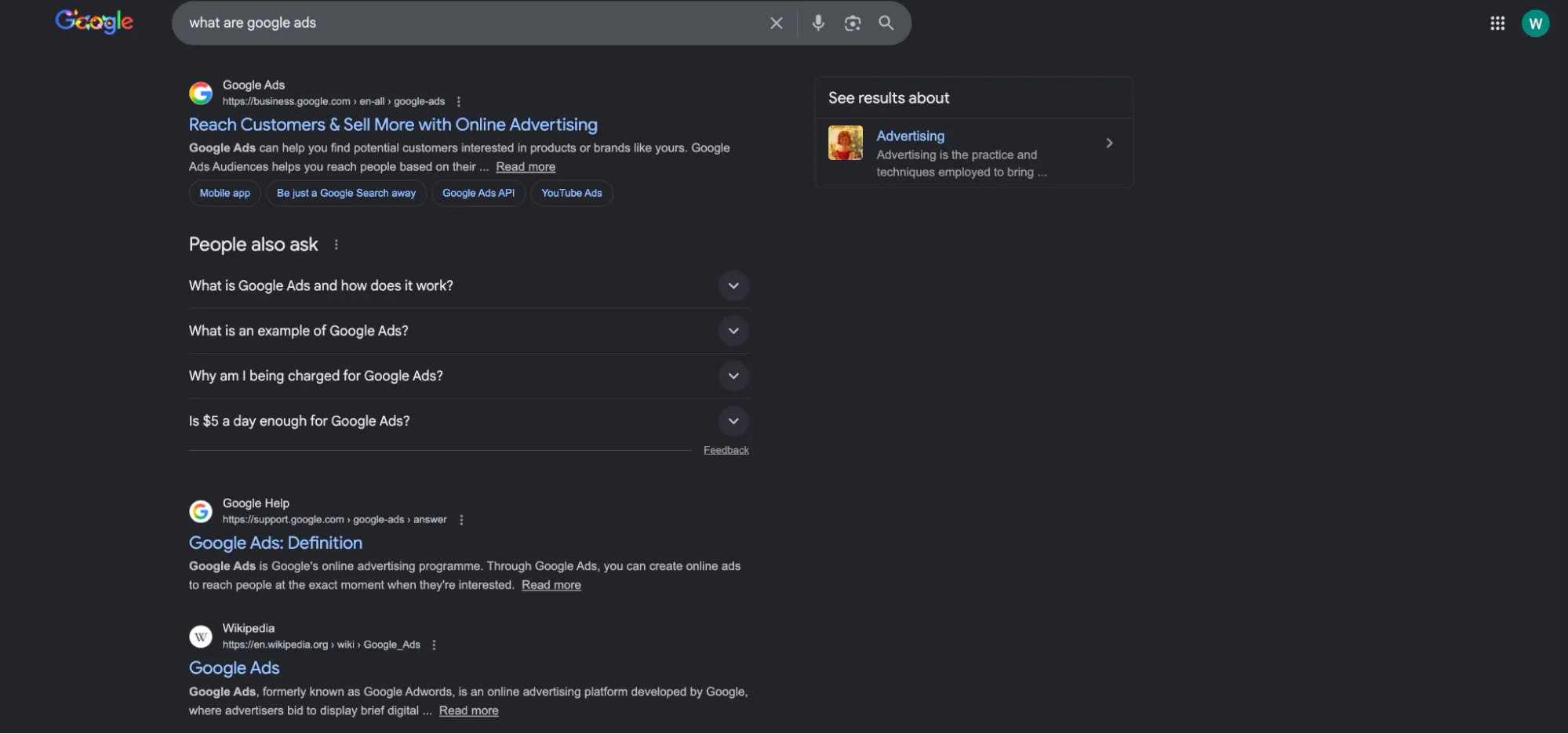
Organic results
Organic results are the classic ten-a-page blue links. They're usually scrapable from HTML, but markup varies. These results are your classic title/link/snippet blocks.
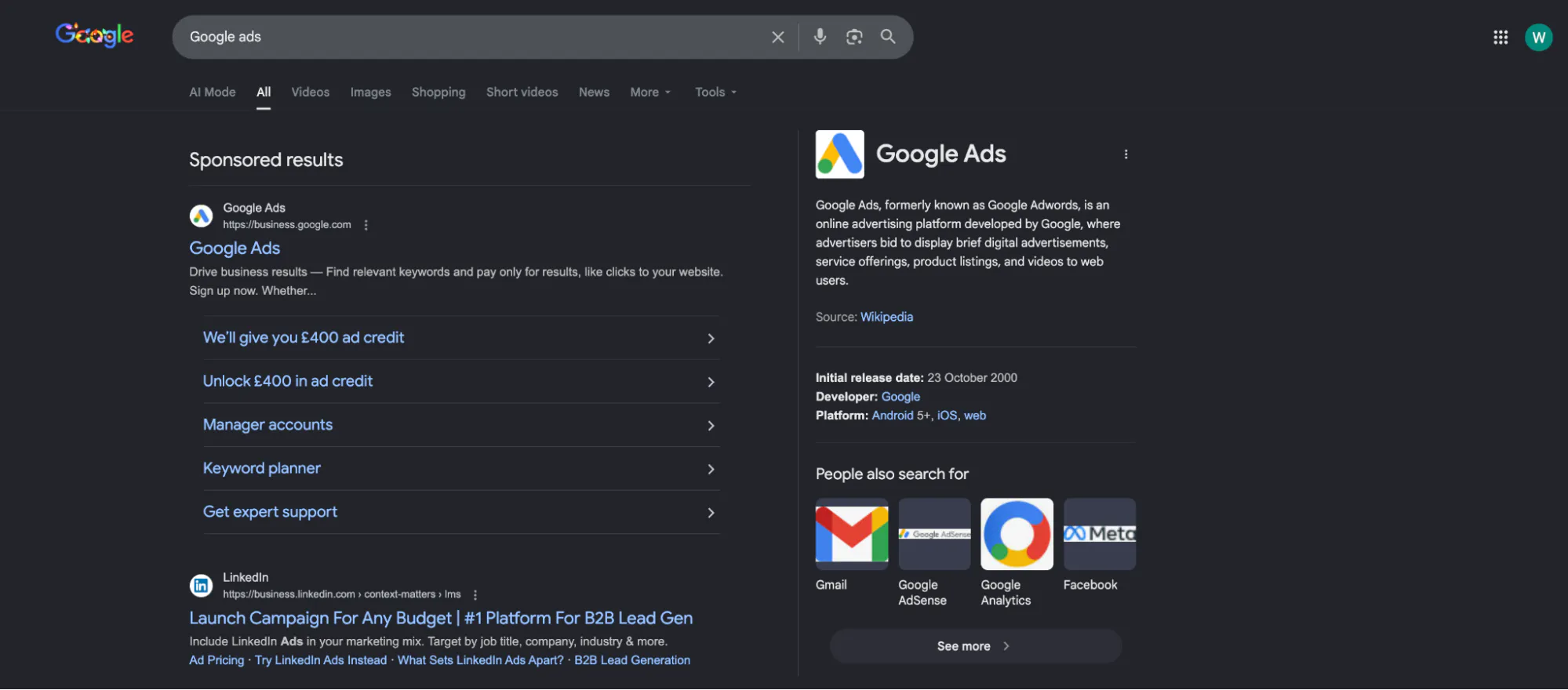
Paid ads
Paid ads are sometimes present in the HTML, sometimes rendered differently, and often harder to distinguish reliably without heuristics. Treat ad extraction as "best effort". They usually appear under "Sponsored results" on the Google results page.

SERP features
SERP features are the additional informational elements that are designed to provide searchers with different ways to get the information they want. Examples include:
- Featured snippets
- People Also Ask (PAA), which you can see in the screenshot above
- Top Stories
- Images / Videos carousels
- Knowledge panel
- Related searches
Many of these can be scraped, but each needs its own parser and fallbacks because the HTML shifts and can be nested.
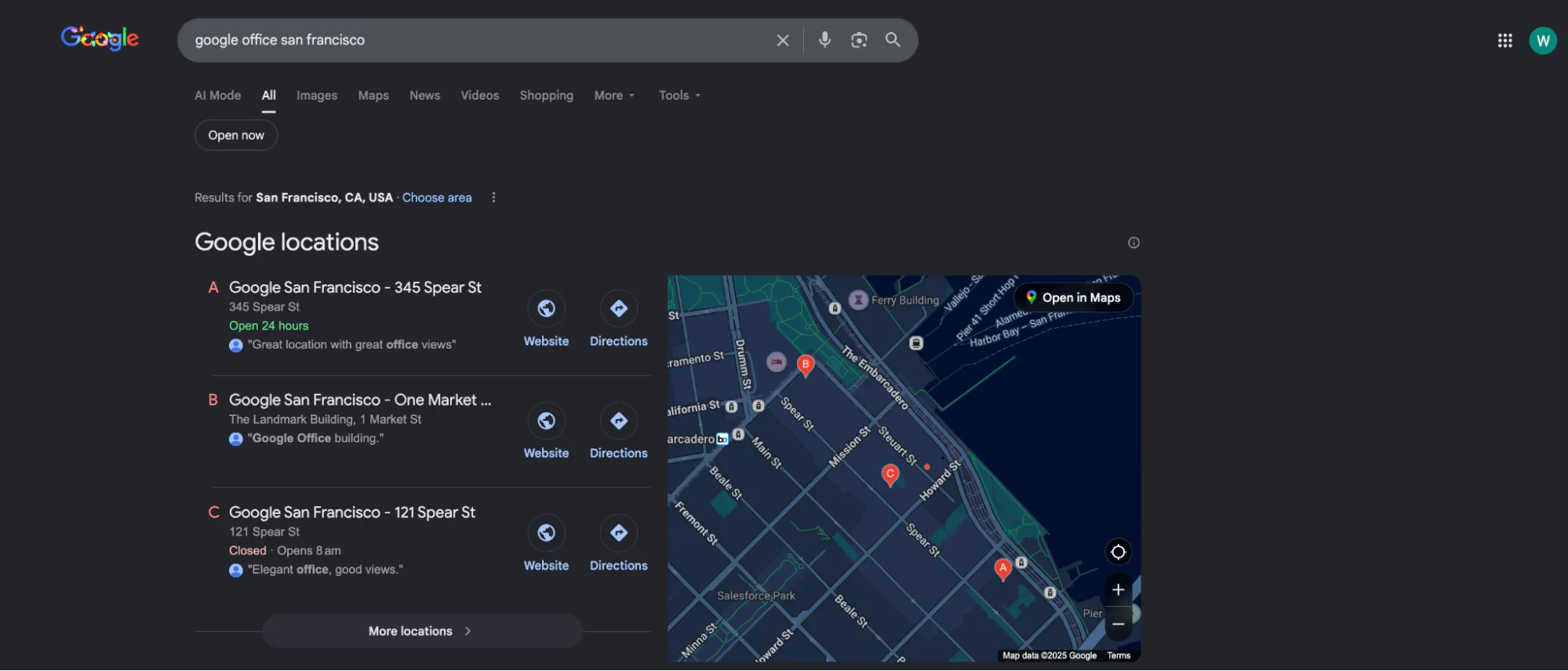
Local pack / Google Maps units
You can scrape Google Maps surfaces, but it's a different beast: heavier JavaScript, more bot detection, and more frequent interstitial flows. Plan separately if your goal is to scrape Google Maps.
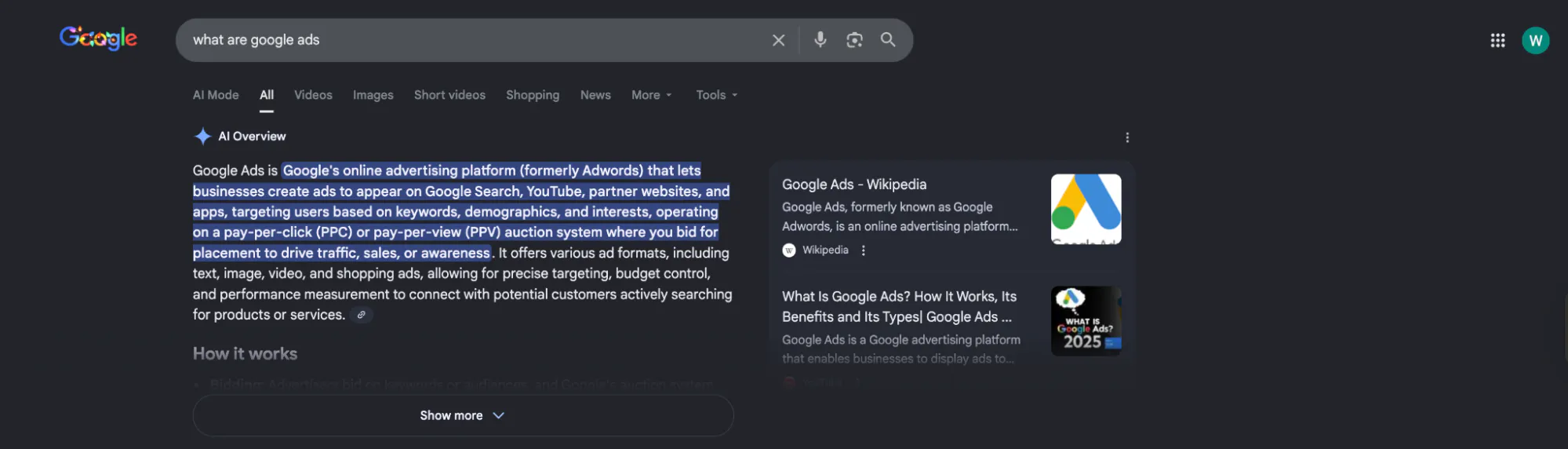
AI Overviews
AI Overviews appear in many searches (over 20%, by recent estimates) and are often above classic results.
They're not guaranteed to show for every query, and the DOM structure can be dynamic. If you need AI Overviews data, assume you'll need a browser session and more tolerant extraction logic. Google also keeps iterating on how these experiences link out and display sources.
There are also different Google Search tabs and options, such as Google Shopping, which you can scrape as well.
How to scrape Google Search Engine Results pages
First: Understand the policy and stability trade-off
Google has long restricted automated querying in its terms, and you'll hit blocks fast if you behave like a scraper.
So the engineering question is usually: do you want "works today on my laptop", or do you want "doesn't page you at 2 AM"?
Option 1: Use the official API — stable, but not equivalent to google.com
If your requirement is to "search API" access in a supported way, Google's Custom Search JSON API (part of Programmable Search Engine) is the closest thing to an official Google search API for web results. It returns JSON, has a defined schema, and predictable quotas, but it's not the same as scraping www.google.com search results directly.
You'll need:
- An API key
- A Programmable Search Engine ID (cx)
- To accept quota and feature limitations (ads and many SERP features won't be represented as they are usually in the live SERP)
Here's an example of code:
import os
import requests

API_KEY = os.environ["GOOGLE_API_KEY"]
CX = os.environ["GOOGLE_CSE_CX"]  # Programmable Search Engine ID (cx)

def google_search_api(query: str, start: int = 1, num: int = 10) -> dict:
    if start < 1:
        raise ValueError("start must be >= 1 (1-based index).")
    if not (1 <= num <= 10):
        raise ValueError("num must be between 1 and 10 (inclusive).")

    url = "https://www.googleapis.com/customsearch/v1"
    params = {"key": API_KEY, "cx": CX, "q": query, "start": start, "num": num}

    r = requests.get(url, params=params, timeout=30)
    r.raise_for_status()
    return r.json()

data = google_search_api("browser automation", start=1, num=10)
for item in data.get("items", []) or []:
    print(item.get("title"), item.get("link"))
Quota/cost details change over time, but Google documents free daily queries and paid scaling patterns for this API.
This route works well for internal tools, light SERP sampling, or when you mainly care about titles, links, or snippets, rather than the full Google search page layout.
Option 2: Scrape the HTML directly — fast to prototype, easiest to block
Scraping Google's HTML directly is the classic approach when using Python. You build a Google URL, fetch the HTML data, and parse search results.
A basic Google URL looks like this:
-
optional query parameters:
-
num — results per page (not always honored exactly)
-
start — offset for pagination
-
hl — interface language
-
gl — country targeting
-
tbm — vertical (images, news, etc.)
If you pass invalid query parameters, Google usually ignores them or responds with unexpected interstitial flows. Don't assume that 200 means success.
Here's a minimal, best-effort HTML fetcher:
import time
import random
import requests
from bs4 import BeautifulSoup
from urllib.parse import urlencode, urljoin, urlparse, parse_qs

GOOGLE_BASE = "https://www.google.com"

def build_google_search_url(query: str, start: int = 0, num: int = 10, hl: str = "en", gl: str = "us") -> str:
    params = {"q": query, "start": start, "num": num, "hl": hl, "gl": gl}
    return f"{GOOGLE_BASE}/search?{urlencode(params)}"

def fetch_serp_html(url: str, timeout: int = 30) -> str:
    headers = {
        "User-Agent": (
            "Mozilla/5.0 (Macintosh; Intel Mac OS X 10_15_7) "
            "AppleWebKit/537.36 (KHTML, like Gecko) "
            "Chrome/120.0.0.0 Safari/537.36"
        ),
        "Accept-Language": "en-US,en;q=0.9",
    }

    r = requests.get(url, headers=headers, timeout=timeout, allow_redirects=True)

    if r.status_code in (429, 503):
        raise RuntimeError(f"Blocked or rate-limited: status={r.status_code}")

    r.raise_for_status()
    return r.text

def _normalize_google_href(href: str) -> str | None:
    if not href:
        return None

    abs_url = urljoin(GOOGLE_BASE, href)
    parsed = urlparse(abs_url)

    # Unwrap /url?q=<target>
    if parsed.netloc.endswith("google.com") and parsed.path == "/url":
        target = (parse_qs(parsed.query).get("q") or [None])[0]
        return target

    # Skip obvious internal Google navigation/search links
    if parsed.netloc.endswith("google.com") and parsed.path in ("/search", "/preferences", "/setprefs"):
        return None

    return abs_url

def looks_like_interstitial(html: str) -> bool:
    # lightweight heuristics: not perfect, but catches many consent / unusual traffic flows
    h = html.lower()
    return ("unusual traffic" in h) or ("before you continue" in h) or ("consent" in h and "form" in h)

def parse_organic_results(html: str) -> list[dict]:
    soup = BeautifulSoup(html, "lxml")
    results = []

    for h3 in soup.select("h3"):
        a = h3.find_parent("a")
        if not a:
            continue
        title = h3.get_text(strip=True)
        url = _normalize_google_href(a.get("href"))

        if not title or not url:
            continue

        results.append({"title": title, "url": url})

    # Deduplicate while preserving order
    seen = set()
    unique = []
    for r in results:
        if r["url"] in seen:
            continue
        seen.add(r["url"])
        unique.append(r)
    return unique

def scrape_google_results(query: str, pages: int = 2, num: int = 10) -> list[dict]:
    all_results = []

    for page in range(pages):
        start = page * num
        url = build_google_search_url(query, start=start, num=num)
        html = fetch_serp_html(url)

        if looks_like_interstitial(html):
            raise RuntimeError("Got an interstitial/consent page instead of a SERP (HTTP 200 but not results).")

        all_results.extend(parse_organic_results(html))
        time.sleep(random.uniform(1.2, 3.2))

    return all_results

if __name__ == "__main__":
    data = scrape_google_results("how to scrape google search results", pages=2, num=10)
    print(f"Got {len(data)} results")
    for item in data[:5]:
        print(item)
This HTML scraper can work for small volumes, but it often fails at scale because of the following reasons:
- Google detects automation and flags the same IP as "unusual traffic"
- Consent and interstitial pages replace the expected SERP HTML
- The DOM varies by region, user state, and experiment bucket
Option 3: Use a browser — when HTML-only scraping stops being enough
When the page is heavily dynamic (SERP features, AI Overviews, local units), you'll usually end up in headless browser land.
Here's a minimal Playwright approach:
from playwright.sync_api import sync_playwright
from urllib.parse import quote_plus

def scrape_google_serp_with_playwright(query: str) -> list[dict]:
    q = quote_plus(query)
    url = f"https://www.google.com/search?q={q}&hl=en&gl=us"

    with sync_playwright() as p:
        browser = p.chromium.launch(headless=True)
        try:
            page = browser.new_page()
            page.goto(url, wait_until="domcontentloaded")
            page.wait_for_selector("h3", timeout=10_000)

            results = []
            for h3 in page.query_selector_all("h3"):
                title = h3.inner_text().strip()
                href = h3.evaluate("n => n.closest('a')?.href || null")
                if title and href:
                    results.append({"title": title, "url": href})

            return results
        finally:
            browser.close()
This approach improves rendering fidelity, but it also increases your operational problems: browser infrastructure, concurrency limits, memory leaks, and most importantly, bot detection.
The challenges of scraping Google Search with Python
If you're scraping Google search results page HTML directly, here are the challenges you'll face:
- IP blocks and rate limiting — You'll see 429s, 503s, and "unusual traffic" flows when you send too many requests from the same IP.
- Fingerprinting** and headless signals** — It's not just navigator.webdriver. Modern defenses look at TLS characteristics, client hints, behavioral timing, and consistency across requests.
- Consent, interstitials, and localization — A UK IP and a US IP can see different layouts. Language, logged-in state, and consent decisions all change the HTML page you parse.
- SERP churn — Google's structure changes. If your parser assumes one DOM shape, you'll get silent data loss.
- Multiple data formats — Even if you store "parsed data" today, you'll want the raw HTML document for re-parsing tomorrow when your extraction logic improves.
- Legal and ToS risk — Google explicitly restricts automated queries in its terms, and it actively enforces abuse protections.
Where Browserless helps is straightforward: it's the same browser automation you'd build yourself, but hosted, tuned, and wired for reliability (with stealth routes, proxy integrations, and CAPTCHA workflows).
BrowserQL, meanwhile, is specifically positioned for bot detection bypass and CAPTCHA solving.
How to scrape Google Search with Python and Browserless
Browserless provides users with a few integration shapes. For Google Search scraping, the most common are:
- /unblock — When you want the page content/cookies/screenshot, even when it's protected
- /stealth/bql — BrowserQL automation with a stealth-first endpoint
- /scrape — CSS-selector-based extraction from a rendered page
You authenticate via a token query parameter and you can pick a region-specific base URL (SFO, London, Amsterdam). Below, you'll find three different approaches to using Browserless to scrape Google Search results, with each having benefits depending on your needs.
- Fetch the rendered SERP HTML via the Unblock API, then parse locally
If you want to keep your Python parsing pipeline (BeautifulSoup, lxml, your own detailed JSON data structure), /unblock is a clean split to fetch parsed data later: Browserless handles the hard part which is getting the page, and you handle the parsing.
First, remember the unblock API basics: POST /unblock with JSON that includes url and booleans for what you want returned (content, cookies, etc.).
import os
import requests
from bs4 import BeautifulSoup
from urllib.parse import quote_plus, urljoin, urlparse, parse_qs

BROWSERLESS_TOKEN = os.environ["BROWSERLESS_TOKEN"]
BASE_URL = "https://production-lon.browserless.io"  # Europe UK region

GOOGLE_BASE = "https://www.google.com"

def browserless_unblock_html(target_url: str) -> str:
    endpoint = f"{BASE_URL}/unblock"
    params = {
        "token": BROWSERLESS_TOKEN,
        "proxy": "residential",
    }
    payload = {
        "url": target_url,
        "content": True,
        "cookies": False,
        "screenshot": False,
        "browserWSEndpoint": False,
    }

    r = requests.post(endpoint, params=params, json=payload, timeout=90)
    r.raise_for_status()
    data = r.json()
    return data.get("content") or ""

def _normalize_google_href(href: str) -> str | None:
    if not href:
        return None

    abs_url = urljoin(GOOGLE_BASE, href)
    parsed = urlparse(abs_url)

    # Unwrap /url?q=<target>
    if parsed.netloc.endswith("google.com") and parsed.path == "/url":
        target = (parse_qs(parsed.query).get("q") or [None])[0]
        return target

    # Skip internal Google navigation/search links
    if parsed.netloc.endswith("google.com") and parsed.path in ("/search", "/preferences", "/setprefs"):
        return None

    return abs_url

def parse_google_results(html: str) -> list[dict]:
    # If you don't have lxml installed, change to "html.parser"
    soup = BeautifulSoup(html, "lxml")
    results = []

    for h3 in soup.select("h3"):
        a = h3.find_parent("a")
        if not a:
            continue

        title = h3.get_text(strip=True)
        url = _normalize_google_href(a.get("href"))

        if title and url:
            results.append({"title": title, "url": url})

    return results

def scrape_google_via_browserless(query: str) -> list[dict]:
    q = quote_plus(query)
    google_url = f"{GOOGLE_BASE}/search?q={q}&hl=en&gl=us"

    html = browserless_unblock_html(google_url)
    if not html:
        raise RuntimeError("Empty HTML returned -- possible interstitial or blocked content.")

    return parse_google_results(html)

if __name__ == "__main__":
    out = scrape_google_via_browserless("scrape google search results")
    print(out[:5])
Why this tends to be more reliable than direct requests.get():
- You're not relying on your own IP reputation
- Browserless is built to deal with bot detection and CAPTCHAs in these flows
You're still not completely invisible, and Google can still block you, but your success rate and operational stability typically improve.
- Automate the search with BrowserQL, then pull back HTML
BrowserQL (BQL) is a GraphQL-based automation layer that can run through a stealth endpoint (/stealth/bql) for better results on protected sites.
A practical pattern for a Google Search scraper is:
- goto() Google
- Navigate directly to the SERP URL (or type into the search bar and submit)
- Return the HTML
- Parse in Python like you already do
Calling the API looks like a normal POST with JSON { "query": "mutation ...", "variables": {...} }:
import os
import requests
from bs4 import BeautifulSoup
from urllib.parse import quote_plus, urljoin, urlparse, parse_qs

TOKEN = os.environ["BROWSERLESS_TOKEN"]
BASE_URL = "https://production-lon.browserless.io"
GOOGLE_BASE = "https://www.google.com"

BQL = """
mutation GoogleSERP($url: String!) {
  goto(url: $url, waitUntil: firstMeaningfulPaint) {
    status
    time
  }

  waitForSelector(selector: "h3", timeout: 10000) {
    time
  }

  html(visible: true) {
    html
  }
}
"""

def call_bql(url: str) -> dict:
    endpoint = f"{BASE_URL}/stealth/bql"
    params = {"token": TOKEN}
    payload = {"query": BQL, "variables": {"url": url}, "operationName": "GoogleSERP"}

    r = requests.post(endpoint, params=params, json=payload, timeout=90)
    r.raise_for_status()

    resp = r.json()
    if "errors" in resp:
        raise RuntimeError(f"BrowserQL errors: {resp['errors']}")
    return resp

def _normalize_google_href(href: str) -> str | None:
    if not href:
        return None

    abs_url = urljoin(GOOGLE_BASE, href)
    parsed = urlparse(abs_url)

    # Unwrap /url?q=<target>
    if parsed.netloc.endswith("google.com") and parsed.path == "/url":
        return (parse_qs(parsed.query).get("q") or [None])[0]

    # Skip internal navigation/search links
    if parsed.netloc.endswith("google.com") and parsed.path in ("/search", "/preferences", "/setprefs"):
        return None

    return abs_url

def parse_results_from_html(html: str) -> list[dict]:
    soup = BeautifulSoup(html, "lxml")  # or "html.parser" if you don't have lxml
    items = []

    for h3 in soup.select("h3"):
        a = h3.find_parent("a")
        if not a:
            continue
        title = h3.get_text(strip=True)
        url = _normalize_google_href(a.get("href"))
        if title and url:
            items.append({"title": title, "url": url})

    return items

def scrape_google_serp_data(query: str) -> list[dict]:
    q = quote_plus(query)
    google_url = f"{GOOGLE_BASE}/search?q={q}&hl=en&gl=us"

    resp = call_bql(google_url)

    status = resp.get("data", {}).get("goto", {}).get("status")
    if status != 200:
        raise RuntimeError(f"Unexpected status in BQL goto: {status}")

    html = resp.get("data", {}).get("html", {}).get("html")
    if not html:
        raise RuntimeError("No HTML returned (possible interstitial/consent/challenge).")

    return parse_results_from_html(html)

if __name__ == "__main__":
    print(scrape_google_serp_data("google SERP data")[:5])
If you want to fine-tune your results further, you can add more query parameters (news/images verticals, pagination offsets, etc.). Just keep in mind that Google can ignore parameters, and some location query parameters are undocumented and may change.
- Use the Scrape API for "selectors in, JSON out"
Browserless also has a REST API /scrape endpoint that renders the page and extracts structured JSON from CSS selectors. It uses document.querySelectorAll and waits for selectors before returning data.
This is convenient when you want a consistent JSON envelope, and you don't want to run BeautifulSoup at all.
Example request:
import os
import requests

TOKEN = os.environ["BROWSERLESS_TOKEN"]
BASE_URL = "https://production-lon.browserless.io"

def browserless_scrape(google_url: str) -> dict:
    endpoint = f"{BASE_URL}/scrape"
    params = {"token": TOKEN}

    body = {
        "url": google_url,
        "elements": [
            {"selector": "h3"},
            {"selector": "a"},  # grab anchors too; pair up in post-processing
        ],
        "gotoOptions": {"waitUntil": "domcontentloaded", "timeout": 30000},
    }

    r = requests.post(endpoint, params=params, json=body, timeout=90)
    r.raise_for_status()
    return r.json()

if __name__ == "__main__":
    url = "https://www.google.com/search?q=how+to+scrape+google+results&hl=en&gl=us"
    data = browserless_scrape(url)
    print(data)
The response includes a detailed JSON data structure per selector (text, HTML, attributes, positioning).
For real SERP extraction, you'll typically still want post-processing:
- Pair up h3 nodes with their nearest anchor.
- Filter out nav/side-panel headings.
- Dedupe and normalize URLs.
- Export scraped data to your storage format.
A practical scaling pattern
When you need multiple URLs:
- Create multiple URLs with deterministic query parameters
- Send them through Browserless (Unblock or BQL)
- Store both parsed results and the raw HTML page for replay
- Monitor failure reasons (status code, CAPTCHA frequency, empty HTML)
That's the difference between a demo script and a Google SERP API you can trust.
Conclusion
If you just need a sanctioned path, start with the official API (Custom Search JSON API) and accept its limits.
If you need the real Google search results page, including SERP features and the messy reality of the live SERP, HTML scraping with requests can work briefly, but it rarely stays reliable.
Browserless is the pragmatic middle ground: you keep your Python parsing and data model, while Browserless handles the hard operational parts: hosted browsers, stealth endpoints, proxying, and CAPTCHA workflows. If you're ready to stop spending too much time with scrapers and start collecting Google search data reliably, try Browserless on the free plan.
Google Search Scraper FAQs
How do I scrape Google SERPs without getting blocked?
You can't scrape Google and fully "avoid" blocks, but you manage them effectively. Start by reducing how scraper-like your traffic looks, and make failures part of the design. Here are some additional tips:
- Prefer supported options when they fit — If you only need titles, links, or snippets, Google's Custom Search JSON API is more stable than scraping HTML.
- Pace requests — Add jittered delays, cap concurrency, and back off on 429 ("Too Many Requests") and 503 ("Service Unavailable").
- Detect consent/interstitials — Google can return 200 OK with a consent page or "unusual traffic" instead of a results page. Treat 200 as only a potential success and validate content.
- Don't reuse the same IP and fingerprint — High-volume scraping from the same IP gets flagged quickly. Use region-appropriate egress and keep headers, locale, and behavior consistent.
- Use a real browser when needed — Dynamic SERP features (and sometimes AI Overviews) often require browser automation. A hosted setup like Browserless Unblock or BrowserQL (stealth) helps handle CAPTCHAs, IP reputation, and headless signals more reliably than raw requests.
What's the best SERP scraper for multiple regions and languages?
The best setup is the one that can consistently reproduce what a user in that region sees. You'll want to:
- Control locale in the URL — Use hl (language) and gl (country) query parameters for repeatability, and keep them consistent across runs.
- Match egress to the region — If you want UK results, scrape from UK egress. Language parameters alone won't fully replicate regional ranking, ads, and SERP features.
- Use regional browser infrastructure — Browserless gives you region-specific endpoints (for example, London, Amsterdam, or San Francisco) so you can run browsers close to your target audience, and then combine that with residential proxy routing when Google is sensitive to data center IPs.
- Standardize output — Store both parsed results and the raw HTML so you can re-parse when Google's DOM changes across locales.
What are the best SERP scrapers for agencies?
Agencies usually need reliability, auditability, and predictable ops more than a clever parser. Here are some key features to look for, which Browserless can support:
- Multi-client isolation — Separate tokens/queues/proxies per client so one campaign's blocks don't spill into others.
- Repeatable geo and language — Lock down hl/gl, Accept-Language, and region egress so reporting is comparable week to week.
- Operational tooling — You want retries with idempotency, block/interstitial detection, and monitoring for 429/503 spikes and CAPTCHA rates.
- Scalable browser automation — DIY Playwright can work, but managing browsers, concurrency, proxying, and CAPTCHAs becomes the job. Browserless is often the pragmatic solution you'd build yourself, but hosted and tuned, so a great option for agencies — especially when using Unblock for retrieval and BrowserQL (stealth) when the SERP is more protected.