
TL;DR
- Stop rebuilding login flows for every automation run: save auth state once, then launch new sessions from that profile.
- Run parallel authenticated sessions without sharing one fragile live browser or pinning work to a specific machine.
- Use profiles across scraping jobs, QA flows, internal automations, and AI agent sessions that need logged-in access.
- Keep the trade-off clear: profiles are reusable snapshots, so session changes don't sync back and expired credentials still need refreshing.
Log in once, then scale your authenticated browser work
Running browser automation against logged-in websites has always had a middle step. You either keep one browser session alive, rebuild the login flow in every script, or manage user data directories across machines and hope nothing moves.
Authenticated Profiles enable you to separate login state from the browser session itself. You capture a logged-in browser's authentication state once - including cookies, localStorage, and IndexedDB - then reuse it on supported Browserless sessions with ?profile=<name>. sessionStorage is intentionally excluded because it's tab-scoped and reusing stale values would break OAuth redirects and CSRF tokens.
What are Authenticated Profiles?
Authenticated Profiles are named, reusable snapshots of auth state, stored under a name unique to your API token. When a session requests that profile, we load the captured state into the browser before your code runs.
With this new feature, you just authenticate once and can then run many sessions.
Here's a quick look at how Authenticated Profiles work in practice:
Why we built Authenticated Profiles
Browser infrastructure gets harder when authentication enters the picture.
A local Puppeteer script can log in, scrape a page, and exit. Production workloads need more than that. You may need 10 concurrent sessions against a vendor portal, an AI agent that can use your internal tools, or a recurring automation that downloads reports from the same authenticated dashboard every morning.
Previously, authenticated browser state was often tied to a live session, a machine-specific user data directory, or a Persisted Session - each of which has trade-offs when you need the same auth state across many parallel workers. The login state lived in the place you're trying to scale away from, which made things awkward.
Authenticated Profiles move that state into a portable artifact. Each new session gets its own isolated copy, so one login can fan out across parallel browser sessions without those sessions stepping on each other.
What changes in your automation workflow?
The old pattern usually looks like this:
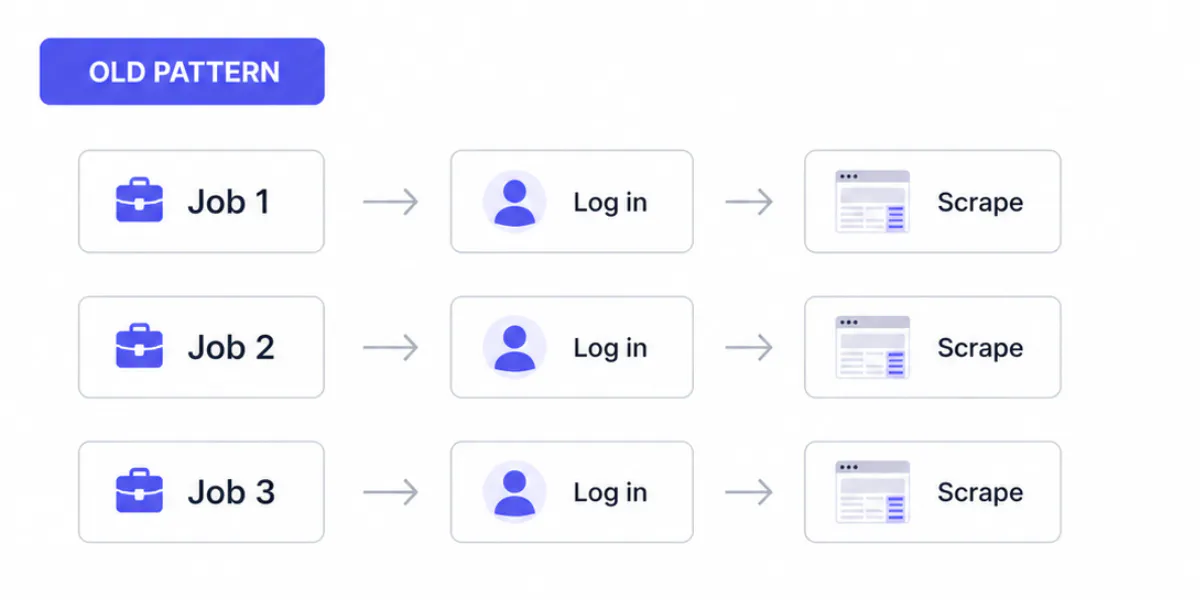
It works until the login flow gets slow, rate-limited, protected by MFA, or blocked by a bot check. Plus, every job carries authentication logic that isn't relevant to the task you actually want to run.
With Authenticated Profiles, we move authentication into the session launch flow:
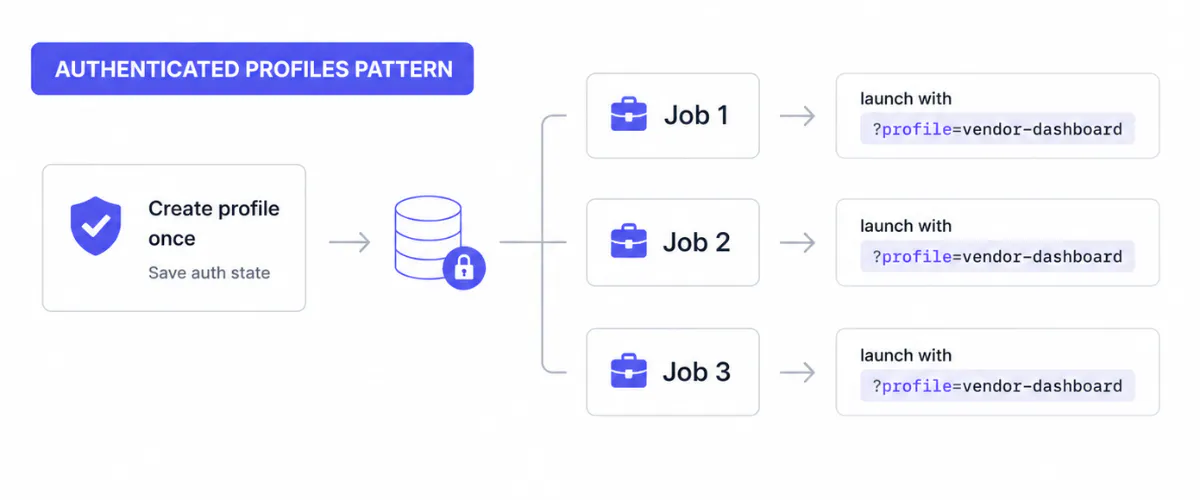
You still need a valid login. You just don't need to repeat it for every session.
Why it's better than keeping a logged-in session alive
Keeping a session alive can feel like the easiest fix, but it creates a ceiling to how much you can scale.
One live browser can only do so much, and tying state to a user data directory makes routing and concurrency harder than they need to be.
| Before Authenticated Profiles | With Authenticated Profiles |
|---|---|
| Login state is tied to a live session or user data directory | Login state is saved as a reusable profile |
| Parallel work needs multiple logins or fragile session sharing | One profile can launch many isolated sessions |
| Machine pinning can make scaling challenging | Any eligible worker can hydrate the profile |
| Session changes can mutate the state you rely on | Each session gets a clean copy of the saved profile |
| Login logic ends up inside every script | Authentication becomes a launch-time option |
Authenticated Profiles enable you to treat authentication state as input to a browser session, not as something the session has to own forever.
The key benefits of Authenticated Profiles
Authenticated Profiles make logged-in automation easier to scale and maintain:
- Save auth state once after a real login.
- Reuse a profile by name across Browserless sessions.
- Launch parallel authenticated sessions from the same profile.
- Keep session changes isolated from the source profile.
- Attach profiles to WebSocket connections, REST API endpoints like
/screenshotand/pdf, BrowserQL queries (withstealth: true), and persisted sessions. - Avoid embedding credentials directly in every scraping or automation script.
- Move authenticated workloads across workers without machine pinning.
Because profiles are passed by value, each session starts from the same saved state but runs independently.
How your team can use Authenticated Profiles
Authenticated Profiles are useful anywhere a browser needs to start behind a login.
When you're scraping the web, you can use profiles for dashboards, marketplaces, analytics accounts, and customer portals. Instead of writing login logic into every worker, you attach the same profile to every job and let each session start authenticated.
QA and internal automation teams can create profiles for different roles, such as admin-user, billing-user, or read-only-user. Each test run starts from the right account state without repeating the full login path.
Teams using AI agents can give their agents access to authenticated sites without passing raw credentials into every run. The agent launches a Browserless session with a profile already attached, then uses Playwright, Puppeteer, BrowserQL (BQL) (with stealth: true), or another integration to navigate from there. You can add agentic browsing to your workflow with Browserless's AI integrations.
Ops and SMB teams can use profiles for recurring tasks such as invoice downloads, report exports, account checks, or support workflows. Complete the login once, save the profile, and reuse it when the job runs.
For cloud users, profiles create a cleaner separation between auth state and browser infrastructure. A supported session can load the saved profile at launch time without relying on a specific live browser or user data directory.
How your AI agents benefit
As mentioned, teams using AI agents arguably get the most out of Authenticated Profiles.
AI agents need browsers that work. They also need access to real web applications, and many of those applications sit behind login screens.
Authenticated Profiles give agents a cleaner starting point. Instead of teaching an agent to complete a fragile login flow every time, you can give it a session that starts already authenticated.
That opens up workflows like:
- Research agents working across logged-in SaaS tools.
- Internal support agents checking account dashboards.
- Data extraction agents reading authenticated reports.
- Browser MCP workflows that need a reusable logged-in context.
- Playwright or Puppeteer agents that run in parallel from the same login.
The important part is control. The profile gives the browser a known authenticated state, but each session still gets its own copy. Your agent can click, navigate, and inspect pages without modifying the source profile for future runs.
Here's an AI agent using a saved profile to log in and pull data, without typing credentials each run:
How profiles stay isolated and reusable
Authenticated Profiles contain sensitive browser state, so we designed them around isolation rather than shared mutation.
Profile names are scoped to your API token, so different tokens can't see or use each other's profiles. Sessions attach a profile at launch time, load from that saved state, and then run independently.
That means:
- A session can read from a profile, but it does not automatically write changes back.
- Multiple sessions can start from the same profile at the same time.
- One failed or messy automation run does not poison the saved state.
- Profiles can move across workers because they aren't tied to one machine.
This behavior is intentional. Authenticated Profiles are for repeatable starting state, not real-time browser sync. We don't automatically commit the session-end state back into the source profile.
Getting started with Authenticated Profiles
Our docs page covers route support, SDK examples, and edge cases. The basic flow is simple, but profile creation needs a CDP-capable client such as Puppeteer, Playwright, or raw CDP. Browserless.saveProfile is a CDP method, not a BrowserQL mutation.
First, launch a temporary profile creation session:
const profileCreation = await fetch(
  `https://production-sfo.browserless.io/profile?token=${process.env.BROWSERLESS_TOKEN}`,
  {
    method: "POST",
    headers: {
      "Content-Type": "application/json",
    },
    body: JSON.stringify({
      name: "vendor-dashboard",
    }),
  },
).then((res) => res.json());

console.log(profileCreation.connect);
Browserless returns a profile creation browser with a WebSocket connection URL and a stop URL you can call to terminate the session early.
Connect to it with Puppeteer or Playwright and complete the login programmatically, or hand off to a human via a live URL if the site uses CAPTCHA, MFA, or a flow that's hard to script. The creation session expires after 10 minutes, or at your plan's maximum session time when shorter.
Once the browser is logged in, save the profile:
import puppeteer from "puppeteer-core";

const browser = await puppeteer.connect({
  browserWSEndpoint: profileCreation.connect,
});

const page = await browser.newPage();

await page.goto("https://example.com/login");
await page.type("#email", process.env.APP_EMAIL);
await page.type("#password", process.env.APP_PASSWORD);
await page.click('button[type="submit"]');

await page.waitForURL("https://example.com/dashboard");

const cdp = await page.target().createCDPSession();

const profile = await cdp.send("Browserless.saveProfile", {
  name: "vendor-dashboard",
});

console.log(profile);
// {
//   ok: true,
//   profileId: '...',
//   name: 'vendor-dashboard',
//   cookieCount: 15,
//   originCount: 1
// }
Then attach that profile to any new session:
const browser = await puppeteer.connect({
  browserWSEndpoint: `wss://production-sfo.browserless.io/chromium?token=${process.env.BROWSERLESS_TOKEN}&profile=vendor-dashboard`,
});

const page = await browser.newPage();

await page.goto("https://example.com/dashboard");

console.log(await page.title());
You can also pass the profile through session creation:
curl -X POST "https://production-sfo.browserless.io/session?token=$BROWSERLESS_TOKEN" \
  -H "Content-Type: application/json" \
  -d '{"profile":"vendor-dashboard"}'
Behind the scenes, Browserless loads the captured cookies, localStorage, and IndexedDB into the browser before your code runs, so the session starts from the saved authenticated state.
Important limitations to be aware of
Authenticated Profiles are designed for repeatable auth state, not permanent login magic.
A few practical limits are worth knowing:
- A profile is a snapshot. Changes made during a session do not sync back to the saved profile.
- Site sessions still expire. If the underlying auth cookies expire, the session may start unauthenticated.
- Expired cookies are filtered out when the profile loads.
- Profile names are scoped to your API token, must be unique per token, and can be up to 255 characters long.
- Profile creation sessions expire after 10 minutes, or at your plan's maximum session time when shorter, if you don't save the profile.
- Unused profiles are automatically cleaned up after 30 days of inaction.
- Capture has safety guards. Up to 2 MB captured state size, 50 distinct origins per profile, 5 IndexedDB databases per origin, and 1,000 IndexedDB entries per object store.
- If the captured state exceeds the size limit,
Browserless.saveProfilereturns an error and nothing is persisted. ?profile=applies to supported Chromium-family browser-launching requests, but is not supported on/firefox/playwrightor/webkit/playwright.- On
/chromium/playwright,/chrome/playwright, and/edge/playwright, the auth state is applied, but Playwright clients need to reuse the existing browser context instead of creating a new one. - Be aware that performing any actions on a website that modify cookies, localStorage, or IndexedDB (for example, logging out) may lead to profile corruption across all existing sessions.
If a site uses very short-lived auth tokens, strict device checks, or MFA on every visit, you may still need a refresh workflow or an interactive login step.
Start with one login, scale to many sessions
Authenticated Profiles make logged-in browser automation feel more like normal Browserless infrastructure. You create a browser, log in once, save the auth state, and reuse it anywhere you launch a session.
It helps scraping jobs, internal automation, testing flows, and AI agents start from the same reliable state without rebuilding login logic every time.
Get started with Browserless today.
Authenticated Profiles FAQs
What happens when authenticated credentials or cookies expire?
Profiles save browser authentication state at a point in time. If the underlying site session expires, future sessions that load the profile may no longer be authenticated.
Profiles unused for 30 days are automatically removed. When a profile no longer provides you with a valid logged-in session, create and save a fresh profile.
Does machine-agnostic profile routing require worker scheduling changes?
No special machine pinning is needed for supported Browserless routes. Pass ?profile=vendor-dashboard when you launch the session, and Browserless loads the saved profile before your code runs.
The main caveat is endpoint support: profiles apply to supported Chromium-family browser-launching requests, not every Browserless endpoint.