
TL;DR
- Parallel testing runs multiple test suites at the same time rather than one after another, dramatically cutting the time it takes to get results back.
- Teams that shift from sequential to automated parallel testing can reduce total test execution time.
- Parallel browser testing is especially valuable for web apps that need to be validated across many browser and OS combinations before each release.
- This article walks through how parallel testing works, where it fits in a CI pipeline, and which tools are best suited to running it at scale.
Introduction
Modern teams ship faster than ever, but test suites grow just as fast, which is where the bottleneck creeps in.
You can automate more of your software testing, add more browsers, expand test coverage, and still end up waiting on a long queue of checks that run one test at a time.
Parallel testing is the fix most high-velocity teams adopt once sequential testing starts dragging down the pipeline.
In this guide, you'll learn what parallel testing is, how parallel testing works, where it fits into continuous integration, how it differs from sequential testing, and which tools make parallel browser testing practical at scale.
What is parallel testing?
Parallel testing is the practice of running multiple tests or test suites simultaneously across separate workers, machines, containers, or browser instances instead of waiting for each run to finish before the next begins.
That idea applies across unit tests, integration tests, end-to-end tests, and browser automation. It also lines up with how modern CI/CD systems are designed to work now: concurrent by default, with short feedback loops as the design goal.
Once you stop thinking of a test suite as one long line of work and start treating it as a set of independent tasks, the next question becomes how those tasks are split, scheduled, and run in parallel.
How parallel testing works
In practice, when you conduct parallel testing, you split a test suite into smaller chunks and distribute those chunks across concurrent workers.
A test runner or orchestrator assigns work, tracks progress, retries failures where appropriate, and aggregates the final test results into one report. Playwright's @playwright/test runner does this with worker processes inside a machine, and its --shard=N/M flag lets you split the suite across multiple CI machines when one host isn't enough.
Underneath that orchestration layer, the test infrastructure can be cloud-based, self-hosted, or API-driven headless browser infrastructure. The important part is isolation. If multiple test cases share mutable state, reuse the same test data, or depend on each other's side effects, parallel execution becomes flaky fast.
Parallel testing vs. sequential testing
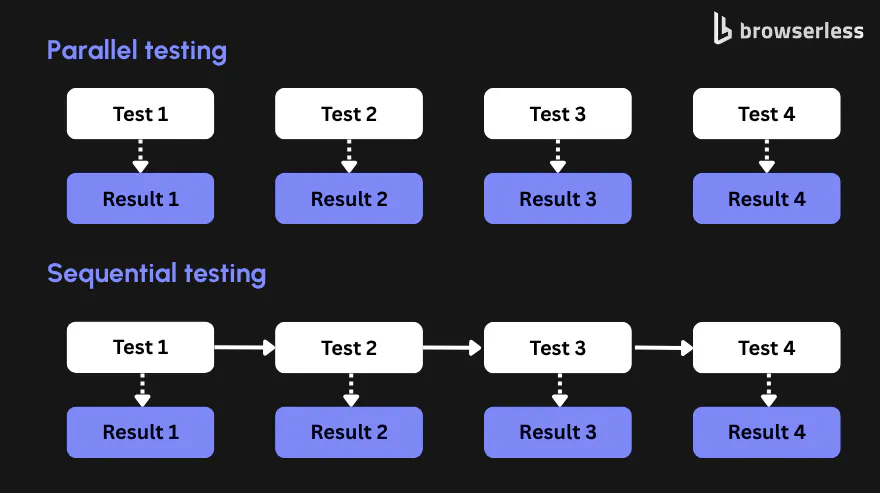
Sequential testing is straightforward: one test starts, it finishes, then the next one begins. That works fine when you have a small test suite, limited environments, or a script that must run in a strict order. The problem shows up when coverage grows.
With enough concurrent workers, a suite that takes over an hour sequentially can often finish in minutes, depending on how well the tests parallelize. Modern test runners, such as Playwright, support workers and sharding as core parts of parallel execution to make that kind of reduction possible.
Parallel testing, by contrast, treats test execution as distributed work.
Multiple test cases move at once, so feedback arrives sooner and the pipeline stops feeling like a serial queue. That doesn't mean sequential testing is never the right option. Some test methods still need it, especially when you're dealing with interdependent tests, brittle legacy scripts, or a shared testing environment that hasn't been isolated yet.
The real issue is that sequential testing becomes a release bottleneck once your team depends on fast CI feedback. You need to keep the test suite fast enough that developers get results in under minutes rather than hours from local runs and from continuous integration.
Here are the key differences between sequential and parallel testing to help you decide which makes sense for you.
| Area | Sequential testing | Parallel testing |
|---|---|---|
| Execution model | One test runs after another | Multiple tests run at the same time |
| Best fit | Small suites, ordered flows, legacy scripts | Large test suites, CI pipelines, broader test coverage |
| Feedback speed | Slows as coverage grows | Improves as you add workers and isolate tests |
| Infrastructure needs | Minimal | Needs orchestration, concurrency limits, and clean environments |
| Main risk | Long waits and delayed bug discovery | Flakiness if tests share state or data |
The benefits of parallel testing
Faster feedback. When you execute tests simultaneously instead of serially, you reduce the wall-clock time developers wait for results. You feel that on every pull request, but you feel it even more when an automated regression test suite has grown large enough that people start merging before the full run finishes.
Faster feedback changes behavior. Developers fix issues while the context is still fresh.
Broader coverage. Once test suite execution stops taking forever, you can run more tests more often. Instead of saving compatibility testing, cross-browser checks, or slower integration flows for nightly jobs, you can bring more of them into the normal CI/CD path.
This practical benefit of parallel testing often has more impact over time than the shorter testing time.
Release confidence. Parallel testing helps you validate more combinations of browsers, operating systems, and environments before code moves forward, reducing the gap between tests passing in one place and a full release being safe.
It also improves developer experience, as waiting an hour for test results is a workflow tax that every team eventually feels.
Types of parallel testing
There are several types of parallel testing, each operating at a different scope:
- Parallel unit testing.
- Parallel integration testing.
- Parallel end-to-end testing.
- Parallel browser testing.
- Parallel cross-browser and device testing.
Parallel unit testing
At the smallest scope, parallel unit testing is the easiest place to start. Unit tests are usually atomic tests with limited dependencies, so they're often the best candidate for immediate parallel execution. When the tests are independent, you can run large numbers of them across multiple machines with very little coordination overhead.
Parallel integration testing
Parallel integration testing is a little trickier because shared services and test data can get in the way. Even so, it's common to run isolated API, database, or service-integration checks in parallel once the environment setup is consistent and each worker gets its own data or namespace.
Parallel end-to-end testing
Parallel end-to-end testing is where the payoff becomes very visible. End-to-end scripts are usually the slowest part of the testing process, so splitting them across workers often delivers the most noticeable reduction in total runtime. It also tends to surface hidden test dependencies, which is annoying at first but useful in the long run.
Parallel browser testing
Parallel browser testing is where web teams feel the infrastructure problem most. Here, you run the same tests across multiple browser and OS combinations at the same time, so cross-browser validation doesn't multiply your pipeline time.
Parallel cross-browser and device testing
Parallel cross-browser testing refers to running the same test cases across different browsers in parallel to catch rendering, JavaScript, and compatibility issues before they reach production. Parallel device testing means running those tests across multiple devices or device combinations at the same time. Both deserve special mention because browser differences and device-specific behavior are often where web apps break in ways a single desktop setup will never expose.
Browserless is a strong fit for parallel browser testing because it gives you isolated headless browser sessions on demand, which makes it easier to run large suites concurrently across Chromium, Chrome, Firefox, WebKit, and Edge without managing browser installs yourself. Lighthouse testing is a common use case too. You can run audits concurrently through our /performance API, so multiple pages or configurations finish in parallel rather than serially.
Playwright supports workers and sharding natively, while tools like Selenium Grid and cloud platforms such as BrowserStack and Sauce Labs provide other ways to run parallel tests across browsers or devices.
Automated parallel testing
Automated parallel testing turns parallel execution from a clever technique into a dependable part of your release pipeline.
In theory, you could perform parallel testing manually across multiple environments. In practice, that becomes operational noise almost immediately. The real gains come when your test automation frameworks trigger parallel tests automatically on every commit or pull request, then report one clean result back to the team.
Headless browsers are commonly used in automation testing for this reason. Puppeteer runs headless by default but ships without a test runner, so test-level parallelism depends on whatever runner you pair it with. Playwright's dedicated test runner, @playwright/test, provides built-in workers and sharding. Headless infrastructure in general reduces UI overhead when your goal is fast CI feedback rather than live manual inspection.
Developers should be able to execute tests, review failures, and move on without babysitting test infrastructure.
The best tools for parallel browser testing
By the time you're ready to scale, the best tools for parallel browser testing usually fall into three buckets:
- Cloud browser grids.
- Self-hosted headless browser infrastructure.
- Hybrid setups that mix both, depending on the job.
Cloud browser grids
Selenium Grid remains the classic distributed testing option when you want remote browser instances under your own control. It's flexible and battle-tested, but you own the setup, browser lifecycle, and capacity planning.
BrowserStack and Sauce Labs are the managed-grid versions of the same idea. They let you run tests simultaneously across many browser, OS, and device combinations without building the underlying farm yourself - making them especially useful for compatibility testing and real-device coverage. However, cost and concurrency limits become part of the conversation as your test suite grows.
Self-hosted or API-driven headless infrastructure
Playwright is one of the cleanest choices when your team already writes tests in its runner. It supports parallel workers by default, can fully parallelize projects, and can shard runs across multiple machines for large suites.
Puppeteer is a strong fit when your automated browser testing process is more custom, script-heavy, or closely tied to headless Chrome workflows. It doesn't give you a full test runner in the same way Playwright does, but it's widely used for browser automation and runs headless by default.
If you're deciding between those two, our Playwright vs. Puppeteer comparison will help you decide.
Browserless fits teams that want the self-hosted or API-driven route without managing raw browser installs and session scheduling themselves.
Browserless offers configurable concurrency, built-in queueing, and browser sessions that can be scaled across workers, making it a practical option for large parallel browser testing workloads.
The best tools for parallel testing in continuous integration
Seen through a CI lens, the question changes slightly.
- GitHub Actions supports matrix jobs.
- GitLab CI jobs run independently on runners.
- CircleCI has built-in parallelism and test splitting.
- Jenkins supports parallel or matrix stages in its pipeline syntax.
In other words, most CI platforms already know how to run work concurrently.
The harder question is, what do those jobs connect to? Playwright and Cypress both support parallelization, but they still need enough clean browser capacity underneath them.
Cypress Cloud, for example, orchestrates parallelization by load-balancing spec files across CI machines. Pairing a CI runner with a stable browser backend such as Browserless gives you a scalable target for browser jobs without forcing every pipeline to install and babysit its own browser stack.
How to set up parallel testing
A practical rollout usually starts with the slowest stable suite you have. Here are the main steps:
- Pick tests that are stateless, independent, and unlikely to fight over shared test data.
- Choose the infrastructure approach that fits your stack, e.g., a cloud grid for cross-browser or real-device coverage, or a headless browser service if you mainly need scalable Chrome instances for CI.
- Configure concurrency in the runner instead of rewriting all your test code. With Playwright, for example, you can start by setting a worker count and then scale out to sharding if one machine isn't enough.
Here's what that code might look like:
// playwright.config.ts
import { defineConfig } from "@playwright/test";

export default defineConfig({
  workers: process.env.CI ? 4 : 2,
  fullyParallel: true,
  retries: process.env.CI ? 2 : 0,
});
- Integrate the run into your CI pipeline and measure the change in test execution time before increasing concurrency further. Parallelization tends to expose flaky tests that already existed, so fix instability early rather than masking it with retries.
Parallel testing best practices
The most important rule is simple: keep tests independent.
If one test depends on another to create data, clean up state, or leave the browser in a particular condition, parallel testing will surface the problem immediately.
The next rule is to size concurrency to your infrastructure, not your optimism - and to treat concurrency as a quota you actively manage. We recommend leaving headroom below total capacity so bursts don't fill the queue. That logic applies whether you run on cloud grids, containers, or your own browser workers.
Over-parallelizing hurts reliability more than it helps speed - contention on shared databases, file systems, or ports turns into flaky failures you'll spend more time triaging than you saved.
Finally, make parallel output readable. Use separate logs or artifacts per worker, keep environments consistent, and make sure browser versions and operating systems are intentional rather than accidental.
Conclusion
Parallel testing is one of the most effective ways to stop test execution from becoming a release bottleneck. It shortens feedback loops, makes broader test coverage realistic in CI, and gives you a cleaner path to continuous testing as your suite grows.
If your main challenge is parallel browser testing, Browserless is a straightforward infrastructure layer to evaluate. It gives you concurrent headless browser sessions through an API, with queueing and concurrency controls documented for larger workloads, so you don't have to manage every browser install yourself.
You can sign up for a free plan and start running parallel browser sessions against a managed pool in a few minutes - no card required.
Parallel testing FAQs
How do I set up parallel testing on real devices?
For real devices, you usually use a device cloud rather than raw browser infrastructure.
Platforms such as BrowserStack and Sauce Labs provide parallel access to real devices and device pools, while your CI system fans test jobs out across them.
Browserless is an option when you're testing desktop and headless browser flows at scale, but it isn't a replacement for physical iOS or Android device farms.
When should I pick Selenium Grid, Playwright, or Cypress for parallel tests?
The best tool depends on what you're trying to parallelize.
- For WebDriver-based cross-browser testing, Selenium Grid is the foundational option.
- For modern JavaScript end-to-end suites, Playwright is strong because workers and sharding are built in.
- For Cypress teams, Cypress Cloud handles spec distribution across CI machines.
- For managed browser or device coverage, BrowserStack and Sauce Labs are common choices.
- For API-driven or self-hosted headless browser infrastructure, Browserless is a strong fit - with managed pools of Chrome, Chromium, Firefox, WebKit, and Edge available through a single endpoint.
How do you execute test cases in parallel in testing?
Split the suite, assign chunks to workers, and make sure the tests are independent.
In most frameworks, you enable parallel execution in the runner, provision enough browser or machine capacity, then let CI orchestrate the jobs.
Start with independent tests first, give each worker isolated test data, and increase concurrency gradually so you can spot flaky behavior before it spreads. Playwright workers, Playwright sharding, Selenium Grid nodes, and Cypress parallelization all follow that same basic pattern.