
TL;DR
- Real-time web scraping. Pulling fresh data from a live page on a tight latency budget, across four tiers: on-demand, scheduled polling, event-driven push, and continuous streaming. Much of what gets sold as real-time is just frequent polling.
- The latency budget. Launching a cold browser is usually the biggest fixed line item in one scrape: roughly one to two seconds paid before the page even loads.
- Two big cuts. Keep browsers warm so you stop paying cold-start, and read the JSON a page fetches for itself instead of re-rendering it.
- Where Browserless fits. Browser-as-a-Service (BaaS) removes cold starts,
/smart-scrapeescalates only when a page needs it, and BrowserQL resolves anti-bot challenges inside the same session.
Introduction
Real-time web scraping fails in a way that never shows up in your logs. Your scraper returns a price that was correct twenty minutes ago, and the checkout it feeds just quoted a customer the wrong number. That gap between "scraped" and "true right now" is the whole problem, and most guides skip past it to talk about tools. Real time is a latency problem before it's a tooling problem, and the biggest cost hides in the browser you launch on every request, a place few teams measure. The guide ahead breaks real time into four honest tiers and publishes a per-stage latency budget for one scrape, then zeroes in on the two changes that cut the most milliseconds at scale.
What is real-time web scraping?
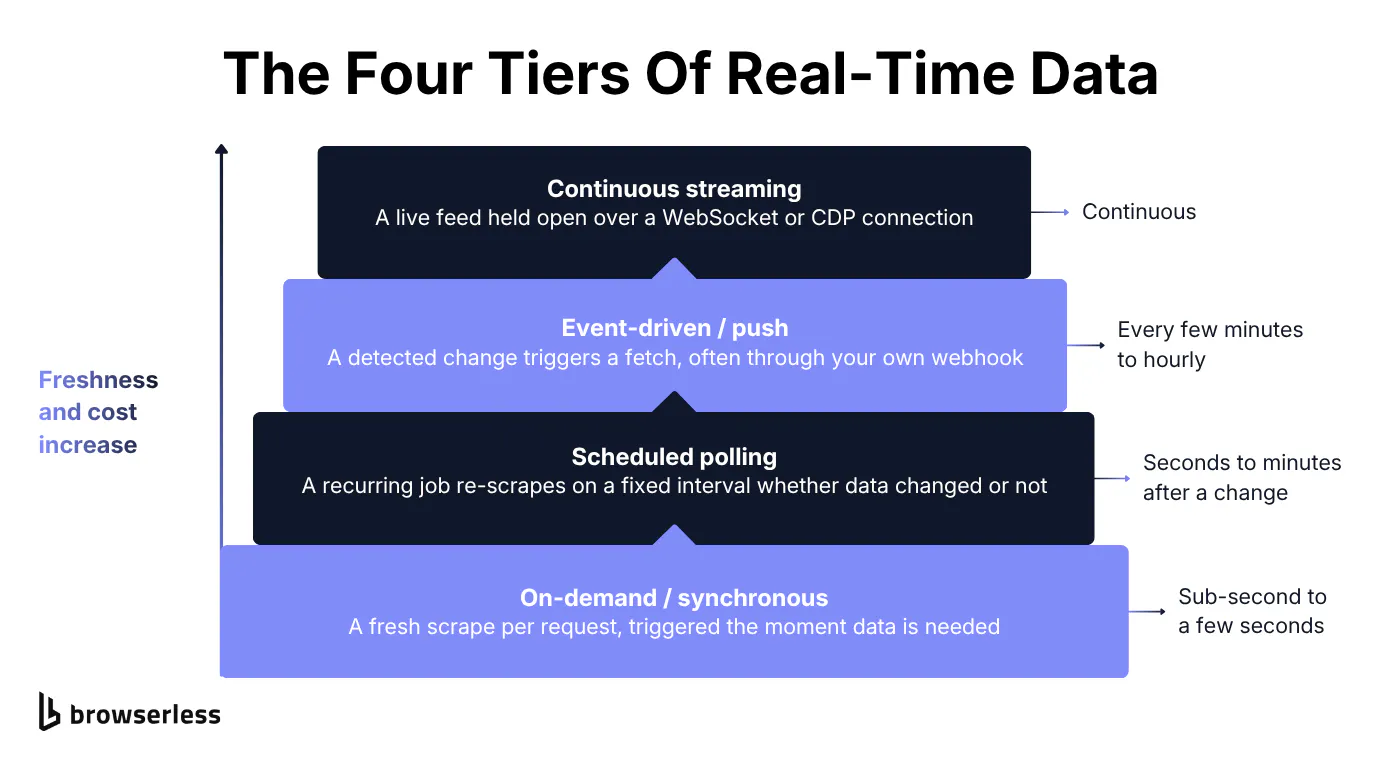
"Real time" covers four very different latency targets, and you need to know which one you're building before you optimize anything. They run from a fresh scrape per request down to a continuous feed, each trading freshness against cost.
The four tiers of real-time data
A lot of real-time scraping sold today is frequent polling with a marketing label on it. Calling a cron job that runs every thirty minutes "real time" relabels the schedule without changing the architecture, and the four tiers it blurs have wildly different costs. Some monitoring products market "real-time" while their shortest available interval is hourly, then daily, weekly, and monthly. Real-time data scraping spans a spectrum, and picking the wrong tier means you either overpay for freshness you don't need or under-deliver on freshness you promised.
On-demand, or synchronous, scraping runs a fresh scrape the moment a request comes in, and the caller waits for the answer, usually sub-second to a few seconds. Scheduled polling is the every-thirty-minutes pattern, where you trade staleness between runs for predictable cost.
Event-driven, or push, scraping fires a fetch when a change happens somewhere, often through a webhook you own. Continuous streaming holds a live feed open over a WebSocket or a Chrome DevTools Protocol (CDP) connection.
Hourly polling is a legitimate tier, but it sits three rungs below on-demand. Real-time data extraction and live web scraping describe the same continuum, so treat them as vocabulary for the tier you need, not as separate features.
Tool shopping runs into the same confusion, with people searching for free, online, app, and GitHub real-time scrapers, or for an AI web scraping tool, and landing mostly on scheduled polling. Knowing the four tiers lets you read those offerings honestly.
Real-time vs. batch scraping
Real-time and batch scraping trade freshness against cost, and choosing the right one deliberately saves more money than any single optimization. Batch scraping is scheduled bulk extraction where staleness of minutes to hours is fine and per-record cost is the metric that matters. On-demand real time is the opposite. A single fresh record matters more than throughput, and latency is the headline number you optimize against.
A nightly price export that feeds a business-intelligence dashboard doesn't need real time, since few people read the dashboard between refreshes, so batch is the right and cheaper call. A "check this one product right now" lookup fired by a user clicking a button does need it. A stale answer there is a wrong answer shown to a person.
You shouldn't pay for real time most of the time. Freshness has a per-request cost, and paying it for data that gets read once a day is waste. The moment you genuinely do need it, latency stops being a footnote and becomes the entire engineering problem, which is where the rest of this guide lives.
The latency budget of one scrape
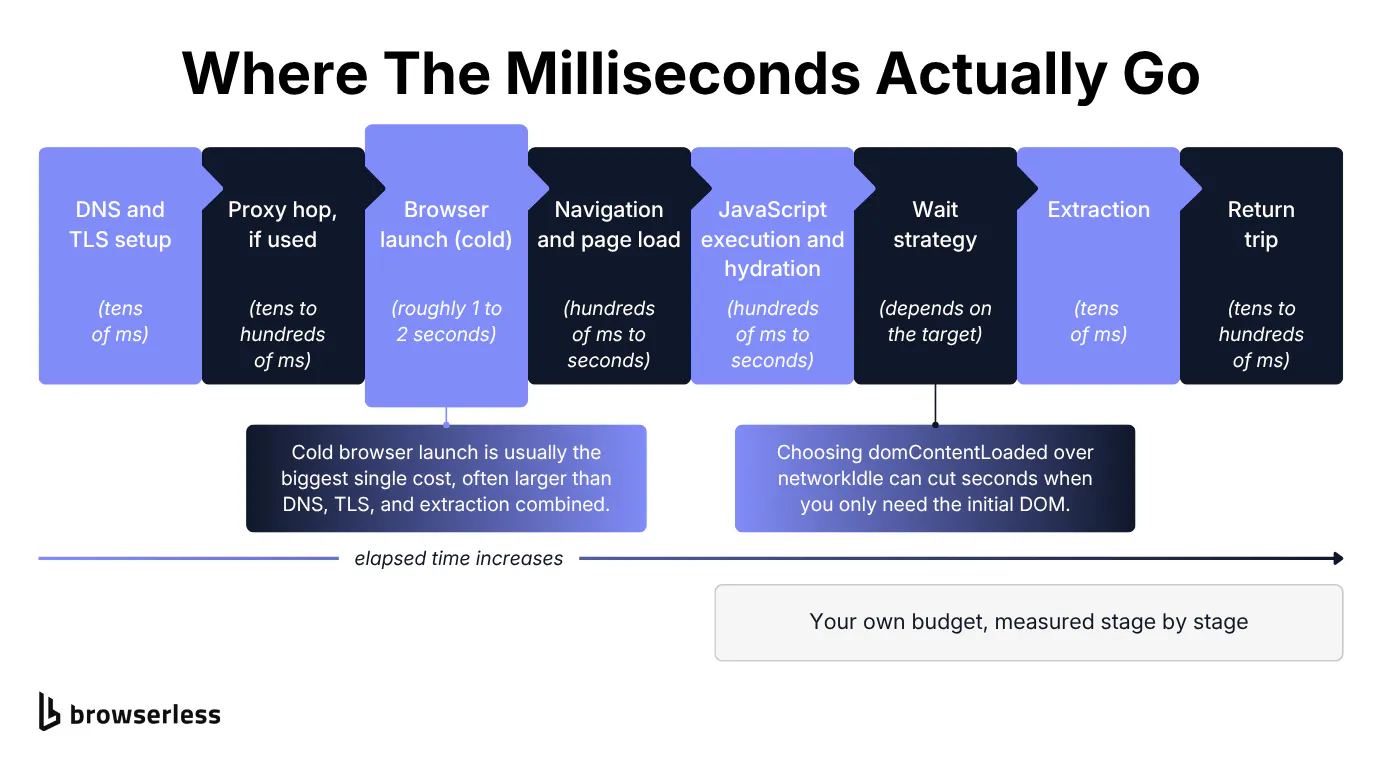
On the on-demand tier, one question outweighs everything else in real-time web scraping. How fast can a single scrape finish? No ranking page publishes a straight answer, so the walk-through below breaks one scrape into stages and shows where the time actually goes.
Where the milliseconds actually go
Every real-time scrape runs through the same chain of stages, and walking it in order lets you reason about your own numbers instead of guessing. The rough shape, in order: DNS and TLS setup, a proxy hop if you use one, browser launch, navigation and page load, JavaScript execution and hydration, your chosen wait strategy, extraction, and the return trip to your caller. The ranges vary by target, so treat any specific millisecond figure as illustrative rather than a benchmark.
Browser launch and the wait strategy dominate the budget. Browser launch is the largest, covered on its own below. The wait strategy is the one you control most directly, and it's where seconds leak. Wait for the network to go fully quiet when you only need the initial DOM, and you pay for every late-loading tracker and image. Choosing the right waitUntil value fixes that.
Documented options include load, domContentLoaded, networkIdle, firstContentfulPaint, and firstMeaningfulPaint (plus commit and interactiveTime), and moving from networkIdle to domContentLoaded when the initial DOM is enough can cut seconds off a single scrape.
A few more levers rarely make it into real-time guides. Calling the nearest regional endpoint (production-sfo, production-lon, or production-ams) trims network round-trip time by putting the browser close to the target site. Collapsing several sequential await calls into one page.evaluate() matters more than it looks, since five sequential awaits mean five separate round-trips between your code and the browser. bestAttempt=true is a latency-budget escape hatch that returns the partial result on timeout instead of failing the whole request, so a slow tail doesn't cost you the entire scrape.
Before any of that, prove why a browser is in the chain at all. The cheapest possible path is a plain HTTP GET with no browser, and for a genuinely client-rendered page it returns almost nothing useful. The Python snippet below fetches a single-page app (SPA) with a plain HTTP client and prints the near-empty shell it gets back.
import re
import requests

# A genuinely client-rendered SPA: the list is injected by JS, not the server.
URL = "https://demo.playwright.dev/todomvc/"

resp = requests.get(URL, timeout=15)
html = resp.text

print(f"HTTP {resp.status_code}, {len(html)} bytes of HTML")

# The container the SPA mounts into: empty in the raw response.
container = re.search(r'<section class="todoapp">.*?</section>', html, re.DOTALL)
print("App container:", container.group(0) if container else "<not found>")
print("Todo items in raw HTML:", html.count("todo-list"))
The empty shell is the whole reason a browser sits in the budget. Now look at the line item that browser costs you.
Cold versus warm browser launch
Launching Chrome from cold is usually the biggest fixed line item in a real-time scrape, and it's the one almost every guide skips. A fresh process pays around one to two seconds before the page even starts loading, on each cold request. That time buys binary start-up, profile creation, and the first warm-up of the render pipeline, and you pay it whether the page you want is simple or complex.
A browser that is already running skips all of it. When the process is warm, the binary is loaded, the profile exists, and the render pipeline has already run once, so navigation can start almost immediately.
Held against the budget from the previous section, cold start often dwarfs DNS, TLS, the proxy hop, and extraction combined, which is why it's the first thing worth attacking. The real fix removes the cold start entirely by keeping a browser hot between requests, which is a scaling decision that lives above any single scrape.
Cutting latency at scale
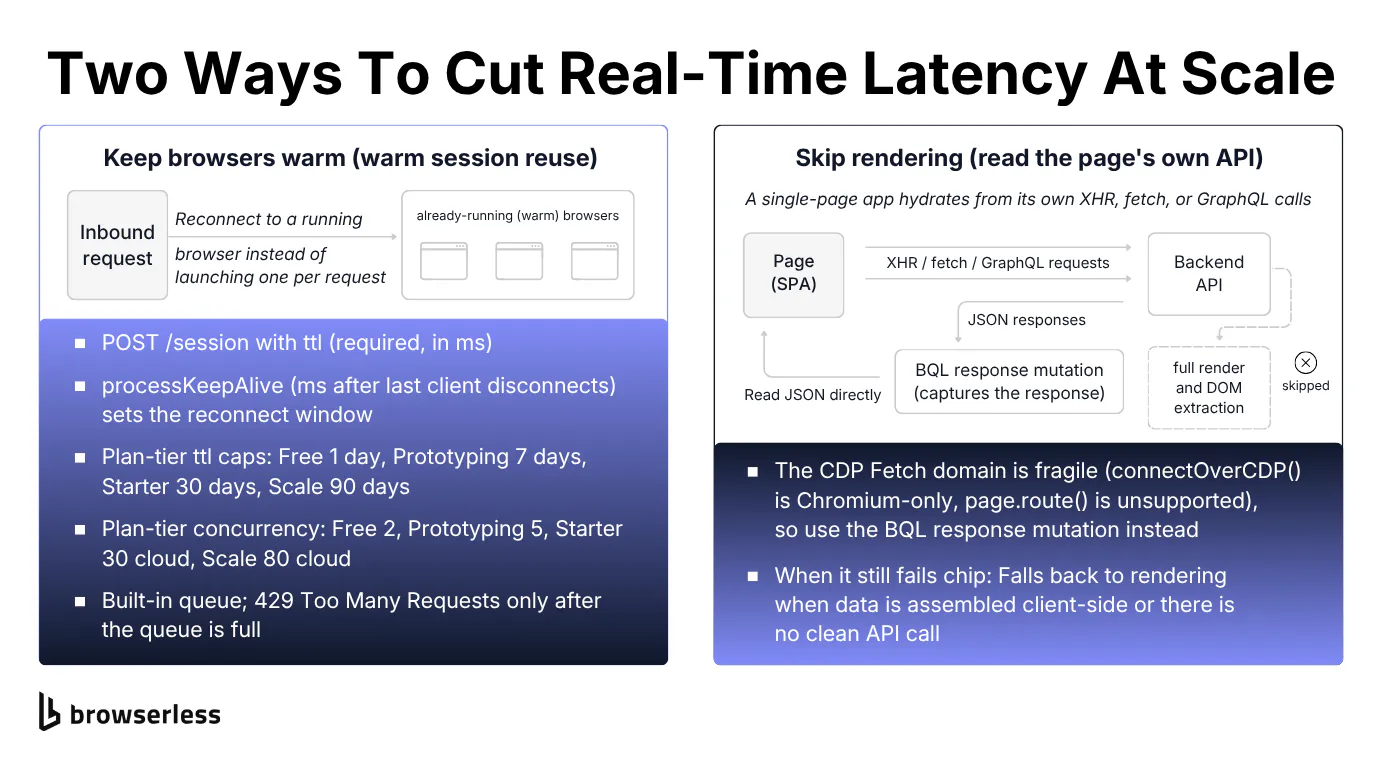
Cutting real-time web scraping latency at scale means attacking its two heaviest costs: cold browser launch and JavaScript rendering. You never launch a cold browser, and you skip rendering when the page will hand you its data another way.
Cutting the cold-start tax
The honest version of the cold-start fix is stronger than "make the launch faster." With managed cloud infrastructure you never launch Chrome yourself. You connect to an always-running browser fleet, so the cold-start line item effectively disappears.
Browserless runs this as BaaS, a pool of hosted browsers you attach to over a WebSocket. Two moves cut the cost from there, and the bigger one is to not attach a browser at all.
For most single-record real-time fetches you don't even need to hold a browser open. The /smart-scrape endpoint runs a cascade: a fast HTTP fetch first, then a proxied fetch, a headless browser, and finally a browser plus a CAPTCHA (Completely Automated Public Turing test to tell Computers and Humans Apart) solve, escalating only when the page actually forces it.
Static and server-rendered pages resolve on the cheap HTTP rung with no browser and no cold start, and the response reports which strategy it used and what it attempted. It also auto-parses JSON when the target returns it.
For pages that don't need rendering, that beats launching a full browser on every request, giving you a real-time scraping API that starts cheap and climbs only when a page blocks it. A genuinely client-rendered page still needs a real browser or an API read, which the next section covers.
import os
import time
import requests

TOKEN = os.environ["BROWSERLESS_TOKEN"]
ENDPOINT = f"https://production-sfo.browserless.io/smart-scrape?token={TOKEN}"

# Both are server-rendered, so both resolve on the cheap http-fetch rung.
TARGETS = [
    ("static catalog", "https://books.toscrape.com/"),
    ("server-rendered news", "https://news.ycombinator.com/"),
]


def smart_scrape(url):
    start = time.perf_counter()
    resp = requests.post(ENDPOINT, json={"url": url, "formats": ["html"]}, timeout=120)
    elapsed_ms = (time.perf_counter() - start) * 1000
    return resp.json(), elapsed_ms


for label, url in TARGETS:
    data, ms = smart_scrape(url)
    print(f"[{label}] {url}")
    print(f"  strategy:  {data.get('strategy')}")   # which rung answered
    print(f"  attempted: {data.get('attempted')}")  # every rung it tried
    print(f"  latency:   {ms:.0f} ms")
Both targets come back on http-fetch with attempted: ["http-fetch"], so neither paid for a browser. Every snippet here runs against your own token, and a free Browserless account gives you 2 concurrent sessions, so you can paste this in and watch the same http-fetch result yourself.
Some flows genuinely need a warm browser across several requests, like a multi-step checkout or an authenticated target you don't want to log into on every hit. The Session API covers that case: POST /session with ttl (required, in milliseconds, sets how long the session lives) and processKeepAlive (in milliseconds, keeps the browser process alive after the last client disconnects, which is your reconnect window). It skips re-navigation and re-login across sequential requests to the same target.
Be precise about what a persisted session is not. It serves one client at a time. A second concurrent connect returns 429 with "already being accessed by another client," and there's no queue for that per-session access, so this is sequential reuse, not a pool of hot browsers for parallel real-time load. Without processKeepAlive, a reconnect starts a fresh process that restores cookies and localStorage from disk but still loads cold.
Parallel concurrency is a separate axis governed by its own limit, your plan's concurrent-session cap. That cap limits how many sessions run at once and returns 429 past the limit, a different limit from the per-session 429 above. It scales with plan tier, from 2 sessions on Free up to 120 on Scale. The maximum ttl scales with plan tier too, and the example's 2-minute ttl exceeds the Free plan's one-minute maximum session time which is a separate limit from the concurrency cap, so run it on a paid tier or shorten the ttl to under a minute to try it on Free. Cloud persistence lives in POST /session and ttl, not in any local Chrome flag.
Create the session so the browser process is already running, wrap the connect-navigate cycle in a helper you can call twice, then call it once to warm the process and once to reuse it. disconnect() is the important line. It leaves the remote process running, where close() would tear it down and defeat the whole point.
import puppeteer from "puppeteer-core";

const TOKEN = process.env.BROWSERLESS_TOKEN;
const BASE = "https://production-sfo.browserless.io";
const TARGET = "https://books.toscrape.com/";
const sleep = (ms) => new Promise((r) => setTimeout(r, ms));

// ttl (ms) is required; processKeepAlive (ms) is how long the process stays
// warm after a client disconnects, which is your reconnect window.
const res = await fetch(`${BASE}/session?token=${TOKEN}`, {
  method: "POST",
  headers: { "Content-Type": "application/json" },
  body: JSON.stringify({ ttl: 120000, processKeepAlive: 60000 }),
});
const session = await res.json();

// Only one client can attach to a session at a time. Right after disconnect()
// the previous client may not be fully released, so retry on the 429.
async function connectWithRetry(url, tries = 5) {
  for (let attempt = 1; ; attempt++) {
    try {
      return await puppeteer.connect({ browserWSEndpoint: url });
    } catch (err) {
      if (attempt >= tries || !String(err.message).includes("429")) throw err;
      await sleep(500);
    }
  }
}

async function navigateOnce(connectUrl) {
  const browser = await connectWithRetry(connectUrl);
  const page = (await browser.pages())[0] ?? (await browser.newPage());

  const start = process.hrtime.bigint();
  await page.goto(TARGET, { waitUntil: "domcontentloaded" });
  const gotoMs = Number(process.hrtime.bigint() - start) / 1e6;

  await browser.disconnect(); // keeps the process warm; close() would end it
  return gotoMs;
}

const cold = await navigateOnce(session.connect); // first hit warms the caches

// Average a few warm reconnects so one noisy navigation doesn't skew the number.
const WARM_RUNS = 3;
let warmSum = 0;
for (let i = 0; i < WARM_RUNS; i++) warmSum += await navigateOnce(session.connect);
const warm = warmSum / WARM_RUNS;

console.log(`Cold goto: ${cold.toFixed(0)} ms`);
console.log(`Warm goto: ${warm.toFixed(0)} ms (avg of ${WARM_RUNS})`);
console.log(`Warm reconnect saved ${(cold - warm).toFixed(0)} ms`);

await fetch(session.stop, { method: "DELETE" }); // permanently ends the session
A representative run navigates in roughly 950 ms cold and 570 ms warm, saving about 380 ms on the reconnect. That's sequential reuse of one warm process, not concurrency. Only one client can attach at a time, so a back-to-back reconnect can briefly return 429 until the previous client is released, which is why connectWithRetry retries.
Reading the page's own API responses
The fastest way to handle a JavaScript-heavy site is often to skip rendering and read the JSON the page already fetches for itself. Most SPAs hydrate from their own XHR (XMLHttpRequest), fetch, or GraphQL calls, and those responses are often clean structured JSON.
Capturing them gives you the data directly, with no wait for a full render and no DOM extraction afterward. It's a technique many scraping tools name-drop for "JS-heavy sites" and few actually explain.
It changes how the wait strategies from the latency budget apply. The goto still takes an initial page-load wait, but you no longer poll networkIdle or watch a selector for your data to appear. The response mutation waits for the one network call that carries it and hands back the body.
Reading a page's own API isn't always the right call. If the page assembles its data client-side from several fragments, or exposes no clean API call, you still have to render. When there's a clean call to capture, though, it removes the render stage from the budget entirely.
You can hand-roll this with the CDP Fetch domain, but that's fragile plumbing, and page.route() behaves differently across connection styles. BrowserQL (BQL) has a purpose-built tool instead.
The response mutation records the HTTP responses a browser makes, filtered by URL pattern, method, or resource type, and waits for them automatically. A query like response(type: fetch, method: GET, operator: and) on /chromium/bql captures exactly the JSON the page fetched for itself, declaratively, with no protocol-level wiring. Point it at a genuinely API-driven page that actually fires the call you're filtering for, not a static server-rendered site that never makes one.
mutation CaptureOwnApi {
  goto(url: "https://www.browserless.io/", waitUntil: networkIdle) {
    status
  }
  # operator: and makes all three filters required. The default `or` would
  # match "fetch OR GET OR any matching URL", far too broad.
  response(
    type: fetch
    method: GET
    url: ["*api.github.com/repos*"]
    operator: and
  ) {
    url
    status
    method
    body
  }
}
The homepage fetches its own GitHub repo stats on load, so this returns the api.github.com/repos/browserless/browserless JSON directly, with star and fork counts parsed from the body, no DOM scraping and no full render.
Real-time scraping in production
A fast scrape that gets blocked, or one wired into the wrong freshness pattern, is worthless. Real-time web scraping in production comes down to two survival tasks: keeping a scrape alive against anti-bot defenses, and choosing the freshness pattern to build around it.
Sites that fight back, fast
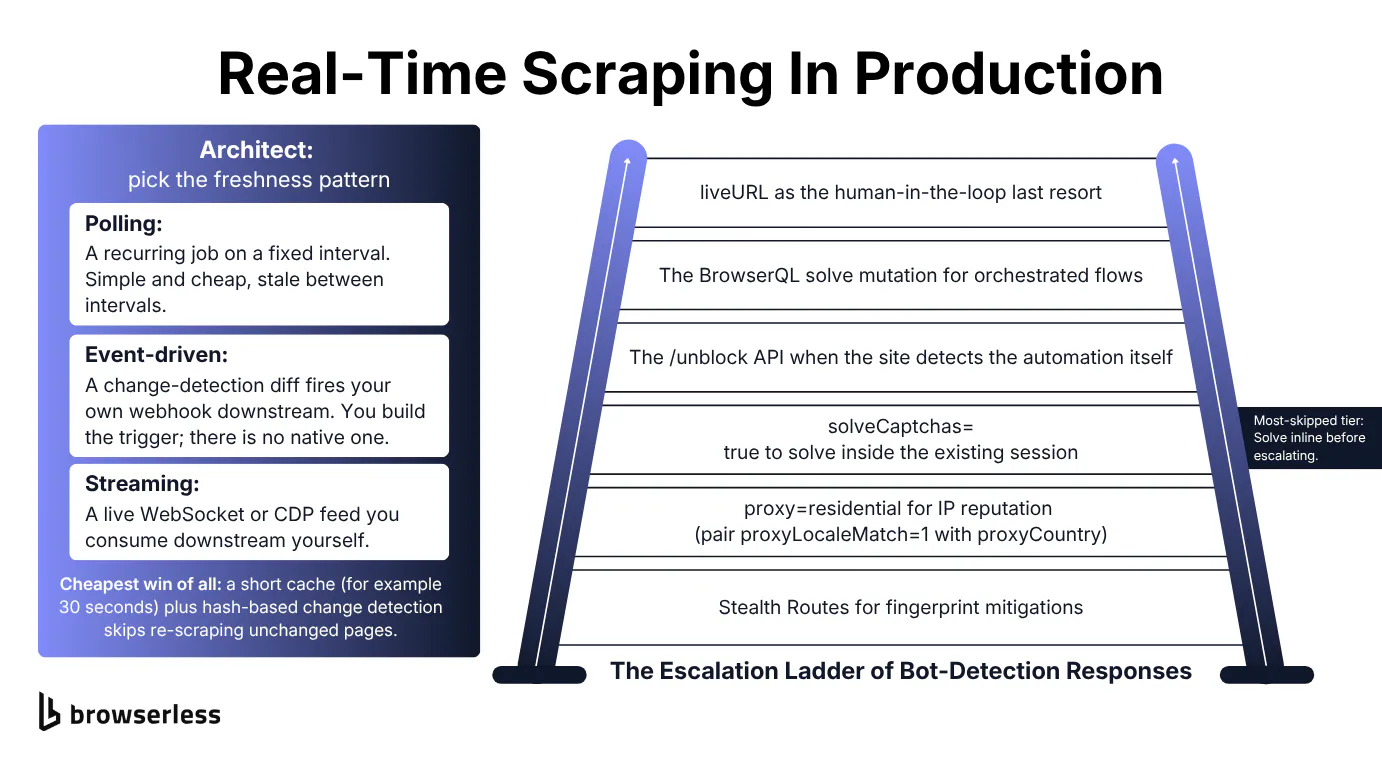
Under a latency budget, a CAPTCHA or a block is time you can't spend, so the goal is to resolve it inside the same session without serializing retries that blow the budget. Browserless documents bot detection handling as a graduated ladder, and it pays to climb it one rung at a time rather than jumping to the heaviest tool.
The ladder runs in a set order. Stealth Routes come first, applying fingerprint mitigations. Next comes proxy=residential for IP reputation, paired with proxyLocaleMatch=1 alongside proxyCountry so the browser language matches the proxy geography.
From there, solveCaptchas=true solves a CAPTCHA inside your existing Puppeteer or Playwright session, and the /unblock API takes over when the site detects the automation itself rather than just showing a CAPTCHA. The BQL solve mutation handles orchestrated multi-step flows, covering reCAPTCHA, Cloudflare challenges, and other CAPTCHA types. Last is liveURL, the human-in-the-loop fallback.
The rung most people skip is solveCaptchas=true, and when a CAPTCHA is the only blocker, you can stay in the same session and solve it inline instead of jumping straight to /unblock, which keeps you inside one latency budget. Connect to the /chromium/stealth route with the flag set, navigate the challenge, and Browserless solves it in place inside the Puppeteer session you already have open.
import puppeteer from "puppeteer-core";

const TOKEN = process.env.BROWSERLESS_TOKEN;
// solveCaptchas=true rides on the stealth WebSocket URL, so the solve happens
// inside this session with no hop to /unblock.
const endpoint = `wss://production-sfo.browserless.io/chromium/stealth?token=${TOKEN}&solveCaptchas=true&timeout=180000`;

const browser = await puppeteer.connect({ browserWSEndpoint: endpoint });
const page = await browser.newPage();
await page.goto("https://www.google.com/recaptcha/api2/demo", {
  waitUntil: "networkidle2",
});

// Auto-solve injects the response token into the challenge's hidden field.
// A non-zero length is the in-session solve landing.
let len = 0;
for (let i = 0; i < 40 && len === 0; i++) {
  len = await page
    .$eval("#g-recaptcha-response", (el) => el.value.length)
    .catch(() => 0);
  if (len === 0) await new Promise((r) => setTimeout(r, 3000));
}
console.log(`Response token length: ${len}`);

await browser.disconnect();
A representative run injects a response token roughly 2,400 characters long into the challenge's hidden field, confirming the solve completed inside the session you were already driving, with no separate token vendor and no move to /unblock.
Inline solve handles a lone CAPTCHA in place. When that's not enough, and the block is an orchestrated multi-step challenge like Cloudflare rather than a single CAPTCHA, escalate to the BQL solve mutation on /stealth/bql, a route that runs privacy-hardened Chromium for BQL.
It applies the same anti-detection layer through that endpoint. Enable natural interaction timing with humanlike=true on the stealth endpoint, since it defaults to false and is opt-in, never something that happens on its own. The stealth configuration rides on the endpoint URL, so set it once with the residential proxy and human-like timing enabled before you send the query.
# Stealth knobs travel as query params on the /stealth/bql endpoint.
BQL="https://production-sfo.browserless.io/stealth/bql?token=${BROWSERLESS_TOKEN}&proxy=residential&proxyCountry=us&proxyLocaleMatch=1&humanlike=true"
Then run the whole survive-and-read flow as one mutation: navigate, clear the Cloudflare challenge in the same session, and pull the target text without a second round trip.
mutation SolveInSession {
  goto(url: "https://nowsecure.nl/", waitUntil: firstMeaningfulPaint) {
    status
  }
  solve(type: cloudflare) {
    found
    solved
    time
  }
  data: text(selector: "body") {
    text
  }
}
Solving is itself a cost, not a free operation. A real Cloudflare challenge over a residential proxy can run well over 20 seconds. You pay it once, in-session, instead of paying it again on every serialized retry.
Picking the right freshness architecture
With survival handled, the last decision is which freshness pattern to build, mapped back to three of the four tiers from the start of this guide. On-demand is the synchronous path the rest of the guide already covered.
Pick polling when predictable cost matters more than catching every change, event-driven push when you need to react the moment something moves, and continuous streaming only for feeds that genuinely need a live connection. Picking the wrong one either wastes requests or misses changes.
Caching is the cheapest latency win of all, and it's easy to underrate. A short cache of, say, 30 seconds is "real-time enough" for a lot of price and inventory reads, and conditional or hash-based change detection lets you skip re-scraping a page that hasn't changed. Real-time price scraping is the classic case, where you scrape a price, diff it against the last stored value, and act only when it moves.
Streaming web scraping sits at the far end of the spectrum, a continuous-connection case most real-time scrapers never need and one this guide doesn't cover in code. Browserless provides the WebSocket and CDP browser tier for it while you handle the downstream stream yourself.
Browserless has no native change-detection trigger for scrape and session flows, so you build the diff-then-your-webhook loop around it, as the snippet below does with /scrape.
Point the script at the product page and a selector for the price, plus the webhook you own downstream. Each poll reads the current price through /scrape by that selector, then compares it against the last value you stored and fires the webhook only on a move, so unchanged polls cost one cheap scrape and nothing downstream.
import os
import requests

TOKEN = os.environ["BROWSERLESS_TOKEN"]
SCRAPE_URL = f"https://production-sfo.browserless.io/scrape?token={TOKEN}"

PRODUCT_URL = "https://books.toscrape.com/catalogue/a-light-in-the-attic_1000/index.html"
PRICE_SELECTOR = ".price_color"
WEBHOOK_URL = "https://postman-echo.com/post"  # stand-in for your own receiver


def scrape_price():
    resp = requests.post(
        SCRAPE_URL,
        json={"url": PRODUCT_URL, "elements": [{"selector": PRICE_SELECTOR}]},
        timeout=60,
    )
    resp.raise_for_status()
    # /scrape returns data[].results[].text for each selector.
    return resp.json()["data"][0]["results"][0]["text"]


def check_price(last_seen):
    current = scrape_price()
    if current != last_seen:
        payload = {"event": "price_changed", "old_price": last_seen,
                   "new_price": current, "url": PRODUCT_URL}
        requests.post(WEBHOOK_URL, json=payload, timeout=30).raise_for_status()
        print(f"{current} changed from {last_seen} -> webhook fired")
    else:
        print(f"{current} unchanged -> no webhook, no downstream cost")
    return current


# In production, last_seen loads from your own store written by the prior poll.
# Seeded here so the first poll exercises the "changed" branch on a static page.
last = check_price("£49.99")
check_price(last)  # same price now -> unchanged branch
The thread running through every technique here is a single question you ask at each stage, whether the request in front of you actually needs the expensive path. Ask it at the fetch, the render, and the freshness interval, and you never pay for latency the use case doesn't demand.
Conclusion
Real-time web scraping comes down to picking the right freshness tier and spending your latency budget where it counts, on browser cold starts and JavaScript rendering. Wrap that in the freshness pattern your use case actually needs, from on-demand to a diff-and-webhook loop to a streaming feed, and you scrape data in real time without paying for freshness you won't use. For a concrete first step, point /smart-scrape at one of your own targets and watch it resolve on the cheap HTTP rung, or keep a session warm and shave a navigation from roughly 950 ms cold to 570 ms warm the way this guide measured. Both /scrape and /smart-scrape run on the Free plan, which gives you 2 concurrent sessions, so sign up for a free account and run one low-latency scrape today.
FAQs
Is real-time web scraping actually possible?
Yes, if you scope "real time" to the on-demand tier, meaning a fresh scrape that runs when a request arrives and returns in sub-second to a few seconds. What's not possible is instant, zero-latency data from an arbitrary site, since every scrape pays for network, rendering, and extraction. The practical goal is a tight, predictable latency budget, not literal zero.
When is the raw HTTP path safe to rely on for real-time scraping?
When the data you need is already in the initial HTML the server sends. Open the page, view source, and search for the value. If it's there, a plain HTTP GET will return it and you can skip the browser entirely. If the value only appears after JavaScript runs, or the source shows an empty container, the raw path returns a shell and you need a browser or an API-response capture instead.
Are there free real-time web scraping tools?
Many free and open-source scrapers exist, but most of them run on scheduled polling rather than true on-demand fetching, so read the shortest interval they support before trusting the "real-time" label. Free tiers of hosted browser services, including Browserless, let you build genuine on-demand scrapes with a low concurrency cap. For steady production load you'll eventually need a paid tier for the concurrency and session limits.
How often should you poll a price to stay real-time without overpaying?
Match the poll interval to how fast the price actually moves, not to how fresh you wish it were. A short cache of 30 to 60 seconds is "real-time enough" for most retail and inventory reads, and each interval you shave doubles or triples your request volume for freshness a user rarely perceives. Poll on a schedule that fits the volatility, and lean on conditional or hash-based change detection so an unchanged page costs one cheap scrape and nothing downstream.
Can one pipeline serve both real-time and batch scraping?
Yes, and it usually should. The extraction logic is the same, so the split is really about how a job is triggered and how latency-sensitive its caller is. An on-demand endpoint answers a single lookup a person is waiting on, while a scheduled worker reuses the same scrape code to backfill dashboards and nightly exports in bulk. Build the scrape once, then route it through a fast synchronous path or a cheaper batched path depending on who's asking.
What kinds of data do people scrape in real time?
Common targets are fast-moving listings where a stale value becomes a wrong value: real estate listings, product listings on e-commerce sites, and pricing that shifts through the day. Teams also pull news articles for market research, academic papers for machine learning datasets, and contact info for lead enrichment that feeds a sales team. Others wire real-time scrapes into internal tools and data pipelines, dropping the results into a database or spreadsheet for competitive monitoring downstream.
How do you reliably extract data from complex, dynamic websites?
Complex websites with heavy dynamic content usually need a real browser, since the website data only appears after JavaScript runs and hydrates the page. From there the practical work is getting past anti-bot systems: proxy management that handles proxies and IP reputation for you, CAPTCHA handling in the same session, and form fills or point-and-click steps for complex flows behind a login. Where a page exposes a clean API call, capturing it returns structured JSON in one API call with no DOM scraping, and a good scraping API can hand back clean Markdown instead of raw HTML.
How do AI agents fit into real-time scraping?
AI agents and AI tools increasingly drive a browser themselves. An agent like Claude Code can write a Python script, call a web scraping API with your API key, and pull data from the web on demand. Under the hood these are still web scrapers running on a scraping platform, so the same latency and anti-bot costs apply whether a human or a model triggers the run. A platform that handles proxies and rendering lets the agent focus on the data it needs rather than the plumbing, which keeps results accurate as they feed machine learning or analytics downstream.
Can you scrape a search API or search results in real time?
You can, with the same tiering caveat that applies anywhere else. Scraping a search API for results, or treating search results as a data source, is reasonable when you genuinely need the freshest ranking, though most such jobs are really scheduled polling dressed up as real time. Compared with other tools that only fetch static web pages, a real browser reaches results that load dynamically, and scraping web data this way still costs a browser launch you should budget for.