
TL;DR
- Bytes should not enter the conversation.
- Hand out a claim ticket, not the luggage.
- Just as with airlines, we have luggage weight limits (and conditions).
If you recall one of our latest blog posts about local file handling, you’ll recall that handling files yourself, through a remote browser, is never cute. Intercepting requests, building File objects inside the page, creating file streams and piping network requests to it… We built a whole API so you don’t have to do that plumbing yourself.
But we kind of didn’t address the elephant in the room: What happens when you add an LLM to the equation? What happens when you leave this file automation to an agent?
Files are a lot of data
LLMs are smart, and they will absolutely find a way to correctly handle your downloads, like, say, establishing a direct CDP connection with the browser, intercepting the download to pipe that data stream to context, save the file, and call it a day. There’s a problem though…
Files are large. Not large-large, a small USB stick can hold tens of thousands of files of several megabytes. But for an LLM? 2MB is already pushing it – that’s about half a million tokens. So yeah, your LLM will definitely download your 10MB zip file, while it quietly sets fire to your context window, nukes the context, and walks away whistling.

Anthropic’s servers when you try to put a 10MB file into context
It’s not the LLM’s fault, to be honest. They are built to always try to get a task done. If the LLM has to upload a 10MB PDF file it will do it the “obvious” way: convert the PDF into a base64 string, put that into context, and then build a File object using the Uint8Array.fromBase64() method.
If the task can be done while burning your monthly token allowance in 3 minutes, so be it.
But it doesn’t have to do that. We’ve built a solution that is embarrassingly simple: bytes shall not enter the conversation.
Hand out a claim ticket, not the luggage
Instead of having the LLM hold the data, make it hold a reference pointing to the data, upload the data using a fetch or a curl to a dedicated endpoint in the remote browser’s server, and use that reference pointing to the file.
Think about it like boarding a plane. You don’t have to carry your luggage around. Instead, you hand your luggage to the designated person at the line, and they hand you a much smaller ticket. And that’s all you need.
When you arrive at your destination, your ticket is the reference that points to your luggage. The line through customs is another story…
Our version of the claim ticket is an in-house URL that points to browserless-download://9f3a… That's what the model sees. That's all it ever sees. The actual bytes sit on the server's disk the whole time, and the handle is the only thing that crosses into context.
For instance, say you want to upload a file. The LLM wouldn’t touch a single byte, but would stage it on the server:
curl -F "file=@invoice.pdf" "https://mcp.browserless.io/upload?token=$TOKEN"
# { "handle": "browserless-download://9f3a...", "filename": "invoice.pdf", ... }
The file goes up over a side channel, the model gets a ticket, and on the other side, we resolve the handle back to disk. The model never typed a single byte of base64, and never will. Then, the LLM can emit:
uploadFile {
  selector: "input[type=file]",
  files: [{ handle: "browserless-download://9f3a..." }]
}
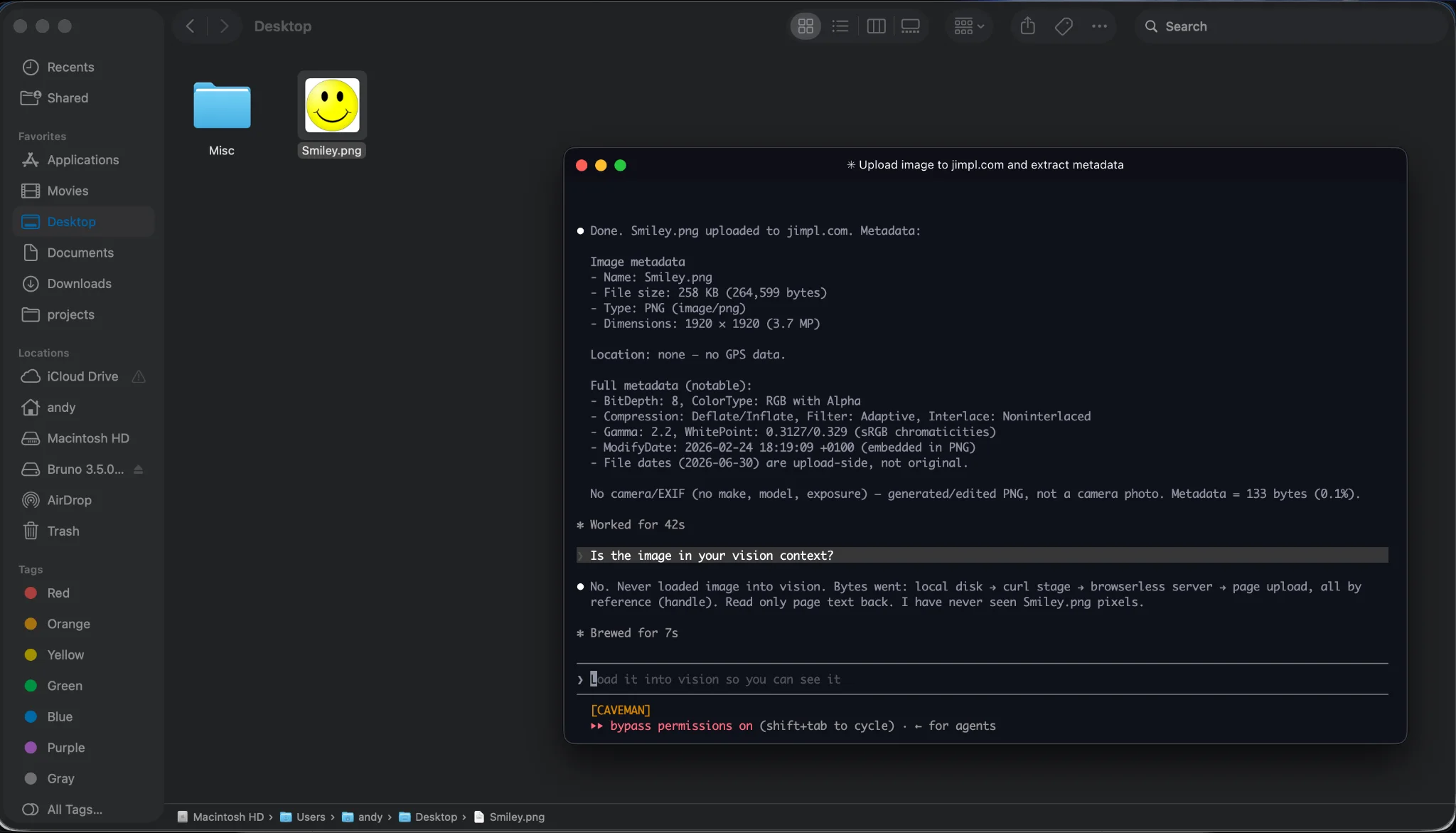
Demo showing how the agent uploads files
If you're running over stdio (local), it's even lazier: the file's already on the same disk. Pass the path, the MCP server binary reads it, donezo.
In turn, the same principle applies to downloads. We detect a downloaded file, assign it an identifier, and the model can run getDownloads to get its URL and metadata:
{
  "filename": "report.csv",
  "mimeType": "text/csv",
  "size": 184320,
  "data": null, // <- on purpose
  "handle": "browserless-download://7c1e..."
}
The LLM will do a curl "https://mcp.browserless.io/download/7c1e...?token=$TOKEN" -o report.csv and it’ll find a nice file in the working directory!
Guardrails, sanity checks and other boring stuff
There’s a reason why airlines have a weight limit for your luggage. A ticket-claim system is just as good as when somebody comes with a 200KG baggage. And, in the same vein, sadly, we have to protect ourselves from folks trying to download a 4GB ISO from the Internet Archive. So:
- Hard cap at 50MB. An oversized download never gets slurped into the server memory. If you try going over the cap, you get the source URL and a polite "here's where it came from, please fetch that directly."
- Files get a TTL of 15 minutes, plus we clean every file attached to a session the moment that session disconnects.
- Filenames get resolved and prefix-checked against the
downloadsdir, so nobody talks their way to../../etc/passwd. - Downloads are opt-in. They don't stream back at all unless you flip the switch.
- Downloaded files can only be fetched once.
It’s all plug-and-play
Where – I hear you ask – can I download this tool? I need to upload me some files! And I say you don’t have to!
As stated in our blog post about our lessons learnt writing the agent, we are making the bet for a plug-and-play approach. So you already can use this with any MCP-capable LLM: Claude, ChatGPT, Cursor, you name it! As long as it points to mcp.browserless.io, you’ll always have access to the latest version of the MCP server, without changing anything on your stack.
Alternatively, you can always run the binary of the server (and host it if you’re into that, we don’t judge) by pulling it from the npm registry.