
TL;DR
- Virtual browser. A browser engine that runs on a remote server, not your local machine. Each session is isolated and ephemeral, with on-demand scale across geographic regions and no local infrastructure to manage.
- Different from VMs. Virtual machines (VMs) run an entire operating system, Virtual Private Networks (VPNs) just route traffic, and a virtual browser moves only the browser engine off your device.
- Common use cases. Security and session isolation, cross-browser testing across versions, web scraping at scale, and multi-account management.
- Where Browserless fits. REST APIs for one-shot tasks like
/content,/pdf, and/screenshot. Browsers as a Service (BaaS) for full programmatic control via Puppeteer or Playwright over WebSocket. BrowserQL for advanced automation with built-in anti-detection and CAPTCHA solving.
Introduction
A virtual browser sounds straightforward until you realize the term covers everything from throwaway cloud sessions to full remote browser infrastructure running at scale. The rest of this guide covers the architecture behind virtual browsers, how they compare to VMs and headless browsers, real use cases including testing websites and automating at scale, and how to connect to one programmatically using Browserless REST APIs, BaaS, and BrowserQL.
What a virtual browser is and how it differs from a regular browser
How virtual browsers work under the hood
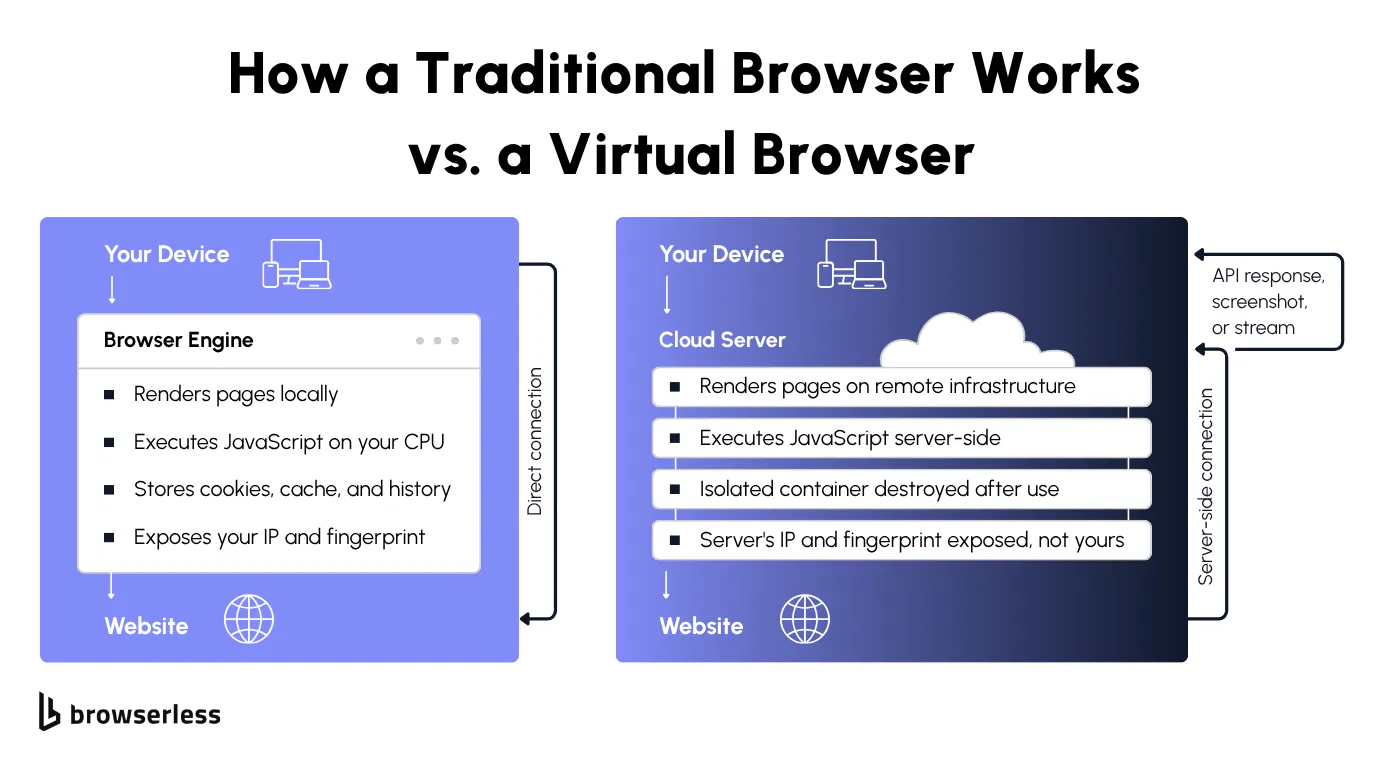
Instead of running a browser on your local machine, a virtual browser runs on a remote server, cloud-hosted or on-prem. The server handles rendering, JavaScript execution, DOM manipulation, and network requests, then sends back either a visual stream or an API response.
Your machine never touches the web content. The request originates from the cloud server, so the target site sees the server's environment rather than your local machine.
Every session starts in an isolated virtual environment that the platform destroys after use. No cookies, browsing history, local storage, or cache carry over between sessions. If you've ever debugged a scraping job that failed because a previous run's cookies leaked into the session, you know why this matters.
The term covers consumer cloud browsers, enterprise Remote Browser Isolation (RBI) products, headless APIs, and developer-focused platforms like Browserless. The right choice depends on whether you need manual browsing, security isolation, or programmatic browser automation.
Virtual browsers vs. headless browsers vs. virtual machines
If you've used Puppeteer or Playwright, you've already worked with a headless browser: a virtual browser that runs without a graphical user interface (GUI), controlled entirely through code. All headless browsers are virtual browsers, but the category is wider than that. Some virtual browsers stream a full visual interface back to you.
VMs are the heavyweight option. They run an entire operating system, which can include a browser, but that's like booking an entire server room when you only need the browser running. Remote Browser Isolation is the enterprise variant, focused on security rather than automation.
VPNs and proxies route your internet traffic through a different server, but your local browser still does all the heavy lifting: rendering pages, running JavaScript, storing cookies. A virtual browser moves the entire browser engine off your device, so your browsing is physically separated from your local system. The distinction matters: with a VPN, a malicious script still executes on your laptop. With a virtual browser, it doesn't.
A platform like Browserless hosts real browser engines (Chromium, Chrome, Firefox, WebKit, and Edge) accessible via WebSocket or REST API, with isolated sessions, stealth modes available through the /stealth and /stealth/bql routes, and no local infrastructure to manage.
You can self-host virtual browsers with Docker and headless Chrome, but you'll spend more time on container orchestration, memory leaks, session cleanup, and scaling than on the automation you built it for. That's the gap a managed platform fills. You get the virtual browser, and the provider handles everything underneath it.
Why teams use virtual browsers
Security, privacy, and session isolation
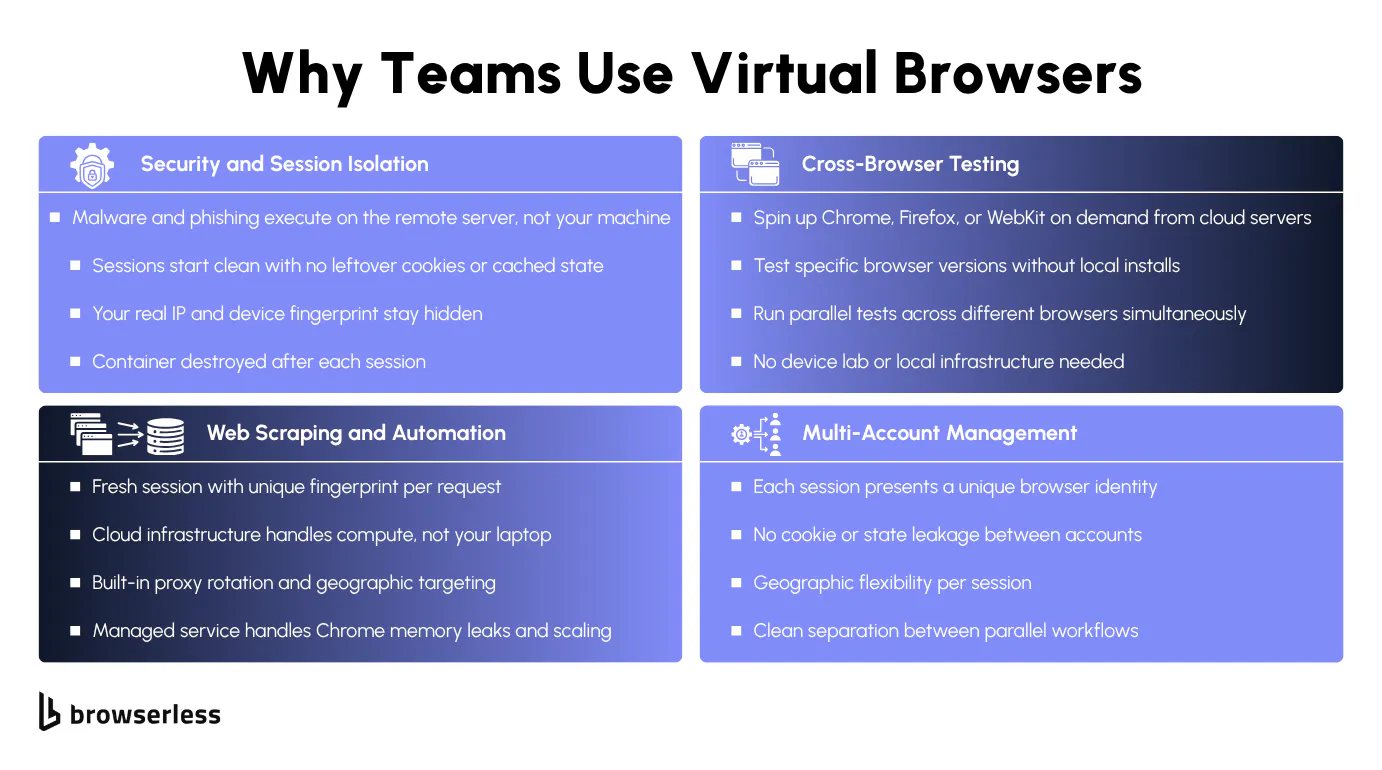
Every new connection starts with a clean browser profile: no leftover cookies, cache, tracking data, or stored credentials from previous sessions. A clean profile eliminates stale state between automation runs and gives you predictable test environments.
Malware and malicious scripts execute on the remote server, never reaching your local system. For stateless sessions, the entire container is destroyed when the session ends. Persisted sessions, created via the POST /session API with a ttl and processKeepAlive, keep an isolated browser context alive for the lifetime you configure, then tear it down. Your real IP address and device fingerprint stay private either way.
The website only sees the remote server's IP and the browser environment configured on that server. Combined with proxy rotation, each session can present a unique identity to the websites it visits.
Cross-browser testing and web scraping at scale
Cross-browser testing typically involves installing different browsers locally (Chrome, Firefox, Safari) and maintaining different versions of each, or running a full device lab across Windows, macOS, and Linux.
Virtual browsers let you spin up any browser version on demand from cloud servers without installing any additional software locally. The same isolation model pays off for scraping. Each request can use a fresh session with a unique fingerprint and IP address, which reduces the risk of detection, tracking, and blocking. Sites that track browser fingerprinting across sessions see each request as a new, unrelated visitor.
Your laptop doesn't need to do any of the rendering work. A single computer with limited resources can drive hundreds of concurrent cloud browser sessions for parallel testing or large-scale data extraction.
You can also load custom user profiles, run from different geographic regions, and emulate mobile device viewports. Need to test how your site renders in Japan? That's a configuration change, not an infrastructure project.
At scale, self-hosting browser infrastructure means managing Docker containers, handling Chrome memory leaks, monitoring session health, and scaling horizontally as demand grows. Anyone who's watched Chrome eat 4GB of RAM across a dozen headless sessions knows why teams offload this to a managed service.
The following curl call shows how simple a virtual browser interaction can be. Send one HTTP request to the Browserless /screenshot endpoint and get back a full-page PNG.
curl -X POST \
  "https://production-sfo.browserless.io/screenshot?token=YOUR_API_TOKEN" \
  -H 'Cache-Control: no-cache' \
  -H 'Content-Type: application/json' \
  -d '{
    "url": "https://news.ycombinator.com",
    "options": { "fullPage": true, "type": "png" }
  }' \
  --output "screenshot.png"
How to connect to a virtual browser programmatically
REST APIs for quick virtual browser tasks
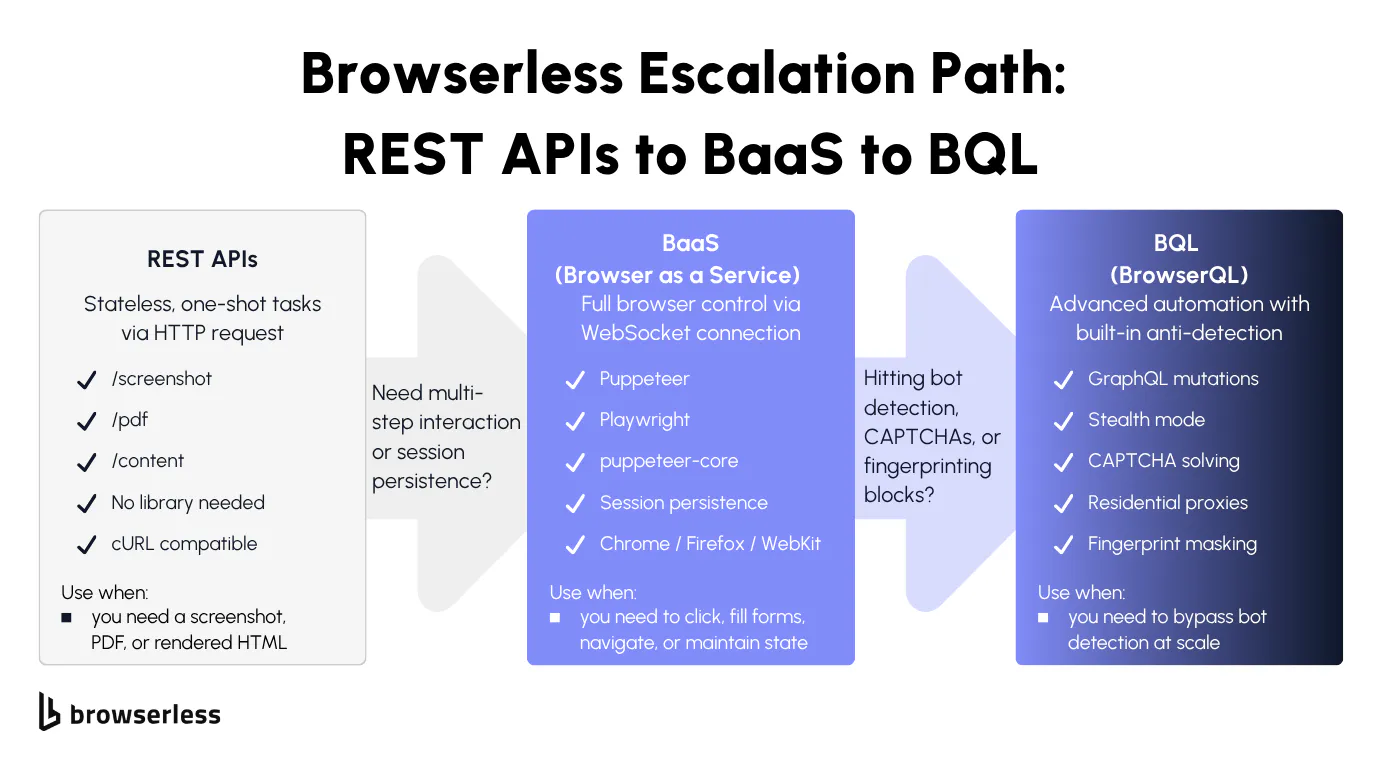
The simplest way to use a virtual browser is a plain HTTP request. Send a POST request to a Browserless REST endpoint and receive a screenshot, PDF, or rendered HTML. No library install, no browser dependency. Anything that can make HTTP requests works, from Python's requests to curl on the command line.
The three core endpoints map to the most common one-shot tasks:
/screenshotreturns a PNG, JPEG, or WebP of the rendered page./pdfreturns a PDF./contentreturns the fully rendered HTML after JavaScript execution.
Each REST call spins up a browser session, executes the action, and tears down the session. That's ideal for stateless, one-shot tasks: generating invoices as PDFs, capturing screenshots for visual monitoring dashboards, or extracting rendered content from JavaScript-heavy single-page apps where a simple HTTP GET returns an empty shell.
Each call is stateless and single-action, so you can't click a button, fill out a form, and then scrape the result in a single request. For multi-step interactions, you need BaaS or BrowserQL.
REST endpoints accept URL query parameters alongside ?token= for runtime customization, including ?blockAds=true, ?blockConsentModals=true, and ?timeout=60000. Add them to the request URL when you need ad blocking, consent dismissal, or a custom request timeout without changing the body payload. For CAPTCHA solving, use the stealth path instead: /unblock or /smart-scrape over REST, or solveCaptchas on a BaaS or BrowserQL connection.
The /content call below returns the fully rendered HTML after JavaScript execution:
curl -s -X POST \
  "https://production-sfo.browserless.io/content?token=YOUR_API_TOKEN" \
  -H 'Cache-Control: no-cache' \
  -H 'Content-Type: application/json' \
  -d '{
    "url": "https://news.ycombinator.com",
    "waitForTimeout": 2000
  }'
BaaS and BrowserQL for full virtual browser control
Browsers as a Service (BaaS), specifically BaaS v2 (the current Puppeteer/Playwright over WebSocket layer), gives full programmatic control over a cloud browser session. Connect with puppeteer-core using puppeteer.connect() (Puppeteer's -core variant skips bundling a local Chromium, which is what you want when connecting to a remote browser), or with the standard playwright package using chromium.connectOverCDP(). Both point at a Browserless WebSocket URL, and the remote browser behaves exactly like a local one.
With a BaaS connection, you can navigate pages, fill forms, click buttons, extract data, manage cookies, and run any automation logic you'd normally run locally. The session stays alive as long as your connection does, and you can persist and reconnect to sessions for multi-step workflows.
BrowserQL is a GraphQL-based query language purpose-built for browser automation. It includes built-in stealth mode via the /stealth/bql route, fingerprint masking, CAPTCHA solving, reconnect support, and residential proxy support. You send a mutation and get structured results in return.
Start with REST APIs for simple, stateless tasks. Move to BaaS when you need multi-step interaction or session persistence. Move to BrowserQL when you hit bot detection, CAPTCHA, or need anti-detection capabilities at scale.
BaaS supports Chromium, Chrome, Firefox, WebKit, and Edge on cloud. Cross-browser testing requires only a change to the connection endpoint. BrowserQL exposes three browser variants on separate endpoints: /chromium/bql for open-source Chromium, /chrome/bql for Chrome, and /stealth/bql for the privacy-hardened Stealth browser used when targets actively detect Chrome or Chromium.
import puppeteer from "puppeteer-core";

const TOKEN = process.env.BROWSERLESS_API_KEY;

// Connect to Browserless cloud browser via WebSocket
const browser = await puppeteer.connect({
  browserWSEndpoint: `wss://production-sfo.browserless.io/chromium?token=${TOKEN}`,
});

const page = await browser.newPage();

await page.goto("https://books.toscrape.com/", {
  waitUntil: "domcontentloaded",
});
Now extract the data you need from the rendered page using page.evaluate(), then close the session.
const titles = await page.evaluate(() => {
  const bookElements = document.querySelectorAll("article.product_pod h3 a");
  return Array.from(bookElements).map((el) => el.getAttribute("title"));
});

console.log(`Found ${titles.length} books:`);
titles.forEach((title, i) => console.log(`  ${i + 1}. ${title}`));

await browser.close();
BrowserQL takes a different approach. Instead of writing imperative automation code, you send a GraphQL mutation that describes the full workflow. For sites without bot detection, use the /chromium/bql endpoint. For protected sites, switch to /stealth/bql with a residential proxy for fingerprint masking and anti-detection.
The mutation below navigates to a page and extracts data:
mutation ScrapeBooks {
  goto(url: "https://books.toscrape.com/", waitUntil: domContentLoaded) {
    status
    time
  }
  titles: mapSelector(selector: "article.product_pod h3 a", wait: true) {
    bookTitle: attribute(name: "title") {
      value
    }
  }
}
Send the mutation as the JSON body of a POST to https://production-sfo.browserless.io/chromium/bql?token=YOUR_API_TOKEN and BrowserQL returns the structured result. No imperative code, no chained REST calls.
Virtual browser performance and best practices
Performance trade-offs and when virtual browsers are overkill
The examples above cover the happy path, but virtual browsers have trade-offs in production. Every interaction round-trips to the remote server, so latency is the most visible trade-off you'll notice.
For most automation workflows, the delay is negligible. Where it shows up is in rapid-fire interactions: filling a form field by field, scrolling through infinite feeds where each action adds a round trip.
If you don't actually need JavaScript rendering (say, pulling prices from a page where the data is already in the raw HTML), a plain HTTP request with cheerio or BeautifulSoup is faster and cheaper than spinning up a full browser session.
The other cost is that virtual browsers consume CPU and RAM per session on the server side, and running hundreds concurrently adds up. Right-size your approach: not every task needs a full browser session. If a REST API call handles the job, don't open a full BaaS session.
Production patterns for reliable virtual browser sessions
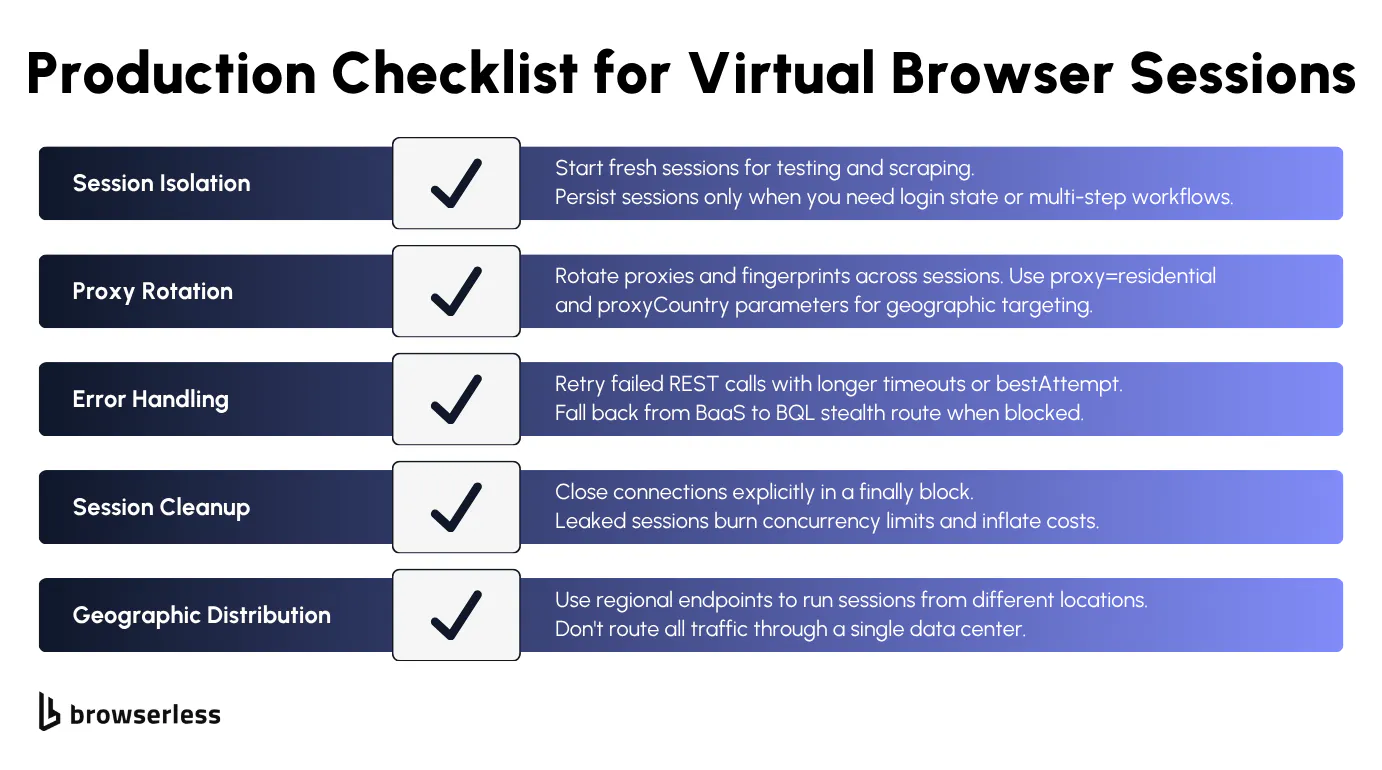
Not every task needs a clean slate. Start fresh sessions for tasks that need a clean state (testing, scraping with unique fingerprints), but persist sessions when you need to maintain login state or continue multi-step workflows across reconnections.
If you're scraping at scale, rotate proxies and fingerprints across sessions. Browserless supports built-in residential proxies via the proxy=residential parameter, with country targeting via proxyCountry, sticky sessions via proxySticky, city-level targeting via proxyCity, and locale matching via proxyLocaleMatch. In BrowserQL, the proxy mutation exposes the same controls.
When a REST API call times out waiting for page elements, use the bestAttempt flag to capture partial results instead of failing entirely, or retry with a longer timeout. BaaS sessions that trigger bot detection should fall back to BrowserQL via the /stealth/bql route, with residential proxies enabled.
Browserless sessions default to a 60-second timeout, with the maximum scaling per plan tier (set explicitly via the ?timeout= URL param). Set a timeout that matches your workload and close connections in a finally block. Leaked sessions burn concurrency limits, and a try without finally quickly stacks zombie sessions against your account quota.
Latency depends on where your browser runs. Use Browserless regional endpoints (production-sfo, production-lon, production-ams) to run virtual browsers closer to the target site rather than routing all traffic through a single data center region.
The script below puts those patterns into practice. It connects via the BaaS stealth route using a residential proxy and hits a bot-detection test page to verify that the stealth mitigations are working.
import puppeteer from "puppeteer-core";

const TOKEN = process.env.BROWSERLESS_API_KEY;
let browser;

try {
  browser = await puppeteer.connect({
    browserWSEndpoint: `wss://production-sfo.browserless.io/stealth?token=${TOKEN}&proxy=residential&proxyCountry=us`,
  });

  const page = await browser.newPage();
  await page.setViewport({ width: 1920, height: 1080 });

  await page.goto("https://bot.sannysoft.com", {
    waitUntil: "networkidle2",
    timeout: 30000,
  });

  const results = await page.evaluate(() => {
    const rows = document.querySelectorAll("table tr");
    return Array.from(rows)
      .slice(1, 8)
      .map((row) => {
        const cells = row.querySelectorAll("td");
        const resultCell = cells[cells.length - 1];
        return {
          test: cells[0]?.textContent?.trim(),
          result: resultCell?.textContent?.trim(),
          passed: !resultCell?.className?.includes("failed"),
        };
      });
  });

  console.log(`${results.length} detection tests:`);
  results.forEach((r) => {
    console.log(`  ${r.passed ? "PASS" : "FAIL"}: ${r.test} → ${r.result}`);
  });
} catch (error) {
  console.error("Failed:", error.message);
} finally {
  if (browser) {
    await browser.close();
  }
}
With stealth active, the WebDriver flag is hidden, plugins report realistic values, and the browser fingerprint matches a real user session. Without the stealth route, tests like WebDriver and Broken Image Dimensions fail immediately.
Conclusion
You don't need to manage Docker containers, watch Chrome's memory usage, or maintain a fleet of browser instances to run automation at scale. Browserless covers the full spectrum of virtual browser infrastructure. Reach for the /screenshot REST API when you need a quick capture, escalate to BaaS once full browser control through Puppeteer or Playwright is required, then move to BrowserQL with the stealth route once anti-detection becomes the constraint. Pick the tier that fits your workload and skip the infrastructure management. Sign up for a free trial and test it against your own workloads.
FAQs
Is a virtual browser the same as a headless browser?
A headless browser is a type of virtual browser controlled via code, with no GUI. "Virtual browser" is broader and also includes Remote Browser Isolation, cloud browsers with visual streaming, and browser-as-a-service platforms such as Browserless.
Can a virtual browser protect against malware?
Yes. Everything executes on the remote server, so malware and malicious scripts never reach your device. For stateless sessions, the container is destroyed at the end of the request, taking any threats with it. Persisted sessions keep an isolated environment for the configured lifetime, then tear it down.
Is a virtual browser the same as using a VPN?
No. A VPN routes your traffic through a different server, but your local browser still executes all web content and stores cookies. A virtual browser moves the entire browser engine to a remote server. Your device only receives the output while the server handles rendering.
How is Browserless different from consumer virtual browsers like Browserling?
Browserless is built for developers and automation. Instead of a visual browser you interact with manually, you get API access through REST endpoints, WebSocket connections (BaaS), and BrowserQL. Sessions run programmatically and in parallel, and integrate with CI/CD workflows.
Do virtual browsers work for cross-browser testing?
Yes. Spin up Chromium, Chrome, Firefox, WebKit, or Edge on demand without local installs through BaaS. Playwright targets Chromium, Firefox, WebKit, and Edge, while Puppeteer connects to Chrome and Chromium. One WebSocket connection to the cloud infrastructure replaces a local browser lab.