
TL;DR
- Web authentication. The process a site uses to verify who you are before it grants access, then to keep trusting you on every request after that.
- The methods. Passwords, server-side sessions, signed tokens such as JWTs, delegated login through OAuth and OpenID Connect, and passkeys built on the Web Authentication API (WebAuthn).
- Passwordless. WebAuthn swaps the shared secret for a key pair, so the private key never leaves the device and a phishing page has nothing to capture.
- Saved sessions. Every method ends in an artifact the browser hands back on each request, which is why re-running a full login on every test or scrape is the wrong place to spend effort.
Introduction
Web authentication is the step between typing something into a form and the server actually believing you're you. Every login, every API call carrying a bearer token, and every passkey prompt is some version of it. Even a simple web app means choosing, or inheriting, one of several genuinely different mechanisms, each with its own security profile and its own way of breaking.
That's true whether the one logging in is a person at a keyboard or an AI agent doing the work on their behalf. In this guide you'll learn how each method works, where each one breaks, and how to test or automate a flow that sits behind any of them.
What is web authentication?
Web authentication, sometimes just called user authentication, is how your app checks who someone is before it lets them near anything protected. It sits underneath every login screen and every API call that requires a token, and it's what stops one user's account from being interchangeable with anyone who guesses the right URL.
Authentication and authorization get conflated constantly, so it's worth pinning them apart. Authentication answers "who are you?" Authorization, sometimes called access control, then decides what that identity is allowed to do. You authenticate once at login, and the app leans on that established identity for every request after it, like whether you can pull up your own order history or everyone else's.
The mechanics behind that vary a lot in practice, and that variation is most of what this guide covers.
How does web authentication work?
Strip away the specifics of any one method, and most web authentication follows the same shape. A client submits proof of identity: a password, a signed token, a cryptographic signature, or a code from an authenticator. Specs usually call that client a user agent, whether it's a browser, a mobile app, an automated script, or increasingly an AI agent.
The server validates that proof to verify identity, checking it against something it already trusts like a stored password hash, a certificate, or a public key registered earlier. HTTP is a stateless protocol, so the server has no memory of the last request, but re-proving who you are on every single one would make the web unusable.
Instead, it issues something that stands in for a fresh login: most often a session cookie or an access token, and for single sign-on flows, a signed authentication assertion. That artifact travels with the user's browser or app on every subsequent authenticated request, and the server checks it far faster than it checked the original credentials.
That artifact is also where most exploitable weakness lives, and nearly every risk below is a variation on someone getting hold of it without doing the proving.
What are the main types of web authentication?
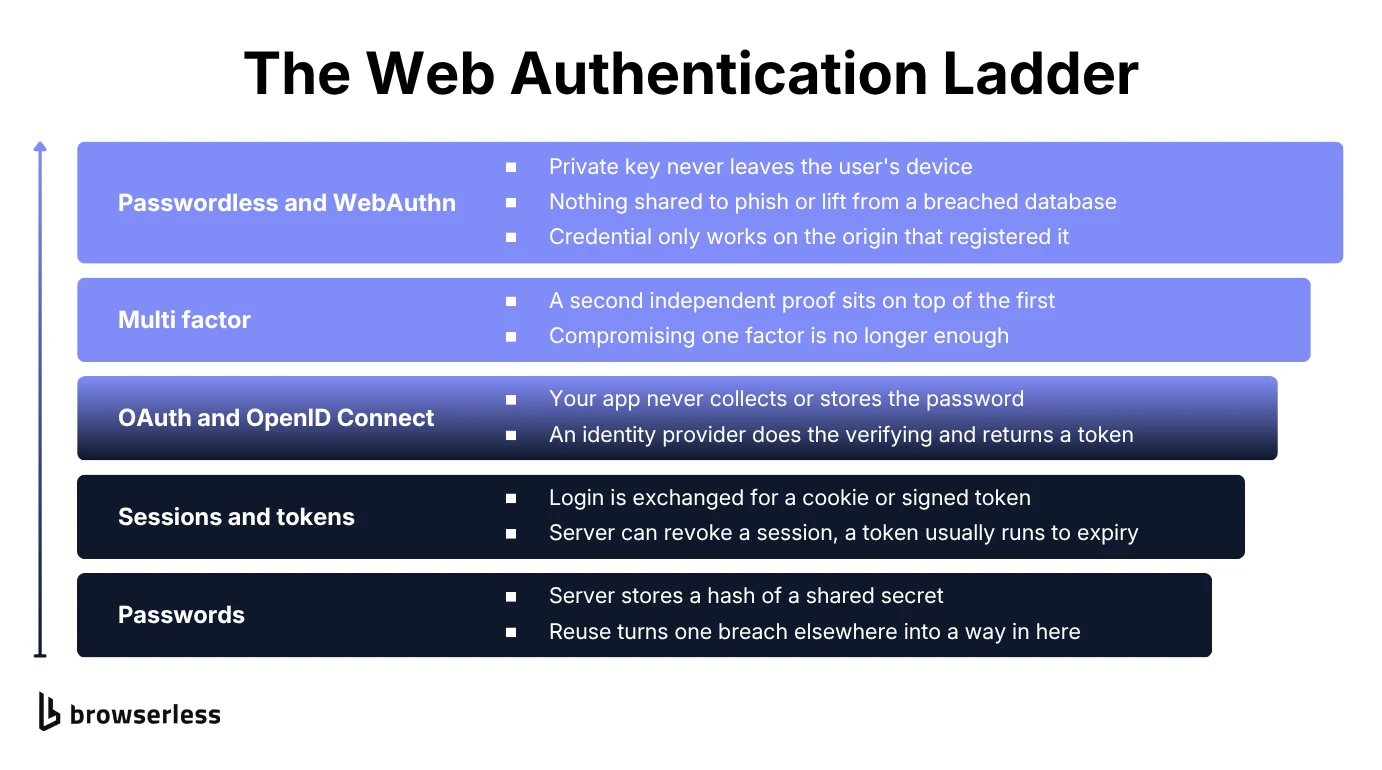
People often reduce this to "something you know, something you have, and something you are," and that model still holds for the factors themselves: a password is something you know, a hardware security key is something you have, a fingerprint is something you are.
The families below cover those factors and the mechanisms that carry the result afterward. In practice you choose both together, and the pairing is what decides how a system fails.
Password-based authentication
Passwords are still the default for most web applications. A user sets one, the server runs it through a hashing algorithm and stores only the result, and when that user logs in again the server hashes what they typed through a secure form and compares.
The core weakness is that a password is a shared secret, so anyone who obtains the user's password, whether stolen in a breach or simply guessed, can authenticate as that user. Password fatigue makes this worse: people reuse the same password across services since a fresh, unique one for every site is a genuine burden, so one breach elsewhere becomes a way in here.
The simplest implementation, HTTP basic authentication, sends a username and password on every request instead of establishing a session at all. The server prompts for it by answering an unauthenticated call with a 401 and a WWW-Authenticate header, and the client resends with the credentials packed into its request headers.
It still shows up on internal tools and simple APIs because it needs no extra infrastructure, but it sends those user credentials on every single call, so it belongs behind HTTPS only and rarely survives contact with a real user base.
Session-based authentication
Session-based authentication is the answer most applications reach for first. After a successful login, the server creates a session record and gives the browser a session ID, typically as a cookie. On each request, the browser sends that cookie back, the server looks it up, and treats the request as coming from whichever user owns it.
Keeping the record server-side leaves the server in full control, since it can invalidate a session instantly. It also means the server has to store and manage session state, and a stolen session cookie is functionally as good as valid credentials.
Session hijacking, capturing or guessing a valid session ID, is the main risk to design around, which is why secure sessions rely on flags like HttpOnly and Secure alongside short expiry windows. Those flags travel on the response that sets the cookie:
Set-Cookie: sid=8f4b2c9e1d...; HttpOnly; Secure; SameSite=Lax; Max-Age=3600
HttpOnly keeps the cookie out of reach of JavaScript, which is what blunts a cross-site scripting (XSS) bug, and Secure stops it traveling over plain HTTP.
Token-based authentication (JWT)
Instead of a server-side session record, the server issues a signed token, most commonly a JSON Web Token (JWT), that the client stores and attaches to future requests, typically as a bearer value in the Authorization header. Every request after login carries it:
Authorization: Bearer eyJhbGciOiJIUzI1NiIsInR5cCI6IkpXVCJ9.eyJzdWIiOiIxMjM0NSJ9...
The two dot-separated segments before the signature are each a base64url-encoded JSON object, readable by anyone who intercepts the token, so a JWT is signed rather than secret. The alg in that first segment names how it was signed, and HS256 means a message authentication code computed with a shared key rather than public key cryptography.
The server verifies the signature rather than looking anything up, which scales cleanly across multiple servers or services. The cost is that a JWT is usually valid until it expires, so a leaked one isn't simple to revoke early.
Real systems handle this with two tokens: a short-lived access token that rides along with client requests, and a longer-lived refresh token used only to request a new access token once the first one expires. Well-designed systems rotate refresh tokens on every use, so a leaked one only works once.
OAuth and OpenID Connect
OAuth is a delegation protocol. Instead of your app collecting and storing a password, a user proves their identity to a separate identity provider, an existing account with a platform they already trust, and that provider hands your app a token confirming the user's identity.
The most common pattern, formally called the authorization code grant, is the authorization code flow. Your app redirects the user to the identity provider, the user authenticates there, and the provider sends them back carrying an authorization code as a query parameter.
Your server then exchanges that code at the provider's token endpoint, using a client ID and client secret, for an access token. That last step is a back-channel POST request the user never sees:
POST /oauth/token
Content-Type: application/x-www-form-urlencoded

grant_type=authorization_code&code=AUTH_CODE&client_id=CLIENT_ID&client_secret=CLIENT_SECRET
Splitting it this way is the point of the pattern. The code travels through the browser where it can be intercepted, but it's useless without the client secret, which only ever lives on your server.
OpenID Connect builds a standard identity layer on top of OAuth, so a "log in with Google" button is really OAuth plus OpenID Connect working together, not a separate mechanism.
The difference on the wire is that an OpenID provider returns an identity token alongside the access token, describing who the user is rather than just what your app may do on their behalf.
Your app is called the client in OAuth terms and the relying party in OpenID Connect. Security Assertion Markup Language (SAML), the older federation standard, calls the same role the service provider. Under all three names it never sees the password at all.
Multi-factor and biometric authentication
Multi-factor authentication (MFA), or two-factor authentication (2FA) when there are exactly two, is a common way to add strong authentication without asking users to change how they log in.
It stacks a second, independent proof on top of the password, usually a one-time code from an app, a push notification, a hardware security key, or a fingerprint check. No single factor has to be unbreakable, since an attacker who compromises one still needs the other.
Hardware security keys and platform biometrics are the strongest factors you can reach for, since neither can be phished or guessed remotely the way a one-time code can.
Your fingerprint or face unlocks a credential stored on the device rather than traveling anywhere itself, which is what makes the method below work.
Passwordless authentication and WebAuthn
Passwordless authentication removes the shared secret from the equation entirely and replaces it with public key cryptography. Instead of a password, the browser generates a key pair for a specific site, keeping the private key on the user's device and handing the server only the public half.
Nothing secret ever crosses the network, only cryptographic proof that you hold the matching private key, so a breached password database has nothing in it worth stealing, which is the model behind passkeys.
What is the Web Authentication API?
The Web Authentication API, usually shortened to WebAuthn, is the browser-level API that makes passwordless authentication possible, with nothing to install and nothing to buy. It extends the Credential Management API already shipping in every major browser, standardized by the World Wide Web Consortium (W3C) together with the FIDO Alliance.
Two calls do almost all the work, starting with navigator.credentials.create(), which registers a new credential for a website. The site, acting as what WebAuthn calls the relying party, sends a random challenge and some information about the user.
The browser hands that to whatever authenticator is available: a platform authenticator like Windows Hello or Touch ID, or an external one such as a USB security key. The authenticator returns a public key for the site to store.
navigator.credentials.get() does the equivalent for logging in afterward. The site sends a new challenge, the authenticator produces a digital signature over it with the private key it already holds, and the site verifies that against the public key from registration. Those two calls carry the key principles of the whole API, with the browser acting as the WebAuthn client between your page and the authenticator.
A minimal registration call looks like this:
const credential = await navigator.credentials.create({
  publicKey: {
    challenge: cryptoRandomChallengeFromServer, // a fresh random buffer from your backend
    rp: { name: "Acme Support", id: window.location.hostname }, // must match the origin
    user: {
      id: userIdBuffer,
      name: "jane.doe",
      displayName: "Jane Doe",
    },
    pubKeyCredParams: [{ type: "public-key", alg: -7 }], // -7 is ES256
  },
});
pubKeyCredParams is where you list the public key algorithms your server will accept, in order of preference.
Logging in later is the mirror image, where navigator.credentials.get() sends a fresh challenge, names the credential the browser should sign with, and asks the authenticator to verify the user before it signs:
const assertion = await navigator.credentials.get({
  publicKey: {
    challenge: freshChallengeFromServer, // a new random buffer, never reused
    rpId: window.location.hostname,
    allowCredentials: [{ type: "public-key", id: storedCredentialId }],
    userVerification: "required", // forces the biometric or PIN prompt
  },
});
An authenticator can also supply an attestation certificate, letting the server confirm a credential really came from a trusted device, though many consumer-facing sites don't check it.
Everything above happens in the browser. Validating the returned credential, confirming the challenge and origin, and storing the public key correctly all happen on your server, which is where the real work sits.
It's fiddly enough that you should reach for an established WebAuthn server library in your language rather than reimplementing the verification steps yourself. If you've used a passkey on any major browser, you've used this API without necessarily knowing its name.
What are the biggest web authentication security risks?
Fake login pages remain one of the most effective attacks, precisely because they don't need to break anything technical. A page that looks like the real login screen collects a password, or worse, an OAuth session, and hands it straight to an attacker, who then authenticates as the victim through the completely legitimate path.
Phishing is also one of the strongest arguments for passwordless authentication. A WebAuthn credential is tied to the same origin that registered it, so it simply won't work on a convincing fake.
Session hijacking targets the artifact rather than the credential. If an attacker captures a valid session cookie, through a network sniff over unencrypted communication, an XSS bug, a leaked log, or a malicious browser extension, they can act as the user for as long as that session stays valid, without ever presenting valid credentials of their own.
Credential stuffing takes the same idea further and automates it: feeding lists of usernames and passwords leaked from other breaches into a login form and letting a script find the accounts where someone reused that password. It works precisely because password reuse is common, and it's exactly the kind of attack multi-factor authentication is designed to blunt, since a correct password alone stops being enough.
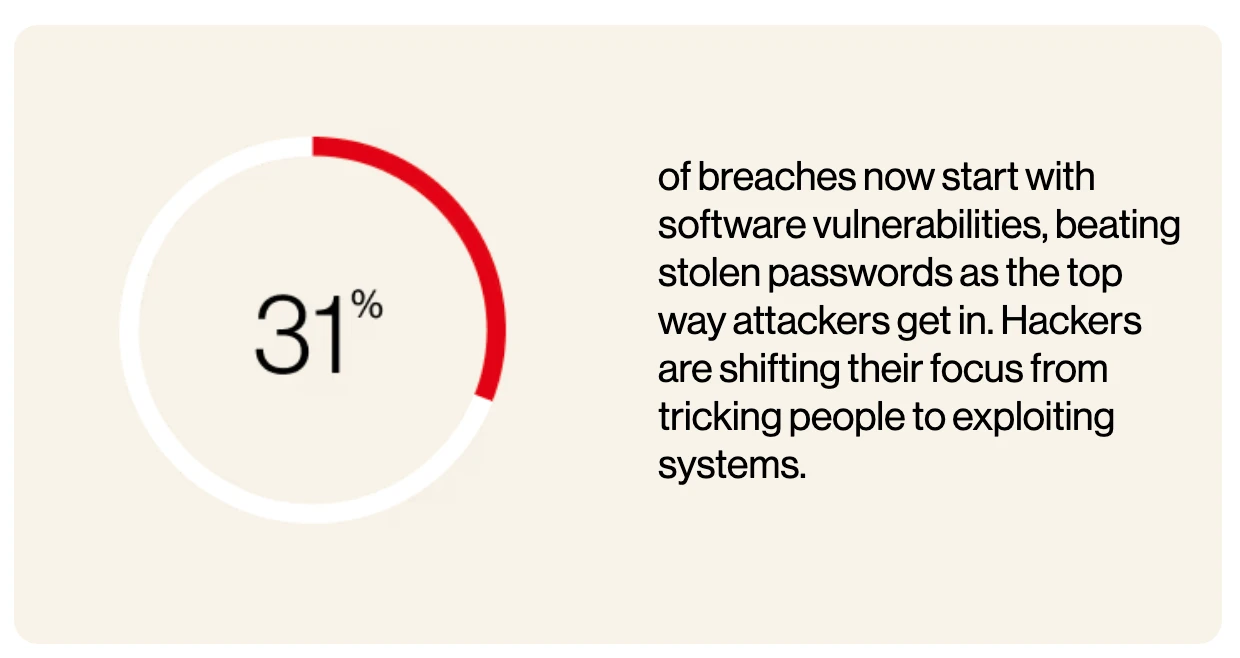
Weak or stolen credentials remain one of the most common ways attackers get in. The 2026 Verizon Data Breach Investigations Report puts credential abuse behind 13% of breaches, second only to exploited software vulnerabilities at 31%, the first time in 19 editions that credentials haven't led. Attackers are increasingly finding it easier to exploit an unpatched system than to steal a password.
How do you choose the right web authentication method?
Most real systems end up combining methods rather than picking exactly one, so the useful question is which combination fits the application in front of you, and three questions narrow it down quickly.
How sensitive is what you're protecting? A newsletter signup and a banking dashboard don't need the same authentication method. Session-based or token-based authentication with a solid password policy is often enough for low-stakes access; anything touching money, health data, or admin controls should add multi-factor authentication at minimum, and passwordless authentication wherever you can justify the engineering cost.
Who controls the identity? If you're building for consumers who likely already have a Google or Microsoft account, OAuth and OpenID Connect save you from ever storing a password and offload a chunk of the security burden to a provider with a dedicated security team. If you need full control over the login experience, or your users don't have an existing account to federate from, you're back to managing sessions, tokens, or WebAuthn credentials yourself.
How much engineering time do you have? Passwordless authentication gives the strongest guarantees but costs the most to implement correctly, from registration flow edge cases to fallback paths for users without a compatible authenticator.
Session-based authentication is the fastest to stand up and the most forgiving to debug, which is a legitimate reason to start there and add stronger methods later rather than blocking a launch on getting WebAuthn perfect. There's no single right combination here. The answer depends on what you're protecting and what you can afford to build.
What is a web authentication service?
Not every team wants to build and maintain authentication in-house, and a whole category of tools exists because of that. Identity providers and auth-as-a-service platforms authenticate users on your behalf, handling sessions, tokens, password storage, and WebAuthn ceremonies behind a software development kit (SDK) or API you integrate once. In practice the integration is small. The provider redirects back to a callback route with an ID token describing the user, your app verifies its signature and sets its own session cookie, and the rest of your application keeps working the way it already does.
You get a team whose entire job is keeping up with new attack techniques and current best practices, which is genuinely hard for a small engineering team to do alongside building an actual product. MFA, social login, and passwordless support all arrive without you implementing any of it.
You're also handing a core piece of your application, and often your users' credentials, to a third party, which means their outage is your outage and their pricing changes are your cost increase. Larger, security-mature teams often build in-house instead, precisely to keep that control, while smaller teams reasonably decide the trade-off favors a service.
Either is a defensible choice, as long as you make it deliberately.
How do you test and automate web authentication flows?
Every method above eventually produces the same thing from a browser's point of view: a cookie, a token, or a signed assertion that says this session is authenticated. That's convenient for users, and it's exactly the wall that stops a scraper, a test suite, an AI agent, or anything else scripting a browser, before it can get on with its actual job.
Scripting a login form is simple until the flow gets real. Multi-factor authentication needs a live code from somewhere, and OAuth needs a redirect through a third party's login page you don't control.
A genuine WebAuthn ceremony needs a biometric prompt or a hardware key touch, which is a deliberate human action by design, not something a script should be able to fake. If it could, the whole point of WebAuthn would be defeated. Re-running any of this on every test or scrape is slow at best and impossible at worst.
Rather than automating the login itself, or the MFA, CAPTCHA, or OAuth handshake wrapped around it, complete that login once and replay the resulting state into every session afterward. Browserless packages this as browser authentication with authenticated profiles, and it runs in two halves.
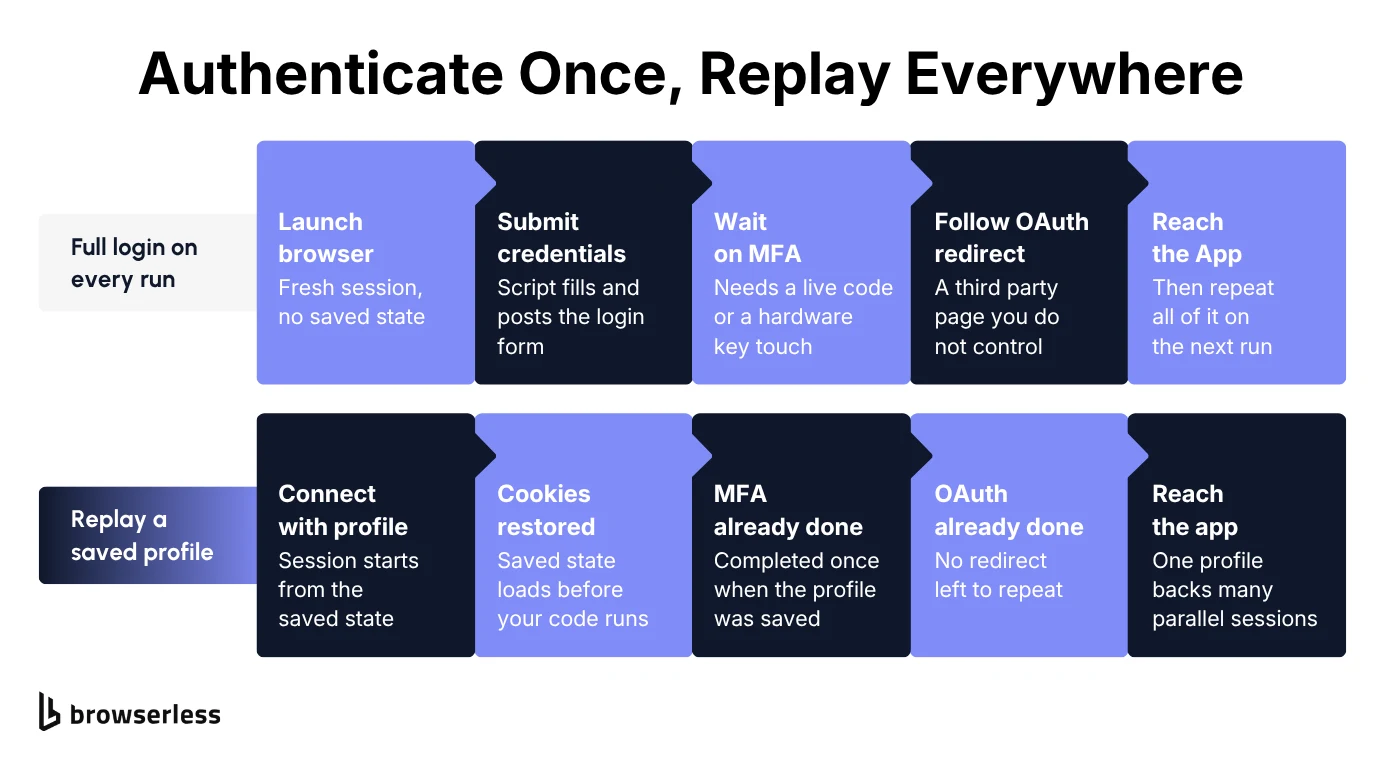
First you log in once and save what the browser is holding. Start a profile session with POST /profile, which returns a WebSocket endpoint. Connect to it, then create a live session link with the Browserless.liveURL CDP command and hand it to a person to complete the one-time code or CAPTCHA through a live remote-browser session. Once the browser is signed in, snapshot the state into an authenticated profile:
import puppeteer from "puppeteer-core";

// `connect` is the WebSocket endpoint returned by POST /profile.
const browser = await puppeteer.connect({ browserWSEndpoint: connect });
const page = await browser.newPage();

// Drive the login yourself, or leave the session open for a person to finish it.
await page.goto("https://example.com/login", { waitUntil: "domcontentloaded" });

// Once the browser holds the authenticated state, save it under a name.
const cdp = await page.createCDPSession();
const result = await cdp.send("Browserless.saveProfile", { name: "acme-prod" });

console.log(result);
// { ok: true, error: null, profileId: '<id>', name: 'acme-prod', cookieCount: 12,
//   originCount: 1, skippedOriginsCount: 0, skippedIdbDatabasesCount: 0,
//   skippedIdbStoresCount: 0 }

await browser.close();
The call captures the cookies, localStorage, and IndexedDB behind the session. sessionStorage is left out on purpose, since tab-scoped values would come back stale and break CSRF and OAuth flows, and profiles that go unused for 30 days are removed automatically. Check ok on the result rather than assuming the call worked, since state too large to store, or a name already in use, comes back as { ok: false, error } instead of saving. From then on, any browser-launching session, whether a WebSocket connect or a REST call to /screenshot, /pdf, /unblock, or /chromium/export, starts already signed in when you pass ?profile=<name>:
import puppeteer from "puppeteer-core";

const browser = await puppeteer.connect({
  browserWSEndpoint: `wss://production-sfo.browserless.io/chromium?token=${process.env.BROWSERLESS_TOKEN}&profile=acme-prod`,
});

const page = await browser.newPage();

await page.goto("https://github.com/settings/profile"); // signed in, as long as the profile was saved on this origin

await browser.close();
One saved profile can back many parallel sessions at once. That's the part that matters for a test suite or a fleet of scraping workers, since every worker acts as the same logged-in user without sharing a single browser between them. It also means the credentials get entered once instead of being stored in CI and handed to every runner. If you'd rather not have a person in the loop at all, 1Password Autologin signs in from a connected service account and saves the profile for you, and the secret values never reach your code.
For a workflow that instead needs one specific browser instance to survive across reconnects rather than replaying state into a fresh one, persisted sessions solve a related but different problem, and the two combine, since POST /session accepts a profile name to start a persisted browser from saved auth state.
Be clear about what any of this does and doesn't solve. It replays a login you already completed, and it doesn't automate a fingerprint prompt or a hardware key touch, nor should it.
It also doesn't help if the login page itself sits behind bot detection before your script ever reaches the form. That's a separate problem, and the stealth route handles the fingerprinting layer of it, though the docs are clear that fingerprinting is only one layer among proxies and CAPTCHA solving.
For teams whose automation handles real user sessions or credentials, keeping that captured state inside your own compliance boundary is exactly what a self-hosted deployment is for.
Conclusion
A session cookie, a JWT, an OAuth redirect, and a WebAuthn assertion are all solving the same underlying problem: proving identity without re-asking for it constantly. What differs is the security each one buys and the complexity it costs you. Pick the combination that matches what you're actually protecting, layer multi-factor authentication in wherever the stakes justify it, and treat passwordless authentication as the strongest option once you can afford to build it properly.
If part of your job is testing or automating something that sits behind any of these methods, the fix is the same regardless of which one you're facing: authenticate once, then persist that session instead of repeating the flow on every run. Sign up for free and give your automation a browser that remembers where it left off.
Web authentication FAQs
Which browsers support WebAuthn today?
Every major browser supports WebAuthn: current versions of Chrome, Firefox, Safari, and Edge all implement it, on both desktop and mobile operating systems. It has been broadly available for years now, so compatibility isn't the blocker it once was; the more common limitation is whether a given device has a compatible authenticator, built-in biometrics or a hardware key, available to complete the ceremony.
Where should you store a JWT in the browser?
Keep it out of localStorage, where any script running on the page can read it. A cookie with HttpOnly and Secure set keeps the token out of reach of JavaScript, which limits the damage from an XSS bug. The trade-off is that cookies are sent automatically on every matching request, so you need SameSite and a cross-site request forgery (CSRF) defense alongside them.
Can you automate a WebAuthn login in a test suite?
You can't automate the ceremony itself, since the biometric or hardware key touch is a deliberate human action the spec is designed to require. Chrome DevTools exposes a virtual authenticator for local testing, which is useful for unit-level coverage. For end-to-end runs against a real environment, complete the login once by hand and replay the saved session state instead.
Does two-factor authentication stop session hijacking?
Teams use 2FA to harden the initial authentication request, and it does that job well, but it doesn't cover what happens after the session exists. An attacker holding a stolen session cookie never issues a fresh authentication request, so no second-factor prompt is ever triggered. Closing that gap takes short session expiry, HttpOnly and Secure cookies, and re-prompting for a second factor before sensitive actions.
How should a script or AI agent authenticate on a user's behalf?
Give it a delegated credential rather than the user's password. OAuth exists precisely so an application can act on a user's behalf with a scoped token the user can revoke, and that token travels on every authentication request the agent makes. Where no API exists and the agent has to drive a real browser, complete the interactive login once as a human and replay the saved session, so the agent never holds the credentials at all.