Run an AI browsing task with one REST call
The new /agent/run endpoint gives you a browser agent you can call from your own code. POST a task in plain English, get a run ID back, and poll GET /agent/run/{id} for a clean JSON result, or register a webhook and skip polling. One call replaces a stack you'd otherwise wire up yourself, so you don't manage a model key, build an agent loop, or run any browsers. The agent plans and drives its own steps, navigating, clicking, typing, and reading, then returns its answer.
Runs happen on the same infrastructure built for hard sites, so saved authentication profiles, CAPTCHA solving, and residential or datacenter proxies are all available to a task. Shape a run with a JSON responseSchema, a startUrl, an allowedDomains allowlist, proxy settings, or a saved profile for pages behind a login. The API is in beta and available on Cloud plans.
curl -X POST \
  'https://production-sfo.browserless.io/agent/run?token=YOUR_API_KEY' \
  -H 'Content-Type: application/json' \
  -d '{ "query": "Go to browserless.io/pricing and find the Pro plan price." }'
Read the Agent Run API guide →
Multiple API keys, one for every app and environment
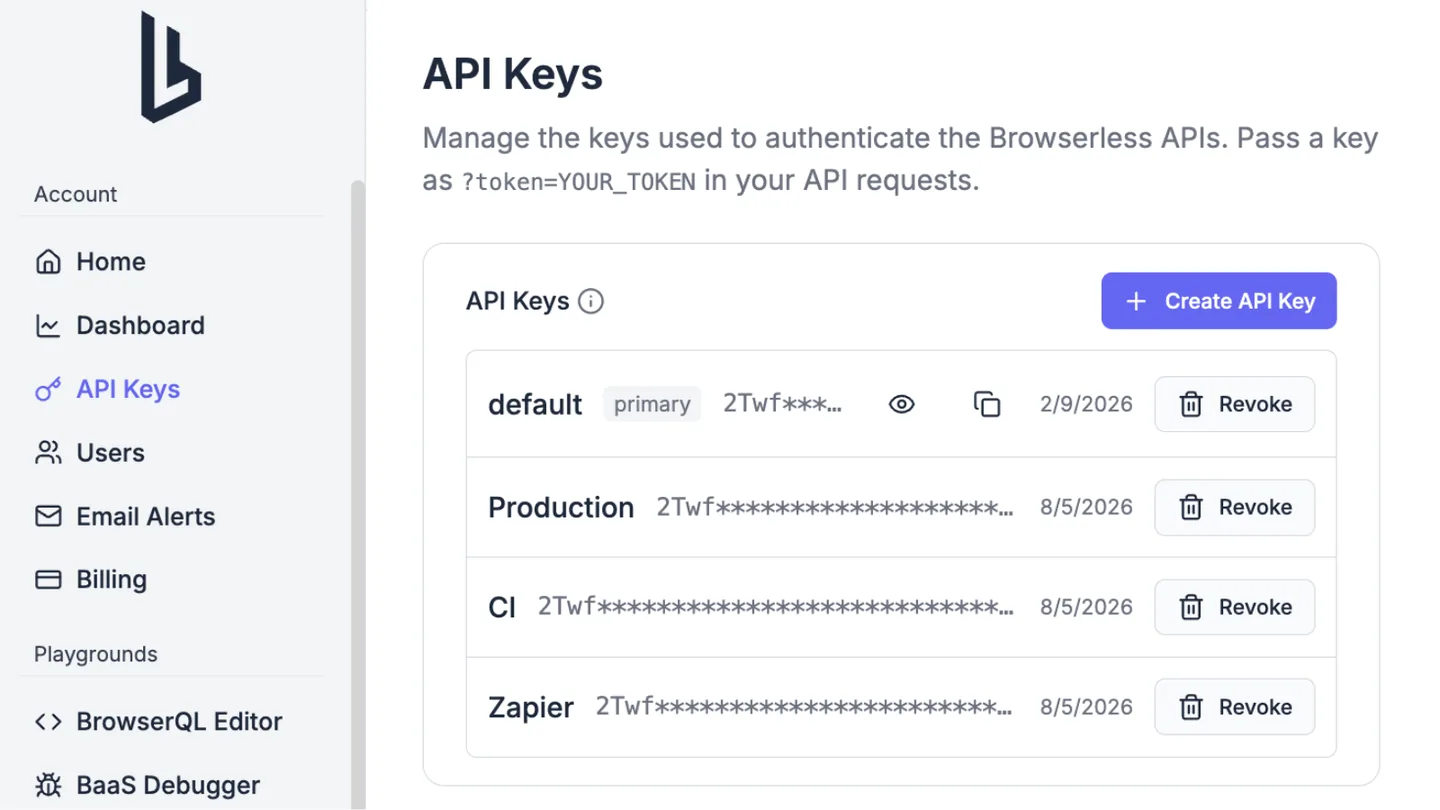
You can now create multiple named API keys on a single account, so each application, environment, or teammate gets its own key that you can revoke on its own without disturbing the others. Open API Keys in your account, click Create API Key, and add up to 20 keys per account. Only account owners and admins can manage them, and a new key is shown only once at creation time, so copy it somewhere safe right away.
Every key on the account draws from the same shared unit balance and concurrency limit, and billing stays at the account level, so splitting work across keys never changes what you pay. Your account always keeps one primary key, and if you revoke it another active key is promoted automatically. Crawls, authenticated profiles, and 1Password integrations are account-scoped too, so a resource created with one key is visible and usable from any other key on the same account.
Scrape mobile sites with a real Android identity
Add emulationOs=android to a stealth or BQL connection and the session presents as mobile Chrome on Android, with a coherent mobile User-Agent, Client Hints, phone viewport and pixel ratio, touch input, and a mobile GPU identity. This replaces the old approach of hand-matching a mobile viewport to a user-agent, which left navigator.userAgent reporting desktop Chrome and got sessions flagged.
Leave the device out and Browserless picks a real device profile for you and keeps it stable for the whole session, or pin one with emulatedDevice=<slug>, for example pixel-8-pro or galaxy-s25-ultra. Android is the supported mobile persona today; iPhone, iOS, and Safari are not emulated.
wss://production-sfo.browserless.io/stealth?token=YOUR_API_KEY&emulationOs=android&emulatedDevice=pixel-8-pro