Write BrowserQL in TypeScript or Python instead of GraphQL
Browser Automation Protocol (BAP) is our own SDK for driving a browser. You call ordinary methods like page.goto() and page.click() and get autocomplete and typed responses, so a wrong argument fails right where you wrote it. Underneath it speaks BrowserQL, our GraphQL API for declarative browser automation, so you get managed stealth, residential proxies, CAPTCHA solving, and live debugging URLs without writing a query by hand.
That also makes picking a connection method simpler. Bring the Puppeteer or Playwright script you already have, reach for BAP when you want the stealth engine behind a typed API, or skip libraries altogether and call the REST APIs for one-off jobs like a screenshot or a scrape.
The TypeScript package is out now. The Python package is landing shortly.
npm install @browserless.io/bap-ts
Now you can see exactly why a request failed
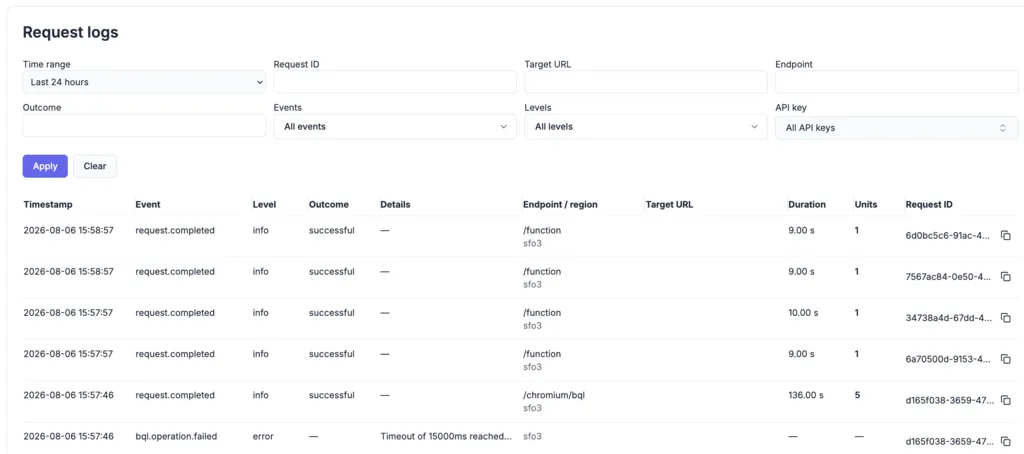
Request logs are live. Every request you send now shows up on your account page with the whole story: which endpoint handled it, where it ran, how long it took, and the error that killed it. Narrow the feed by time range, target URL, endpoint, outcome, level, or API key, including keys you have already revoked.
Every run shows its cost too, even the ones that died halfway. Hover the units column for the breakdown across browser time, proxy, captcha, and agent. When an API error comes back with an ID attached, like (requestId: f3a9c2d81b7e4a06), drop it into the Request ID filter to replay everything that request did before it gave up. Logs cover Cloud Unit and Dedicated plans, searchable back 8 hours on Free and up to 7 days on Scale and Dedicated.
Live URLs are now available on every plan
You can create a Live URL on any plan now, including Free. Stream a running session to a real person, let them click through a login or a 2FA prompt, and take control back in the script once they are done. Free sessions also went from one minute to two, which is the room a human actually needs.
Read the Hybrid Automation guide →
Control your overage spend
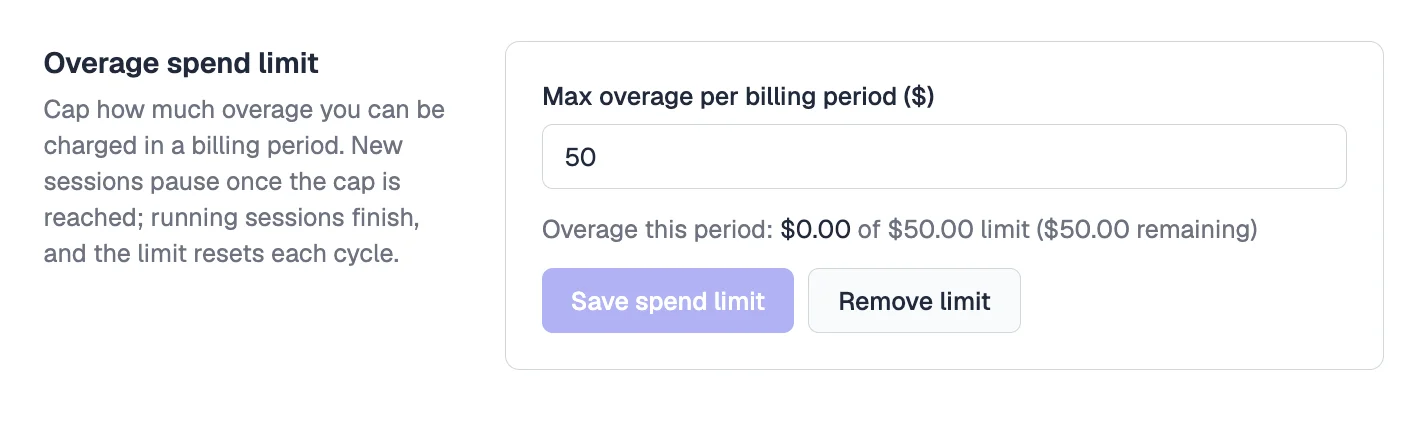
Set a dollar cap under Overage spend limit in your account settings, and new sessions pause once you reach it. Set it to $0 to stop at your plan allowance instead. Sessions already running are allowed to finish, the limit resets each billing cycle, and anything paused comes back with an error naming your cap.
Owners and admins can set it; viewers see it read-only.