
TL;DR
- AI scraping tools. Use language and vision models to read a page the way a person would, instead of relying on brittle CSS selectors, so they keep working when a site's layout changes.
- No-code. Options like Browse AI, Octoparse, and Thunderbit let non-developers point, click, and extract data without writing code.
- Developer-first and enterprise. Firecrawl and ScrapeGraphAI turn URLs into structured data for AI agents, while Diffbot and Kadoa run self-healing extraction at scale.
- Infrastructure. Browserless gives you the managed browser layer – Puppeteer, Playwright, or Selenium over WebSocket, plus REST and BrowserQL endpoints – when you're building the scraper or agent yourself.
Introduction
AI scraping tools exist because you've been burned by a hard-coded selector before. You wire up a scraper, it runs clean for months, then a <div class="price"> quietly turns into a <span data-testid="price"> and everything breaks. Now you're not shipping data – you're rewriting extraction logic you already wrote once.
They fix that by reading a price or listing semantically, so they can pull data from pages that redesign constantly. That resilience splits the category into four types: no-code apps, developer APIs, enterprise platforms, and the browser infrastructure underneath all of them. In this guide, you'll compare eight AI scraping tools across those four types, with pricing, GitHub stars, and a pros-and-cons table for each.
What is an AI scraping tool?
An AI scraping tool uses machine learning, usually a large language model (LLM) or a vision model, to extract structured data from a page without depending on fixed CSS selectors or XPath rules.
Instead of code that says "grab the third <div> in this container," the tool learns what specific data points – a product name, a price, a job posting – look like and applies that pattern across pages it has never seen before.
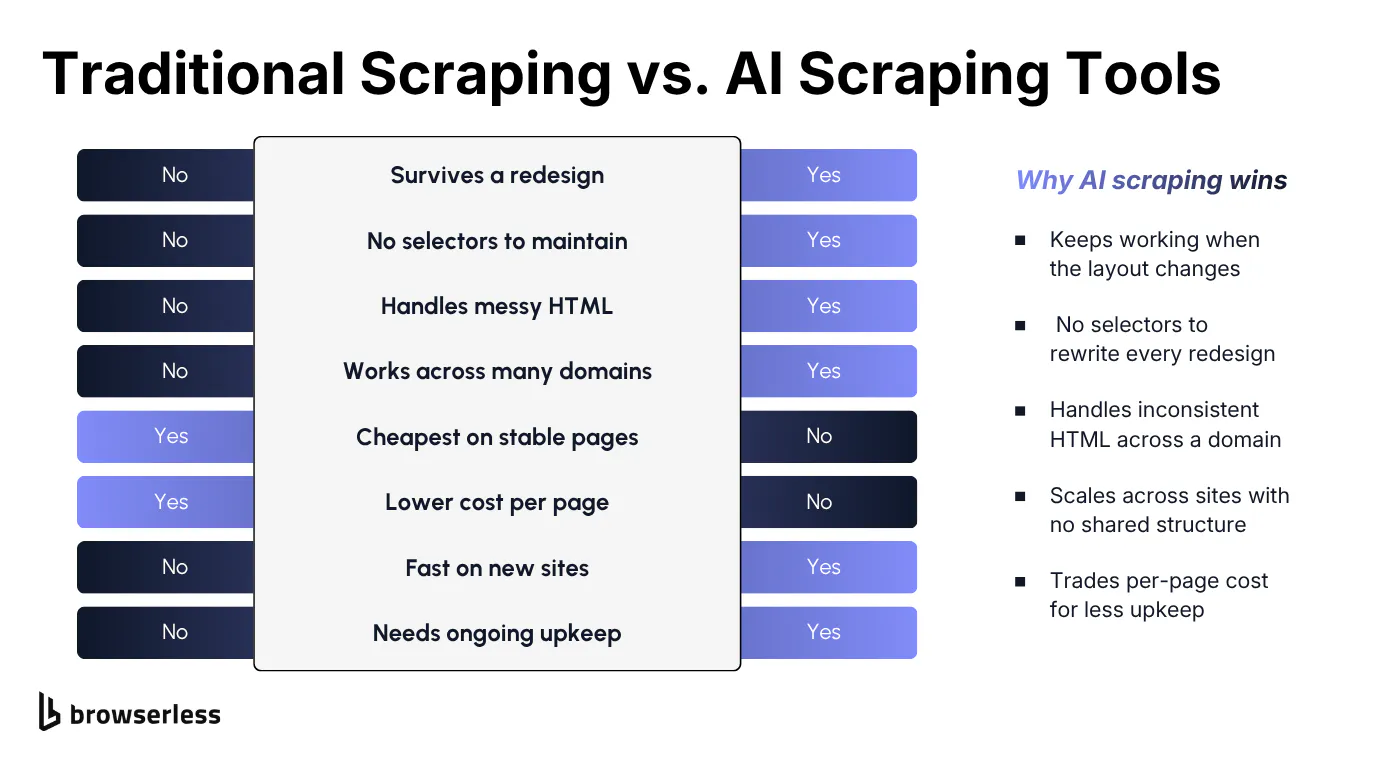
Traditional web scraping still has its place. For a handful of fields on one stable page, a hand-written scraper with CSS selectors is cheaper to run and easier to debug.
AI scraping tools earn their higher per-page cost when the layout shifts often, the site renders most of its content client-side, or you need to scrape websites across dozens of domains that don't share a structure. That's the real trade-off – more resilience for more cost per page.
The best AI web scraping tools, compared at a glance
All eight tools stack up like this on the basics, before the category breakdown below covers pricing, core features, and output formats for each in more depth. GitHub stars are pulled live from each project's public repository as of this writing.
Several of these are closed-source SaaS products with no primary open-source repo, so that column says so rather than guessing.
| Tool | Category | What it does | GitHub stars |
|---|---|---|---|
| Browse AI | No-code point-and-click | Point-and-click AI robots that scrape and monitor any website without code. | Not applicable (closed-source SaaS) |
| Octoparse | No-code point-and-click | Desktop-and-cloud scraper with 500+ prebuilt templates for popular sites. | Not applicable (closed-source SaaS) |
| Thunderbit | No-code point-and-click | Chrome-extension scraper that auto-detects fields for two-click extraction. | Not applicable (closed-source SaaS) |
| Firecrawl | Developer AI scraping API | Open-source API that turns any URL into clean, LLM-ready markdown or JSON. | 168.6k |
| ScrapeGraphAI | Developer AI scraping API | Python library that builds LLM-driven extraction graphs instead of selectors. | 29.5k |
| Diffbot | Enterprise extraction platform | Computer-vision API that auto-classifies pages and extracts data with no setup. | Not applicable (closed-source SaaS) |
| Kadoa | Enterprise extraction platform | Self-healing extraction platform for monitoring hundreds of scrapers at once. | Not applicable (closed-source SaaS) |
| Browserless | Browser infrastructure for scraping and agents | Managed and self-hosted browsers you drive with Puppeteer, Playwright, Selenium, REST, or BrowserQL. | 13.6k |
No-code web scraper tools you can point and click
These three let you train a scraper by showing it what you want, then run it on a schedule, no code required. If you like the no-code flow but hit a wall on protected sites, Browserless also runs behind n8n and Zapier, so the same workflow can call a managed browser instead of a bundled one.
Browse AI
Best for. Monitoring competitor websites and recurring data changes without touching code.
Browse AI is a no-code platform built around what it calls robots. You open a page in its Robot Studio, click the fields you want, and the AI learns the pattern well enough to repeat it on similar pages, adapting on its own when a layout changes instead of throwing an error.
The platform leans into monitoring rather than one-off pulls. You can schedule a robot to check a page daily, get alerted when content changes, and chain robots together for multi-page workflows. Real estate listings, job postings, lead generation from social media platforms, and price monitoring are its heaviest use cases, backed by 250-plus prebuilt templates for sites like Amazon and LinkedIn.
Pricing starts free (50 credits a month, two websites), then Personal at $19 a month billed annually (12,000 credits a year), Professional at $69 a month billed annually (60,000 credits a year), and a custom Premium tier from $500 a month for fully managed setups.
Features:
- Bulk Run. Apply one trained robot across thousands of URLs in a single job.
- Workflows. Chain robots to scrape a listing page, then every detail page it links to.
- Human-like browsing that scrolls, clicks, and fills forms rather than firing raw requests.
- 7,000-plus integrations through Zapier, plus native Google Sheets and Airtable export.
- SOC 2 Type II certification for regulated buyers.
| Pros | Cons |
|---|---|
| No CSS selectors, regex, or code required at any point. | Free tier caps at 50 credits and two websites, tight for real evaluation. |
| Change detection keeps robots working after a site redesign. | Premium credits on protected sites can cost 2 to 10 times a normal credit. |
| Strong for structured, repeating layouts like product cards. | Less suited to pages with no consistent layout pattern. |
| No low-level scripting for edge cases the visual builder can't reach. |
Octoparse
Best for. Advanced, large-scale scraping for users comfortable with a steeper learning curve.
Octoparse is one of the older names in this space, and its feature set goes deeper than most. It's no-code in that you build workflows visually, but it expects more technical comfort than Browse AI or Thunderbit before your first task runs cleanly.
It's strongest at massive scale. IP rotation, automatic CAPTCHA solving, and residential proxies are available as add-ons for sites that actively block scrapers.
Its 500-plus prebuilt templates cover common targets like Google Maps and Amazon, so you're not always starting from a blank workflow.
Pricing runs from free (10 tasks, one device, 50,000 exported rows a month) to Standard at $69 a month, or about $58 a month billed annually (100 tasks, cloud extraction, residential proxies), and Professional at $249 a month, or about $209 a month billed annually (250 tasks, 20 concurrent cloud runs). Enterprise pricing is custom.
Features:
- 500-plus prebuilt templates for sites like Amazon, Google Maps, and Twitter.
- Cloud extraction with up to 20 concurrent runs on the Professional plan.
- Data export API direct to MySQL, PostgreSQL, or cloud storage.
- Pay-per-result templates for protected sites, billed only on successful results.
| Pros | Cons |
|---|---|
| Deep feature set for IP rotation, proxies, and CAPTCHA handling at scale. | Steeper learning curve than Browse AI or Thunderbit for a first-time user. |
| Large template library shortcuts setup for popular sites. | Paid plans start higher than most competitors on this list. |
Thunderbit
Best for. Fast, one-off extractions from unfamiliar sites without any training step.
Thunderbit's whole premise is speed. Click its Chrome extension button on any page and it auto-detects the fields worth extracting – product name, price, rating – letting you approve or tweak them before running. There's no robot to train, which trades depth for speed on ongoing, complex jobs.
It's aimed at sales, recruiting, and operations teams who need to collect data now, scraping candidate profiles, pulling pricing data from marketplaces, or grabbing job postings across a handful of boards. It also handles PDFs and images alongside standard pages.
Pricing starts free (6 pages a month, about 180 credits), then Starter at $15 a month, and Pro at $38 a month for higher volume. A custom Business tier covers teams that outgrow Pro.
Features:
- Two-click extraction with no training or setup step.
- Data enrichment that standardizes prices and parses addresses automatically.
- Pagination and subpage scraping for multi-page listing data.
- PDF and image scraping alongside standard HTML pages.
| Pros | Cons |
|---|---|
| Fastest tool on this list to get a first result from. | Free tier is very limited at just 6 pages a month. |
| No training step, so it works on sites you've never scraped before. | Less flexible than Browse AI for ongoing monitoring or complex workflows. |
Developer-first AI scraping tools with natural language extraction
These two are built for engineers writing code, not clicking through a UI, and both are open source.
Firecrawl
Best for. Developers building LLM applications and AI agents that need reliable, structured web data.
Firecrawl is API-first. Sign up for an API key, send it a URL, and it handles JavaScript rendering itself, returning clean markdown or structured JSON instead of raw HTML.
That output format matters because feeding an LLM raw HTML wastes tokens on navigation and boilerplate that its markdown conversion strips out.
Its Agent endpoint takes a natural language prompt, something like "find the pricing plans for Notion", and searches, navigates, and retrieves the answer without a URL at all.
Crawl and Map handle multi-page jobs, discovering every URL across entire websites and pulling content from all of them, the pattern most automated data pipelines and AI agents need when building a knowledge base from a whole site.
Pricing starts free (1,000 credits a month), then Hobby at $16 a month (5,000 pages), Standard at $83 a month (100,000 pages, its recommended tier), Growth at $333 a month (500,000 pages), and Scale at $599 a month (1 million pages). Enterprise pricing is custom.
Features:
- Agent endpoint that retrieves a result from natural language alone, no URL required.
- Media parsing for web-hosted PDFs and DOCX files alongside standard pages.
- Actions that click, scroll, and wait before extraction runs.
- MCP server. Model Context Protocol (MCP) support for direct integration with Claude, Cursor, and other AI agent clients.
- SDKs. Software development kit (SDK) support for nine languages, including Python, Node.js, Go, and Rust.
- AGPL-3.0 open-source license with a self-hosted option alongside the hosted API.
| Pros | Cons |
|---|---|
| Markdown and JSON output are genuinely LLM-ready, not raw HTML dressed up. | API-only, with no visual UI for exploring results without code. |
| Agent endpoint removes the need to know target URLs upfront. | Costs can climb quickly at high page volumes without watching credit usage. |
| Broad SDK support and an active open-source community. |
ScrapeGraphAI
Best for. Python developers who want full control over which LLM powers their extraction.
ScrapeGraphAI takes a different approach. You define a graph of extraction steps in Python, an LLM call here, a data transformation step there, and the library executes that graph against a URL or a local document, returning JSON without writing a single CSS selector.
What sets it apart is model choice. Point it at OpenAI, Anthropic, Gemini, Azure, or a fully local model through Ollama, so token costs and quality are tied to whichever model you pick, not one vendor.
That flexibility comes with setup work if you self-host, managing your own browser rendering through Playwright, proxies, and LLM keys.
The open-source library is free under MIT. You only pay for the LLM API you connect it to. The managed cloud API adds a free plan (500 credits), a Starter plan at $20 a month (10,000 credits), and a Growth plan at $100 a month (100,000 credits), with managed rendering, proxies, and anti-bot handling included.
Features:
- Multiple graph pipelines, including versions that scrape multiple pages in one call or generate a reusable Python script.
- Local model support through Ollama, so extraction can run without sending data to a third-party LLM API.
- Async execution with caching to cut down on repeated LLM calls.
| Pros | Cons |
|---|---|
| Full control over which LLM does the extraction, including free local models. | Python-only, with a steeper learning curve than a simple REST API. |
| MIT-licensed open source with an active community. | Self-hosting means managing your own browser rendering and proxies. |
Enterprise AI scraper and monitoring platforms for scale
Both of these are built for teams running scraping as an ongoing operation across many sites, not a handful of one-off jobs.
Diffbot
Best for. Enterprise teams that need automatic page classification across large, varied sets of URLs.
Diffbot's pitch is zero configuration, pulling data from any website without a template to maintain. Send it any URL and its computer-vision model figures out what kind of page it's looking at – article, product listing, job posting – and extracts the relevant fields automatically. That's a purpose-built vision model for page classification, not an adapted general-purpose LLM.
The other half is its Knowledge Graph, a pre-indexed database of entities that lets you link extracted data to existing records instead of treating every scrape as an isolated blob of text. Research and finance teams get the most out of it, usually for entity resolution across thousands of sources.
Pricing starts free (10,000 credits a month), then Startup at $299 a month (250,000 credits), and Plus at $899 a month (1 million credits, Crawl access). Enterprise plans use custom pricing.
Features:
- Automatic page-type detection across articles, products, people, and job postings.
- Knowledge Graph entity linking across billions of pre-indexed entities.
- Natural Language API for sentiment and categorization on top of scraped text.
- Diffbot for Students, giving academic researchers Startup-tier access at no cost.
| Pros | Cons |
|---|---|
| Genuinely zero-configuration for common page types, with no templates to build. | Starts at $299 a month once you outgrow the free tier. |
| Knowledge Graph entity linking is a real differentiator for research use cases. | Less flexible for custom, unstructured extraction outside its known page types. |
| Free tier's 10,000 monthly credits is generous enough for real evaluation. |
Kadoa
Best for. Enterprise teams managing hundreds of scrapers in production who need extraction that survives site changes without manual fixes.
Kadoa's core idea is self-healing extraction. When a target site changes its layout, Kadoa's AI re-learns the new structure and adjusts automatically, rather than failing silently until someone notices broken data downstream. A built-in change detection system flags shifts as they happen.
The platform is built for scraping as infrastructure rather than a side project, with scheduling and change alerts keeping live data flowing rather than a one-time export.
Shared workspaces, SAML SSO, and audit logs point at compliance needs, and its integrations lean toward data warehouses like Snowflake and BigQuery rather than spreadsheets.
Kadoa uses consumption-based pricing rather than published tiers. A free trial is available for its Flex plan, and full pricing for both Flex and Enterprise requires a sales conversation.
Features:
- Self-healing extraction that adapts to layout changes without manual retraining.
- Data warehouse integrations with Snowflake, BigQuery, and Amazon S3.
- MCP integrations for connecting extraction output into AI agent workflows.
| Pros | Cons |
|---|---|
| Self-healing extraction genuinely reduces long-term maintenance burden. | Pricing is opaque, and you need a sales conversation to know the real cost. |
| Change detection turns layout breaks into alerts instead of silent failures. | Overkill for a single site or an occasional scraping job. |
Browser infrastructure for AI agents and scrape data pipelines
Every tool above ultimately needs a browser to render the page it's scraping, and most either build that layer themselves or rely on one like this underneath.
Browserless is what you reach for when you're building the scraper or agent yourself, not buying a finished product.
Browserless
Best for. Developers and AI agent builders who need managed, production-grade browser infrastructure instead of running their own headless Chrome fleet.
Running headless Chrome at scale is its own infrastructure challenge. Memory leaks crash long-running sessions, Chrome versions break scripts overnight, and sites with real anti-bot defenses block a default headless browser fast.
Browserless exists so you don't have to solve that yourself. You connect your existing Puppeteer or Playwright script to a Browserless endpoint instead of launching a local browser to pull website data, and scaling and version management become someone else's job.
For AI scraping specifically, the /smart-scrape API cascades through fetch strategies, a plain HTTP request first, then a proxy, then a full rendered browser, then CAPTCHA solving if needed, so you're not paying for a full render when a cheaper strategy works. That CAPTCHA handling covers challenges gating the page itself, not ones embedded inside a form you still need to submit. Here's what that looks like against a real page:
curl -X POST "https://production-sfo.browserless.io/smart-scrape?token=YOUR_API_TOKEN" \
  -H "Content-Type: application/json" \
  -d '{"url": "https://news.ycombinator.com"}'
The /crawl (beta) and /map REST APIs, both on Cloud plans, handle whole-site jobs into structured, LLM-ready data. An agent works from that live web data instead of a stale export, the same multi-page use case developer tools like Firecrawl target, but as infrastructure you connect your own code to. An MCP server ships alongside these APIs, so Claude, Cursor, and other AI agent clients can drive a real browser directly.
Browserless has an open-source core, self-hosted or run on its cloud, a real option when data privacy and compliance requirements rule out routing everything through a third party.
Built-in residential and datacenter proxies are available on every plan, including free, billed by bandwidth (6 units/MB residential, 2 units/MB datacenter), and BrowserQL plus automatic CAPTCHA solving are on the free plan too. Stealth routes, the Unblock API, and BrowserQL's solve mutation are the three layers Browserless uses against bot detection, and private deployments plus licensed self-hosting are the pieces reserved for Enterprise. It's been in production since 2017, and its Docker image has been pulled more than 175 million times, according to Docker Hub's own pull-count data, a public number you can check yourself.
Pricing starts free (1,000 units a month, two concurrent browsers), then Prototyping at $35 a month, or $25 billed annually (20,000 units, five concurrent browsers, ten on annual billing), Starter at $200 a month, or $140 billed annually (180,000 units, 30 concurrent browsers, 40 on annual), and Scale at $500 a month, or $350 billed annually (500,000 units, 80 concurrent browsers, 100 on annual). A unit is 30 seconds of browser time, a solved CAPTCHA costs 10 units, and proxy traffic is billed per MB on top. See the full pricing plans for Enterprise details covering private and self-hosted deployments.
Features:
/smart-scrapeAPI that cascades from a plain fetch to a full rendered browser to CAPTCHA solving, only escalating when needed./crawland/mapREST APIs for discovering and scraping every URL on a site into structured, LLM-ready data.- MCP server for connecting Claude, Cursor, and other AI agent clients to real browser sessions.
- BrowserQL for fingerprint-level bot-detection avoidance and automatic CAPTCHA solving, available from the free plan.
- Session persistence and replay, keeping cookies and cache across sessions with configurable retention.
- Puppeteer and Playwright compatibility with unforked libraries, so an existing script is usually a one-line endpoint change.
- Self-hosted and cloud options on the same codebase, for compliance-sensitive teams.
| Pros | Cons |
|---|---|
| Drop-in for existing Puppeteer or Playwright code, usually a one-line endpoint change. | Not a finished scraping product – you still write the extraction logic yourself. |
/smart-scrape's cascading strategy avoids paying for a full render when a plain fetch would do. | Private deployments and licensed self-hosting are Enterprise-only, and proxy and CAPTCHA usage still add to your unit cost as volume grows. |
| Self-hosted or cloud on the same codebase, useful for compliance-sensitive teams. | Free plan's two concurrent browsers suits testing, not production traffic. |
| MCP server gives AI agents a real, managed browser out of the box. | |
| 175 million-plus Docker pulls and production use since 2017 back up its reliability claims. |
How to choose the best AI scraping tools for your AI workflows
There isn't one tool that's best across the board. It comes down to who's asking. A marketing team monitoring three competitor pricing pages has different constraints than an engineering team feeding a retrieval-augmented generation (RAG) pipeline from thousands of URLs a day.
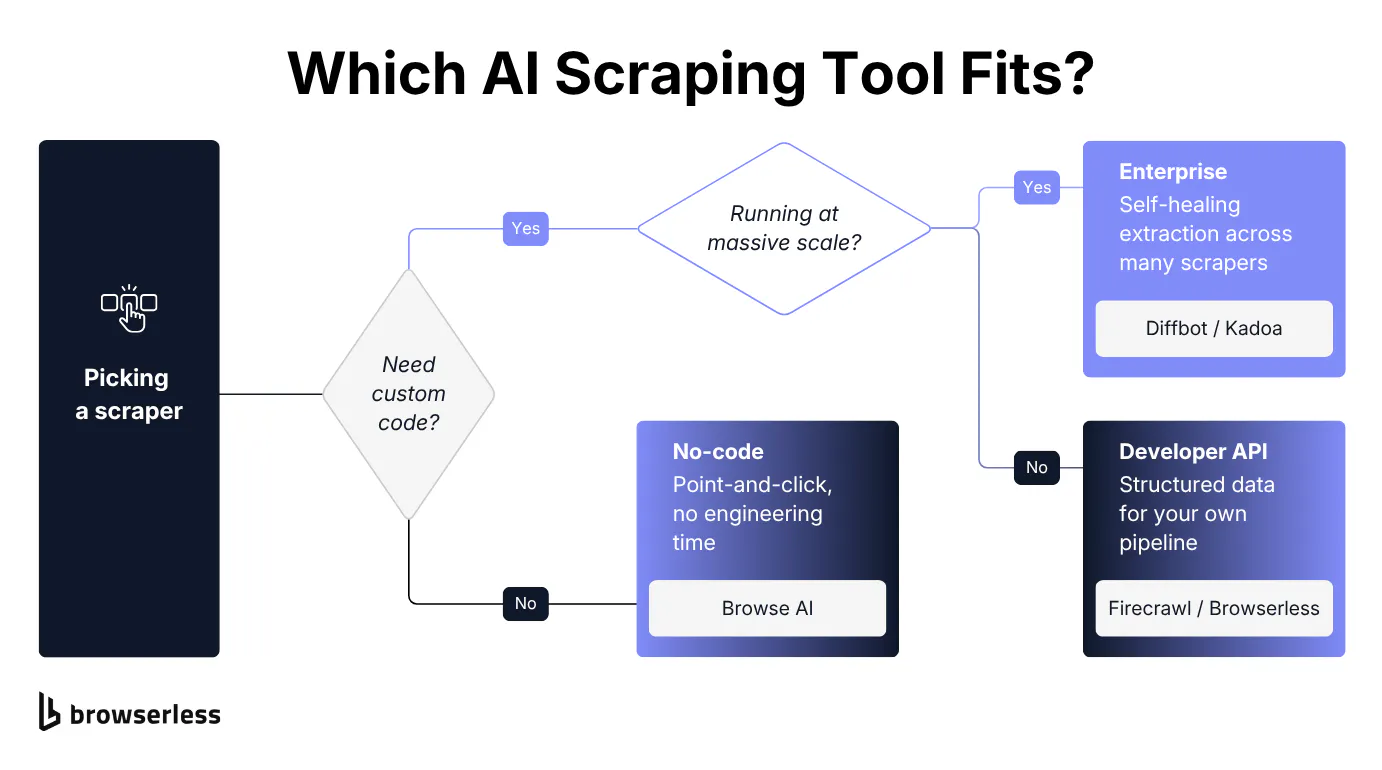
A few honest starting points: if you don't want to write code and you're monitoring a handful of sites, start with a no-code solution like Browse AI or Thunderbit. If you're building an AI agent or LLM application and need clean, structured output at API scale, Firecrawl or ScrapeGraphAI fit better than a point-and-click tool ever will.
If you're running hundreds of scrapers in production, look at Diffbot or Kadoa. If you're writing the scraper or agent yourself and just need reliable browser infrastructure underneath it, that's the gap Browserless fills.
Every tool here has a free tier except Kadoa, which publishes no pricing at all, and most measure usage in AI credits or pages rather than a flat seat count, so the cheapest way to answer the question is usually to run your actual targets through two or three of them before committing to a paid plan.
Browserless's broader roundup of web scraping tools and comparison hub are useful next stops if none of the eight above turn out to be the right fit.
Conclusion
Which tool fits you comes down to whether you're buying a finished product or building your own, and building your own always comes back to the same infrastructure question.
That's exactly the infrastructure question Browserless answers. The /smart-scrape cascade, a plain HTTP request first, then a proxy, then a full rendered browser, then CAPTCHA solving if the page needs it, handles that escalation automatically instead of you hard-coding it yourself. Connect your existing Puppeteer or Playwright code and try it against a page that's been blocking you, no credit card required, once you sign up for Browserless's free plan.
AI scraping tools FAQs
Is AI scraping legal?
Scraping publicly available data is generally legal in the United States and most jurisdictions, but "generally legal" isn't "always fine," and what actually makes scraping legal or not is a fuller topic than a couple of paragraphs can cover.
A few practical guardrails apply regardless of which tool does the extraction. Check a site's terms of service and robots.txt before scraping it, since ignoring an explicit prohibition is a contract issue even where scraping itself isn't illegal. Avoid data behind a login wall, which shifts the analysis toward unauthorized access rather than public collection.
Personally identifiable information carries its own obligations under laws like the General Data Protection Regulation (GDPR) and California Consumer Privacy Act (CCPA), separate from scraping rules generally. None of the tools above grant a legal exemption from any of that. They extract data faster, but using it lawfully still sits with whoever runs the job.
Which AI tool is best for scraping data?
There's no single best tool across every use case. The right pick is tied to whether you need a no-code interface, a developer API, enterprise-scale monitoring, or infrastructure to build your own scraper on. See the how-to-choose section above for a breakdown.
Can ChatGPT do web scraping?
ChatGPT can fetch and read a single page you give it a URL for, but it isn't a dedicated web scraper and struggles with multi-page jobs or anything at real volume. The tools above are typically used alongside an LLM like ChatGPT, not as a replacement. A dedicated scraper extracts the data, then hands it to the LLM to summarize or act on.
Do these tools export straight to Google Sheets?
Most of the no-code tools here, including Browse AI, Octoparse, and Thunderbit, support direct export to Google Sheets alongside Airtable and CSV. The developer-first and enterprise tools return structured JSON through their APIs instead, and getting that into a spreadsheet means writing a small integration or using a connector like Zapier.
Can AI scraping tools handle job boards and other fast-changing sites?
Yes, and it's a category where AI scraping tools have a real edge over fixed selectors. Job boards, real estate listings, and marketplace sites change layout and content constantly, which is exactly the pattern AI-driven extraction handles better than rules built for a static page. Browse AI, Octoparse, and Thunderbit all market listing scraping specifically, and Kadoa's self-healing extraction is built around exactly this kind of high-change target.
Do any of these tools offer unlimited robots or credits?
No. Every tool in this roundup, no-code or developer-facing, meters usage somehow: credits, pages, or concurrent runs, even on its highest published tier. Nobody advertises unlimited robots or unlimited credits – the underlying cost (browser rendering, proxy bandwidth, or LLM tokens) scales with every page you touch. Treat any plan that claims unlimited usage with the same skepticism you'd apply to unlimited cloud storage.