
TL;DR
- CPUs handle logic, GPUs handle math. A CPU has a few powerful cores that crush sequential, decision-heavy work. A GPU has thousands of simpler cores that crush the same math repeated across huge datasets.
- CPUs win anywhere one step depends on the last: web servers, databases, browser automation, anything with branching.
- GPUs win when the same operation repeats billions of times: model training, inference, graphics, and scientific simulations.
- Headless browser automation is CPU work. V8 parsing, DOM manipulation, network juggling. None of it uses a GPU. That's why running Chrome on a GPU box is a waste of money. Browserless runs managed Chrome on CPU-tuned infrastructure so your GPU stays busy serving your model.
Introduction
CPU vs GPU used to be a question for gamers and video editors. Now it shapes how you build AI pipelines, what your cloud bill looks like, and whether your machine learning model sits idle while your browser works. An AI agent that scrapes pages and feeds the data to a language model runs on both kinds of hardware at once, and getting the split wrong is how infrastructure bills blow up. Plenty of comparisons stop at "one's sequential, one's parallel" and leave you to figure out the rest. This guide covers the rest: how the two processing units handle work, which workloads belong where, and why browser automation stays on CPU even when it lives next to a GPU model.
How CPUs and GPUs process information differently
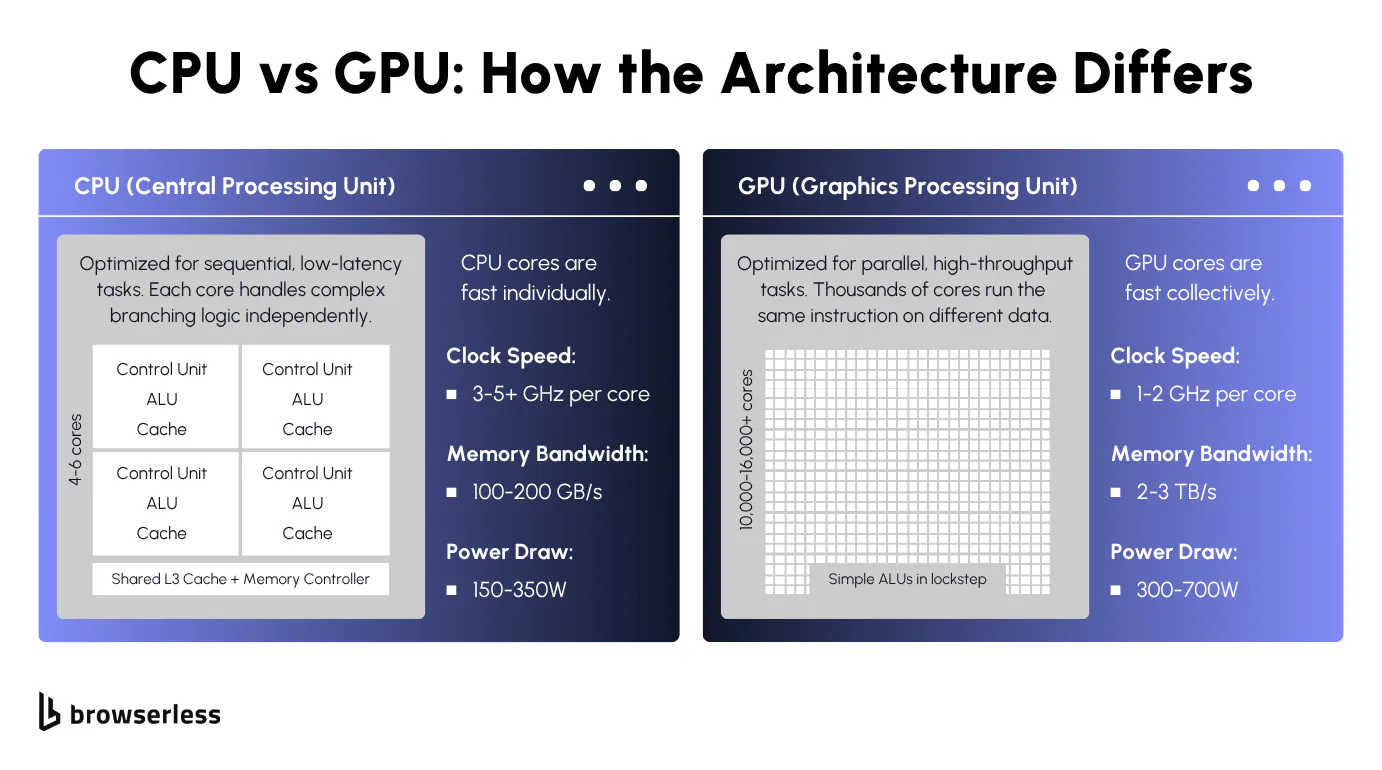
What a central processing unit does and how it works
A CPU is the central processing unit in your machine. It handles your operating system, your app logic, your I/O, and every branching decision in between. Unless you've explicitly punted something to a GPU, TPU, or other accelerator, it's the CPU doing the work.
Modern CPUs pack multiple cores, 16 to 128 in typical server parts, with flagship parts reaching 192 on AMD Turin and up to 288 on Intel Sierra Forest E-core SKUs. These multi-core CPUs run at high clock speeds, 2-5+ GHz depending on the base and boost frequencies.
But raw clock speed isn't what makes a core fast. It's how efficiently the core rips through a chain of dependent steps. Branch prediction, speculative execution, big caches, and a complex control unit schedule instructions through the instruction cycle.
All tuned to keep one thread moving. That's how CPU architecture handles general-purpose tasks and complex tasks alike. That's why CPUs dominate processing tasks where step B depends on step A.
Parsing JSON, evaluating an if-statement, walking a DOM tree, and routing a database query. None of it parallelizes. That's sequential processing, and it wants fast, smart cores, not thousands of simple ones.
A 64-core server CPU is fast per core, but 64 cores are still 64 cores. Run the same operation across millions of data points at once, and you hit a wall. That wall is why GPUs exist.
What a graphics processing unit does and how it works
Graphics processing units (GPUs) started life as pixel-pushers for computer graphics: millions of independent calculations, one per pixel, all running at the same time. That hardware pattern turned out to fit anything else shaped like "same math, massive dataset," which is how GPUs ended up running machine learning and deep learning workloads, too.
A modern high-end graphics processing unit packs thousands of cores. NVIDIA's H100 has over 16,000. Each core is simpler and slower than a CPU core, but when many cores run the same instructions at once, the throughput dwarfs any CPU.
GPU cores are stripped down, fed by huge memory bandwidth, and run in lockstep with each other. That's parallel processing at its simplest: one instruction, many data points (SIMD).
This execution model makes GPUs ideal for parallel computing workloads in which the same calculation runs across many tasks simultaneously. A GPU trades latency for volume. Factory floor, not decision-maker.
Unlike CPUs, GPU cores can't handle branches, sequential dependencies, or irregular memory access. They lack the control-unit complexity that CPUs have. Parallel processing falls apart when step 1's output feeds step 2, and the core just sits there waiting. Thousands of idle cores at cloud GPU rates get expensive fast.
Differences between CPUs and GPUs
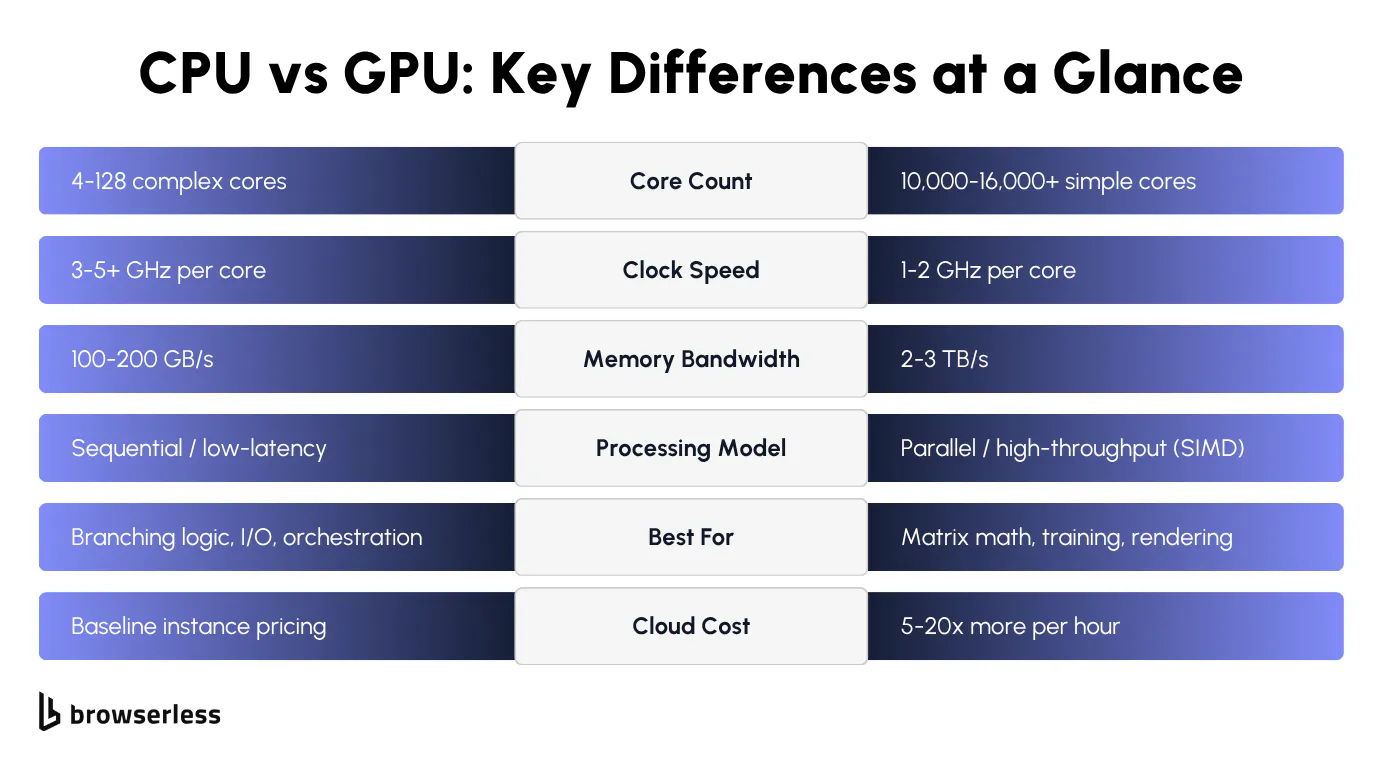
Both processing units were designed for different kinds of problems. The key differences show up in how they handle workloads, and the specs below make the tradeoffs concrete.
Architecture and performance characteristics
Between the two processing units, four specs decide how each performs under different computing demands: core count, clock speed, memory bandwidth, and power consumption.
The main difference between them shows up here:
Cores
A high-end server CPU has 96 to 192 powerful cores optimized for decision-heavy work. A high-end GPU has 16,000 to 20,000+ simpler, smaller cores (NVIDIA B200: 20,480; RTX 5090: 21,760). Sounds like the GPU wins 100 to 1. It doesn't. Those aren't comparable processing cores. A CPU has fewer cores, but each core is a full processor that can handle any instruction you throw at it. A GPU core is an arithmetic lane that only works when thousands of its siblings are doing the same math. More cores on a GPU mean more lanes running the same instruction in parallel, not a faster overall processor. Count them wrong, and you end up with hardware that disappoints.
Clock speed
CPUs run at 2 to 5+ GHz; GPUs at 1.5 to 2.5 GHz. One CPU core finishes one complex task faster than one GPU core, every time. The GPU's counter is volume: thousands of slower cores attacking the same problem at once.
Memory bandwidth
This is where GPUs pull way ahead. A data-center GPU pushes 3 to 8 TB/s (H100: 3.35, H200: 4.8, B200: 8). A server CPU on DDR5 tops out around 500 to 800 GB/s per socket. A typical desktop is under 100. Feeding thousands of cores in parallel is the whole game, and GPUs are built for it.
Power draw
A high-end GPU draws 400-1000W+ under load (B200 hits 1000W per module). A server CPU draws 150-500W. That's most of the reason high-performance GPU instances cost what they do. Cooling and electricity add up.
The most common mistake is pairing a powerful GPU with a weak CPU. The CPU still feeds the GPU: data flow, I/O, scheduling. If it can't keep up, the GPU sits idle between batches.
GPU compute instances (AWS p4d/p5, GCP A2/A3, and similar) cost 3 to 10x what comparable CPU instances do, with B200 and H200 SKUs at the top of that range.
For example, a team might spin up a p4d for the model, then run scraping and orchestration on the same box because "it's already there." At those per-hour rates, it's an expensive way to run Chrome.
Use cases for CPUs and GPUs
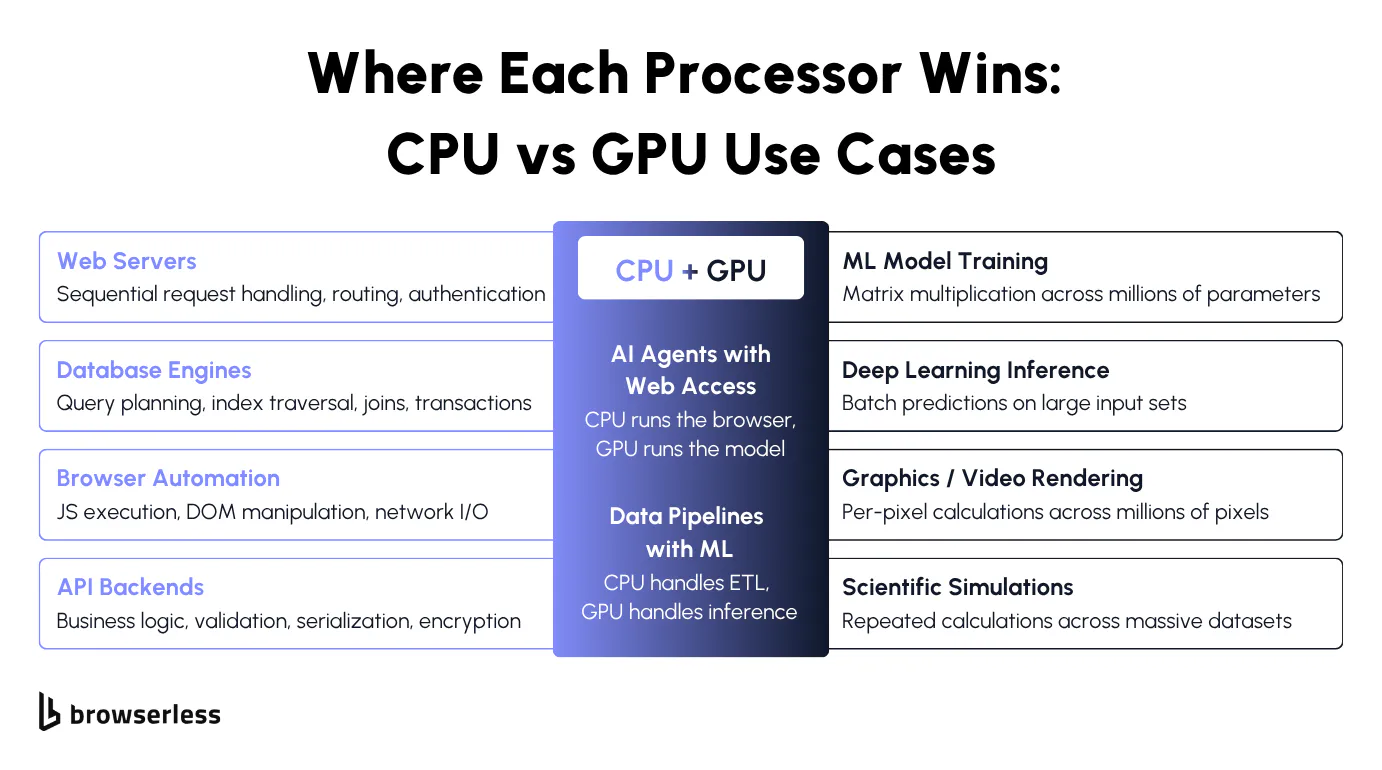
Different workloads stress different processing units. The list below covers specific workloads you're likely to run, from the general-purpose tasks CPUs excel at to the parallel processing workloads GPUs were built for.
Machine learning training (GPU)
The LLM your scraping agent calls was almost certainly trained on a GPU cluster, running the same multiply-and-add operation across neural networks with millions of parameters, billions of times a second.
This is how machine learning workloads scale across high-performance computing clusters. Training machine learning models, especially large deep learning models, collapses weeks of CPU work into hours on GPUs. It's the flagship GPU job for a reason.
Model inference (GPU)
Running a trained model on new data, known as deep learning inference or machine learning inference, is also GPU-heavy, though less intense than training. Each call still involves big matrix math, and batched inputs map cleanly to GPU-parallel processing across large datasets.
Running thousands of tasks simultaneously in parallel is what GPUs were built for. Every artificial intelligence API you've ever called was talking to a high-performance GPU cluster in a data center, handling artificial intelligence workloads that would be infeasible on CPUs.
Graphics and video rendering (GPU)
Every frame of a modern game or film is millions of pixels getting lit, shaded, and textured independently. Same shape as training neural networks. Computer graphics, modern games, film VFX, 3D visualization, professional video editing and video rendering, and color grading all map to high-performance parallel workloads. From video editing suites to real-time game engines, these workloads run on specialized processors like the graphics processing unit: same math, same hardware.
High-performance computing (GPU)
Molecular dynamics, climate models, and financial Monte Carlo simulations follow the same pattern: the same calculation repeated across large datasets. These high-performance computing tasks are the extreme end of parallel computing, and they have moved from CPU supercomputers to GPU clusters in data centers over the last decade. GPU availability, not CPU availability, is now the bottleneck for anyone training or inferencing at scale in modern computing.
Web servers, APIs, and databases (CPU)
An API request hits your backend the same way every time. Parse headers, check a JWT, query Postgres, format the response. Each step waits on the last, and throwing GPU cores at it wouldn't reduce latency because none of them support parallel processing. These are single-threaded tasks that cover databases, backend services, microservices, and anything else built on sequential business logic. Classic CPU processing tasks.
Headless browser automation (CPU)
If you come to headless browsing from an AI/ML background, it catches you off guard. Headless Chrome is pure CPU work: parsing JavaScript, walking the DOM, calculating CSS, juggling network callbacks. All sequential, all branch-heavy, all CPU-bound.
AI agents that browse the web (hybrid)
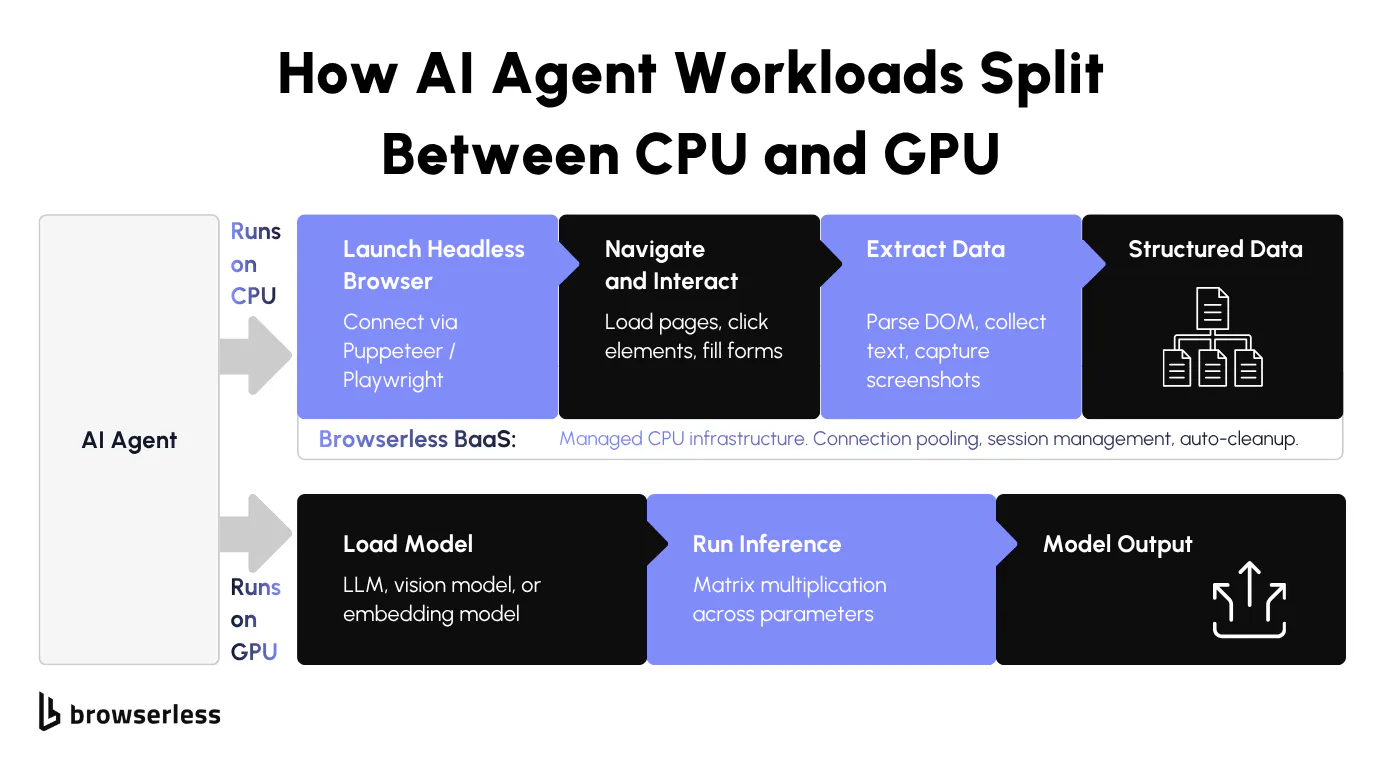
AI agents that browse the web for RAG pipelines or for autonomous testing are hybrid AI tasks that require both CPUs and GPUs. Language model on the GPU, browser on the CPU. Mix them up, and you pay GPU prices to run Chrome, or you starve a strong GPU model by cramming 50 browser sessions onto the same box.
Headless browsers, AI agents, and why the CPU still matters
This is where the GPU-CPU split matters most in AI agent architectures; getting the two processing units paired correctly determines whether your cloud bill makes sense.
Why headless browsers run on CPUs, not GPUs
When headless Chrome loads a page, the V8 JavaScript engine kicks in (V8 is a just-in-time compiler that runs on the central processing unit). HTML gets parsed, the DOM gets built, scripts execute, and network callbacks get juggled. All of it is sequential CPU work driven by the operating system's thread scheduler. Nothing in the pipeline wants a GPU.
Browsers do use GPU acceleration (integrated graphics on most laptops, dedicated graphics cards on desktops), but only for visual rendering: compositing layers, rasterizing pixels, CSS transforms, animations.
Headless mode has historically run with --disable-gpu, and for normal scraping or DOM extraction, the browser doesn't touch a GPU anyway. GPU acceleration still matters for rendering-heavy headless work like screenshots, video recording, WebGL, and WebGPU. For everything else, it's dead weight.
If you do have a GPU-requiring use case, we can host a private deployment on our Enterprise plans with that infrastructure provisioned for you. Contact us for more info.
Each headless session eats CPU capacity and RAM, not GPU compute. Scaling browser automation from 10 to 100 concurrent sessions means adding more cores and memory. For JavaScript-heavy scraping and DOM work, more GPU resources do nothing for you. You need more CPU and more RAM.
If you've been scaling AI workloads, your instinct is "more compute, more GPUs." For the browser side of an AI stack, that instinct is backward. More CPU cores, more RAM. Running headless browsers on GPU instances means paying AI-tier hourly rates for compute the browser never uses, even on a high-end GPU.
How Browserless handles CPU-intensive browser workloads
Browserless runs managed Chrome on infrastructure built for one thing: CPU-bound browser work at scale. Connection pooling, session management, resource allocation, and automatic cleanup are tuned for the CPU and memory profile that headless browsers actually need. The scaling and session plumbing that usually eat up a team's time are already handled.
You connect via WebSocket using Puppeteer or Playwright (BaaS - Browsers as a Service). The change in your code is one line: swap puppeteer.launch() for puppeteer.connect() pointed at a Browserless endpoint. The browser runs on our CPU infrastructure instead of yours.
For AI agent architectures that combine language models with web scraping, Browserless takes the browser half off your plate. You're not provisioning a second box of CPU infrastructure to sit next to your GPU model.
Run fifty scraping agents in parallel, and the browser half alone is chewing through fifty CPU cores. If those cores live on the same box as your model, the LLM you're paying for gets starved.
A p5.48xlarge on AWS runs about $25K/month on demand, and the moment CPU contention starts dragging token throughput, you're paying AI-tier hourly rates for the privilege of running Chrome. Move the browser to Browserless, and the GPU box gets to do the job you're paying for: serving the model.
To illustrate, here's how you would connect to Browserless, load a page, and pull structured data back for the model:
const puppeteer = require("puppeteer-core");

// Connect to Browserless (CPU infrastructure handles the browser)
const browser = await puppeteer.connect({
  browserWSEndpoint: "wss://production-sfo.browserless.io?token=YOUR_API_KEY",
});

const page = await browser.newPage();
await page.goto("https://www.browserless.io/blog/browser-automation", {
  waitUntil: "domcontentloaded",
  timeout: 30000,
});

// Extract structured data to feed into an AI model
const structuredData = await page.evaluate(() => {
  const title = document.title;
  const metaDesc =
    document.querySelector('meta[name="description"]')?.getAttribute("content") ||
    "No meta description found";
  const headings = Array.from(document.querySelectorAll("h1, h2, h3")).map((h) => ({
    tag: h.tagName.toLowerCase(),
    text: h.innerText.trim(),
  }));
  const linkCount = document.querySelectorAll("a[href]").length;
  return { title, metaDesc, headings, linkCount };
});

// This JSON output is what your GPU-powered LLM would process next
console.log(JSON.stringify(structuredData, null, 2));

await browser.close();
No Chrome processes to manage, no session cleanup to write, no CPU contention on your GPU box. The model gets clean JSON, and you stop paying for browser work twice.
Conclusion
Picking the wrong processing unit costs real money, both ways. Put a CPU workload on a GPU instance, and you pay several times per hour for cores your code never touches. Put a parallel workload on a CPU, and you wait hours for what should take minutes. Headless browser automation sits firmly on the CPU side of the GPU-CPU divide, which is why Browserless runs on CPU-tuned infrastructure. Your GPU quota stays reserved for machine learning model training and inference. Sign up for a free trial and offload your browser automation to infrastructure built for the job.
FAQs
Is a GPU faster than a CPU?
Depends on the work. GPUs have higher throughput for parallel tasks like matrix math and graphics rendering. CPUs are faster for sequential, single-threaded work like database queries and application logic. For anything with branching or dependencies between steps, a CPU wins every time.
Do headless browsers use GPU?
Not by default. Chrome in headless mode disables GPU acceleration, and for normal scraping or DOM work, the browser doesn't need it anyway. The work that remains (JavaScript, DOM, network) is all CPU-bound. Running headless on a GPU instance means paying for GPU cycles the browser never touches, so scale with CPU cores and RAM instead.
Can you use both a CPU and GPU together?
Most production AI systems do, and it's a pattern that scales across machine learning pipelines and data analysis workloads. The CPU handles orchestration, operating system tasks, sequential logic, and data loading. The GPU handles parallel math like model inference or rendering. The GPU and CPU each do what they're built for, and neither can do the other's job efficiently. Match the workload to the hardware, or you pay for idle capacity on both sides.
Why are GPUs used for machine learning?
Training neural networks for machine learning and deep learning involves matrix multiplication across millions of parameters, billions of times over. A GPU with thousands of cores running that same operation in parallel cuts training times from weeks on CPUs to hours. Every modern language model and image model you use was trained on NVIDIA GPUs in a data center, and the GPU and CPU work together even there: GPUs do the matrix math while CPUs orchestrate the training loop.
What hardware do I need for browser automation at scale?
CPU cores and RAM, not GPUs. Each headless browser session eats CPU and memory. Going from a handful of sessions to hundreds means more CPU capacity and more memory. Unlike machine learning workloads, browser automation gets no benefit from GPU compute. Browserless manages this CPU-tuned infrastructure so you can scale without provisioning servers yourself.