
TL;DR
- Data extraction is the process of pulling clean, structured data out of sources that weren't designed to hand it over.
- You can extract structured data, semi-structured data, and unstructured data, with each needing a different extraction approach.
- In this guide, you will find a 5-step ladder for web extraction, and each step has a clear failure signal.
Introduction
Rows pulled from a database into a warehouse, fields pulled from a scanned invoice, product data pulled from a website that doesn't want you scraping it – each of those tasks involves data extraction, and each needs a different set of tools.
This guide covers all three processes, focusing on the one with the most moving parts: extracting data from the modern web, where scrapers come back empty even when the data loads fine in Chrome, redirects bounce them to login pages, and Cloudflare serves block screens where the article body should be.
There are actually four different failure modes behind one URL bar – static pages, JS-rendered apps, infinite-scroll feeds, and sites that block automated traffic – and the challenge is in identifying what broke before you reach for a heavier tool. The 5-step ladder below maps a tool to each of them.
In this guide, you'll learn what successful data extraction involves, the types of data you'll run into, each step on the web-extraction ladder, when to climb to the next, the best web scraping tools for data extraction, and where Browserless fits in.
What is data extraction?
Data extraction is the process of pulling data out of a source system and turning it into a usable, structured format for storage and analysis. The source can be a database, a PDF, a scanned form, or a website, and the extraction method must match the source: a fixed-schema database needs a query, a scanned invoice needs OCR, and a JS-rendered web page needs a browser that can run its JavaScript.
This guide goes into detail about how you pull structured, semi-structured, and unstructured data out of web pages, JS-rendered single-page apps (SPAs), and network responses, then transform the raw data into a usable format.
Data extraction from web pages is distinct from BI/ETL extraction (databases to a data warehouse) and document extraction (PDFs plus OCR), which are also both covered briefly below.
Types of data extraction: structured, semi-structured, and unstructured data
Before you start any data extraction job, you need to know what type of data you're pulling, as that impacts which tool you use before you've written a line of code.
Structured data
Structured data lives in a fixed schema: rows and columns in a relational database, a CSV export, a JSON payload with predictable keys. It's the easiest type to extract because the shape is already known; structured query language (SQL) or a REST API call is usually enough to get it out, and the result is ready for data analysis without much cleanup.
Semi-structured data
Semi-structured data has some organization but no rigid schema, and can include HTML pages, JSON-LD blocks, XML documents, and log files.
The data is machine-readable and tagged, but the tags vary page to page, so extraction relies on selectors (CSS paths, XPath) or parsers rather than a fixed query. Most web scraping and web data extraction processes this guide covers work against semi-structured data sources.
Unstructured data
Unstructured data extraction is the hardest: prose, PDFs, scanned contracts, images, emails, medical records.
There's no schema at all, just free-form content a human can read but a machine can't parse directly – though AI is getting better every day.
PDFs are often considered to be unstructured data. A scanned PDF with no embedded text layer is unstructured until OCR turns its pixels into text, though a text-based PDF with consistent form fields can behave more like semi-structured data.
Unstructured data extraction typically pairs optical character recognition (OCR) with natural language processing or an LLM, among the newer data extraction techniques that turn prose into structured fields – an AI-assisted shortcut covered later in this guide.
Many extraction jobs encounter more than one type of data in the same pipeline: a web page (semi-structured) might embed a downloadable PDF report (unstructured) that itself links to a database export (structured).
Knowing which type you're looking at before you start is what prevents you from using a browser automation script when a simple database query would do, or vice versa. Pick the data extraction tool after you've identified the type of data, not before.
The three jobs of data extraction
"Data extraction" covers three different jobs, each with its own toolchain.
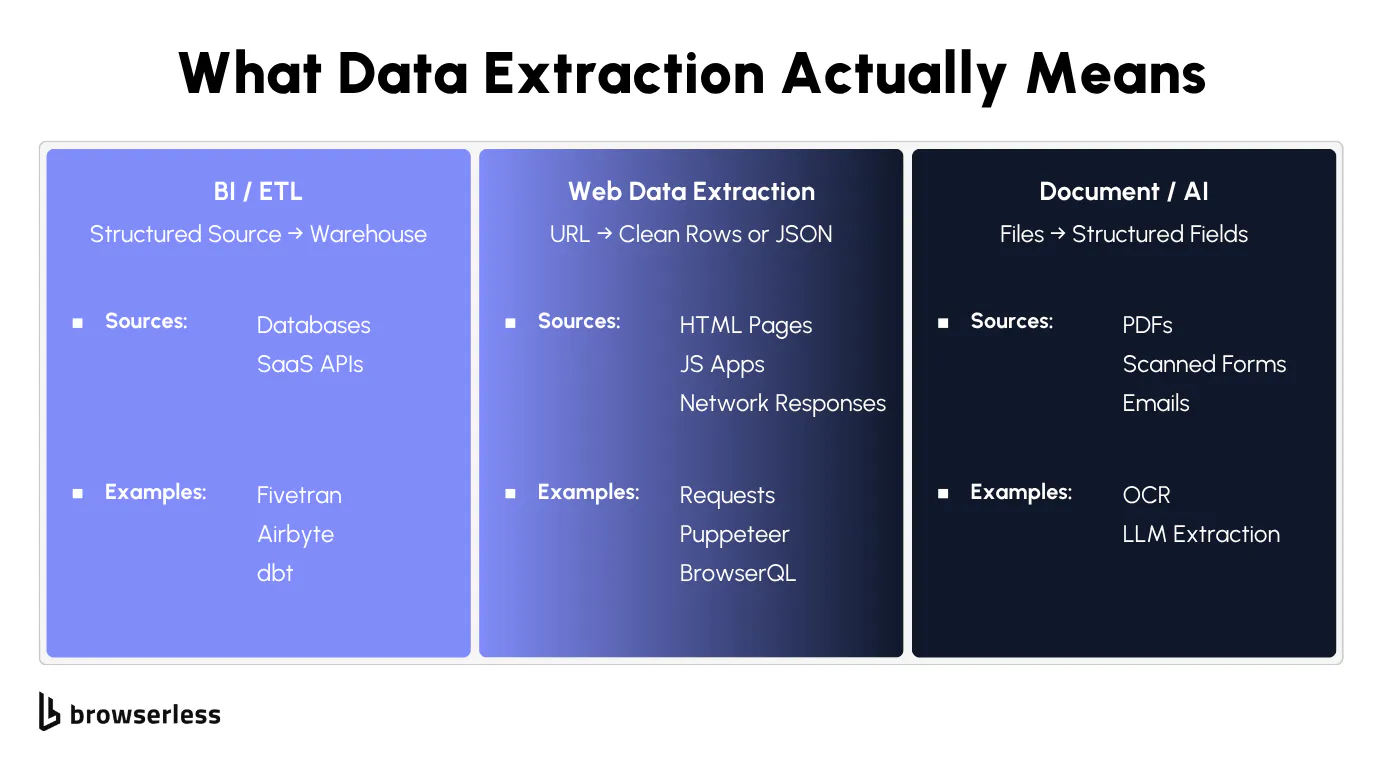
BI/ETL extraction
BI/ETL extraction pulls rows from relational databases and SaaS APIs into a data warehouse with tools like Fivetran or Airbyte. Batch jobs handle full extraction, while change data capture handles incremental extraction in near-real time. A transformation layer such as dbt then shapes the data inside the warehouse. That business intelligence and data integration work requires a different stack from the one covered here.
Document and AI extraction
Document and AI extraction turns PDFs, scanned forms, and emails into structured fields via OCR and natural language processing, storing the extracted data in that structured form. It's the right choice when you want to extract customer data buried in invoices, sensitive data in scanned contracts, financial data trapped in legacy PDFs, or electronic health records pulled from imaging. Our intelligent data extraction write-up covers that stack in detail.
Web data extraction
Web data extraction is the messiest one, and involves you having to pull structured data out of HTML pages, JS-rendered apps, and JSON returned by network calls inside the browser. To do it successfully, we recommend using the 5-step ladder in our guide.
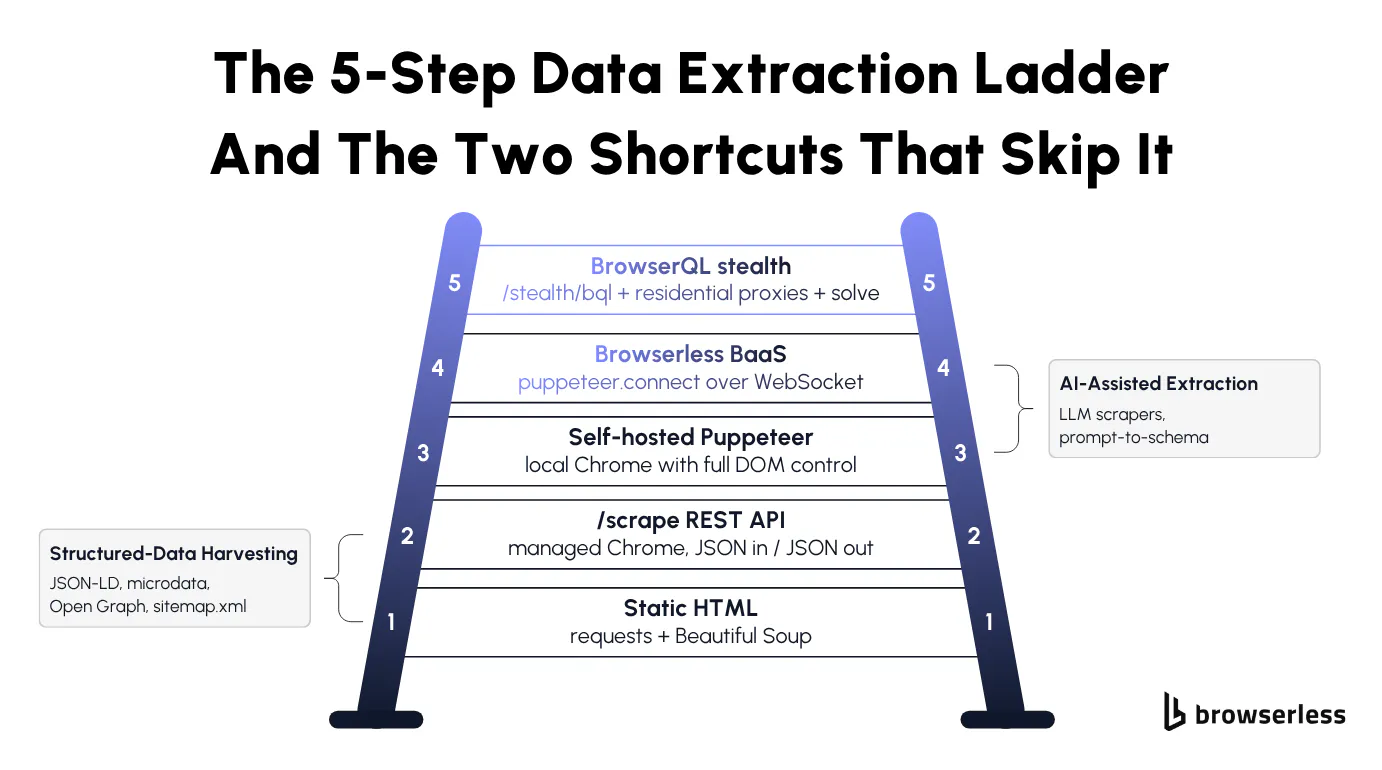
The 5-step data extraction ladder
Every data extraction tool has a domain where it works and a boundary where it stops working, which is why people keep getting blocked, rate-limited, fingerprinted, or outright banned with a tool that worked perfectly on a different page yesterday. Many data extraction challenges trace back to using the wrong tool for the step you're actually on.
A ladder gives you a default order of attempts: try the cheapest tool first, and escalate one step when it breaks. Only skip ahead when a failure signal points past the next step, because every unnecessary step up costs you in proxy spend, code complexity, and detection surface area.
The five steps are:
- Requests plus BeautifulSoup for static HTML.
- The Browserless
/scrapeREST API for rendered pages. - Self-hosted Puppeteer or Playwright for full DOM control.
- Browserless Browsers as a Service (BaaS) for parallel sessions and persisted state.
- Browser Automation Protocol (BAP) with stealth and residential proxies for protected sites.
Two shortcuts can short-circuit the ladder when the site cooperates:
- Structured-data harvesting (JSON-LD, microdata, and OpenGraph) for data the site already publishes for SEO.
- AI-assisted extraction (LLM-driven prose-to-schema scrapers) for pages where selectors aren't worth the maintenance.
If you don't want to pick a rung at all, the /smart-scrape endpoint escalates from a fast HTTP fetch to a stealth browser with CAPTCHA solving in one call, and its strategy field tells you which tier actually got the page. Short on time? Jump to the /smart-scrape section near the end, and come back to the ladder when it isn't enough.
Static HTML data extraction with requests and the Scrape API
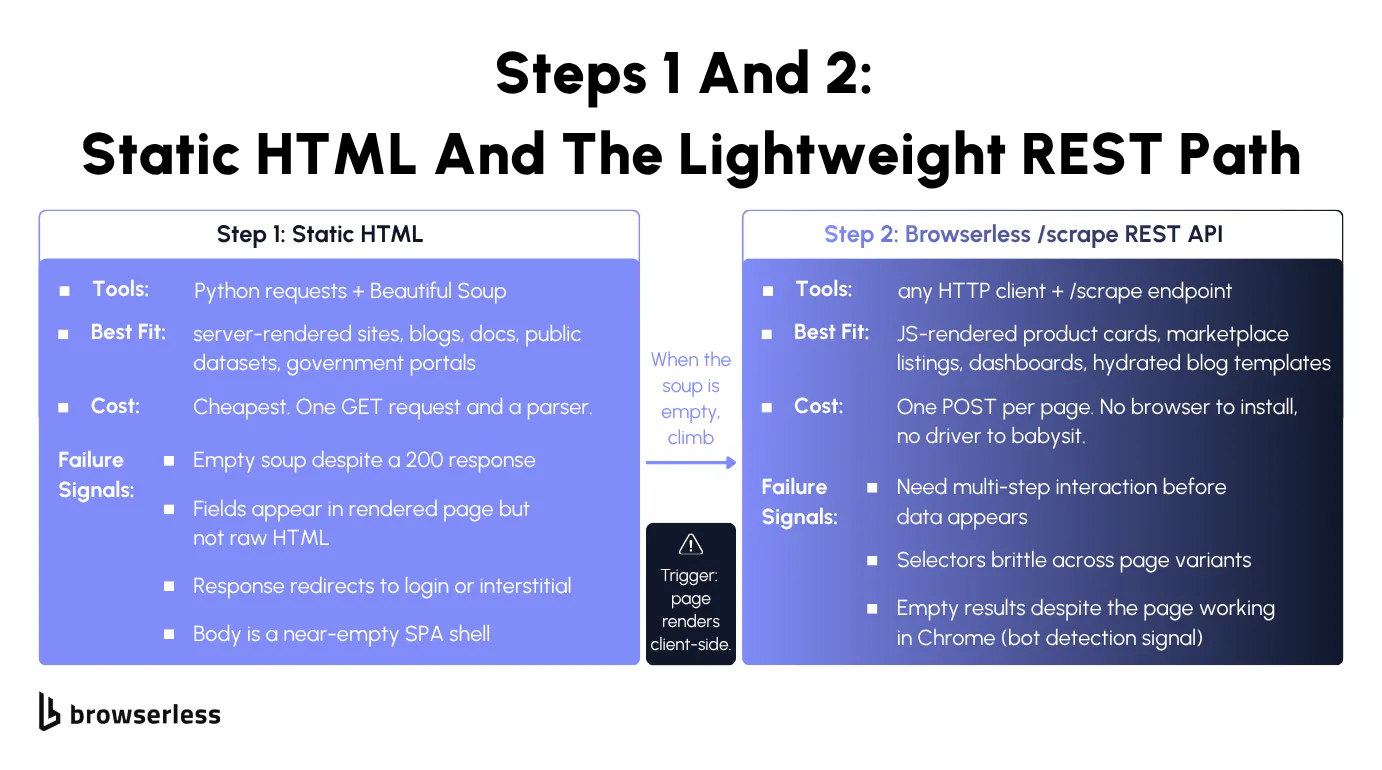
Data extraction from web pages starts with one GET request, an HTML parser, and a CSS selector. It works wherever "View Source" already shows the data. When client-side JS hides the fields, escalate to a managed render endpoint like /scrape.
Step 1: requests and BeautifulSoup for static pages
Static HTML extraction is the first step on the ladder, requiring the one GET request, HTML parser, and CSS selector mentioned above for retrieving data that's already sitting in the page source.
There's no headless Chrome to manage, no proxies to rotate, and the main cost is your own bandwidth, which makes it the cleanest starting point for data collection on server-rendered sites like blogs, documentation portals, public datasets, government data, and news archives.
For step 1, Browserless isn't your default tool, since raw HTTP plus a parser is hard to beat on cost. If you want a managed alternative that reaches sites blocking plain requests, the /smart-scrape endpoint (covered later) ships a browser-shaped fingerprint at the cheap tier.
The snippet below targets books.toscrape.com, the canonical server-rendered scraping playground, and shows the whole step 1 loop end to end.
# pip install requests beautifulsoup4
import requests
from bs4 import BeautifulSoup

URL = "https://books.toscrape.com/catalogue/page-1.html"

response = requests.get(URL, timeout=15)
response.raise_for_status()

soup = BeautifulSoup(response.content, "html.parser")
books = soup.select("article.product_pod")

print(f"Found {len(books)} books on {URL}\n")
for book in books:
    title = book.select_one("h3 a")["title"].strip()
    price = book.select_one(".price_color").get_text(strip=True)
    stock = book.select_one(".availability").get_text(strip=True)
    print(f"- {title} | {price} | {stock}")
Three signals tell you when step 1 will no longer work.
- The
soupyou get back is empty even though the response was a200, or the body is a near-empty SPA shell with a JS bundle below it. - The fields you want aren't in the raw HTML but appear in the rendered page when you load it in Chrome.
- The response redirects to an anti-bot interstitial, or the data sits behind a login that needs cookies you can't set from a single
requests.get.
When any of these fire, the page is rendered client-side or session-gated, and clever workarounds will only buy you a week before something else breaks, so move to step 2 where the /scrape endpoint takes over the rendering.
Step 2: the Scrape REST API for rendered pages
When step 1 failure signals fire, you have two escalations available: spin up a headless Chrome yourself (step 3), or hand the rendering off to a managed REST endpoint – the cheaper option in engineering time.
The /scrape endpoint accepts a JSON body containing a url and an elements array of CSS selectors, then loads the page, runs JS, waits up to 30 seconds for the selectors, and returns each element with its text, html, attributes, and bounding-box info.
It's selector-targeted, meaning you specify which CSS paths to pull and you get those elements back as JSON, whereas /smart-scrape returns full page content and auto-escalates from HTTP up to a stealth browser if needed.
Authentication is a ?token=YOUR_API_TOKEN_HERE query parameter on https://production-sfo.browserless.io/scrape (see the /scrape API docs), so any HTTP client hits it the same way, and step 2 trades a per-request fee for zero ops overhead.
Pointing /scrape at the JS-rendered version of the same demo site at quotes.toscrape.com/js, where a plain requests.get would return only the SPA shell, shows the difference.
curl --request POST \
  --url "https://production-sfo.browserless.io/scrape?token=YOUR_API_TOKEN_HERE" \
  --header 'Content-Type: application/json' \
  --data '{
    "url": "https://quotes.toscrape.com/js/",
    "elements": [
      { "selector": ".quote .text" },
      { "selector": ".quote .author" },
      { "selector": ".quote .tags" }
    ]
  }'
The response groups results by selector. You get a top-level data array where each entry has the selector you asked for plus a results array with text, html, attributes, and bounding box info per match, ready to feed the extracted data into your downstream pipeline.
You know that you'll need to escalate from step 2 when one of these signals shows up.
- You need multi-step interaction (e.g., clicking a tab, scrolling into view, or filling a form) before the data becomes visible.
- The page renders a different DOM under different conditions, so your selectors stay brittle no matter how you write them.
- The
resultsarrays come back empty even though the page works fine in Chrome, which points to a bot-detection block. Try/unblockfirst; if the site still detects the browser, it's time for step 5.
The first two signals point to step 3 and full programmatic browser control, while the third usually means skipping straight to step 5 – Browser Automation Protocol (BAP) stealth is faster than fighting fingerprints with a vanilla browser.
Headless browser data extraction at scale
Headless browser data extraction runs Chrome under script control, so you can click, scroll, fill forms, and wait for network responses before pulling the DOM. Use Puppeteer or Playwright self-hosted at low volume, or a managed BaaS pool when parallel sessions outgrow one machine.
Step 3: self-hosting Puppeteer or Playwright
When the page wants clicks, scrolls, form fills, or waits on a network response before data appears, REST scraping isn't expressive enough. You need a real browser to drive, which is what Puppeteer and Playwright give you.
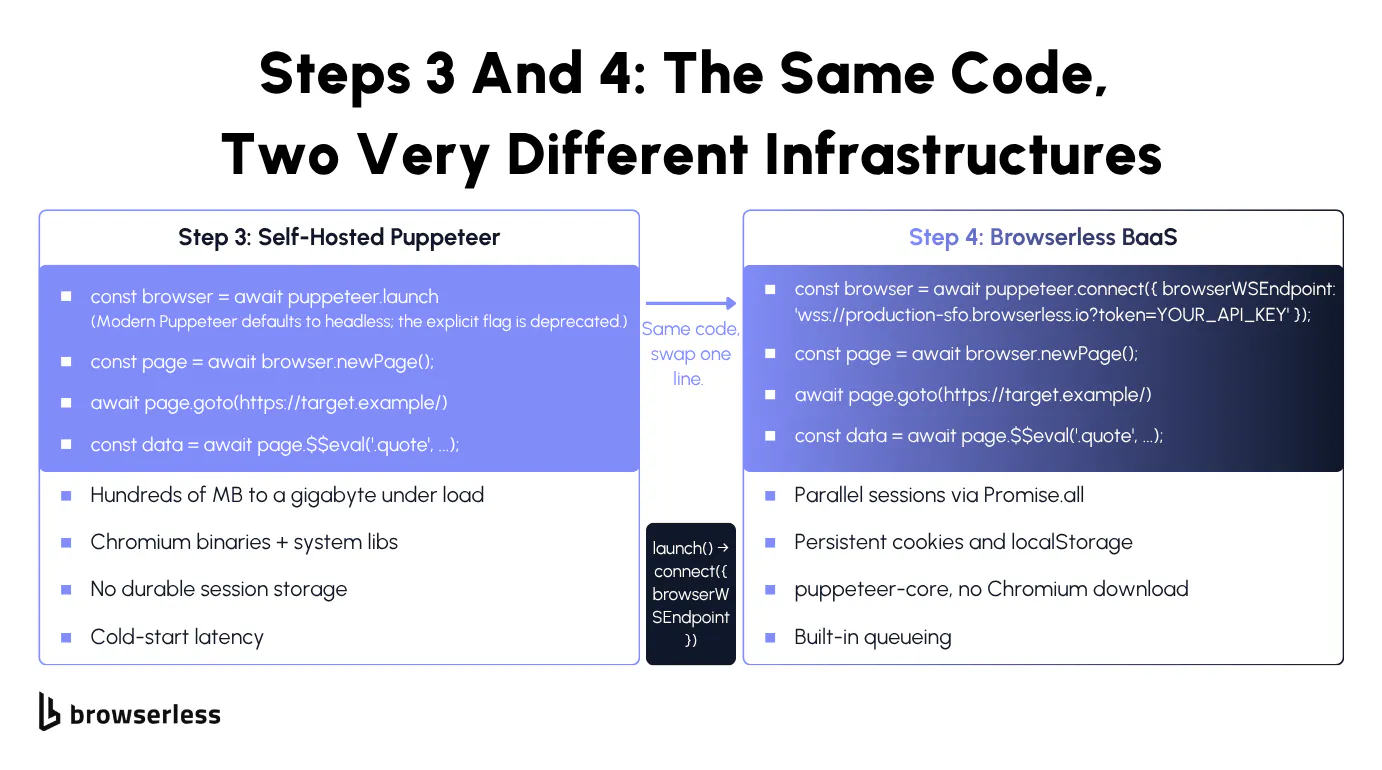
Step 3 is the standard self-hosted setup, and the step Browserless makes optional. You install Puppeteer or Playwright locally, download a Chromium build, and run it on your laptop or in a container, which is free as far as the library goes but expensive everywhere around it – container size, RAM, continuous integration (CI) minutes, and the engineer-hours spent debugging why Chromium won't start on Alpine.
Step 3 is where most teams hit an operations wall, and switching is cheap because Browsers as a Service (BaaS v2) in step 4 uses the same Puppeteer or Playwright API.
Step 3 can help you get around SPAs that hydrate after navigation, infinite-scroll pages, dashboards behind a login, and anything needing a sequence of actions before data appears.
The demo target is quotes.toscrape.com/scroll, an infinite-scroll page that loads more quotes via AJAX every time you reach the bottom, so a static fetch returns only the first batch.
The step 3 script below boots Chromium locally, opens the scroll page, and scrolls until the quote count stops growing.
// npm install puppeteer
const puppeteer = require("puppeteer");

(async () => {
  const browser = await puppeteer.launch();
  const page = await browser.newPage();
  await page.goto("https://quotes.toscrape.com/scroll");
  await page.waitForSelector(".quote");

  // Scroll until the quote count stops growing, since the page lazy-loads via AJAX.
  let previousCount = 0;
  while (true) {
    const currentCount = await page.$$eval(".quote", (nodes) => nodes.length);
    if (currentCount === previousCount) break;
    previousCount = currentCount;
    await page.evaluate(() => window.scrollTo(0, document.body.scrollHeight));
    await new Promise((resolve) => setTimeout(resolve, 1000));
  }

  const quotes = await page.$$eval(".quote", (nodes) =>
    nodes.map((node) => ({
      text: node.querySelector(".text")?.textContent?.trim() ?? "",
      author: node.querySelector(".author")?.textContent?.trim() ?? "",
    })),
  );

  console.log(`Scraped ${quotes.length} quotes`);
  for (const quote of quotes) {
    console.log(`- ${quote.author}: ${quote.text}`);
  }

  await browser.close();
})();
You will find it challenging to self-host Chrome when you try to scale it, and you'll know step 3 has reached its limits when you start hitting any of the following.
- Each Chrome session eats hundreds of MB to a gigabyte under load, and your laptop or container falls over the moment you try to run several in parallel.
- CI containers and AWS Lambda need Chromium plus a stack of system libraries –
libnss3,libatk-bridge,libgbm, and the rest – so your install diff balloons into a forty-line Dockerfile. - Cookies and login state evaporate between runs because there's nowhere durable to persist a session.
- Cold-start latency adds seconds to every job, which adds up fast on cron.
Once the bottleneck shifts to working out how to run a hundred Chrome processes reliably, it's time to stop running Chrome yourself and let step 4 take over, which is the same code with puppeteer.launch() swapped for puppeteer.connect().
Step 4: Browserless BaaS for automated extraction at scale
Step 4 keeps your Puppeteer or Playwright code intact and offloads the Chrome process to a managed pool, with a single-line diff from step 3.
You swap puppeteer.launch() for puppeteer.connect({ browserWSEndpoint }) against wss://production-sfo.browserless.io?token=YOUR_API_TOKEN_HERE, or use chromium.connectOverCDP() on Playwright against the same WebSocket URL.
Install puppeteer-core instead of the full puppeteer so you don't pull a second Chromium you'll never launch, and always close pages and connections so the slot frees for the next job.
Parallel sessions now cost a Promise.all instead of a container fleet, and persistent state works by creating a session through the Session API, which takes a ttl for its lifetime, so cookies and localStorage survive reconnects from Puppeteer, Playwright, or any other library.
Puppeteer users can also set processKeepAlive to keep the browser process warm between disconnects; Playwright doesn't support it because it has no disconnect() method.
A separate, shorter-lived mechanism, the CDP Browserless.reconnect command, is Puppeteer-only because it relies on browser.disconnect(). Playwright users should use the Session API instead.
As cloud-based tools go, BaaS is the workhorse for production scraping, handling cron jobs, monitoring scripts, and internal data pipelines, with cost flipping from step 3's fixed infrastructure to per-session usage that stays predictable even as you're collecting large volumes of data.
The step 4 swap demonstrates parallelism via Promise.all against three paginated quote pages, with Browserless owning the Chrome processes. The same launch() to connect() line change carries over to step 3's scroll logic if you needed it here too.
// npm install puppeteer-core
const puppeteer = require("puppeteer-core");

// The only library change from step 3 is launch() to connect().
const BROWSER_WS_ENDPOINT = `wss://production-sfo.browserless.io?token=YOUR_API_TOKEN_HERE`;

const TARGETS = [
  "https://quotes.toscrape.com/js/page/1/",
  "https://quotes.toscrape.com/js/page/2/",
  "https://quotes.toscrape.com/js/page/3/",
];

async function scrapePage(url) {
  // Each task gets its own connection so they truly run in parallel.
  const browser = await puppeteer.connect({
    browserWSEndpoint: BROWSER_WS_ENDPOINT,
  });
  const page = await browser.newPage();
  await page.goto(url, { waitUntil: "networkidle2" });
  await page.waitForSelector(".quote");

  const quotes = await page.$$eval(".quote", (nodes) =>
    nodes.map((node) => ({
      text: node.querySelector(".text")?.textContent?.trim() ?? "",
      author: node.querySelector(".author")?.textContent?.trim() ?? "",
    })),
  );

  // Free the slot for the next job in the BaaS pool.
  await browser.close();
  return { url, quotes };
}

(async () => {
  const results = await Promise.all(TARGETS.map(scrapePage));
  for (const { url, quotes } of results) {
    console.log(`\n${url} | ${quotes.length} quotes`);
    for (const quote of quotes) {
      console.log(`  - ${quote.author}: ${quote.text}`);
    }
  }
})();
Step 4 has hit its limits when the site starts fighting back, with Cloudflare interstitials, DataDome challenges, JA3 fingerprint blocks, and Turnstile widgets that appear only when the request looks automated.
Before climbing to step 5, check whether CAPTCHA is the only blocker. If your fingerprint is fine and only a challenge widget gates the page, you can stay on the BaaS connection and add solveCaptchas=true to the WebSocket URL so Browserless solves CAPTCHA inline in the same Puppeteer or Playwright session without changing routes.
If the site flags the headless browser itself, try a BaaS stealth route before you climb: point the same connection at wss://production-sfo.browserless.io/chromium/stealth?token=YOUR_API_TOKEN_HERE and leave the rest of your code alone. Step 5 is for sites that still detect the browser after that.
Cloudflare-grade data extraction with BAP stealth
Cloudflare-grade data extraction needs a hardened fingerprint, residential IPs, and an automatic challenge solver. BAP's /stealth/bql endpoint applies fingerprint mitigations and entropy injection at the connection level, paired with a solve() method that clears Cloudflare Turnstile, reCAPTCHA, and other supported challenges without you wiring up a separate CAPTCHA vendor.
Step 5: stealth routes and residential proxies
Step 5 is the route for sites that bounce a clean puppeteer.connect() request before your code even runs. That covers Cloudflare-protected portals, DataDome-guarded storefronts, and other heavily defended public sites – the targets where naive web scraping fails outright.
Check the site's terms and applicable laws before you automate against them.
BAP connects over WebSocket to the same three routes as BrowserQL, Browserless's GraphQL-based automation language, so you can pass any of them straight to Browserless.connect():
/chromium/bql– Open-source Chromium with a minimal fingerprint surface, the recommended starting point./chrome/bql– A genuine Google Chrome build for sites that require real Chrome or need built-in video codec support./stealth/bql– A hardened browser with fingerprint randomization, ad and tracker blocking, and a distinct user agent.
Our anti-detection techniques guide walks through what each layer does under the hood.
Residential proxies route through page.proxy(), called before the navigation whose traffic you want proxied:
await page.proxy({ country: "US", sticky: true });
await page.goto("https://nowsecure.nl");
Without sticky: true, BAP can send each matching request through a different IP, so set it whenever the session needs to keep one address, like a login flow or a multi-page crawl. Pass sticky: false if you'd rather rotate IPs, and design any login-bound flow to re-authenticate if the IP changes mid-session.
Step 5 continued: clearing CAPTCHA with page.solve()
To clear an active challenge, call solve(), which auto-detects reCAPTCHA, Cloudflare Turnstile, and other supported challenge types without a type argument.
A typical flow chains goto() to load the page, then solve() to clear whatever challenge appeared, then mapSelector() or html() to pull the extracted data once the page settles.
Step 5 is the most expensive step on the ladder per request, but it takes on work you'd otherwise maintain yourself – TLS fingerprint mismatches, CAPTCHA handling, residential IP rotation, and fingerprint upkeep. Reserve it for the targets that actually need it.
The full step 5 stack fits into a single script. It goes straight to /stealth/bql, since nowsecure.nl exists to flag automation; on less aggressive targets, start with /chromium/bql and switch only if you're detected. The script routes the session through a US residential IP, calls page.solve() to clear any challenge, and pulls cleaned HTML for further processing.
import Browserless from "@browserless.io/bap-ts";

const TOKEN = "YOUR_API_TOKEN_HERE";

const browser = Browserless.connect({
  browserWSEndpoint: "wss://production-sfo.browserless.io/stealth/bql",
  token: TOKEN,
});

try {
  const page = await browser.newPage();

  // Sticky US residential IP for the whole session.
  await page.proxy({ country: "US", sticky: true, type: ["document"] });
  await page.goto("https://nowsecure.nl", { waitUntil: "networkIdle" });

  // Auto-detects the challenge type and clears it in place.
  const challenge = await page.solve({ timeout: 30_000 });

  const { html } = await page.html({
    selector: "main, article, #content, body",
    clean: { removeAttributes: true, removeNonTextNodes: true },
  });

  console.log({ solved: challenge.solved });
  // html now holds your extracted data, ready for further processing.
} finally {
  await browser.close();
}
Scoping by type keeps metered residential traffic to the HTML documents that actually need a clean IP.
If challenge.found comes back false or null, the solver didn't detect a challenge within its timeout. Usually the page didn't show one and html holds the content as usual, but a challenge that renders late inside an iframe or shadow root can slip past, so raise timeout if html still looks like a block page. If found is true but solved is false, check challenge.error and retry before trusting html, because it may still contain the challenge page.
Data extraction shortcuts and the /smart-scrape elevator
Two shortcuts can skip the data extraction ladder entirely when the site cooperates. Structured-data harvesting of JSON-LD, microdata, and OpenGraph pulls data the site already publishes for SEO, while LLM-driven data extraction software extracts a schema from prose when selectors aren't worth maintaining. When neither shortcut fits, /smart-scrape is the cheap first call that handles most sites in one round-trip.
Shortcut 1: Structured-data harvesting
This is the SEO sense of "structured data" (schema.org markup), not the data-shape category from earlier in this guide. Before you start climbing on a new site, check whether the site already hands you the data. A surprising number do.
Modern pages embed JSON-LD blocks (<script type="application/ld+json">) for SEO, microdata attributes (itemprop="..."), Open Graph tags, and sitemap.xml files, and the shortcut fits whenever the site wants search engines to find the data, which covers Schema.org Product markup on e-commerce pages, NewsArticle or BlogPosting on publishers, recipe sites, events, and job boards.
Always inspect the page source first. If JSON-LD already has the fields you need, you've cut the ladder to one HTTP call plus a JSON parse, and when it's sparse, you fall back to the step that matches the page.
Shortcut 2: AI-assisted extraction
When the page structure changes weekly, and the real cost is rewriting selectors every other Tuesday, LLM-driven scrapers – a machine learning approach – extract a target schema from prose instead of CSS paths.
You hand the model cleaned HTML or a screenshot, describe the schema you want, and get JSON back. Pairing the model with a real browser at the hard steps lets the LLM see a fully rendered DOM rather than an SPA shell, which beats brittle selectors when structure drift is your real problem.
It's overkill on stable sites with clean selectors.
The elevator: /smart-scrape in one call
/smart-scrape is a single REST endpoint that starts with a browser-fingerprinted HTTP fetch and falls back to a stealth browser when needed, so the cheap tier handles more sites than naive requests could.
Internally, it walks these four tiers in order:
- Fast HTTP fetch with a browser-shaped fingerprint.
- Proxied HTTP fetch via residential IPs if tier 1 is blocked.
- Headless stealth browser if the page needs JavaScript rendering or the HTTP tiers are blocked.
- Stealth browser plus CAPTCHA solving (reCAPTCHA, Cloudflare Turnstile, and others) when a challenge gates the page itself. Captchas inside forms aren't solved.
The response includes a strategy field naming which tier resolved the page – http-fetch, http-proxy, browser, or browser-captcha – and an attempted array listing every tier tried.
If the strategy comes back as http-fetch but the content looks thin, like an SPA shell that is a few kilobytes instead of the hundred-plus you'd expect, the site is JS-rendered or session-gated, so escalate to step 4 manually with the same token.
The formats array controls what comes back in one call. Asking for ["html", "markdown", "rawText", "screenshot", "pdf", "links"] returns all six, with markdown ready for LLM chunking, HTML for parsing, plain text for lightweight NLP, screenshots for vision models, PDFs for archival, and a link array for crawl discovery.
A profile query parameter loads a persisted browser profile (cookies, localStorage, and IndexedDB) before navigating.
Running /smart-scrape against the static step 1 target returns strategy: "http-fetch" and the full page HTML.
curl --request POST \
  --url "https://production-sfo.browserless.io/smart-scrape?token=YOUR_API_TOKEN_HERE" \
  --header 'Content-Type: application/json' \
  --data '{
    "url": "https://books.toscrape.com/catalogue/page-1.html",
    "formats": ["html", "markdown", "links"]
  }'
The response should come back with ok: true, a content string holding the page HTML, a markdown string ready to feed an LLM, an array of absolute links, and the strategy field showing which tier resolved the page.
Server-rendered sites resolve as http-fetch with payloads in the tens of kilobytes. If a JS-rendered page comes back as http-fetch with thin content, add a positive waitFor (or an actions array) to force the browser strategy. If you need multi-step interaction beyond that, move to step 4 with puppeteer.connect() and the same token.
Conclusion
Production data extraction is less about the latest tool and more about matching the step to the failure mode in front of you.
Steps 2, 4, 5, and /smart-scrape all live on one Browserless account, so climbing the ladder doesn't mean wiring up a new vendor at each step.
Find your current step, push it until it breaks, then sign up for Browserless for free and try the next one.
Data extraction FAQs
What are the two types of data extraction?
Extraction methods can be split into full extraction and incremental extraction.
Full extraction pulls the entire dataset from the source every run, which is simple but wasteful once the source is large.
Incremental extraction pulls only what changed since the last run, using a timestamp, a version column, or change data capture, and it's what most production pipelines use once full extraction stops being practical.
Separately from the extraction-method split, data itself splits into structured, semi-structured, and unstructured, covered above.
What is a data extraction process?
A data extraction process identifies the source system, connects to it (a query, an API call, a scrape, an OCR pass), pulls the raw data out, and validates that what came back matches what was expected before handing it to the next step, typically a transformation or loading stage in an ETL pipeline, or straight to storage for a web-extraction pipeline.
The process differs by source type, but the steps of identify, connect, extract, and validate stay the same whether you're querying a database or scraping a web page.
Is data extraction the same as ETL?
ETL is one specific shape of data extraction, with a structured source system, strict schema, data warehouse destination, and contracts that don't shift mid-pipeline.
Web data extraction is the messy sibling that pulls data out of HTML and network responses, where the schema is whatever you can scrape today and might change tomorrow.
ETL teams use Fivetran, Airbyte, or dbt, while web teams use Puppeteer, Playwright, or Browserless.
How do I extract data from a website that uses JavaScript?
Raw HTTP doesn't run JavaScript, so the moment your requests call returns an SPA shell instead of rendered data, you've outgrown step 1. Use the /scrape endpoint at step 2 when you only need rendering plus selectors, or drive a real browser with Puppeteer or Playwright at step 3 (self-hosted) or step 4 (BaaS) when you need clicks, scrolls, or form fills before the data appears.
The failure signal is always the same: empty results despite a 200 response and the data clearly visible when you load the page in Chrome.
How do I extract data from a site behind Cloudflare?
Vanilla Puppeteer or Playwright leaks headless markers in the navigator object, telltale JA3 TLS fingerprints, and WebDriver flags that Cloudflare reads on the first request. Patching those leaks one by one becomes a treadmill that eats engineer-hours.
Climbing to step 5 is the cleaner option: BAP on /stealth/bql, with page.proxy() for residential IPs and page.solve() for challenges, handles Cloudflare, DataDome, and Turnstile without bespoke fingerprint code.
Which programming language is best for data extraction?
It depends on the step you're on rather than your personal preference. Python is cleanest at step 1, where requests plus Beautiful Soup pairs naturally with pandas downstream, while Node is cleanest at steps 3 and 4, where Puppeteer is first-class JavaScript.
Step 2 is a plain HTTP endpoint, so it works the same in any language. For step 5, BAP has SDKs for both TypeScript and Python.
What's the simplest way to do automated data extraction at scale?
Skip the operations layer entirely and use a managed Chrome service you connect to with the library you already use, which means BaaS over WebSocket via puppeteer.connect or chromium.connectOverCDP for library users, or the Browserless REST APIs, /scrape for targeted selectors and /smart-scrape for full-page content with auto-escalation, for HTTP-only stacks. That's step 4 territory, and it's where most automated extraction at scale should live unless the target site forces you up to step 5.
How do you handle different types of data and protect data quality?
Three types of data show up in web extraction, covered in more depth above. Structured data lives in databases and JSON payloads with predictable keys, semi-structured data lives in HTML pages and JSON-LD blocks with tags that vary page to page, and unstructured data lives in free-form prose and screenshots with no schema at all.
Step 1 and the structured-data shortcut handle the first two on static pages, steps 3 to 5 handle semi-structured on JS-rendered pages, and AI-assisted extraction handles the unstructured tail.