
TL;DR
- Proxy rotation. Routing your outbound traffic through a management server that automatically swaps the IP address you present, drawing each one from a larger pool of proxy servers.
- Rotation methods. Per-request, time-based, and session-based policies decide when the IP changes, trading raw volume against keeping a session intact.
- Proxy types. Residential IPs are hardest to detect. Datacenter IPs are faster and cheaper. Mobile IPs offer the highest anonymity at the highest cost.
- Where Browserless fits. Managed residential rotation lives on the browser connection URL through
proxy=residential,proxyCountry, andproxySticky, with no proxy infrastructure to run.
Introduction
Proxy rotation is the difference between a scraper that finishes its run and one that dies on 429 responses and CAPTCHA walls a week in. Once a single IP address sends too much traffic and gets flagged, the whole job stalls. Rotating proxies spread your requests across a pool of IPs so no one address draws attention, which is why teams lean on them for scraping at scale, dodging IP blocks, evading rate limits, and pulling region-specific data. What follows covers what proxy rotation is, how the IP swap works, how to configure it on a real browser-automation connection, and when rotating is the wrong call.
What is proxy rotation?
Before wiring anything up, it is worth being clear on what proxy rotation actually does and why data teams lean on it so hard. The mechanism itself is simple. A management server swaps your IP from a shared pool as requests go out, which on its own would just be a technical curiosity. What makes it matter is the work it unlocks, from large scraping runs that would otherwise stall to pulling region-specific data from inside a target country.
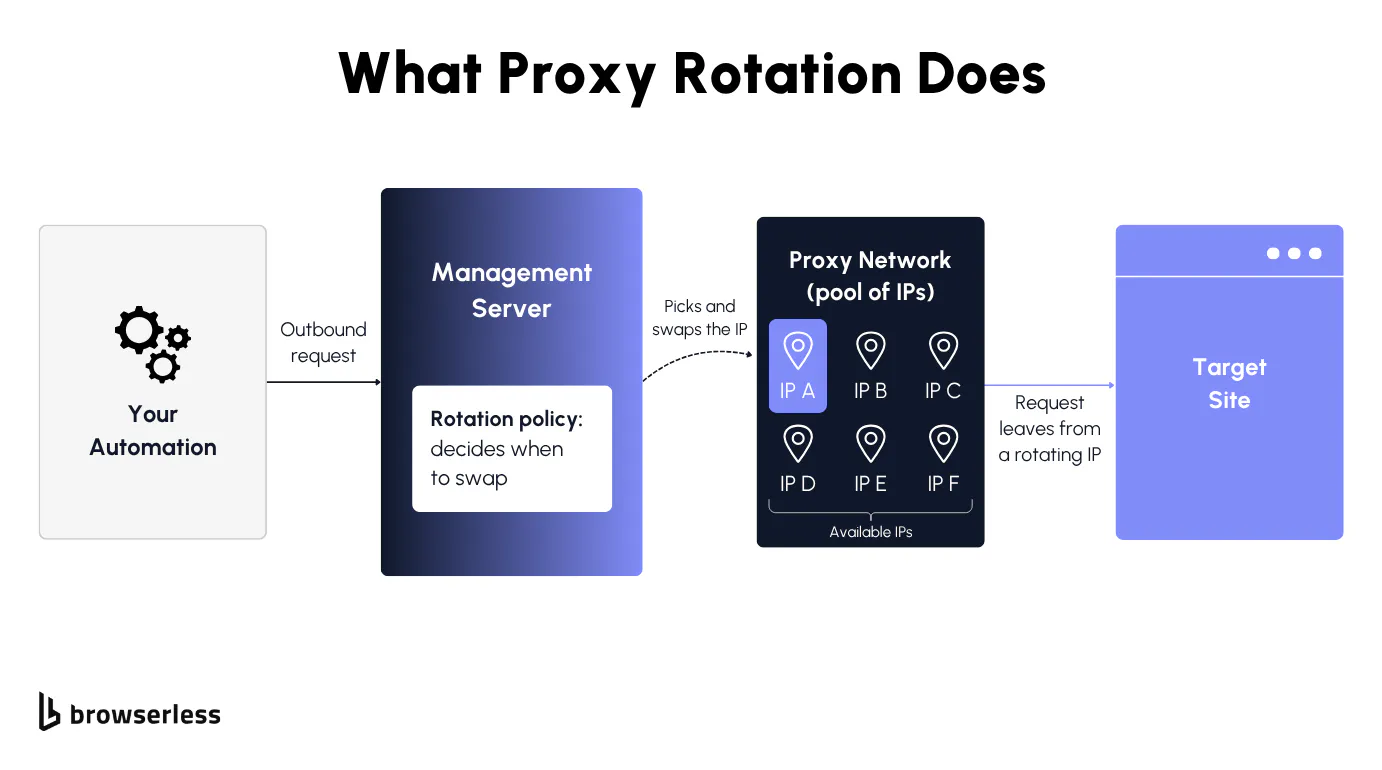
Swapping IPs across a proxy network
Proxy rotation routes your outbound traffic through a management server that automatically rotates the IP address you present, drawing each new IP address from a larger pool of rotating proxy servers. Instead of every request leaving from a single fixed address, multiple requests spread across many IPs, so the traffic looks like it comes from different users.
A few pieces make that work: a rotating proxy network (the pool of available IPs), a management server that picks and assigns an IP per request, and a rotation policy that decides when to swap.
Compare that to a static proxy, which sends every request from one fixed IP. Rotation is the deliberate opposite, and that is exactly what makes large-scale data collection practical.
Why teams rotate for data collection
Rotation exists to keep high-volume jobs running without tripping the defenses that one busy IP triggers. When thousands of requests arrive from a single address in a short window, rate limits and CAPTCHA challenges follow. Spreading the load across many IPs keeps a data collection run from stalling halfway.
In practice, a few specific jobs are what push teams to rotate. Web scraping at scale pulls product and pricing data across thousands of pages a day, the kind of run a price monitor needs to finish without interruption. The same goes for gathering data across global sources, and for any long-running pull where one flagged address could otherwise take the whole job down with it.
Geo-targeting comes almost for free once you are rotating. Because the pool spans IPs from different regions, you can make your traffic look like it comes from inside a target country and bypass geo restrictions to see the region-specific content a local user would.
How proxy rotation works
That leaves two practical questions: how the swap actually happens and what you are rotating through. Timing is one half, since a rotation policy decides whether your IP changes on every request or holds for a full session. The kind of IP is the other half, since residential, datacenter, and mobile addresses trade detection resistance against speed and cost in very different ways.
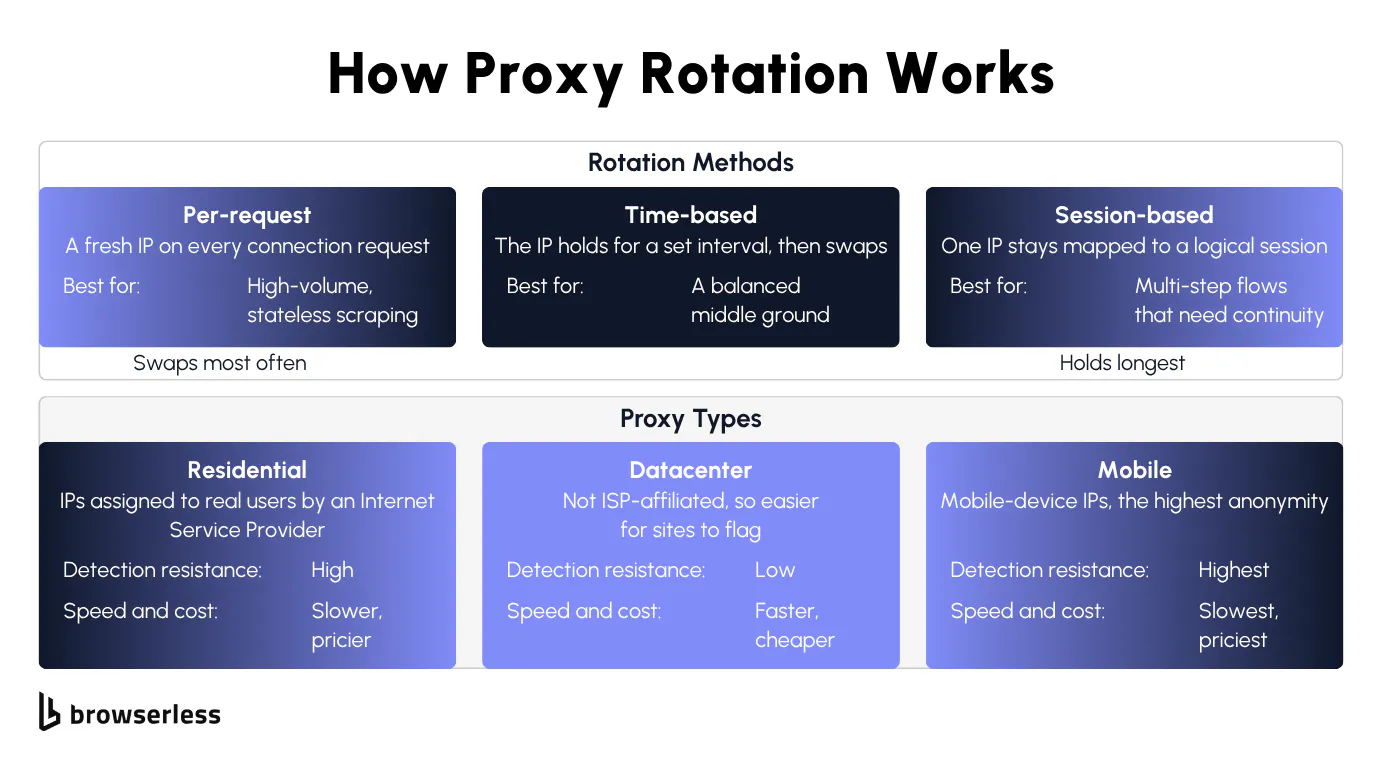
How automatic IP rotation works
The management server runs a rotation policy, and in practice three methods cover almost everything you will run into. Per-request rotation assigns a fresh IP on every connection request, which suits high-volume stateless scraping. For moderate workloads, time-based rotation holds an IP for a set interval and then swaps. When a multi-step flow cannot break mid-task, session-based rotation maps one IP to a logical session.
The cadence is a tradeoff in both directions, since rotating too aggressively breaks stateful flows like logins and shopping carts when the server sees a new address mid-session and challenges it. Rotate too little and request volume piles onto one IP, which brings back the rate limits you were trying to avoid.
Each of these methods maps straight onto a connection parameter, so whichever cadence you want is a single setting once you wire it up.
Residential, datacenter, and mobile proxies
Proxy type decides how detectable your traffic is. Rotating residential proxies use residential IP addresses an Internet Service Provider (ISP) assigns to real home users, so they are the hardest to flag, though slower and more expensive at 6 units per MB on Browserless. Rotating datacenter proxies draw from data centers rather than ISPs, which makes them faster and cheaper at 2 units per MB but easier for a site to spot and block. Mobile proxies route through mobile-device IPs and offer the highest online anonymity, at the highest cost and the lowest speed.
Dedicated rotating proxies are one more variant worth knowing about, reserving a pool for you alone instead of sharing it across many users, trading higher cost for cleaner IP reputation. For most browser automation the practical mapping is straightforward, with residential for hardened targets, datacenter for tolerant or internal ones, and mobile when the defenses are aggressive enough to justify the price. A managed residential proxy folds the type choice and the rotation policy into the browser connection itself.
Configuring proxy rotation in browser automation
With a method and a proxy type picked, the next step is wiring them into a real browser-automation connection, which on a managed service all happens on the connection URL. A handful of query parameters turn rotation on, pin a country, and align the browser locale, and the snippets below run against a live endpoint. Sticky sessions and bring-your-own proxies sit on the same URL for the flows that need them.
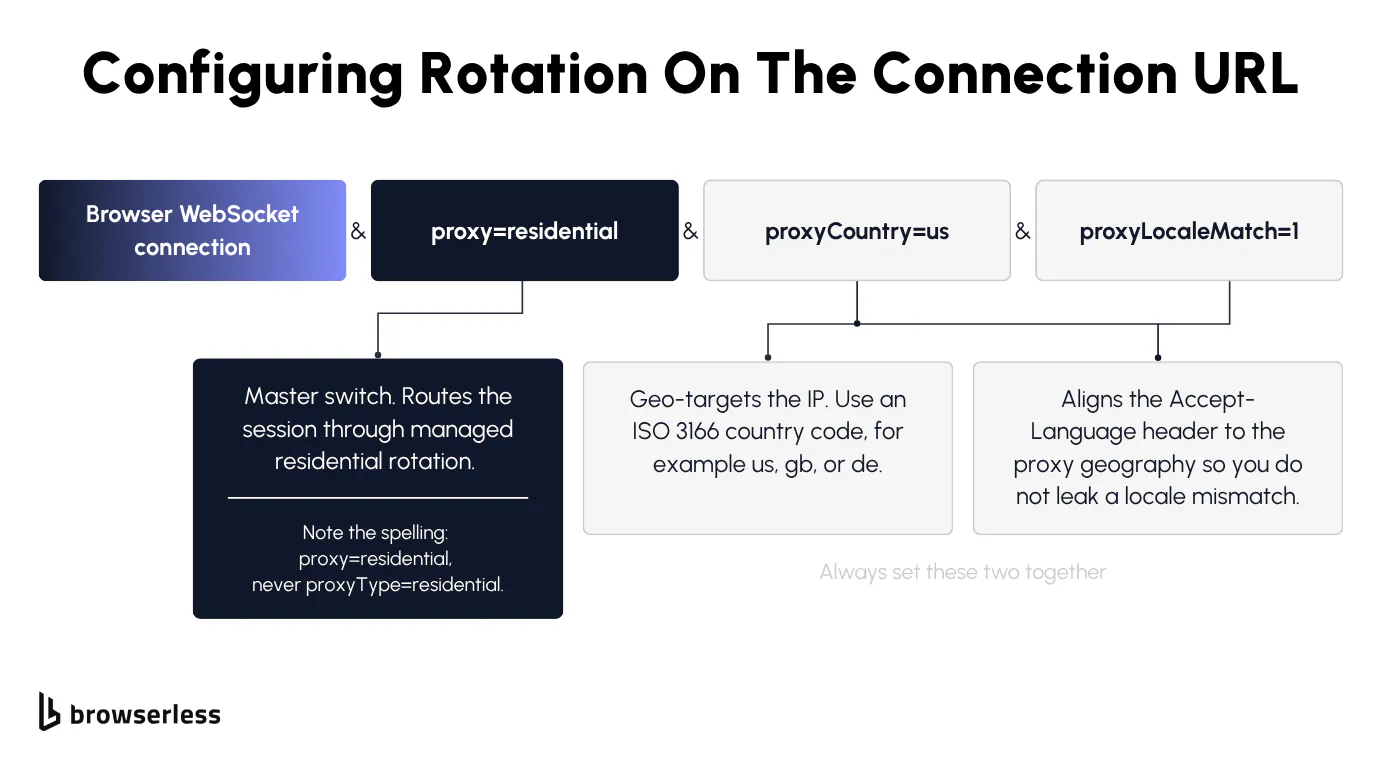
Setting rotation on the connection URL
Rotation lives entirely in the connection string, where you add the rotation settings as query parameters on the browser WebSocket URL and the managed residential rotation handles the pool and the swap behind it. The switch that turns it on is proxy=residential, not proxyType=residential, a spelling that catches people out on their first try. Swap proxy=residential for proxy=datacenter to draw from the cheaper datacenter pool on tolerant targets.
Geo-targeting comes from proxyCountry, which takes an ISO 3166 country code such as us, gb, or de. Whenever you set proxyCountry, set proxyLocaleMatch=1 alongside it on a stealth route so the browser language and locale line up with the proxy geography. The parameter only takes effect on the stealth endpoints (/stealth, /chromium/stealth, /chrome/stealth), so pairing it with the residential proxy there is what stops a US IP from advertising a German language preference, the kind of mismatch detection systems watch for.
To watch rotation happen, open three separate connections over the Browsers as a Service (BaaS) stealth WebSocket, each carrying all three parameters, and print the address the target sees on each one.
const puppeteer = require("puppeteer-core");

const TOKEN = process.env.BROWSERLESS_TOKEN;

// proxy=residential enables the rotating pool, and proxyLocaleMatch=1 aligns the locale to proxyCountry.
const browserWSEndpoint =
  `wss://production-sfo.browserless.io/chromium/stealth?token=${TOKEN}` +
  `&proxy=residential&proxyCountry=us&proxyLocaleMatch=1`;

async function fetchProxiedIP() {
  const browser = await puppeteer.connect({ browserWSEndpoint });
  const page = await browser.newPage();
  await page.goto("https://api.ipify.org?format=json", {
    waitUntil: "networkidle0",
  });
  const { ip } = JSON.parse(await page.evaluate(() => document.body.innerText));
  const language = await page.evaluate(() => navigator.language);
  await browser.close();
  return { ip, language };
}

(async () => {
  // A fresh connection draws a fresh pool IP, so three connections rotate through three.
  for (let i = 0; i < 3; i++) {
    const { ip, language } = await fetchProxiedIP();
    console.log(
      `Connection ${i + 1} IP the target sees: ${ip} (language: ${language})`,
    );
  }
})();
The three connections print three different US residential IPs, which is rotation working, while navigator.language reads en-US on every one. A single connection holds its IP across requests, so a fresh IP comes from opening a new connection rather than from each navigation. On the stealth route, proxyLocaleMatch=1 keeps the browser locale aligned to the proxy country, so a US exit IP never pairs with a contradicting language.
Sticky sessions and bring-your-own proxies
A multi-step flow such as login, then cart, then checkout has to read as one continuous user, so the exit IP can't change partway through. Adding proxySticky tells the proxy network to keep the same IP node for the session, which is what holds a stateful flow together across requests.
Two adjacent parameters round out the set. proxyCity narrows geo-targeting from the country level down to a city but is available on the Scale plan only, so don't assume it everywhere, while externalProxyServer lets you bring your own proxy when you already have a provider you trust. Note that externalProxyServer and the built-in proxies are mutually exclusive on a single request, so combining them returns a 400 error. Bringing your own proxy this way also requires a paid cloud plan.
The example below stands in for that stateful flow, connecting once with proxySticky=true, reading the exit IP at two points in the same session, and reporting whether the address held. For a deeper comparison of sticky versus static behavior, see the residential proxies guide linked above.
import json
import os

from playwright.sync_api import sync_playwright

TOKEN = os.environ["BROWSERLESS_TOKEN"]
# proxySticky=true asks the pool to hold one IP for the whole session.
WS_ENDPOINT = (
    f"wss://production-sfo.browserless.io/chromium?token={TOKEN}"
    "&proxy=residential&proxySticky=true"
)


def read_ip(page):
    page.goto("https://api.ipify.org?format=json", wait_until="networkidle")
    return json.loads(page.inner_text("body"))["ip"]


with sync_playwright() as p:
    browser = p.chromium.connect_over_cdp(WS_ENDPOINT)
    page = browser.new_page()

    first = read_ip(page)   # step 1
    second = read_ip(page)  # step 2, same session

    print("Step 1 IP:", first)
    print("Step 2 IP:", second)
    print("Sticky IP held across both steps:", first == second)

    browser.close()
The snippet compares the two IPs and reports whether they matched rather than asserting they always will.
When to rotate and what breaks
With the wiring done, what is left is judgment about when rotation is overkill and what to do when a rotating proxy still gets blocked anyway. Not every job needs it, and turning rotation on where a static IP would do only adds cost and breaks sessions for no real gain. For the jobs that do need it, even a clean residential IP gets challenged now and then, so the payoff is knowing which anti-block tool to reach for next instead of guessing.
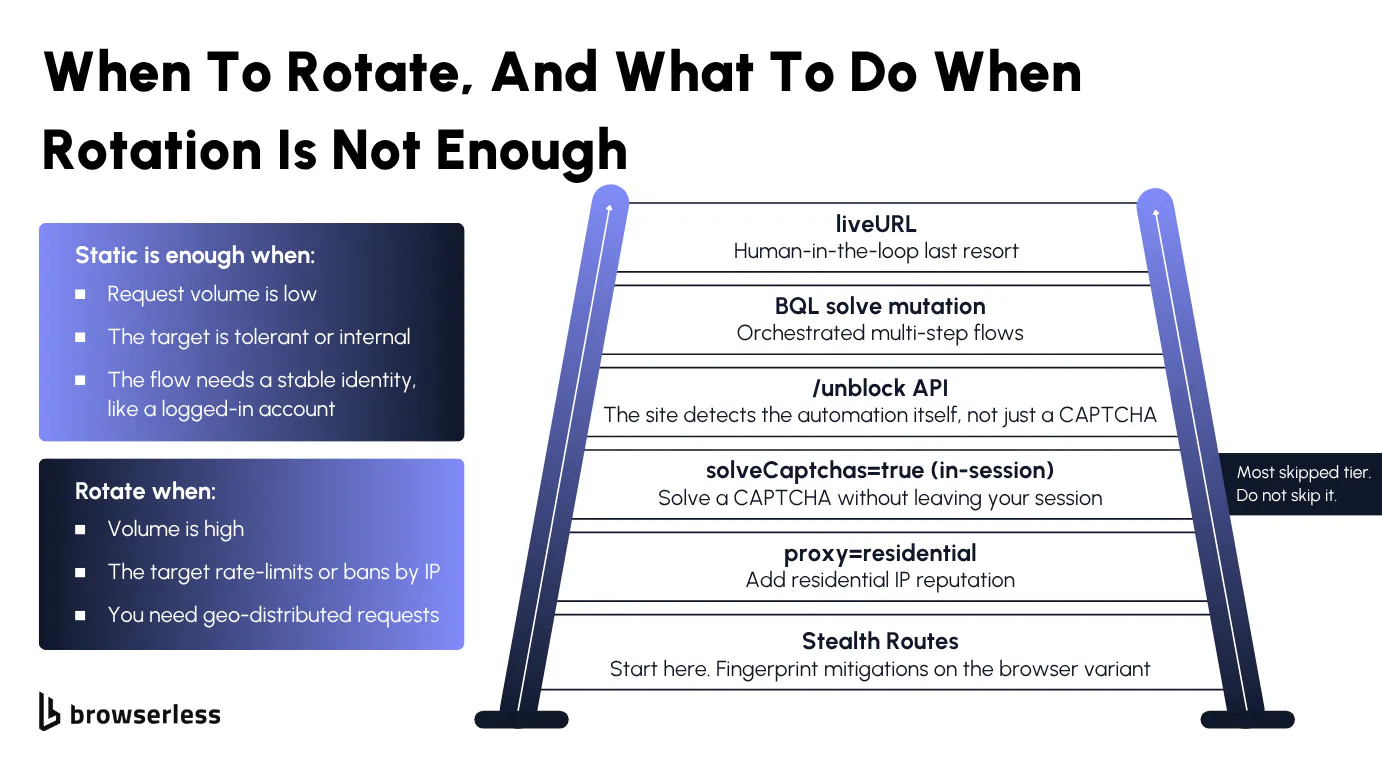
When static beats rotating
Rotation isn't always the right call, since over-rotating breaks sessions for no benefit. Static proxies, or static IPs, are enough when request volume is low, when the target is tolerant or internal, or when the flow needs a stable identity such as a logged-in account.
Rotation becomes the better choice when volume is high, the target actively rate-limits or bans by IP, or you need geo-distributed requests. The cost tradeoff is real and worth saying plainly, since rotating proxies cost more than static ones, and performance swings with IP quality and provider. Turn rotation on when the workload demands it, not as a default.
Surviving rate limits and IP bans
When a residential rotating proxy still gets challenged, the fix is a layered escalation that adds defenses one tier at a time. Browserless layers anti-block defenses across six escalating tools, lightest first.
- Stealth Routes apply fingerprint mitigations so the browser itself looks less automated.
proxy=residentialadds IP reputation on top of the stealth layer.solveCaptchas=true, set on the connection URL, solves a CAPTCHA inside your existing Puppeteer or Playwright session without leaving it.- The
/unblockAPI takes over when the site detects the automation itself rather than just serving a CAPTCHA. - The BrowserQL (BQL)
solvemutation handles orchestrated multi-step flows, covering reCAPTCHA, Cloudflare, DataDome, and other challenge types. liveURLstreams the live browser to a shareable URL a person can take over, the human-in-the-loop last resort when no automated tier clears the challenge.
The tier most setups skip is the third one, since the temptation is to jump from stealth straight to the unblock API. Solving a CAPTCHA in-session keeps you in the same script and avoids a heavier path you may not need.
It's a one-parameter change to a session you already have, since adding solveCaptchas=true to the connection makes Browserless solve the challenge inline. The snippet below stays in Puppeteer, navigates to a reCAPTCHA page, and reads back the solved token without handing off to a heavier endpoint.
const puppeteer = require("puppeteer-core");

const TOKEN = process.env.BROWSERLESS_TOKEN;
const browserWSEndpoint =
  `wss://production-sfo.browserless.io/chromium/stealth?token=${TOKEN}` +
  `&proxy=residential&solveCaptchas=true`;

(async () => {
  const browser = await puppeteer.connect({ browserWSEndpoint });
  const page = await browser.newPage();
  await page.goto("https://www.google.com/recaptcha/api2/demo", {
    waitUntil: "networkidle0",
  });

  // solveCaptchas=true lets Browserless solve the challenge in the same
  // session. Wait for the reCAPTCHA token to populate, then read it back.
  await page.waitForFunction(
    () => document.querySelector("#g-recaptcha-response")?.value?.length > 0,
    { timeout: 60000 },
  );
  const token = await page.$eval("#g-recaptcha-response", (el) => el.value);

  console.log("CAPTCHA solved in-session, token length:", token.length);

  await browser.close();
})();
A populated g-recaptcha-response token is the proof the solve landed, and the script never left the Puppeteer session to get it.
Routing proxies through REST and BrowserQL
At the lighter end, the /scrape REST API can route through residential proxies in a single request.
source .env  # exports BROWSERLESS_TOKEN

# proxy=residential routes this single REST call through the rotating pool, no browser session needed.
curl -s -X POST \
  "https://production-sfo.browserless.io/scrape?token=${BROWSERLESS_TOKEN}&proxy=residential" \
  -H "Content-Type: application/json" \
  -d '{
    "url": "https://books.toscrape.com",
    "elements": [{ "selector": "article.product_pod h3 a" }]
  }' | jq -r '.data[0].results[:3][] | "  - " + (.attributes[] | select(.name == "title") | .value)'
The titles live in the title attribute of each link, so jq pulls that attribute rather than the truncated link text, and the run returns the first few books scraped through a managed residential IP.
At the heavy end, a BrowserQL flow on the stealth route pairs residential proxies with human-like behavior and an explicit solve step. humanlike defaults to false, so you enable it explicitly on the connection URL rather than relying on it being on.
The mutation navigates to a Cloudflare-protected target and then gates solve behind an if selector check so it only fires when a challenge is actually on the page. That gating matters because solve waits for a CAPTCHA and errors on timeout if none appears, and a strong stealth-plus-residential stack often clears the page with no challenge at all.
mutation StealthSolve {
  goto(url: "https://nowsecure.nl", waitUntil: networkIdle) {
    status
    url
  }
  # Gate solve behind the challenge selector so it only fires when one is actually present.
  challenge: if(selector: "iframe[src*='challenges.cloudflare.com']") {
    solve(type: cloudflare, timeout: 20000) {
      found
      solved
      time
    }
  }
  proof: text(selector: "body") {
    text
  }
}
Save that mutation as mutation.graphql and post it to the /stealth/bql endpoint, where humanlike=true and proxy=residential ride along as query parameters since humanlike is off by default.
source .env  # exports BROWSERLESS_TOKEN

# humanlike=true must be set explicitly here since it defaults to off.
jq -n --rawfile q mutation.graphql '{query: $q}' | curl -s -X POST \
  "https://production-sfo.browserless.io/stealth/bql?token=${BROWSERLESS_TOKEN}&proxy=residential&proxyCountry=us&humanlike=true" \
  -H "Content-Type: application/json" \
  --data-binary @-
One more lever cuts cost rather than detection, since reusing a browser across steps with browser reconnects, instead of opening a fresh proxied session each time, reduces how much proxy traffic a job burns through.
Taken together, these tiers show where rotation actually sits in the larger picture. A rotating residential pool lowers the odds of a block, and stacking it with stealth fingerprinting, geo-aligned headers, and in-session CAPTCHA solving is what carries a high-volume job through the challenges that would otherwise stall it halfway.
What makes that stack possible is that every tier rides on the same connection that runs the browser. A standalone proxy pool hands you a fresh IP and stops there, while a managed browser connection lets the rotation and every tier above it run from one place, so you escalate only as far as a target forces you to.
Conclusion
Running rotation yourself means standing up and maintaining three moving parts: a pool of IPs, a management server to assign them, and a rotation policy to decide when each one swaps. Browserless folds all three into the browser connection URL, so proxy=residential, proxyCountry, and proxySticky are the entire setup, with no proxy infrastructure to source, monitor, or maintain. A standalone proxy service stops at the IP, while here the same connection also gives you stealth routes, solveCaptchas, and BrowserQL solve for the moments a fresh IP is not enough. Sign up for a free trial and add rotation to a live connection in a few query parameters.
FAQs
Are rotating proxies legal?
Using rotating proxies is legal in most places, and the legal question usually turns on what you do with them, not the proxies themselves. Scraping publicly available data is generally permitted, while accessing data behind a login, ignoring a site's terms of service, or collecting personal data can cross legal lines. Check the target site's terms and the data-protection rules that apply to you before a large run. For a fuller breakdown of the laws, the CFAA, and where the lines fall, see our guide on whether web scraping is legal.
What makes the best rotating proxies for scraping?
The best rotating proxies come down to pool size, location coverage, and reliability rather than one headline figure. Strong proxy providers run large IP pools spanning many countries, with both country and city targeting, a high success rate on hard targets, and extensive documentation to get started. Managed rotation folds those proxy lists into the connection itself, so you tune a highly scalable pool through query parameters instead of maintaining one yourself.
How do managed rotating proxies compare to standalone proxy providers?
Standalone proxy providers sell access to large rotating pools you wire into your own stack, with pricing models that range from a limited free plan to custom plans sized to your business needs. Managed rotation takes a different shape, since all the proxies sit behind one connection URL, and rotating proxies provide a new IP through a single query parameter rather than a separate dashboard. You still get fresh IPs on demand without building the rotation layer yourself, and because that pool sits on the browser connection, the same setup also handles the stealth routes and CAPTCHA solving that a proxy-only service leaves on your plate.
Do rotating proxies guarantee high performance and security?
Rotating proxies raise your success rate against rate limits and help you avoid CAPTCHAs, but high performance and security depend on the wider setup, not rotation on its own. A clean residential pool lets you collect data across many requests without a single IP getting flagged, and you still pair it with stealth fingerprinting and geo-aligned headers for the hardest targets. Knowing where rotating proxies fit in that stack and routing only through providers that don't log or inject traffic are what keep a job both fast and safe.
Can rotating proxies still get you blocked?
Yes. Rotation only changes the IP a site sees, so it leaves every other signal untouched, from an automated browser fingerprint to a behavioral pattern or a locale that does not match the exit IP. A fresh IP on a session that still looks like a bot gets flagged regardless. Rotation buys you IP diversity, and the stealth and CAPTCHA layers cover the signals it cannot reach.