
TL;DR
- Puppeteer alternative. Can mean a different testing framework, a different scraping approach, or simply infrastructure that runs the Puppeteer code you already have.
- The frameworks. Playwright, Selenium WebDriver, Cypress, and TestCafe each solve a different gap Puppeteer leaves open, whether that's multi-browser support, bindings for languages beyond JavaScript, or a test runner in the box.
- For scraping. The library you pick usually matters less for web scraping tasks than whether your setup survives bot detection on dynamic pages and holds up under concurrent load.
- Keep your code. Browserless runs your existing Puppeteer or Playwright code as managed infrastructure, so switching doesn't always have to mean a rewrite.
Introduction
Teams searching for a Puppeteer alternative usually start from the same place. Puppeteer is a Node.js library for controlling Chrome over the Chrome DevTools Protocol (CDP), a dependable choice for browser automation for years, though it ships with no built-in test runner, its auto-waiting stops at the action level, and its Chromium-first design shows its age at scale. Playwright exists specifically to remove those constraints.
A "puppeteer alternative" search usually means one of two different problems. A team with flaky assertions or missing cross-browser coverage needs a different framework. A team whose scraper falls over at scale, or keeps getting blocked, needs different infrastructure, not a different library. The guide below covers both: which framework fits which gap, and when the fix is the layer underneath your code.
Why teams outgrow controlling Chrome with Puppeteer
A handful of specific limitations account for most of these searches, and not all of them point toward the same fix.
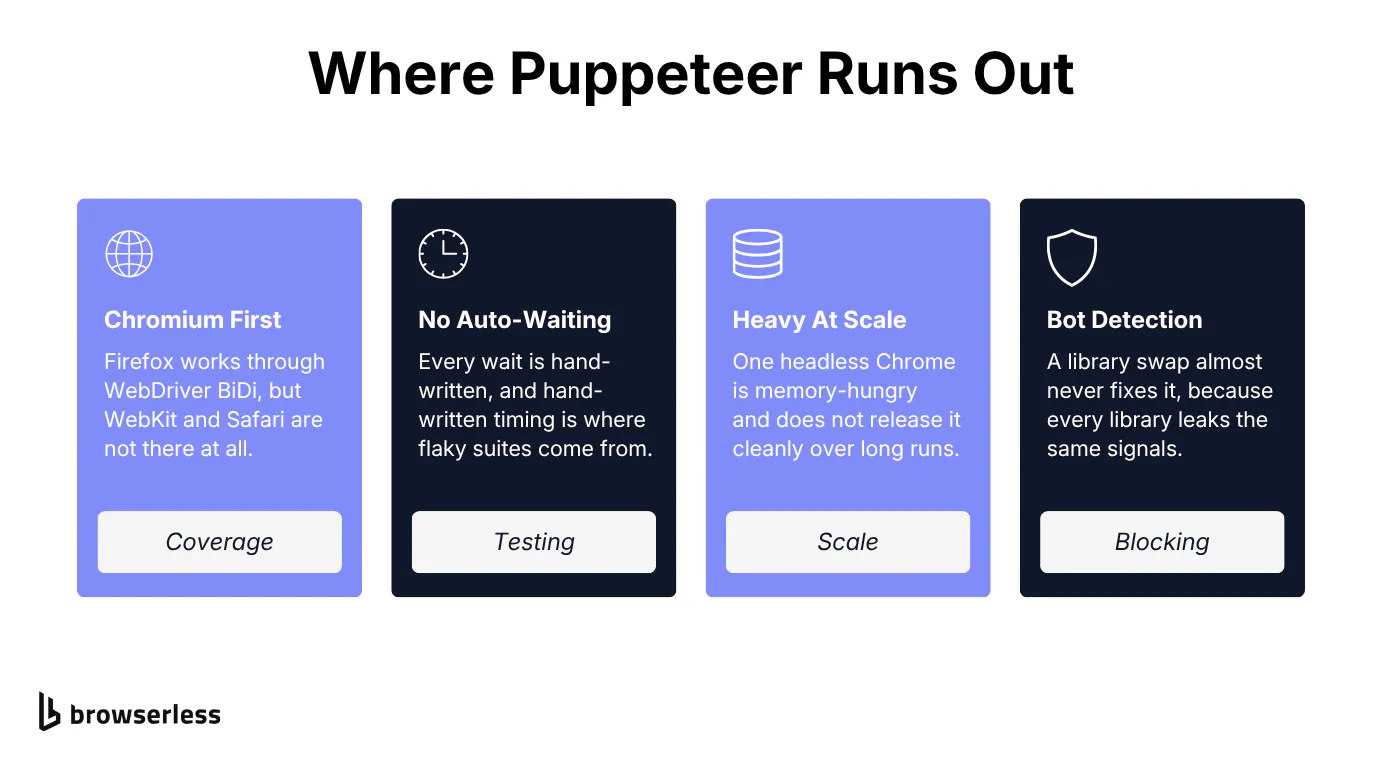
- Chromium-first automation. Puppeteer's CDP-based approach is fast, and it's built around Chromium-based browsers. Firefox is supported now through WebDriver BiDi rather than CDP, but WebKit and Safari coverage still aren't there, so it reaches two of the three browser engines that matter. If your matrix needs Safari, that alone pushes you toward Playwright or Selenium for broader browser support.
- No built-in test runner, and auto-waiting only where you opt in. Puppeteer is a browser-control library, not a test framework. Its locator API waits for an element to be visible and stable before acting, but
page.$()doesn't wait at all, andwaitForSelector()waits for the element to appear without retrying a failed action. There are no retrying assertions either, so the timing logic is left to you, and hand-written timing logic is where most flaky automated tests come from. - Still maintained, no longer the focus. Google ships updates and bug fixes, but new feature investment and community momentum have moved to Playwright.
- Resource-heavy at scale. A single headless Chrome instance is memory-hungry on its own, and it doesn't release that memory cleanly over long-running sessions. Running dozens of concurrent Puppeteer sessions on one host is usually the first sign a team gets that this has turned into an infrastructure question, not a code question.
- Bot detection and anti-scraping walls. For anyone trying to extract structured data at volume, this is the single biggest reason teams start looking for alternatives, and it's the one a library swap almost never fixes. It's covered in the scraping section below.
- Configuration overhead at project scale. Puppeteer's setup is simple for one script. It gets harder to keep clean once a team is running dozens of them across continuous integration (CI) pipelines.
Top Puppeteer alternatives for cross-browser testing
These are the right picks when the gap is genuinely the framework, whether that's auto-waiting or cross-browser reach for end-to-end testing. If you're coming at this from the other direction, Selenium alternatives covers the same field with Selenium as the starting point.
Playwright
Playwright was built by the same core engineers who built Puppeteer, after they left Google for Microsoft, which makes it the most direct successor of anything on this list.
It adds first-class Firefox and WebKit support alongside Chromium, so one suite runs across all three engines. Those same engines are available as managed browsers if you'd rather not host them yourself. On top of that it ships a test runner with parallel test execution, and browser contexts that keep each test cleanly isolated.
Auto-waiting removes most manual timing code, and the trace viewer makes a CI failure something you can actually inspect rather than guess at.
The migration path from Puppeteer is close to mechanical, and a full Playwright vs Puppeteer comparison covers it in more depth. Both use similar patterns like page.goto() and page.click(), and both have a locator() API that waits before acting. Playwright adds assertions that retry until the page catches up, which Puppeteer leaves to you.
It also supports multiple programming languages, with official bindings for JavaScript, Python, Java, and C#. Playwright is a heavier dependency with a steeper curve for its more advanced features, and for extracting data or PDF-generation work most of that extra power goes unused.
Selenium WebDriver
Selenium predates Puppeteer by more than a decade and is still the most widely deployed browser automation tool in enterprise test suites, built on the standardized WebDriver protocol that every major browser vendor implements natively.
It supports Java, Python, C#, Ruby, and JavaScript, and that spread across multiple languages counts if your quality assurance (QA) infrastructure was never JavaScript-native to begin with.
Which is better, Puppeteer or Selenium, comes down to what you're optimizing for. Selenium wins on multi-browser support and language breadth, plus existing Grid infrastructure at enterprises that already run it.
Puppeteer wins on setup simplicity and speed for Chrome-only work, and why we pick Puppeteer over Selenium goes further into that trade.
Neither is better in the abstract; they're built for different constraints, and a full Playwright vs Selenium breakdown is worth reading if Playwright is also on your shortlist.
Selenium has no built-in auto-waiting, carries more driver-version overhead, and takes longer to configure than Puppeteer for a simple Chrome-only script. If what's actually expensive is keeping Grid running rather than writing Selenium tests, that's a hosting cost worth pricing separately from the framework decision.
Cypress
Cypress takes a different architectural approach entirely, running test code inside the browser alongside the app under test rather than controlling it externally over a protocol.
That gives it the most approachable debugging experience of anything covered here, since you can time-travel through every command and get error messages that point straight at the failing web element.
Cypress retries queries and assertions until they pass and waits for elements to be actionable before it clicks or types. That removes most of the manual wait logic a Puppeteer test still needs, and makes UI tests that depend on slow user interactions far less brittle.
Cypress is JavaScript and TypeScript only, and it still can't drive multiple browser tabs. Cross-origin flows are handled these days by wrapping the second origin in cy.origin(), though WebKit support still lags behind Chromium.
TestCafe
TestCafe skips WebDriver and CDP entirely, injecting a proxy script into the page instead, so there are no browser drivers to install or manage.
It runs on Chrome, Firefox, Edge, and Safari from one config, with built-in automatic waiting and clean, TypeScript-friendly syntax. Safari support is macOS-only, so CI running on Linux won't get it.
That injection-based approach means TestCafe can't reach some of the lower-level browser APIs that CDP-based tools like Puppeteer and Playwright expose, and its plugin ecosystem is noticeably smaller than either. Active development has also slowed, so it's worth checking before you adopt it for anything long-lived.
Puppeteer alternative for mobile and legacy browser testing
WebdriverIO
WebdriverIO pairs the WebDriver protocol with Appium to test web and native mobile apps from the same framework, covering native mobile automation that neither Puppeteer nor Playwright reaches on its own.
Appium
Appium extends that same WebDriver protocol to iOS and Android specifically, for teams whose Puppeteer use case was always going to need a mobile app eventually.
Selenium for legacy browsers
For legacy browser support, Selenium remains the only serious option on this list. Its WebDriver protocol still ships an Internet Explorer driver, tested against IE 11 on Windows, which is more than Chromium-based tools like Puppeteer and Playwright ever offered.
If your test matrix genuinely needs that reach across multiple platforms, the limited browser support of the newer tools rules them out regardless of their other advantages.
Comparing Puppeteer alternatives by use case
| Tool | Best for | Cross-browser support | Auto-waiting | Language support |
|---|---|---|---|---|
| Playwright | Migrating off Puppeteer for testing | Chromium, Firefox, and WebKit | Yes | JavaScript, TypeScript, Python, Java, C# |
| Selenium WebDriver | Multi-language, enterprise test suites | All major browsers via WebDriver | No, manual waits | Java, Python, C#, Ruby, JavaScript |
| Cypress | Web app testing, developer experience | Chromium-first, partial Firefox and WebKit | Yes | JavaScript, TypeScript |
| TestCafe | Cross-browser testing without driver setup | Chrome, Firefox, Edge, Safari | Yes | JavaScript, TypeScript |
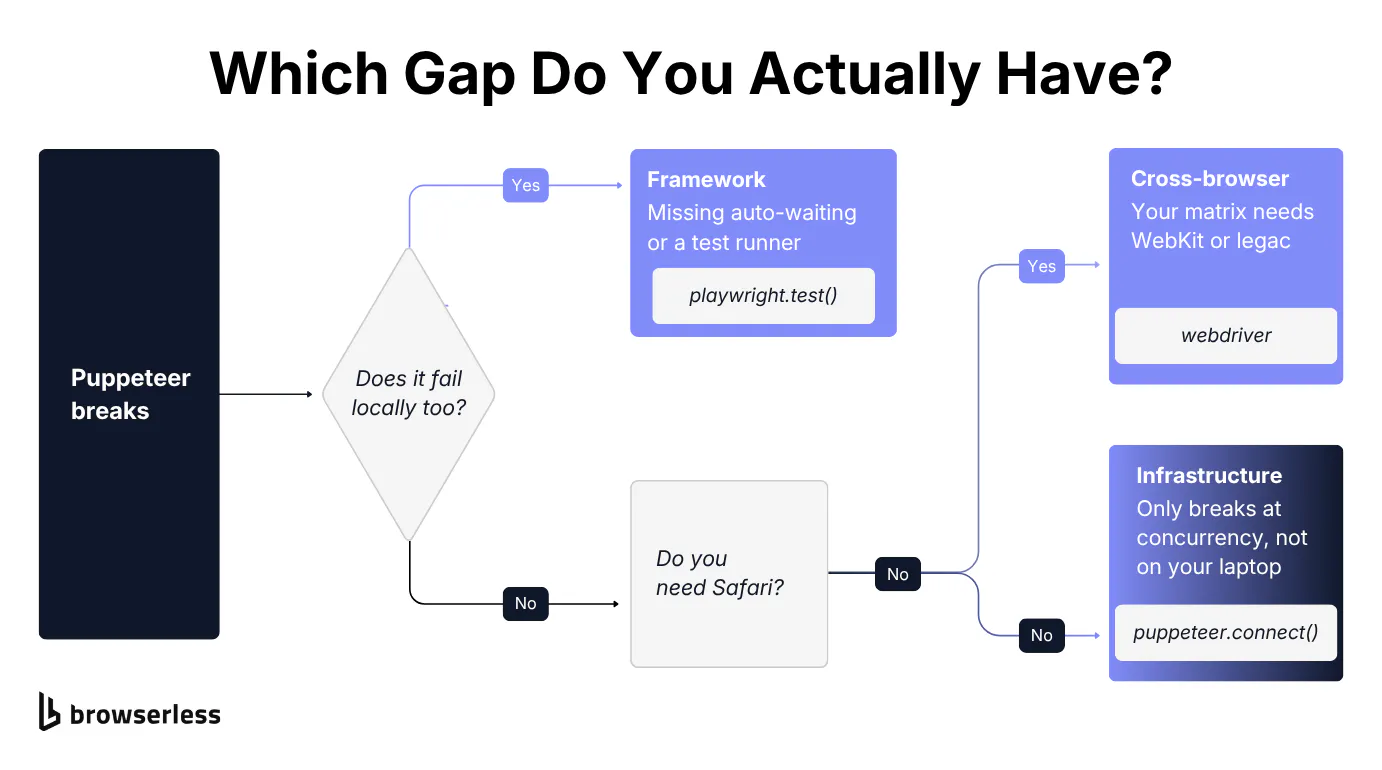
A few questions to work through before picking one:
- Are you replacing Puppeteer for test automation, or for scraping and automation? These call for different fixes, and scraping gets its own section below.
- Do you need real multi-browser coverage, or is Chromium already enough? If Chromium covers your users, ask whether you actually have a framework gap at all.
- Is your team JavaScript-only, or spread across multiple programming languages? Selenium and Playwright are the options above with genuine non-JavaScript-first support, and the other tools here are JavaScript-first by design.
- Are your test failures only showing up at scale, in CI, or under concurrent load? That pattern usually points at infrastructure rather than the framework.
Best Puppeteer alternative for web scraping and extracting data
For pages you need to pull data off, Puppeteer itself is often still the right call. It's lightweight and well-documented, with a large scraping-focused ecosystem built up around it over the years.
Playwright is the closest upgrade if you need one, with better long-term maintenance and a wider ecosystem. For a script that just pulls structured data off a page, it's more than you need. Cypress and TestCafe aren't built for this and don't belong on a scraping shortlist. If all you need is the data, a scraping API endpoint skips the browser-control code entirely.
The library you choose rarely determines whether a scraper survives in production. What does is whether it survives bot detection, and whether it holds up running many sessions at once without crashing.
Neither Playwright nor Puppeteer solves either of those by default. Both need extra handling on top: a stealth route, residential proxies, CAPTCHA solving, and session concurrency management. None of that depends on which library issued the API call.
If you've read this far because it's your scraper that's breaking rather than your test suite, the fix is very likely infrastructure rather than a different browser-control library.
Choosing a browser automation tool for infrastructure at scale
Keep your existing Puppeteer scripts
A Puppeteer script works fine on a laptop, then breaks at a hundred concurrent sessions. Memory leaks crash the process, Chrome versions drift and quietly break scripts overnight, and there's no monitoring to tell you why.
Teams patch it, hit the same wall at a thousand sessions, and eventually notice they're maintaining browser infrastructure instead of shipping whatever they set out to build.
None of the frameworks above fix this on their own. Playwright and Selenium hit the identical wall under enough concurrent load. The constraint is Chrome's memory footprint and process management, not the API sitting on top of it.
Browserless fits here as managed browser infrastructure rather than a framework. That model is called Browsers as a Service (BaaS), and it means a headless browser you connect to instead of one you run and patch yourself.
Your existing Puppeteer code connects over a WebSocket endpoint instead of launching a local one, and the rest of the script doesn't change. Here's the local version:
import puppeteer from "puppeteer";

// Local browser: you manage the Chrome process yourself.
const browser = await puppeteer.launch();
const page = await browser.newPage();

await page.goto("https://quotes.toscrape.com/");
console.log(await page.title());

await browser.close();
Pointed at Browserless, that same call becomes:
import puppeteer from "puppeteer-core";

// Remote browser: Browserless manages the Chrome process.
const browser = await puppeteer.connect({
  browserWSEndpoint: `wss://production-sfo.browserless.io?token=${process.env.BROWSERLESS_TOKEN}`,
});
const page = await browser.newPage();

await page.goto("https://quotes.toscrape.com/");
console.log(await page.title());

await browser.close();
The swap is launch() for connect(), with puppeteer-core in place of puppeteer. Everything below that line, selectors and waits included, runs untouched. Browserless supports browser automation through Puppeteer and Playwright, handling concurrency and session isolation, and taking Chrome version management off your plate.
The knobs for the scraping problems above are query parameters on that same connection string: proxy=residential for blocked IPs, and timeout in milliseconds for long crawls, capped at one minute on the free tier and sixty on Scale. Harder targets move you to a stealth route at wss://production-sfo.browserless.io/stealth?token=...&solveCaptchas=true, or to the /unblock endpoint for pages that refuse a normal session.
AI agents that browse the web are a newer reason teams end up on this page. Whether they drive it through Puppeteer, Playwright, or a browser Model Context Protocol (MCP) server, the load profile is the same one a test suite hits at scale: bursty and high-concurrency. That's what production browser infrastructure is sized for, and what a script running on a laptop isn't.
What this doesn't replace
Browserless isn't a testing framework. If your actual gap is a test runner with retrying assertions, the fix is Playwright or Cypress. If it's cross-browser coverage, it's Playwright or Selenium. Neither is an infrastructure problem.
Mobile is a gap infrastructure doesn't close either. Browserless can present a browser as an Android device with emulationOs=android, but that's fingerprint emulation aimed at bot detection rather than device testing, and it only takes effect on the stealth route. On /chromium or /chrome the parameter is accepted and then silently does nothing. There's no iOS equivalent.
If the gap is the imperative script itself, BrowserQL replaces it with a declarative query rather than another library to learn. If you have data-residency or VPC requirements the cloud can't meet, Browserless also runs self-hosted on your own infrastructure. The open-source image covers the Puppeteer, Playwright, and REST APIs; the stealth and CAPTCHA handling described earlier ships in the enterprise image, so check which one your use case needs before you plan around it.
For scale, Browserless has eight years in production, more than 173M+ Docker pulls, 99.9% uptime, and SOC 2 Type II certification. Those are credentials worth knowing about once "it works on my laptop" stops being good enough.
Conclusion
There's no single best puppeteer alternative, and any list that claims otherwise is skipping the part where your actual constraint decides which one fits. If the code you've already written is fine but the infrastructure underneath it isn't, keeping that code and running it on managed infrastructure is a smaller lift than rewriting a working scraper or test suite from scratch.
If that last case is yours, sign up for Browserless free and your existing Puppeteer or Playwright code connects with a one-line change.
Puppeteer alternative FAQs
What is the Python equivalent of Puppeteer?
Puppeteer is Node.js-only, so there isn't a direct port, and the closest equivalents in Python are Playwright for Python, the official Python bindings for the same project, and Selenium WebDriver, which has shipped a Python library for browser automation for years longer than either.
What are some alternatives to Puppeteer Recorder?
Puppeteer Recorder was a Chrome extension that turned your clicks into a Puppeteer script. Chrome DevTools now has a built-in Recorder panel that exports the same thing, so the extension is largely redundant. Playwright ships an equivalent in Codegen, and Selenium offers Selenium IDE for the same record-and-playback workflow.
Is Playwright always a better choice than Puppeteer?
It isn't better for every job, though it wins clearly on cross-browser reach and on waiting that extends from actions into assertions, which is why it's the default recommendation for test suites. For a Chromium-only scraper or a PDF-generation script, Puppeteer is lighter, and most of Playwright's extra surface goes unused. Pick on the gap you actually have rather than on which project is newer.
Does writing tests change when you move off a local browser?
No rewrite is involved if you're staying on the same library. Swapping puppeteer.launch() for puppeteer.connect() with a WebSocket endpoint points the same script at a remote browser, and the selectors and extraction logic underneath don't change. Moving between libraries, say Puppeteer to Playwright, is the case that does mean touching the script.
Which Puppeteer alternative supports multiple browsers best?
Playwright, since it drives Chromium, Firefox, and WebKit from one API and can execute tests against all three from a single config. Selenium reaches further still through WebDriver, including Safari and the legacy end of the range, at the cost of a slower testing process and more driver upkeep. If you only need Chromium, neither buys you anything Puppeteer doesn't already do.
Can you do visual regression testing with a Puppeteer alternative?
None of these ship it as a first-class feature, so you pair a runner with a screenshot-diffing library. Playwright comes closest with built-in screenshot assertions that compare against a stored baseline, and it can output results in multiple formats for CI to pick up. The part that actually decides whether visual diffs are usable is environment consistency, since fonts and GPU rendering differ between a laptop and a CI container, which is one more argument for running the browser somewhere fixed.
How do these tools handle user interactions differently?
Puppeteer and Playwright drive browser interactions over a protocol, sending the browser instructions to dispatch a click or a keystroke against web elements you select. Cypress runs inside the page instead, so it manipulates the DOM directly. TestCafe injects a proxy script and works from there. For most tests the difference is invisible, but it shows up when you're simulating user interactions the browser treats as untrusted, like a native file picker, where the protocol-driven tools have more reach.
Is parallel testing worth the setup?
Once a suite passes a few minutes, yes. Playwright ships parallel execution in its runner with no extra tooling, enabling developers to shard across workers without writing code to coordinate them. The limit you hit isn't the runner, it's how many browser instances one machine can hold, which is the point where parallel testing turns into an infrastructure question rather than a config one.