
TL;DR
- What REST is. Almost every REST API interview starts here. Strip it back and REST (Representational State Transfer) is a client and a server talking over HTTP with stateless requests, predictable URIs, and the methods you already know: GET, POST, PUT, PATCH, and DELETE.
- Strong vs. weak. Every question below gives you the answer that lands, the detail that makes you sound senior, and the mistake that quietly marks you as junior. It doubles as a rubric if you're the one interviewing.
- Try it yourself. You also get a working idempotency test to run before your interview, plus the scenario questions that start replacing definitions once you have some experience behind you.
Introduction
If you have a backend, full-stack, or QA interview lined up, you can safely bet REST API interview questions are coming. Just about every RESTful web service you'll touch runs on REST, and interviewers lean on it because a handful of questions tells them quickly whether you've shipped one or only read about it.
So this guide walks you through the interview questions and answers that keep coming up. For each one you'll see what a strong answer actually sounds like, the extra bit of detail that makes you sound senior, and the slip that quietly loses you the room.
REST API fundamentals
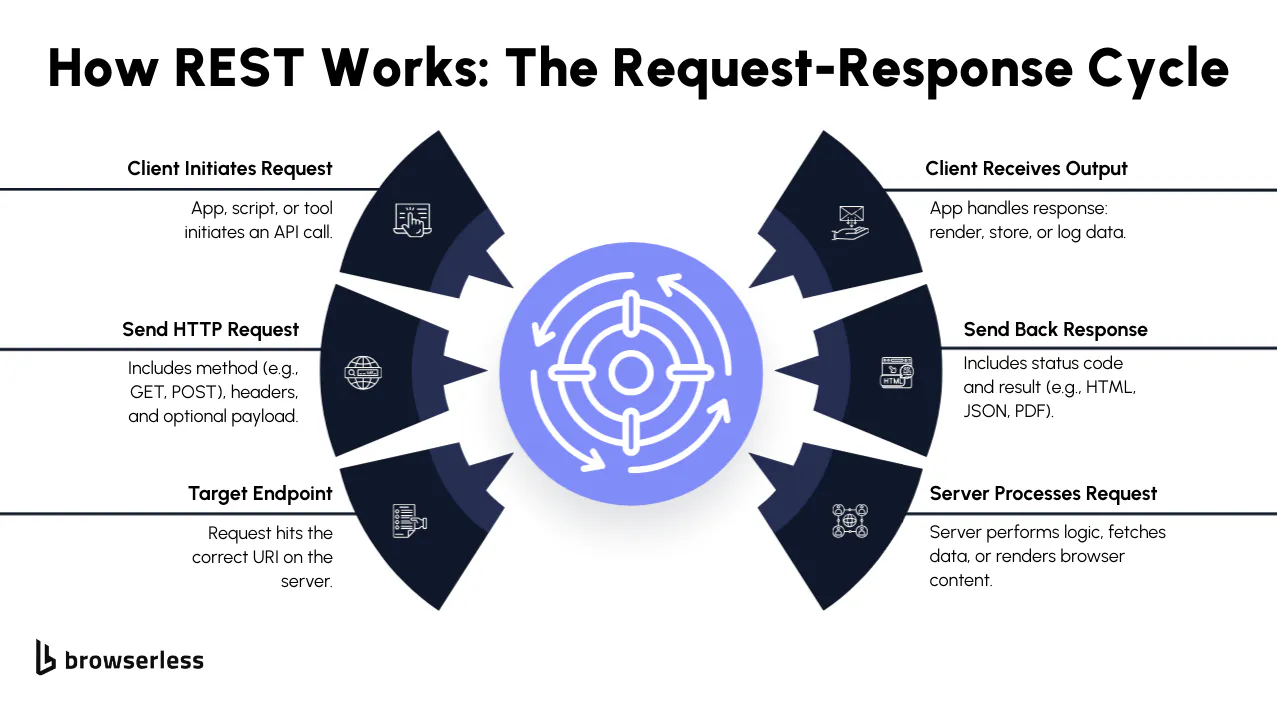
Interviews almost always open here, and the nice part is that the ground they cover is pretty narrow. You'll get asked about HTTP methods, URIs, resources, and standard HTTP status codes, and then come the follow-ups on error handling, API endpoints, and how API versioning, authentication and authorization mechanisms, and cross-origin resource sharing (CORS) get applied in practice.
What is a REST API and how does it work?
Strip it back and a REST API (REST is short for Representational State Transfer) is an agreed set of rules for how a client and a server talk to each other over HTTP. If you only hang on to one of those rules, make it statelessness. Every request carries everything the server needs for request processing, so each one stands on its own with no reliance on an earlier call, on subsequent requests, or on session memory sitting off somewhere.
You hit an API endpoint like /users/123, and the API server responds with a structured payload, usually JavaScript Object Notation (JSON). That's really the whole shape of it, and it's why RESTful APIs scale so predictably, from internal microservices to public APIs anyone can call.
How to take it further
The strongest version of this answer is one you've actually lived. Something like "the last service I worked on exposed an /orders endpoint, and every request carried its own auth token because the API server kept no session" tells an interviewer far more than a textbook definition does.
It also helps to point out that REST is an architectural style rather than a strict protocol the way SOAP is, since SOAP is an XML based messaging protocol with a formal contract. Worth knowing that SOAP stopped being an acronym at version 1.2, so the old "Simple Object Access Protocol" expansion is historical. "RESTful" in the wild is usually closer to "HTTP API", since almost nobody implements every constraint Roy Fielding originally laid out.
What not to say
Nothing loses a room faster than rattling off acronyms you can't unpack. If you say "REST is stateless" and then stop, with nothing about what statelessness actually changes for caching, horizontal scaling, or retries, it just sounds memorized. Steer clear of calling REST a protocol, and don't mix up REST with JSON either. JSON is the payload format you'll see most often in RESTful web services, and the same API can happily hand back JSON or XML format, plain text, or whatever the client negotiates.
What are HTTP request methods in REST APIs?
Every REST API interaction kicks off with an HTTP method, or HTTP verb if you prefer that name, and it tells the server which action you're taking against a resource:
- GET – retrieve data without changing it.
- POST – create something new, or hand the server something to process.
- PUT – fully replace a resource at a known URI, creating it if it isn't there yet.
- PATCH – apply a partial update.
- DELETE – remove a resource.
Once you've listed those, idempotency is almost always the next thing an interviewer reaches for. The idea is straightforward enough, in that sending the same request more than once leaves you in exactly the same place (PUT and DELETE are idempotent, POST isn't). Have an answer ready for why picking the right HTTP request method keeps your API documentation and your tests honest.
How to take it further
Try to bring up safety and idempotency yourself, before anyone has to ask. GET is both safe (it changes nothing) and idempotent, PUT and DELETE are idempotent but not safe, and POST and PATCH are neither. PATCH is the one that catches people out. It looks a lot like PUT, so people assume it's idempotent too, but like POST it isn't safe to auto-retry by default. There's a full question on idempotency further down, so a name-check is enough here.
It doesn't hurt to bring up HEAD and OPTIONS either. You'll run into OPTIONS in CORS preflight checks, and HEAD shows up all over the place in health probes.
What not to say
If you just list the verbs without saying when you'd reach for each one, the answer lands flat. You'll hear people say "PUT and POST are basically the same," and it simply isn't true. And if you tell an interviewer you use POST for every write operation because "it just works," they'll hear someone who has never had to maintain an API that other developers consume.
What is a REST resource, and how does it differ from an API endpoint?
Whatever you're working with is a resource, whether that's a user, a product, or a webpage, and each one gets its own Uniform Resource Identifier (URI). That's all /users/123 is, the address for one particular user.
You get at resources through HTTP requests, passing query parameters or a request body to filter or change what comes back, and what you get back is usually key-value pairs in JSON that are easy to parse and reuse across web applications or server processes.
How to take it further
The nouns vs. verbs point is the one to reach for here. Your resources should read as nouns, with the action coming from the HTTP method instead of the URL, which is exactly why DELETE /users/123 beats POST /deleteUser?id=123. If you can also talk about collection vs. item endpoints (/users vs. /users/123) and how nesting works for related resources (/users/123/orders), you've made it obvious you've thought past a single endpoint.
What not to say
Watch out for calling a resource an API endpoint, because the two really aren't the same thing. The endpoint is the address you hit, and the resource is the thing waiting on the other side of it. Another tell is modeling every resource as a single flat object, because real RESTful web services almost always have nested relationships and toy projects usually don't.
What are URI and URL in REST context?
This one comes up so often it's worth having a crisp answer ready. Think of a Uniform Resource Identifier (URI) as the string that uniquely identifies a resource. A URL (Uniform Resource Locator) is one flavor of URI, and it goes a step further by telling you how to actually get to the resource.
- URI –
https://api.example.com/users/123uniquely identifies a resource. A bare/users/123is strictly a relative reference, since a URI needs a scheme. - URL – the same string, which also counts as a URL because it tells you how to reach the resource and not just which one it is.
You'll hear both terms thrown around API endpoints, and the bit worth keeping in your back pocket is that all URLs are URIs, but not all URIs are URLs.
How to take it further
The third sibling in the URI family is worth knowing, the URN (Uniform Resource Name). URNs identify something by name without saying where it lives, like urn:isbn:0451450523. You'll almost never touch one in practice, but knowing the whole family tree shows an interviewer you went past the surface.
Say out loud that the line between URI and URL has blurred in practice, and that most engineers use the two interchangeably in conversation.
What not to say
The one thing you don't want to do is say they're the same thing. They're related but not identical, and getting it backwards, like claiming a URL is a kind of URN, tends to suggest you only memorized the acronyms. Don't camp out here either, because this is a quick checkpoint rather than a deep dive.
What are HTTP status codes and why are they important?
HTTP status codes are the server's way of telling the client how an HTTP request turned out. You'll lean on them constantly for error handling and for giving back meaningful error messages in RESTful APIs. These are the common HTTP status codes you'll want down cold before an interview:
- 200 OK – request was successful.
- 201 Created – a new resource was created.
- 400 Bad Request – client sent an invalid request.
- 401 Unauthorized – missing or invalid credentials.
- 404 Not Found – the server has no representation for the resource requested, or won't admit it has one.
- 500 Internal Server Error – something went wrong on the API server.
From there, the follow-ups usually dig into the split between client errors and server errors, when each code is the right one, and what actually belongs in an error response body. Anyone can list codes, and that's the easy part. What actually lands is when you explain why they matter for debugging, for monitoring, and for keeping API requests predictable for existing clients.
How to take it further
Pair every code with a decision you actually made, and suddenly you're not reading out a lookup table anymore. You might say something like "we return 401 for missing tokens and 403 for valid tokens that lack permission, because they trigger different flows in the frontend." If you can also bring in 422 Unprocessable Content for validation (RFC 9110 renamed it from Unprocessable Entity, and knowing that is its own small signal), 409 Conflict for concurrency, and 429 Too Many Requests for rate limiting, you're well ahead of anyone who only knows 200 and 500.
What not to say
If you return 200 OK with an error tucked into the response body, that'll cost you, and defending the choice costs even more. Every monitoring tool and dashboard reads a 200 as healthy, so the failure never surfaces. It's worth resisting the urge to reach for 500 Internal Server Error as a catch-all too. If the request itself was bad, that's a 4xx, and mixing the two up makes debugging harder for everyone downstream.
Design and best practices
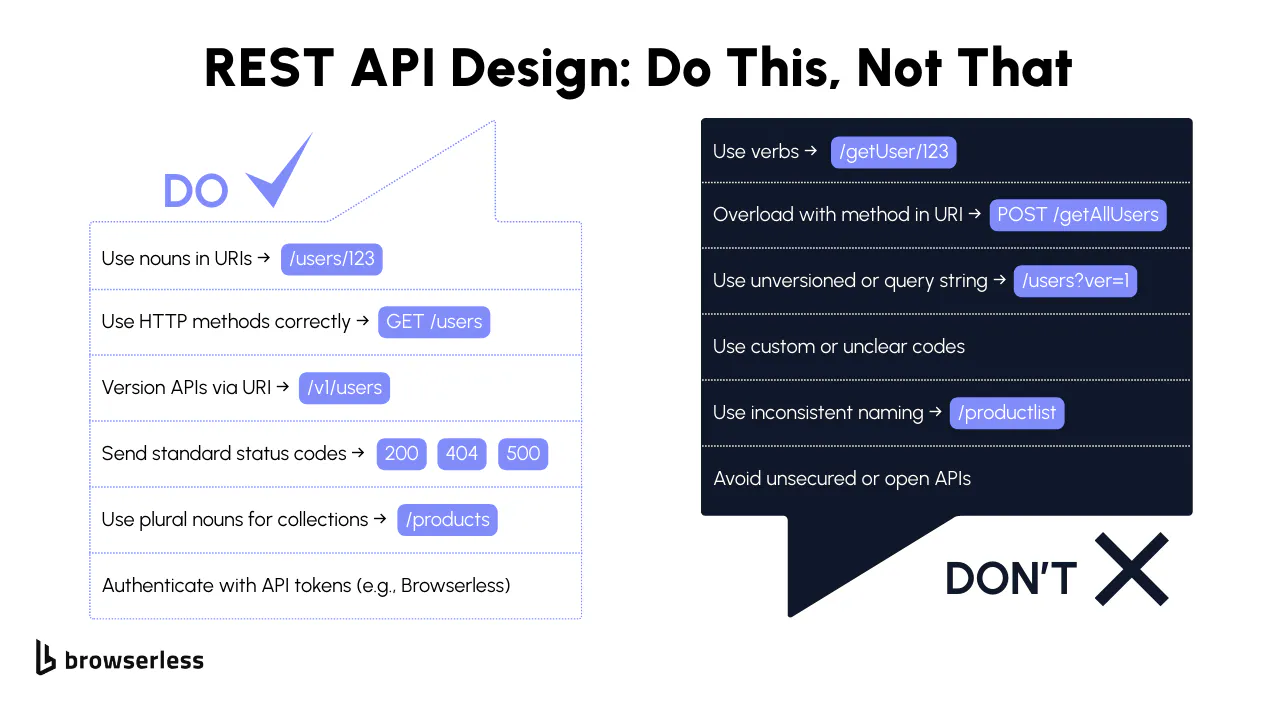
Once you've cleared the fundamentals, interviewers usually start asking about design. Can you build a resource-oriented architecture that scales and stays pleasant for the next developer to use? You'll almost certainly get questions on HTTP methods, status codes, API versioning, and how you'd handle errors in production.
What are the best practices for designing RESTful APIs?
The thing to aim for when you design a RESTful API is a REST architecture that stays predictable and easy to use. Here are the best practices worth calling out in an API interview:
- Use nouns, not verbs, in your API endpoints:
/users/123instead of/getUser. - Stick to standard HTTP methods like GET, POST, PUT, PATCH, and DELETE for actions.
- Always return appropriate HTTP status codes with clear response bodies and meaningful error messages.
- Support API versioning (e.g.,
/v1/users) to prevent changes from breaking existing clients and maintain backward compatibility. - Document your API with clear examples of API requests, query parameters, and HTTP request methods.
Get that right and other developers can retrieve data, send payloads in a request body, and read your HTTP responses without ever having to ask you a question. That's really what you're aiming for.
How to take it further
Nothing beats a trade-off you've actually lived through. You could say something like "we moved from offset to cursor-based pagination because the dataset was being written to constantly and offset pagination kept skipping or duplicating rows."
HATEOAS (Hypermedia as the Engine of Application State) is a good one to name, since it's the discoverability piece of the uniform interface constraint in Fielding's dissertation, and it lands even better if you're honest that most RESTful APIs in production never implement it. Talking through a deprecation strategy works the same way, so mention a Sunset header and a real end-of-life date in the release notes.
What not to say
The answer you want to avoid is the one that could have come straight out of any tutorial. Saying "use HTTPS and good URLs" doesn't give the interviewer a design discussion to work with. You'll also raise eyebrows if you say you'd skip API versioning because "we can always add it later," since retrofitting versioning onto a REST API with live existing clients is painful, and any interviewer who has done it will notice.
How do you handle versioning in REST APIs?
Interviewers ask about API versioning constantly, mostly because it's critical for long-term maintainability. You've got a few options:
- URI versioning – include the version in the path, e.g.,
/v1/users. - Query parameter versioning – add a version parameter, e.g.,
/users?version=2. - Header-based versioning – use a custom request header like
API-Version: 2.
Most people reach for URI or header-based versioning, because both are explicit and easy to live with. Either way, existing clients keep working on the old version while you ship new features on a separate track. Just make sure you've got a preference ready and a reason to back it up.
How to take it further
What gets more interesting is talking about when you wouldn't version at all. An internal API with one consumer can usually skip versioning and lean on feature flags instead, but a public one with paying customers doesn't get that luxury. Then you can get into how you'd actually break the news of a breaking change, using deprecation headers, advance notice in the release notes, and a documented end-of-life date. That ties API versioning back to real people depending on you, which is what interviewers are listening for.
What not to say
Be careful about saying you'd break backward compatibility because "the client team can just update." Even when that's technically true, it tells an interviewer you've never had to fix a production outage caused by a silent schema change.
What does idempotency mean in REST APIs?
Idempotency is a nice idea once it clicks, because it just says multiple identical requests leave you exactly where a single one would. That's what makes retries safe, which is why it matters far more in production than it sounds like it should.
A couple of examples make it concrete:
- Sending the same request body multiple times to
PUT /users/123will not change the result after the first update. DELETE /users/123leaves you in the same place however many times you call it. The resource is gone after the first one, and later calls just tell you so, usually with a 404.
POST is the one that breaks the pattern, since every call usually creates something new. Interviewers often walk this straight into error handling. If a flaky network forces a retry, idempotency is what stops you writing the same record twice.
How to take it further
The place this really earns its keep is retries in production. Networks fail and mobile clients drop connections, so a write that isn't idempotent can quietly create duplicate orders or double-charge someone.
The fix you'll see most often is the Idempotency-Key header, which Stripe popularized. You send a unique key with each write, and if the API server sees that key again, it just replays the original HTTP response. Walk through that and you've quietly told the interviewer you've worked on payment or financial code.
What not to say
The slip people make most often is treating "idempotent" and "safe" as if they were the same word. They're close cousins, but they're not the same thing. GET manages both at once, PUT is idempotent but not safe because it changes state, and POST doesn't give you either one. Saying "POST can be idempotent if we just make it so" without explaining how, with idempotency keys or request hashing, is hand-waving that interviewers pick up on straight away.
What's the difference between PUT and POST requests?
You'll get asked this in just about every REST API interview. Both HTTP methods send changes to the server, but you reach for them in different situations:
- POST – create a new resource. Example:
POST /userswith a request body adds a new user. - PUT – replace the resource at a known URI. Example:
PUT /users/123replaces the user data with new values, and creates that user if they don't exist yet, which is a 201 rather than a 200.
The follow-up you should expect is about PATCH. PUT and PATCH methods split the job differently, in that PATCH changes just part of a thing while PUT replaces the entire resource. Be ready to say why picking the right verb saves the next developer a lot of guessing.
How to take it further
The tricky part with PUT is that it assumes you already know the resource's full state. If all you have is an email address and you PUT it, you can wipe every other field by accident, which is why PATCH is the safer default for most update flows.
If you name JSON Patch (RFC 6902) or JSON Merge Patch (RFC 7396), you've shown you know PATCH is the method and not the body format, and that the body format is a separate decision you get to make.
What not to say
"We just use POST for everything because it's simpler." That works until two developers update the same requested resource at the same time and the REST API has no way to express partial updates. The opposite mistake is insisting PUT is always the right choice for updates. It's fine when the client has the full object, but when it doesn't, PATCH is the better fit.
What are REST API rate limits?
Rate limits are how you keep usage of an API server fair, by capping how many client requests can arrive within a given timeframe. That's what stops people abusing the API, protects server resources against denial-of-service attacks, and keeps load even across all authorized users.
A service might cap API endpoints at 1,000 HTTP requests per hour per client, for instance. Once a client goes past that, the server should hand back a 429 Too Many Requests response.
You'll probably get follow-ups on how rate limits tie into error codes and useful error messages, and on where you'd draw the line between protecting the service and annoying the people using it.
How to take it further
You can go a level deeper into the algorithm doing the limiting. You've got fixed window, sliding window, token bucket and leaky bucket to pick from, and they all behave differently under bursty traffic. Token bucket is the one you'll run into a lot, because it tolerates a short spike without blowing the long-term limit.
You can also rate limit per API key, per IP, per authorized user, or per endpoint, and in practice a well-designed REST API leans on more than one of those at once.
What not to say
Don't reach for 500 Internal Server Error when a client hits the rate limit. That's a server error, and 429 Too Many Requests exists for precisely this. It's also not a great look to suggest blocking someone permanently the first time they go over. Real APIs back off, return a clear error with a Retry-After header, and give the client a way back.
How do caching, an API gateway, and API management fit into REST?
Cacheability is one of Fielding's original constraints, and it's a neat way for an interviewer to tell who has run a REST API in production and who has only built one. The piece doing the work is the cache control header (Cache-Control), which tells clients and anything in between whether they may store a response, who may store it, and how long it stays fresh. Server side caching sits behind that and holds computed responses, so repeat traffic never has to reach your database.
The other half of the answer is the API gateway. It sits in front of your services and distributes incoming requests across them, and it's usually where authentication, rate limiting, and request logging live instead of being rebuilt in every service. API management is the wider discipline sitting around all of that, and it covers versioning policy, developer onboarding, and usage analytics.
How to take it further
It gets genuinely interesting when you talk about what you decide not to cache. Anything personalized or authenticated needs Cache-Control: private at most, and getting that wrong serves one user's data to another out of a shared cache.
Bring up ETag and conditional requests with If-None-Match and you've shown you know caching isn't only about expiry, because a 304 Not Modified still saves you the bandwidth after the cached copy goes stale.
What not to say
Don't treat the API gateway as a magic box. If you can't say what it does to a request, you can't reason about the latency it adds or what happens when the gateway itself goes down. The other trap is assuming a cache is always safe, because a stale response served straight after a write is a real bug you will hit, and the fix is deliberate invalidation rather than a shorter timeout.
Security and testing
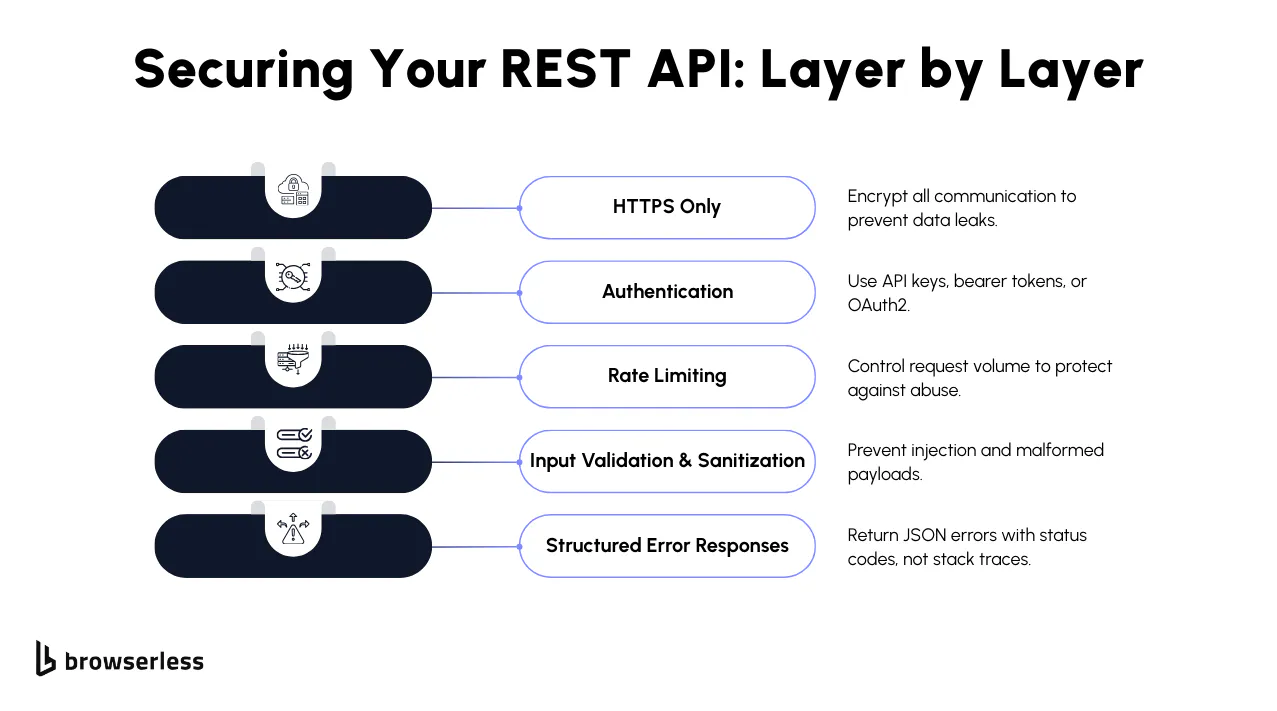
Security and testing usually come straight after the fundamentals, because knowing how REST works is only table stakes. What a company really wants to know is whether you can keep an API from being abused, handle client errors and server errors sensibly, and check that any of it works. You'll be asked about authentication and authorization mechanisms, CORS, and tools like Postman and curl.
How do you secure a REST API?
When you secure a RESTful API, most of the work is protecting data in transit and controlling who can reach your API endpoints. In an API interview, you'll want to cover:
- HTTPS – encrypts all HTTP requests and HTTP responses so that sensitive data isn't leaked.
- API keys or tokens – used to authenticate authorized users making API requests.
- Input validation – prevents injection attacks by sanitizing input data from query parameters and request bodies.
- Rate limits – helps enforce fair usage and prevents abuse.
JSON Web Tokens (JWTs) are worth raising, and so is token-based authentication split across an authorization server and a resource server. Tie it back to returning a clear error when credentials are missing or invalid and you've covered the part most people forget. Browserless's API security guide goes deeper on hardening if you want the fuller picture before an interview.
How to take it further
Name the OWASP API Security Top 10 and you've anchored the answer in something real. The 2023 edition is still the current API list, and it opens with broken object-level authorization (BOLA), then broken authentication, then broken object property level authorization, with unrestricted resource consumption right behind them.
Then ground it in something real, like checking that user 123 actually owns order 456 before you hand it over, which shows you've thought about REST API security in the code and not just on a whiteboard.
What not to say
If you claim HTTPS is enough on its own, expect that to get picked apart. It protects data in transit and does nothing about a leaked API key or a token scoped far too widely. Keep API keys out of URLs too, since they end up in server logs, browser history and analytics tools, which is one of the most common ways credentials escape an otherwise well-built API.
What is the difference between authentication vs. authorization in REST?
Interviewers love this one, and you'll hear some version of it nearly every time. Authentication is about who you are, and authorization picks up from there to decide what you're actually allowed to do.
It's easier to see side by side:
- Authentication – you send an API token in the request header, and the API server checks it against valid authentication credentials.
- Authorization – based on that token, the server decides whether you can retrieve data, create, or delete a requested resource.
Because REST is stateless, you authenticate on every request, and the server checks the authorization rules before it runs anything. That sounds simple enough, but the two get muddled all the time.
How to take it further
This one sticks a lot better once you put an example on it. Someone can authenticate perfectly well and still get a 403 Forbidden trying to delete an order that isn't theirs. Once you've said that, it's worth naming role-based access control (RBAC) and attribute-based access control (ABAC), as long as you can say when you'd pick each. RBAC is easier to reason about, but ABAC scales better once permissions depend on the data itself and not just on someone's role.
What not to say
The mistake to watch for here is mixing up 401 Unauthorized and 403 Forbidden. A 401 says "I don't know who you are." A 403 says "I know exactly who you are, and you still can't do this." It's one of the most common mistakes in real APIs and an easy point to drop in an interview.
How do you test a REST API?
Here you just want to show you've actually used the tools. There are three you'll want to be able to talk about:
- Postman – GUI and CLI for sending HTTP requests, testing status codes, and checking the response body.
- curl – command-line tool to hit API endpoints directly, great for debugging.
- Automated test frameworks – using Java, Python, or JavaScript libraries to script API requests and validate responses.
Cover the error handling as well as the happy path: status codes like 400, 401, 404 and 500, response headers, and what actually lands in the error body. Mention how automated tests catch a broken change before it ever reaches existing clients, because that's the part interviewers want to hear.
How to take it further
Interviewers care far more about what you test for than which tool you open. So talk about status codes, response shape, headers, error structure, idempotent retries, rate limit behavior, and authorization edge cases. Contract testing is the one to name if you want to show you've caught breaking changes before a client did, and Pact is the tool to name with it. Schemathesis is worth a mention too, as long as you're precise that it does schema conformance testing rather than consumer-driven contracts.
You may also be asked to write an assertion rather than describe one, so it's handy to have something you can type out on the spot. Here's one you can borrow. It calls the same GET endpoint twice against a public REST API and compares the two response bodies, using Node's built-in fetch.
async function checkIdempotency(url) {
  const fetchOnce = async () => {
    const response = await fetch(url, { signal: AbortSignal.timeout(5000) });
    if (!response.ok) {
      throw new Error(`Request failed with status ${response.status}`);
    }
    return { status: response.status, body: await response.json() };
  };

  const first = await fetchOnce();
  const second = await fetchOnce();
  const identical = JSON.stringify(first.body) === JSON.stringify(second.body);

  console.log(`Status codes: ${first.status}, ${second.status}`);
  console.log(`Responses identical: ${identical}`);

  return identical;
}

checkIdempotency("https://jsonplaceholder.typicode.com/users/1").catch((error) => {
  console.error(`Idempotency check failed: ${error.message}`);
});
Run it against that endpoint and you'll get Status codes: 200, 200 and Responses identical: true. The timeout and the status check matter as much as the assertion, because a test that hangs or silently passes on a 500 is worse than no test at all.
Be careful about what you claim it proves, because a good interviewer will push. Idempotency is really a promise about server state, namely that sending the same request twice leaves things exactly as one request would have. A stable response body gives you decent evidence the endpoint is behaving, but it doesn't prove it. Point that out before the interviewer does and you've made yourself sound senior.
If you're testing real browser workflows end to end rather than plain HTTP calls, a managed platform like Browserless can host your Puppeteer or Playwright sessions over WebSocket, so your test suite doesn't bottleneck on CI machines. That matters when the thing under test is whether a REST-backed dashboard actually renders the data your API returns.
If you want to practice writing assertions against a real, stateless REST API before your interview, Browserless's own REST API endpoints work well for it. Its REST API playground walks through building and firing requests without writing a client first, which is a fast way to rehearse.
What not to say
"I just use Postman." Postman is fine for poking around, but an interviewer is looking for a testing strategy, not a tool name. Don't claim you skip 4xx and 5xx responses either; the error paths are where RESTful APIs actually break, and ignoring them is a junior move.
What is CORS, and how does it affect REST APIs?
Cross-Origin Resource Sharing (CORS) is how a server opts in to being called from another origin. The browser's same-origin policy blocks that by default, and CORS headers are how the server says which origins it will accept, where an origin means scheme, host, and port.
Without the right CORS headers (Access-Control-Allow-Origin), the browser stops your code reading the response, and for anything needing a preflight the request never goes out at all. It comes up a lot, because the moment a frontend consumes your API you have to get this right. If you allow only trusted origins, you keep things locked down and still let legitimate apps through.
How to take it further
Preflight is where this usually bites people. The browser fires an OPTIONS request first whenever your request isn't a "simple" one, meaning anything but GET, HEAD or POST, any custom HTTP headers outside the small safelist, or a Content-Type other than form-encoded, multipart, or plain text. That last one is why application/json triggers a preflight at all. If it fails, your real request never leaves, and knowing that saves you hours of hunting a backend bug that turns out to be a missing header.
What not to say
Don't say you'd set Access-Control-Allow-Origin: * on a production API that uses cookies or authenticated requests. It's convenient for a demo and genuinely dangerous anywhere else. The other red flag is treating CORS like a server-side firewall, because it's a browser feature and nothing more. curl, Python requests or a mobile app ignore it completely, so it's never a substitute for authentication and authorization mechanisms.
Real-world scenarios and advanced concepts
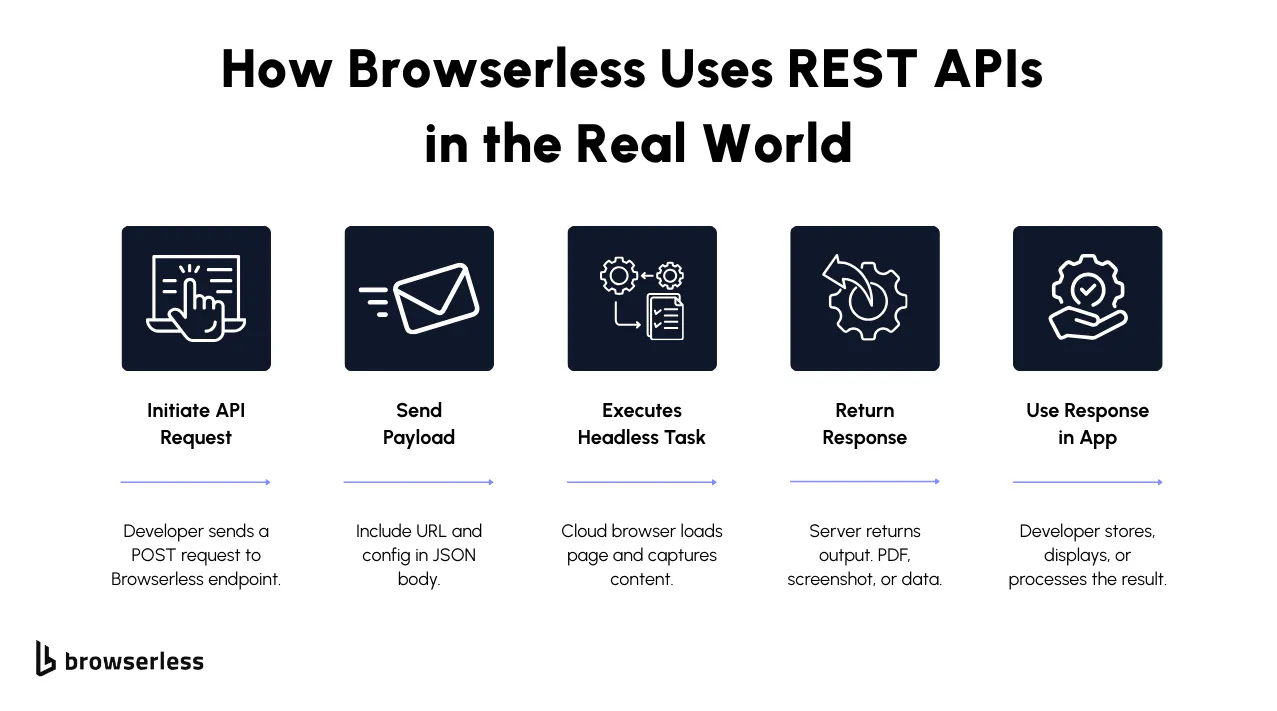
Once you're past the fundamentals, interviewers stop asking how RESTful APIs are designed and start asking how they behave in production. So you'll get asked about payloads, HTTP request methods, distributed server processes, and error handling when the system is under real load.
What is a REST API payload?
The payload is the data carried in a message body. A request payload is what the client sends to the API server, and a response payload is what the server sends back. Most of the time it's JSON, which is a lightweight data interchange format built out of key-value pairs and ordered lists of values.
For example, if you're creating a user, you might send:
{
  "username": "dev123",
  "email": "dev@example.com"
}
A payload is doing more than carrying raw values. It's also how a client sends configuration, filters, or a state change to an API endpoint, so they end up sitting right in the middle of the data exchange between RESTful web services.
How to take it further
Treat payload size and shape as design decisions and you'll sound like someone who has shipped one. Big payloads are slow to parse and expensive over a mobile connection, so a well-built API gives you pagination, projection (fields=name,email), or compression to avoid them.
JSON is what most people reach for, but it isn't your only option. Protocol Buffers and MessagePack show up in performance-sensitive RESTful web services, and CSV or NDJSON are common in data export endpoints, so be ready to name more than one of the data formats in play.
What not to say
Don't confuse the payload with the whole request. A request or response carries a start line, headers and a body, and the payload is just the body. Don't suggest cramming every field into one giant POST body either, since large unstructured payloads are slow to validate and a magnet for bugs.
Can you send a payload with GET or DELETE, or should you use query parameters?
It's a trick question, and it's asked a lot. The short answer is that GET and DELETE aren't designed to carry a request body. The spec allows the framing but gives that content no defined semantics, and says you shouldn't send one unless the origin server has told you it will handle it. Some implementations reject the request outright and close the connection, because a body on a GET is a request-smuggling vector.
Stick to POST for creating and PUT or PATCH for updating when you have a body to send, and use query parameters for filtering a GET.
How to take it further
That said, there's one real exception you'll want to raise. Search endpoints sometimes use POST instead of GET when the query is too big or too nested to fit in a URL, since URLs have practical length limits and query strings handle nested objects badly. Elasticsearch is the example everyone reaches for here. Knowing why that compromise exists shows you can tell the difference between REST purity and what ships.
What not to say
"Yes, you can, so we do." It may work in your test environment and silently break behind a CDN, a proxy, or a strict HTTP client. Going hard the other way and insisting "never, ever" is just as weak. What you want to say is "you can, but it's fragile, and here's the one case where I'd do it anyway."
How do you handle errors in REST APIs?
If you want to spot a well-built REST API quickly, look at its error handling logic. Rather than a generic failure, you want the right status code and a body that actually tells the client what went wrong.
For example:
{
  "error": "InvalidToken",
  "message": "API token is missing or expired",
  "status": 401
}
Here's what to highlight in an API interview:
- Reach for client errors (4xx) when the problem is with the request itself.
- Save server errors (5xx) for when something breaks inside the server processes.
- Always return JSON data in a predictable shape so clients can parse and act on errors programmatically.
- Document common status codes and error patterns in your API documentation.
Browserless's /smart-scrape is a good example of the consistent-shape half of that. Every REST API call requires an API token, and the endpoint hands back the same JSON envelope whether the target page loads or not, with statusCode carrying the target's own status and message holding a reason when there is one.
Be precise about what that shows, though. The envelope itself comes back as HTTP 200, because the status code being reported is the target page's rather than Browserless's own. It's a strong example of a predictable, parseable error shape and not of status-code discipline, and knowing that difference is worth saying out loud if an interviewer pushes on it.
How to take it further
If you want a standard error format to point to, that's RFC 9457 (Problem Details for HTTP APIs), which gives you fields like type, title, status, detail, and instance. It obsoleted RFC 7807 back in 2023, and naming the current one instead of the superseded one is a quiet signal that you keep up.
Adopt it, or something close to it, and you get a consistent error response format across the whole API, so a client only ever learns one shape. The more endpoints you add, the more those consistent error responses pay you back. The other thing you'll want to mention is putting trace IDs in the body, since they turn "something broke" into a five-minute log search.
What not to say
The one that really hurts is when you return 200 OK with {"success": false} in the body. It looks fine in a tutorial and quietly breaks monitoring everywhere else, because every dashboard reads 200 as healthy.
Don't put stack traces in production responses either. They leak file paths, library versions and sometimes credentials, and they tell an attacker exactly where to look. Stack traces belong in your logs.
How does statelessness help a REST API scale?
Statelessness means every request carries everything the server needs to handle it, so no server has to remember anything about the client between calls. That lets you put any number of identical servers behind a load balancer, send each request to whichever one is free, and add or remove servers as traffic changes.
Browserless is a useful real-world example. It's a managed headless browser platform, and alongside Puppeteer and Playwright connections over WebSocket, it exposes REST APIs for one-shot browser tasks. Those endpoints are a clean example of statelessness at scale: every HTTP request you send to an API endpoint like /screenshot or /scrape carries all the configuration it needs, whether that sits in the request body or in query parameters like blockAds, stealth, and proxy.
So you can spread rendering a page, generating a PDF, or scraping structured content across multiple servers in the cloud, and none of it depends on a previous request or a shared session. That's what lets parallel test runs and high-throughput scraping work without falling over. It's a good example to have ready when someone asks how REST supports scale.
How to take it further
It's worth pausing on why statelessness earns its keep here. Browser sessions are heavy and slow to start, so the tempting thing is to keep one alive between requests. Browserless goes the other way and assumes any worker can take any request, which is what lets the work spread across a shared fleet.
REST endpoints like /screenshot, /pdf, /scrape, /content, and /function each wrap an entire browser task in a single stateless call, and that's the sort of specific you'll be glad you had ready.
What not to say
Don't lump Browserless in with the generic web scraping APIs. It's a headless browser platform with REST APIs in front of it, which is a very different animal from a simple scraping endpoint. The other thing that trips people up is claiming statelessness is automatic in distributed systems, when really it's a design choice the platform has to enforce, and it costs something. Every request pays to set up its own context, not just for the work itself.
REST API interview questions for experienced developers
Everything above holds at any level, but once you have a few years behind you the questions change shape. Interviewers stop asking what idempotent means and start asking about the time statelessness bit you. Have a couple of stories ready rather than more definitions.
How would you evolve a REST API without breaking existing clients?
Name the actual mechanics here. You make additive changes only on a stable version, so new optional fields and new endpoints, you announce a deprecation window through response headers and release notes, and you agree on a real cutoff date with the client team rather than a vague "we'll turn it off eventually." The weak version is just "version it," with nothing about how old and new coexist during the migration.
How do you debug a REST API failing intermittently in production but never locally?
That's a scenario question, not trivia. Talk about correlating trace IDs across multiple services, looking for whether failures cluster by client, region, or payload shape, and separating a genuine server fault from a client retrying itself into a rate limit. The answer that falls flat is jumping straight to "add more logging" without a hypothesis behind it.
When would you choose GraphQL or gRPC over REST?
They're checking whether your REST habit is judgment or dogma. Here's what a grounded answer sounds like. REST's uniform interface and cacheability make it a strong default for public, resource-oriented APIs, but a client fetching deeply nested and constantly varying data in one round trip is usually better off with GraphQL, and a latency-sensitive internal hop between two services you own is a fair fit for gRPC. Browserless's REST vs. GraphQL comparison goes deeper than an interview answer has room for.
What would you do differently if you started the project over?
It's a values question wearing a technical costume. They want to hear a real regret, like modeling a resource so close to a database table that you had to break backward compatibility the moment the schema needed to move. The wrong instinct here is defending every decision you've ever made.
Conclusion
All of this gets easier once you've actually done it. Reading that a retry can create a duplicate order is one thing. You'll remember it properly the first time you watch it happen in your own logs. Browserless's REST API is a reasonable place to go poking around before an interview.
It's stateless by design, and an endpoint like /smart-scrape returns a structured body whether a call succeeds or fails, so status codes and error shape are right there in the response for you to pull apart. Adapt the idempotency check above to POST the same body twice, or create a Browserless account and write a few assertions of your own.
REST API interview questions FAQs
How should I prepare for REST API interview questions in 2026?
Spend time on the fundamentals of RESTful web services first, until you're comfortable with how HTTP requests, HTTP responses, and HTTP methods (GET, POST, PUT, DELETE) behave against an API endpoint. Then work through status codes, especially client errors (4xx) and server errors (5xx) like 500 Internal Server Error, and practice explaining them out loud with a real example attached to each one. Error handling, API versioning, and backward compatibility come up constantly, so have a story for each.
What are the most common API interview questions I should expect?
In a REST API interview, you'll usually get asked about things like:
- How you'd explain REST architecture and Representational State Transfer principles.
- How Uniform Resource Identifiers (URIs) define a requested resource.
- The difference between standard HTTP methods, PUT and PATCH especially.
- Returning appropriate HTTP status codes with clear response bodies.
- How you'd implement authentication and authorization mechanisms, whether that's API keys, tokens, or JSON Web Tokens.
Some interviewers will also ask you to compare REST with SOAP, mostly to see whether you know your way around legacy web service APIs.
What are the 5 basic principles of a REST API?
This comes from Roy Fielding's original REST architectural style, which actually defines six constraints. Five of them get treated as mandatory: client-server separation, statelessness, cacheability, a uniform interface, and a layered system. The sixth, code-on-demand, is optional and almost nobody implements it, which is why the question usually rounds down to five. Name all five and point out which one is optional, and you're well past the candidate who lists three and trails off.
What are the "4 types" of REST APIs?
This phrase shows up often in REST API interview questions, but REST itself doesn't define four formal types, so it's worth clarifying what the interviewer actually means before answering. Nine times out of ten they mean one of two things. Either the Richardson Maturity Model, which lays out four levels of RESTful adoption from a single-endpoint RPC-style API up to full HATEOAS, or just the four standard HTTP methods (GET, POST, PUT, DELETE) a basic RESTful API exposes. If you answer with a clarifying question ("do you mean maturity levels or HTTP methods?"), you come across as precise rather than evasive.
What is a RESTful web service, and how does it differ from a REST API?
In practice, people use the two terms interchangeably, and most interview questions on RESTful web services won't expect you to draw a hard line. If someone pushes you on it, the split they're usually after is that "REST API" means a single endpoint or interface built on REST principles, while "RESTful web service" means the broader service that exposes one or more of those APIs over HTTP for other applications to consume. Either way, you're still assuming statelessness, a uniform interface, and resource-based URIs.