
TL;DR
- The boundary. Session isolation keeps one browser session's cookies, storage, and identity from bleeding into another. Browserless gives every connection a fresh remote browser process instead of one shared profile.
- AI agents. Isolation is what lets an agent browse the web without carrying browser state and authenticated access from one task into the next.
- Under load. Weak boundaries turn into leaked credentials, contaminated results, correlated sessions, and bans once real concurrency arrives.
Introduction
Session isolation usually becomes real the first time you get a bug report you can't reproduce. A scrape comes back carrying the wrong user's data, or a job runs as an account nobody assigned it, and nothing in your own code explains either one. The cause is almost always two sessions quietly sharing something they shouldn't.
If you're running scrapers, browser automation, or AI agents, isolation means every task gets its own cookies, storage, cache, and authenticated state. Nothing drifts in from the job before it, and nothing leaks into the job beside it. You'll see how that boundary works, where it breaks under real concurrency, and how to prove it on your own account in a few lines of Puppeteer.
What is session isolation?
Enterprise security got to this phrase first, so it's worth a couple of minutes on their version, if only so you can tell the two apart, before this section gets to the one you came for.
The enterprise security meaning of privileged session isolation
Privileged session isolation is a privileged access management (PAM) concept. Administrative users never connect straight to a server. A PAM solution puts a controlled layer in between, usually a jump server, so the privileged user and the target system never exchange credentials directly. The administrator authenticates to that intermediary layer and it opens the onward connection on their behalf, inside an isolated environment they never hold the real credentials for.
Because every privileged session runs through one controlled environment, access policies can be set per session, so one engineer reaches a single sensitive resource while another reaches a whole tier of internal systems. Two other security controls come with it.
Credential vaulting makes credential theft much harder, and session recording leaves security teams an audit trail for incident response. Add real-time monitoring and a PAM solution can detect suspicious activity while the session is still live.
What makes privileged session isolation important is containment. Run it inside a monitored environment and the isolation layer limits lateral movement into critical assets rather than handing over the estate.
It's essential in critical infrastructure and operational technology (OT) environments, where the threats are physical as well as financial. In OT environments one compromised session can reach production servers, critical systems, or machinery that can't tolerate downtime, and an attacker free to rewrite system configurations does damage no rollback undoes.
Session isolation in browser automation
For browser automation, that containment happens inside the browser. Each session gets its own isolated environment for cookies, local storage, session storage, IndexedDB, and cache instead of every scrape or agent task piling into the same profile.
If two jobs run side by side, neither should be able to read the other's login, find leftovers in its cache, or rewrite its state. Isolation ensures the boundary holds even when you reuse the same session on purpose. That's the version this article is about.
How session isolation works in browser automation
Reusing one browser instance or writable profile for every job is seductive. It's fast to wire up, and the first demo usually works. Then production arrives.
Job B picks up job A's cookies, a previous user's local storage lands in the wrong scrape, and two workers overwrite state neither one realized was shared. These bugs feel random from the outside, which is exactly what makes them so expensive to chase.
A shared profile gives each job access to whatever the last one left behind. An isolated session starts with state scoped to the task in front of you.
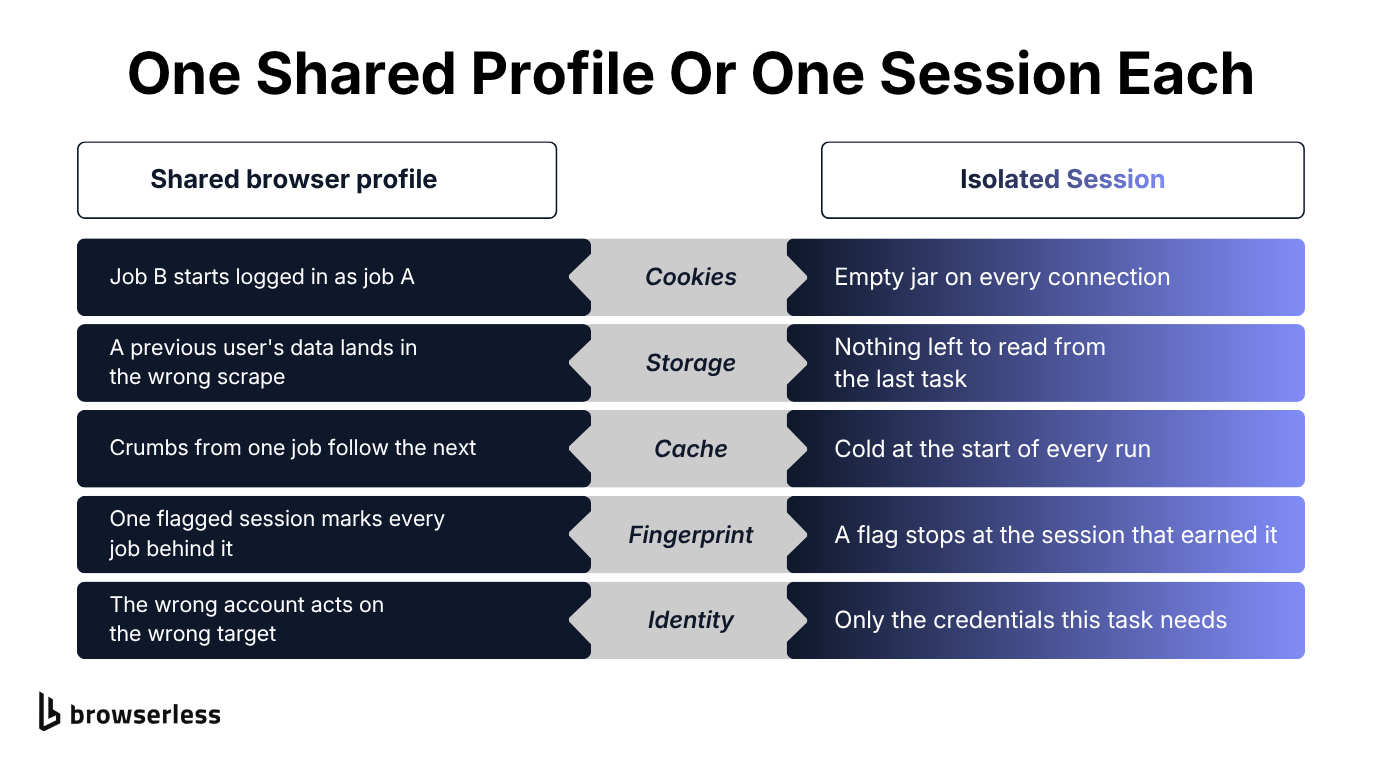
There are two session boundaries worth separating. First there's browser state, the cookies, storage, IndexedDB, cache, and everything else saved in the profile.
Then there's identity, meaning which account or tokens that browser can act with. A pristine profile loaded with the wrong credentials is still the wrong session, so you need both.
Fingerprint and network identity sit beside those two. Separate processes can still look alike to a target site, or arrive from the same IP, so a fresh process alone won't make them look unrelated.
When that matters, Browserless handles it separately through stealth browser routes and per-session proxy configuration.
None of this means every run has to start at a login screen. A trusted workflow might need to stay signed in for hours or days. What matters is intent.
Reusing known state is a feature; letting the next scrape inherit whichever cookies happen to be lying around is a bug. Good isolation gives state an owner and an expiry date, then drops it when the session ends unless you asked for it to survive.
Why session isolation matters for AI agents
AI agents make this boundary much harder to ignore. A useful browser agent needs state. Logging in doesn't help if it forgets the login on its next click, and a multi-step form is impossible if every action starts from a blank page. State should live for the length of the task, not spill into an unrelated agent run tomorrow.
The same state that makes the agent useful is what makes it risky. If a malicious page steers the agent through indirect prompt injection, the agent can misuse whatever accounts and sensitive data the current browser can reach.
An isolated, ephemeral session clears its browser-side state before another job begins. A session that never resets drags access from all previous interactions along with it, so one bad encounter can expose far more than the page that caused it.
Isolation limits that cross-task blast radius. It won't stop a compromised agent from misusing access during the current task, but it can stop that mistake from following every task that comes next.
Handing an agent your everyday browser is a bad bargain for the same reason. It feels convenient, but the agent inherits every account you already have open.
Your email, admin panels, cloud consoles, and personal tabs all become part of the same attack surface. Give the agent a dedicated session and you can hand it the one login it needs without handing over everything else you're signed into.
You may also see AI platforms use "session isolation" to mean keeping one user's conversation history away from another's. That's important, but it lives at the application layer. The concern here is the browser the agent is actually driving, and the access that browser carries.
Session isolation at scale: why weak boundaries fail under concurrency
With ten predictable jobs, a shared cookie jar can stay invisible for weeks. You aren't safe; you're lucky. Add real concurrency and the luck runs out. Collisions happen more often, touch more jobs, and become far harder to reconstruct from logs after the fact.
At a thousand concurrent sessions, a tiny leak becomes a fleet problem. One scrape's local storage contaminates another's output while workers race to modify the same profile.
Several jobs act through one account and trip the same restriction. If they also share browser characteristics or network identity, a target site can correlate and block them together.
Good isolation turns a bad session back into what it should be: one bad session. Without it, you're fixing jobs one at a time while the contamination keeps moving.
You're also burning capacity. Every poisoned scrape you retry takes a concurrency slot away from useful work.
If you're already hitting this, Browserless's best practices for running sessions reliably and the write-up on scaling browser automation past a thousand sessions cover the fixes in more depth.
How Browserless isolates sessions
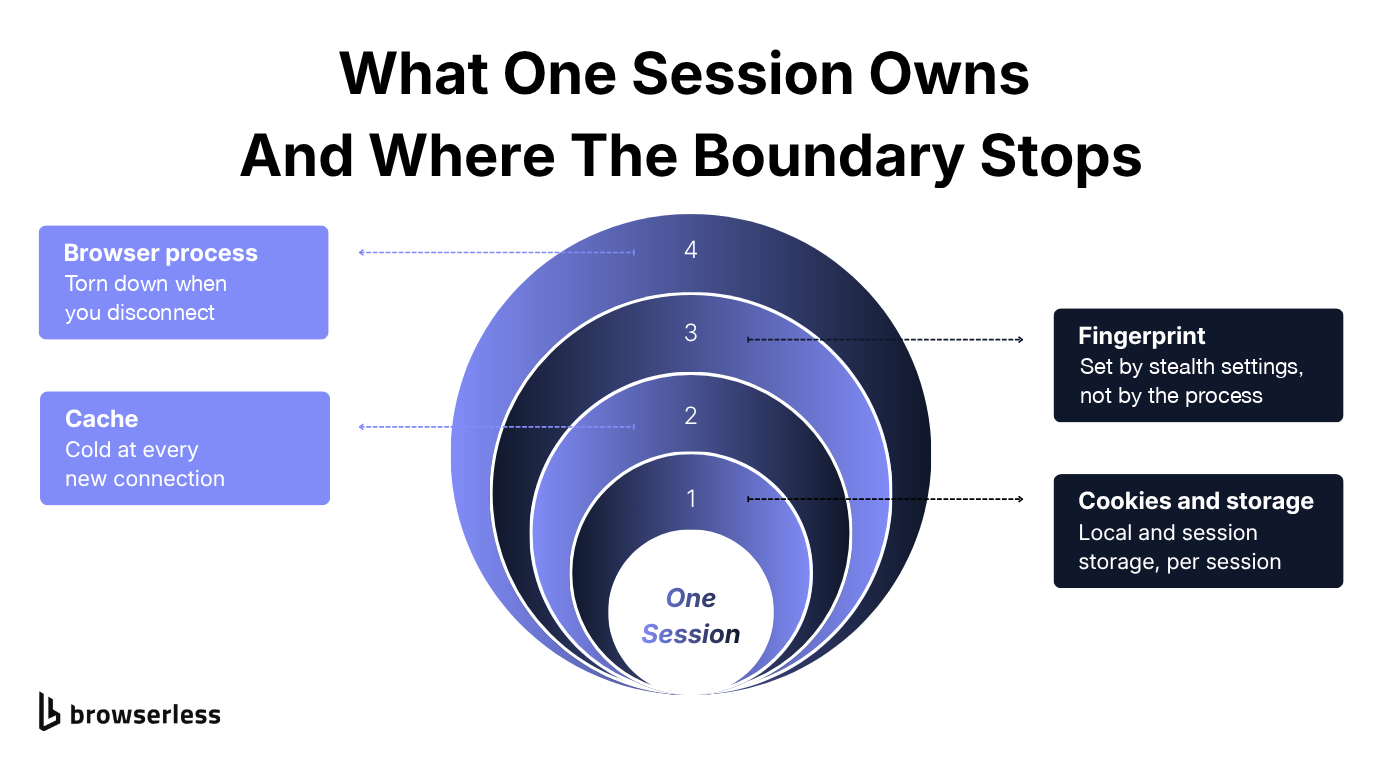
Browserless makes an opinionated choice here. Connect and you get a fresh remote browser process with empty state. End the connection and Browserless closes it. The next scrape, test, or agent run starts clean unless you explicitly choose to carry something forward.
That boundary covers the process and the browser state inside it, so cookies and storage don't quietly wander into the next job. The diagram below shows what belongs to one session.
Prove the boundary in a few lines
You can check this yourself rather than take it on trust. With puppeteer-core installed and BROWSERLESS_API_KEY set in your environment, open one connection, write to localStorage, and close it. Then open the same origin in a second connection and try to read the value. A clean session returns null.
import puppeteer from "puppeteer-core";

const WS = `wss://production-sfo.browserless.io/chromium?token=${process.env.BROWSERLESS_API_KEY}`;
const TARGET = "https://docs.browserless.io/";

async function withSession(fn) {
  const browser = await puppeteer.connect({ browserWSEndpoint: WS });
  try {
    const page = (await browser.pages())[0];
    await page.goto(TARGET, { waitUntil: "domcontentloaded" });
    return await fn(page);
  } finally {
    await browser.close();
  }
}

// The first session writes a value.
await withSession((page) =>
  page.evaluate(() => localStorage.setItem("leak-probe", "session-one")),
);

// The second session is a separate browser process, so it sees nothing.
const leaked = await withSession((page) =>
  page.evaluate(() => localStorage.getItem("leak-probe")),
);

console.log(leaked); // null
The second browser knows nothing about the first browser's local storage for that origin. It tests only one part of the boundary, but it's a useful sanity check, and much nicer than discovering the boundary is missing through a customer's leaked login.
Three ways to keep state on purpose
Starting clean doesn't mean giving up continuity. Each of these answers one of the failure modes from the last section, and Browserless gives you three deliberate ways to keep the state you actually want. Standard Sessions use the Browserless.reconnect CDP command to hold the same live browser open for a short handoff. Reconnect inside the allowed window and you're back on the same pages with the same in-memory state and scroll position.
It's a Puppeteer pattern because it depends on browser.disconnect(), which Playwright doesn't expose. The waiting browser still occupies a concurrency slot, so treat it as a short bridge rather than free storage.
If the workflow needs to come back hours or days later, use the Session API. It stores cookies, local storage, and cache in an isolated userDataDir, the same mechanism Chrome uses for personal profiles.
The browser process can stop while the state survives across restarts for as long as the session's ttl allows. When that ttl expires, Browserless deletes the session data.
The API works with Puppeteer and Playwright, though only one client can attach to a session at a time. A second active connection gets a 429 rather than a shared browser, which is the isolation boundary showing up as an error code. Not every 429 means contention, though: the attachment isn't released the instant a client finishes, so a quick reconnect can see a transient 429 and should retry after a short backoff. If you also need the live process briefly, processKeepAlive adds a grace window, but it leans on browser.disconnect(), so it's Puppeteer-only just like standard sessions.
Authenticated Profiles handle the other common case, where many fresh jobs need the same starting login. Capture the authenticated state once, then load it into parallel sessions as needed.
Each worker gets its own copy, so it can't mutate the saved profile or leak changes into its neighbors. The login travels as captured state rather than as credentials, which keeps the secret itself secure.
You keep the convenient part of reuse without rebuilding the shared-browser problem you were trying to escape.
What this isolation doesn't cover
Browserless isolates browser state. That isn't the same as giving every session its own virtual machine, container, host, or network. If your threat model needs those infrastructure boundaries, add them.
The same goes for fingerprint and IP separation, which depend on stealth and proxy settings rather than appearing automatically with a fresh process.
The fresh-state default works the same way whether you're running a scraper, a test suite, or an AI agent. You can also self-host Browserless, but persistent profiles still need separate user-data directories.
Point two sessions at one directory and you've recreated the problem yourself.
Debugging an isolated session has its own wrinkle, because once it ends there's nothing left to inspect. Session Replay, enabled by adding replay=true to the connection URL, preserves the DOM, the console output and the network timeline without forcing you to keep the browser alive.
Conclusion
Session isolation sounds abstract until it ruins an afternoon: one scraper fails every tenth run, one agent acts through the wrong account, or a whole fleet gets correlated and blocked together. The fix is concrete. Keep browser state separate, choose identity deliberately, and carry state forward only when the workflow actually needs it.
Browserless gives you that boundary by default, then lets you opt back into the exact persistence your scraper or agent needs. Start with a Browserless account and compare it with the browser setup you're running today.
Session isolation FAQs
What does browser isolation mean?
Browser isolation usually means running browsing activity somewhere away from the user's device or network, often to contain malware or block risky sites. Session isolation is narrower. It keeps individual browser sessions away from each other's state, whether or not the browser itself runs remotely.
What is isolation in cybersecurity?
In cybersecurity, isolation means putting a boundary around something (a process, session, or network segment) so a compromise in one place can't spread into another. Session isolation applies that same idea to browser data and state.
What is a session in security?
A session is the state that ties one continuous interaction together. A cookie or token usually tells the server that you're still the same authenticated user from one request to the next. Once the session is invalidated, that state should no longer grant access.
What is a session example?
Logging into a website is the everyday example. The site gives your browser a cookie, and that cookie keeps you signed in as you move between pages. Logging out or letting the credential expire invalidates the access. Closing the browser clears session-only browser state, but it doesn't necessarily invalidate a server-side session or persistent cookie. Automation works the same way; a script or agent drives the session instead of you.