
TL;DR
- Turnstile bypass. Getting your scraper through Cloudflare's Turnstile check by looking less like a bot, not by switching it off.
- It scores you. Turnstile weighs your browser fingerprint and behavior first, folds in your IP reputation, then decides how much friction you've earned.
- Three ways through. Run your own browser automation, pay a solving service, or hand the whole thing to a managed cloud browser. All three work, and all three need upkeep every time Cloudflare changes its checks.
Introduction
You go looking for a Turnstile bypass the moment a scraper that worked yesterday starts returning "verifying you are human" instead of the page you asked for. Worse, an HTTP client with no browser engine just hangs on the challenge. That's Cloudflare Turnstile, which hit open beta in 2022 and general availability in 2023, and it scores visitors quietly in the background instead of always making them prove they're not a robot.
Getting past it means learning what those checks look at and giving them less to flag. This guide covers what Turnstile actually checks, the three real methods developers use against Cloudflare Turnstile CAPTCHA, and working code for both the DIY and the managed path. Whether you're doing web scraping or general browser automation, none of it is permanent, since Turnstile keeps shipping new checks the way any maintained anti-bot product does.
What is Cloudflare Turnstile?
Cloudflare Turnstile is Cloudflare's CAPTCHA alternative. Instead of making you squint at an image puzzle, it scores you with fingerprinting and behavioral checks in the background, and only asks for a click when that score comes back too low.
Turnstile runs in three widget modes, and the site owner picks one when they create the widget:
- Managed – Cloudflare's recommended default, and the adaptive one. It runs its checks quietly and only asks you to tick a checkbox, much like reCAPTCHA v2, when it wants more proof.
- Non-Interactive – shows a widget with a loading spinner while the checks run, and never asks you to do anything.
- Invisible – shows nothing at all, with no widget and no hint that a challenge ran.
The mode itself is fixed, so what changes from visitor to visitor is what Managed decides to do. A site can wave most of its traffic straight through and still start demanding checkbox clicks the moment your trust score looks weak.
How Cloudflare Turnstile detects bots
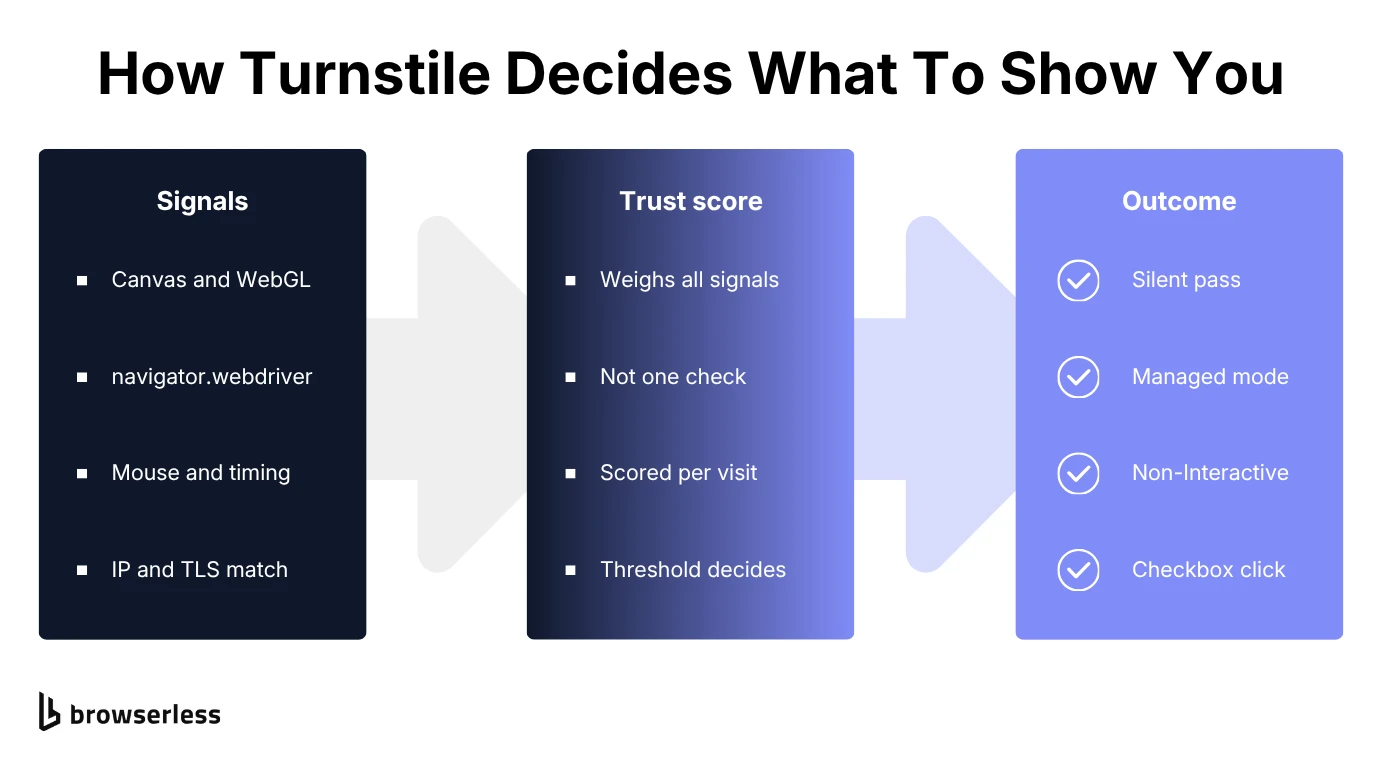
Turnstile pools several categories of signal into one trust decision, rather than running a checklist where each item passes or fails on its own. No single signal settles it, and none of them carries a weight you can work out from the outside.
That's why beating a single check rarely gets you all the way through, and why the same setup can sail past one Turnstile-protected site and stall on the next. What you're really doing is nudging a score.
Browser environment and fingerprint checks
Cloudflare describes Turnstile as running non-interactive JavaScript challenges that probe for web APIs and pick up browser quirks. In practice that means canvas and WebGL rendering fingerprints, the navigator.webdriver flag, and whether APIs like AudioContext and MediaDevices are present and working.
Launch a fresh headless instance with no stealth patches and you'll fail several of these at once. navigator.webdriver reports true under remote control, and API probes come back undefined where a real browser would hand you a working object.
Behavioral signals
Alongside the static fingerprint, Turnstile watches how a visitor interacts with the page, tracking mouse movement, keystroke rhythm, and how long the page sat open before anything happened. Real cursors wander, overshoot a target and correct back, and accelerate unevenly. Real typing leaves uneven gaps between keys and slows down on unfamiliar strings.
A script that jumps straight from page load to a form submit, with no movement in between, doesn't look like someone who actually read the page. Neither does one that travels in a straight line at constant speed, or fires keystrokes at exactly 100ms intervals. Naive randomness is its own tell, because evenly distributed jitter isn't how people behave either.
Network and TLS signals
Turnstile also weighs the connection itself. Datacenter IPs start from a weaker reputation than residential ones, since not many real people browse from a hosting provider's IP range. That reputation is shared, too, so you inherit whatever the previous tenant of an address did with it.
TLS fingerprints get checked against the claimed browser too. The handshake exposes which cipher suites you offer, the order you list them in, and which extensions you send. Every HTTP stack has its own recognizable shape there. A user agent announcing Chrome, paired with a handshake that doesn't match Chrome's, is a signal on its own.
Turnstile tokens and how verification works
Clear a challenge in any mode and Turnstile writes a response token into a hidden field named cf-turnstile-response. You'll also see it called a CAPTCHA token or Turnstile token. Your backend, whether it runs Node, Python, or PHP, posts that token to Cloudflare's verification endpoint from a callback function and lets the request through only if it comes back valid.
The first property that will bite you is that the token is single-use, so submitting it burns it and a replay fails. The second is that it's short-lived, so a long gap between solving and submitting kills it before the server sees it.
Sites can scope a token to a specific page context with optional parameters like action and cData, which Cloudflare's siteverify response hands back alongside the result so your backend can check them.
That's why a token minted on one page sometimes fails validation when replayed against a different one.
Can you actually bypass Cloudflare Turnstile?
You can clear individual challenges, and how well any bypass works comes down almost entirely to which mode the site runs.
Non-Interactive and Invisible never ask for a click, so a real browser with a consistent fingerprint clears them fairly reliably once the trust score is good enough.
Managed is where it gets hard, since it can decide to demand a checkbox click and no single technique clears that consistently. That's why the solving services below exist at all.
Before you automate around a Cloudflare CAPTCHA
Whether any of this is allowed comes down to the target website's own terms of service, not to Turnstile itself. Using automated scripts to access publicly available data is one thing.
Driving a site's login, checkout, or account-creation flow in ways its terms explicitly prohibit is another, and that one carries real legal exposure, not just a technical inconvenience.
So check what you're agreeing to before automating around any CAPTCHA on a site you don't own. Keep your request rate to something a human could plausibly generate, respect robots.txt, and stop when a site states its position. Everything below assumes you've settled that question.
Methods to bypass Cloudflare Turnstile CAPTCHA
Three Cloudflare Turnstile bypass methods cover most of what works, from lightest-weight to most managed. They aren't mutually exclusive either, and most production setups end up combining two of them once the first one stops being enough on its own.
| Method | Best for | Main trade-off |
|---|---|---|
| Browser automation | Non-Interactive and Invisible modes, small scale | Needs ongoing fingerprint upkeep |
| CAPTCHA-solving services | Checkbox challenges, low request volume | Solve time and token expiration |
| Managed cloud browsers | Production scraping at real volume | Ongoing cost per request |
Browser automation and stealth in headless mode
Your baseline is a real browser engine, one of the mainstream headless browsers rather than a raw HTTP client. Turnstile's checks lean on JavaScript execution, and an HTTP-only client simply can't run it.
A bare headless instance still leaks the tells above, so you layer stealth techniques on top. That means overriding navigator.webdriver, presenting a realistic plugin list, and keeping the user agent consistent with everything else the browser reports. On stubborn targets, running headful clears checks that headless mode still fails, because some sites weight headless signals more heavily.
Consistency matters more than any single patch, and research presented at the 2025 ACM Internet Measurement Conference shows why. It ran 20 bot services against two commercial anti-bot systems across half a million requests, measuring evasion rates of 52.9% and 44.6%. The bots that got caught gave themselves away through fingerprint values that contradicted each other, inside one fingerprint or across time.
Third-party CAPTCHA-solving services
Here you hand the CAPTCHA-solving work to a remote service instead of solving it yourself.
Your code extracts the sitekey from the target website, posts it along with the page URL and any other necessary parameters to a solving service, polls in a loop until a response token comes back, then injects that token into the form.
It handles a Managed-mode checkbox well without a full stealth stack, and it costs you on two fronts. The first is money, since the service bills you per solve. The second is time, because solving takes anywhere from several seconds to tens of seconds, and every one of those seconds eats into the token's five-minute life before your scraping pipeline has even submitted it.
Managed cloud browsers
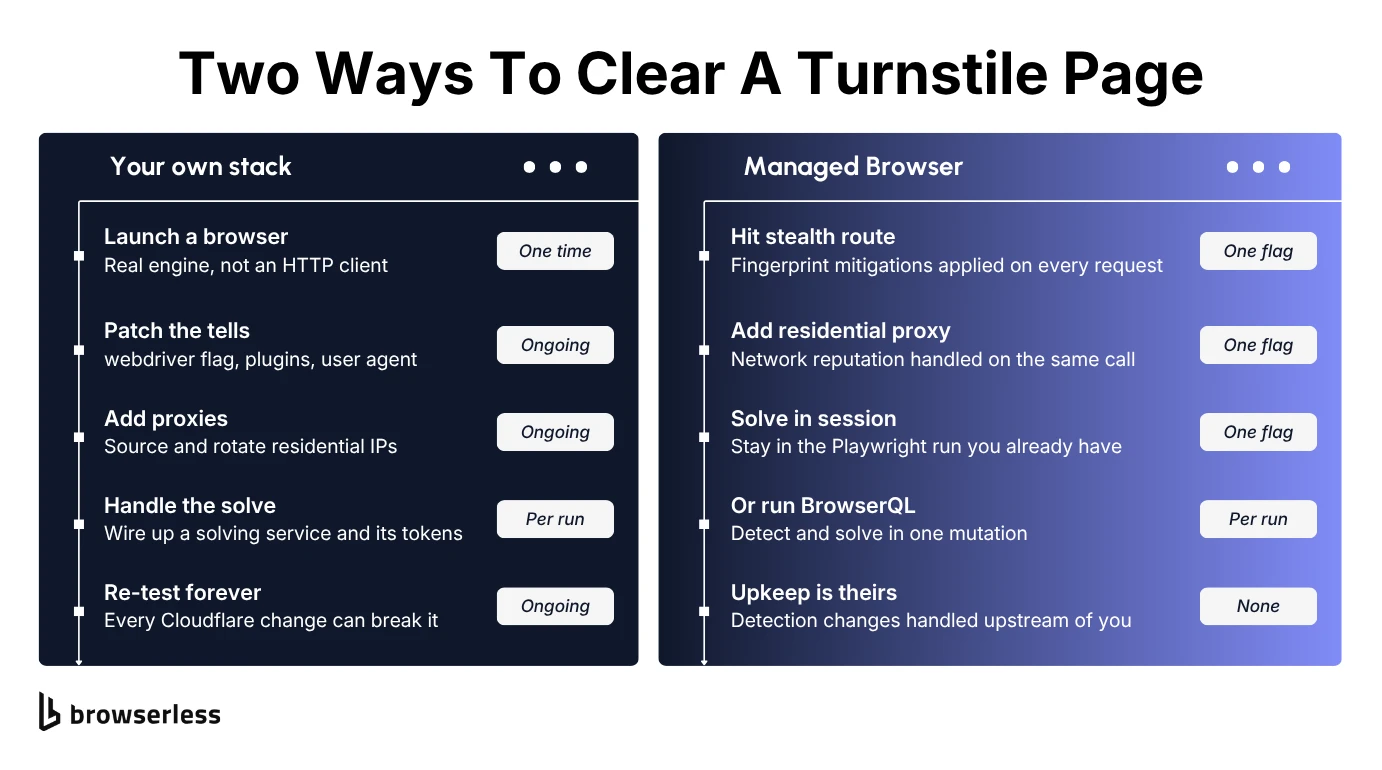
A managed cloud browser does all of that in one request instead of three systems you maintain yourself. It keeps your fingerprint consistent, routes through a proxy, and solves whatever's left, on infrastructure somebody else updates as Turnstile changes.
Bypass Cloudflare Turnstile with Python
Here's the first method in code, and the DIY path runs in two steps. The cheap one comes first, where a plain HTTP request tells you whether a Turnstile widget is there at all before you reach for anything heavier.
import requests

TARGET_URL = "https://nowsecure.nl"

response = requests.get(
    TARGET_URL,
    headers={
        "User-Agent": (
            "Mozilla/5.0 (Windows NT 10.0; Win64; x64) AppleWebKit/537.36 "
            "(KHTML, like Gecko) Chrome/124.0.0.0 Safari/537.36"
        ),
    },
    timeout=30,
)

has_turnstile = "challenges.cloudflare.com" in response.text or "cf-turnstile" in response.text
print(f"Status: {response.status_code}, Turnstile widget present: {has_turnstile}")
if has_turnstile:
    print("A plain HTTP client can't execute Turnstile's JavaScript challenge.")
Against a Cloudflare-protected target this returns Status: 200, Turnstile widget present: True.
If a widget shows up, the requests library stops being useful on its own, since it has no JavaScript engine to run the challenge. Step two hands the page to a real browser, which executes the challenge and then waits for Turnstile to write its token into the form:
from playwright.sync_api import sync_playwright
from playwright.sync_api import TimeoutError as PlaywrightTimeout

TARGET_URL = "https://nowsecure.nl"

with sync_playwright() as p:
    browser = p.chromium.launch(headless=True)
    try:
        page = browser.new_page(
            user_agent=(
                "Mozilla/5.0 (Windows NT 10.0; Win64; x64) AppleWebKit/537.36 "
                "(KHTML, like Gecko) Chrome/124.0.0.0 Safari/537.36"
            )
        )
        # networkidle never settles here, because the widget keeps polling in the background
        page.goto(TARGET_URL, wait_until="domcontentloaded")

        try:
            # Turnstile writes its result into a hidden field, so wait for that field to
            # hold a value rather than watching the widget itself
            page.wait_for_function(
                """() => {
                    const el = document.querySelector('input[name="cf-turnstile-response"]');
                    return el && el.value.length > 0;
                }""",
                timeout=20000,
            )
            token = page.eval_on_selector(
                'input[name="cf-turnstile-response"]', "el => el.value"
            )
            print(f"Token acquired, {len(token)} chars.")
        except PlaywrightTimeout:
            print("Challenge still unresolved after the wait.")
    finally:
        browser.close()
What this does:
- Opens a headless Chromium instance with Playwright and a realistic, internally consistent user agent.
- Waits on
domcontentloadedrather thannetworkidle, which never settles on a Turnstile page because the widget keeps polling in the background. - Polls the hidden
cf-turnstile-responsefield until it holds a value, since that value is the token, and gives up cleanly after 20 seconds instead of hanging. - Closes the browser in a
finallyblock, so a timeout or a navigation error doesn't leak the session.
Against nowsecure.nl this prints Challenge still unresolved after the wait. every time, and that's expected. The page uses Cloudflare's test sitekey 3x00000000000000000000FF, which forces an interactive checkbox on every visitor, and this script has no click step.
Point the same code at Cloudflare's Turnstile demo, where the sitekey always passes, and it returns a token instead.
On a real Turnstile deployment, a plain headless browser usually fails for a different reason: the fingerprint checks described above flag it before any checkbox appears.
A Managed-mode checkbox is the gap in this script, since clearing one needs an added click step targeting the widget, and even with that, success stays inconsistent.
Why DIY Turnstile bypass techniques break over time
Cloudflare updates Turnstile's checks and rollout behavior continually, adjusting trust-score thresholds, adding fingerprint signals, and changing how readily a Managed widget escalates to a checkbox.
A stealth setup that clears challenges cleanly today can start getting blocked next month with zero changes on your end, simply because Cloudflare shipped an update to what it's checking for.
The maintenance cost is the part a one-time tutorial never mentions, because the script you wrote is only a snapshot of what worked against one version of Turnstile's detection.
Keeping it alive means re-testing and re-tuning your fingerprint handling every time something shifts, so budget for it as ongoing work, not a solution you ship once.
A more reliable way to handle Cloudflare Turnstile
A managed approach applies the same layers you'd build yourself, just continuously instead of by hand. Browserless treats CAPTCHA solving as the last layer rather than the first, and Cloudflare Turnstile is one of the bot-detection systems it lists by name as a target, alongside reCAPTCHA v2 and v3, DataDome, and GeeTest.
The stealth route applies fingerprint mitigations and entropy injection on every request, and residential proxies take the datacenter IP out of the picture.
When a challenge still lands, adding solveCaptchas=true to a connection URL turns on automatic solving for the lifetime of the Puppeteer or Playwright session you already have, with no move to a separate API.
When you need the whole flow in one place, BrowserQL's solve mutation handles detection and solving in a single call, with type: cloudflare as the confirmed value for Turnstile in the current schema. Navigating, solving, and submitting the form fit in one mutation, the same job the Playwright script above did by hand:
mutation SolveTurnstile {
  goto(url: "https://demo.turnstile.workers.dev/", waitUntil: networkIdle) {
    status
  }
  solve(type: cloudflare) {
    found
    solved
    time
  }
  click(selector: "button[type='submit']") {
    time
  }
}
Run it against https://production-sfo.browserless.io/stealth/bql?token=$BROWSERLESS_TOKEN&proxy=residential, reading the token from your environment, not pasting it in.
What this does:
- Hits the stealth route, which applies fingerprint mitigations and entropy injection to every request.
- Routes the request through a residential proxy instead of a datacenter IP.
- Runs
solve(type: cloudflare), which detects and automatically solves the Turnstile challenge without you writing separate detection logic. - Clicks the submit button once the token is in place, since solving only mints the token and the form still needs submitting.
A successful run returns JSON with the solve block filled in. found and solved both come back true, and time gives you the milliseconds the solve took, a figure you can log and retrieve.
None of that adds up to a bypass guarantee, and Browserless's own production telemetry puts Cloudflare solve rates between 89.9% and 96.6% across four separate weeks, strong but plainly short of 100%.
Cloudflare Turnstile vs reCAPTCHA
Turnstile and reCAPTCHA solve a similar problem from different starting points. Both score a visitor before deciding whether to put anything in their way, and both are drop-in widgets any site can add.
Turnstile doesn't require the site to sit behind Cloudflare, which is a common misconception about it.
The difference that matters for automation is what each one counts as evidence. Cloudflare has pointed out that a Google cookie in the browser raises a visitor's reCAPTCHA score, so an established, logged-in profile works in your favor there.
Cloudflare says Turnstile never looks at cookies at all, so a clean profile costs you nothing against it, and your fingerprint and behavior carry that much more weight.
If you're scraping across multiple targets, the techniques overlap heavily. Real browser engines, consistent fingerprints, and clean IP reputation help against both, though the specific widget, token format, and escalation logic don't carry over.
Conclusion
If your scraper broke on a "verifying you are human" page, you now know what was happening behind it. Turnstile scored you, the score came back low, and the mode that site picked decided how much friction you got. Every technique here aims at the score rather than at the widget, which is why consistency across fingerprint, behavior, and IP matters more than any single patch.
Which method you pick comes down to how much of the upkeep you want to own. Patching your own stack works fine right up until Cloudflare changes something and it quietly stops working, and then it's your weekend. If you'd rather that maintenance were somebody else's problem, sign up for Browserless free and point your existing Playwright or Puppeteer code at it.
Turnstile bypass FAQs
Can you bypass Turnstile without a browser?
Not reliably, because Turnstile's checks depend on JavaScript execution and browser-environment probing that an HTTP-only client can't satisfy on its own. A third-party CAPTCHA-solving service can stand in for the browser, but that service still runs a real browser somewhere on its end to produce the token.
How long does a Turnstile token last?
A Turnstile response token is single-use and expires 300 seconds (five minutes) after it's issued, per Cloudflare's own documentation. Submit it as soon as your flow has it, since a slow hand-off is one of the most common ways a perfectly valid token still fails.
Do you need rotating proxies to get past Turnstile at scale?
Proxy support matters more as volume climbs. A single clean residential IP will carry a small job, but for high volume scraping, rotating proxies spread requests across addresses so no one IP builds up a pattern worth flagging. They won't rescue a fingerprint problem, though, and a browser that fails the environment checks fails them from a different proxy too. Treat network reputation as one signal among several, not the fix.