
TL;DR
- Vector database. A database that stores embeddings, the numerical representations of text or images or audio, and retrieves the closest ones by similarity instead of exact match.
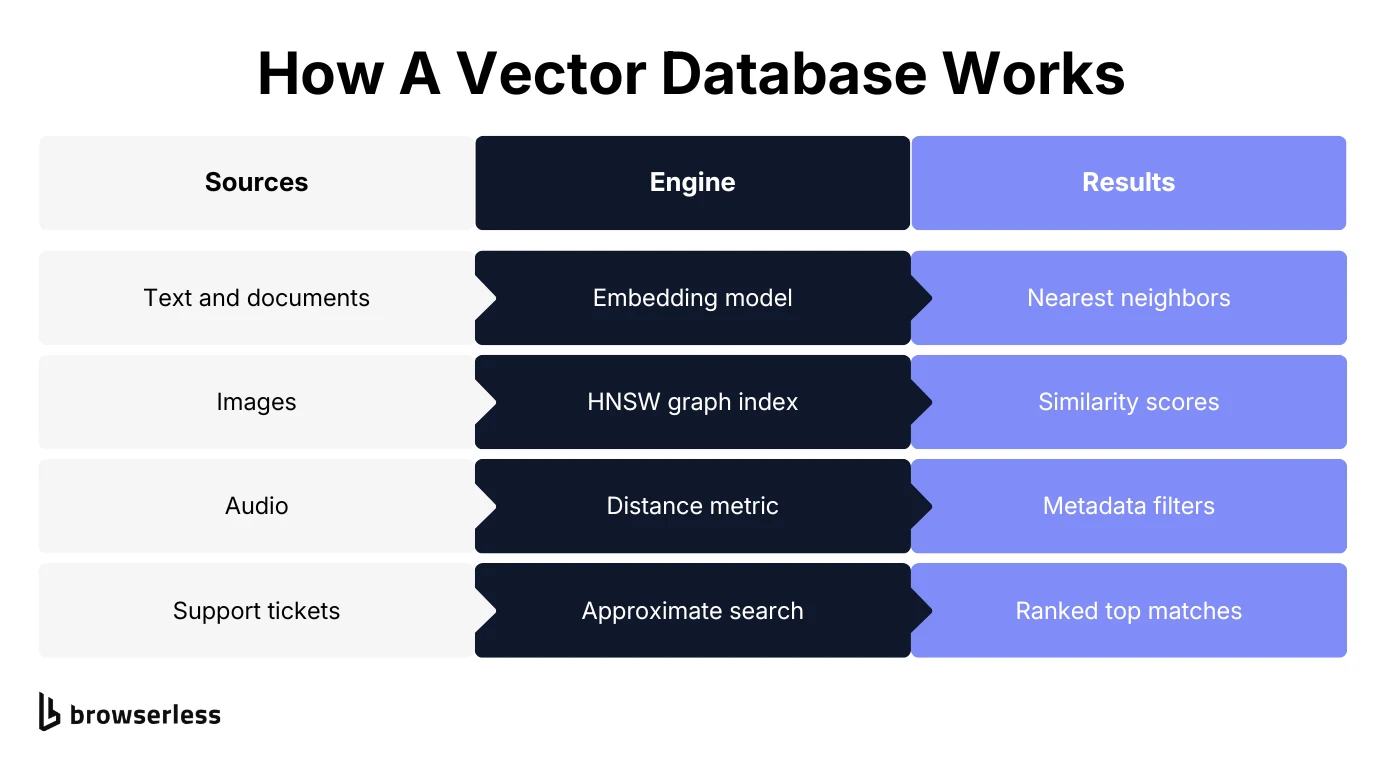
- How it works. An embedding model turns content into vectors, a hierarchical navigable small world (HNSW) index organizes them for fast lookup, and a query vector is matched against that index using a distance metric.
- What it powers. Retrieval-augmented generation (RAG), semantic search, recommendations, and deduplication all rest on the same similarity lookup.
- Feeding it. What you embed reflects the source at fetch time and nothing refreshes it for you, so pulling rendered content out of JavaScript-heavy pages and re-crawling on a schedule matters as much as the retrieval itself.
Introduction
Chatbots, recommendation engines, and search features increasingly sit on a vector database, and most explanations of one stop at "it stores embeddings," which is true without telling you much about the system you'd actually build.
This guide covers the mechanics and the part that usually gets left out, since a vector database doesn't fill itself. Getting real unstructured data in, then keeping it from going stale, is usually harder than the querying.
What is a vector database?
Vector databases store embeddings, index them, and make them searchable by similarity. Embeddings are numerical representations of complex data, whether text, images, or audio, in a form software can compare mathematically.
Vector databases are designed around that one comparison and not much else. That narrow focus is why you'll sometimes see them called vector database management systems.
Instead of returning exact keyword matches, a vector database hands back the vectors sitting closest to a given query vector in vector space. A standalone vector index like Facebook AI Similarity Search (FAISS) does a narrower job: it compares vectors quickly without being a database. Deletes range from awkward to unsupported depending on the index type you picked, there's no metadata filtering, and persistence is on you.
A vector database wraps that similarity search in the data storage features you'd expect from any production system, so vector search and vector data management live in one place instead of bolting an index onto something else.
How vector databases work
Underneath that, a vector database runs a three-stage pipeline that turns raw data into vectors, indexes those vectors so they're fast to search, and compares a query vector against them to find near neighbors.
Vector embeddings and high-dimensional vectors
An embedding model converts raw data into a vector, a list of numbers where each position, or dimension, captures some learned characteristic of the input. A short product description might become a vector with a few hundred dimensions, while a modern text embedding model often produces 768 to 3,072.
Machine learning models learn that mapping during training, not from any explicit rule you write, and it's the geometry of the whole vector rather than any single position that carries the meaning. That's why two sentences with no words in common can still land close together if they mean roughly the same thing.
High-dimensional vector embeddings work because distance in that dimensional space tracks similarity in meaning. Within a given model family, more dimensions capture more nuance at the cost of more storage and slower comparisons. Across families that doesn't hold, and a 768-dimension model can beat a 3,072-dimension one.
Hierarchical navigable small world (HNSW) indexing
Comparing a query against every stored vector works fine at a few thousand rows and falls over well before a few million. Approximate nearest neighbor (ANN) indexing solves this by organizing vectors so a search only has to check a small, promising subset instead of the entire dataset, which is what keeps retrieval fast and accurate once high-dimensional vector data runs into the millions of rows.
HNSW is a widely used indexing approach that builds a multi-layer graph where each vector connects to its nearest neighbors, with sparser, longer-range connections in the top layers and denser, local ones near the bottom.
A search starts at the top layer, jumps toward the target region using the long-range links, then narrows in through progressively denser layers until it reaches a close set of candidates. It's a bit like using a highway system to get across a country before switching to local roads for the last mile, rather than checking every street in every town along the way.
HNSW isn't the only option. Locality-sensitive hashing (LSH) hashes similar vector embeddings into the same buckets so a search only has to check a handful of buckets rather than scan every vector, and product quantization compresses vectors, trading a little accuracy for a lot less memory once the index gets large.
HNSW is the common default because it holds up well on both speed and recall, though some databases let you pick based on your own data.
Efficient similarity search and the query vector
At query time you run the user query through the same embedding model that indexed everything else, which gives you a query vector directly comparable to what's already stored. The database then runs its efficient similarity search over the index, ranking stored vectors against that query vector with a distance metric such as cosine similarity or Euclidean distance.
Because ANN indexing is approximate by design, there's a real accuracy versus speed dial here. A broader search checks more candidates and returns better matches at a higher latency cost, while a narrower one is faster but occasionally misses a genuinely close vector. Most databases expose this as a tunable parameter, not a fixed trade you're stuck with.
Cosine similarity, the most common distance metric, is easiest to picture with a tiny example. Reduce two product descriptions down to three dimensions each, so that "wireless noise-canceling headphones" might embed as [0.9, 0.1, 0.4], and "Bluetooth over-ear headphones with ANC" as [0.85, 0.15, 0.42].
Those vectors point in nearly the same direction, so their cosine similarity lands close to 1. A vector for "stainless steel water bottle," by contrast, points somewhere else in the space entirely, and its similarity score to either headphone vector drops well below theirs.
Real embeddings run to hundreds or thousands of dimensions instead of three, but the underlying comparison, how closely two vectors point in the same direction, works exactly the same way.
Hybrid search: combining vector and keyword search
The blind spot in pure similarity search is that it's good at "conceptually related" and worse at "this exact SKU number" or "this specific person's name," because embeddings capture meaning, not precise strings.
Hybrid search fixes that by combining vector similarity with keyword matching or metadata filtering in a single query, so you're not forced to choose one retrieval method for an entire application.
Take a query like "find support articles like this one, published in the last 90 days, tagged billing." The similarity search handles "like this one," while metadata filtering handles the date range and tag. Both run together instead of as two separate queries you'd have to merge yourself.
Most managed vector databases now ship hybrid search, but implementations vary, so check for it directly if your queries mix semantic and exact-match requirements. The better ones run both retrieval paths in a single query plan instead of making you merge two result sets afterward.
Vector databases vs. traditional databases
Traditional relational databases are built around exact and structured lookups over rows and columns, with indexes on known fields and queries that return records matching a condition precisely. That model works well for structured data with a defined schema, and it just isn't built for "find me things similar to this," because similarity isn't something a WHERE clause can express against a block of unstructured text.
Graph databases change the shape of the query but not the principle, since they still traverse defined edges and properties rather than meaning.
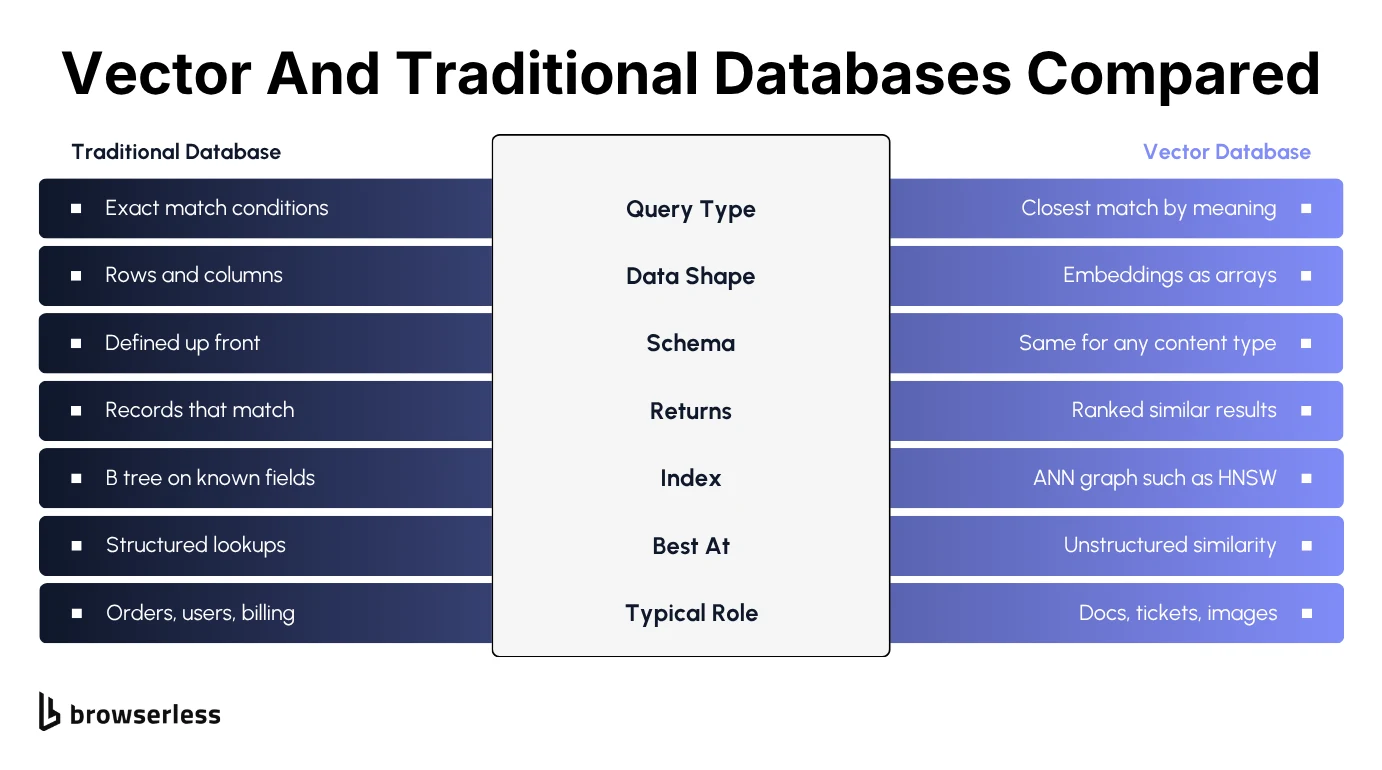
Vector databases excel at exactly that question, and one complements a relational database instead of replacing it. Your orders, users, inventory, and billing records stay exactly where they are, while product descriptions, support tickets, or documentation get embedded and made searchable by meaning. Most real systems run both side by side.
Unlike traditional databases, a vector database also doesn't care much about a fixed schema for the content itself. A vector is a vector, whether it started as a paragraph, a product photo, or a snippet of audio.
What it does still need is ordinary database discipline, meaning durability, access control, and the ability to update or delete a record without rebuilding the whole index from scratch. A vector database provides that alongside the similarity search, and a bare index does not.
Common vector database use cases in AI
AI systems increasingly need data retrieval by meaning rather than by keyword, and a vector database is the piece that makes it fast at scale. Almost all the current demand traces back to that one shift.
Retrieval-augmented generation and large language models
RAG is a major driver of new vector database deployments. A large language model (LLM) doesn't know anything past its training data and can't verify facts on its own, so RAG uses a vector database as an external knowledge base.
You retrieve the matching documents by similarity search, drop them into the prompt as relevant context, and the model answers from those instead of guessing from memory. If you're wiring this up in LangChain or through an MCP client, the retrieval step plugs into the same loaders. Done well, this cuts down on hallucinated answers and lets you point a general-purpose model at your own existing data without retraining it.
Semantic search and natural language processing
Semantic search returns results based on meaning rather than exact wording. Natural language processing (NLP) work has been building toward that for years. A search for "affordable laptop for students" can surface listings titled "budget-friendly notebook for college" because the embeddings land close together even though barely a word overlaps. Semantic similarity does work there that traditional keyword-based search structurally can't.
Machine learning and data science workflows
Beyond chatbot-style retrieval, data scientists use vector databases for clustering and feature retrieval, analyzing data across large corpora well before anything user-facing gets built. Cluster a month of support tickets by embedding and the recurring complaint themes fall out without anyone reading all of them, which is a reporting job rather than a product feature. Embedding a product catalog once and reusing it for search and recommendations also tends to work out cheaper than building separate systems for each, leaving one pipeline to maintain instead of several.
Image recognition and computer vision
Images embed into the same kind of vector space as text. That shared space is what makes reverse-image search and "find visually similar products" possible. Some systems even embed text and images into a shared space, so you can search photos using a text description.
Anomaly detection
Anomaly detection works by embedding what "normal" activity looks like as a cluster of nearby data points, then flagging anything that lands unusually far from that cluster. Fraud detection and network security tooling both lean on this, since you never have to define every fraudulent pattern in advance, only a reasonable model of typical behavior, and distance in vector space does the flagging.
Entity resolution and deduplication
Two records describing the same thing rarely match on exact text. Acme Corp, ACME Corporation, and Acme Corp. are three different strings but one company, and a WHERE name = clause won't catch that they're duplicates. Embed each record instead, and the three variants land close enough together in vector space that a similarity threshold catches them as the same entity, without anyone writing fuzzy-matching rules by hand.
When you might not need a vector database
None of the above is a reason to reach for one by default, because a vector database adds real operational weight, from embedding compute for every piece of content to index memory that grows with your data and another service to run and monitor.
If your dataset is small and mostly structured, a standard database with full-text search will get you most of the benefit with a fraction of the setup. If your users search by exact identifiers (order numbers, SKUs, usernames), similarity search is solving a problem you don't have. If your entire corpus is small enough to scan directly, the overhead of an index isn't buying you anything a simple lookup wouldn't already do faster.
General-purpose databases now ship vector search as a feature, with Postgres and pgvector the common example. For a smaller project already running one of these, adding an extension is often simpler than standing up and operating an entirely new database just for embeddings.
Getting your data into a vector database
Clean, ready-to-embed content is the assumption every section above quietly rests on, and it's where most ingestion pipelines break.
Documentation sites, competitor pages, internal wikis, and JavaScript-rendered single-page apps hold most of the unstructured data worth embedding, and none of it arrives as tidy paragraphs waiting for an embedding model.
Where that content isn't yours, the terms of service, robots directives, and rate limits of each source set the boundary. Stay inside them and the pipeline keeps working. Ignore them and you burn the access in a week.
A meaningful share of that content also sits behind rendering that a plain HTTP request can't get through, whether that's pages building their content with client-side JavaScript or sites running bot detection such as Datadome that filters out automated traffic, often paired with passive CAPTCHAs. A request library fetching the raw HTML of a client-side-rendered page comes back with an empty shell, since the actual content never rendered.
You end up needing real browser automation, not just an HTTP client. Browserless exposes that as either a managed browser you drive with Puppeteer or Playwright, or as single-call endpoints: /content for fully rendered HTML, Smart Scrape for LLM-ready markdown, and /unblock for pages behind bot detection. None of them render every site cleanly.
Source formats add their own friction on top of the rendering problem. PDFs need layout-aware extraction so a two-column table doesn't collapse into scrambled text. Support tickets and chat logs need speaker turns separated before they mean anything as standalone chunks, and marketing pages bury the actual content under navigation, cookie banners, and footer boilerplate that you don't want polluting an embedding.
None of this is exotic engineering, but all of it has to happen correctly before an embedding model ever sees the text, and a pipeline that skips it quietly degrades every search result downstream.
Keeping a vector database fresh
A vector database holds a snapshot of its sources and not a live view of them, so once you've embedded a set of pages and loaded them in, that data reflects the state of those pages at fetch time and nothing updates it automatically when the source changes.
That gap causes a specific, hard-to-notice failure, in which a RAG system keeps answering confidently with information that quietly stopped being true. A pricing page changes, a product gets deprecated, an API endpoint moves, and the vector database has no way to know unless something goes back and re-fetches it. Documentation-heavy and pricing-sensitive use cases feel this the fastest, since those are exactly the pages that change without warning.
The fix is treating ingestion as a recurring job instead of a one-time load, so you re-crawl source pages on a schedule, re-embed anything that changed, and upsert the updated vectors so old ones don't linger. Browser automation earns its keep a second time here, running the same rendering and extraction step on a schedule rather than once, so the index tracks reality instead of a moment you captured weeks ago. For whole-site refreshes, the /crawl API does the spidering for you, with depth limits, path filters, and a webhook when the job finishes, returning each page as LLM-ready content (beta, Cloud plans).
You don't need to re-embed everything on every run, so hash the extracted text for each page and compare it against the stored hash from the last crawl. Change detection like that lets you skip anything unchanged and send only the pages that really did change back through the chunk-and-embed step.
On a documentation site of any real size, that turns a nightly refresh from re-embedding thousands of pages into re-embedding the handful that changed, which keeps both the compute bill and the job runtime predictable.
Choosing a vector database: what to weigh
Once you've decided you actually need one, a few criteria separate a good fit from a migration you'll be doing again in a year:
- Serverless vs. self-hosted. A serverless vector database removes the operational burden of running the infrastructure yourself, but it couples your cost directly to usage in a way that can get expensive at scale. Self-hosting flips that, so you take on the ops work but get control over data residency and a cost curve that doesn't move in lockstep with query volume.
- Metadata filtering. Some vector databases handle this natively at index time, while others apply the filter after the similarity search runs, which gets noticeably slower once your filters get selective.
- Ecosystem fit. Check that it plugs into the embedding models and orchestration frameworks your team already uses, rather than forcing a rewrite around a proprietary client. A vector database that only ships a Python SDK is a real constraint if your ingestion pipeline runs in Node or Go.
- Scaling behavior. Ask how it performs as both your row count and your number of dimensions grow, since graph indexes like HNSW and hash-based approaches like LSH degrade differently in high-dimensional space. A benchmark run on a 10,000-vector test set tells you very little about how the same index behaves at 50 million.
There's no universally right answer to any of these, which is why they're worth asking before you commit.
A practical example: scrape, embed, and store
Here's what the full pipeline looks like end to end, using Browserless for the rendering and extraction step. Browserless connects your existing Puppeteer or Playwright code to a managed browser over a WebSocket endpoint, so a JavaScript-rendered page returns real, extracted text instead of an empty shell.
import puppeteer from "puppeteer-core";

const browser = await puppeteer.connect({
  browserWSEndpoint: `wss://production-sfo.browserless.io/chromium?token=${process.env.BROWSERLESS_TOKEN}`,
});

const page = await browser.newPage();

await page.goto("https://scraping-sandbox.netlify.app/products", {
  waitUntil: "networkidle2",
});

// Pull the rendered main content as plain text, ready to chunk and embed.
const content = await page.evaluate(
  () => document.querySelector("main")?.innerText ?? "",
);

await browser.close();
From there, the rest of the pipeline is standard regardless of which vector database, or orchestration framework like LangChain, you land on:
- Chunk the text. Break it into smaller passages, usually a few hundred tokens each, since embedding an entire page as one vector loses too much specificity to be useful for retrieval.
- Generate embeddings. Create one for each chunk with your embedding model of choice, alongside metadata like the source URL, section title, and fetch date.
- Upsert the vectors. Add them to your vector database, replacing any prior version of the same chunk so re-runs update in place instead of creating duplicates.
On a scheduled re-run, hash the text you just extracted and compare it against the previous crawl, so only pages that actually changed go back through chunk-and-embed:
import { createHash } from "node:crypto";

const fingerprint = (text) => createHash("sha256").update(text).digest("hex");

// `lastSeen` is a url -> hash map you must persist between runs, not rebuild each time.
const hash = fingerprint(content);
const changed = hash !== lastSeen[url];

if (changed) lastSeen[url] = hash;
To be precise about the split, Browserless renders and extracts the page; it doesn't compute embeddings or host the vector index. Those stay separate tools, and connecting them is on you.
Conclusion
A vector database turns embeddings into fast, meaning-based search, and that mechanism of embed, index, query is clean once you've seen how the pieces fit. Getting real, messy, unstructured data into a state worth embedding, and keeping it that way as the source changes, is where most of the work actually goes. If that's the piece you're stuck on, it's what Browserless handles, rendering and extracting JavaScript-heavy or bot-protected pages, once or on a recurring schedule, so whatever vector database you choose has current, usable data to work with. Sign up free to try it against your own target pages.
Vector database FAQs
What's the difference between SQL and a vector database?
SQL databases retrieve rows by exact conditions against structured columns, while a vector database retrieves by similarity across embeddings of unstructured content. Most production systems run both together.
What happens when you switch embedding models?
Every stored vector has to be regenerated, because query vector embeddings are only comparable to indexed vectors from the same model. Vector databases rely on that consistency, so mixing two models in one index ranks results wrongly while looking plausible. Keep the extracted text from your last crawl and a rebuild re-embeds the high-dimensional data you already hold instead of re-fetching every page.
Can a vector database store the original text documents?
Many vector databases hold the source chunk and its metadata next to the vector, so a query returns readable text documents rather than IDs you look up elsewhere, which matters most for RAG. Watch the billing here. Advanced vector databases often split the tiers, keeping the index in fast storage while raw text sits on cheaper disk. A service exposing vector search capabilities alone leaves you a second lookup on every query.
How do you chunk pages before embedding?
Split on structure before you split on length. Headings, list items, and paragraph boundaries usually map to a single idea, so chunking on those keeps a passage self-contained, with a few hundred tokens as a reasonable starting size. Overlap neighboring chunks by a sentence or two so a definition straddling a boundary survives in at least one of them, and carry the source URL and section title as metadata on every chunk so a retrieved passage can be traced back to its page.
How much does it cost to embed a large documentation site?
Embedding is usually the cheap part, and re-embedding is what adds up. Work it out in tokens rather than pages, since a site of a few thousand pages at roughly a thousand tokens each is a few million tokens for the first pass, and every full re-embed costs that again. Index memory is the other line item, scaling with both vector count and dimension width. That combination is why change detection matters more than the initial load.