
TL;DR
- Web agents. A web agent is a large language model (LLM)-driven system that perceives a web page and reasons about a goal before acting. It navigates websites and completes tasks with minimal human intervention, and no step-by-step script required.
- Two layers. Every agent splits into a decision layer (the model and framework) and an execution layer (the browser that runs the actions), and the browser is where production breaks.
- Getting blocked. Agents leak automation signals, so on sites you're authorized to automate, improving your odds means climbing a layered path from stealth to residential proxies to attempting challenges in-session.
- Offload execution. Pointing an agent over the Chrome DevTools Protocol (CDP) at a hosted browser hands off the stealth mitigations and session persistence a fleet needs at concurrency. A Browsers as a Service (BaaS) platform is one way to run it.
Introduction
Your web agent will sail through a demo, then fall apart the moment it meets a real login wall or a Cloudflare check, and closing that gap is what this guide is about. These systems promise hands-off web automation across complex workflows, yet they're easy to stand up and hard to keep running.
Most explainers cover the reasoning half, the model deciding what to click, and stay quiet on the browser that actually executes those clicks. That browser is where demos turn into production incidents, from blocked requests to lost sessions once you need real concurrency. The hard part is the browser, not the model. Raising its odds against bot detection, then keeping it stable under load, is what separates an agent that ships from one that quietly stalls on real sites. This guide walks the execution layer end to end: connecting an agent to a hosted browser, getting it past bot detection, keeping its sessions alive across runs, and scaling it to concurrent tasks.
Here's a web agent doing a real task end to end:
What is a web agent?
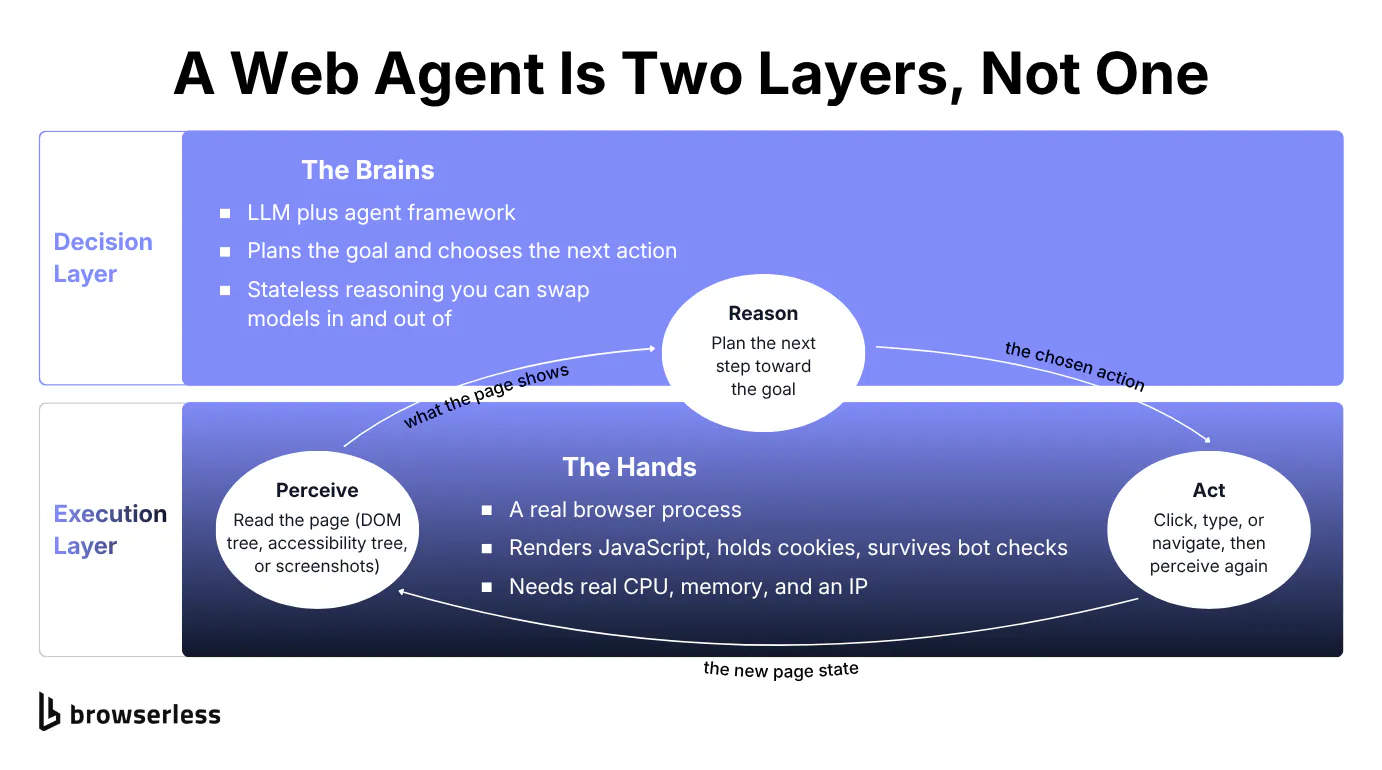
A web agent is a language model running in a loop against a live browser. The sections below trace that loop, then split it into the two systems the agent depends on.
How web and browser agents perceive and act
The agent first perceives the page. It can read the Document Object Model (DOM) tree, the accessibility tree, a screenshot passed to a vision model, or a structured page snapshot that lists interactive elements with stable selectors, which is the approach the Browserless Agent takes. From there it reasons about the next step, with the LLM planning which action moves it closer to the goal. Then it acts by clicking or typing into the elements it located, before perceiving the changed page and repeating.
You'll see them called browser agents, artificial intelligence (AI) web agents, autonomous web agents, and web browsing agents, part of a broader class of AI systems that autonomously navigate the web. The browser they run inside is increasingly called an agentic browser. The labels shift, but the shape does not. It's always a language model in a loop driving a browser toward a goal.
Web agents also fail a large share of real-world tasks. In the WebVoyager benchmark (He et al., 2024), a study of agent performance on live websites, a multimodal GPT-4V agent completed 59.1% of tasks against 40.1% for a text-only agent, across 643 tasks on 15 live sites. Even the stronger multimodal agent misses roughly four tasks in ten.
An agent that reads a page and pulls structured data out of it behaves like an AI web scraper, a goal-driven form of data collection rather than a fixed script. It turns unstructured web content into structured records you can query or feed downstream. The same mechanics carry over to most web tasks, whether the agent is scraping web data or running a checkout.
The decision layer and the execution layer
The decision layer is the brain, the LLM plus the agent framework that handles decision making, turning a natural language goal into the next action to take. The execution layer is the hands, the actual browser those actions run inside.
The decision layer is stateless reasoning, so you can swap models in and out freely. The execution layer carries the crucial role, a real browser process that has to render JavaScript, hold cookies, survive bot checks, and run somewhere with real CPU and memory. Collapsing both into "the agent" hides the exact part that breaks in production.
The rest of this piece stays on the execution layer.
Giving an agent a real browser
Before an agent can do anything, it needs a browser to drive, and where that browser runs decides whether it stays stuck on one laptop or scales.
Wiring an agent over CDP
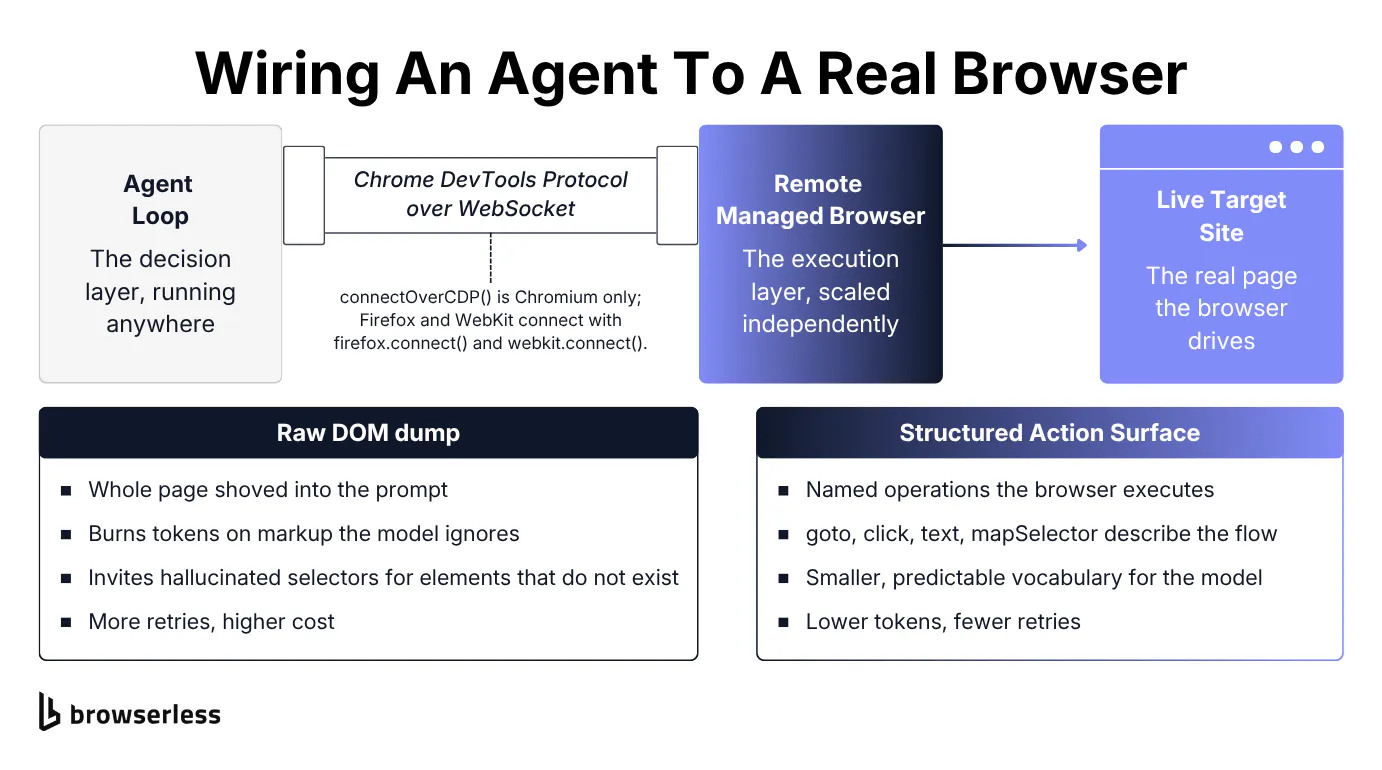
An agent drives a browser by speaking CDP to it. The browser can be local or a remote managed one reached over a WebSocket. A local Chromium is fine for a demo, but it ties the agent to one machine's hardware and single IP address. A remote managed browser over CDP lets the decision layer run anywhere while the execution layer scales on its own cloud infrastructure.
Start local to see the shape of it. The snippet below launches a Chromium on your own machine and drives it over CDP, the same wiring an agent loop sits on top of.
import asyncio

from playwright.async_api import async_playwright


async def main() -> None:
    async with async_playwright() as p:
        # Launch a Chromium on this machine and drive it over CDP.
        browser = await p.chromium.launch(headless=True)
        page = await browser.new_page()

        await page.goto("https://docs.browserless.io", wait_until="load")
        print(f"Page title : {await page.title()}")

        await browser.close()


asyncio.run(main())
That works for a demo, but the browser still lives on your machine. Moving to a hosted browser is a one-line swap. Instead of launching Chromium locally, the agent connects over CDP with puppeteer.connect() or chromium.connectOverCDP() against wss://production-sfo.browserless.io/chromium. connectOverCDP() is Chromium-only, so Firefox and WebKit connect with firefox.connect() and webkit.connect() over Playwright's own protocol instead, on the /firefox/playwright and /webkit/playwright routes.
The snippet below is the wiring primitive an agent loop calls, connecting, navigating, and reading back what's on the page. It has no LLM in it, just the connection the model's actions travel through, not the agent itself.
import asyncio
import os

from playwright.async_api import async_playwright

TOKEN = os.environ["BROWSERLESS_TOKEN"]
CDP_URL = f"wss://production-sfo.browserless.io/chromium?token={TOKEN}"


async def main() -> None:
    async with async_playwright() as p:
        # connect_over_cdp is Chromium-only; Firefox/WebKit use firefox.connect()/webkit.connect().
        browser = await p.chromium.connect_over_cdp(CDP_URL)
        context = browser.contexts[0] if browser.contexts else await browser.new_context()
        page = await context.new_page()

        await page.goto("https://books.toscrape.com", wait_until="load")

        title = await page.title()
        # Read back a piece of on-page text the agent would reason over.
        first_book = await page.locator("article.product_pod h3 a").first.get_attribute("title")

        print(f"Page title : {title}")
        print(f"First book : {first_book}")

        await browser.close()


asyncio.run(main())
That runs the whole loop on a real hosted browser instead of the local one above, with no setup. Every remaining snippet connects the same way, so you can point your own agent at a managed browser and follow along.
The same connection is why framework choice is a lookup rather than a decision. Whichever agent framework you pick sits on top of the identical managed browser reached through a single API, so the mapping below is short.
| Agent framework | Connection knob that points at the managed browser |
|---|---|
| Browser Use | BrowserSession(cdp_url="wss://production-sfo.browserless.io/chromium?token=...") |
| Stagehand | localBrowserLaunchOptions: { cdpUrl } (plus env: "LOCAL" and a model) |
| Claude Agent Software Development Kit (SDK) | wraps a chromium.connectOverCDP(...) connection inside an execute_playwright Model Context Protocol (MCP) tool |
| Anthropic Computer Use | drives the same CDP browser through a screenshot-and-action loop rather than an execute_playwright tool |
| LangChain / Vercel AI SDK | drive the same CDP connection as a tool the agent calls |
Each framework still needs its own initialization boilerplate, and the exact connect string lives in its own docs. Browserless documents native integrations for the popular agent frameworks and vendor SDKs, including Browser Use, Stagehand, the Claude Agent SDK, LangChain, and the Vercel AI SDK, plus no-code tools like n8n, Make, and Zapier. It also exposes a Browserless MCP server, so an agent can reach the browser as an MCP tool inside Claude Desktop, Cursor, VS Code, or Windsurf rather than only as a raw CDP endpoint.
Browser Use, the framework most agent builders reach for first, proves the point. You hand its BrowserSession that same CDP URL, set OPENAI_API_KEY in your environment, and the agent's whole loop runs on the managed browser.
import asyncio
import os

from browser_use import Agent
from browser_use.browser import BrowserSession
from browser_use.llm import ChatOpenAI

TOKEN = os.environ["BROWSERLESS_TOKEN"]
CDP_URL = f"wss://production-sfo.browserless.io/chromium?token={TOKEN}"


async def main() -> None:
    session = BrowserSession(cdp_url=CDP_URL)
    agent = Agent(
        task="Go to https://books.toscrape.com and report the title of the first book listed.",
        llm=ChatOpenAI(model="gpt-4o"),  # reads OPENAI_API_KEY from the environment
        browser_session=session,
    )
    result = await agent.run(max_steps=6)
    print(result.final_result())


asyncio.run(main())
The agent runs its whole loop on the hosted browser and returns the first title, A Light in the Attic. Browserless also ships a blockConsentModals flag that auto-dismisses common cookie and consent modals, so the agent avoids spending an LLM turn on them. It's available on the BrowserQL and REST APIs, so reach for it when you're driving those endpoints.
Structured actions over raw DOM dumps
Feeding an agent a raw DOM dump has two costs. It burns tokens on markup the model doesn't need, and it invites hallucinated selectors that point at elements which don't exist on the page.
The raw approach looks like this, grabbing the whole page and handing its markup to the model.
import asyncio

from playwright.async_api import async_playwright


async def main() -> None:
    async with async_playwright() as p:
        browser = await p.chromium.launch(headless=True)
        page = await browser.new_page()
        await page.goto("https://quotes.toscrape.com", wait_until="load")

        # The raw approach: hand the whole page's markup to the model.
        html = await page.content()
        print(f"raw DOM dump: {len(html):,} chars of markup into the prompt")

        await browser.close()


asyncio.run(main())
That dump is thousands of characters of markup the model pays for on every step, most of it irrelevant, and nothing in it stops the model from inventing a selector for an element that was never there. A structured action surface fixes both by giving the browser a fixed vocabulary of named operations instead of free-form text to interpret.
BrowserQL (BQL) is Browserless's stealth-first, GraphQL-style automation language, where mutations such as goto, click, text, and mapSelector run declarative flows against the /chromium/bql endpoint, with bot-detection handling built in. Because the agent works from a small, predictable set of operations, it spends fewer tokens per step and retries less often than it would when shoving a whole page into the prompt.
The flow below navigates to a page and pulls named fields out of it, returning typed data instead of a wall of markup.
mutation StructuredExtract {
  goto(url: "https://news.ycombinator.com", waitUntil: networkIdle) {
    status
  }
  headline: text(selector: "title") {
    text
  }
  stories: mapSelector(selector: "span.titleline > a") {
    text: innerText
    href: attribute(name: "href") {
      value
    }
  }
}
Extraction is only the perceive half. The same surface drives the act half of web navigation, so an agent types into fields and clicks through a flow with named mutations instead of guessed selectors. The flow below logs into a form and reads the result back.
mutation LoginFlow {
  goto(url: "https://the-internet.herokuapp.com/login", waitUntil: load) {
    status
  }
  username: type(selector: "#username", text: "tomsmith") {
    time
  }
  password: type(selector: "#password", text: "SuperSecretPassword!") {
    time
  }
  submit: click(selector: "button[type=submit]") {
    time
  }
  result: text(selector: "#flash") {
    text
  }
}
Each step runs as a declared action, and the flow reads back You logged into a secure area! with no free-form selector for the model to hallucinate.
Why web agents get blocked
Before automating against a protected site, make sure you're allowed to. Check its Terms of Service and robots directives, stay within its published rate limits, and keep to applicable law such as the Computer Fraud and Abuse Act (CFAA) or the General Data Protection Regulation (GDPR). The techniques here are for targets you're authorized to access. With that settled, a browser that works on a test page behaves very differently against a protected one, which is where most agents break down.
Reducing bot-detection hits in layers
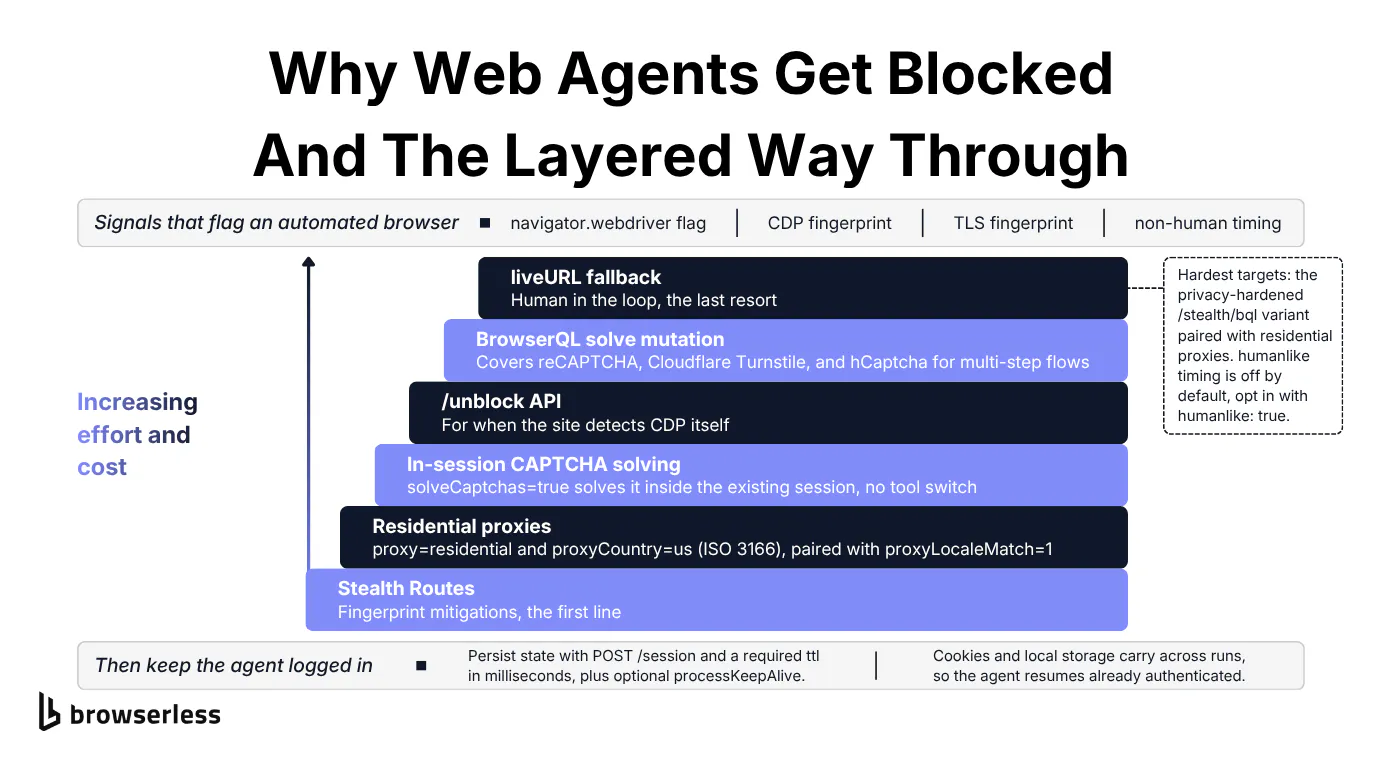
Agents are easy to flag because a default automated browser leaks signals. The navigator.webdriver flag, CDP fingerprints, Transport Layer Security (TLS) fingerprints, and non-human timing all point the same way, and protection services read them together rather than one at a time. Improving your odds is a ladder you climb in order, and no rung guarantees access.
The escalation runs in six tiers, climbed in order:
- Stealth routes. Fingerprint mitigations that strip common automation tells, applied through a privacy-hardened browser variant.
- Residential proxies. Route through real residential IPs with
proxy=residential&proxyCountry=us, whereproxyCountrytakes an ISO 3166 code. On a stealth route (/stealth,/chromium/stealth, or/chrome/stealth), pair it withproxyLocaleMatch=1so the browserAccept-Languageheader matches the proxy geography. - In-session CAPTCHA solving. Set
solveCaptchas=trueto attempt the Completely Automated Public Turing test to tell Computers and Humans Apart (CAPTCHA) inside the session the agent is already driving, though some challenges won't solve. An agent can't tab out to a standalone solver mid-plan without losing its place, so keeping the solve in-session is what holds the loop together. Browserless attempts that solve automatically. - Unblock API. When the site detects the automation library itself, hand off to
/unblock, which drives the browser through its native interfaces and can hand back abrowserWSEndpointplus cookies so the agent reconnects and keeps driving. - BrowserQL solve. For orchestrated multi-step flows,
solveattempts challenge types such as reCAPTCHA, Cloudflare, and DataDome, while image-based challenges route to the separatesolveImageCaptchamutation. liveURLhandoff. The last resort, where a human opens a live view and clears the challenge by hand.
Two more knobs sit alongside the ladder. BQL's stealth variant runs at /stealth/bql. It routes onto an in-house Chromium build hardened against fingerprinting, not a stealth overlay bolted onto standard Chromium, and pairs with residential proxies for the hardest targets.
Browserless also ships a humanlike mode, off by default, that adds natural mouse movement and typing, with randomized delays between actions, once you enable it with humanlike: true in the BQL launch payload. Scope the expectations honestly. These tiers reduce detection when configured well. They don't make an agent invisible.
For Browser Use specifically, the connection URL bakes in in-session CAPTCHA solving with solveCaptchas=true&integrations=browseruse, where integrations=browseruse lets the agent pause and resume around the solve. The connection below attempts a CAPTCHA in-session, when it's solvable, without ever leaving the session the agent is already driving.
import asyncio
import os

from playwright.async_api import async_playwright

TOKEN = os.environ["BROWSERLESS_TOKEN"]
# solveCaptchas attempts challenges that appear mid-session (best-effort, not all solve);
# integrations=browseruse lets a Browser Use agent pause and resume around the solve.
CDP_URL = (
    f"wss://production-sfo.browserless.io/chromium"
    f"?token={TOKEN}&solveCaptchas=true&integrations=browseruse"
)


async def main() -> None:
    async with async_playwright() as p:
        browser = await p.chromium.connect_over_cdp(CDP_URL)
        context = browser.contexts[0] if browser.contexts else await browser.new_context()
        page = await context.new_page()

        # nowsecure.nl sits behind a Cloudflare challenge.
        response = await page.goto("https://nowsecure.nl", wait_until="domcontentloaded")

        # A real title instead of "Just a moment..." is a signal the challenge cleared this run; another run may not.
        print(f"HTTP status : {response.status if response else 'n/a'}")
        print(f"Page title  : {await page.title()}")

        await browser.close()


asyncio.run(main())
A 200 and a real page title instead of "Just a moment..." are signals the challenge cleared on this run, so the agent kept driving its own session without switching tools.
No tier clears everything, so the realistic last resort is that tier-6 handoff, a short burst of human interaction inside an otherwise hands-off run. When the agent hits a two-factor authentication (2FA) prompt or a CAPTCHA it can't solve, it pauses and hands the live browser to a human through a liveURL, a shareable link that doesn't carry your API token. The person clears the wall and the agent resumes.
The BQL flow below stops at a login wall and returns that liveURL for a person to finish the step.
mutation HumanHandoff {
  goto(url: "https://the-internet.herokuapp.com/login", waitUntil: load) {
    status
  }
  # Confirm the agent is parked on the login wall it can't get past.
  wall: text(selector: ".example h2") {
    text
  }
  # Return a link a person opens to finish the step by hand.
  handoff: liveURL {
    liveURL
  }
}
The wall field confirms the agent is stuck on a login it can't pass, and handoff returns the shareable liveURL a person opens to clear it, after which the agent resumes on the same session.
Keeping an agent logged in
Only persist a session on a site you're authorized to stay logged into, within its Terms of Service and rate limits. Detection is only half the problem. Long-running and multi-step tasks both assume state survives, yet an agent that logs in once, then runs again tomorrow, will re-authenticate from scratch every run unless its session persists. Those repeated logins can also trip 2FA walls, so persisting a session cuts needless re-authentication too.
On managed cloud browsers, you persist state with POST /session. It takes a required ttl, the session lifetime in milliseconds, plus an optional processKeepAlive that sets how long the browser process stays alive after the last client disconnects. Within that window, reconnecting restores the full live browser state, and after it expires the agent can still reconnect for the rest of the ttl, on a fresh process with cookies and local storage retained.
Cookies and local storage carry across runs inside that session, so the agent resumes already authenticated and skips a redundant login step on each run. For a login an agent reuses across many sessions, Authenticated Profiles save it once and replay it, so you don't re-authenticate each run.
The ttl sets how long the session lives, and the maximum is plan-dependent, from one day on lower plans up to 90 days on higher ones. If the session will later be driven with BrowserQL, create it with stealth: true, or the BQL calls return a 400.
The flow below creates a persisted session, logs in through it, then proves the login survives by hitting a protected page on a second, separate request.
# Source your .env first so BROWSERLESS_TOKEN is set.
: "${BROWSERLESS_TOKEN:?Set BROWSERLESS_TOKEN (source .env)}"

REGION="production-sfo.browserless.io"

# processKeepAlive must not exceed ttl (here 10% of it) or the API returns 400.
RESP=$(curl -s -X POST "https://${REGION}/session?token=${BROWSERLESS_TOKEN}" \
  -H 'Content-Type: application/json' \
  -d '{
        "ttl": 600000,
        "processKeepAlive": 60000,
        "stealth": true
      }')

# id, connect (CDP reconnect), browserQL (drive the session with BQL), stop (teardown).
echo "$RESP" | jq '{id, connect, browserQL, stop}'

BQL_URL=$(echo "$RESP" | jq -r .browserQL)
STOP_URL=$(echo "$RESP" | jq -r .stop)

# Run 1: log in. The session cookie is written into the persisted browser.
curl -s -X POST "$BQL_URL" -H 'Content-Type: application/json' \
  -d '{"query":"mutation { goto(url: \"https://the-internet.herokuapp.com/login\", waitUntil: load) { status } u: type(selector: \"#username\", text: \"tomsmith\") { time } p: type(selector: \"#password\", text: \"SuperSecretPassword!\") { time } click(selector: \"button[type=submit]\") { time } flash: text(selector: \"#flash\") { text } }"}' \
| jq '{run1_login: .data.flash.text}'

# Run 2: a fresh request to the SAME session lands straight in the secure area.
curl -s -X POST "$BQL_URL" -H 'Content-Type: application/json' \
  -d '{"query":"mutation { goto(url: \"https://the-internet.herokuapp.com/secure\", waitUntil: load) { status } heading: text(selector: \"h2\") { text } }"}' \
| jq '{run2_still_authenticated: .data.heading.text}'

# Teardown: DELETE the stop URL to destroy the session and its data.
curl -s -X DELETE "$STOP_URL" -o /dev/null -w "delete HTTP %{http_code}\n"
Run 1 logs in and Run 2, a separate request to the same session, lands in the secure area still authenticated, which is the cookie persistence the section promised. The response also hands back id, connect, and browserQL URLs plus a stop URL, and a DELETE against it removes the session and its data for good. A wall a human cleared through the liveURL handoff earlier survives in that same persisted session, so later runs start past it too.
Running web agents in production
By now the agent can automate tasks end-to-end, from connecting through defenses to holding its session. The last wall is volume, and one working task on your laptop is a long way from a thousand complex workflows running at once, where a managed execution layer does the most work.
From one browser to thousands
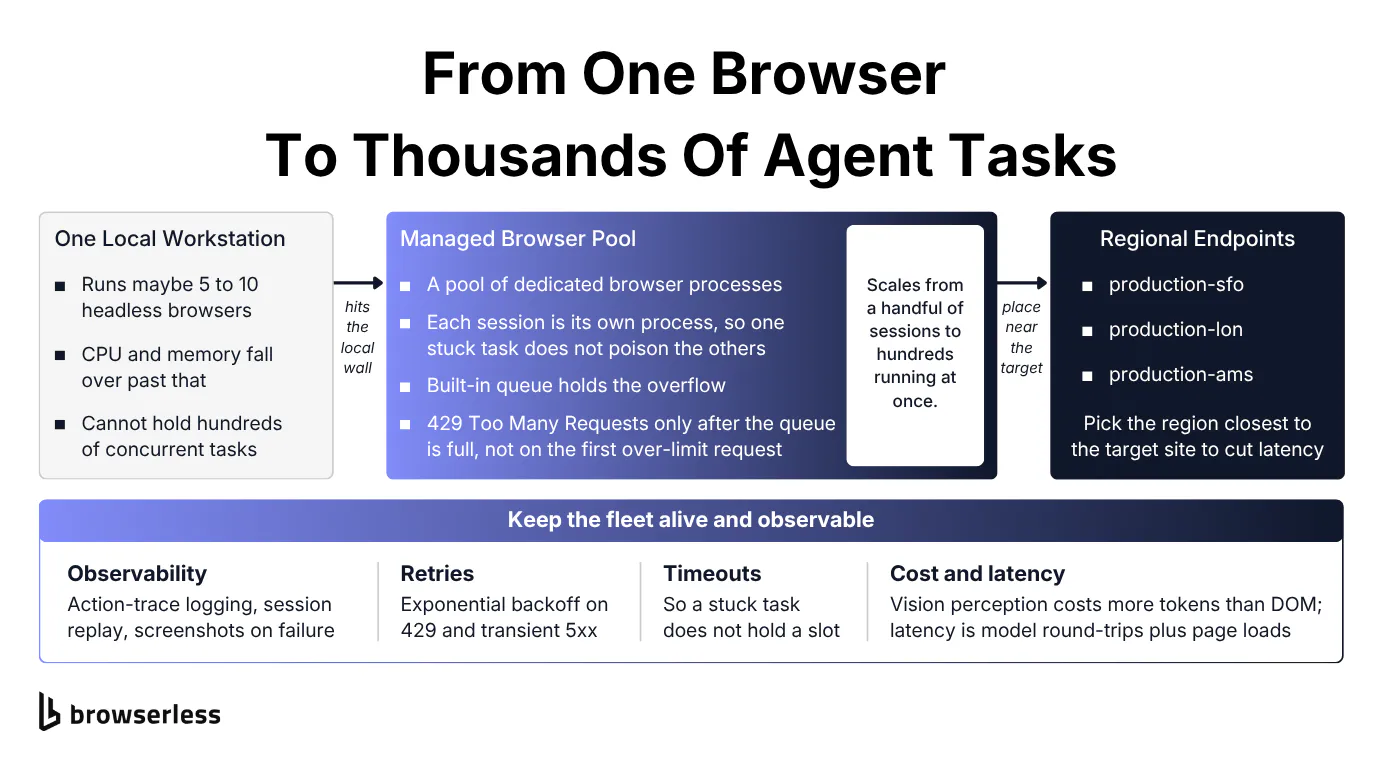
A single workstation runs only a handful of headless browsers before CPU and memory give out. An agent fleet that needs hundreds of concurrent tasks can't live on local hardware. Managed concurrency is the way out, a pool of dedicated browser processes fronted by a queue that absorbs overflow and returns a 429 Too Many Requests only once it's full, not on the first request over the limit.
Concurrency scales with the account, from a handful of parallel sessions to hundreds running at once, without touching your code.
The pattern that uses that capacity is a fan-out. You launch every task at once, and the queue holds whatever exceeds your available concurrency until a slot frees up, so the same code scales as your concurrency grows.
import asyncio
import os

from playwright.async_api import async_playwright

TOKEN = os.environ["BROWSERLESS_TOKEN"]
CDP_URL = f"wss://production-sfo.browserless.io/chromium?token={TOKEN}"
PAGES = [f"https://books.toscrape.com/catalogue/page-{n}.html" for n in range(1, 6)]


async def scrape(p, url):
    browser = await p.chromium.connect_over_cdp(CDP_URL)
    try:
        ctx = browser.contexts[0] if browser.contexts else await browser.new_context()
        page = await ctx.new_page()
        await page.goto(url, wait_until="load")
        return url, await page.locator("article.product_pod").count()
    finally:
        await browser.close()


async def main() -> None:
    async with async_playwright() as p:
        # Fan out every task at once; some run now and the queue holds the rest.
        results = await asyncio.gather(*(scrape(p, url) for url in PAGES))
    for url, count in results:
        print(f"{count:>3} books  {url.rsplit('/', 1)[-1]}")


asyncio.run(main())
All five tasks finish even when only some run at once, with more running in parallel as your concurrency grows.
Two levers matter at scale, starting with the regional endpoints production-sfo, production-lon, and production-ams, which let you place the browser close to the target site and cut page-load latency. Each session is also a dedicated browser process, not a browser.newContext(), so a stuck task is far less likely to affect the others sharing the pool.
Scaling the decision layer is just more model calls. Scaling the execution layer reliably is the fiddly part these regional endpoints and dedicated processes exist to handle.
Observability and cost at scale
When an agent fails at volume, a non-zero exit code tells you nothing. You need to see what the browser saw, from action-trace logging through to screenshots captured at the moment of failure, so a bad run can be inspected instead of guessed at.
Browserless supports this directly, shipping Session Replay and screen recording alongside a live debugger, so a failed agent run replays frame by frame rather than leaving you to reconstruct it from logs. In your own code that's a try/except around the task that calls page.screenshot(path=...) in the failure branch, so the exact frame the agent choked on is on disk before the process exits.
A few error handling patterns keep a fleet alive under real traffic:
- Retries with exponential backoff handle the
429and transient5xxresponses that are inevitable at concurrency. - Timeouts stop a stuck task from holding a slot.
- Graceful degradation keeps a run useful when a page changes shape mid-task.
Vision-based perception burns more tokens than reading the DOM. The browser runtime is itself a per-task cost, billed in Units at one Unit per 30 seconds of browser time, rounded up, with proxy bandwidth and CAPTCHA solving drawing from the same balance. End-to-end latency is the sum of model round-trips and page loads. That math is why structured actions and regional endpoints both pay off, cutting tokens and milliseconds off every step.
The wrapper below retries a managed-browser connection with backoff, catching 429 responses and reconnecting instead of crashing the task.
const puppeteer = require("puppeteer-core");

const TOKEN = process.env.BROWSERLESS_TOKEN;
// production-sfo targets US West (production-lon and production-ams are the other regions).
const WS_ENDPOINT = `wss://production-sfo.browserless.io/chromium?token=${TOKEN}`;

const MAX_ATTEMPTS = 4;
const BASE_DELAY_MS = 500;

const sleep = (ms) => new Promise((r) => setTimeout(r, ms));

// 429 (queue full) and transient 5xx are worth retrying; a bad token is not.
function isRetryable(err) {
  const msg = String(err && err.message);
  return (
    msg.includes("429") ||
    msg.includes("Too Many Requests") ||
    msg.includes("500") ||
    msg.includes("502") ||
    msg.includes("503") ||
    msg.includes("Unexpected server response")
  );
}

async function connectWithRetry() {
  for (let attempt = 1; attempt <= MAX_ATTEMPTS; attempt++) {
    try {
      const browser = await puppeteer.connect({ browserWSEndpoint: WS_ENDPOINT });
      console.log(`Connected on attempt ${attempt}.`);
      return browser;
    } catch (err) {
      if (attempt === MAX_ATTEMPTS || !isRetryable(err)) throw err;
      const delay = BASE_DELAY_MS * 2 ** (attempt - 1); // 500ms, 1s, 2s...
      console.log(
        `Attempt ${attempt} failed (${err.message}); backing off ${delay}ms.`,
      );
      await sleep(delay);
    }
  }
}

(async () => {
  const browser = await connectWithRetry();
  try {
    const page = await browser.newPage();
    await page.goto("https://docs.browserless.io", {
      waitUntil: "domcontentloaded",
    });
    console.log(`Page title: ${await page.title()}`);
  } finally {
    await browser.close();
  }
})().catch((err) => {
  console.error("Task failed after retries:", err.message);
  process.exit(1);
});
Wrapped this way, a transient 429 or 5xx becomes a short backoff and a reconnect instead of a dead task, which is the difference between a fleet that self-heals under load and one that sheds work every time the queue fills.
Conclusion
Browserless runs that execution layer for you. Over one connection string and token, the frameworks above connect to a managed browser over CDP (or Playwright's own protocol for Firefox and WebKit), drive it with structured BQL actions, work through permitted anti-bot measures, keep sessions alive across runs, and fan out to concurrent tasks. The reasoning stays yours to build in whatever framework fits, and the layer that used to break under load runs on infrastructure built for it. The demo already works, so sign up for a free account, move your agent onto a managed browser, and find out how it behaves at the thousandth concurrent run instead of the first.
FAQs
Is ChatGPT an agent or an LLM?
ChatGPT is a large language model, and a web agent is the system built around one. On its own, an LLM generates text. It becomes a web agent when a framework wraps it in a perceive-reason-act loop and connects it to a browser it can drive. Agent products that browse the web are LLMs plus that execution layer, not the model by itself.
What should you evaluate in a web agent before running it in production?
Look past the framework and ask what runs the browser. The reasoning layer is easy to swap, so the questions that matter are about execution, namely how well it holds up against bot detection, whether it persists sessions across runs, and how many concurrent tasks it holds before it stalls. A demo that clicks through one clean page tells you little about how the same agent behaves against a login wall at scale.
Where do web agents fit among the main types of AI agents?
It's more useful to think in categories than a fixed list. Broadly, you'll see coding agents, general task or computer-use agents, customer-facing conversational agents that power automated customer service for end users, and web or browser agents that drive a real browser to complete online tasks. The web-agent category is the demanding one, since it has to survive the open web rather than a controlled tool set.
Do web agents need residential proxies?
Residential proxies aren't always needed, but often they are. Against sites with light defenses, a stealth-hardened browser alone can be enough. Once a target checks IP reputation, residential proxies (proxy=residential) often make the difference between a task that completes and one that gets blocked, and pairing them with proxyLocaleMatch=1 keeps the browser language aligned with the proxy region.
Can a web agent replace a scraping API or a search engine?
For high-volume data collection, usually not. When you need product prices or real-time data from a known set of pages, a dedicated scraping API or search API behind a single API call is cheaper and more predictable than an agent reasoning its way through each visit, and it feeds structured pipelines like knowledge graphs or a model's training data cleanly. A web agent earns its place when the task needs judgment a fixed endpoint can't encode, or when the target changes shape often enough that a hard-coded scraper keeps breaking. Plenty of teams run both, an agent for the messy long tail and an API for the bulk.
How does a web agent find the clickable elements on a page?
It reads the page structure, the DOM or accessibility tree, to locate the clickable elements and map a natural language goal onto them. Some setups overlay numbered labels on the interactive controls, an idea borrowed from the Vimium extension, a Chrome extension (with a browser extension port for other browsers) that lets you navigate pages by keyboard hints, so the model references a labeled control instead of guessing a selector. Either way, the job is to turn a visual web UI into something the model can address more consistently across different web interfaces.
Are web agents production-ready or still a research prototype?
Both, depending on the stack. Much of the field began as a research prototype or an experimental project, and benchmark agent performance still trails a human on the open web. Yet open source frameworks like Browser Use and Stagehand have pushed web agents into real-world applications, from quality assurance (QA) to data work, and the distance between a slick demo and a real-world system is almost entirely the execution layer this guide covers.