
TL;DR
- AI browser. A web browser with an AI agent built in that can read pages and answer questions about them, and in some cases click, fill forms, and finish a task for you.
- Two kinds. AI-native browsers put the agent at the center; Chrome, Edge, and Brave just bolt AI onto what you already use.
- Agent mode. Runs on the same click-fill-navigate browser automation that has powered scripts for years, just steered by a language model instead of code.
- The trade-off. Most AI browsers act inside your logged-in session, so know what you're handing over before you switch.
Introduction
Ask what an AI browser is and you'll get two incompatible answers, one describing a chat sidebar bolted onto Chrome, the other a browser that clicks, types, and buys things on your behalf. OpenAI shipped ChatGPT Atlas, Perplexity shipped Comet, and The Browser Company shipped Dia in late 2025, while Google and Microsoft added AI features to the browsers you already use instead of building something new. Both camps ship under the same two words, which is why the term alone tells you almost nothing.
This piece covers what an AI browser is, how it works underneath, where today's examples diverge, and what you give up for the convenience, enough to tell an AI-native browser from a bolted-on assistant and judge whether switching is worth it.
What is an AI browser?
At its simplest, an AI web browser is a web browser with an AI agent built into it. The agent reads the page in front of you and answers questions about it. In the more advanced versions it takes actions too, clicking links or working through a multi-step task from a sentence you typed instead of a mouse.
That definition covers a wide range of products. On one end, you get an AI assistant in a chat panel that sits alongside your normal browsing and can summarize an article or draft a reply, much like the AI chatbots you already use. On the other, you get a browser that treats the agent as the main way you interact with the web, where you type or speak a goal and the browser plans and executes the steps to reach it. Both get called AI browsers, and that ambiguity is a big part of why the question keeps coming up.
What ties them together is a shift from a browser that waits for input to one that interprets user intent. A traditional browser renders whatever you point it at and does nothing until you click. An AI browser adds a layer that reasons about that content and acts on it. Underneath, that usually means a large language model (LLM) wired to the rendering engine, with a way to observe the page and fire actions inside it.
Most AI browsers today, agent-native or not, are still built on Chromium, the same open-source engine underneath Chrome and Edge. The AI sits on top of familiar browsers-as-a-service infrastructure rather than replacing it, which shapes a lot of what's actually possible once you get into how these things are built.
What is the difference between an AI web browser and a normal one?
The practical difference comes down to memory and initiative. A traditional browser has no recollection of what you did five minutes ago unless you bookmarked it or left the tab open, and it never acts first.
An AI browser holds context across a session, reasons across multiple open tabs, and in agent mode completes a task without you clicking through every step.
For a lot of everyday browsing, reading an article, checking email, scrolling a feed, the experience barely changes. The gap opens up on complex web tasks that involve several steps or several tabs, whether that's researching a topic across ten sources, comparing prices across multiple sites, or filling out a long form from information scattered across other apps.
That's where an AI browser's ability to hold context and take action starts to save real time, and it's also where things can go wrong if the agent misreads what you actually wanted.
How do AI browsers work?
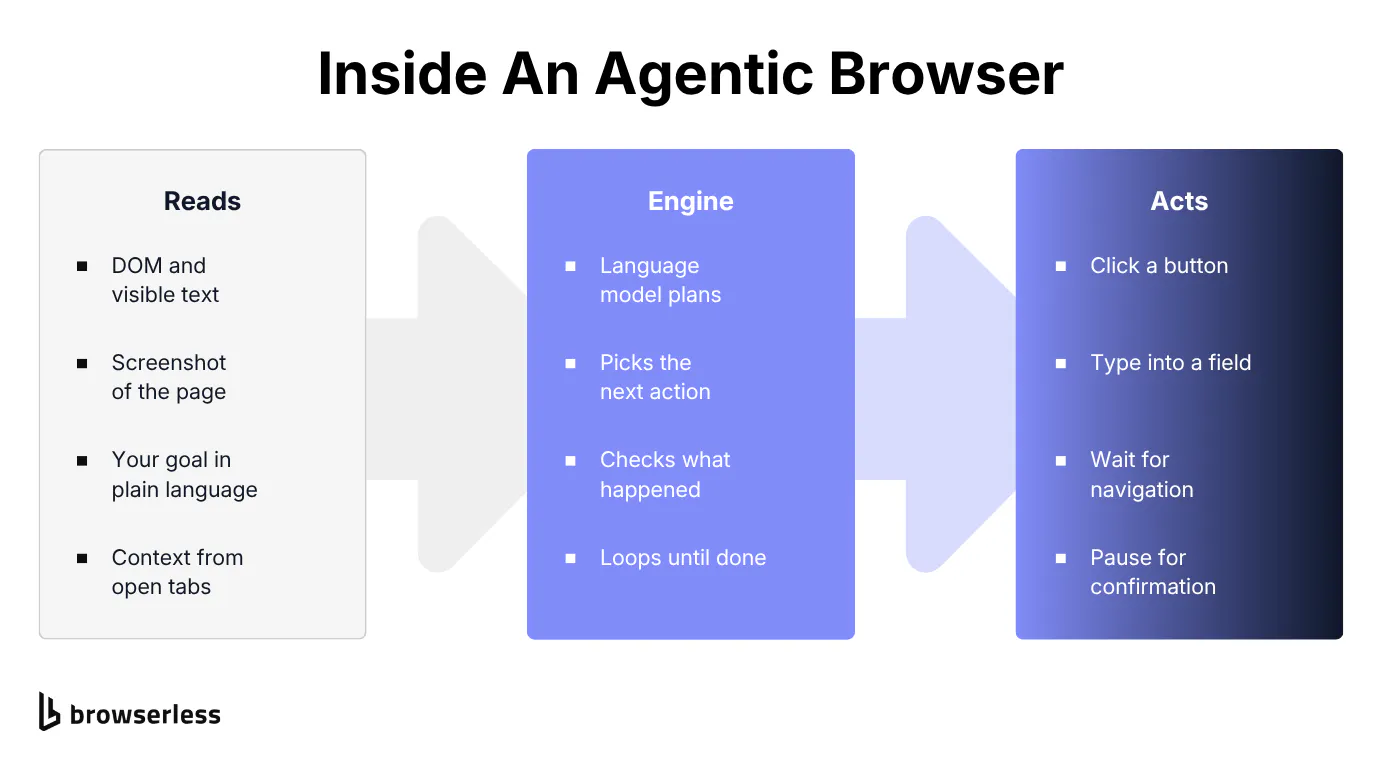
Under the hood, an AI browser runs the loop agent frameworks call ReAct, reason, act, observe, over a real browser session. It reads the page, decides what to do, acts, then re-reads what changed, and each piece works differently.
Reading page context
Before an AI browser can answer a question about a page, it needs to see it roughly the way you do. Most systems take a snapshot of interactive and informational elements with stable selectors, parsing the page's document object model (DOM) and visible text, sometimes alongside a screenshot, and turn that webpage content into a compact summary the AI models can read alongside your request.
That is what lets you ask about the return policy on a page and get a direct answer instead of hunting for it yourself. Some browsers extend this across multiple tabs at once, building what vendors sometimes call browser memories, a context-aware running record of what you've looked at in the current session that the AI can refer back to later.
The trade-off shows up here first. Reading page content means sending some version of that content, and often your prompt, to an AI model, which for most AI powered browsers today means an external server in someone else's data centers rather than something processed entirely on your device.
Agent mode: how AI agents choose an action
Agent mode is where an AI browser stops answering questions and starts acting. You give it a goal in plain language, or in some products through voice commands, and the browser breaks it into steps, clicking a button, typing into a field, waiting for the page to load, checking what happened, then deciding the next move.
Every one of those actions is a standard browser automation primitive, the same vocabulary Puppeteer and Playwright scripts have used for years, and a later section digs into why that matters.
That loop repeats, observing the page, choosing an action, executing it, checking the result, until the task finishes or the agent needs you to confirm something risky, like a purchase.
Natural language interface
The natural language interface is what most people notice first, since instead of navigating menus or hunting for a setting you type or speak what you want. Natural language search replaces a sequence of clicks with a sentence, summarize a page, find every email from one sender, book the cheapest option on a list.
For anyone who finds modern web apps cluttered that's a genuine usability shift, though it's worth being precise about what actually changed.
The rendering engine and the tab model haven't moved. What changed is the input method, natural language instead of a pointer, sitting on top of the same web pages and the same browser engine as before.
Is the Chrome browser an AI browser? Built-in AI vs. AI-native
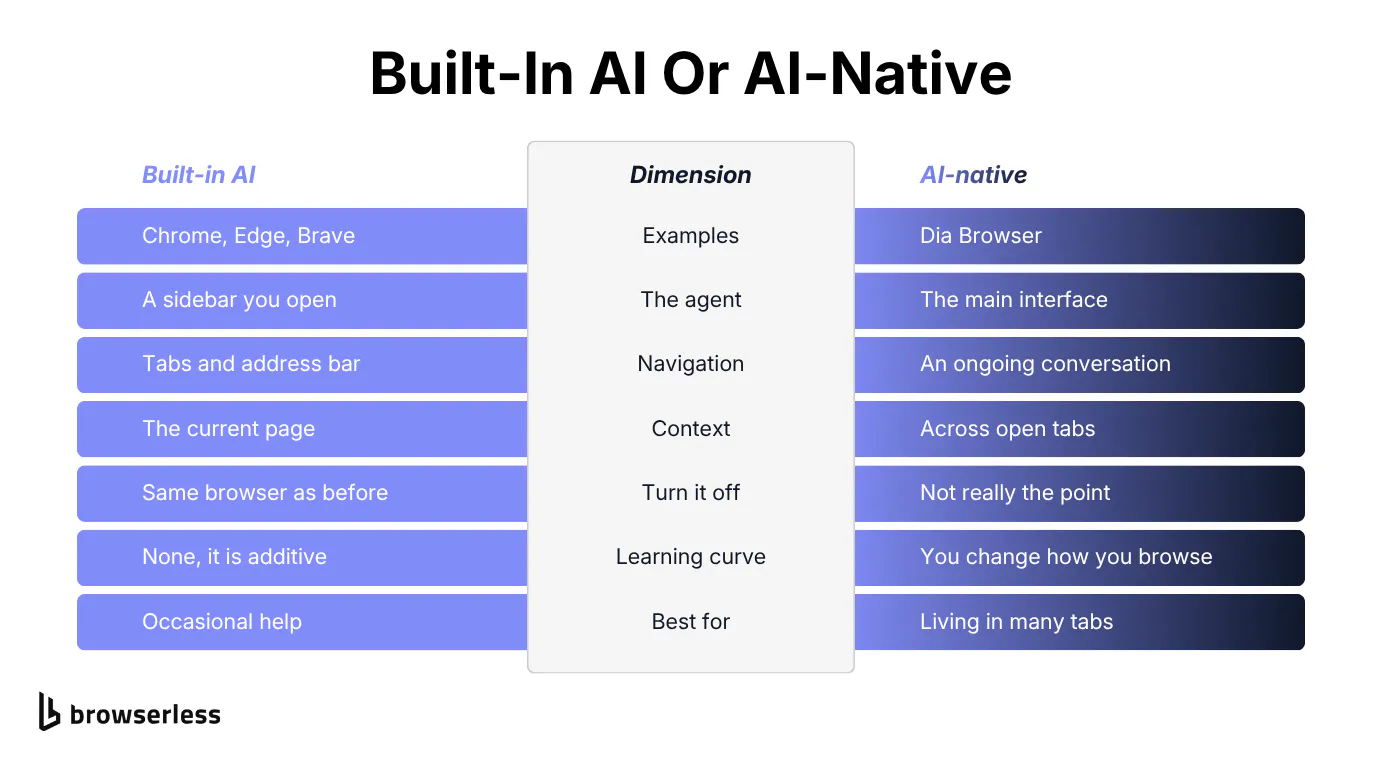
Google search surfaces this exact question, and it's a fair one. The Google Chrome browser now has Gemini built in, Microsoft Edge has Copilot, and the Brave browser has Leo. So is Chrome an AI browser the same way Dia Browser is? Not in the same sense, and the difference matters.
Browsers with built-in AI
Chrome, Edge, and Brave are traditional browsers with an assistant layered on top, closer to a set of built-in browser extensions than a rebuilt browser. Their basic features are untouched.
The core browsing experience is unchanged, so you still navigate with tabs, an address bar, and bookmarks the same way you always have, and the AI shows up as a sidebar or a button you choose to open. Turn it off, and you have the same browser you had before.
What each one actually does differs more than the category suggests. Gemini answers questions about the page you're on or summarizes a YouTube video without leaving the tab.
Copilot sits closer to Microsoft 365, so it can help with a document or a spreadsheet as easily as a webpage. Leo is the privacy-oriented one, routing prompts to third-party models without attaching identifiers like your IP address, and it can point at a local model if you turn that on yourself.
AI-native browsers
AI-native browsers start from the opposite direction, with the agent as the primary interface rather than an add-on. Three shipped in late 2025.
Dia Browser, built by The Browser Company, has no sidebar to open, since the browser is built around an ongoing conversation with an assistant that reads your open tabs and answers from what's actually on screen, carrying context across the session instead of treating every question as a fresh start.
ChatGPT Atlas, OpenAI's own browser, puts ChatGPT in that same position, the primary way you interact with a page, with an agent mode that can carry out multi-step tasks like filling forms or booking a reservation on your behalf.
Comet, Perplexity's browser, wraps its answer-engine search around the same agentic model, reading your open tabs and taking actions instead of just returning links to click through yourself.
That category moves fast enough that the state of AI browser automation reads differently every few months, and the rise of the AI browser tracks how the products themselves have shifted. Autonomous purchases and task chains spanning several apps are experimental today, and they're where most AI-native browsers are heading. Reliability still varies between vendors, and between updates of the same product.
Where privacy-first browsers fit
Not every alternative browser is chasing AI at all. Zen Browser goes the other way, a minimal, distraction-free browser that prioritizes a clean interface over AI tools altogether, worth knowing about if the category above sounds like more than you want.
What AI browsers are good at
The clearest wins are tasks that involve reading or comparing a lot of information quickly.
- Summarizing. A long article or a dense terms-of-service page, the most immediately useful of the intelligent features on offer and the easiest to trust, since it takes no action on your behalf. It's the fastest way to consume web content you'd otherwise skim, and some browsers extend it across every open tab at once, or to a 40-minute YouTube video, pairing it with genuine tab management that groups or closes tabs once a research session wraps up.
- Content creation. Drafting a reply or generating a first pass at something you'll edit yourself. Treat what an AI browser hands you as a draft, not a finished product. These tools still make mistakes and miss context a person would catch.
- Task automation. The feature that separates a chat sidebar from a genuine AI browser, booking a reservation, checking multiple sites for price drops, or working through a checklist of small web-based tasks, and the more autonomous browsers chain several into a single request.
Agent mode earns its keep here, and it's also where you want the most oversight, since it's the category where the agent is doing something rather than describing it. Most vendors ask for confirmation before anything irreversible, like a payment, but confirm it for the browser you pick rather than assuming.
What an AI browser isn't good at yet is anything requiring judgment calls with real stakes, whether that's legal documents, medical information, or purchases above a threshold you're not comfortable delegating. Every vendor recommends a human check-in for exactly these cases, and an assistant's confidence is not evidence it got something right.
What to look for in an AI browser
Two things are worth confirming before you commit, and the first is integrations. They decide whether the agent can reach past the current tab. Several connect to Google Docs, Google Sheets, and Google Calendar as external tools, so the agent can pull a value out of a spreadsheet into a form, or check your calendar before proposing a time.
Cross-app reach like that is still early and inconsistent between vendors, so confirm the specific integrations rather than assuming. If you're building rather than choosing between consumer products, Browserless documents the equivalent developer-side surface, Authenticated Profiles for reusing a login, an MCP server, and agent frameworks that reach past a single tab too.
The other is data privacy, meaning whether page content is processed locally or sent to external servers, whether ad and tracker blocking or private browsing are on by default, and whether the security features confirm with you before an agent does something it can't undo.
Cross-platform sync is convenient but expands where that data lives. A browser that's transparent about these choices, rather than burying them in a settings menu, is usually the more trustworthy pick.
Security and data privacy risks of AI browsers
Is an AI browser safe? It comes down to what you're comparing it to and how much you trust the vendor with your data, not a simple yes or no.
Compared with a browser that has no AI at all, the biggest structural security risk is that most AI browsers run inside your regular, logged-in profile. That access, email, shopping accounts, sometimes a password manager, is what makes the agent useful, and it's why a mistake costs more than a typo in a search bar.
Indirect prompt injection is the specific, current risk worth naming. It's instructions hidden in a web page's content, in text you can't see, in a comment, in an image, that a language model can't reliably tell apart from your own AI prompts.
A poisoned page could, in theory, steer an agent to visit a different site or submit a form you never asked it to touch. The risk isn't hypothetical, and Palo Alto Networks' Unit 42 threat research team documented campaigns already running in the wild in 2026, including hidden page content written to make an AI agent promote a site or manipulate a review.
Prompt injection is an active area of security research across the entire industry, not a flaw specific to any one browser, and nobody has fully solved it yet. If you're evaluating or building agent-driven browsing for work rather than personal use, browser agent security risk is worth a much deeper look than this section can give it.
Beyond that, web content and prompts are often sent to external servers for the AI models behind these browsers to process, a meaningful shift if you're used to thinking of your browsing history and sensitive information as private by default.
Browser extensions widen this further. Each one is another piece of software with some level of access to your browser history and what you're doing right now. Check the ad blocking and the privacy policy before you hand an AI browser your everyday sign-ins.
None of this makes AI browsers unsafe, but it does turn the safety question into a question about access, and about what you're comfortable letting an agent see and do with the credentials you already hold, which is worth deciding on purpose rather than by default.
How AI browsers are actually built: the browser automation underneath
Strip away the chat interface and agent mode is conventional browser automation. A program opens a page, reads its structure, and fires clicks and keystrokes.
The only difference is that a language model picks the next action instead of a developer coding the logic in advance. Written out, a single step of that loop is indistinguishable from a script somebody wrote by hand:
// Illustrative: the loop behind "agent mode" isn't fundamentally
// different from a hand-written browser automation script.
await page.goto("https://quotes.toscrape.com/login");

const submitButton = await page.$("input[type=submit]");

// Start listening before the click, or the navigation can fire first.
await Promise.all([page.waitForNavigation(), submitButton.click()]);
Nothing in those calls says whether a model or a developer chose them, which reframes where the engineering difficulty actually sits. Getting a model to decide which button to click is the easier half.
The harder half is running the browser at all. Memory has to be managed so long sessions don't crash, Chrome versions keep moving underneath you, plenty of sites actively detect and block automated browsers, and the whole thing has to hold enough concurrent sessions that the product doesn't fall over the week it gets popular. These are the same hurdles any team running headless browsers in production has dealt with for years, whether an AI model or a hand-written script is driving the browser.
The AI browser story connects to a much older one, and the AI companies shipping these products all hit it. Companies that provide browser automation for AI agents, running headless Chrome reliably at scale so other teams don't have to, exist specifically because running headless Chrome reliably at scale is hard to get right.
Browserless is one of them. It doesn't add AI to a browser, it hands your agent a real browser to act through, the same thing developers writing an AI agent have used for years.
If you're a developer building your own agent feature rather than using one of the consumer AI browsers covered above, the practical takeaway is that you don't need to solve browser reliability from scratch to give your product agentic web access.
A model that can plan and a browser agent that can execute reliably are two separate concerns, and treating them as one is usually where a promising prototype stalls once real traffic hits it.
The pieces an agent needs are documented rather than novel, from the Agent Run API that runs the observe-act loop for you, to authenticated profiles so a login survives between runs, to an /unblock endpoint for pages that refuse an automated session.
Is an AI browser right for you?
If your browsing is mostly reading and shopping across a handful of familiar sites, an AI browser adds convenience but not much you'll actually miss without it, and other browsers will serve you just as well.
The people who get real value are the ones drowning in open tabs. Heavy researchers, anyone comparing dozens of options before a decision, anyone losing hours a week to the same repetitive web task.
There's a learning curve worth being honest about, since trusting an agent to act on your behalf rather than just answer questions takes some adjustment, and most people start cautious, checking every action before letting the browser run further ahead, which is the right instinct.
Start with summarization and question-answering, where a mistake is just wrong information you can double check. Hand over agent mode later, once you've seen how it behaves on something that doesn't touch a payment or an account you can't easily unwind.
If you already like your current browser, adding built-in AI, Gemini in Chrome, Copilot in Edge, Leo in Brave, is the lower-friction way to try the category before committing to a full switch. Save an AI-native browser for once you know which specific tasks you'd actually delegate.
Conclusion
An AI browser is what happens when you connect a language model to a rendering engine and let it act on what it reads. Sometimes that's an assistant answering questions, sometimes an agent clicking and typing through a task with minimal supervision. Some products build that in from the ground up, others bolt it onto a browser you already use, and both are legitimate versions of a genuinely useful category.
Whichever direction you take, you're trading convenience for an agent that can see more of your accounts than a search bar ever could. If you're building your own agent rather than choosing a consumer browser, the problem is the same one automation has always had, running a real browser reliably at scale. Browserless has solved that for years, so you can focus on the agent instead of the browser underneath it. Sign up free to see what yours can do with a production-grade browser behind it.
What is an AI browser? FAQs
Is there a free AI browser?
Every AI browser and AI browser feature covered here, Dia Browser, Chrome with Gemini, Edge with Copilot, and Brave with Leo, is free to start. Some advanced agent features or higher usage limits sit behind a paid tier in a few products, but you can try the core AI features of any of them without paying.
Do you have to switch browsers to get AI features?
You don't need to switch. If you're happy with Chrome, Edge, or Brave, each already has a built-in AI assistant you can turn on without changing browsers at all. Switching to an AI-native browser like Dia Browser is only worth it if you want the agent to be the primary way you interact with the web, not an occasional feature.
Do AI browsers work with your existing browser extensions?
Usually. Almost all of them are built on Chromium and keep the extensions system intact. The thing to check is how the agent and an extension interact when both act on the same page, because an extension that rewrites the DOM can change what the agent thinks it's looking at. Test password managers first, because the agent is already operating inside your logged-in session.
What's the difference between an AI browser and a browser agent?
An AI browser is a consumer product you install and browse with, where the agent is a feature of the browser you use every day. A browser agent is the underlying capability, a model driving a real browser through clicks and keystrokes, and it can run headlessly on a server with no human watching. Every AI browser contains a browser agent, but plenty of browser agents run in production with no consumer browser anywhere near them.
What is the best AI browser right now?
There isn't one, and any ranking that claims otherwise is really ranking a use case. If you live in dozens of open tabs, an AI-native browser that holds context across them will do more for you than a sidebar ever will. If you mostly read and shop, the assistant already in your current browser covers it. The category moves fast enough that the best AI browser for you in six months may not be the one shipping today.
Do AI browsers replace search?
Not yet, though AI-powered search is where a lot of the effort is going. Asking a browser a question and getting an answer drawn from the pages you have open is genuinely faster than running a query and opening five results. It falls down on anything where you need to see the sources yourself, or where the answer depends on something published in the last hour.
Will an AI browser handle complex tasks without supervision?
Some will attempt it, and the results still vary. AI browsers that walk you through a form or a booking flow are reliable enough to be useful, while anything involving payment, several apps, or an irreversible action is where you want to be watching. The honest framing is that these browsers save you clicks on things you'd have done anyway today, not run your week unattended.