
TL;DR
- Learn what an API, or application programming interface, is.
- Most modern web APIs are RESTful APIs, but you'll also run into SOAP APIs, GraphQL APIs, and RPC APIs depending on the system you're working with.
- You don't need to be a developer to send your first API request. You just need an endpoint, a method, and usually an API key.
- Browser automation and web scraping now run almost entirely through APIs, while AI agents are having a big impact on adoption.
Introduction
An API is the reason your weather app knows it's about to rain, a checkout page can confirm your card without building its own payment system, a travel site can show you flight prices from a dozen airlines at once, or a ride-hailing app can show you a map with your live location.
You've used dozens of APIs, even if you've never engaged with one directly.
This guide answers what an API actually is, breaks down how the request and response cycle works, and walks through how APIs are classified by access and the protocols you'll keep running into: REST APIs, SOAP, GraphQL, and RPC.
You'll also get a practical look at making your first API call, plus a section on why APIs have become the backbone of browser automation and web scraping.
What is an API?
An application programming interface (API) is a set of rules that lets one piece of software request data or functionality from another, without either side needing to know how the other is built internally. Think of it as a defined boundary: you send a request in a format the other system expects, and you get back a response in a format you can predict.
A developer building a travel app doesn't need to understand how an airline's internal booking system works; they just need to know what request to send to the airline's API and what shape the response will take.
The airline keeps its systems private and secure, while still making the data other applications need available on its own terms.
An API is different from a user interface (UI), which is built for people to click and read rather than for software to call. Where a UI hides complexity behind buttons and screens, an API hides complexity behind a request and a response.
APIs simplify software development by enabling teams to build on existing services instead of building everything from scratch.
Instead of writing your own mapping engine, you send a request to a mapping API, and instead of building your own payment processor, you send a request to one that already handles it.
The same principle drives most of web development today: reuse what already works instead of rebuilding it. That's why APIs are so prevalent in modern software development: they let two software systems share work while keeping their codebases completely separate.
API meaning: what does API stand for?
API stands for application programming interface.
Each word describes part of the job it does:
- Application – the software making or receiving the request.
- Programming – the code that defines what can be asked for and how.
- Interface – the boundary itself, the part that's exposed so other programs can use it.
Put together, an API is the programmed interface one application exposes so another application can use it.
How does an API work?
APIs predate the World Wide Web, with the term having first appeared in a paper from 1968, but web APIs grew rapidly in popularity once HTTP became the shared language browsers and servers both speak.
Every API call follows the same basic shape: a client sends a request, and a server sends back a response. The clearest way to see this is to look at a real one instead of a metaphor.
Here's a real request that fetches the fully rendered HTML of a page – including anything loaded by JavaScript – using Browserless's /content endpoint as a concrete example:
curl -X POST \
  "https://production-sfo.browserless.io/content?token=YOUR_API_TOKEN_HERE" \
  -H "Content-Type: application/json" \
  -d '{
    "url": "https://example.com/"
  }'
The request has three parts worth noticing: the endpoint (/content), the method (POST), and the body – which tells the API what to do, in this case, which URL to load.
The response comes back as the rendered HTML of that page. No browser window opens on your end, and no manual navigation happens. You send a request, and you get back exactly what you asked for.
That's an API request, sometimes called an API call, in its simplest form. Every API you'll ever use, whether it's a weather service, a payment processor, or a browser automation platform, works on this same request-and-response pattern. What changes is the data, the rules, and how much state gets remembered along the way.
The client-server model
Every API sits between two roles: a client and a server. The client is whatever initiates the request, your app, your script, or your browser. The server is whatever receives that request, processes it, and sends back a response.
The API itself is the agreed-upon contract for how that conversation happens between two different software systems: what URL to hit, what data to send, and what format the answer comes back in.
That arrangement is what's usually meant by a web API: the server side is reachable over the internet using standard web protocols. That's the case for the vast majority of APIs you'll use as a developer today.
Stateless vs. stateful APIs
Most REST APIs are stateless, meaning they don't save client data between requests. The server won't remember anything about the last request you sent, so every request has to include everything it needs on its own.
Browserless's REST APIs, for example, are stateless by design: a call to /screenshot or /pdf spins up a browser, does one task, and tears the browser down the moment it sends a response back. Nothing about that session, cookies, login state, or page data carries over to your next request.
That process works well for one-off tasks, but it becomes a problem if you need a browser to remember you're logged in across multiple steps. If that's the case, you need stateful APIs.
Browserless's Session API lets you create a browser session that persists for a set amount of time, so you can disconnect, reconnect, and pick up exactly where you left off, cookies and local storage included.
Types of APIs in software development
Beyond that general definition, "API" gets used in a few more specific ways day to day.
Once you start working with APIs regularly, you'll hear them categorized in a few consistent ways. The most common split is by who's allowed to use them, but they can also be grouped by what they bundle – a composite API, for example, packages several related calls into one request.
| Type | Who can access it | Example |
|---|---|---|
| Public APIs (open APIs) | Any external developer, sometimes for free and sometimes as a paid product | A weather data API you can sign up for and start calling within minutes |
| Private APIs (internal APIs) | Hidden from external users entirely | A company's own internal APIs connecting its systems, never exposed outside the organization |
| Partner APIs | Specific external partners under an agreement, not the general public | A retailer exposing shipping data to its logistics provider |
| Composite APIs | Any client that needs several related calls bundled into one | A single request that gathers data from multiple APIs at once instead of several round trips |
APIs define what they connect just as much as who can access them.
- A remote API defines how applications on different devices or servers interact with each other over a network.
- A Java API, or similar language-specific API, defines how components written in that programming language interact with each other, sometimes without a network involved at all.
- Operating systems expose their own APIs so applications can request things like file access, memory, or hardware resources directly from the OS.
API protocols and architectural styles
Knowing the type of API you need or are using is only half the picture. The other half is the protocol it's built on, as that determines the actual format of the requests and responses.
REST (representational state transfer)
The dominant architectural style behind most modern web APIs. RESTful APIs use standard HTTP methods – GET, POST, PUT, DELETE – to transfer data, typically formatted as JSON (JavaScript Object Notation), which represents information using simple, language-independent data structures.
It's a set of REST architectural constraints for network-based software architectures, rather than a protocol on its own. Most APIs follow it because it keeps requests simple and stateless, and the results easy to cache.
SOAP (simple object access protocol)
An older, XML-based messaging protocol, SOAP APIs are stricter and more heavyweight than REST.
They include built-in security and transaction-handling features that still make them common in finance, healthcare, government, and enterprise systems with strict compliance requirements.
GraphQL
An open-source query language that lets a client ask for exactly the data it needs in a single request, rather than making separate calls to several different endpoints.
GraphQL APIs are especially useful when a client only needs a few fields from a much larger dataset. Browserless applies the same idea to browser automation with BrowserQL, which uses GraphQL mutations to script scraping and interaction in one place.
RPC (remote procedure call)
RPC allows one program to trigger a function on a different system as if that function were running locally.
RPC APIs, including newer formats like gRPC, are common in microservices architectures where services need to call each other quickly and efficiently.
Most APIs you'll work with as a developer today are RESTful, since REST is straightforward to document and consume, but SOAP APIs and RPC APIs are still the right tool in the systems they were built for.
How to use an API
Making your first API call is more approachable than it looks once you know the four things you need:
- Get an API key. Most public and partner APIs require a key or token so the API provider can identify who's calling and enforce usage limits. You'll usually get this from a dashboard after signing up.
- Find the right endpoint and method in the documentation. Good API documentation lists every available endpoint, what method it expects – GET, POST, etc. – and what parameters it needs. It's the map for everything else you're about to do.
- Send the request. Using a tool like cURL, Postman, or a few lines of code in your programming language of choice, send a request to the endpoint with your API key and required parameters included.
- Read the response. Every response includes a status code – 200 for success, 401 for an authentication problem, 404 if the endpoint doesn't exist, and so on – along with the actual data you asked for, usually formatted as JSON.
That loop, key, endpoint, request, response, is the same whether you're calling a public weather API or a private API inside your own company's systems.
Most API integrations follow this exact pattern, whether they're a single script or a production pipeline sending thousands of API requests a day.
The documentation is what changes from one API to the next, so reading it carefully before you start saves far more time than guessing. Browserless's own quickstart guide is a good example of what that first request should look like in practice.
Using APIs for browser automation and web scraping
A browser is complex software, and running one without a person at the keyboard used to mean managing that complexity yourself: installing Chrome, keeping it updated, and cleaning up after crashes.
APIs changed that by turning browser tasks into single HTTP requests instead of infrastructure you maintain. You send a request, a browser does the work on a server somewhere, and the result comes straight back to you.
Browserless builds its REST APIs around exactly this idea: each endpoint in the REST API overview maps to one browser task, whether that's fetching rendered HTML, extracting structured data with the scrape API, generating a screenshot or PDF, or bypassing bot detection with the unblock API.
Every one of those calls follows the same stateless pattern covered earlier: launch, execute, tear down.
That single-task model works well for most scraping jobs, but real workflows often need more than one step chained together. That's what the Function API is for: you send your own Puppeteer code, and Browserless runs it inside a real browser on your behalf, returning whatever your function returns.
If a task needs a login to persist between requests instead of resetting each time, a stateful option like session persistence offers a solution, enabling a browser session to stay alive and reconnectable across multiple calls – which is often what it takes to automate workflows that span logins and multi-step forms.
Browserless also runs a newer set of purpose-built endpoints aimed specifically at scraping workflows:
- Smart Scrape for turning a single URL into usable content without configuring proxies or rendering yourself.
- Search for querying the web and scraping the results in one call.
- Map for discovering the URLs on a site before you commit to scraping it.
- Crawl for working through an entire site asynchronously.
Each one is still just an API call. What changes is how much of the underlying browser work it handles for you.
That same request-and-response pattern is what makes APIs so relevant to AI agents and the growing use of the Model Context Protocol (MCP).
An agent that needs to read a web page, extract data, or take an action on a site still reaches the web the same way any other client does: through an API call. The intelligence lives in what decides to make the call and what it does with the response.
APIs in the world of AI
AI has driven API call volumes up fast, leaving teams racing to adjust.
According to Postman's 2025 State of the API Report, 82% of respondents have adopted some level of an API-first approach, with a quarter now operating as fully API-first – up 12% from 2024.
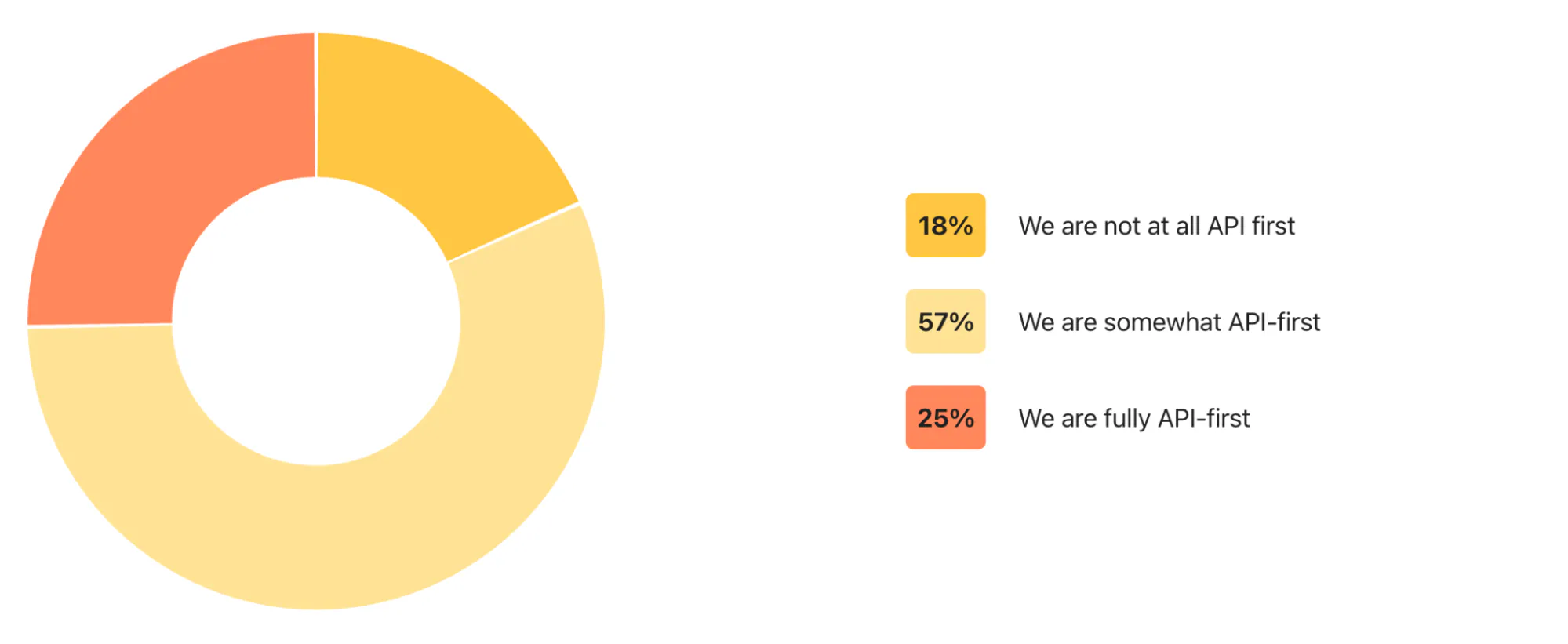
Postman's own platform saw calls to AI APIs grow 40% year over year over the same period, and while most developers have heard of MCP, an open protocol that connects AI agents to external tools and data sources, only 10% use it regularly yet.
It's worth remembering that an AI agent doesn't call an API the way a person does. It can hit an endpoint thousands of times a second, with none of the pauses a human takes to read a response before making the next request.
AI agents are quickly becoming one of the biggest categories of API consumer, and the API on the other end doesn't get a say in whether it was built to handle that.
Common API examples
A few everyday examples make all of this concrete:
- Messaging APIs power the text alerts and two-factor codes you get from apps that don't run their own telecom network, handing off actual delivery to a provider like Twilio.
- Video embed APIs let a blog or news site drop a fully working video player onto a page without hosting or streaming a single byte of video themselves.
- Calendar APIs let a booking or events app add a meeting directly to your Google or Outlook calendar instead of asking you to copy the details over yourself.
- Smart home APIs let a single app control a thermostat, doorbell camera, or smart lock from different manufacturers, translating each device's own protocol into one consistent set of requests.
Each example hides a different provider behind the same simple request and response.
Conclusion
An API is ultimately just an agreed-upon contract for two systems to exchange data, with everything else hidden behind that boundary.
Once that request and response cycle clicks, the types and protocols covered here start to make a lot more sense.
Browserless's REST APIs are a practical place to start if you need an API to improve your workflows. Sign up for a free account and send a real request to a live endpoint.
You'll have rendered HTML, a screenshot, or a PDF back within seconds, and a much clearer picture of what an API actually does.
What is an API FAQs
What is an API used for?
APIs are used to connect software systems so they can exchange data or trigger functionality without merging their code together – which covers everything from a weather app pulling forecast data to a checkout page processing a payment to a script pulling structured data off a website through a scraping API.
What is an API explained simply?
An API is a way for one piece of software to ask another piece of software for something and get a predictable answer back. You send a request in a format the other system understands, and it sends back a response you can use, without you needing to know how it worked internally.
What's the difference between an API and a web service?
A web service is a specific kind of API that works over a network, typically the internet. Every web service is technically an API, but not every API is a web service, since web services specifically require a network connection to work. Some APIs, like an operating system API, don't involve a network at all.
What's the difference between an API and a webhook?
An API is something you actively call when you want data or an action to happen. A webhook works the other way around: instead of you asking a system for something, the system automatically sends data to you the moment a specific event happens, like a payment clearing or an order shipping.