Automate financial portals, on infrastructure you control
Self-hosted browser infrastructure for account aggregation, payment automation, document extraction and KYC. Credentials and customer financial data never reach Browserless.
175M+
Docker pulls
SOC 2
Type II report
99.9%
Uptime commitment
Fintechs already running on Browserless
Two published case studies, in payroll and retirement.


Security & compliance
The blocker is rarely the automation. It's the review.
The workflow gets built in a sprint and then waits on procurement. Self-hosting removes the question that holds it up, because Browserless is no longer a vendor in the data path to assess.
Shared cloud infrastructure fails the security review
Automating logged-in access to banks, payroll systems and payment portals means handling credentials and customer financial data. Your InfoSec team has to approve every vendor in that data path, and a shared browser fleet is a hard one to get signed off.
Running your own browser fleet
It clears the security review, then becomes a permanent engineering cost. Chrome leaks memory, concurrent sessions fight over CPU, bot detection changes weekly, and the team you hired to build financial products is patching browsers instead.
Self-hosted Browserless
The same browser infrastructure, running inside your own VPC, on-premises, or air-gapped. Credentials and financial data never reach Browserless, and your existing Puppeteer and Playwright code runs unchanged. You run the containers, and stop maintaining the browsers inside them.
Compliance summary
Two pages for your security review.
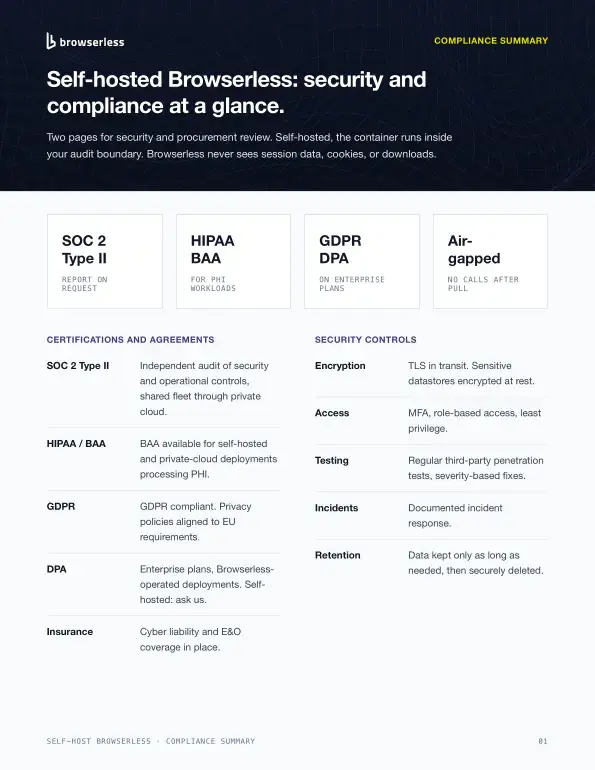
Production browser infrastructure, deployed on your terms
Everything below runs in the self-hosted enterprise image, inside your own network boundary.
Deployed where your data already lives
- Docker and Kubernetes, inside your VPC or on-premises
- Air-gapped deployment is a documented, supported configuration
- The container makes no outbound calls to run
- License keys are time-limited and validate offline
- Scale horizontally across your own cluster
Built for the security questionnaire
- SOC 2 Type II report available through the Trust Center
- GDPR compliance, with a DPA on deployments we operate
- Regular third-party penetration testing
- Subprocessor list provided on request
- Per-team token roles, so you can revoke one credential without rotating the fleet
Evidence for every automated run
- Session recording captures the run as a replayable audit trail
- DOM changes, clicks, keyboard input, console and network activity
- Screen recordings written straight to your own storage
- OpenTelemetry export to your existing observability stack
- Webhooks for every session lifecycle event
What financial teams automate with Browserless
Every one of these is a workflow behind a login, on a site that was never built to be automated.
Deploy inside your network boundary
Where does the data live? Wherever you put it. Our cloud stores customer data primarily in the United States, and self-hosting removes the question altogether.
Your own Virtual Private Cloud
Run Browserless inside the VPC your financial data already sits in.
On-premises
Deploy on your own hardware when the review says nothing leaves the building.
An air-gapped environment
Docker or Kubernetes with no outbound connectivity required to run.
Keep the Puppeteer and Playwright code you already have
Puppeteer and Playwright over WebSocket, BrowserQL, and the core REST endpoints all run in the self-hosted image, with the same request formats as the cloud. Point your existing scripts at your own endpoint and ship. No re-architecture, no new SDK, no migration project to schedule around a release freeze.
// Same Puppeteer code, pointed at your self-hosted Browserless
const browser = await puppeteer.connect({
  browserWSEndpoint:
    'wss://browserless.internal.your-vpc.example/?token=YOUR_API_KEY',
});

const page = await browser.newPage();
await page.goto('https://portal.your-institution.example/login');
// Credentials and customer financial data never reach BrowserlessPick the API that fits the workflow
Carrying HIPAA obligations too?
Benefits reconciliation and claims work stack HIPAA and a BAA on top of everything on this page.
Ready to put this in front of your security team?
Talk to us about your deployment, or read how we handle SOC 2 Type II, GDPR and the DPA in the Trust Center.