
TL;DR
- Four detection layers. An anti-detect browser is a Chromium fork that patches JavaScript fingerprints and isolates profiles per persona. It covers the JavaScript layer cleanly but misses three more: the Transport Layer Security (TLS) handshake, HTTP/2 framing, and behavioral telemetry – mouse movement, typing rhythm, and other behavioral signals. TLS and HTTP/2 are scored before content is served; JavaScript fingerprints and behavioral telemetry are scored as the session runs.
- Coherence first. A Windows user agent paired with a Linux GPU is often more suspicious than no spoofing at all, since no real device reports that combination.
- Browserless covers the three gaps. Browserless's stealth routes handle the TLS and HTTP/2 layers by running a real Chromium. Residential proxies plus
proxyLocaleMatch=1keep locale coherent, and BrowserQL's opt-inhumanlikeflag handles behavioral pacing.
Introduction
Even a powerful anti-detect browser that patches every JavaScript fingerprint surface (canvas, WebGL, navigator, user agent) can still get a 403 on the third request to a Cloudflare-protected website.
The patches succeed at the only layer fingerprint checkers actually test, but they miss three layers Cloudflare scores in parallel. The TLS handshake completes before JavaScript runs, the HTTP/2 framing comes from the HTTP/2 client implementation, not from anything JavaScript can patch, and behavioral telemetry watches how the session unfolds.
In this article, you'll see how Browserless closes each gap with its stealth route, residential proxies, and the opt-in humanlike flag.
What is an anti-detect browser?
Under the hood, an anti-detect browser is a Chromium fork with two things bolted on. It patches the fingerprintable browser parameters a website reads through JavaScript so each profile reports back different browser fingerprints, and it isolates cookies and storage per browser profile so multiple profiles can run side by side without giving away that they share a host.
Teams use anti-detect browsers to manage multiple accounts from a single machine – anywhere from one account to many accounts – so none of them trace back to one identity.
You'll also see the category called a fingerprint browser in some cases, as the ability to patch the fingerprint convincingly is the feature most buyers evaluate first. Each profile functions as its own digital identity: a distinct fingerprint, a dedicated proxy, and no shared account history.
In practice, a third piece – proxy integration – has to work alongside those two for the persona to hold:
- Fingerprint spoofing patches the fingerprint parameters JavaScript reads from navigator, screen, the canvas, WebGL, and the audio context, so each profile gets its own digital fingerprint instead of sharing yours.
- Profile isolation keeps each account in its own isolated profile, with cookies, local storage, and history walled off.
- Proxy integration pairs each profile with a dedicated IP so the IP reputation lines up with the persona.
The category came out of multi-account management workflows on platforms that ban running multiple accounts from the same host.
Common use cases include multi-account fleets to manage ad accounts on social media and advertising platforms, mobile multi-accounting for app stores, and web scraping for market research and price-tracking on e-commerce platforms.
Desktop vs. API
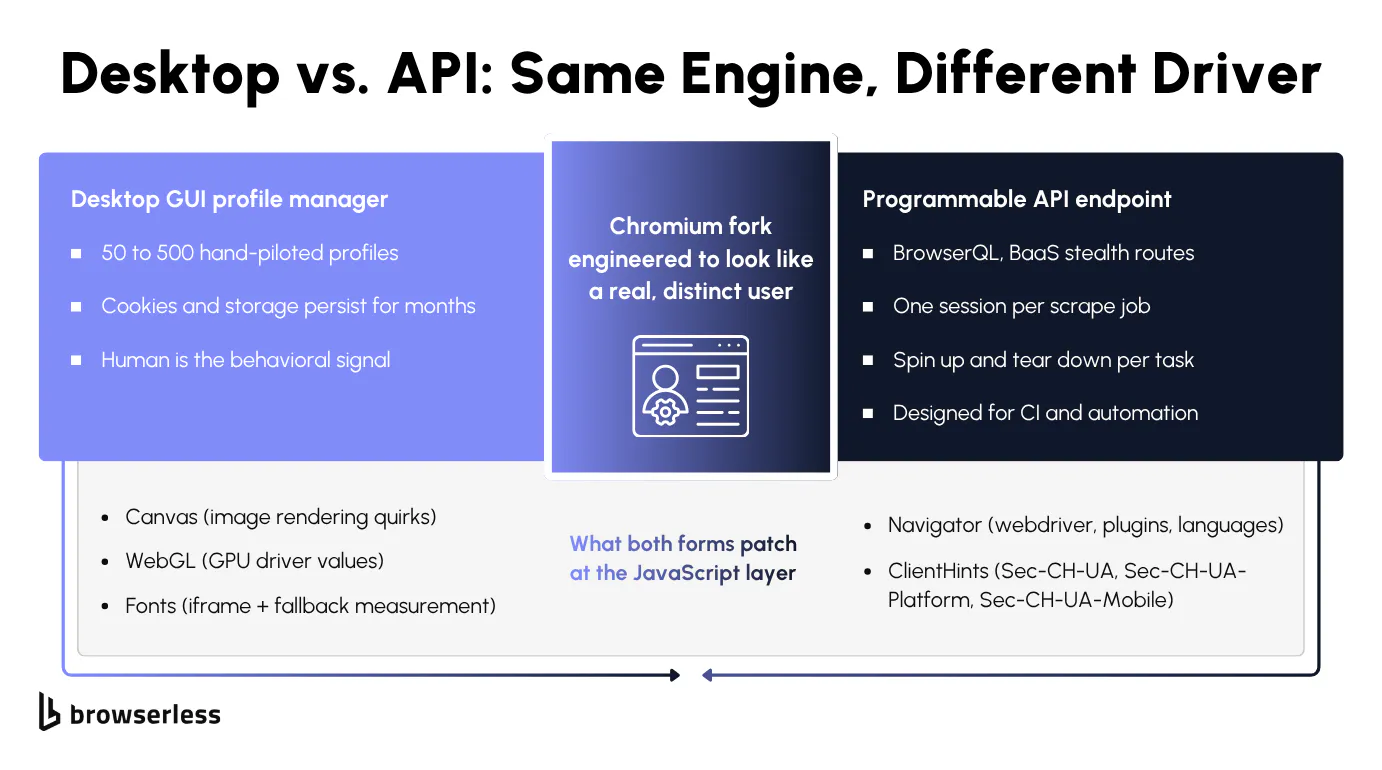
The same technology ships in two forms with different drivers. Desktop GUI products are profile and account management with a user-friendly interface, where you launch the app, create or pick a saved persona, and a Chromium window opens with that fingerprint already swapped in.
The user sits at the keyboard on their own device, clicking around social media or advertising dashboards, often managing large fleets of profiles, with cloud sync so teammates can share profiles across machines. Products like Octo Browser and Ghost Browser are built around this model.
The API form drops the GUI entirely. You hit an endpoint over WebSocket or HTTP, the platform spins up a headless browser tuned for stealth; your script drives automation tools like Puppeteer or Playwright; and the session tears down when the job ends. There's no human in the loop, and state only carries over when you ask for it, for example by loading a saved profile with the profile parameter.
Browsers as a Service (BaaS) is Browserless's API form, with the /stealth route exposing a privacy-hardened browser variant tuned to strip the usual automation tells, accessed over a connection URL.
Affiliate marketers and agency operators use the GUI because they're working real accounts and want a window to drive. Developers running headless browsers at scale for web scraping, AI agents, or end-to-end testing across thousands of URLs prefer API access over a GUI. The guidance in this article is for developers.
How to set up a proxy in an anti-detect browser
A proxy makes the rest of the fingerprint believable. An IP that resolves to Frankfurt attached to a profile claiming a US timezone and an English-US browser language fails the same coherence test as a mismatched user agent. Proxy setup belongs to the same persona as the fingerprint itself, not a separate task added afterward – the goal throughout is one consistent fingerprint.
Setting one up follows the same four steps whether you're running a desktop GUI or scripting automation workflows against the API:
- Pick a proxy type that matches the workload. Residential and mobile IP addresses route through real consumer connections and carry a trustworthy IP reputation; datacenter IPs are cheaper and faster but get flagged faster on platforms that specifically watch for them, and free proxies might be datacenter IPs already burned by thousands of other users.
- Assign one proxy per profile, not one proxy shared across several profiles. Multiple accounts exiting the same IP, or logging in from the same device, is exactly the pattern multi-accounting bans are built to catch.
- Match the proxy's country to the profile's language and timezone. A real device doesn't exit from Germany while reporting a US locale, so the browser's reported language and timezone need to agree with the proxy's exit country too.
- Keep the proxy sticky for the life of one session. Rotating IPs mid-session breaks any cookies or server-side state tied to the old IP, and it reads as more suspicious than keeping one exit point for the whole workflow.
A desktop anti-detect browser bundles this into a manual setup inside a profile's settings panel: you paste in a host and port plus credentials, pick a country, and the app threads the proxy through every request that profile makes.
On the API side, Browserless folds the same four steps into connection-URL parameters instead of a settings form:
wss://production-sfo.browserless.io/stealth?token=YOUR_API_TOKEN_HERE&proxy=residential&proxyCountry=de&proxySticky=true&proxyLocaleMatch=1
proxy=residentialpicks the IP type.proxyCountry=desets the exit country.proxySticky=truepins one exit IP for the whole session. It's already the default on/stealthroutes and BrowserQL, so you only need to set it on plain BaaS or REST connections.proxyLocaleMatch=1automatically aligns the browser's reported language andAccept-Languageheader to whichever country the proxy exits from, so you don't have to set either by hand.
The HTTP/2 and locale-coherence section later in this article shows the full verification script that reads these values back from a live session.
The JavaScript layer every anti-detect browser patches
Every anti-detect browser patches the same JavaScript surfaces, and most of them do it well. That's the value of the solution, but it's also the trap most automation falls into.
The patches are important because JavaScript fingerprinting is the most-tested layer (it's what every checker site reports on), but they're not enough because three other layers report on you before the page's JavaScript even runs.
Canvas, WebGL, and the rendering layer
Browser fingerprinting works on tiny rendering differences. The same image drawn on a MacBook comes out slightly different than on a Linux server, since the GPU and graphics drivers underneath aren't the same, and that difference is enough to give your machine a unique digital fingerprint that survives a cookie clear.
The same trick works with audio (sites play a silent sound and measure how your OS processes it) and with fonts (sites measure text width to figure out which fonts you have installed).
A site that runs all three in parallel combines the result with the values JavaScript reports about your machine, producing one of the unique digital fingerprints a site uses to recognize you across sessions, IPs, and even devices on the same hardware.
Beyond rendering, the browser hands over basic info through JavaScript, including the user agent string, the screen resolution, the installed plugins, the language and timezone, and the operating system. The newer Client Hints headers expose more (OS version, chip architecture) before any JavaScript runs.
A good anti-detect browser patches all of this so the site sees a consistent fake persona instead of your real machine.
Coherence is more important than randomization. A profile with an impossible combination, like a mobile user agent paired with a desktop GPU or a US English locale paired with a Tokyo timezone, gets flagged faster than no spoofing at all. On Browserless, the emulationOs parameter swaps the whole OS-derived set (User-Agent, Client Hints, navigator.platform, GPU renderer) together, so they never disagree.
Why PixelScan doesn't equal Cloudflare
A green check on PixelScan, CreepJS, or IPhey tells you your fake persona is internally consistent at the JavaScript layer, and that's all it tells you.
Fingerprint checkers don't simulate the tracking systems Cloudflare and other bot-detection vendors actually run, so they give no indication about the TLS handshake your client made before JavaScript started, nothing about the shape of your HTTP/2 traffic, and nothing about whether your IP looks like a real human or a scraper hitting many pages a second.
The gap is obvious when you run a real test. A well-configured anti-detect browser passes bot.sannysoft.com without getting IPhey flagged, then the same configuration hits Cloudflare's "Just a moment" interstitial and a 403 on scrapingcourse.com/cloudflare-challenge, a public test page that sits behind a real Cloudflare managed challenge. The fingerprint passed, but the session still failed.
Three layers an anti-detect browser can't reach
Three detector layers live outside the browser process a desktop GUI controls. The TLS handshake happens in C++ before any JavaScript runs. HTTP/2 framing comes from the HTTP/2 client implementation, not from anything JavaScript can patch, and behavioral telemetry depends on whether a human is actually at the keyboard. Fixing any of them takes infrastructure rather than another fingerprint patch, which is what the next three sections walk through.
TLS fingerprinting (JA3, JA4)
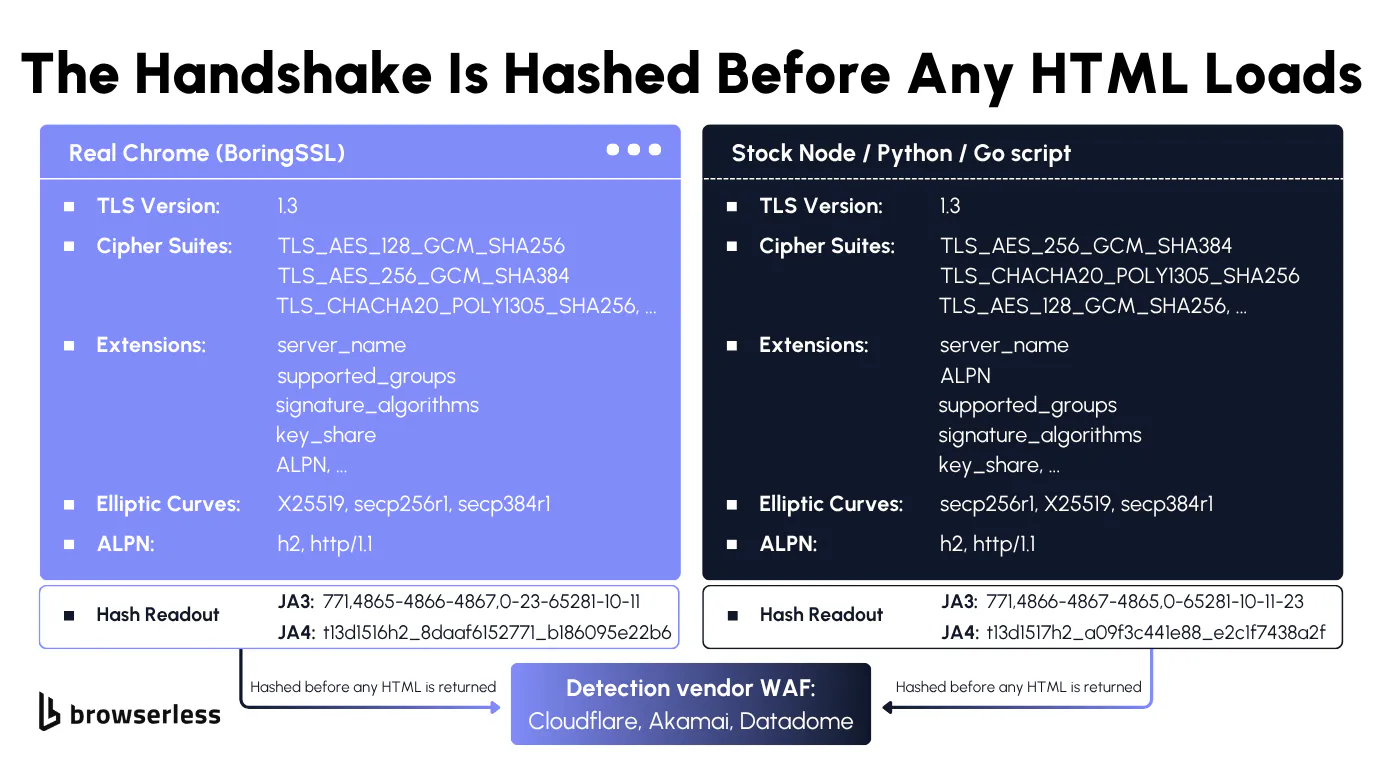
Before any HTML moves, your client and the server do an HTTPS handshake, a handshake that is surprisingly chatty. Your client announces which encryption methods it supports, in a specific order, and that order alone is enough to identify which library opened the socket.
Real Chrome opens the conversation one way; Python's requests, Go, curl, and every proxy library in between open it differently. Detection vendors hash those differences into a unique fingerprint (JA3 or JA4) at the network edge, so by the time your request line is parsed, the bot score is already partly set.
A desktop GUI anti-detect browser can't fix this. The vendor doesn't run the network between your laptop and the destination, so whatever TLS library you opened the socket with is what shows up at the edge.
JavaScript-layer stealth plugins can't touch it either, since the handshake completes in the browser’s native networking stack, before any JavaScript runs.
The fix is to run the browser somewhere the handshake originates from real Chromium, which is what Browserless's stealth routes do. You can drive the BrowserQL stealth route at /stealth/bql with GraphQL mutations directly or through Browser Automation Protocol (BAP), Browserless's typed TypeScript and Python SDKs built on BrowserQL. You can also connect Puppeteer or Playwright to the /stealth route, as the proxy script later in this article does.
The cleanest way to see the gap is a side-by-side test against a TLS reflector (a server that tells you exactly what your handshake looked like). The curl below reads the fingerprint your local shell sends out, with no browser involved.
curl -sS "https://tls.peet.ws/api/all" \
  | jq '{ja3: .tls.ja3_hash, ja4: .tls.ja4, ua: .user_agent}'
Now run the same request through Browserless. The mutation below tells managed Chromium to navigate to the reflector and read its JSON response back through text, so the handshake comes from a real Chromium network stack rather than a script's HTTP library. Compare the ja4 values: the two clients come back with different JA4 fingerprints from the same reflector before either has parsed a byte of HTML. (Chrome shuffles its TLS extension order on every connection, so its JA3 hash changes run to run, while JA4 sorts the extensions and stays stable.)
curl -sS -X POST \
  "https://production-sfo.browserless.io/stealth/bql?token=YOUR_API_TOKEN_HERE" \
  -H 'Content-Type: application/json' \
  -d '{"query":"mutation { goto(url: \"https://tls.peet.ws/api/all\", waitUntil: networkIdle) { status } body: text(selector: \"body\") { text } }"}' \
  | jq -r '.data.body.text' \
  | jq '{ja3: .tls.ja3_hash, ja4: .tls.ja4, ua: .user_agent}'
HTTP/2 and proxy coherence
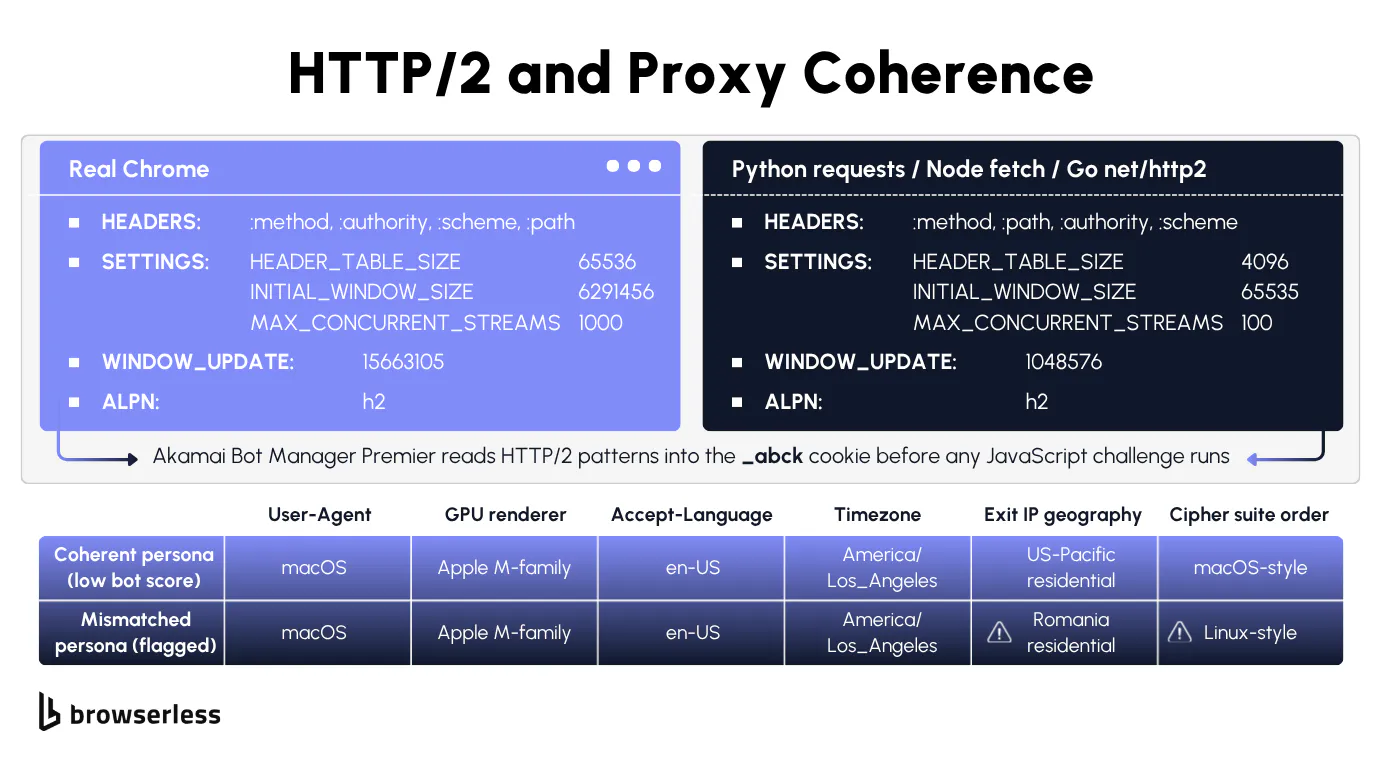
HTTP/2 fingerprinting picks up where TLS leaves off. Real Chrome sends pseudo-headers in :method :authority :scheme :path order, a specific set of SETTINGS frame values, and a large WINDOW_UPDATE right after the connection opens.
Python's httpx and Go's net/http send different SETTINGS and WINDOW_UPDATE values, and Go also puts the pseudo-headers in a different order, so bot-management platforms hash the difference into your score before the server parses your request line.
Browserless avoids this by running a Chromium-based browser on its stealth routes, so the HTTP/2 frames come from a browser's own network stack instead of a script's HTTP client.
Proxy coherence is the other piece a desktop GUI can't fix, and most desktop products leave proxy management as a separate concern entirely.
A German residential IP paired with an English-US browser language and a New York timezone is impossible to defend, since no real device combines the three. The connection-URL parameters from the proxy setup section handle the alignment: proxy=residential&proxyCountry=de picks the exit IP, proxyLocaleMatch=1 matches the browser language to it, and the /stealth route keeps that IP for the whole session by default.
Switching proxies mid-session breaks coherence even faster than getting it wrong on the first request.
The script below verifies the alignment by connecting through the residential proxy, hitting an IP reflector, and reading back the exit IP, exit country, and browser language.
When proxyLocaleMatch=1 is doing its job, a DE exit IP comes back with de-DE for navigator.language without you setting it in code (the Accept-Language header follows it too).
const { chromium } = require("playwright-core");

(async () => {
  const TOKEN = "YOUR_API_TOKEN_HERE";

  const wsEndpoint =
    "wss://production-sfo.browserless.io/stealth" +
    `?token=${TOKEN}` +
    "&proxy=residential" +
    "&proxyCountry=de" +
    "&proxySticky=true" +
    "&proxyLocaleMatch=1";

  const browser = await chromium.connectOverCDP(wsEndpoint);
  const context = browser.contexts()[0] ?? (await browser.newContext());
  const page = context.pages()[0] ?? (await context.newPage());

  await page.goto("https://ipinfo.io/json", { waitUntil: "domcontentloaded" });
  const ipJson = JSON.parse(await page.locator("body").innerText());

  const locale = await page.evaluate(() => navigator.language);

  console.log("Exit IP:        ", ipJson.ip);
  console.log("Exit country:   ", ipJson.country);
  console.log("navigator.lang: ", locale);

  await browser.close();
})();
Synthesizing behavior with the humanlike flag
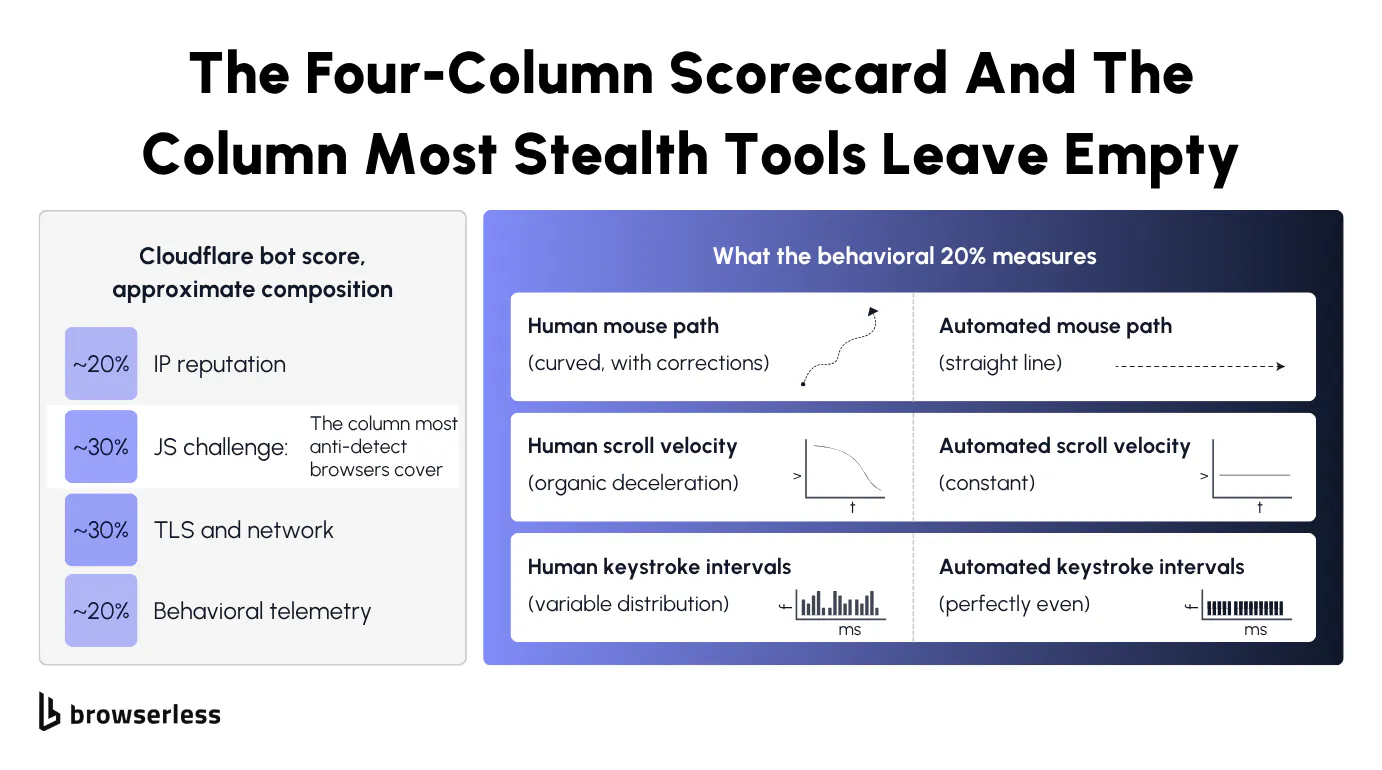
Once you're past TLS and HTTP/2, detection starts watching how you actually behave. Bot-management platforms track the path your mouse traces before clicking, how your scroll wheel decelerates, which form field you focused first and for how long, and the rhythm of your keystrokes.
A hand-piloted desktop GUI passes this layer naturally because a real person moves the mouse and types the password, but a script-driven session has no mouse or keyboard events at all (or events arriving at suspiciously even intervals), and calling page.type in Puppeteer fires keystrokes with no delay between them by default.
BrowserQL closes the behavioral gap with an opt-in humanlike flag, which adds randomized mouse movement and typing delays to your interactions. It's off by default since most automation doesn't need it and the realistic timings slow sessions down.
Turn it on (add humanlike=true to your BrowserQL endpoint URL, or toggle Human-like Behavior in the BrowserQL (BQL) IDE), and goto waits like a person reading, scroll slows down naturally, type spaces out keystrokes, and click approaches the target before pressing. It only applies to BrowserQL. Puppeteer and Playwright sessions on /stealth don't read it.
With humanlike on, the mutation below logs into a test form. The response has the same shape as a default run, but each step's time field (the total milliseconds the action took) goes up.
In our test, typing the password went from about 2.9 seconds to about 4 seconds and the click from 160 ms to about 1 second. BQL's type already spaces keystrokes 50–200 ms apart by default, so humanlike adds mouse movement and longer, more varied pauses on top.
mutation HumanlikeLogin {
  goto(url: "https://the-internet.herokuapp.com/login", waitUntil: networkIdle) {
    status
  }
  typeUsername: type(selector: "#username", text: "tomsmith") {
    time
  }
  typePassword: type(selector: "#password", text: "SuperSecretPassword!") {
    time
  }
  click(selector: "button[type='submit']", visible: true) {
    time
  }
  flash: text(selector: "#flash", timeout: 10000) {
    text
  }
}
One mutation, end-to-end Cloudflare bypass
Three of the four detection layers come down to flags on the same Browserless connection URL.
- The TLS handshake closes with the
/stealth/bqlroute. - HTTP/2 framing is handled by routing traffic through real Chromium on Browserless infrastructure.
- Locale coherence is handled with residential proxies plus
proxyLocaleMatch=1. - Behavioral pacing closes with the opt-in
humanlikequery parameter on the connection URL.
CAPTCHA challenges that show up mid-session close with the solve mutation in BQL, or with solveCaptchas=true on the connection URL in a Puppeteer or Playwright session. Both cover Cloudflare Turnstile, reCAPTCHA, and other challenge types.
Here's the full four-layer pass as one mutation. Send it to /stealth/bql, which covers TLS and HTTP/2, and add &proxy=residential&proxyCountry=us&proxyLocaleMatch=1 to the connection URL for locale coherence. The mutation navigates to the ScrapingCourse Cloudflare challenge page, runs solve to clear the challenge, and reads the body text back.
To cover the behavioral layer, add humanlike=true as a query parameter on the connection URL alongside the mutation.
mutation BypassCloudflare {
  goto(
    url: "https://www.scrapingcourse.com/cloudflare-challenge"
    waitUntil: networkIdle
  ) {
    status
  }
  solve(type: cloudflare) {
    found
    solved
    time
  }
  bodyText: text(selector: "body", timeout: 10000) {
    text
  }
}
A successful run returns solve.found: true, solve.solved: true, and bodyText.text containing the page behind the challenge rather than the interstitial. Don't read goto.status as the result: it reports the challenge page's response, so it can come back as 403 even when the challenge is solved and the content loads.
With humanlike=true set on the connection URL, the same call addresses all four detector layers, though humanlike is opt-in and slows the session, so leave it off when the behavioral score isn't the blocker.
Conclusion
Even the best anti-detect browsers solve only one layer of bot detection – production targets read three more before serving content.
Browserless closes the gap with the /stealth/bql route for the TLS handshake and HTTP/2 framing, residential proxies plus proxyLocaleMatch=1 for locale coherence, and an opt-in humanlike flag for behavioral pacing, all on the same connection URL, so you keep full control over the session without hand-rolling any of it yourself.
Start on Browserless’s free tier and run a stealth session against the target that’s blocking you today.
FAQs
How is an anti-detect browser different from running multiple Chrome profiles?
Chrome's built-in browser profiles separate cookies and history, but they share the same fingerprint – canvas hash, WebGL renderer, audio context, and user agent – the same TLS handshake, and the same exit IP.
A site that fingerprints visitors will treat all your Chrome profiles as the same machine. An anti-detect browser patches each profile to look like a different device at the JavaScript layer, and pairs each profile with its own residential or mobile IP so the network layer matches too.
Are anti-detect browsers legal?
The software itself is legal in most jurisdictions. What you do with it determines the legal exposure. Buying limited-edition sneakers across ten accounts on a retailer that explicitly bans multi-accounting is a terms-of-service violation that may or may not have legal weight depending on the platform and your local law.
Treat the browser as a tool, check the terms of service of the platforms you're targeting, and stay away from anything that requires impersonating identified crawlers or accessing data you aren't authorized to see.
How long does an anti-detect browser profile stay viable?
A profile's useful life depends more on the account behavior than the fingerprint patches. A profile that logs in from the same residential IP, runs a few sessions a day, and behaves like a human can stay viable for months. A profile that gets used for aggressive scraping, account-takeover attempts, or impossible-pattern activity (logging in from Berlin and Tokyo within an hour) burns within days.
Rotate proxies intentionally, keep the fingerprint coherent across sessions, and avoid behavior that no real user produces.
What is the difference between an anti-detect browser and a VPN?
A VPN swaps your network identity on the internet and leaves your browser identity untouched. A site that fingerprints visitors still recognizes your machine across IP rotations because the canvas hash, the WebGL renderer, and the user agent all stay the same.
An anti-detect browser does the opposite, swapping the browser identity but leaving the network alone. Most multi-account workflows need both, with the browser layer to fake who you are and the network layer to hide where you are.
Do free anti-detect browsers work?
A free version exists for most products in the category, and they patch the basic JavaScript surfaces well enough to pass fingerprint-checker sites. A free plan often caps how many unique profiles you can save, restricts proxy integration, and skips the newer client-hint headers and WebGPU surfaces that newer detectors hash.
Paid plans typically advertise an unlimited number of profiles, plus advanced features like cloud sync across multiple devices, a larger proxy bundle, and a support team for account recovery.
How is BrowserQL different from a desktop anti-detect browser?
BrowserQL targets script-driven automation and scraping rather than human-driven multi-account workflows, which is what desktop anti-detect browsers are built for.
The two cover different use cases, and BrowserQL covers three additional detection layers a desktop product can't reach.
You drive sessions through GraphQL mutations against the /stealth/bql route on Browserless infrastructure, with TLS and HTTP/2 handled by the stealth route's real Chromium, locale coherence by residential proxies plus proxyLocaleMatch=1, and behavioral pacing by the opt-in humanlike query parameter on the connection URL.