
TL;DR
- Layered scoring. Akamai Bot Manager is a bot-detection system that scores your IP, your TLS fingerprint, browser signals from a JavaScript sensor script, and on key pages your behavior, so to bypass Akamai you have to pass all of them and keep passing on later requests.
- Signals must agree. Bare HTTP clients fail at the TLS handshake, stock headless browsers leak automation flags to the sensor script, and faking one layer leaves the others exposed.
- Solve, then persist. BrowserQL's
solvemutation supports Akamai, but a solved challenge only gets you past the gate. Keep the session on a stealth route with a sticky residential proxy, and hand the strictest targets to a person through a live URL.
Introduction
You usually go looking for a way to bypass Akamai after a scraper that worked last week starts coming back blocked or quietly missing the data it was built to collect, even though nothing in your code changed. The site now sits behind Akamai Bot Manager, and its bot detection scores your client on several layers at once.
The usual fixes go after one of those layers, like a better User-Agent or a patched browser, and they work until Akamai's next update. Below, you'll see what Bot Manager checks and why those shortcuts keep breaking, then a BrowserQL setup that handles the IP, TLS, fingerprint, and challenge layers in one session. You'll also see what to do on the strictest sites, where automation alone runs out.
The detection layers behind Akamai bot detection
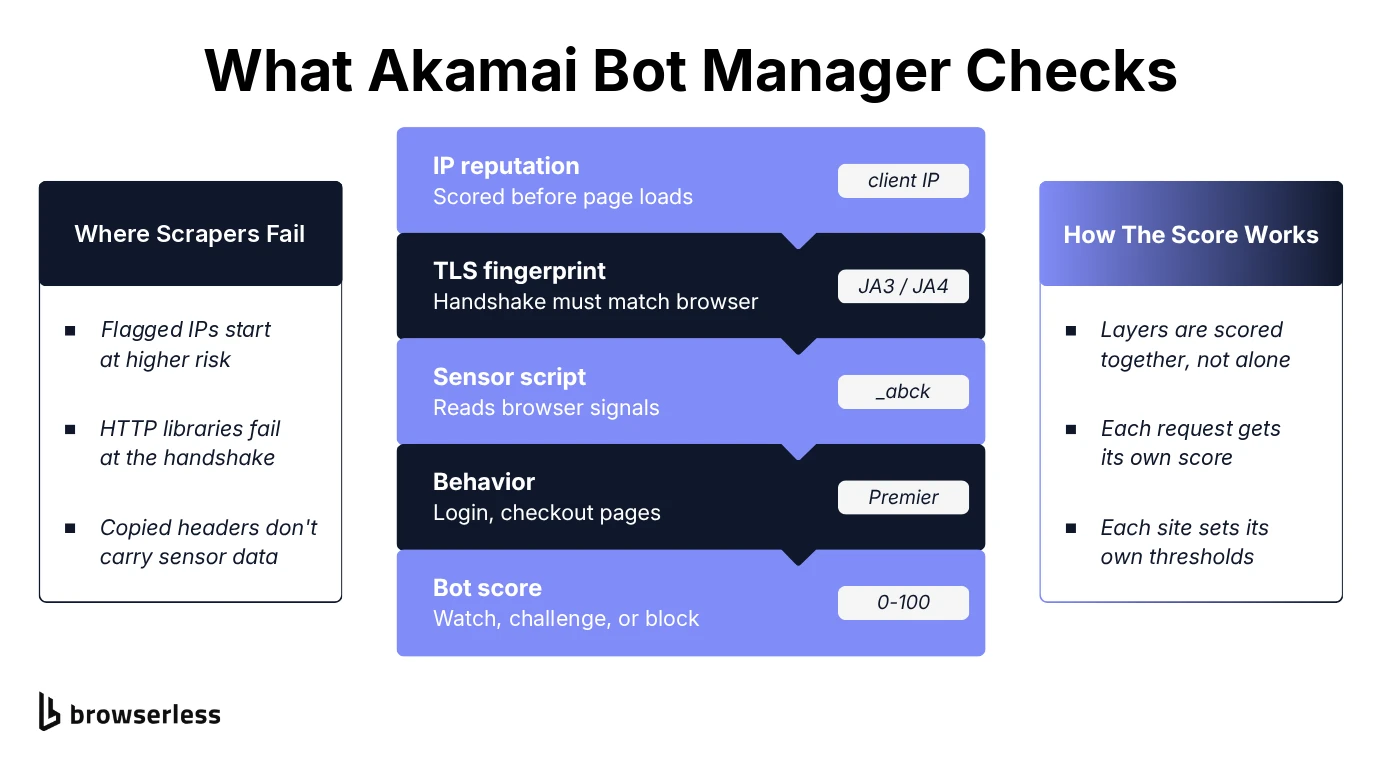
Akamai Bot Manager is Akamai's bot-detection product. It runs on Akamai's edge network in front of the site and scores every request on whether there's a real browser on the other end. Like other anti-bot systems, it doesn't give you a single check to pass. Several layers feed one combined score, so you can get most of them right and still get flagged by the one you missed.
IP reputation comes first
Before your request even reaches the site's web server, Akamai can already score your IP. Akamai keeps client reputation scores for IPs, including a category for web scrapers, so addresses with a history of scraping or abuse start you off at higher risk. A clean residential IP without that history doesn't carry the same penalty, which is also why proxy rotation through a cheap pool of flagged IPs backfires, whether they're datacenter IPs or residential ones.
TLS fingerprinting catches the handshake itself
Your client gives itself away before a single byte of the page loads. The Transport Layer Security (TLS) handshake carries the TLS version, the cipher suites your client offers and their order, and the extensions it sends. Together those form a fingerprint, usually summarized with the JA3 or newer JA4 method, and Akamai has written about using TLS fingerprints to tell bots apart from real users. A fingerprint that doesn't match the TLS fingerprints of your claimed browser stands out.
So if your script starts with import requests and sends Python's Requests traffic with a spoofed User-Agent header, the header says Chrome while the handshake still says Python TLS client. Akamai sees both in the same request, before you've asked for any content.
Browser fingerprinting through a JavaScript sensor script
Next, Akamai injects an obfuscated sensor script into the page, which shows up as a bmak object in the page's JavaScript. It reports browser settings and other browser-level data points back to Akamai, and that sensor data is tied to a cookie, _abck, which travels with your later requests so Bot Manager can tell your session apart from a bot's.
Patching individual values, like the reported screen size, to fake those signals is fragile when they all have to stay consistent with each other. The dependable way to get consistent signals is a real browser engine rendering a real page.
Behavioral analysis watches the pages that matter
On top of the up-front checks, Bot Manager Premier adds behavioral detection on the transactional endpoints a site cares most about, like login and checkout. Akamai says it collects mouse movements, key presses, and screen touches and looks at the velocity and cadence of typing, which is where a script's evenly timed input stands out.
That's how a session that looked fine on its first request can still hit Akamai blocks a few requests later, when it reaches a protected page and starts acting like a script. Akamai doesn't publish how it weights any of this, so there's no formula to reverse-engineer.
Challenge severity scales with risk
Bot Manager doesn't treat every visitor the same way, so if your request has a clean IP, a matching TLS fingerprint, and a plausible sensor payload, you might never see a visible check. A shakier request gets heavier treatment, from being watched to being challenged or blocked outright.
Akamai assigns each request a bot score from 0 to 100, and each site operator decides where the thresholds for cautious, strict, and aggressive responses sit. A fix that works cleanly on one Akamai-protected site can still get challenged hard on a target website with stricter settings.
Why browser automation and AI agents trip Akamai
Beyond the handshake mismatch above, a plain HTTP client can't execute JavaScript, so it never produces a sensor payload or gets through JavaScript challenges.
Stock Chrome in headless mode and common automation tools get further with a real browser engine running the sensor script. That script was written to catch what's left, though, like the navigator.webdriver flag, internals a retail Chrome build populates differently, and the small, unplanned motion of real users.
AI agents built on a headless browser have the same problem. The model on top doesn't change what the browser exposes, and agents that log in or check out land on exactly the pages Premier's behavioral detection watches.
Check the site's terms before you bypass Akamai
Bot Manager exists to keep unwanted automated traffic off a site, so before bypassing Akamai bot detection, read the target site's terms of service and robots.txt. Some sites are fine with automated collection of public data, and others ban it outright. That's the site owner's call, and nothing in this guide changes it.
Common anti-bot bypass workarounds, and why they don't last
The first thing you might try to avoid detection is copying a real session's request headers, like Accept-Language, Upgrade-Insecure-Requests, and the Sec-Fetch-Site, Sec-Fetch-Mode, Sec-Fetch-Dest, and Sec-Fetch-User set, onto your script. Headers alone won't get you far when the TLS fingerprint comes from your client's network stack and the sensor payload is generated fresh by whatever renders the page. Akamai's transparent detection also runs its own request analysis, looking for anomalies like out-of-order headers and browser version mismatches, so a hand-assembled header set can hurt more than it helps.
The two more serious workarounds go after the deeper layers. TLS-impersonation libraries fake the handshake, matching the cipher-suite order and extensions of a real Chrome or Firefox fingerprint. Patched browser-automation forks, like undetected-chromedriver and SeleniumBase's UC Mode, patch a real browser setup to hide known automation tells like the navigator.webdriver flag.
TLS impersonation gets the network layer right, but it's usually still a bare HTTP client underneath. There's no browser running, so nothing generates a sensor payload or answers JavaScript challenges, and Akamai's detection systems get a browser handshake with no browser signals behind it.
A patched fork can get past Akamai for a while, and building one is serious reverse-engineering work, but it doesn't last long. Bot detection doesn't stand still, so your fork works until the next round of Akamai updates, and then someone has to patch it again.
The last option is outsourcing the problem. Paid solver APIs are a fair trade if you don't want to own that maintenance, but solving only covers one of the layers.
An Akamai bypass that holds up
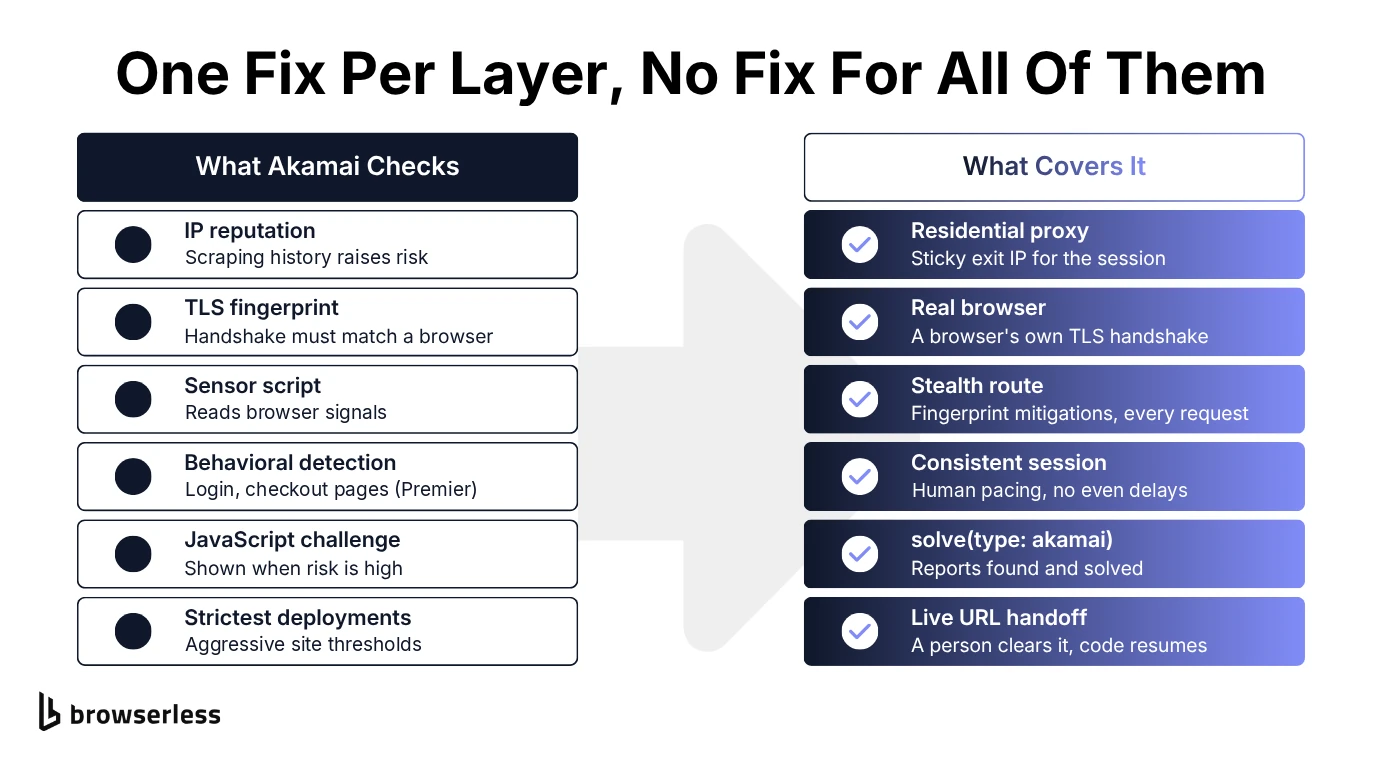
What works is covering each layer with its own piece. A residential proxy handles IP reputation, the stealth route's real browser handles the TLS handshake and device fingerprinting, and solve handles the challenge itself. Use only one of them, a proxy alone or a solver alone, and you might get through a basic deployment, then fall over on a more defensively configured one.
The Akamai challenge takes one call
BrowserQL's solve mutation handles Akamai with the same CAPTCHA solving call it uses for Cloudflare, reCAPTCHA, DataDome, and Amazon WAF, so the challenge step is one line in your query instead of a sensor-payload generator you build and keep patching. Call solve(type: akamai) on a page behind Akamai protection (or leave out type to auto-detect the provider) and you get a straight answer back, whether a challenge was found and whether it was solved. Browserless's own CAPTCHA guide says Akamai solving isn't yet as consistent as reCAPTCHA or Cloudflare, so give your code a retry or fallback path for the misses.
A solve gets you past the gate, and the rest of the setup keeps you there, since Akamai scores every later request too.
The stealth route and a residential proxy cover the rest
BrowserQL's stealth route is a hardened endpoint that applies fingerprint randomization and entropy injection on every request, not just when a challenge shows up. Because it's a real browser, its TLS handshake is a browser's handshake too, and the fingerprint mitigations stay on after solve runs. Browserless maintains those stealth settings and tunes them as bot detectors and TLS fingerprinting change, which is the re-patching job a DIY fork leaves on your plate.
Add the proxy mutation on the residential network and your session goes out through a residential IP, with sticky: true keeping the same exit IP for the whole visit. Sticky is already the BrowserQL default, set here so you can see it. Browserless's proxy docs note that Akamai binds its sensor data and cookies to the egress IP, so rotating mid-session can re-trigger the block.
A working example
Since Akamai scores multiple layers at once, the three pieces need to run in the same session, and they fit in a single BrowserQL request. The script below sends a mutation to /stealth/bql that sets a sticky US residential proxy, loads your target page, runs solve scoped to Akamai, and reads back the page title and text, so you can judge the result by what actually loaded.
You need Node 18 or later for the built-in fetch. If you'd rather not hand-write GraphQL, Browserless's BAP SDKs for TypeScript and Python wrap these same mutations. Set BROWSERLESS_TOKEN to your API token. The script loads Akamai's own Bot Manager page by default, and you can set TARGET_URL to the target URL of another Akamai-protected page.
// Node 18+. Needs BROWSERLESS_TOKEN. TARGET_URL is optional.
const { BROWSERLESS_TOKEN } = process.env;
const TARGET_URL =
  process.env.TARGET_URL ?? "https://www.akamai.com/products/bot-manager";
if (!BROWSERLESS_TOKEN) {
  throw new Error("Set BROWSERLESS_TOKEN before running.");
}

// timeout raises the session limit (60 seconds by default), since a solve can take longer.
const endpoint = `https://production-sfo.browserless.io/stealth/bql?token=${BROWSERLESS_TOKEN}&timeout=300000`;

const query = `
  mutation AkamaiSession($url: String!) {
    proxy(url: "*", network: residential, country: US, sticky: true) { time }
    goto(url: $url, waitUntil: load, timeout: 60000) { status }
    solve(type: akamai) { found solved time }
    title { title }
    text { text }
  }
`;

const response = await fetch(endpoint, {
  method: "POST",
  headers: { "Content-Type": "application/json" },
  body: JSON.stringify({ query, variables: { url: TARGET_URL } }),
  signal: AbortSignal.timeout(300_000),
});

if (!response.ok) {
  throw new Error(
    `Browserless returned HTTP ${response.status}: ${await response.text()}`,
  );
}

const { data, errors } = await response.json();
if (errors?.length) {
  throw new Error(`BrowserQL error: ${errors.map((e) => e.message).join("; ")}`);
}

const pageText = data.text.text.trim();
if (!pageText) {
  throw new Error("Page loaded with no text, which usually means a block page.");
}

console.log("First response status:", data.goto.status);
console.log(
  "Akamai challenge found:",
  data.solve.found,
  "| solved:",
  data.solve.solved,
);
console.log("Final title:", data.title.title);
console.log("Page text:", pageText.slice(0, 200));
Save it as akamai-session.mjs and run node akamai-session.mjs. The mutation's steps run in order inside one browser session, and proxy goes first, so its url: "*" pattern sends every request through the residential network, including the very first one to your target.
If anything goes wrong, the script throws instead of printing an empty result, so a failed run can't pass for a good one, and an occasional navigation timeout on a slow load is worth a retry. The browser session closes when the request completes, so there's nothing to clean up.
The output below comes from a run against Akamai's own Bot Manager product page. That page runs Bot Manager itself, sets the _abck cookie, and answers a plain curl request with an Access Denied error, even with a Chrome User-Agent.
First response status: 200
Akamai challenge found: true | solved: true
Final title: Bot Manager | Bot Detection, Protection, and Management | Akamai
Page text: Skip to main content
English
Docs
...
Read the solve line together with the title and text. found: false next to real content means no challenge appeared, and a solved challenge followed by a block page or empty text means it isn't working yet.
If you drive the session yourself, keep the stealth route and sticky residential proxy on throughout, and add humanlike=true to the endpoint URL so mouse movement and typing follow human-like patterns on login and checkout pages. BrowserQL's type mutation already spaces keystrokes 50 to 200 milliseconds apart at random by default, so keep that instead of adding perfectly even delays of your own.
When Akamai still blocks the session
Since each operator sets their own thresholds, some sites run Bot Manager at its most aggressive settings, and the approach above won't clear those every time.
If solve keeps failing, switch the endpoint to /chrome/bql and keep the residential proxy, since some sites check for a genuine Chrome build. If that still fails, try site unblocking. It loads the page in a real browser launched the way an end user's would be, handles common bot-detection challenges, and returns whichever of the content, cookies, a screenshot, or a browserWSEndpoint you ask for. The endpoint stays open for ttl milliseconds (up to 60 seconds) so you can connect Puppeteer or Playwright to it.
If that still stalls, bring in a person instead of writing a smarter script. BrowserQL's liveURL mutation returns a short-lived link that opens the running session in a normal browser tab. Pass it instructions, like "Clear the challenge, then choose Done.", and the person sees Done and Couldn't finish buttons. Choosing either closes the link and leaves the browser session running so your code can carry on.
Save it for real stalls, and decide up front what counts as stalled, like a solve that keeps failing or a 200 missing the content you asked for, so stuck sessions get escalated instead of failing quietly.
Conclusion
Akamai blocks usually come down to a mismatch, like a browser TLS handshake with no sensor data behind it, or a clean fingerprint arriving from an IP with a scraping history. Faking one layer doesn't fix that while the layers you didn't fake still give you away. You stay unblocked longer when every signal comes from the same real browser on a clean IP, so nothing contradicts anything else.
Browserless gives you each layer as a real component, with the stealth route for fingerprints, a sticky residential proxy for IP reputation, solve for the challenge, and a live URL for the deployments automation can't clear. To try it on your own target, sign up for Browserless.
Bypass Akamai FAQs
How to bypass Akamai when web scraping
Keep one long-lived session for the whole scrape instead of opening a new one for every page. A fresh session starts without the _abck cookie and has to pass the sensor checks and any challenge again. Pace your page loads like a person would, too, since a burst of requests stands out on its own.
In BrowserQL, add the reconnect mutation to your first query. It returns a browserQLEndpoint, and sending your next query there with your token appended reuses the same browser, cookies and all.
How can you tell a site uses Akamai Bot Manager?
Response headers show whether a site runs on Akamai's edge, like Server: AkamaiGHost on a block page or an X-Akamai-Transformed header when Akamai has modified the response, but they don't tell you Bot Manager is on. For that, load the page in a real browser and look for Bot Manager cookies like _abck and bm_sz.
Is Akamai WAF the same as Akamai Bot Manager?
No, Akamai's web application firewall (WAF) is a different product. It's now sold as App & API Protector after replacing Kona Site Defender, and it filters requests against rule sets and known attack patterns. App & API Protector has basic bot visibility built in, but Bot Manager is the dedicated product that tells automated clients apart from real browsers using fingerprinting and behavioral scoring. If you're blocked by rule-based filtering rather than a JavaScript challenge or a fingerprint mismatch, stealth browsing won't fix it.
Does the same setup bypass Cloudflare?
Mostly, yes, since the solve mutation handles Cloudflare challenges too, and the stealth route and residential proxy cover the same fingerprinting and IP reputation layers. Cloudflare's anti-bot measures differ in the details, so check the guide on how to bypass Cloudflare for the specifics.
Is there a guaranteed way to bypass Akamai?
No, and be skeptical of anyone who says there is. Bot Manager deployments vary too much in how aggressively they're tuned for any single API call or method to clear all of them every time.