
TL;DR
- What it hides. Undetected ChromeDriver is a patched Selenium driver that hides
navigator.webdriverand thecdc_variables, but the site still sees your real IP address and the machine your script runs on. - Version pins drift faster. Chrome now ships a new major version every two weeks, and the library hasn't released anything since 3.5.5 in February 2024, so keeping the two matched is on you.
- Know when to switch. A patched driver is fine for local scripts. Once a job runs unattended in CI or needs sessions that persist, managed browser infrastructure starts paying for itself.
Introduction
If a Selenium script of yours has ever been blocked on its first page load, undetected ChromeDriver is probably the fix someone pointed you to. You swap in its driver with a two-line change, run the script again, and the bot check that stopped you a minute ago lets you through. It feels solved, right up until the same script gets blocked in your continuous integration (CI) pipeline without a single code change.
Nothing about the patch changed between those two runs, but it only ever hid a couple of things, and a site also checks where your traffic comes from and what machine your script runs on. In this article, you'll see what it actually fixes, how to keep it running now that Chrome updates every two weeks, and when it's worth moving the browser off your machine.
What undetected ChromeDriver actually patches
Undetected ChromeDriver is a drop-in replacement for Selenium's ChromeDriver. You still write normal Selenium code, and it hides two things that give automation away.
Out of the box, Selenium launches Chrome with automation switches, and one of them sets navigator.webdriver to true on every page. Sites have checked that flag for years, which makes it one of the oldest and most checked-for bot signals around. ChromeDriver adds a second giveaway, a small script that leaves cdc_-prefixed variables on the window object.
Undetected ChromeDriver gets rid of the first by launching Chrome as a normal process and connecting ChromeDriver over a debugging port afterward, so the automation switch is never set and navigator.webdriver comes back false. For the second, it patches the ChromeDriver binary so the script that creates the cdc_ variables never runs.
That's a smaller fix than the name suggests. Your IP address and the way your script moves through a page look exactly the same to the site, and so does the machine it runs on. Any of them can still get you flagged.
Before you point it at a site, check that you're allowed to automate it. Read the terms of service and robots.txt, and stick to sites you own or have permission to test. Hiding automation signals doesn't change what those terms allow.
Setting it up and proving it works
Install it from PyPI, and Selenium comes along as a dependency. If you're on Python 3.12 or newer, add setuptools too. The current release still imports distutils, which Python removed in 3.12, and setuptools puts a replacement back.
pip install undetected-chromedriver setuptools
Skip setuptools and you'll hit ModuleNotFoundError: No module named 'distutils' before a browser even opens.
Next, check that the patch actually does something. bot.sannysoft.com is a public test page that runs a set of common fingerprint checks in the browser and marks each one as passed or failed. The script below opens it, prints the result of the WebDriver check, lists any checks the page marked as failed, and closes the browser even if something throws along the way.
import undetected_chromedriver as uc
from selenium.webdriver.common.by import By

driver = uc.Chrome()
try:
    driver.get("https://bot.sannysoft.com")
    print("WebDriver:", driver.find_element(By.ID, "webdriver-result").text)
    failed = driver.find_elements(By.XPATH, "//td[contains(@class, 'failed')]/../td[1]")
    print("Failed checks:", [cell.text.splitlines()[0] for cell in failed] or "none")
finally:
    driver.quit()
With a visible Chrome window on your own machine, the page comes back clean.
WebDriver: missing (passed)
Failed checks: none
Now swap uc.Chrome() for plain Selenium's webdriver.Chrome() (import it with from selenium import webdriver) and run it again. The same page catches you straight away.
WebDriver: present (failed)
Failed checks: ['WebDriver']
Everything else on that page, from plugins to WebGL, already passes in a normal Chrome window on your laptop, so the WebDriver flag is the only result the patch changes here.
That's the happy path, and the project's PyPI listing notes that results "may vary due to many factors" and that "no guarantees are given." In practice, the first thing to break usually isn't bot detection at all.
The version mismatch that breaks most setups
By default, undetected ChromeDriver downloads the driver for whatever Chrome is currently on the Stable channel, not the Chrome you have installed. When those drift apart, the downloaded driver refuses to connect to your browser and the session never starts. When Chrome 155 reached the Stable channel in early October 2026, for example, a machine still on Chrome 154 got this error, shown here minus the stack trace.
selenium.common.exceptions.SessionNotCreatedException: Message: session not created: cannot connect to chrome at 127.0.0.1:50429
from session not created: This version of ChromeDriver only supports Chrome version 155
Current browser version is 154.0.8037.98; For documentation on this error, please visit: https://www.selenium.dev/documentation/webdriver/troubleshooting/errors#sessionnotcreatedexception
The last two lines tell you what went wrong, since the driver wants Chrome 155 and you've got 154.
The fix is to tell undetected ChromeDriver which Chrome you actually have. Open chrome://version, grab the major version (the number before the first dot), and pass it as the version_main option, swapping 154 in the script below for your own number.
import undetected_chromedriver as uc

CHROME_MAJOR_VERSION = 154  # the major version from chrome://version

driver = uc.Chrome(version_main=CHROME_MAJOR_VERSION)
try:
    print("Chrome:", driver.capabilities["browserVersion"])
    print("ChromeDriver:", driver.capabilities["chrome"]["chromedriverVersion"].split()[0])
finally:
    driver.quit()
This time undetected ChromeDriver downloads the driver that matches your browser, and the script prints both versions so you can see they line up.
Chrome: 154.0.8037.98
ChromeDriver: 154.0.8037.92
With both on major version 154, the session starts, and the pin holds until Chrome updates again, which now happens a lot more often than it used to.
Why it keeps breaking in 2026
Chrome now ships every two weeks
Since Chrome 153 shipped on September 8, 2026, Chrome has shipped a new major version to the Stable channel every two weeks instead of every four, the cycle it had used since 2021, according to Chrome's developer blog.
For you, that means a pinned version_main goes stale twice as fast. A number that worked a month ago can be two major versions behind today, and you're back to the same mismatch error.
The library stopped shipping releases
On the library side, the 3.5 line started with 3.5.0 in June 2023, and the newest release on PyPI is still 3.5.5, from February 17, 2024. GitHub issues are switched off, so fixes get passed around in the project's Discussions board instead.
Some fixes get merged and never ship, like the Python 3.13 compatibility update that landed on the main branch in July 2025. It still hasn't been released, so PyPI users are stuck on 3.5.5 and workarounds like the setuptools install from earlier. The library still works today, but when the next Chrome release breaks something, you're the one digging through Discussions threads for a fix.
The many factors a driver patch can't fix
Even with the version sorted, whether a session gets through mostly comes down to things the driver never touches.
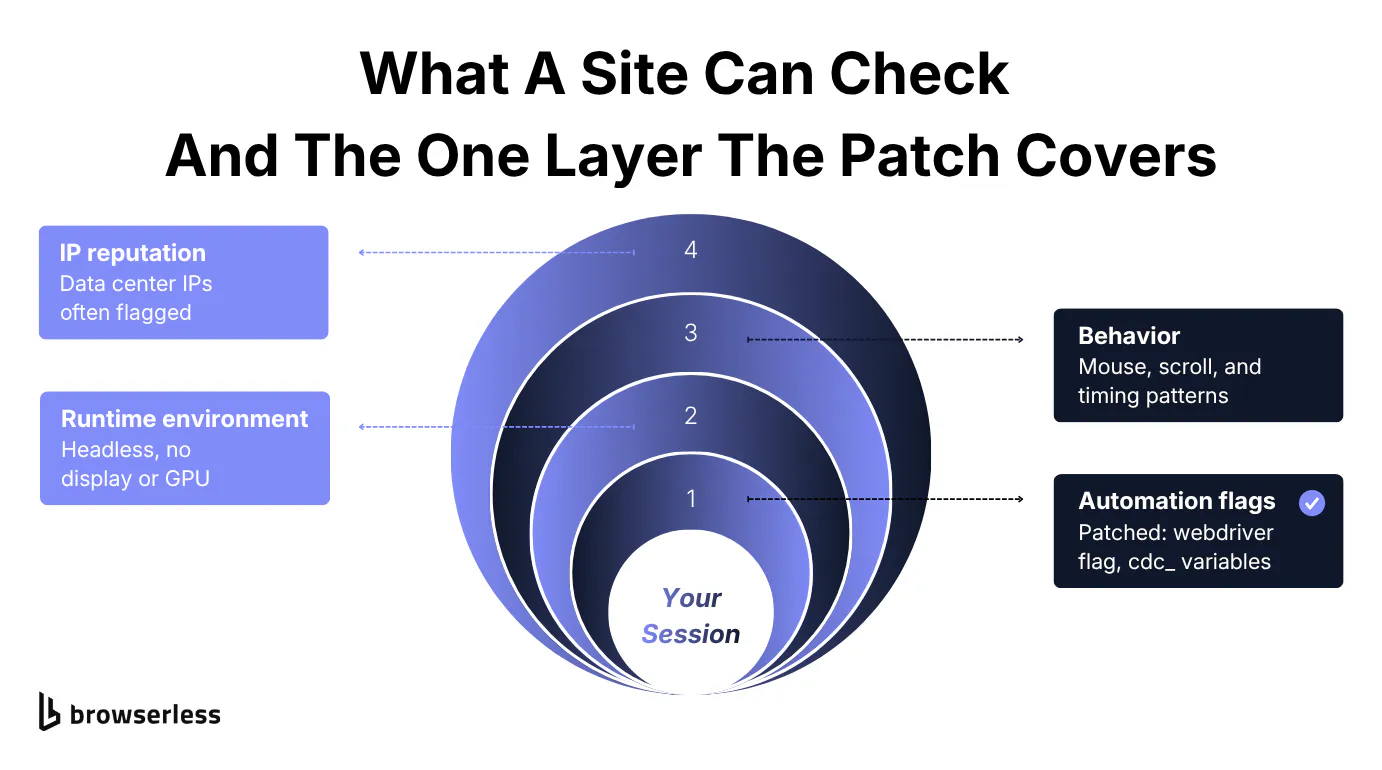
Start with your IP address, which the project's own README warns the package doesn't hide. From a data center, it says, "chances are large you will not pass." A home connection with a bad reputation fails too, and rotating through more data center addresses only helps with simple rate limits.
Behavior is next, and it's harder to fake. Some anti-bot systems watch mouse movement, scrolling, request timing, and click patterns to decide whether a person or a script is on the page. The patch runs once when the browser starts, so it has no say in how your script behaves after that.
Then there's headless mode, where plain headless Chrome announces itself with HeadlessChrome in its user agent and opens a small default window.
Undetected ChromeDriver requests a 1920×1080 window for every session, which takes care of the window size, but its headless=True option leaves the user agent alone. The code that strips Headless from the string only runs when navigator.webdriver comes back true, and the library's own launch method already makes it false, so the token stays. Run the bot.sannysoft.com script from earlier with uc.Chrome(headless=True) and the page catches it.
WebDriver: missing (passed)
Failed checks: ['User Agent', 'HEADCHR_UA', 'CHR_MEMORY']
The project still lists headless as unsupported, so if sessions start failing, try a visible window before anything else.
Why it passes on your laptop and fails in CI
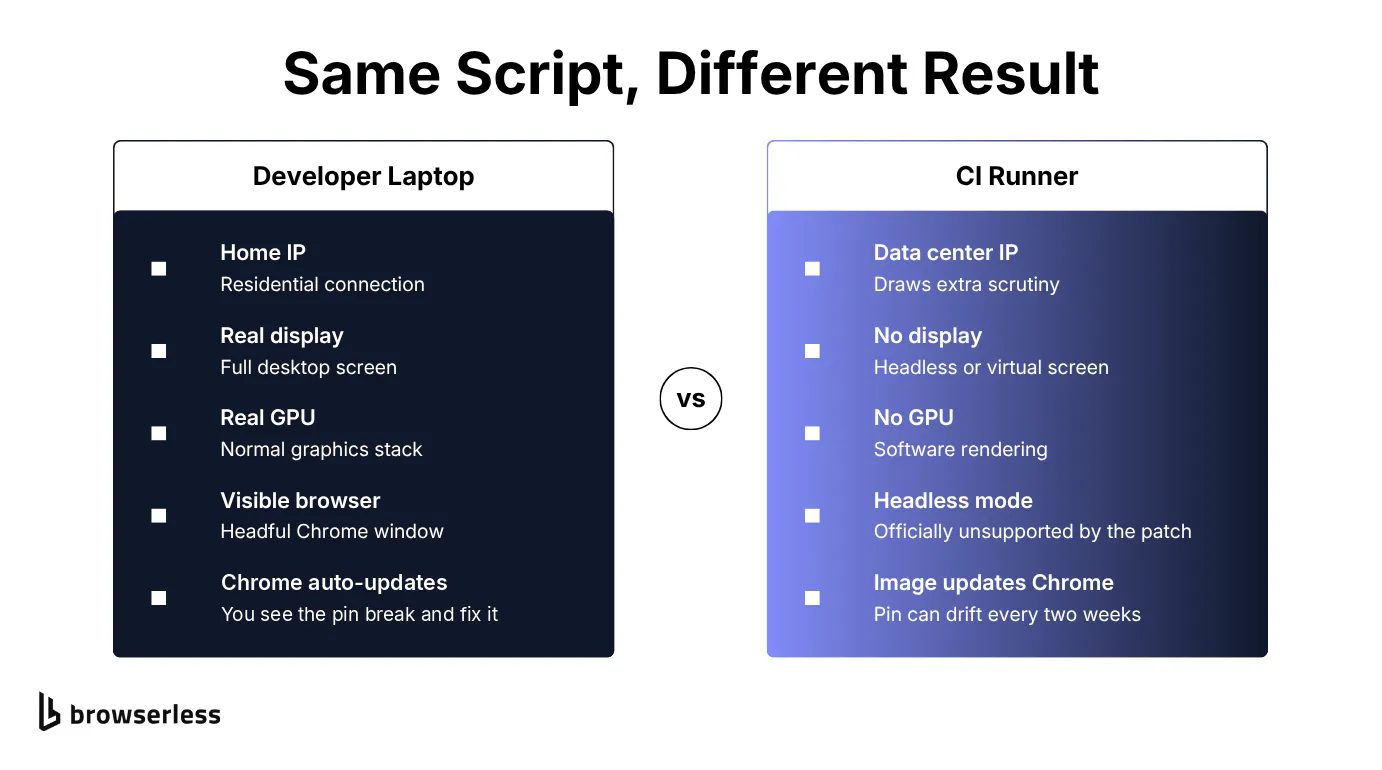
Those factors are exactly what change when your script moves from a laptop to a CI runner or cloud container. On your laptop, traffic goes out through an ordinary residential connection, and Chrome draws to a real display with a real GPU.
On a typical runner, the IP belongs to a data center, and there's no physical display or GPU, so Chrome runs headless or on a virtual screen with software rendering. That's one of the main differences in any headless browser vs. real browser comparison.
It shows up on the test page too. Run the earlier script on a runner with no GPU, and bot.sannysoft.com can flag WebGL Vendor and WebGL Renderer even though the WebDriver check still passes. Your code didn't change, and nothing in the driver can change what the machine underneath it looks like.
When a patched driver stops being worth it
None of this means you should drop undetected ChromeDriver. For a small scraper you run locally, a side project, or a test suite that only hits a bot check now and then, a version pin and the occasional fix are a fair price.
It starts costing more than it saves once one of these situations applies to you:
- Upkeep lands on you. Every Chrome release means re-checking the pin and hunting for fixes. That's fine for one script, but across a team it becomes a recurring chore.
- Jobs run unattended. A scheduled or CI job that gets blocked fails with nobody watching, and a block you can't reproduce on your laptop is slow to debug.
- Sessions must persist. If cookies, localStorage, or a logged-in state have to survive between scheduled jobs, you end up building and maintaining session storage yourself.
Running the same check on Browserless
Once one of those situations applies, the fix is to stop running the browser on your own machine, which is the side of the problem Browserless handles. Its stealth routes run managed browsers with fingerprint mitigations applied, and its residential proxies route each session through a real residential IP address.
Moving from Selenium to Playwright
Selenium scripts need a rewrite before they'll run on Browserless. The current (v2) platform speaks the Chrome DevTools Protocol (CDP) rather than WebDriver and doesn't support Selenium, which only ever worked on the legacy v1 platform. The script needs to move to Playwright or Puppeteer, and Browserless has a step-by-step guide to migrating from Selenium to Playwright.
You don't have to leave Python to make the switch. Playwright for Python can connect to a Browserless WebSocket URL instead of launching a local browser, and the script below runs the same bot.sannysoft.com check from earlier. It waits for the WebDriver result to fill in, then loads api.ipify.org to show which IP address the site actually saw.
import os
from playwright.sync_api import sync_playwright

BROWSERLESS_URL = (
    "wss://production-sfo.browserless.io/stealth"
    f"?token={os.environ['BROWSERLESS_API_KEY']}&proxy=residential&proxyCountry=us"
)

with sync_playwright() as p:
    browser = p.chromium.connect_over_cdp(BROWSERLESS_URL)
    try:
        context = browser.contexts[0]
        page = context.pages[0] if context.pages else context.new_page()
        page.goto("https://bot.sannysoft.com", wait_until="domcontentloaded")
        page.wait_for_selector("#webdriver-result:not(:empty)")
        print("WebDriver:", page.text_content("#webdriver-result"))
        failed = page.eval_on_selector_all(
            "td.failed", "cells => cells.map(cell => cell.parentElement.cells[0].innerText.split('\\n')[0])"
        )
        print("Failed checks:", failed or "none")

        page.goto("https://api.ipify.org?format=json")
        print("Exit IP:", page.inner_text("body"))
    finally:
        browser.close()
Here's what it prints, with the last part of the IP address masked.
WebDriver: missing (passed)
Failed checks: none
Exit IP: {"ip":"172.56.x.x"}
Compare that with the headless undetected ChromeDriver run, which failed three user agent checks on the same page. The Browserless session runs on remote servers rather than your desktop, yet it passes every check, and the IP now comes from the Browserless residential proxy pool instead of your own connection or your CI runner's data center.
Run it again and you may see a different address. Stealth routes keep one residential IP for the whole session, but a new session isn't tied to the last one's IP. The site sees the same kind of browser and connection whether you start the script on your laptop or in CI.
To run it, install Playwright with pip install playwright, set BROWSERLESS_API_KEY to your API token, and run the script. The browser runs remotely, so you can skip playwright install.
What changes when the browser runs remotely
Moving the browser off your machine also takes care of the three situations from the previous section:
- No version pins. Browserless manages the browser pool and keeps the runtime up to date, so there's no local Chrome to match and no
version_mainto bump every two weeks. - Blocks you can replay. Add
replay=trueto the connection URL, and Session Replay records the page, clicks, console logs, and network requests for playback in the Browserless dashboard, so an unattended failure doesn't stay a mystery. - Sessions that persist. The Browserless Session API keeps cookies, localStorage, and cache between connections, so a logged-in state survives from one scheduled job to the next.
If a site still pushes back
Some sites keep challenging the session even then, and Browserless has more layers for those. Setting solveCaptchas=true solves CAPTCHAs in the same session. A solve can take anywhere from a few seconds to a few minutes, so raise the session timeout as well (for example, timeout=300000).
The /unblock API takes a URL and, when you set browserWSEndpoint: true in the request, returns a live browser you can connect to once the bot detection challenges are cleared. For harder targets, BrowserQL (Browserless's GraphQL API) has a solve mutation that detects and solves CAPTCHAs without you naming the type. Its humanlike=true option adds human-like mouse movement and typing to each interaction.
When automation can't get through at all, a Live URL lets a person open the running session and finish the step by hand. All of these options are part of Browserless's bot detection features, and none of them guarantees a pass on every site.
Conclusion
Undetected ChromeDriver still does the narrow job it was built for. It hides the navigator.webdriver flag and the cdc_ variables, which is enough for a lot of local scraping and testing work. If a patched script starts failing, check the cheap things first by making sure version_main matches your installed Chrome, then look at where the script runs and which IP it's using. If it isn't a version error, the cause is usually the environment rather than the driver.
At that point the problem is the machine and network around the driver, so patching it further won't help. Browserless takes that part off your plate by running and updating the browser for you on a stealth route with a residential IP, so a site sees the same kind of browser and connection whether the job starts on your laptop or in a scheduled pipeline. To try it on your own workflow, sign up for Browserless.
Undetected ChromeDriver FAQs
Is undetected ChromeDriver still maintained?
It isn't actively maintained, but it still works if you install setuptools on Python 3.12 or newer, pin version_main to your installed Chrome, and check the project's Discussions board when a new Chrome release breaks something.
Does undetected ChromeDriver work with Cloudflare?
It can get some sessions past Cloudflare challenges by hiding navigator.webdriver and the cdc_ variables, but Cloudflare also runs heuristics, JavaScript checks for headless browsers, and machine-learning scoring that the patch doesn't touch. Results vary by site, and Browserless covers the bigger picture in its guide to scraping Cloudflare-protected sites.
Does undetected ChromeDriver work in headless mode?
It runs with headless=True, but the project marks headless as unsupported, and its headless mode still leaves HeadlessChrome in the user agent. If you need it, test on the same kind of machine you'll deploy to, since a session that passes on your laptop can still fail on a server.
Are there actively maintained alternatives to undetected ChromeDriver?
Yes, some open-source projects skip the driver entirely and talk to Chrome over CDP, and others add their own stealth patches on top of Selenium. Check each one's license and release history before you depend on it.