
TL;DR
- Layered checks. Fastly bot detection fingerprints your TLS handshake (JA3/JA4) at the edge and can add a client-side script and up to three challenge types on top, so fixing one layer still leaves the others.
- Real browser, steady IP. A plain HTTP client or stock headless browser fails because it never produces the signals a real browser does. Put a stealth-rendered browser behind a sticky residential proxy and it can clear the automated checks a genuine visitor clears, though an interactive challenge still needs a person.
- No Fastly solve type. BrowserQL doesn't have a
solvetype for Fastly, so the working example leans on the stealth route, a sticky proxy, and time for the page to settle, with a human handoff for targets automation can't clear.
Introduction
If you've pointed a scraper at a site behind Fastly bot detection, the failures can feel random. A curl request with a real Chrome User-Agent can still get flagged, and a headless browser that runs JavaScript can get flagged for a different reason.
Fastly checks several things at once, from the TLS handshake to how your browser runs JavaScript and how the whole visit behaves. You'll see what each check looks for and how to pass them all in one browser session.
What is Fastly Bot Management?
Fastly Bot Management is Fastly's bot detection and mitigation product, sold as an add-on to its Full-Site Delivery and Streaming Delivery services. Once a site owner deploys it on a Fastly CDN service, requests to their websites and apps get classified so they can identify bots, decide what to do with them, and keep legitimate users moving.
The owner gets a breakdown of bot activity by category, so traffic spikes from automated clients arrive with a reason attached instead of a bare yes-or-no flag. They also get rules to allow, log, or block that traffic, and depending on how it's deployed, Bot Management inspects every request before the cache or only the cache misses headed to the origin.
Crawlers that announce themselves honestly, like search engine indexers and monitoring tools, go through a separate verified bots program with its own signal, while everything else, your scraper included, goes through detection.
Fastly bot detection methods
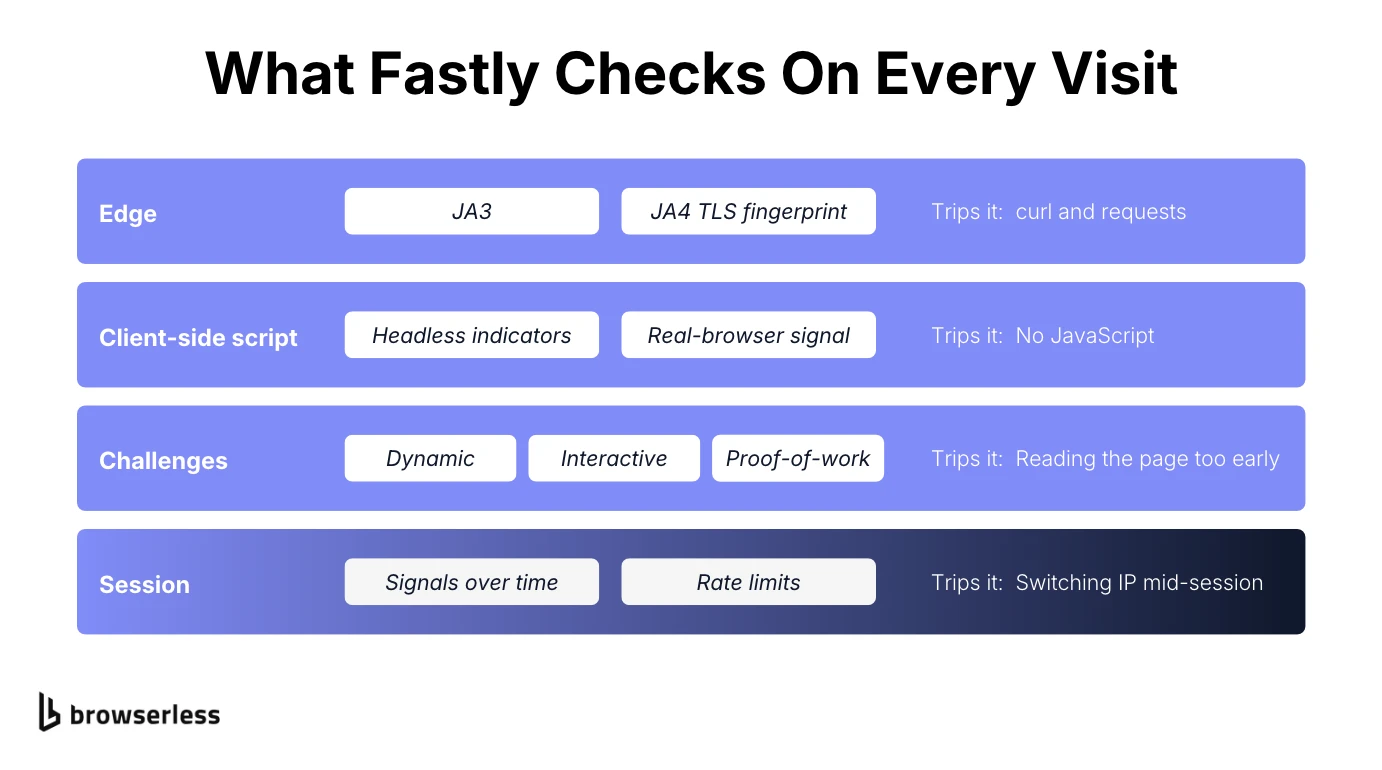
Fastly checks your traffic in layers, roughly in the order your client runs into them. The TLS handshake gets fingerprinted at the edge, the site's script runs on the page, and a challenge may show up. After that, the session as a whole gets judged over time, with each layer built to detect bots that take a different shortcut.
Why a spoofed user agent isn't enough
Fastly's first check runs at the edge before your HTTP request is even sent, applying TLS fingerprinting to the handshake with JA3 and JA4 (JA4 support arrived in Bot Management in February 2025). You can put whatever you like in your HTTP headers, but the handshake comes from the TLS library your client uses, and that library has a signature of its own.
That's why a requests or curl script with a perfectly realistic User-Agent string can still get flagged, since its handshake doesn't match any real browser's. Fastly's own product FAQ backs this up, saying its detection doesn't depend on easily spoofed attributes such as IP addresses or user-agent strings.
The client-side script and JavaScript execution
Site owners can also add an optional client-side script to their pages, placed above every other script in the <head> so it runs first. Its filename can be anything ending in .js, so you can't reliably spot it by name.
When it runs, it looks for headless-browser indicators and can tag your traffic with signals such as SUSPECTED-BOT.HEADLESS. If it runs cleanly, it sets a cookie, and later requests that carry it are tagged CLIENTSIDE-COOKIE-VALID (those are the Next-Gen WAF signal names, and pre-cache deployments expose the same headless check as a bot category). Next-Gen WAF is the renamed Signal Sciences product line, which Fastly acquired in 2020.
A client with no JavaScript execution fails because it never gets that cookie, so its requests never carry the valid-cookie signal, however good its headers look. A headless browser that does run the script but is missing a real browser's properties fails the other way, by tripping the headless signal.
Three challenge types, and when they show up
If the site owner's rules call for it, Bot Management can serve one of three challenges, set up either as Next-Gen WAF rules or on the Bot Management Protection page depending on how it's deployed.
- Dynamic lets Fastly pick the challenge type.
- Interactive works like a traditional CAPTCHA.
- Non-interactive runs a JavaScript proof-of-work puzzle in the background without the visitor doing anything.
That proof-of-work step is close in concept to the puzzle in the Kasada bypass guide. Private Access Tokens, a limited-availability option, skip the puzzle entirely by letting the device vouch for itself. They only work on Apple devices running iOS 16 or later or macOS Ventura or later, though, so they're no help to an automated session on a Linux server.
Behavioral analysis across the session
Fastly says Bot Management correlates behavioral and client signals over time, so passing a check once doesn't earn you a free pass for the rest of the session. It doesn't say which kinds of suspicious behavior it weighs, or whether timing and navigation patterns are on the list, and that uncertainty is the best argument for keeping your whole session consistent.
Next-Gen WAF also applies rate limiting, so once you cross a request threshold the site owner has set, you're flagged however clean your fingerprint is.
Fastly Bot Management vs. Cloudflare
Both are edge networks with bot management built on top of their core CDN, and neither publishes a detection rate you could compare. Where they really differ is how much they tell you, since Cloudflare's bot tooling, Turnstile included, is documented in far more depth than Fastly's scoring model or challenge implementation.
The key place you feel that gap is when a request fails and you need to know why. With Cloudflare there's public material to help you pin down which check you failed, plus well-documented tooling around its challenges. With Fastly there's little of either, so your main debugging tool is comparing what your session gets back with what a real visit gets back.
Can you actually bypass Fastly bot detection?
Yes, as long as your browser session produces the same consistent, genuine signals a real visitor's does, since Fastly is looking for missing or contradictory signals rather than a secret password. Nothing clears every configuration on every target, though, Browserless included, so be skeptical of anyone who promises otherwise.
Whether a site will accept automated access is the owner's call, whichever vendor sits in front of it, and even legitimate scraping of public pages has to respect that. Read the terms of service before you build something that depends on getting past its defenses, the same as you would on Cloudflare or DataDome.
How to bypass Fastly bot detection
What works is matching what a real browser and a real visitor produce, consistently, for the whole session. In practice that comes down to running the right browser, keeping one IP, and giving the page enough time to finish before you read it.
Match a real, stealth-rendered browser environment
Run an actual rendered browser with fingerprint mitigations applied, so both the TLS handshake and the JavaScript environment look like a genuine browser's. A real browser's handshake passes the JA3/JA4 check, and a browser that runs the client-side script the way Chrome does earns the same validation cookie a human visitor would.
Adding random delays or rewriting HTTP headers in a plain HTTP client won't change either result. Both checks look at what your client is, not how fast it asks, so pacing only starts to matter once the browser itself passes, for rate limits and session-level signals.
When to rotate proxies, and when to hold one IP
A residential IP with a clean IP reputation still helps, mostly because of the site owner's own rules rather than Fastly's scoring. Datacenter proxies live in published cloud address ranges, which makes them easy to block or rate-limit.
Rotate proxies between sessions, say when an IP starts drawing challenges or hits a site's rate limit, but keep the same IP for the whole of each session. Fastly correlates signals over time, and a session that suddenly changes address halfway through is exactly what that correlation is built to catch.
Handle the JavaScript challenge and the validation cookie
Let the page settle before you read anything, so the client-side script and any proof-of-work challenge can finish the way they would for a real visitor. After that, keep later pages in the same browser session so the cookies from that process carry over. A fresh session for every page throws away the trust the first one earned, so session management matters as much as the browser itself.
Why DIY Fastly bypasses break over time
A hand-built Fastly bot management bypass works right up until Fastly changes what it checks, and then it quietly stops working. Hand-matched TLS fingerprints, a patched headless browser, and similar DIY solutions hold up for a while. Fastly's public changelog covers product features, such as JA4 support and a Bot Management API, but not changes to what the detection system looks for.
That means you usually find out about a change only when your own setup starts failing. A configuration that clears the challenge this month is a snapshot of this month's checks, and the same decay shows up across the wider set of anti-detection techniques as detection trends shift.
A more reliable way to handle Fastly bot detection
Browserless's bot detection bypass puts stealth browsing, a residential proxy pool, and automatic CAPTCHA solving together, and in BrowserQL the solve mutation works out the CAPTCHA type on its own when you leave type out. It's the same stack you'd build yourself, except Browserless ships regular updates to the stealth route's fingerprinting, so the upkeep isn't on you.
If stealth and a residential proxy still get challenged, the Unblock API is the next thing to try, though its docs don't list Fastly, so test it on your target first. It works directly with the browser's native interfaces, leaving no automation-library traces, and hands back an unblocked session you can connect Puppeteer or Playwright to.
Browserless publishes measured solve rates for Cloudflare and reCAPTCHA but doesn't have any for Fastly yet, so treat it as unproven there and test against your own target before you depend on it.
A working BrowserQL example for Fastly bot detection
BrowserQL's CaptchaTypes enum covers cloudflare, recaptcha, datadome, akamai, and others, but it has no fastly value, so solve has nothing to auto-detect here.
Instead, the script applies the same three fixes as the manual approach, one for each of Fastly's layers. It sends a single mutation through a simple API call to the stealth route at /stealth/bql, which runs a real browser with fingerprint mitigations to get through the edge and client-side script checks. On top of that, humanlike=true layers natural mouse movements, typing, and random delays.
The proxy is a US residential one, sticky by default in BrowserQL and set explicitly here, so the IP stays put for the whole visit. The script then loads your page, waits eight seconds, and reads back the title and text. The 45-second navigation cap keeps the whole run inside BrowserQL's default 60-second session timeout.
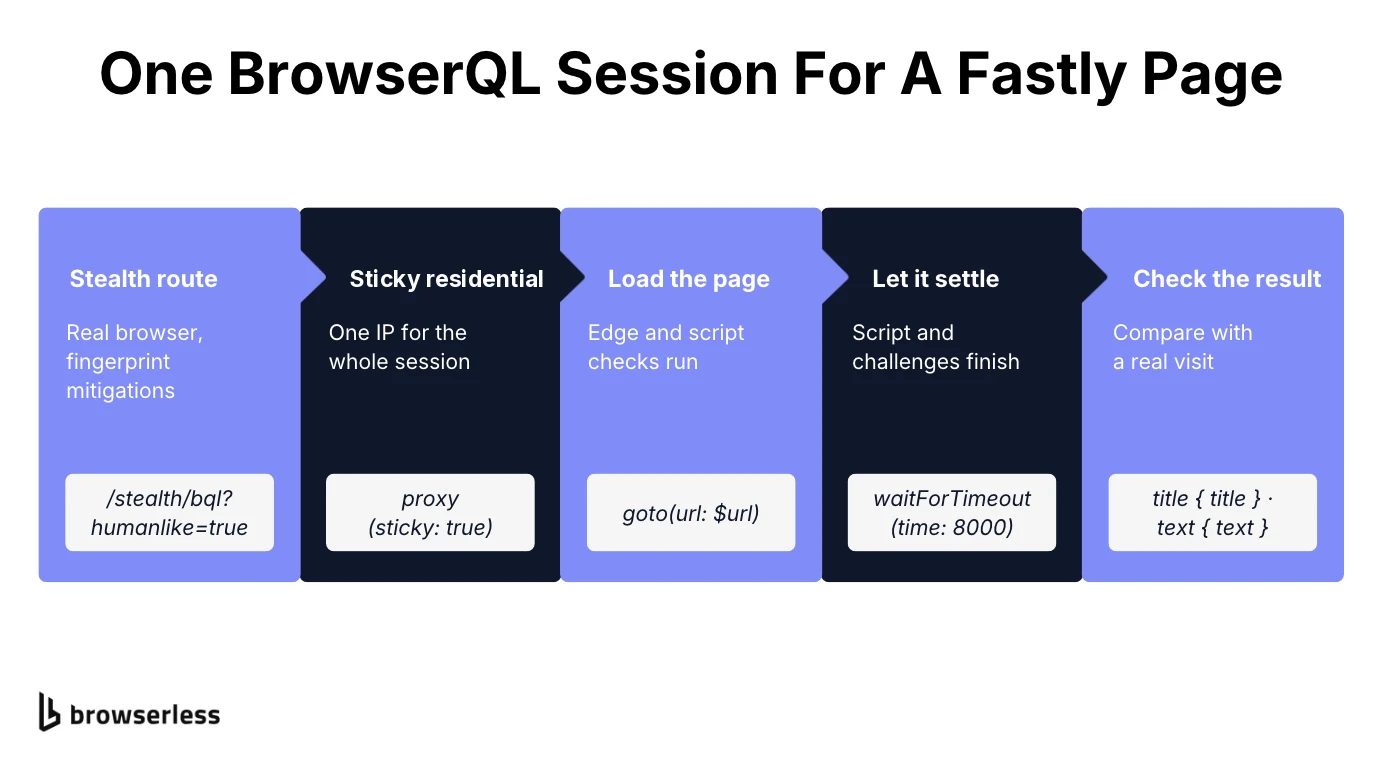
You'll need Node 20 or later and your API token in BROWSERLESS_TOKEN, with the code saved as fastly-session.mjs so top-level await works. TARGET_URL defaults to fastly.com so the script runs as copied, but a default page only proves the script works, so point it at one of the Fastly protected sites you're authorized to test. The script checks for the token up front, then posts the mutation and fails loudly on any HTTP or GraphQL error.
// Node 20+. Needs BROWSERLESS_TOKEN. TARGET_URL defaults to a Fastly-served page;
// point it at a Fastly-protected page you're authorized to test.
const { BROWSERLESS_TOKEN, TARGET_URL = "https://www.fastly.com/" } = process.env;
if (!BROWSERLESS_TOKEN) {
  throw new Error("Set BROWSERLESS_TOKEN before running.");
}

const endpoint = `https://production-sfo.browserless.io/stealth/bql?token=${BROWSERLESS_TOKEN}&humanlike=true`;

const query = `
  mutation FastlySession($url: String!) {
    proxy(url: ["*"], network: residential, country: US, sticky: true) { time }
    goto(url: $url, waitUntil: networkAlmostIdle, timeout: 45000) { status }
    waitForTimeout(time: 8000) { time }
    title { title }
    text { text }
  }
`;

const response = await fetch(endpoint, {
  method: "POST",
  headers: { "Content-Type": "application/json" },
  body: JSON.stringify({ query, variables: { url: TARGET_URL } }),
  signal: AbortSignal.timeout(120_000),
});

if (!response.ok) {
  throw new Error(
    `Browserless returned HTTP ${response.status}: ${await response.text()}`,
  );
}

const { data, errors } = await response.json();
if (errors?.length) {
  throw new Error(`BrowserQL error: ${errors.map((e) => e.message).join("; ")}`);
}

console.log("First response status:", data.goto.status);
console.log("Final page title:", data.title.title);
console.log("Page text sample:", data.text.text.trim().slice(0, 200) || "(empty)");
Run it with node fastly-session.mjs, and if the token's wrong or the query fails, the script stops with the error Browserless sent back. A successful run prints the first response status, the final page title, and the first 200 characters of page text.
Those three lines are your result, since Fastly doesn't give you a solved flag. A challenge page can still come back with a normal status, so check the title and text against what you see when you open the same page in your own browser.
Because everything runs in one mutation, the cookies set by the client-side script and any challenge stay in that browser session. If your job covers several pages, add more aliased goto steps to the same mutation instead of sending a new request per page. A separate request starts a fresh browser without those cookies unless you reuse the session with BrowserQL's reconnect mutation.
If you're still getting a challenge after the wait, this session isn't going to clear that target on its own. That's where hybrid automation comes in, handing that one step to a person in a live browser before the automated tasks pick up again, and it's worth planning for as an escalation path on the hardest websites.
Conclusion
Fastly bot detection judges the whole visit, so fixing one layer isn't enough. Use a real browser, keep one IP for the whole session, and give the page time to finish its checks, then compare the result with what your own browser shows.
Browserless gives you that setup as a hosted service, so you don't have to maintain it yourself. Add your token and run the BrowserQL session on a Fastly page you're authorized to test when you sign up for Browserless.
Fastly bot detection FAQs
Why am I being detected as a bot?
Something in your session doesn't line up with what a real visitor's would look like. The usual suspects are a TLS fingerprint that doesn't match a browser, HTTP headers that contradict your user agent, a screen resolution no real display uses, or a client that doesn't execute JavaScript, so the client-side script never runs.
Does Fastly use JA4 fingerprinting?
Bot Management has supported JA4 fingerprinting since February 2025, alongside JA3, and both read the TLS handshake your client sends before any HTTP headers arrive. That's why changing your headers doesn't fix a handshake that doesn't match a real browser.
Which is better, Cloudflare or Fastly?
Neither vendor publishes a detection rate, so there's no fair way to call one stronger. For site owners the choice usually follows whichever CDN they already run, since both sell bot management as an add-on to delivery.
Can Browserless solve Fastly challenges?
BrowserQL's solve mutation has no Fastly type, so there's no one-call solve the way there is for Cloudflare or reCAPTCHA. Instead, Browserless gives you the stealth route, sticky residential proxies, and time for Fastly's own script and proof-of-work challenge to finish, with the Unblock API and hybrid automation as fallbacks when a target still challenges you.