
TL;DR
- Hosted rendering. A generate PDF API is a REST endpoint that turns HTML, a URL, or structured data into a finished PDF in one request, no PDF library on your side.
- Layout decides. HTML rendering gives you full CSS control and suits layouts that change often. A drag and drop builder is faster for non-developers to edit, but only pays off when the layout stays fixed.
- Browser infrastructure. At volume the hard part is the browsers doing the rendering. Patching, memory, and concurrency limits matter more than any PDF option.
Introduction
A generate PDF API is rarely the first thing you try. The first time, a library does the job. Puppeteer on your laptop, an invoice template, page.pdf(), and it works. It's the second time that sends you searching. Once that script is in production, the fonts render wrong, the server runs out of memory, and every deploy pulls a Chrome binary first.
By then you own browser infrastructure. This guide is about handing it off. Send HTML, a URL, or a data payload. A finished document comes back, and the browser is somebody else's to run. It covers how that works, the two ways services approach it, what to check before you pick one, and a real request you can drop into your own code.
What is a PDF generator API?
A PDF generator API is a hosted service you call over HTTP. It renders the document on its own infrastructure and hands you back the file.
None of the individual details is hard. Font embedding, a page break landing mid-table, print-specific CSS, and keeping a rendering engine patched are each manageable. The cost is owning all of them at once.
Someone has to maintain PDF libraries, a headless browser, or both, and that someone doesn't need to be your team. One API hands that job to whoever runs the service, and PDF generation collapses into a single API call.
If you generate one kind of document, rarely, this is overkill and a local library is fine. Once the layouts multiply, or the volume does, it's no longer overkill.
How does a PDF generator API work?
POST some data and it renders. Back comes either the finished PDF binary or a URL to fetch it from once it's ready. The shape is the same whichever service you pick. There's no SDK to install and no connection to keep alive, and if you can call an HTTP endpoint you can do this.
Where they differ is what "data" means, and that difference splits the category in two.
HTML to PDF
The service takes raw HTML, or a URL to navigate to, and renders that page the way a browser would before printing the result to a PDF. It's the same CSS and markup you'd write for a web page.
If your app renders HTML already, you're most of the way there. You send the markup you'd have served anyway.
Rendering HTML to PDF offers a tighter feedback loop too. Open the same markup in a browser and you can see roughly what will print before you ever call the API.
Template-based document generation
Design a reusable template once, often in a drag and drop editor, then send structured JSON data against a template id to merge into it. The page layout stays fixed and only the dynamic data changes.
Version control usually ships with it. You manage PDF templates centrally and roll back a template versioning change that breaks a document already in production.
Generating PDFs from HTML vs. templates
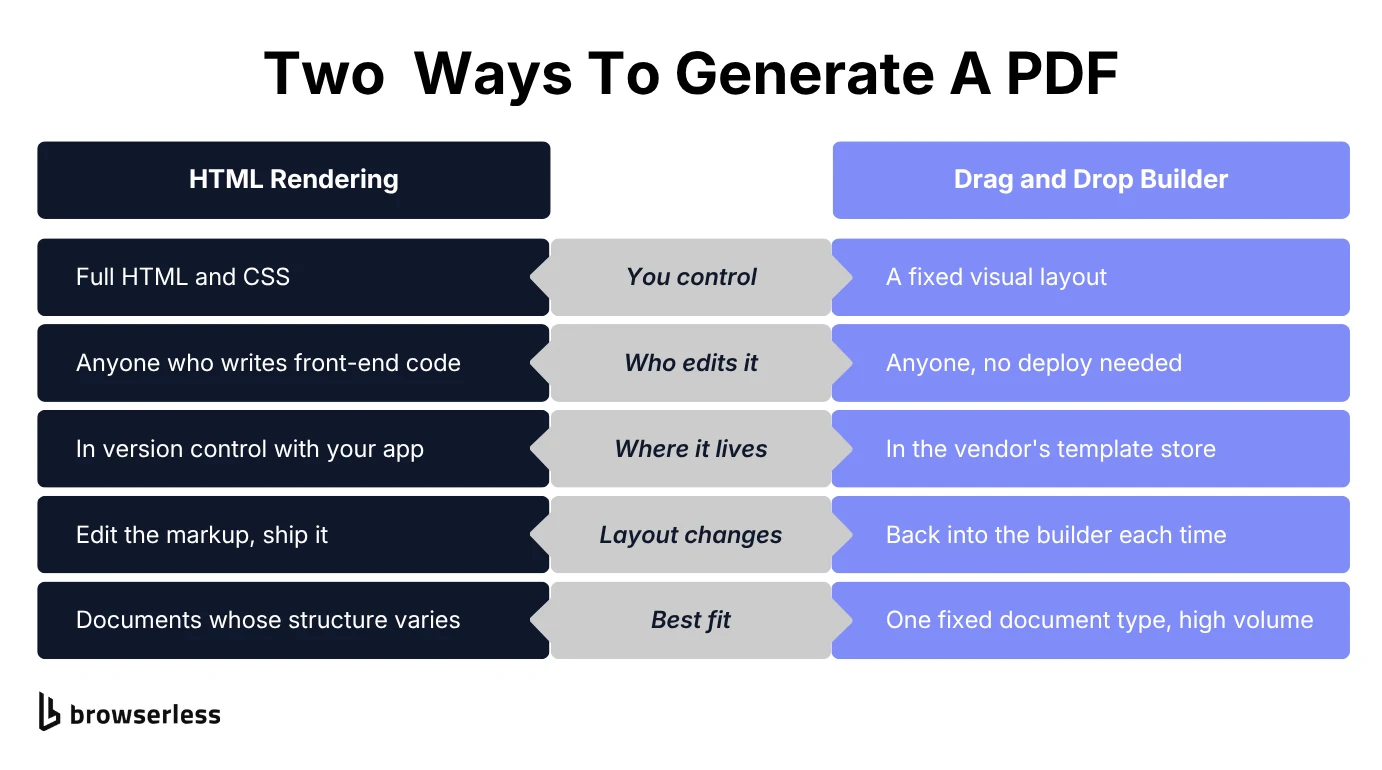
These are different product categories, and a given service usually commits to one. The useful question is how often your layout changes. Answer that first, before you compare a single feature.
Raw HTML rendering wins when the structure itself varies from document to document. Any templating engine you already run, Handlebars, EJS, or server-rendered React, can build the HTML string beforehand, and the PDF generator API never needs to know how it was built.
The layout lives in version control next to everything else, and anyone who writes front-end code can change it.
A drag and drop builder wins when the structure is fixed and only the data moves. Once the layout is locked, someone outside the engineering team can manage templates without a deploy, and your generation logic shrinks to "send data, get PDF."
Some builders start from a blank canvas and support conditional logic for rows or sections that appear only for certain records. A monthly statement or a standard invoice fits that well. The trade-off shows up later, when layouts start to diverge and every structural change means going back into the builder.
Services built on real browser rendering, Browserless included, sit on the HTML side of that line, giving you full HTML and CSS control rather than a drag and drop interface. If a visual template editor is what you actually want, that's a different category of tool, and it's worth settling that early.
Common use cases for a PDF generator API
The trigger is almost always an event somewhere else in your app. An order closes, a shipment is created, a course is completed. Because even a small render takes a second or two, PDF workflows belong in a background job, off the request path. The business documents they produce cover a lot of ground:
- Invoices and billing – turn billing data into professional PDFs and PDF invoices your customers will actually open, generated the moment an order closes.
- Reports – convert a dashboard or analytics view into a shareable PDF document without asking someone to screenshot it by hand.
- Legal documents – build reusable document templates for agreements that need identical structure every time.
- HR paperwork – produce offer letters, policies, and payroll summaries on a schedule.
- Shipping and logistics – create packing lists and labels from order data as soon as a shipment is created.
- Certificates – generate a finished PDF the moment someone completes a course or a certification.
What varies is how much the layout matters. A packing slip only has to be legible, while an invoice a customer opens gets read properly.
What to look for in a PDF generator API
Everyone supports page sizes, margins and headers. The spec sheet flattens out fast, and feature lists end up making PDF generator APIs compare more evenly than they perform. The differences that matter turn up later, usually in the first week you put real volume through one:
- Rendering accuracy. Does it hold page breaks together the way a real browser would, on complex documents with tables, embedded fonts, and mixed content?
- Reliability at volume. A demo that works for one request can behave very differently at a thousand an hour. Ask about concurrency limits and uptime.
- Data handling. Once documents carry sensitive data, the question moves from whether PDF generator APIs secure the transfer to what they keep afterwards. Check the data retention policies, and whether regional API endpoints exist for data-residency requirements.
- Developer experience. Docs written in plain language, real code examples, and predictable error responses save hours the first time something renders wrong.
- Generation model. For very large or slow documents, some services offer asynchronous generation with a webhook callback so the connection isn't held open until the file is ready. Check which model suits your request volume before you build around one.
- Room to grow. Can the same API call later handle image generation, digital signatures, PDF forms, or form filling on existing PDFs, or does it dead-end at basic PDF creation?
PDF generator API pricing models
Comparing PDF generator API cost is easier once you know which billing shape you're looking at. The headline number rarely tells you much on its own. What matters is what the meter counts. Per-document pricing punishes volume, while time-based pricing punishes slow pages and heavy assets. Three shapes are common:
- Free tier – covers evaluation or small-scale use, normally against a capped allowance.
- Credit based pricing – sells a block of usage upfront and deducts credits per operation. Costs multiply quickly in complex workflows, when one document pulls from several data sources or chains multiple operations together. Price it against your real volume.
- Usage-based plans – bill by a broader unit of consumption such as API calls or browser time. This is usually easier to forecast when your workload varies month to month.
Browserless prices by browser time, where a unit is a block of up to 30 seconds on a browser connection. Most documents render well inside one unit. What moves your bill is how many you generate.
How to generate a PDF with a REST API
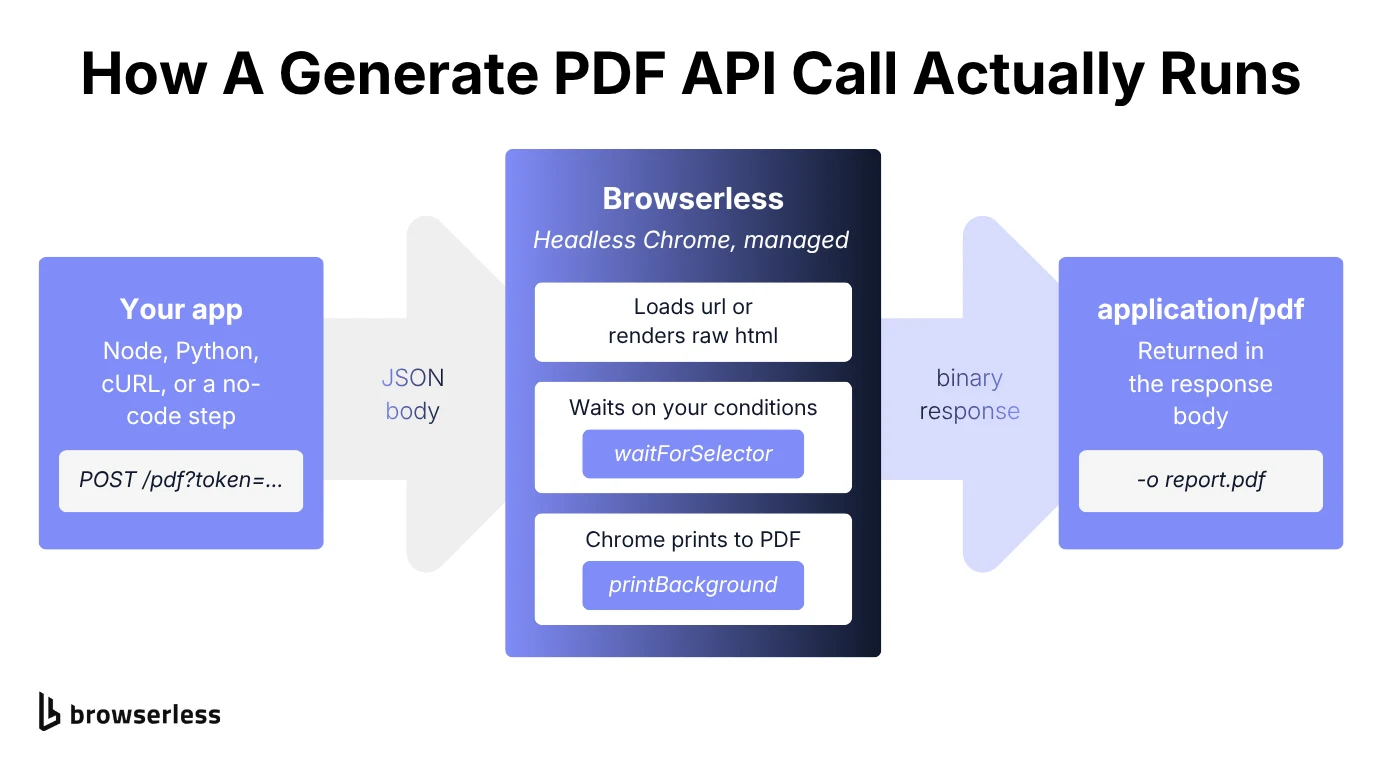
Browserless exposes a /pdf endpoint that takes either a url to navigate to or raw html to render, though not both in the same request. It authenticates with a token query parameter and returns the finished file as application/pdf.
Full parameter and response details live in the Browserless PDF API docs, the reference for everything below. There's also a walkthrough covering PDF and screenshot generation with API endpoints together.
The simplest useful call points the endpoint at a live URL and asks for an A4 document with a header, a footer, and enough margin to fit both:
curl -X POST \
  "https://production-sfo.browserless.io/pdf?token=YOUR_API_TOKEN" \
  -H "Content-Type: application/json" \
  -d '{
    "url": "https://example.com/",
    "options": {
      "format": "A4",
      "printBackground": true,
      "displayHeaderFooter": true,
      "headerTemplate": "<div style=\"font-size:10px; width:100%; text-align:center;\">Generated report</div>",
      "footerTemplate": "<div style=\"font-size:10px; width:100%; text-align:center;\">Page <span class=\"pageNumber\"></span> of <span class=\"totalPages\"></span></div>",
      "margin": { "top": "60px", "bottom": "60px" }
    }
  }' \
  -o report.pdf
Run that and report.pdf lands in the working directory.
Chrome loads the page, applies its print stylesheet, and stamps the page numbers as it goes. What comes back is a properly paginated document.
More often the document doesn't exist as a page yet and your app is already holding the markup. Sending html instead of url skips navigation altogether and renders the string you pass in:
import fs from "fs/promises";

const TOKEN = process.env.BROWSERLESS_TOKEN;
const endpoint = `https://production-sfo.browserless.io/pdf?token=${TOKEN}`;

const response = await fetch(endpoint, {
  method: "POST",
  headers: { "Content-Type": "application/json" },
  body: JSON.stringify({
    html: "<h1>Invoice #4821</h1><p>Amount due: $240.00</p>",
    options: { format: "Letter", printBackground: true },
  }),
});

if (!response.ok) {
  throw new Error(`PDF request failed: ${response.status} ${await response.text()}`);
}

const pdfBuffer = await response.arrayBuffer();
await fs.writeFile("invoice.pdf", Buffer.from(pdfBuffer));
The response body is the PDF itself, which is why it's read with arrayBuffer() and not json(). Whatever happens next in your pipeline, whether that's uploading the file to storage or attaching it to an email, works from that same buffer.
Both calls lean on the same small set of options. format sets the page size, printBackground controls whether CSS background colors and images print at all, and margin sets the spacing around the printed content. Turning on displayHeaderFooter activates the headerTemplate and footerTemplate fields. Both accept HTML, and reserved classes like pageNumber and totalPages fill themselves in on every page.
Request configuration options such as waitForSelector and waitForFunction are shared across the REST endpoints. The waiting logic that works for a screenshot works here unchanged. Wait conditions matter for dynamic documents whose content arrives after the initial load, like a chart drawn by JavaScript.
Launch parameters travel in the same query string. Appending blockAds=true strips ad frames before printing, useful when you're capturing a page you don't own.
No-code and low-code PDF generation
Not everyone generating PDFs wants to write and maintain code for it, and a REST endpoint doesn't ask you to. One HTTP request step wires PDF generation into Zapier, Make, or n8n, with no complex setup and no application code anywhere near it.
That single-request shape is what no code tools and no code platforms are built to consume. Browserless publishes ready-made Zapier templates for its REST endpoints. You end up in the same place a visual editor would take you, and it suits teams where whoever sets up the workflow isn't whoever maintains the codebase.
Advanced PDF generation features
A basic render covers most documents, and four options handle the cases where it doesn't. You probably won't need all four. They cover screen readers, documents too long for one request, brand fonts, and repeating headers and footers.
Accessible, tagged PDFs
A PDF from a browser's print engine holds real, selectable text, because it prints from the rendered DOM. Screen readers and automated parsers need more than that.
For documents an applicant tracking system or an assistive tool has to read reliably, set options.tagged to true. Tagged PDF output writes reading order and heading structure from the source HTML into the file itself.
How much that helps depends on your markup. Tagging exports the structure your HTML already has. A page assembled from nested div elements gains far less than one built on real headings and semantic elements.
Long documents and page ranges
When a document is too long to render in one request, the request fails instead of returning a PDF. Check the status code, or use --fail-with-body with curl, so a failed chunk stops your script instead of writing an error body into a .pdf.
Most documents never get near that limit. When one does, split it by passing options.pageRanges as "1-20", then "21-40", and requesting each chunk separately before merging the resulting files with a library such as pdf-lib.
Each range is a fresh request that reloads the source, so keep that source deterministic across chunks, with the same data, the same auth, and the same wait conditions. Otherwise page 20 and page 21 can disagree about what the document says.
Sometimes what you want is the opposite, one continuous page instead of paginated output. The /pdf endpoint paginates by design, but the /function API hands you a real page object and returns whatever file it produces, so you can measure the rendered height yourself and pass explicit dimensions to page.pdf(). Leave format unset or it overrides them.
Custom fonts and styling
Inject stylesheets and fonts at render time and a finished PDF stays on-brand without a second design tool to maintain. Google Fonts and self-hosted external assets load the way any browser loads them, as a stylesheet reference the render waits on before printing. On the /pdf endpoint that's the addStyleTag and addScriptTag request fields, each taking a url or inline content, applied before Chrome prints.
Fonts are worth a little care here. Glyph hinting, color profiles, and font services that pick what to deliver based on the user-agent all change how text comes out, and Browserless has a breakdown of Puppeteer font issues covering the launch flags that fix them on your own Chrome.
Dynamic headers and footers
Page numbers, dates, and document titles fill themselves in, with no glue code to write per template variant. Because they are separate request fields, one header definition works whether you render from a url or from raw html.
Give them room in the margin though. The request earlier pairs displayHeaderFooter with 60px top and bottom for exactly that reason.
Scaling PDF generation without breaking your infrastructure
Vivian Health used to generate its PDFs from a self-managed Chromium and Puppeteer setup on Heroku, where demand spikes competed for memory with the API processes sharing the same dyno, and every boot waited on a Chrome binary download.
After moving PDF generation off its own dynos, the team went from roughly 100,000 PDFs a month to millions, without restructuring the system around the change.
Any service that renders in a real browser inherits the same problems Vivian Health hit. A PDF generation API built on a rendering engine is browser infrastructure underneath, whether or not the product markets itself that way. How well those APIs handle infrastructure is what keeps your month-end billing run on schedule.
Browserless was built for that layer, and has run headless Chrome in production for years. Its Docker images have been pulled over 175 million times across every kind of browser workload, PDF generation included.
Daniel Edwards, a software engineer at Commify, says Browserless "has enabled us to generate thousands of high quality PDFs at large scale. Having multiple Chrome instances running as a service means we spend far less time tweaking templates than we would do with any other HTML to PDF library."
Where it runs starts to matter too once sensitive documents are involved. Browserless runs as a managed cloud service with San Francisco, London, and Amsterdam endpoints (production-sfo, production-lon, production-ams), or self-hosted on your own infrastructure, with the same REST API either way.
Which one you pick usually comes down to what the documents are. Legal paperwork, payroll summaries, and anything else where data residency isn't negotiable tend to decide it for you. Compliance details, including SOC 2 Type II and GDPR, sit on the Trust Center.
Conclusion
Before you commit to a service, do three things. Decide whether your layouts change, and pick HTML rendering if they do and a template builder if they don't. Send it a real document at your real volume. A demo render tells you nothing about concurrency. Ask what it keeps after the render, and ask before an invoice or a payslip goes through it.
If your documents are already HTML-shaped, you don't need a templating system or your own Chrome. Browserless renders them on the same engine behind its browser automation platform, the one already built for production traffic. Your first PDF is one request away when you sign up for free.
Generate PDF API FAQs
Is there a free API that can create PDFs?
A free PDF generator API almost always means a capped allowance. It's enough to check rendering quality and confirm the API fits, but not to run production on. Check the provider's current pricing page for what the allowance covers, since allowances change.
Is Adobe PDF embed API free?
Yes. Adobe's PDF Embed API, for viewing and embedding PDFs in web pages, is free with unlimited access. It's a separate product from Adobe's PDF Services API, which generates and manipulates PDF documents and includes 500 free document transactions a month before paid plans apply.
Is there a free PDF generator?
Yes, and not only as an API. Any browser can print a page to PDF, and headless Chrome does the same thing programmatically, which is the mechanism HTML-rendering services wrap. The tradeoff is that running it yourself means owning the browser, the fonts, and the failure modes.
How to auto-generate a PDF?
Send a request to a PDF generation API with either a URL or HTML content plus any layout options you need, such as page format, margins, and headers and footers. The response comes back as a finished PDF file, with no manual export step.