
TL;DR
- JS crawler. A crawler whose fetch step runs a real browser so client-side JavaScript executes before links get extracted.
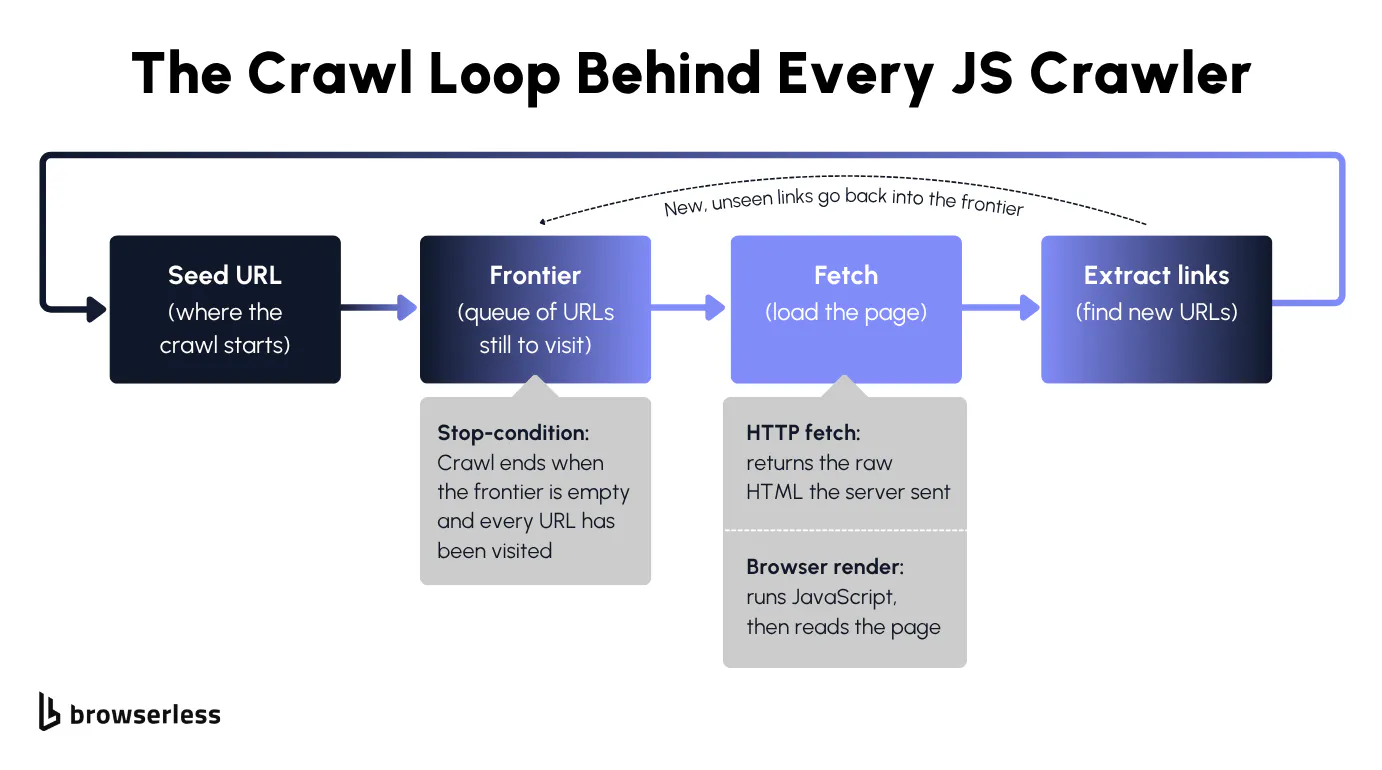
- The crawl loop. Every crawler is a seed URL, a frontier queue, a fetch step, and a link extractor that feeds new URLs back. A visited set is what makes it stop.
- Static vs rendered. A plain HTTP fetch returns raw HTML, which is fine for server-rendered sites. Single-page apps ship an empty shell, so the links only exist after scripts run.
- Where Browserless fits. Render JS pages over Browsers as a Service (BaaS), cascade mixed static and JavaScript sites through a single REST endpoint, then layer residential proxies and CAPTCHA solving to scale without getting blocked.
Introduction
A JS crawler earns its keep the moment your scraper pulls a page, gets clean HTML back, and finds none of the links it came for. The page builds those links in the browser only after JavaScript runs, and that is the wall a plain HTTP crawler hits the moment it meets a single-page app. Running a real browser in the fetch step clears that wall and lets the crawler read every link a visitor would see. You will build one here from the ground up, starting with a bare static crawler in Node, upgrading it to render JavaScript pages through a hosted browser, and finishing with the rate limiting and concurrency controls that keep it polite, plus the bot protections that decide whether it survives at scale.
What is a JS crawler?
A JS crawler is a web crawler that executes page JavaScript before reading the content. A growing share of sites assemble their links and data client-side rather than serving them in the initial response. Before writing any code, it helps to separate the crawl loop that every crawler shares from where a JS crawler actually diverges from a plain one.
The core crawl loop
A web crawler is a loop, not a single request. It's the same machinery a search engine uses to walk the entire web, and it has four moving parts that stay the same no matter what you crawl. They are a seed URL to start from, a frontier that holds the URLs still waiting to be visited, a fetch step that retrieves each web page, and a link-extraction step that pulls new URLs out of that page and pushes them back onto the frontier.
The only thing a JS crawler changes is that fetch step, swapping the HTTP request for a real browser, so the extractor sees the page a user would see rather than the bare document the server sent.
The loop also needs a clear stopping point, and that is where a lot of first attempts go wrong. The crawl is done once the frontier drains and every queued URL has been visited, which only works if you track what you've already fetched in a visited set. Skip it, and cyclic links between pages keep refilling the frontier so the loop never ends.
Static HTML vs JavaScript-rendered pages
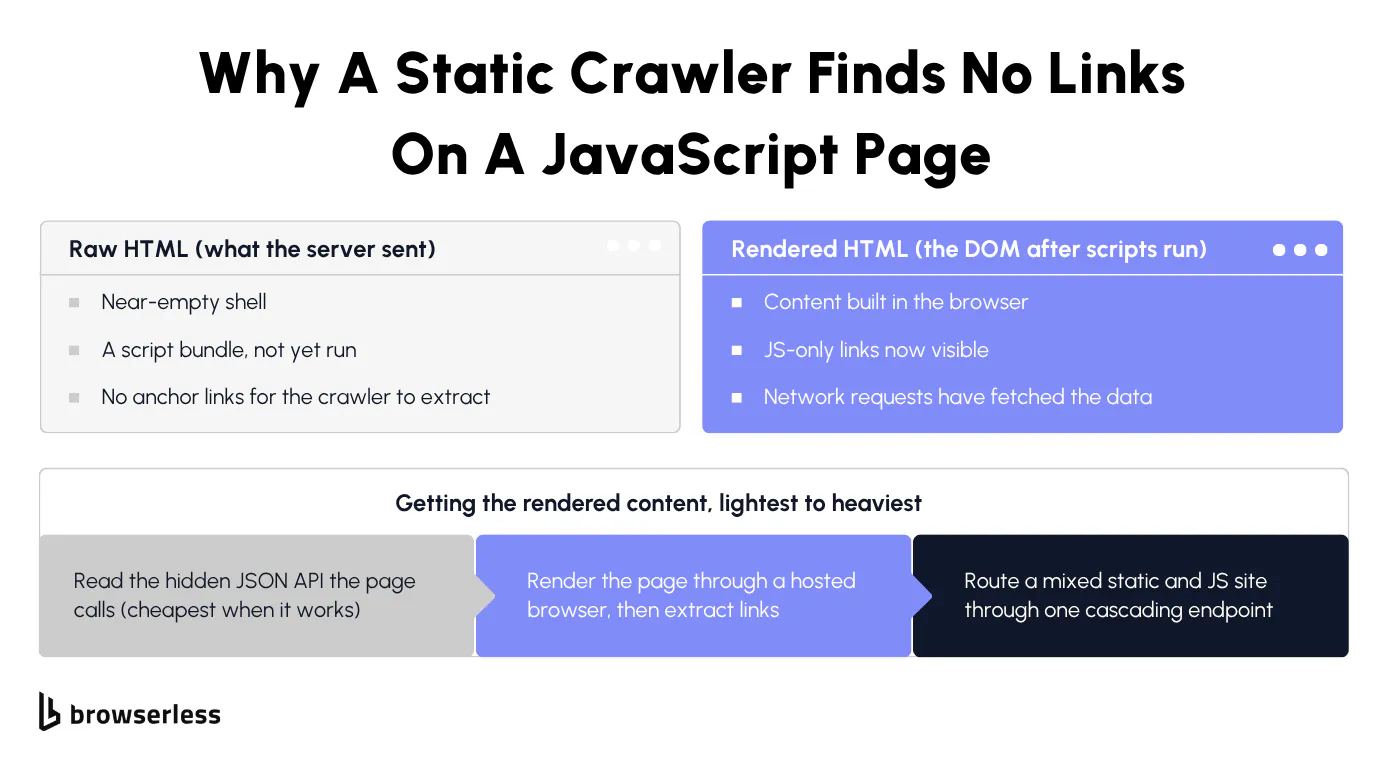
The real question is whether the content exists in the HTML the server sends, or only appears after JavaScript runs. A plain HTTP fetch returns the raw HTML code, which is enough for server-rendered websites where the markup already contains the links and text. Single-page apps and infinite-scroll listings instead ship a near-empty shell plus a JavaScript bundle that builds the page in the browser.
You can settle this in one line before reaching for a browser. Fetch the URL with a plain HTTP client and grep the response for the content you want. If the links or fields are not in that raw response, the page needs rendering, and a static crawler will come back empty.
# The JS quotes page builds its quotes client-side, so they are absent from raw HTML.
curl -s https://quotes.toscrape.com/js/ | grep -c 'class="quote"'   # 0 here, 10 on the static page
A 0 means the quotes are not in the raw HTML at all, only in what the browser builds afterward.
Crawling and web scraping are often conflated, but they are two different jobs. Crawling finds URLs by walking links, while web scraping pulls specific fields out of the pages you reach. A JS crawler is about getting to the right pages when they are built client-side, and the web scraper that extracts the data sits on top of that.
Many real sites are mixed, with some routes plain server-rendered HTML and others JavaScript-only, so a crawler that holds up in production needs a way to cover both without deciding page by page.
Building a basic web crawler in Node.js
Start with the static version of a basic web crawler and watch where it falls short. The whole thing is a crawling queue, a visited set, and a fetch. Node ships everything you need to wire those together with no extra dependencies.
Writing the crawl loop
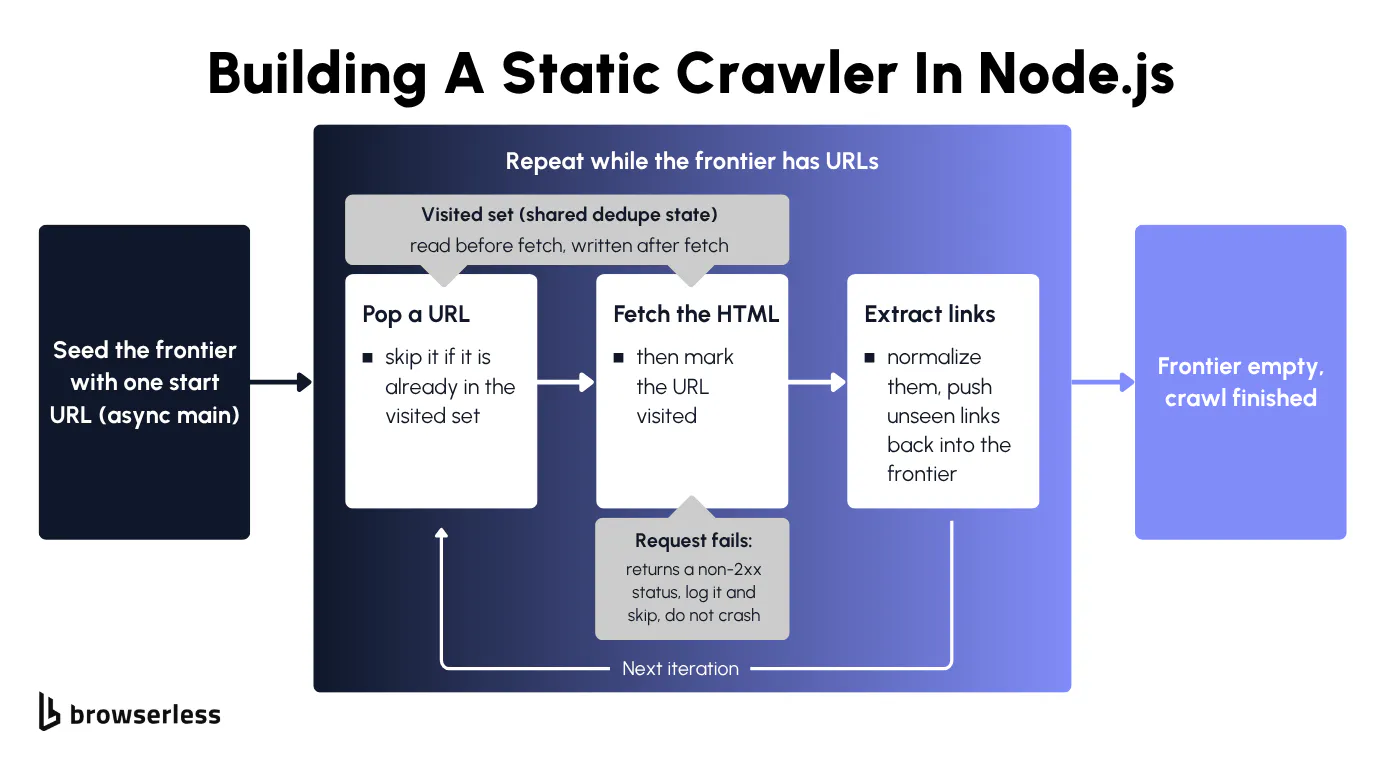
The entry point is an async main function that seeds the frontier with a single URL and then drains it. On each pass it pops a URL off the queue, skips it if the visited set already contains it, fetches the HTML, marks the URL visited, extracts links, and pushes any unseen links back onto the queue. Node's built-in fetch handles the request, and await response.text() reads the body into the HTML string you parse.
The failure path matters as much as the happy path. When a request fails with a non-2xx status or throws a network error, it should be logged and skipped rather than allowed to crash the loop, so one dead page doesn't end the whole crawl. Wrapping the fetch in a try/catch and checking response.ok covers both cases.
The stop condition from earlier becomes concrete here, with the while loop running until the frontier empties, and the visited set keeping the crawl off pages it has already fetched. The snippet below wires the queue, the visited set, and the fetch into one runnable loop, with the link-extraction call standing in for the function built in the next section.
const SEED = "https://www.scrapingcourse.com/ecommerce/";
const MAX_PAGES = 12; // safety bound so the demo terminates quickly

// Pull href values out of raw HTML. The full link-extraction + normalization
// logic is in the next section.
function extractLinks(html, baseUrl) {
  const hrefs = [...html.matchAll(/href="([^"]+)"/g)].map((m) => m[1]);
  const links = [];
  for (const href of hrefs) {
    try {
      const abs = new URL(href, baseUrl);
      if (abs.protocol === "http:" || abs.protocol === "https:") {
        links.push(abs.href);
      }
    } catch {
      // skip malformed hrefs
    }
  }
  return links;
}

async function crawl(seed) {
  const frontier = [seed];
  const visited = new Set();
  let failures = 0;

  while (frontier.length > 0 && visited.size < MAX_PAGES) {
    const url = frontier.shift();
    if (visited.has(url)) continue;

    try {
      const response = await fetch(url);
      if (!response.ok) {
        console.error(`skip ${url} -> HTTP ${response.status}`);
        failures++;
        continue;
      }
      const html = await response.text();
      visited.add(url);

      const links = extractLinks(html, url);
      for (const link of links) {
        if (!visited.has(link) && !frontier.includes(link)) {
          frontier.push(link);
        }
      }
      console.log(`visited ${visited.size}: ${url} (frontier: ${frontier.length})`);
    } catch (err) {
      console.error(`skip ${url} -> ${err.message}`);
      failures++;
    }
  }

  console.log(
    `\nDone. Visited ${visited.size} pages, ${failures} failures, ${frontier.length} still queued.`,
  );
}

crawl(SEED);
Run it against scrapingcourse.com, and the loop prints each visited URL and the shrinking frontier until it hits the MAX_PAGES limit, with extractLinks still a placeholder that the next section turns into the real thing.
Extracting and normalizing links
A raw href value is not a crawlable URL until you normalize it. The extraction step does three jobs, pulling every href out of the fetched HTML, resolving relative URLs against the current page, and deciding which of the results are worth keeping. The new URL(href, baseUrl) constructor handles the resolution, turning /about on https://realpython.github.io into the absolute URL the frontier needs.
The keep-or-drop rules are what keep the crawl on target. Drop off-domain links so the crawl stays within the site's structure rather than wandering onto external links across the open web. Drop fragments and obvious duplicates, and normalize trailing slashes and query strings so two spellings of the same page do not both enter the frontier.
Normalization closes the gap the visited set cannot catch on its own. Without it, /page and /page/ look like two different URLs, and the loop revisits the same content. Collapsing those variants before a URL enters the frontier is what closes the loop cleanly. A lightweight HTML parse is enough here, with no browser involved yet.
const PAGE = "https://realpython.github.io/fake-jobs/";

function normalize(urlString) {
  const u = new URL(urlString);
  u.hash = ""; // drop #fragments
  // collapse a trailing slash on the path ("/jobs/" -> "/jobs")
  if (u.pathname.length > 1 && u.pathname.endsWith("/")) {
    u.pathname = u.pathname.slice(0, -1);
  }
  return u.href;
}

function extractLinks(html, baseUrl) {
  const base = new URL(baseUrl);
  const hrefs = [...html.matchAll(/href="([^"]+)"/g)].map((m) => m[1]);

  const kept = new Set();
  let dropped = 0;

  for (const href of hrefs) {
    try {
      const abs = new URL(href, baseUrl);
      if (abs.protocol !== "http:" && abs.protocol !== "https:") {
        dropped++;
        continue;
      }
      // drop off-domain links so the crawl stays on-site
      if (abs.hostname !== base.hostname) {
        dropped++;
        continue;
      }
      kept.add(normalize(abs.href));
    } catch {
      dropped++;
    }
  }

  return { kept: [...kept], dropped };
}

async function main() {
  const response = await fetch(PAGE);
  const html = await response.text();

  const { kept, dropped } = extractLinks(html, PAGE);

  console.log(`dropped (off-domain / fragment / non-http): ${dropped}`);
  console.log(`kept (normalized + deduped): ${kept.length}`);
  kept.slice(0, 8).forEach((l) => console.log(`  ${l}`));
}

main();
Pointed at a server-rendered page like the Real Python fake-jobs board, it reports how many href values it dropped as off-domain, fragment, or non-HTTP, and how many it kept after normalizing and deduping. The result is the clean list the frontier should actually receive.
Crawling JavaScript-rendered pages
Point the static crawler at a JavaScript-rendered page and it returns almost nothing useful. The rest of this section covers what it misses and how a hosted browser recovers it.
When a static fetch comes up empty
Run the static crawler against a single-page app and the link extractor comes back empty, exactly as the one-line test predicted. Those anchor tags live only in the rendered Document Object Model (DOM) that JavaScript builds, so a static fetch structurally can't reach them.
There is a lighter escalation worth checking before you reach for a browser at all. Sometimes the JSON endpoint the page calls is readable directly, so you can hit that network request and parse the data without rendering anything. It's cheaper when it works, though plenty of sites sign or obfuscate those requests, at which point rendering the page is the reliable path.
Rendering pages with a hosted browser
The fix is to swap the static fetch for a connection to a hosted headless browser, so JavaScript executes and the rendered DOM becomes what you extract links from. BaaS is the managed path for this, so instead of installing and babysitting Chromium yourself, you connect to a browser that Browserless runs.
Use puppeteer-core with puppeteer.connect() pointed at the wss://production-sfo.browserless.io/chromium?token=${BROWSERLESS_TOKEN} WebSocket endpoint, never puppeteer.launch(). After page.goto() and a wait for the HTML content to settle, the link extractor from the previous section now sees the JS-only links it was missing.
You can set the user agent on the hosted browser too, and matching a believable one removes the cheapest signal a site uses to flag automation. Treat it as one signal among many rather than a bypass, since device fingerprinting goes far deeper than the user agent string.
The snippet below makes that gap concrete, counting the a[href] links in the raw HTML, then the links in the rendered DOM, and the ones that show up only after JavaScript runs.
const puppeteer = require("puppeteer-core");

const TOKEN = process.env.BROWSERLESS_TOKEN;

async function main() {
  // raw HTML: a plain fetch, no JS executed
  const rawHtml = await (await fetch("https://docs.browserless.io")).text();
  const rawLinks = [...rawHtml.matchAll(/<a[^>]+href="([^"]+)"/g)].map((m) => m[1]);

  // rendered DOM: connect to hosted Chromium, let JS run, then read links
  const browser = await puppeteer.connect({
    browserWSEndpoint: `wss://production-sfo.browserless.io/chromium?token=${TOKEN}`,
  });
  const page = await browser.newPage();
  await page.goto("https://docs.browserless.io", { waitUntil: "networkidle2" });

  const renderedLinks = await page.$$eval("a[href]", (as) => as.map((a) => a.href));
  await browser.close();

  const rawSet = new Set(rawLinks);
  const jsOnly = renderedLinks.filter((href) => !rawSet.has(href));

  console.log(`raw HTML <a href> links: ${rawLinks.length}`);
  console.log(`rendered DOM a[href] links: ${renderedLinks.length}`);
  console.log(`links that existed ONLY after rendering: ${jsOnly.length}`);
  jsOnly.slice(0, 5).forEach((l) => console.log(`  ${l}`));
}

main();
That diff is the whole case for rendering. Dropping the browser fetch into the static loop from earlier turns it into the actual JS crawler, where one hosted browser drains the frontier and reads links from each rendered DOM.
const puppeteer = require("puppeteer-core");

const TOKEN = process.env.BROWSERLESS_TOKEN;
const SEED = "https://quotes.toscrape.com/js/";
const MAX_PAGES = 10;

async function crawl(seed) {
  const browser = await puppeteer.connect({
    browserWSEndpoint: `wss://production-sfo.browserless.io/chromium?token=${TOKEN}`,
  });
  const frontier = [seed];
  const visited = new Set();
  const base = new URL(seed);

  while (frontier.length > 0 && visited.size < MAX_PAGES) {
    const url = frontier.shift();
    if (visited.has(url)) continue;

    const page = await browser.newPage();
    try {
      await page.goto(url, { waitUntil: "networkidle2" });
      visited.add(url);

      // Links come from the rendered DOM, so JS-only routes are included.
      const links = await page.$$eval("a[href]", (as) => as.map((a) => a.href));
      for (const link of links) {
        try {
          const sameSite = new URL(link).hostname === base.hostname;
          if (sameSite && !visited.has(link) && !frontier.includes(link)) {
            frontier.push(link);
          }
        } catch {
          // skip malformed hrefs
        }
      }
      console.log(`visited ${visited.size}: ${url} (frontier: ${frontier.length})`);
    } catch (err) {
      console.error(`skip ${url} -> ${err.message}`);
    } finally {
      await page.close();
    }
  }

  await browser.close();
  console.log(`\nDone. Rendered ${visited.size} pages.`);
}

crawl(SEED);
Every pass renders the page before extracting, so the same frontier and visited set now reach JS-only routes like the rendered /js/page/2/ pagination a raw fetch never returns.
Mixed sites are the awkward middle, where some routes are static and others only resolve after rendering. Rather than hand-rolling a fallback ladder in your own code, you can let the /smart-scrape REST endpoint run a documented cascade for you, trying a fast HTTP fetch first, then a proxied HTTP fetch, then a headless browser, then browser-plus-CAPTCHA solving, and returning the content once a tier succeeds.
The attempted array in the response shows how far it had to climb, so one request covers a site you would otherwise have to special-case route by route.
# source your .env first: set -a && source .env && set +a
curl -s -X POST \
  "https://production-sfo.browserless.io/smart-scrape?token=${BROWSERLESS_TOKEN}" \
  -H "Content-Type: application/json" \
  -d '{
    "url": "https://www.browserless.io",
    "formats": ["html", "links"]
  }' | jq '{
    ok,
    status: .statusCode,
    strategy: .strategy,
    attempted: .attempted,
    links: (.links | length)
  }'
On a server-rendered target the cascade succeeds at the cheapest tier, so both strategy and attempted come back as http-fetch alone. The pipeline escalates to a proxied fetch, a headless browser, then browser-plus-CAPTCHA solving only as each tier fails, and stops at the first one that works.
Scaling a crawler without getting blocked
Rendering correctly is one problem, and pointing a JS crawler at a whole site without melting the target or getting your IP banned is the next one, which splits into controlling your own request volume and surviving the site's defenses.
Rate limiting and concurrency
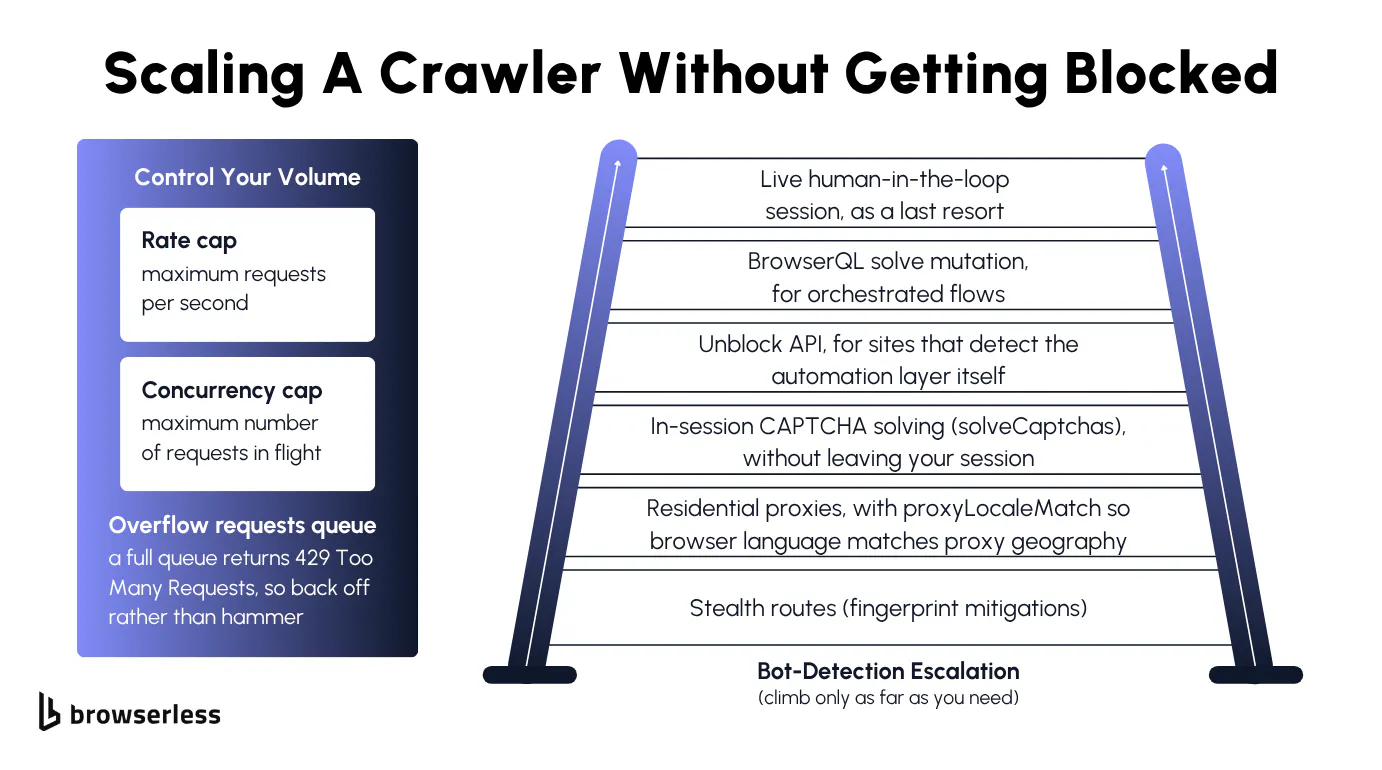
An uncapped crawler either overwhelms the target or gets itself blocked, so it needs two limits: one on how many HTTP requests go out per second and one on how many run at once.
The two are different knobs, since a concurrency cap is a bounded worker pool that drains the frontier in parallel up to a fixed number of in-flight requests, while a rate cap is a delay between dispatches that keeps you from hammering the server even when workers are free.
Both fit in a compact loop, with a fixed pool of workers for the concurrency cap and a shared dispatch clock that spaces requests for the rate cap.
const SEED = "https://www.scrapingcourse.com/ecommerce/";
const CONCURRENCY = 3; // max requests in flight at once
const RATE_MS = 200; // minimum gap between dispatches
const MAX_PAGES = 20;

const sleep = (ms) => new Promise((r) => setTimeout(r, ms));

async function crawl(seed) {
  const frontier = [seed];
  const queued = new Set([seed]);
  const visited = new Set();
  const base = new URL(seed);
  let nextDispatch = 0;

  async function fetchOne(url) {
    // rate cap: space dispatches by RATE_MS even when workers are idle
    const now = Date.now();
    const at = Math.max(now, nextDispatch);
    nextDispatch = at + RATE_MS;
    await sleep(at - now);

    const html = await (await fetch(url)).text();
    visited.add(url);
    for (const m of html.matchAll(/<a[^>]+href="([^"]+)"/g)) {
      try {
        const abs = new URL(m[1], url).href;
        if (new URL(abs).hostname === base.hostname && !queued.has(abs)) {
          queued.add(abs);
          frontier.push(abs);
        }
      } catch {
        // skip malformed hrefs
      }
    }
    console.log(`visited ${visited.size}: ${url}`);
  }

  async function worker() {
    while (visited.size < MAX_PAGES) {
      const url = frontier.shift();
      if (url === undefined) {
        if (frontier.length === 0) return;
        await sleep(50);
        continue;
      }
      try {
        await fetchOne(url);
      } catch (err) {
        console.error(`skip ${url} -> ${err.message}`);
      }
    }
  }

  // concurrency cap: a fixed pool of workers drains the shared frontier
  await Promise.all(Array.from({ length: CONCURRENCY }, worker));
  console.log(`\nDone. ${visited.size} pages at concurrency ${CONCURRENCY}.`);
}

crawl(SEED);
The workers drain the frontier together, while the shared clock keeps any two requests at least the rate gap apart, so volume stays bounded on both axes at once.
The hosted-browser path has its own ceiling worth planning around, since each rendered page is a full browser session. Browserless enforces concurrency by plan, with Free allowing 2 concurrent sessions, Prototyping 5 (10 on annual), Starter 30 (40 on annual), Scale 80 (100 on annual), and Enterprise custom.
Requests above your concurrency limit do not fail immediately. They queue, and Browserless returns 429 Too Many Requests only once the queue itself is full, so a well-behaved crawler should treat a 429 as a signal to back off and retry rather than something to retry instantly.
Avoiding blocks at scale
At volume, a hosted browser on its own is not enough. Modern bot protections read IP reputation and browser fingerprints together, so the fix is a documented escalation that goes cheapest first.
Stealth routes are the lightest layer, with a residential proxy (proxy=residential plus proxyLocaleMatch=1 on the stealth route) as the next step up. Enabling solveCaptchas=true works on any route, standard or stealth, and clears CAPTCHAs in-session as they appear.
Heavier targets call for the /unblock API when a site detects the automation itself, a BrowserQL solve flow for orchestrated multi-step cases, and liveURL to hand a session to a person when nothing automated clears it.
None of this is a guarantee, since proxySticky is best-effort and stealth makes a crawler harder to spot without making it invisible. The proxy rotation guide walks the full ladder end to end.
The snippet below routes a render through residential proxies with locale matching and verifies the egress IP, so you can prove the proxy is actually in effect.
const puppeteer = require("puppeteer-core");

const TOKEN = process.env.BROWSERLESS_TOKEN;

async function main() {
  // proxyLocaleMatch aligns the browser Accept-Language header to proxyCountry.
  // Connecting through /stealth pairs fingerprint mitigations with the residential proxy.
  const browser = await puppeteer.connect({
    browserWSEndpoint:
      `wss://production-sfo.browserless.io/stealth?token=${TOKEN}` +
      `&proxy=residential&proxyCountry=us&proxyLocaleMatch=1`,
  });
  const page = await browser.newPage();

  await page.goto("https://ipinfo.io/json", { waitUntil: "networkidle2" });

  const data = await page.evaluate(() => JSON.parse(document.body.innerText));
  const lang = await page.evaluate(() => navigator.language);

  console.log(`egress IP: ${data.ip}`);
  console.log(`location: ${data.city}, ${data.region}, ${data.country}`);
  console.log(`network: ${data.org}`);
  console.log(`browser language (proxyLocaleMatch): ${lang}`);
  console.log(
    data.country === "US"
      ? "Proxy confirmed: egress is a US residential IP."
      : `Proxy NOT confirmed: egress country is ${data.country}.`,
  );
}

main();
A country of US confirms the render left through the residential proxy, and navigator.language shows the locale that proxyLocaleMatch aligned to it.
By this point you've hand-built every layer yourself, from the frontier and visited set through link normalization, browser rendering, a bounded worker pool, rate limiting, and proxy routing.
The /crawl endpoint collapses every one of those pieces into one managed job. You POST a starting URL and get back a crawl ID plus a status URL to poll, and the job discovers the pages, renders the JavaScript, dedupes the URLs, and extracts each page into clean structured data.
Depth limits, path filters, retries, and request delays are exposed as parameters. It runs asynchronously on Cloud plans (currently in beta), and the same rendering and extraction is available on the free tier through BaaS and /scrape.
Whatever path you take, crawl responsibly by respecting each site's robots.txt and terms of service, since sustainable automation depends on not burning the targets you rely on.
The crawl loop barely changes from one job to the next, even when a page builds itself entirely client-side. The real work is everything around it. Normalization, rate limits, proxies, and the anti-block ladder are what keep a crawl alive at scale, and they pay off most when you plan them up front instead of discovering them halfway through a run that keeps getting blocked.
Conclusion
By now you've built every piece of a production JS crawler by hand, from the crawl loop and browser rendering to link normalization, rate limiting, concurrency, and the anti-block ladder that keeps it alive at scale. Browserless runs that same loop for you, with no browser fleet or proxy pool to maintain behind it, and the /crawl endpoint takes it further by handling the whole job as a managed async crawl you submit and poll. Sign up for a free account and run a rendered crawl against your first JavaScript-heavy target.
FAQs
How do I find the JSON endpoint a page calls in the background?
Open DevTools, switch to the Network tab to watch the page's network requests, filter to Fetch/XHR, then reload the page or trigger the content. The request that returns the data you want, usually JSON, is the endpoint. Copy its URL, headers, and query parameters and call it directly, which is faster than rendering. If the endpoint is signed or rotates a token on each request, fall back to rendering the page in a browser.
How do I stop a crawl that never seems to finish?
A well-linked site can produce new URLs faster than you drain them, through pagination, filter combinations, or calendar links, so you rarely return all the URLs in a single run. Bound it by setting a maximum depth from the seed, capping the total page count, and using path filters on the URL to skip endless query-string variants. The visited set stops repeats, while those caps stop an effectively-infinite frontier.
How do you test a JS crawler?
Start with unit tests around the pure functions, especially link extraction and URL normalization, since those have predictable inputs and outputs that are easy to assert against. For the rendering path, run the crawler against a known JavaScript-rendered page and confirm it extracts links that a raw HTTP fetch of the same URL does not return. Testing both layers separately keeps a parsing bug from hiding behind a rendering bug, which is how you build reliable scrapers.
Is crawling a website with a JS crawler legal?
Crawling public pages is generally allowed, but the answer comes down to what data you collect, the site's terms of service, and the jurisdiction you operate in. Respect robots.txt, avoid scraping personal or copyrighted data you have no right to, and keep your request rate low enough that you are not degrading the service. When in doubt, check the terms and consider an official API.
Should I build one web scraper that crawls and scrapes, or two?
In practice it is one pipeline with two stages, where the crawler builds a queue of URLs, and the web scraper pulls the table data, prices, or article text out of each one. Keep the stages separate in code, though, so you can re-run extraction without spinning up a new crawler and swap the fetch layer per stage, using a plain request for static websites and a rendered browser for the ones that need it.