
TL;DR
- Web crawling. Discovering and following links to map a site's pages, as opposed to scraping, which extracts specific fields from the pages a crawl finds.
- Baseline stack. An HTTP request library fetches pages, an HTML parser reads them, and
requests.get(url)plus CSS selectors gets you a working crawler in a few lines. - The JavaScript wall. A plain HTTP crawler only sees the initial HTML, so it returns empty on JavaScript-heavy sites until you render the page in a real browser.
- Where Browserless fits. Browsers as a Service (BaaS) lets you connect to a managed browser over a WebSocket to render JavaScript pages, and
/crawloffloads depth, throttling, retries, and dedupe to parameters instead of a framework.
Introduction
Web crawling in Python looks simple until a real site renders nothing without JavaScript, loops you in circles, and blocks you the moment your traffic looks automated. The first request is the easy part, ten lines and you're fetching pages, but everything after it is the actual work. You'll build a working crawler, render the JavaScript pages that come back empty, scale it across a full site, get past the defenses built to block bots, and learn where hand-rolling stops being worth the upkeep.
What is web crawling in Python?
Web crawling in Python means pointing a script at a site and following its links across the site's web pages to map what's there, rather than pulling data off them. The stack is small, an HTTP request library to fetch pages and an HTML parser to read them. Two terms get thrown around as if they mean the same thing, though, so it's worth pulling them apart before you write anything.
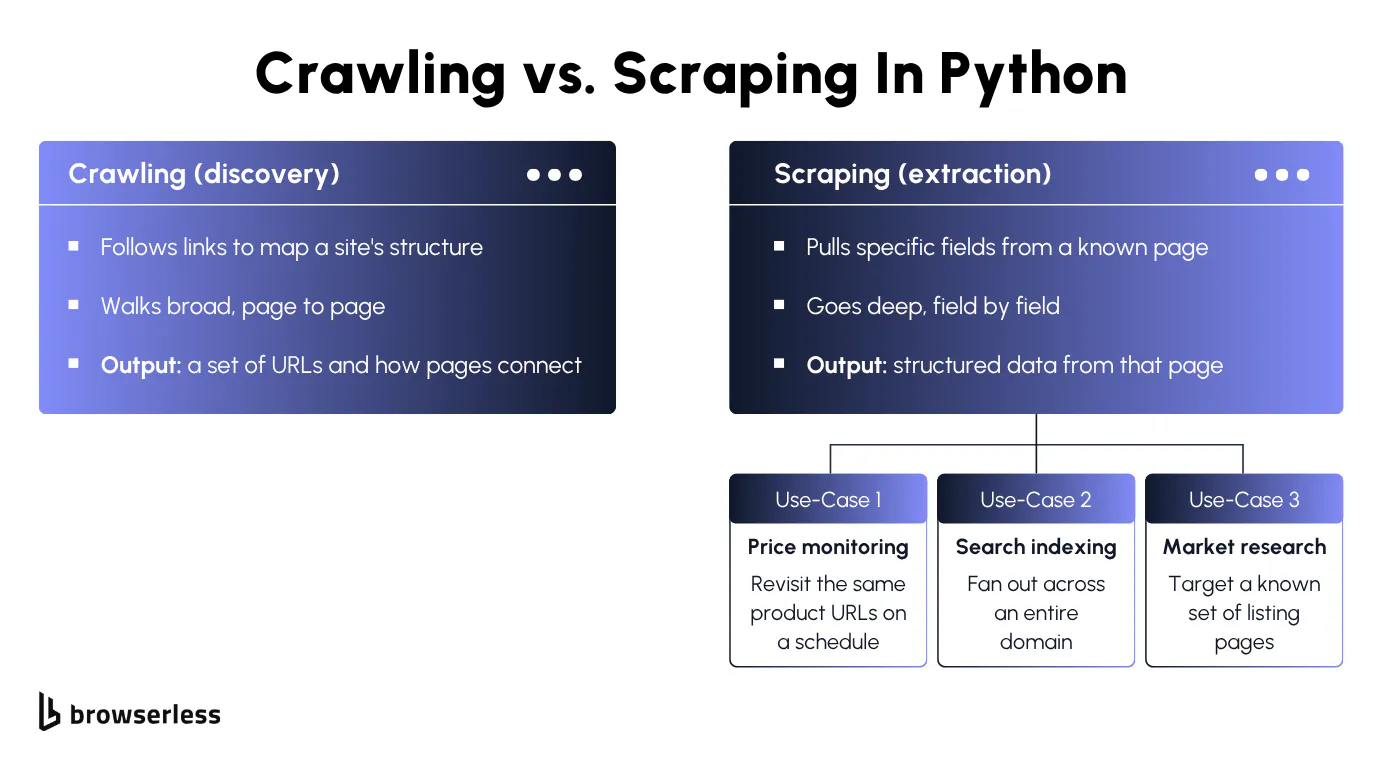
Crawling vs scraping
The cleanest way to keep them straight is breadth versus depth. Crawling goes broad, a discovery pass that walks a site to find what exists and hands back a set of URLs and a map of how they connect. Web scraping goes deep, a targeted pass that heads straight to pages you already know and lifts the structured data you care about, like a price or a title.
Many real projects chain the two together. A blind pass walks the whole site to gather links, then a targeted pass works through the page content on each one, extracting data as it goes. You rarely pick one in isolation, so the question is usually which half of the job you're working on right now, not which one to use. The full scrape vs. crawl comparison digs into where each one wins.
What people crawl for
Why you're crawling shapes how the crawler behaves, and the job is almost always discovery, finding the pages that exist before anything reads them. A few common reasons pull that discovery pass into different shapes.
- Search indexing. Fan out from a homepage to catalog every page a domain exposes, the broadest crawl there is and the closest to what you're about to build, just scaled up.
- Site audits and migrations. Walk a whole site to inventory its URLs, catch broken links, or generate a sitemap before a redesign, a one-off crawl that cares about coverage over speed.
- Feeding a scraper. Run a discovery pass to collect the URL inventory a later scraping pass works through, the crawl half of jobs like price monitoring or market research where the scrape pulls the fields once the crawl has found the pages.
- Content aggregation. Pull listings or articles from many sources into one feed, a crawl that fans across sites rather than walking down a single one.
Each of these sets your crawler's breadth and how hard it can hit a site without straining it. A quick site audit touches a few dozen URLs, while a full-domain index has to pace itself across thousands. That pacing is the first thing you'll bump into once you start building.
Building a basic Python web crawler
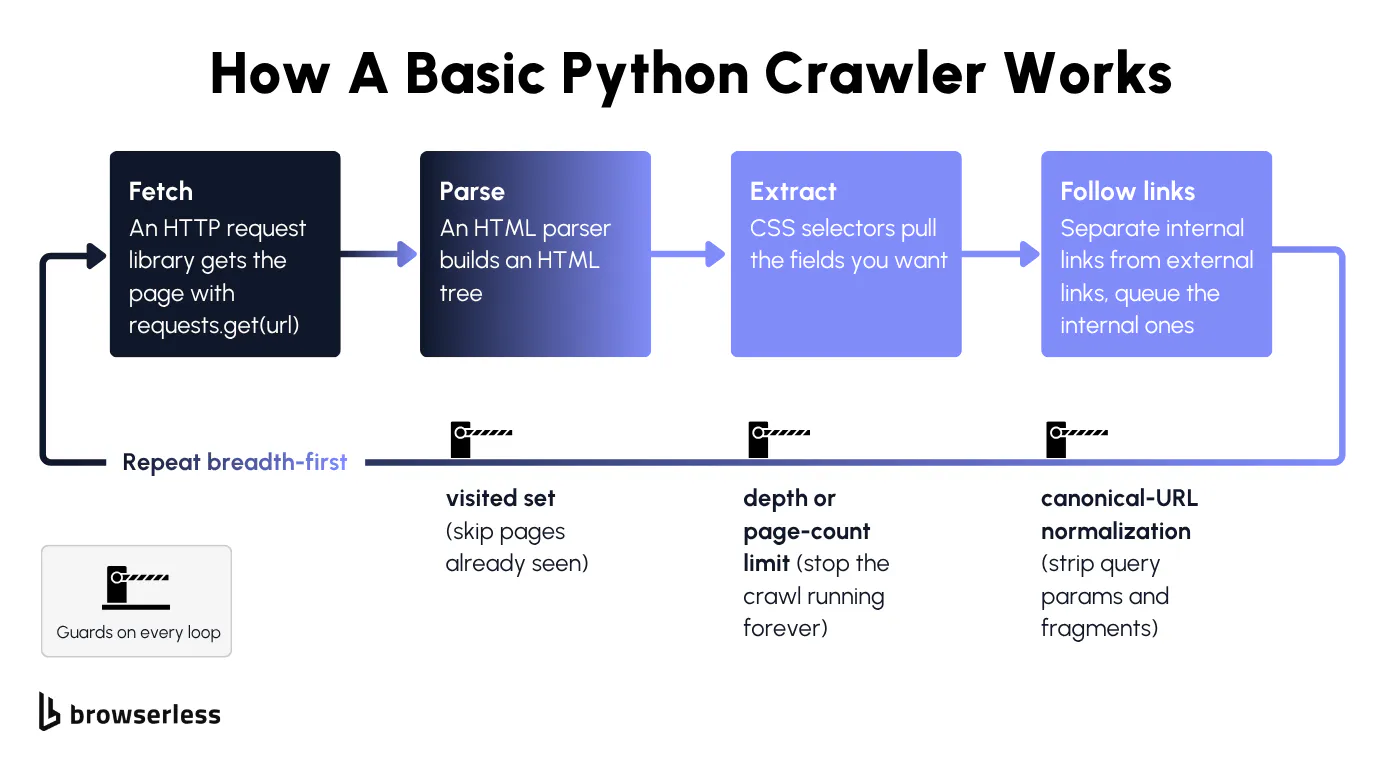
Underneath, a crawler is just a fetch loop with a memory. You pull a page, grab its links, queue the ones you haven't seen, and go again. The version below is barely a dozen lines, and it works right up until it doesn't.
Your first request and parsing HTML
At its smallest, you fetch a page with requests.get(url), hand the response to an HTML parser that builds a tree from the markup, and use CSS selectors to pull out the fields you want. CSS selectors are just the addressing scheme for that tree, the same div.country or .country-name patterns you'd use in a stylesheet, except here they locate data instead of styling it.
You don't need much Python to follow along, just loops, functions, basic error handling, and a working idea of how HTML is structured. A practice site with a stable layout keeps the selectors predictable while you learn, so the example below targets one.
The goal of this first pass is narrow, just confirm the selectors resolve against a real page before you scale anything up.
import requests
from bs4 import BeautifulSoup

url = "https://www.scrapethissite.com/pages/simple/"

resp = requests.get(url, timeout=30)
resp.raise_for_status()

soup = BeautifulSoup(resp.text, "html.parser")
countries = soup.select("div.country")

print(f"Fetched {url} -> HTTP {resp.status_code}, {len(countries)} countries on the page")
for country in countries[:5]:
    name = country.select_one(".country-name").get_text(strip=True)
    capital = country.select_one(".country-capital").get_text(strip=True)
    population = country.select_one(".country-population").get_text(strip=True)
    print(f"  {name:<22} capital: {capital:<14} pop: {population}")
That whole sequence is the crawler in miniature, with soup.select("div.country") returning every repeated block on the page and select_one reaching inside each block for one field. Get it resolving against a stable page and you've confirmed your selectors before any crawl logic starts depending on them.
Following links without crawling forever
Everything so far reads a single page, which is really scraping, and turning it into a crawl means pulling the anchor hrefs off each page and splitting them into internal links and external ones. The internal ones get normalized to absolute URLs and pushed onto a queue, and a breadth-first loop works through that queue, fetching and parsing each new page the same way.
Two guards keep the loop honest, a visited set that records every URL you've already processed so the same page never gets crawled twice, and canonical-URL normalization (stripping query parameters and fragments) that stops near-duplicate URLs from sneaking past that check. Without a depth or page-count limit on top, a recursive crawl of a well-linked site can run indefinitely.
Here's that loop with both guards wired in and a 15-page cap on top, so a well-linked site can't keep the crawl running forever. Pointed at something the size of the Python docs, the cap is the only reason it stops, and the frontier still holds thousands of URLs when the crawl halts.
from collections import deque
from urllib.parse import urljoin, urlparse, urldefrag

import requests
from bs4 import BeautifulSoup

START = "https://docs.python.org/3/tutorial/index.html"
MAX_PAGES = 15  # hard stop so a well-linked site can't crawl forever


def normalize(url):
    """Strip the fragment and query so near-duplicate URLs collapse to one."""
    url, _ = urldefrag(url)
    return urlparse(url)._replace(query="").geturl()


def same_domain(url, root):
    return urlparse(url).netloc == urlparse(root).netloc


queue = deque([normalize(START)])  # the crawl frontier (discovered, not yet fetched)
visited = set()
external = set()

while queue and len(visited) < MAX_PAGES:
    url = queue.popleft()          # breadth-first order, oldest URL first
    if url in visited:
        continue
    resp = requests.get(url, timeout=30)
    visited.add(url)

    soup = BeautifulSoup(resp.text, "html.parser")
    for anchor in soup.select("a[href]"):
        link = normalize(urljoin(url, anchor["href"]))  # resolve relative hrefs to absolute
        if not link.startswith("http"):
            continue               # skip mailto:, javascript:, tel: and other non-web schemes
        if same_domain(link, START):
            if link not in visited:
                queue.append(link)
        else:
            external.add(link)

print(f"Crawled {len(visited)} pages, stopped at the {MAX_PAGES}-page cap with {len(queue)} URLs still queued")
print(f"Off-site links found and skipped: {len(external)}")
for url in list(visited)[:5]:
    print(f"  {url}")
Crawling and extracting in one pass
On its own the crawl just hands back URLs, but most jobs want the data on those pages, not the addresses. The loop already fetches and parses every page, so the extract step is a couple of lines on the same soup the crawl just built, discovery and extraction folded into one pass.
from collections import deque
from urllib.parse import urljoin, urlparse, urldefrag

import requests
from bs4 import BeautifulSoup

START = "https://docs.python.org/3/tutorial/index.html"
MAX_PAGES = 8
root = urlparse(START).netloc


def normalize(url):
    url, _ = urldefrag(url)
    return urlparse(url)._replace(query="").geturl()


queue = deque([normalize(START)])
visited = set()
records = []

while queue and len(visited) < MAX_PAGES:
    url = queue.popleft()
    if url in visited:
        continue
    resp = requests.get(url, timeout=30)
    resp.encoding = resp.apparent_encoding        # docs serve UTF-8 with no charset header
    soup = BeautifulSoup(resp.text, "html.parser")
    visited.add(url)

    heading = soup.select_one("h1")               # extract pass: the field you came for
    title = heading.get_text(" ", strip=True).rstrip(" ¶") if heading else "(no title)"
    records.append((title, url))

    for anchor in soup.select("a[href]"):         # discovery pass: queue new on-site links
        link = normalize(urljoin(url, anchor["href"]))
        if link.startswith("http") and urlparse(link).netloc == root and link not in visited:
            queue.append(link)

for title, url in records:
    print(f"  {title[:36]:<36}  {url}")
Each row is a page the crawl found and a field lifted from it in the same loop, the chain the earlier sections kept apart. The resp.encoding = resp.apparent_encoding line earns its place here, docs.python.org sends its HTML as UTF-8 without a charset header, so without it the heading's ¶ permalink comes back garbled.
The hand-rolled approach starts to show its seams here. You now own dedupe, depth, and broken-link handling by hand, and there's still no retry logic, no delay between requests, and no parallelism. The sections that follow take on the walls that come after, from pages that render nothing to the defenses built to keep crawlers out.
Crawling JavaScript-heavy websites
The crawler you just built holds up until it hits a site that assembles its content in the browser. The HTML comes back, the parse succeeds, and the selectors return empty anyway.
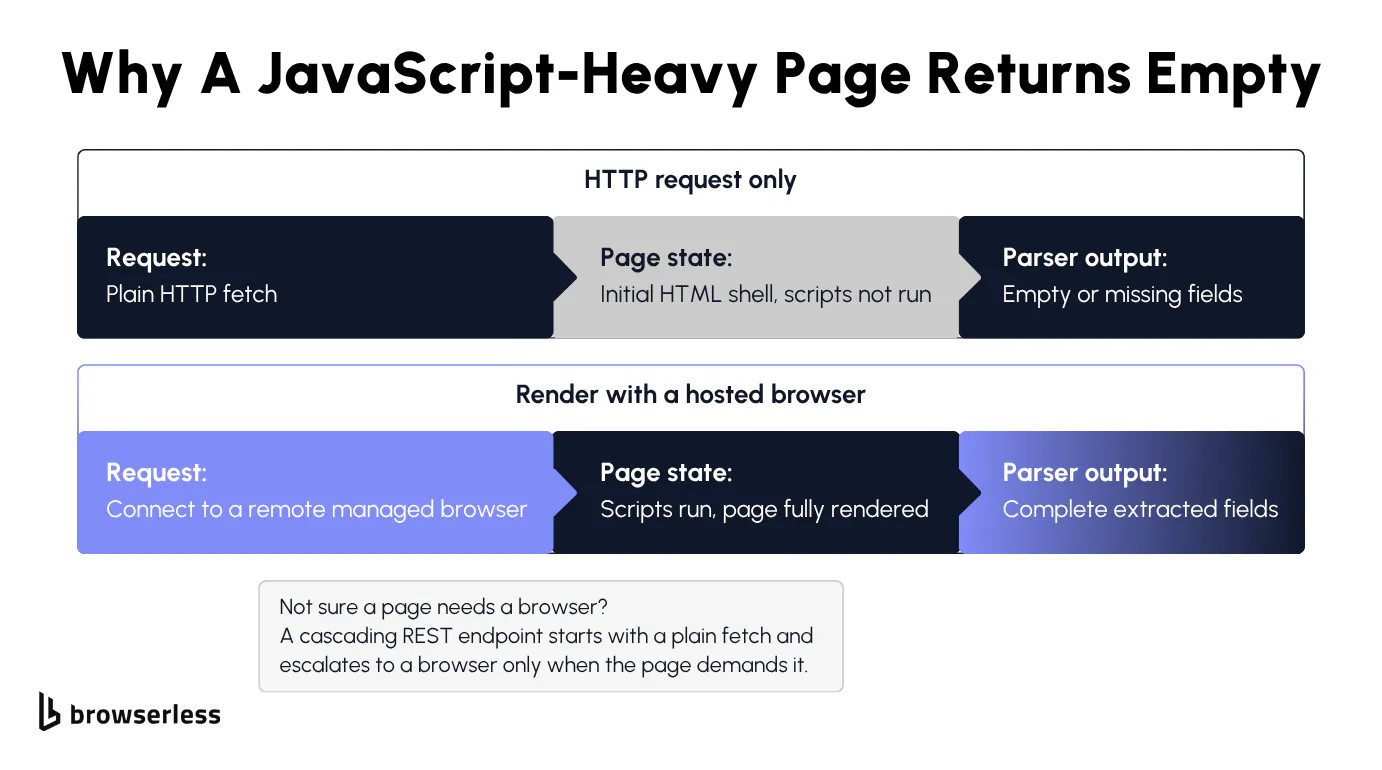
Why your crawler returns empty pages
Your requests call grabs the initial HTML content the server sends and stops there. On a JavaScript-heavy site, that first response is a shell, and the real content only shows up after scripts run and call back to an API for the data. Your code never runs those scripts, so the tree you parse is missing the fields you wanted.
Point the baseline crawler at a page that builds its content in the browser, like the Oscar films archive in the next section, and the gap is obvious. Its table of winners looks full in your own browser, but the raw markup your crawler sees and the rendered markup you see are two different documents.
From here you have two honest options, depending on the page. You can find and replay the underlying API the page calls for its data, which works when that API is discoverable and stable. When it isn't, you render the page in a real browser so the JavaScript runs and the content appears, then parse the result exactly as before.
Rendering pages with a hosted browser
Running a real browser is what clears this wall, and a hosted browser gives you one without managing headless Chrome on your own machine. For pages that only need rendering and no interaction, the /content API returns fully rendered HTML from a single POST, no Playwright needed. When the page needs a click, a scroll, or other interaction first, like the films archive below, Browsers as a Service (BaaS) is the managed path. You connect a browser-automation library to a remote browser over a WebSocket, navigate, let the page render, then hand the rendered HTML to the same parser you already wrote.
For standalone scripts, the connection method is chromium.connect_over_cdp() against the /chromium endpoint, which speaks the Chrome DevTools Protocol (CDP) directly and is Chromium-only. Once the page has rendered, the extraction logic from earlier doesn't change, which is the point of the fix.
The swap is a small one, replacing the plain fetch with a browser connection, clicking the control that triggers the page's own AJAX call, and reading the rendered rows with the same kind of selectors you'd use on static HTML. A raw request to this films archive returns an empty table, while the rendered page returns the full list.
import os

from playwright.sync_api import sync_playwright

TOKEN = os.environ["BROWSERLESS_TOKEN"]
CDP_URL = f"wss://production-sfo.browserless.io/chromium?token={TOKEN}"
TARGET = "https://www.scrapethissite.com/pages/ajax-javascript/"  # films load over AJAX; a raw fetch sees none

with sync_playwright() as p:
    browser = p.chromium.connect_over_cdp(CDP_URL)  # remote Chromium, no local headless to manage
    page = browser.new_page()
    page.goto(TARGET, wait_until="networkidle", timeout=60000)

    page.click("a.year-link[id='2015']")      # the year link fires the AJAX call that fills the table
    page.wait_for_selector("tr.film", timeout=30000)  # wait for the JS-added rows before reading

    title = page.title()
    films = page.locator("tr.film")
    film_count = films.count()
    first_film = films.first.locator("td.film-title").inner_text()

    print(f"Rendered {TARGET}")
    print(f"  Title:  {title}")
    print(f"  Films:  {film_count} loaded over AJAX for 2015")
    print(f"  First:  {first_film}")

    browser.close()
You don't always know in advance whether a page needs a browser at all. That's the case /smart-scrape handles: it cascades from a plain HTTP fetch up to a headless browser only when the page demands it, so you don't pay browser cost on pages that don't need it.
Instead of guessing per page, you hand that call to the endpoint, one POST and it escalates only as far as the page forces it.
curl -s -X POST \
  "https://production-sfo.browserless.io/smart-scrape?token=${BROWSERLESS_TOKEN}" \
  -H "Content-Type: application/json" \
  -d '{"url":"https://news.ycombinator.com/","formats":["markdown","links"]}' \
  | jq -r '
      "ok:             \(.ok)",
      "statusCode:     \(.statusCode)",
      "strategy:       \(.strategy)",
      "attempted:      \(.attempted)",
      "links found:    \(.links | length)",
      "markdown chars: \(.markdown | length)"
    '
The JSON response includes a strategy field that tells you which path the endpoint took. A static target like the Hacker News front page stays on http-fetch and doesn't need to escalate, so the browser cost is only paid where rendering is actually required. Both the rendered BaaS connection and /smart-scrape run on the free tier, so you can test the rendering path against your own pages before committing to anything.
Crawling at scale without rebuilding everything
Rendering JavaScript clears the empty-page problem, but the biggest wall is still ahead. Point the crawler at a whole site and the work changes shape, with retries that flake, rate limits, dedupe, proxy rotation, and a queue that backs up all now yours to build and babysit. You can rewrite into a framework and own that system, or you can keep the part that's actually yours, which pages to crawl and what to keep, and hand the system to an endpoint that already runs it.
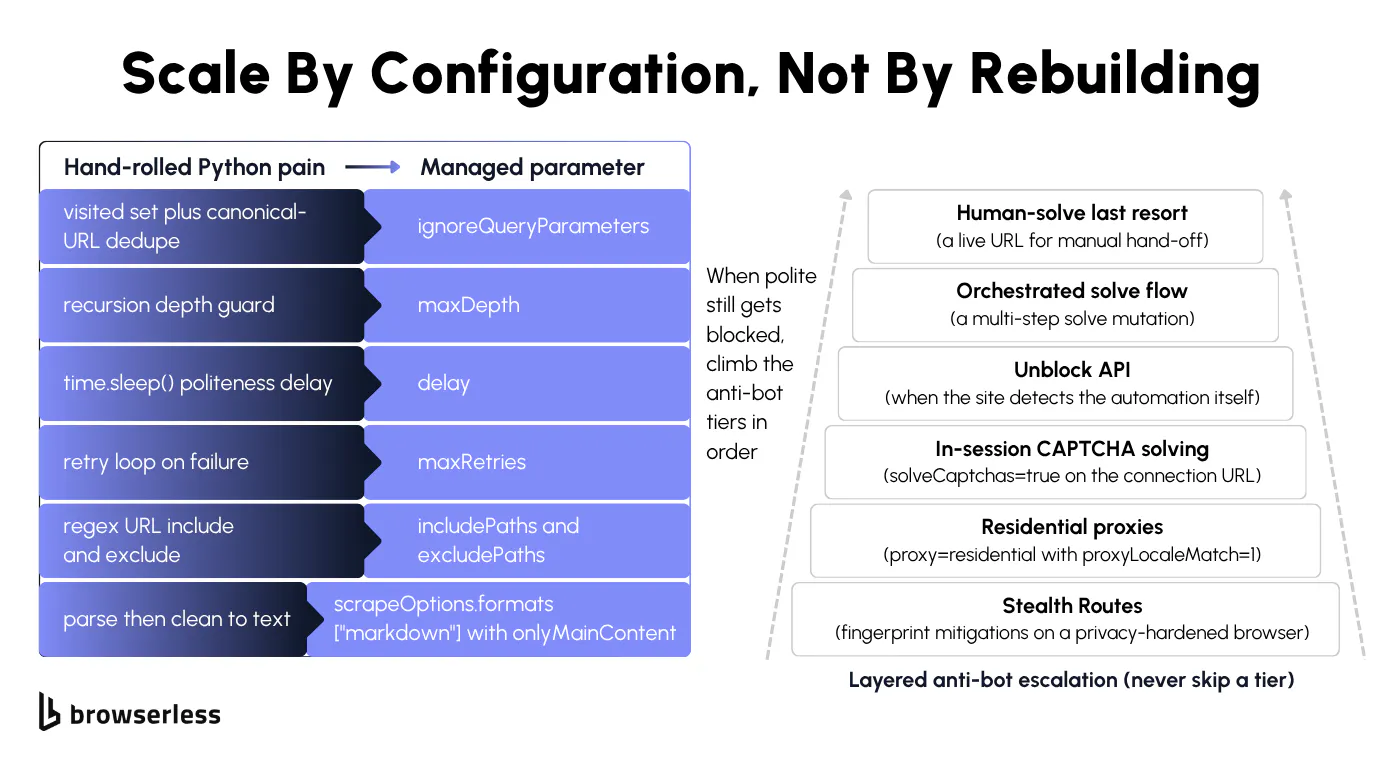
Reliability, by hand or by parameter
Staying reliable across a full site by hand means a visited set for dedupe, a time.sleep() delay so you don't get rate-limited, a retry loop, a depth guard, and include or exclude URL regex to keep the crawl on the paths you want. These are exactly the cracks the baseline build exposed, now multiplied across a full site.
Each of those hand-rolled concerns has a direct equivalent as a /crawl parameter:
| Hand-rolled Python pain | /crawl parameter |
|---|---|
visited set plus canonical-URL dedupe | automatic (the crawl dedupes URLs for you) |
| recursion depth guard | maxDepth |
time.sleep() delay between requests | delay |
| retry loop on failure | maxRetries |
| regex URL include and exclude | includePaths and excludePaths |
| parse then clean text | scrapeOptions.formats: ["markdown"] with onlyMainContent |
The left column is code you write, debug, and keep alive as sites change, while the right is a single value you set once. /crawl also covers what the table leaves out, domain-boundary checks (allowSubdomains and allowExternalLinks), sitemap discovery, and JavaScript rendering, so one request both scales the crawl and clears the rendering wall. Here's what several of those rows look like as a single request.
# Each field replaces a hand-rolled concern: maxDepth=depth guard, delay=request
# throttle, maxRetries=retry loop, includePaths=URL allowlist, onlyMainContent=text cleanup.
JOB=$(curl -s -X POST \
  "https://production-sfo.browserless.io/crawl?token=${BROWSERLESS_TOKEN}" \
  -H "Content-Type: application/json" \
  -d '{
    "url": "https://docs.browserless.io",
    "maxDepth": 1,
    "limit": 6,
    "delay": 300,
    "maxRetries": 2,
    "includePaths": ["^/baas"],
    "scrapeOptions": { "formats": ["markdown"], "onlyMainContent": true }
  }')

# /crawl runs as an async job: it returns an id and a status URL to poll
STATUS_URL=$(echo "$JOB" | jq -r '.url')

while true; do
  sleep 3
  OUT=$(curl -s "${STATUS_URL}?token=${BROWSERLESS_TOKEN}")
  [ "$(echo "$OUT" | jq -r '.status')" = "completed" ] && break
done

echo "$OUT" | jq -r '"Final: total=\(.total) completed=\(.completed) failed=\(.failed)"'
echo "$OUT" | jq -r '.data[] | "  [\(.status)] \(.metadata.sourceURL)"'
Each finished page lands as clean markdown behind a presigned contentUrl, stripped to main content and ready to drop into a database or an AI pipeline, with its source address under metadata.sourceURL. Depth, throttling, retries, and dedupe are now configuration rather than code you maintain. If you'd rather not poll at all, /crawl takes a webhook object and posts page, completed, and failed events to your URL as they happen, so the poll loop above collapses into a single endpoint on your side. Unlike the render and /smart-scrape paths, /crawl runs on Cloud plans rather than the free tier.
Getting past anti-bot measures
The last wall is the one slowing down can't get you past, the sites that actively fight back with CAPTCHA challenges, IP bans, and fingerprinting, and it's where hand-rolled crawlers tend to die. Beating modern bot detection is a full-time arms race, not a feature you bolt onto a weekend script.
Browserless climbs that wall for you, cheapest tier first. It starts with stealth routes, then residential proxies, then in-session CAPTCHA solving with solveCaptchas=true, then the /unblock API, then a BrowserQL solve flow, with liveURL handing off to a human only as a last resort. It stops at the first tier that clears the block, and the anti-detection techniques guide walks the full ladder if you want the details. You set a flag, it picks the tier, and you're not building any of it.
The solve tier is the one worth seeing run, a single BrowserQL mutation that loads a Cloudflare-protected page, waits for the challenge, clears it, and reads text that only appears once the page is through.
curl -s -X POST \
  "https://production-sfo.browserless.io/chromium/bql?token=${BROWSERLESS_TOKEN}&proxy=residential&humanlike=true" \
  -H "Content-Type: application/json" \
  -d '{
    "query": "mutation ClearCloudflare { goto(url: \"https://nowsecure.nl\", waitUntil: firstMeaningfulPaint) { status } solve(type: cloudflare) { found solved time } verify: text(selector: \"body\") { text } }"
  }' \
  | jq -r '
      "goto status:   \(.data.goto.status)",
      "challenge:     found=\(.data.solve.found) solved=\(.data.solve.solved)",
      "solve time ms: \(.data.solve.time)",
      "page text:     \(.data.verify.text | gsub("\n"; " "))"
    '
The solved: true flag and the NOWSECURE BY NODRIVER text confirm the session cleared Cloudflare and reached the real page. The proxy=residential and humanlike=true switches sit it on the lower rungs of the ladder before solve runs, so one mutation covers several tiers at once.
That clears the last of the three walls, and each one, rendering, scale, and bot defenses, is a point where you choose between building the machinery yourself and handing that part to an endpoint that already runs it. The smaller your crawl stays, the longer hand-rolling wins, and the bigger it gets, the sooner the managed path pays off.
Conclusion
Web crawling in Python starts with a few lines of requests and a parser, and most of the work after that is handling what the baseline can't, the JavaScript rendering, throttling, retries, dedupe, and anti-bot defenses. For the problems that show up once a crawl gets large, see the companion guide on list crawling at scale. If you want to try the rendering and scale paths against your own targets, sign up for a free account and point a crawl at a site.
FAQs
Do I need permission to crawl a website?
The bigger question than robots.txt is the site's terms of service. Terms can restrict or forbid crawling even on pages that robots.txt allows, and they carry the most weight for anything commercial, so read them before you start. Public pages the site permits are generally fair to crawl politely, but the terms set the real boundary on what's allowed.
My crawler returns empty results but the page loads fine in my browser. What else besides JavaScript causes that?
JavaScript rendering is the usual culprit, but not the only one. A site can gate content behind a cookie or consent wall, block the default requests User-Agent, or return a soft block, a 200 OK with a stripped body when it flags automation. Before reaching for a browser, log the raw status code and the first few hundred characters of the response body, since a soft block and a JS-rendered shell look identical until you do.
Which tier actually clears Cloudflare?
For Cloudflare specifically, a stealth route paired with a residential proxy clears most challenges before one even appears. When a challenge does show up, solveCaptchas=true in-session (or the BrowserQL solve mutation) handles it without leaving your session. You rarely need the /unblock API for Cloudflare unless the site is detecting the automation layer itself rather than just serving a challenge.
When is it worth offloading a crawl to Browserless?
Hand-roll the crawler while it's still a script, and offload once it becomes a system. The moment you're maintaining JavaScript rendering, rotating proxies, CAPTCHA solving, and concurrency on top of the actual crawl, the managed path costs less than the upkeep. /smart-scrape makes the render-or-not call per page, /crawl runs a whole site as one job, and BaaS lets you connect your existing Puppeteer or Playwright code and drop just the infrastructure.
How do you save crawled data?
For structured data, build a Python dictionary per page and write it to a JSON file, which keeps each field easy to access later. Tabular data fits a CSV instead, one row per record. For binaries like images or PDFs, open the file in binary write mode (open(path, "wb")) and write the response bytes straight to disk. If you'd rather skip the plumbing, /crawl hands back each crawled page as markdown behind a presigned URL, already cleaned and ready to store.